Your Python script collects product pages from a few dozen shops every morning. It works on all of them except one. That shop answers with a 403 and a short HTML page that asks for JavaScript and cookies. Running the script again returns the same page. The shop sits behind Cloudflare, and Cloudflare answered before the shop's own server saw your request.
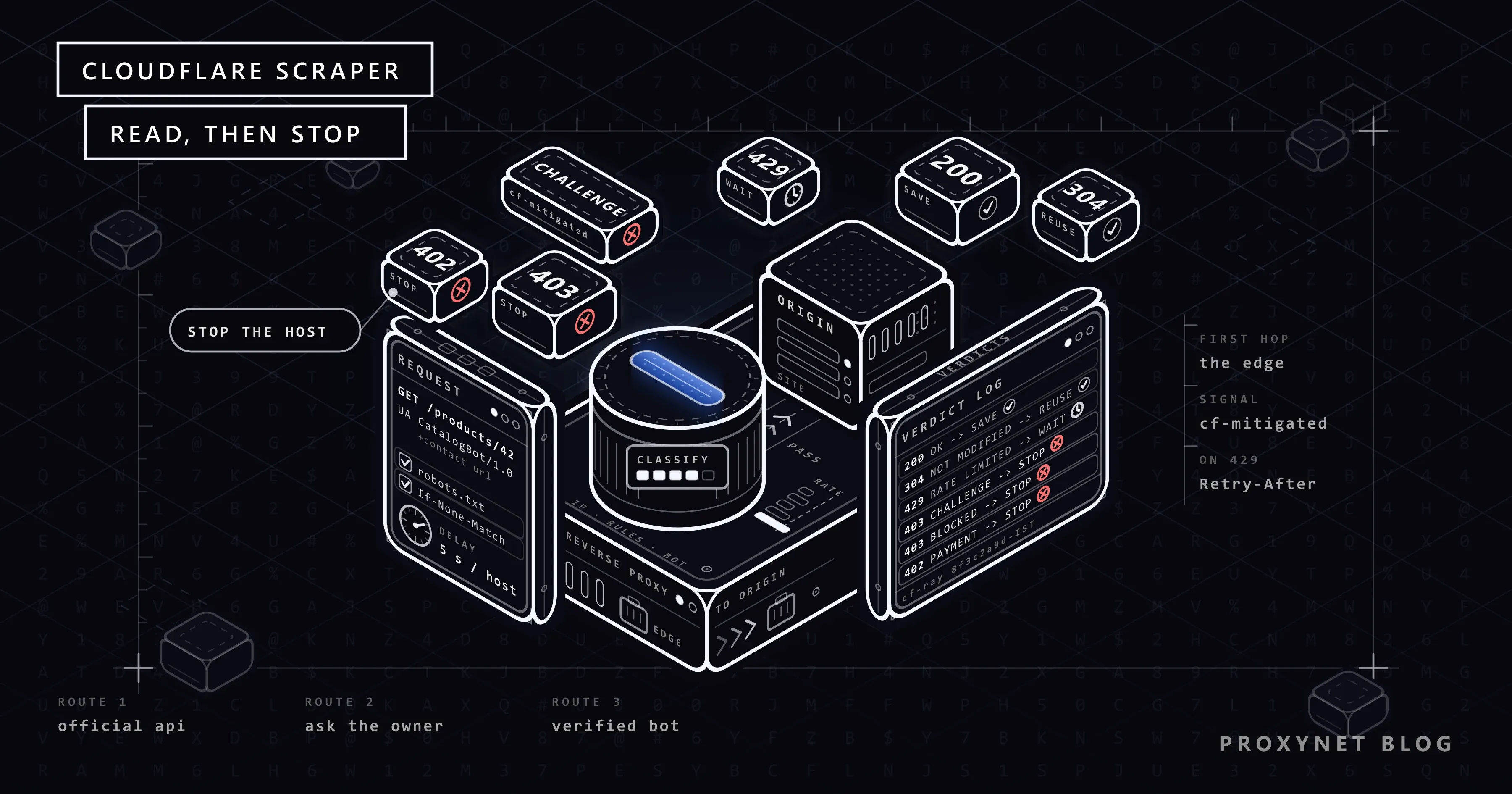
Every Cloudflare scraper gets an answer like this at some point. This guide shows how to read it, which legitimate routes lead to the data and what a proxy can and cannot change. It ends with a tested Python scraper that classifies every Cloudflare response and stops when the site refuses, without trying to get around any challenge.
What does the term Cloudflare scraper mean?
A Cloudflare scraper is not a special tool: it is any scraper whose target site runs its traffic through Cloudflare. (Some Python packages use the same name for challenge solvers; we explain below why we skip them.) On such a site, DNS returns Cloudflare's addresses, so your request reaches a Cloudflare server first. Cloudflare applies the owner's security settings there and forwards only the requests that pass to the origin server (the site's own server). This setup is a reverse proxy: it works for the site, while a forward proxy that you set in your scraper works for you (Forward Proxy vs Reverse Proxy).
How does Cloudflare decide a request is a bot?
Cloudflare runs the owner's settings one after another, and the first one that blocks or challenges the request ends the check. Simplified:
- IP and header checks. IP Access rules match the IP address, its network (ASN) or its country. Browser Integrity Check, on by default, challenges a missing or non-standard
User-Agent. - Custom rules. The owner's own rules can match the path, country,
User-Agent, bot score and more. - Rate limiting rules. Most plans count requests per IP. Enterprise Advanced Rate Limiting can also count per cookie, header, ASN or, with Bot Management, TLS fingerprint (JA3/JA4).
- Managed rules and bot products. Known attack patterns are checked, then Bot Fight Mode, Super Bot Fight Mode or Bot Management acts, depending on the plan.
- The answer. The request reaches the origin, gets an error page, or gets a challenge that runs checks in the browser and sets a
cf_clearancecookie when they pass.
The signals behind each step are in How Bot Detection Works, and the session layer in Cloudflare Precursor.
Which Cloudflare block did your scraper hit?
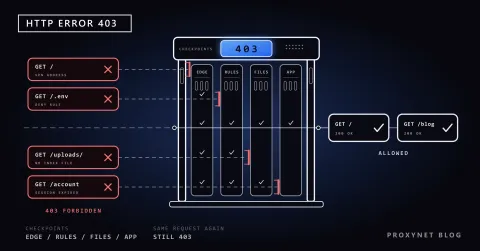
A 403 from a Cloudflare site can mean a challenge, a firewall rule, a banned network or the origin's own refusal. Check the headers, then the status code, then the body, then your own content check. The cf-ray and server: cloudflare headers alone mean nothing, because every response that passes through Cloudflare carries them.
| What you see | Status | Signal | Meaning | Next step |
|---|---|---|---|---|
| A short page that asks for JavaScript | Often 403 | cf-mitigated: challenge | A challenge page | Stop; do not try to solve it |
| A normal page with a Turnstile form | 200 | A cf-turnstile element | Turnstile guards that form | Do not submit the form |
| "Sorry, you have been blocked" | 403 by default | A Cloudflare page, a Ray ID, no 1xxx code | A WAF rule the owner set | Stop; send the owner the Ray ID |
| Error 1020, "Access denied" | 403 | A 1xxx code from Cloudflare | A legacy firewall rule | Stop; send the owner the Ray ID |
| Error 1010 | 403 | Same | Browser Integrity Check blocked you | Ask the owner |
| Error 1005, 1006-1008, 1106 or 1009 | 403 | Same | Your network (ASN), IP or country is banned | Stop; do not switch networks |
| Error 1015 | 429 by default, or a 4xx the owner picks | 1015 in the body, or the 429 | A rate limit, from 10 seconds up to a day by plan | Wait, honour Retry-After, slow down |
| A payment notice | 402 | crawler-price header | Pay per crawl for AI crawlers | Stop unless you take part |
| A plain error page | 403 | No Cloudflare error code or Ray ID | The origin server refused | Stop; ask the owner |
| A page without your data | 200 | Your content check fails | A JavaScript-built page or a trap page | Do not save it; see Static vs Dynamic Pages and Honeypot Traps |
| A server error | 5xx, including 520-526 | Status code | Trouble at the origin, not a block | Back off, retry a few times |
Four details matter here:
- Trust the header, not the text. Cloudflare documents
cf-mitigated: challengeas the way to detect a challenge page response: every challenge type sets it, andchallengeis its only value. Challenge text changes with the browser's language, and/cdn-cgi/challenge-platform/also appears on normal pages. The visitor's view of the same page is in Cloudflare Verifying You Are Human. - Error codes come in two forms. Cloudflare sends either a branded HTML page ("Error 1020") or a short text body such as
error code: 1003. We got the short form when we requested a Cloudflare IP address directly, even with a browserUser-Agent. - Not every 1xxx code is a block. Error 1016, for example, is an origin DNS error on the site's side.
- Blocks carry no
cf-mitigatedheader. Only the body separates a Cloudflare block from the origin's own403: an error code, or a Cloudflare page with a Ray ID. The codes one by one are in "Sorry, You Have Been Blocked", and rate limits in Error 1015.
Why is Python Requests blocked by Cloudflare when a browser passes?
Chrome loads the page after a short wait, while Python Requests gets the challenge. Three things differ.
No JavaScript. Cloudflare says a visitor needs JavaScript and cookies to pass any type of challenge. Requests, httpx and curl download HTML but never run it.
No clearance cookie. A browser that passes stores a cf_clearance cookie and sends it with each later request. A plain HTTP client never gets one.
A client identity that does not match. Python libraries open a TLS connection differently from Chrome, so a request that says "Chrome" in its User-Agent but has Python's TLS handshake is easy to spot (TLS Fingerprinting and JA3). An honest bot name can also trigger Browser Integrity Check, which challenges non-standard User-Agent values; only the owner can make an exception.
Some tools make a script pretend to be a browser: stealth plugins, TLS impersonation libraries, patched drivers and solving services. We do not cover them. They misrepresent your client, usually break the site's terms and stop working whenever the detection changes.
What are the legitimate routes to data on a Cloudflare-protected site?
Here are the routes in the order we would try them.
1. An official API, feed or sitemap
Many sites publish data for machines: an API, an RSS or product feed, or a sitemap listed in robots.txt. An API gives you a key, a documented limit and a stable format, and nothing breaks when the HTML changes. Check the footer, the developer pages and the Sitemap: lines in robots.txt before you write a scraper.
2. Ask the site owner
Only the owner can remove a challenge or a block; Cloudflare's staff cannot. Write a short message with your bot's name, a contact address, the paths you need, how often you visit and your IP address. The owner can then allow your IP with an IP Access rule, which skips custom rules, rate limiting and managed rules, and Bot Fight Mode does not act on it either. On paid plans, a Skip rule can also exempt you from Super Bot Fight Mode; it usually matches a fixed IP too, or a header token you agree on. For a fixed address, see Static IP for API Access or use an ISP Proxy.
3. Join Cloudflare's verified bots programme
For a crawler that serves the public, Cloudflare's verified bots programme is the formal route. A verified bot proves who it is with a Web Bot Auth signature, a published IP list with a stable User-Agent, or reverse DNS. It must obey robots.txt and keep a reasonable rate. You apply through a form in the Cloudflare dashboard; generic names such as python-requests are not accepted for IP validation. Since 1 July 2026, the programme also covers signed agents that act for users, and its categories include SEO, monitoring and price scraping.
With Web Bot Auth, the bot signs each request with its private key following RFC 9421 HTTP Message Signatures, a standard since February 2024, and publishes the public key on its own domain. The IETF working group adopted the rules for bots as a draft, draft-ietf-webbotauth-httpsig-protocol, on 1 September 2026; the full flow is in why AI shopping agents get blocked. Verification proves who you are, but the owner still decides whether verified bots get in.
4. For AI crawlers: defaults and pay per crawl
Since July 2025, new Cloudflare domains block AI crawlers by default. From 15 September 2026, new domains also block Training and Agent bots on pages with ads, while Search stays allowed. Some sites add Content-Signal lines such as ai-train=no to robots.txt; urllib.robotparser ignores them (we checked), so read them yourself. Pay per crawl started as a private beta in July 2025, and in September 2026 Cloudflare's documentation still calls it a closed beta. A crawler without payment headers gets a 402 with a crawler-price header.
5. A real browser, only where needed
If a page builds its data with JavaScript and the site allows automation, Playwright gets the rendered page (Playwright with a proxy). Check the network tab first: the data often comes from a JSON request that a plain client can call. Cloudflare states that automation frameworks such as Playwright are not supported for solving its challenges, so if a challenge appears, stop and go back to route 2.
Where do proxies help, and where don't they?
A proxy changes only the IP address and network of your request. It does not change the TLS handshake, run JavaScript or carry cf_clearance. Rotating on every request makes one client look like many unknown visitors with no history (how IP rotation works).
It is the right tool in three cases:
- Content for one country. A Residential Proxy in that country shows the page local visitors see.
- A fixed IP the owner allowed. An ISP Proxy keeps that address stable.
- Many sites, one polite rate each. A Rotating Proxy can give each site a different exit, and a Sticky Proxy keeps one exit for each site. Never use rotation to send one site more requests than a single IP would be allowed.
Getting past a ban is not one of them: switching networks after Error 1005 or 1006 is exactly what those rules are meant to stop.
A Python Cloudflare scraper that knows when to stop
The script is for jobs you are allowed to run, such as public catalogues on sites that permit crawling, or a site whose owner allowlisted your IP. Without trying to pass any check, it:
- sends an honest
User-Agentwith a bot name and a contact URL; - reads
robots.txtonce per host through the same classifier and stops crawling that host on a challenge or a block there (our own cautious rule, since RFC 9309 treats a4xxas "no rules"); - logs the real error when
robots.txtcannot be fetched, for example after a407for a wrong proxy password, so a setup mistake does not look like a refusal; - waits
MIN_DELAYseconds, or a longerCrawl-delay, between two requests to one host (whole seconds only:urllib.robotparserignores1.5); - sends
If-None-MatchandIf-Modified-Since, so an unchanged page costs only a304; - on a
429or a5xx, honoursRetry-Afterin both forms RFC 9110 allows, otherwise doubles its wait, caps it atMAX_WAITand gives up on the host afterMAX_RETRIESretries (HTTP Status Codes in Web Scraping); - on a challenge, a block or a
402, logs the URL and thecf-rayvalue and skips that host.
It uses synchronous Requests (pip install requests), because the goal is one polite request at a time per host (HTTPX vs Requests vs AIOHTTP).
"""A small scraper for sites behind Cloudflare that reads each answer and stops when told no."""
import email.utils
import logging
import math
import re
import time
from datetime import datetime, timezone
from enum import Enum
from urllib.parse import urlsplit
from urllib.robotparser import RobotFileParser

import requests

BOT_NAME = "NorthwindCatalogBot"
USER_AGENT = f"{BOT_NAME}/1.0 (+https://example.com/bot)"
PROXY = "http://user:pass@pr.proxynet.io:8000"  # a fixed exit IP the owner allowlisted, or None
EXPECT = 'data-sku="'  # a marker every real product page contains
MIN_DELAY = 5.0        # seconds between two requests to the same host
MAX_WAIT = 300         # never sleep longer than this before one retry
MAX_RETRIES = 3        # retries after a 429 or 5xx before we give up on the host
BLOCK_CODES = {"1005", "1006", "1007", "1008", "1009", "1010", "1020", "1106"}

log = logging.getLogger(BOT_NAME)


class Verdict(Enum):
    OK = "ok"
    NOT_MODIFIED = "not_modified"
    CHALLENGE = "challenge"
    BLOCKED = "blocked"
    RATE_LIMITED = "rate_limited"
    PAYMENT_REQUIRED = "payment_required"
    SUSPICIOUS_200 = "suspicious_200"
    SERVER_ERROR = "server_error"
    OTHER = "other"


STOP = {Verdict.CHALLENGE, Verdict.BLOCKED, Verdict.PAYMENT_REQUIRED}
RETRY = {Verdict.RATE_LIMITED, Verdict.SERVER_ERROR}


class StopHost(Exception):
    """The site said no. We leave this host alone for the rest of the run."""


def page_text(resp):
    """The start of the body with the HTML tags removed."""
    return re.sub(r"<[^>]+>", " ", resp.text[:20000])


def cloudflare_code(resp):
    """The 1xxx code of a Cloudflare error response, or None.

    Cloudflare sends it as a branded HTML page ("Error 1020") or as a short
    text body ("error code: 1020") together with a "Server: cloudflare" header.
    """
    text = page_text(resp)
    from_cloudflare = resp.headers.get("Server", "").lower() == "cloudflare"
    short_form = from_cloudflare and text.lstrip().lower().startswith("error code:")
    if not short_form and "cloudflare" not in text.lower():
        return None
    match = re.search(r"(?i)\berror(?:\s+code)?:?\s+(1\d{3})\b", text)
    return match.group(1) if match else None


def classify(resp, expect=EXPECT):
    if resp.headers.get("cf-mitigated") == "challenge":
        return Verdict.CHALLENGE, "Cloudflare challenge page"
    status = resp.status_code
    if status == 304:
        return Verdict.NOT_MODIFIED, "unchanged since the last visit"
    if status == 402:
        return Verdict.PAYMENT_REQUIRED, "402 with crawler-price" if "crawler-price" in resp.headers else "402"
    code = cloudflare_code(resp) if status >= 400 else None
    if status == 429 or code == "1015":
        return Verdict.RATE_LIMITED, f"HTTP {status}, error {code}" if code else f"HTTP {status}"
    if code in BLOCK_CODES or status == 403:
        text = page_text(resp).lower()
        if code:
            why = f"Cloudflare error {code}"
        elif "cloudflare" in text and "ray id" in text:
            why = "Cloudflare block page without a code"  # a WAF rule
        else:
            why = "403 from the origin server"
        return Verdict.BLOCKED, why
    if status >= 500:
        return Verdict.SERVER_ERROR, f"HTTP {status}"
    if status == 200 and expect and expect not in resp.text:
        why = "Turnstile form, no data" if "cf-turnstile" in resp.text else "expected content missing"
        return Verdict.SUSPICIOUS_200, why
    if status == 200:
        return Verdict.OK, "expected content found" if expect else "HTTP 200"
    return Verdict.OTHER, f"HTTP {status}"


def wait_seconds(resp, attempt):
    """Retry-After in either RFC 9110 form, else a doubling backoff. Whole seconds, capped."""
    value = resp.headers.get("Retry-After", "").strip()
    wait = 30 * 2**attempt
    if value.isdigit():
        wait = int(value)
    elif value:
        try:
            when = email.utils.parsedate_to_datetime(value)
            if when.tzinfo is None:
                when = when.replace(tzinfo=timezone.utc)
            wait = (when - datetime.now(timezone.utc)).total_seconds()
        except (TypeError, ValueError):
            pass
    return min(max(math.ceil(wait), 1), MAX_WAIT)


class PoliteFetcher:
    def __init__(self, proxy=PROXY):
        self.session = requests.Session()
        self.session.headers["User-Agent"] = USER_AGENT
        if proxy:
            self.session.proxies = {"http": proxy, "https": proxy}
        self.robots, self.delay, self.last, self.cache = {}, {}, {}, {}

    def get(self, url, headers=None, expect=EXPECT):
        host = urlsplit(url).netloc
        for attempt in range(MAX_RETRIES + 1):
            pause = self.delay.get(host, MIN_DELAY) - (time.monotonic() - self.last.get(host, -1e9))
            if pause > 0:
                time.sleep(pause)
            resp = self.session.get(url, headers=headers, timeout=20)
            self.last[host] = time.monotonic()
            if resp.status_code == 407:
                raise requests.exceptions.ProxyError("the proxy rejected the credentials (407)")
            verdict, why = classify(resp, expect)
            if verdict in STOP:
                ray = resp.headers.get("cf-ray", "none")
                log.error("STOP %s: %s, %s (cf-ray %s)", url, verdict.value, why, ray)
                raise StopHost(host)
            if verdict not in RETRY:
                return resp, verdict, why
            if attempt < MAX_RETRIES:
                wait = wait_seconds(resp, attempt)
                log.warning("%s %s: %s, waiting at least %d s", verdict.value, url, why, wait)
                time.sleep(wait)
        log.error("STOP %s: still %s after %d retries", url, verdict.value, MAX_RETRIES)
        raise StopHost(host)

    def allowed(self, url):
        parts = urlsplit(url)
        host = parts.netloc
        if host not in self.robots:
            try:
                resp, _, _ = self.get(f"{parts.scheme}://{host}/robots.txt", expect=None)
            except requests.RequestException as exc:
                log.error("STOP %s: robots.txt unreachable (%s)", host, exc)
                raise StopHost(host) from exc
            parser = RobotFileParser()
            parser.parse(resp.text.splitlines() if resp.status_code == 200 else [])
            self.robots[host] = parser
            # urllib.robotparser reads whole seconds only: "Crawl-delay: 1.5" is ignored
            self.delay[host] = max(MIN_DELAY, parser.crawl_delay(BOT_NAME) or 0)
        return self.robots[host].can_fetch(BOT_NAME, url)

    def fetch(self, url):
        """Page HTML, or None when the page should be skipped."""
        if not self.allowed(url):
            log.info("skip %s: disallowed by robots.txt", url)
            return None
        validators, body = self.cache.get(url, ({}, None))
        resp, verdict, why = self.get(url, headers=validators)
        log.log(logging.INFO if verdict in (Verdict.OK, Verdict.NOT_MODIFIED) else logging.WARNING,
                "%s %s: %s", verdict.value, url, why)
        if verdict is Verdict.NOT_MODIFIED:
            return body
        if verdict is not Verdict.OK:
            return None
        saved = {}
        if "ETag" in resp.headers:
            saved["If-None-Match"] = resp.headers["ETag"]
        if "Last-Modified" in resp.headers:
            saved["If-Modified-Since"] = resp.headers["Last-Modified"]
        self.cache[url] = (saved, resp.text)
        return resp.text


def crawl(urls, proxy=PROXY):
    fetcher, stopped, pages = PoliteFetcher(proxy), set(), {}
    for url in urls:
        host = urlsplit(url).netloc
        if host in stopped:
            log.info("skip %s: host stopped earlier", url)
            continue
        try:
            html = fetcher.fetch(url)
        except StopHost:
            stopped.add(host)
            continue
        except requests.RequestException as exc:
            log.warning("network error %s: %s", url, exc)
            continue
        if html is not None:
            pages[url] = html
    return pages


if __name__ == "__main__":
    logging.basicConfig(level=logging.INFO, format="%(levelname)-7s %(message)s")
    found = crawl([
        "https://www.example.com/products/1001",
        "https://www.example.com/products/1002",
    ])
    print(f"{len(found)} pages saved")
classify() checks cf-mitigated first, then 402 and 429, then looks for a 1xxx code in either form. A 403 without a code counts as a Cloudflare block page when the body names Cloudflare and shows a Ray ID. For a 200, the verdict is ok only if the EXPECT marker is on the page, so pick a marker that a challenge, a JavaScript shell or a trap page would not have, such as a product ID attribute.
What the output looks like
We ran the script with Python 3.13 and Requests 2.34.2 through a local HTTP proxy, against eight local test sites, one for each kind of answer. For the run, we replaced the two example URLs in __main__ with pages on those sites. The test sites only reproduce the documented signals, and the Ray IDs are theirs.
INFO    ok http://127.0.0.1:28150/products/1001: expected content found
INFO    not_modified http://127.0.0.1:28150/products/1001: unchanged since the last visit
INFO    skip http://127.0.0.1:28150/cart: disallowed by robots.txt
WARNING rate_limited http://127.0.0.1:28150/products/1002: HTTP 429, waiting at least 2 s
INFO    ok http://127.0.0.1:28150/products/1002: expected content found
WARNING rate_limited http://127.0.0.1:28150/products/1003: HTTP 429, waiting at least 3 s
INFO    ok http://127.0.0.1:28150/products/1003: expected content found
WARNING suspicious_200 http://127.0.0.1:28150/products/1004: expected content missing
WARNING suspicious_200 http://127.0.0.1:28150/products/1005: Turnstile form, no data
ERROR   STOP http://127.0.0.1:28151/products/1: challenge, Cloudflare challenge page (cf-ray 8f3c2a9d1b7e28151-IST)
INFO    skip http://127.0.0.1:28151/products/2: host stopped earlier
ERROR   STOP http://127.0.0.1:28152/products/1: blocked, Cloudflare error 1020 (cf-ray 8f3c2a9d1b7e28152-IST)
ERROR   STOP http://127.0.0.1:28153/products/1: blocked, Cloudflare block page without a code (cf-ray 8f3c2a9d1b7e28153-IST)
ERROR   STOP http://127.0.0.1:28154/products/1: blocked, Cloudflare error 1006 (cf-ray 8f3c2a9d1b7e28154-IST)
ERROR   STOP http://127.0.0.1:28155/products/1: payment_required, 402 with crawler-price (cf-ray 8f3c2a9d1b7e28155-IST)
ERROR   STOP http://127.0.0.1:28156/robots.txt: challenge, Cloudflare challenge page (cf-ray 8f3c2a9d1b7e28156-IST)
INFO    skip http://127.0.0.1:28156/products/2: host stopped earlier
WARNING rate_limited http://127.0.0.1:28157/products/1: HTTP 429, waiting at least 1 s
WARNING rate_limited http://127.0.0.1:28157/products/1: HTTP 429, waiting at least 1 s
WARNING rate_limited http://127.0.0.1:28157/products/1: HTTP 429, waiting at least 1 s
ERROR   STOP http://127.0.0.1:28157/products/1: still rate_limited after 3 retries
3 pages saved
The first page is ok, although it loads a script from /cdn-cgi/challenge-platform/. On the second visit the server answers 304, and robots.txt keeps the script away from /cart. Both 429 answers carried Retry-After, once in seconds and once as a date; the log says "at least" because the per-host delay can make the real gap longer. Two 200 pages were not saved, the next six hosts stopped at their first page or at robots.txt, and the last host was dropped after three retries.
One limit: an owner can give a rate limit a custom status and body without 1015 in it. The script then logs blocked or other, so watch for both verdicts.
Use cases
- Price monitoring: conditional requests keep daily checks cheap, and
suspicious_200flags a changed template (price monitoring). - Market research: product range and stock data from many shops, each visited at its own rate (market research).
- SEO checks: find out whether your own Cloudflare settings challenge the crawlers you want (SEO proxy).
- Brand protection: marketplace scans for fake listings, run by a job that stops at every challenge (brand protection).
- Public crawlers: an index or archive that applies for verified bot status before its first crawl (web crawler).
- General data collection: clean data plus a record of what the job could not reach (data scraping).
Common mistakes
- Retrying a
403in a loop. The answer stays the same, and the burst itself looks like a bot. - Retrying Error 1015 fast or ignoring
Retry-After. Cloudflare warns that repeated attempts in a short time can extend the block (429 Too Many Requests). - Rotating the IP on every request to one site. New addresses at the same speed ignore the limit the owner set, and limits per cookie or fingerprint do not reset (How to Scrape Websites Without Getting Blocked).
- Faking Googlebot. Google tells site owners to verify Googlebot with reverse and forward DNS lookups or its published IP ranges, and a Googlebot string from another IP fails both.
- Trusting every
200. JavaScript shells, Turnstile forms and trap pages all return200. Cloudflare's AI Labyrinth leads crawlers that follow its hidden links into a maze of pages without blocking them. - Copying
cf_clearanceinto a script. The cookie is tied to the device it was issued to. - Scraping behind a login you do not own. Your own account and data are one thing (Sessions and Cookies in Python); pages the site did not open to you are another.
- Paying a CAPTCHA-solving service. Cloudflare's challenges are not image puzzles; the checks run inside the browser, and a solver works around the owner's decision.
Decision guide
| Your situation | What to do |
|---|---|
| The site has an API or feed | Use it, even if scraping the HTML looks easier |
| You need a few pages from one site | Write to the owner: bot name, paths, rate |
| The owner agreed to allow you | Send all traffic from one fixed IP |
| You run a public crawler | Apply for verified bot status |
| You build an AI crawler or agent | Read Content-Signal lines; treat a 402 as a price |
| The data is built with JavaScript | Find the JSON request; use Playwright only where allowed |
| You need one country's prices | Use a proxy in that country at the same rate |
Your job gets a 429 every day | Lower the rate; do not add IPs |
| Your job hits a challenge or block page | Stop that host; pick a route above |
| You monitor your own Cloudflare site | Allow the monitor's IP with an IP Access rule |
Frequently asked questions
Can Python Requests scrape a site behind Cloudflare?
Yes, as long as the owner's settings let the request through. When the site answers with a challenge, Requests cannot pass it, because every Cloudflare challenge needs JavaScript and cookies. Then use the site's API, ask the owner for access, or stop.
Is scraping a Cloudflare-protected site legal?
This is not legal advice. The answer depends on the country, the site's terms, whether the data is personal and how you use it. A challenge is a clear signal of the owner's wishes; going around it ignores that signal and usually breaks the site's terms. The picture by country is in Is Data & Web Scraping Legal?.
What is the cf_clearance cookie?
cf_clearance is the cookie a browser receives after it passes a Cloudflare challenge, so the next requests reach the origin without a new challenge. It lasts as long as the owner's Challenge Passage setting (30 minutes by default) and is tied to the visitor and device. Precursor can end it early if the session starts to look suspicious.
Does a residential proxy get me past Cloudflare?
No, and that is not its job. A proxy changes your IP address and network, but a challenge still needs JavaScript, your TLS handshake stays the same and a ban on your client still applies. Use a residential proxy to see a page as visitors in one country see it, at a rate the site accepts.
How do I get my crawler verified by Cloudflare?
Give the crawler its own name and one of the proofs from route 3: Web Bot Auth signatures, or a published list of IP addresses that only the crawler uses. Make it obey robots.txt and crawl-delay, then apply through the verified bots form in the Cloudflare dashboard.
Why does my scraper work on my laptop but fail on a server?
Your laptop uses a home or office line; the server uses a hosting provider's network. Owners can ban a whole network by its ASN (Error 1005), and address reputation feeds into bot scoring, so the same script can pass from one and be challenged from the other. Ask the owner to allow the server's fixed IP, or use the official API.
Summary
A Cloudflare scraper gets blocked when the owner's settings stop a request before it reaches the origin. Read the answer before you change anything. A cf-mitigated: challenge header is a challenge, most Cloudflare error codes and the block page are the owner's rules, a 429 or Error 1015 is a rate limit, a 402 is a price, and a 200 counts only if your content is in it. Then pick a route that lasts: an official API, the owner's permission for a fixed IP, verified bot status, or a real browser only where rendering is needed. For jobs where the country or a fixed address matters, compare the options on our proxy services page.