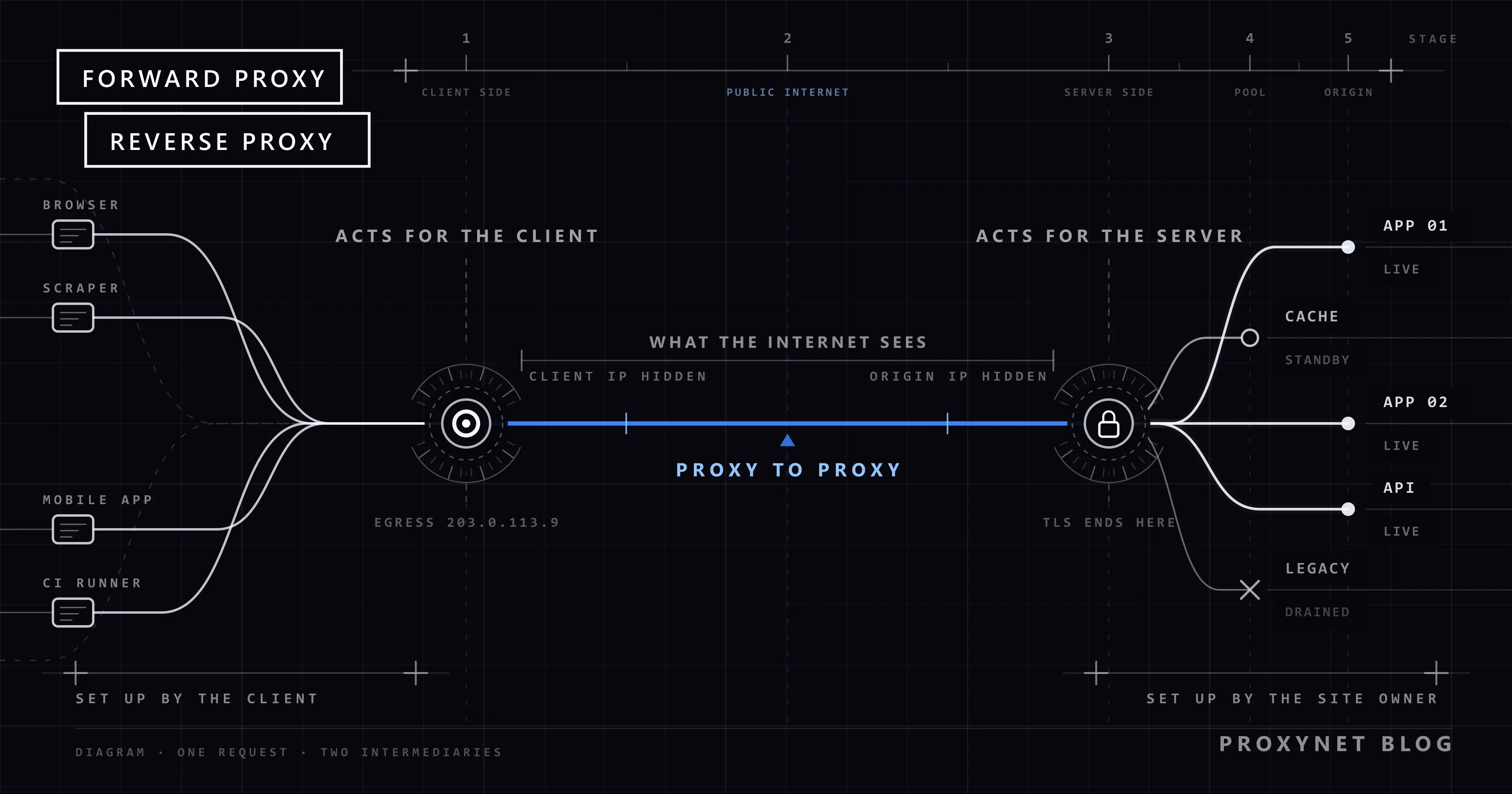
The word "proxy" is used for two different setups, and they get mixed up all the time. When a developer says "we put a proxy in front of the site", they mean a reverse proxy. When a data team says "our requests go through a proxy", they mean a forward proxy. Both are intermediaries sitting between two parties; the difference is on whose behalf they work and who configures them.
This article defines both setups separately, shows step by step how a request passes through each one, and puts the differences in a table. After that we cover what a reverse proxy is used for (load balancing, TLS termination, caching), where CDNs fit into the picture, and a short Nginx configuration.
What is a forward proxy?
A forward proxy is the intermediary one or more clients use to reach the internet. The client knows the proxy's address and sends its requests there; the proxy forwards them to the target sites with its own IP address. The target site sees the connection as coming from the proxy.
In everyday language, "proxy" almost always means a forward proxy. The residential, datacenter and mobile proxies sold by proxy providers are all forward proxies. We explain the basic mechanism in detail in What Is a Proxy Server and How Does It Work?.
This is the path a request takes through a forward proxy:
- The user sets the proxy address in the browser or in code.
- The client connects to the proxy instead of the target site and, for HTTPS, sends a
CONNECT target.com:443request. - The proxy authenticates the client if needed, then connects to the target site with its own IP address.
- The target site logs the request as coming from the proxy's IP and sends the response to it.
- The proxy passes the response back to the client.
Using a forward proxy from the command line is a single option:
curl -x "http://user:pass@pr.proxynet.io:8000" https://httpbin.org/ipHere the client knows about the proxy, because it supplied the address itself.
What is a reverse proxy?
A reverse proxy is an intermediary placed in front of one or more servers. When a visitor connects to example.com, they are actually connecting to the reverse proxy; the reverse proxy forwards the request to one of the application servers behind it and returns the response to the visitor. The visitor does not know which machine answered, and does not need to.
The HTTP standard, RFC 9110, calls this setup a "gateway" or "reverse proxy" and describes it as an intermediary that acts as the origin server from the client's point of view. For the client, the reverse proxy is the site. That is why, when the server behind it fails to answer properly, the visitor gets an error from the reverse proxy itself: the familiar 502 Bad Gateway page.
This is the path a request takes through a reverse proxy:
- The visitor opens
example.com; DNS resolves the name to the reverse proxy's IP address. - The reverse proxy accepts the connection and usually decrypts TLS at this point.
- It picks one of the backend servers based on the request path, the host name or the current load.
- It forwards the request to that server and adds the visitor's real IP address in an
X-Forwarded-FororForwardedheader. - It receives the application server's response, caches it if configured, and sends it to the visitor.
What is the difference between them?
Both setups take traffic from one end and pass it to the other. The quickest way to see the difference is to ask whose interests the intermediary serves.
| Criterion | Forward proxy | Reverse proxy |
|---|---|---|
| Who does it represent? | The client | The server |
| Where does it sit? | Between the client and the internet | Between the internet and the servers |
| Who configures it? | The user or network administrator | The site owner or infrastructure team |
| Is the client aware of it? | Yes, the client sets the address | No, the client thinks it is talking to the site |
| Whose IP is hidden? | The client's | The backend servers' |
| How many destinations? | Any site on the internet | Specific servers behind it |
| TLS | Tunnels HTTPS and cannot see the content | Usually terminates TLS itself |
| Caching | Possible for unencrypted HTTP | Commonly used |
| Typical software | Squid, commercial proxy services | Nginx, HAProxy, Envoy, CDNs |
| Typical use | Access control, location-based access, data collection | Load balancing, security, caching |
The most important row is the TLS row. A forward proxy only opens a tunnel for HTTPS traffic and carries encrypted bytes. A reverse proxy holds the site's certificate, so it decrypts the traffic, reads the request and can route it based on its content.
What is a reverse proxy used for?
A reverse proxy takes over the jobs the application itself should not have to deal with:
- Load balancing. It spreads incoming requests across several application servers. If one server stops responding, traffic moves to the others and visitors do not notice.
- TLS termination. Certificate management and decryption happen in one place. The backend servers can speak plain HTTP on the internal network or use a separate internal certificate.
- Caching and compression. It stores frequently requested pages and static files and compresses responses, so fewer requests reach the application server.
- Security layer. It applies web application firewall (WAF) rules, rate limits and bot filters. The backend servers' IP addresses are not directly exposed to attacks.
- Path-based routing. It sends
/apirequests to one service and/blogrequests to another, so several applications run under one domain. - Zero-downtime deployments. Rolling a new version out to new servers and shifting traffic gradually is done through the reverse proxy.
How a reverse proxy works together with a firewall is covered in Proxy vs Firewall: What's the Difference?.
How do you set up a simple reverse proxy with Nginx?
The core directive for a reverse proxy in Nginx is proxy_pass. The configuration below spreads traffic arriving on port 443 across two application servers and passes the visitor's real IP address to the backend:
upstream app {
    server 10.0.0.11:3000;
    server 10.0.0.12:3000;
}

server {
    listen 443 ssl;
    server_name example.com;
    ssl_certificate     /etc/ssl/example.com/fullchain.pem;
    ssl_certificate_key /etc/ssl/example.com/privkey.pem;

    location / {
        proxy_pass http://app;
        proxy_set_header Host $host;
        proxy_set_header X-Real-IP $remote_addr;
        proxy_set_header X-Forwarded-For $proxy_add_x_forwarded_for;
        proxy_set_header X-Forwarded-Proto $scheme;
    }
}
What the lines do:
- The
upstreamblock defines the backend servers. By default Nginx distributes requests in turn; directives such asleast_connorip_hashchange the method. listen 443 ssland the certificate lines terminate TLS at the reverse proxy.proxy_passforwards the request to theappgroup.- Without the
proxy_set_headerlines, the backend application sees every request as coming from the reverse proxy's IP address, which makes logs and rate limits meaningless.
The full list of directives is in Nginx's ngx_http_proxy_module documentation.
Can you trust the X-Forwarded-For header?
An application behind a reverse proxy reads the visitor's IP address from the X-Forwarded-For header. That header is plain text, and the client can send it too. If the application trusts it blindly, a visitor can write a fake IP address and slip past rate limits or IP-based restrictions.
The right approach:
- Only honour the header on connections that come from known reverse proxies. In Nginx this is done with the
set_real_ip_fromandreal_ip_headerdirectives. - If there are several intermediaries, read the list from right to left and take the address before the last trusted one.
- Where the infrastructure supports it, prefer the standardised
Forwardedheader (RFC 7239).
The same logic applies on the forward proxy side: a target site can look at headers added by a proxy and see the real client. That is why most proxy services do not add headers carrying the client IP.
Is a CDN a reverse proxy?
Yes. A content delivery network (CDN) is made up of reverse proxy servers located around the world. When you put a site behind a CDN, your domain resolves to the CDN's IP addresses; visitors connect to the nearest CDN server, and the CDN forwards requests that are not in its cache to your server (the origin).
That is why CDNs take on every job of a reverse proxy at scale: TLS termination, caching, absorbing DDoS attacks, WAF and bot management. The rate limits and bot challenge pages a scraper runs into usually come not from the target site itself but from this reverse proxy layer in front of it. For one example of how that layer classifies bot traffic, see Cloudflare Precursor.
Are forward and reverse proxies used together?
Most requests pass through both. When a data team's script pulls prices from an e-commerce site, the path looks like this:
- The script sends the request to the team's forward proxy.
- The forward proxy resolves the site's domain and connects to the CDN (reverse proxy) in front of the site.
- The CDN evaluates the request and, if it is not cached, forwards it to the site's application server.
- The response travels back through the same chain to the script.
Here the site sees the forward proxy's exit IP and the script sees the CDN's IP; neither side knows the real machine behind the other. In corporate networks the chain is even longer: employee computer → company proxy → firewall → internet → the site's CDN → application server. A self-hosted monitoring tool such as Uptime Kuma puts both in one setup: its dashboard can be served over HTTPS behind a reverse proxy like nginx, while its monitors can send their checks through a forward proxy from different countries (What Is Uptime Kuma? Setup and Monitoring Through a Proxy).
Use cases
- Data collection team: uses a forward proxy to see prices in different countries and to spread requests. A Rotating Proxy, which gives a different IP on every connection through a single address, is set up for this job. Scaling crawls is covered on our web crawler solution page.
- Corporate IT team: uses a forward proxy to route employee traffic through one exit and keep logs, and a reverse proxy to expose internal applications. The data protection side is on our data security solution page.
- Web application developer: puts the application behind Nginx or a CDN and keeps load balancing and TLS out of the application code.
- Software testing team: uses a forward proxy to see how an application opens from other countries, and a reverse proxy to gather test services under one domain.
- Individual user: sets up a forward proxy such as an HTTPS Proxy to route browser traffic through another location. If encryption is also needed, a VPN is the tool; the difference is explained in Proxy vs VPN.
Common mistakes
- Treating a reverse proxy as an anonymity tool. A reverse proxy protects the site owner; it does not hide the visitor's IP address, and in fact passes it to the backend with
X-Forwarded-For. - Not forwarding the
Hostheader. By default Nginx sends the server name from theproxy_passaddress. If the backend application relies on the domain name, it returns the wrong site or an error page. - Leaving the backend server directly reachable. The reverse proxy's security rules become meaningless once the application server can be reached on its own IP address. The application port should only be open to the reverse proxy's internal address.
- Carrying identity in headers on a forward proxy. A Squid proxy you run yourself may add
X-Forwarded-ForandViaheaders with default settings, in which case the target site sees the client's real address. - Mismatched timeouts. If the reverse proxy's timeout is shorter than the application's, long requests are cut off with
504 Gateway Timeout.
Decision guide
| Your need | Recommendation |
|---|---|
| Send requests from a different IP address | Forward proxy |
| See content in other countries | Forward proxy (with location selection) |
| Control employee traffic from one point | Forward proxy (corporate) |
| Spread your site across several servers | Reverse proxy |
| Manage TLS certificates in one place | Reverse proxy |
| Protect your site from attacks and bot traffic | Reverse proxy or CDN |
| Serve static content quickly worldwide | CDN |
Frequently asked questions
Is "reverse proxy" the same as "inverse proxy"?
Yes, they are two names for the same thing. Technical documentation and software settings almost always use "reverse proxy".
Is a VPN a forward proxy?
Functionally they are similar: both send your traffic out through another server, and the target site sees that server's IP address. But a VPN works at the operating system level and encrypts all traffic between your device and the VPN server. A forward proxy is configured per application and does not encrypt anything by itself.
Can Nginx be used as a forward proxy?
Nginx can forward plain HTTP requests, but the standard build does not support the CONNECT method needed for HTTPS; that requires a third-party module. Forward proxies are usually built with dedicated software such as Squid. For a step-by-step installation, see our Squid proxy guide.
Does a reverse proxy slow a site down?
In theory it adds a small delay because there is one more hop. In practice most sites load faster behind a reverse proxy or CDN thanks to caching, compression, connection reuse and being closer to visitors.
Does a site reveal that it is behind a reverse proxy?
Often, yes. Response headers such as Server, Via or CDN-specific headers show up, and the domain's IP address belongs to a CDN. That information does not reveal the address of the server behind it, though.
What kind of proxy do proxy services sell?
Residential, datacenter, ISP and mobile proxy services are all forward proxies. You get an entry address, and your requests go out through one of the provider's exit IPs.
Summary
A forward proxy represents the client and a reverse proxy represents the server. The user sets up a forward proxy knowingly and the target site sees the proxy's IP address; the site owner sets up a reverse proxy and visitors never see the servers behind it. Reverse proxies handle load balancing, TLS termination, caching and security, and CDNs are the same idea at global scale. If you need to send requests from different IP addresses and locations, a forward proxy is what you are looking for; you can find the options in our proxy services.