


































You click a link and get an almost empty page: "403 Forbidden" in large letters and the word "nginx" underneath. Another site words the same refusal as "You don't have permission to access this resource". And sometimes Chrome shows a grey page of its own that says access to the site was denied, with HTTP ERROR 403 at the bottom.
All of these are one HTTP status code: the server received your request, understood it and decided not to serve it. Below: how 403 differs from 401 and 404, how to tell who refused you, what a visitor can try, how a site owner finds the rule in the logs, and how to read a 403 in your own code or from a proxy.
What does 403 Forbidden mean?
Every answer a web server sends starts with a three-digit status code. Codes in the 400s say the problem lies with the request, and 403 is the one for "I know what you want, and the answer is no." The HTTP standard, RFC 9110, defines it as a server that understood the request but refuses to fulfil it. It may explain why in the page it sends, but it does not have to.
The standard adds two details. If you were signed in, a 403 means your account is not enough for this page, and repeating the request will not change that. And a server that wants to hide that a page exists may answer 404 Not Found instead.
What is the difference between 401, 403 and 404?
| Code | Name | What the server says | What usually helps |
|---|---|---|---|
401 | Unauthorized | "I don't know who you are" | Sign in or send valid credentials |
403 | Forbidden | "I know, and the answer is no" | Another account, another network, or the site's permission |
404 | Not Found | "Nothing here", or "I won't say" | Check the address |
A 401 must come with a header that tells the browser how to sign in. A 403 carries no such hint, so signing in again helps only when the 403 comes from a lost session. A 407 is the proxy's version of 401: your proxy, not the site, wants a username and password.
How does a 403 happen, step by step?
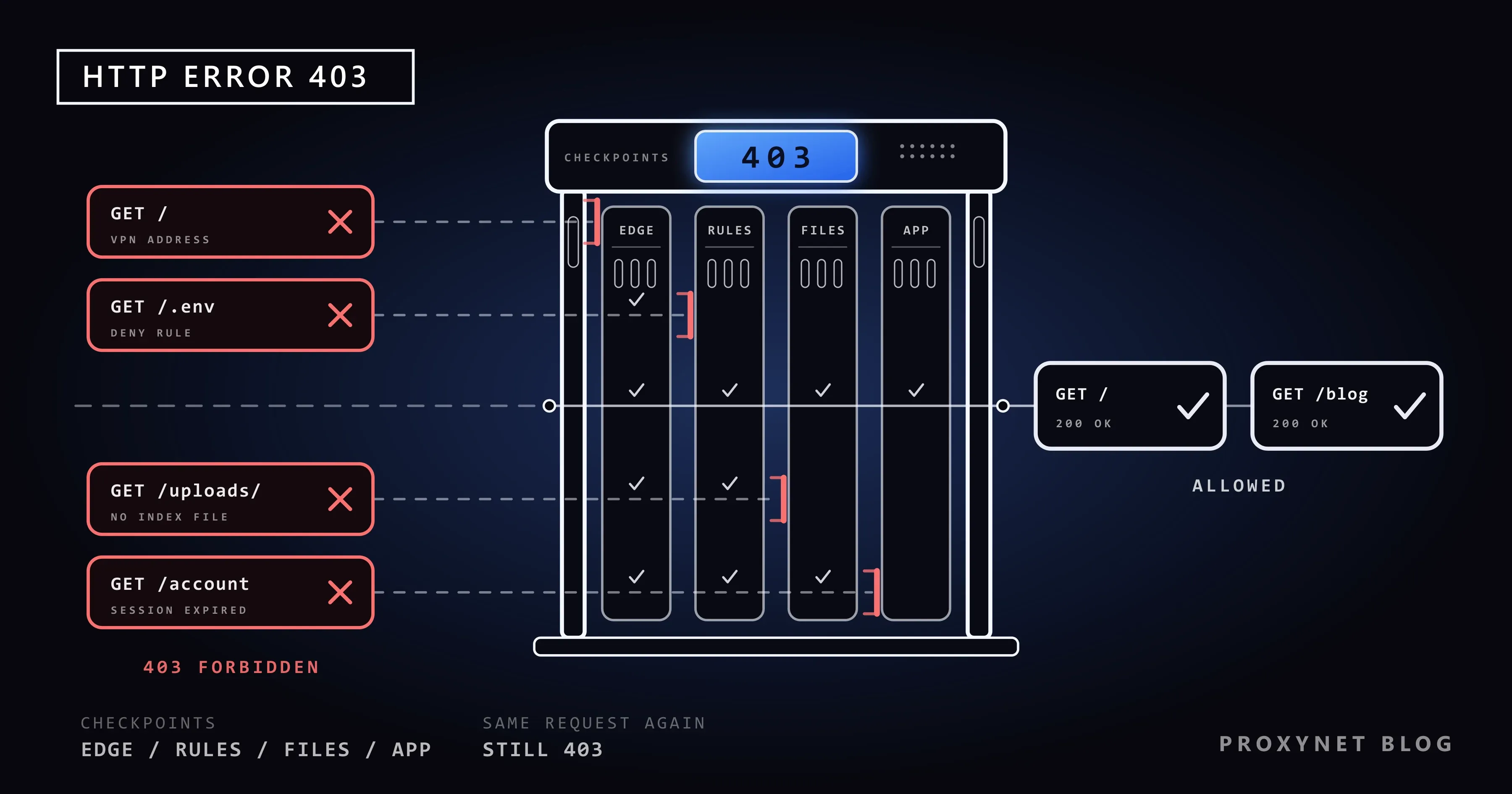
A request passes several checkpoints, and any of them can refuse it:
- The front door. A CDN (a network of servers that answers for the site from many locations) or a firewall checks your IP address, country, request rate and the request itself.
- The web server's rules. nginx, Apache or a load balancer applies its allowed and denied addresses and
.htaccessrules. - The files. The server needs permission to read the file; a folder without a start page is refused rather than listed.
- The application. The site's code checks whether you are signed in and allowed to see the page.
- The refusal. The first checkpoint that says no answers 403. Who said no decides who can fix it.
What does the 403 page look like, and who sent it?
The look of the page tells you which checkpoint refused you.
| What you see | Sent by | Usual cause |
|---|---|---|
| "403 Forbidden", "nginx" underneath | nginx, the site's web server | File permission, missing start page or an access rule |
| "403 Forbidden", "openresty" underneath | OpenResty, a build of nginx | The same as nginx |
| "Forbidden", "You don't have permission to access this resource." | Apache | File permission, .htaccess rule or a folder without a start page |
| "403 Forbidden", "Request forbidden by administrative rules." | HAProxy, a load balancer | An access rule on the load balancer |
| "403 Forbidden", "Microsoft-Azure-Application-Gateway/v2" | The firewall of Azure Application Gateway | A security rule matched your request |
| "Sorry, you have been blocked", a Ray ID | Cloudflare | A security rule the site set up |
| "Access to … was denied", "You don't have authorization to view this page.", "HTTP ERROR 403" | Chrome or Edge | The site sent a 403 without a page of its own |
The last row is the browser talking: when a bare 403 arrives, Chrome and Edge fill the screen with their own text, which says nothing about the cause. For the Cloudflare page, Sorry, You Have Been Blocked explains the Ray ID and what to send the site.
Why am I getting a 403 error?
From the visitor's side, these are the usual reasons:
- The address points at a folder or a private file, such as a folder without a start page or a backup file.
- You are not signed in, or your session ended. A cookie, the small file a site keeps in your browser to remember you, may have expired or been damaged.
- Your account lacks permission, for example to a shared document or an admin page.
- Your IP address or country is not allowed. Some government, banking and company sites accept visitors from certain countries or networks only, and some block address ranges after abuse.
- Your VPN address has a poor reputation. Many people share one VPN address; if some misbehaved, security systems may refuse everyone behind it.
- A security filter matched the request. A web application firewall (WAF) checks every request against rules written to stop attacks, and a search term with characters such as
',--or<script>can look like one. What Is a WAF? explains how these filters decide. - An extension changed the request, for example by rewriting headers or blocking scripts.
- You sent too many requests. Some sites answer a burst with 403 instead of the usual 429 Too Many Requests.
How to fix a 403 error as a visitor
Work through these in order; the first ones take seconds.
- Check the address. Look for a typo, then reach the page from the site's own menu instead.
- Reload once. Press F5 or the Reload button on Chrome's error page. Browsers do not keep a 403 for reuse unless the site says so, so a reload really asks again. If nothing changes, stop; dozens of reloads can trip a rate rule.
- Sign in again. Sign out and back in, then open the page from the site's home page.
- Clear that site's cookies. In Chrome: More > Settings > Privacy and security > Third-party cookies > See all site data and permissions, search for the site and select Delete (Google's steps). This signs you out of that site only.
- Try a private window. In Chrome, More > New Incognito window (Ctrl+Shift+N). It starts without the site's cookies, and extensions stay off unless you allowed them there. If the page opens, a cookie or an extension was the cause; switch extensions off one by one under More > Extensions > Manage extensions.
- Switch off your VPN or proxy, or change networks. Disconnect the VPN and reload, or try your phone over mobile data. If that works, the site refuses that VPN's addresses.
- Contact the site. Send the exact address, the time, what you were doing and any reference on the page, such as a Ray ID or an incident ID.
There is no honest trick for a 403 that a site sets on purpose. If a service accepts visitors from its own country only, the way in is the one it offers: an account, an official app or its support team.
If it is your site: how do you find the cause?
Start with who answered. Cloudflare's notes on error 403 put it plainly: a 403 without Cloudflare branding came from your own server, typically from permission rules, a firewall module such as mod_security or IP deny rules; a Cloudflare-branded one came from a security feature in your Cloudflare settings. The same split works for any CDN or firewall.
On your own server, the error log names the reason. Search it for the minute of the 403:
| Log line | Server | What it means |
|---|---|---|
directory index of "/var/www/html/" is forbidden | nginx | A folder without a start page; listing is off |
open() "/var/www/html/index.html" failed (13: Permission denied) | nginx | The server's user cannot read the file |
access forbidden by rule | nginx | An allow or deny rule matched |
AH01276: Cannot serve directory …: No matching DirectoryIndex … | Apache | A folder without a start page; Indexes is off |
AH01630: client denied by server configuration | Apache | A Require rule in the config or .htaccess |
What to fix:
- Permissions. The web server's user must be able to read the file and enter every folder above it. WordPress's own guide recommends 755 or 750 for folders and 644 or 640 for files. Never set 777: it lets every account on the server change the file.
- A missing start page. Add an
index.htmlorindex.php. Turning directory listing on (autoindex on,Options +Indexes) removes the 403 but shows every file in the folder to anyone. - Access rules. Check
deny,Requireand.htaccesslines, especially after a move to a new host or a new security plugin. Behind a CDN, make sure no rule blocks the CDN's own addresses. - Hotlink protection. Rules that stop other sites from embedding your images check the Referer header, which names the page a request came from. Browsers do not always send it, so let requests without one through.
- The firewall. In Cloudflare, open the site's security Analytics page, select the Events tab and filter by the visitor's IP address; the sampled log shows the action and the feature that acted. Azure Application Gateway answers 403 when its WAF runs in Prevention mode; Microsoft's troubleshooting guide shows how to find the rule ID and add a narrow exclusion instead of switching the WAF off.
If your rules depend on the country, a Residential Proxy exit in that country shows you the exact page a visitor there gets.
If you see a 403 in your code
In a script the 403 arrives as a status code, and the response body often says more than a browser shows. Read it first. The usual causes:
- A missing, expired or wrong key. APIs differ in when they use 401 or 403. Amazon API Gateway answers 403 for an invalid API key, an expired token, and a method or path the API does not have; that last one says "Missing Authentication Token", which misleads many people.
- A valid key without the permission. The token lacks the scope this endpoint needs; resending it will not help.
- CSRF protection. To stop other sites from submitting forms in a user's name (cross-site request forgery), frameworks refuse a submission without the token issued with the form; Django answers 403 with "CSRF verification failed. Request aborted."
- Rate and bot rules. GitHub's API answers 403 or 429 past its rate limit, with
x-ratelimit-remaining: 0in the headers. A site's firewall may do the same for traffic that looks automated.
For a rate or bot rule, behave like a visitor the site accepts: slow down, send a User-Agent that names your tool and a contact address, follow robots.txt, use the official API where one exists, and ask for permission if you need more. Copying a browser's headers or switching IP addresses until something gets through works against the site's decision; it is not a fix. HTTP Status Codes in Web Scraping lists which codes to retry and which mean stop.
Did the 403 come from your proxy or from the site?
Behind a proxy, two servers can say 403. For an https:// address the client first asks the proxy to open a tunnel with a CONNECT request. If the proxy refuses, for example because its rules do not allow that port, the site never saw you. If the tunnel opens and the site refuses, the 403 comes through it with the site's own headers.
Python's Requests library raises a ProxyError with Tunnel connection failed: 403 Forbidden for a refused tunnel and returns the site's 403 as an ordinary response. This script tells them apart:
import requests

PROXY = "http://user:pass@pr.proxynet.io:8000"
PROXIES = {"http": PROXY, "https": PROXY}


def who_sent_403(url):
    try:
        r = requests.get(url, proxies=PROXIES, timeout=20)
    except requests.exceptions.ProxyError as err:
        if "Tunnel connection failed: 403" in str(err):
            return "the PROXY refused the tunnel; the site never saw the request"
        raise
    if r.status_code == 403:
        return f"the SITE answered 403 (Server: {r.headers.get('Server', 'not sent')})"
    return f"no 403, status {r.status_code}"


for url in ["https://httpbin.org/status/403", "https://httpbin.org:8443/"]:
    print(url, "->", who_sent_403(url))
We ran it on our own computer (Python 3.13, Requests 2.34) through a local test proxy that opens tunnels to port 443 only, as many company proxies do. The first address is a public test page that always answers 403:
https://httpbin.org/status/403 -> the SITE answered 403 (Server: gunicorn/19.9.0)
https://httpbin.org:8443/ -> the PROXY refused the tunnel; the site never saw the request
Plain http:// addresses use no tunnel, so both kinds arrive as normal responses; the Server header and the page tell them apart. If a site agrees to let your crawler in, its allowlist needs addresses that do not change, which is what ISP Proxy provides.
Where you might run into a 403
- Government, tax and banking portals opened from abroad or through a VPN.
- Shared documents and admin areas your account is not cleared for.
- "Sign in with Google" inside another app's built-in browser.
- Images embedded from a site with hotlink protection.
- APIs after a rate limit, and price trackers or SEO crawlers that a firewall treats as bots.
Common mistakes
- Clearing the whole cache again and again. Only that site's cookies matter.
- Assuming the site is down. A 403 means the server is up and refusing this one request.
- Owners: setting 777 permissions or turning directory listing on to make the error disappear.
- Owners: blocking the CDN's addresses with a firewall rule or security plugin.
- Developers: retrying a 403 in a tight loop. A refusal does not change, and each retry adds to a rate count.
Decision guide
| Your situation | What to do |
|---|---|
| A plain "403 Forbidden" page on one address | Check the address, use the site's menu |
| It worked yesterday while you were signed in | Sign in again, clear that site's cookies |
| It works in a private window | Remove the cookie or extension behind it |
| A Ray ID or incident ID on the page | Send it to the site with the time |
| Your site, the log says "Permission denied" | Fix file and folder permissions |
| Your script gets "Tunnel connection failed: 403" | The proxy refused; check the port and target |
| Your script gets the site's 403 | Read the body, slow down, use the official API |
Frequently asked questions
Is a 403 Forbidden error my fault?
Sometimes. An expired session, a cookie, an extension or your VPN you can fix yourself. If the site refuses your country, network or account on purpose, only the site can change that.
Can a VPN cause a 403 error?
Yes, often. VPN addresses are shared by many users, and some sites refuse them outright or after abuse from the same range. If the page opens with the VPN off, the site is refusing the VPN's address.
Why do I get a 403 on my phone but not on my computer?
The phone often uses mobile data with another IP address, a VPN app may run on only one device, and each browser keeps its own cookies. Try the phone on the same Wi-Fi, then clear the site's data in its browser.
What does "403 disallowed_useragent" mean when I sign in with Google?
Google refuses sign-ins inside an app's embedded web view (a WebView), because the app could read or change what passes between you and Google. Sign in from your normal browser, or ask the app's developer to fix it.
How long does a 403 block last?
A permission or country rule lasts until someone changes it. Rate and bot rules usually expire after minutes or hours; some APIs give the time in a Retry-After or x-ratelimit-reset header.
Does a 403 hurt a site in Google search?
Yes, on public pages. Google does not index pages that answer with a 4xx code and drops ones already indexed. It also asks owners not to use 403 to slow its crawler: 4xx codes other than 429 do not change crawl speed.
Summary
A 403 Forbidden means a server understood your request and decided not to serve it. As a visitor, check the address, sign in again, clear the site's cookies, test a private window and switch off your VPN; if it still refuses you, contact the site. As an owner, find out who answered, then read the error log. In code, read the body and tell your proxy's 403 from the site's. For monitoring and data collection that sites accept, compare proxy types on our proxy page.


