


































You are collecting data from a store that loads its prices with JavaScript. The HTML that comes back through Requests is empty, so you move to Playwright and the page opens without trouble. As the job grows, the traffic has to go through a proxy, and the first attempt ends with net::ERR_TUNNEL_CONNECTION_FAILED or "Browser does not support socks5 proxy authentication". Most Playwright tutorials treat the tool as a test automation framework, so the proxy side usually gets pieced together from forum threads and issue trackers.
In this post we define Playwright briefly, give the Python and Node.js installation side by side, and then move on to proxies: the difference between a browser-level and a context-level proxy, authentication with a username and password, how Chromium behaves with SOCKS5, choosing between rotating and sticky, saving traffic by cutting image and font requests, verifying the IP, and an error table. We ran every example in this post with Playwright 1.63 and Chromium through a local test proxy that requires authentication.
What is Playwright?
Playwright is an open source browser automation library developed by Microsoft. It opens a real browser from code, navigates to an address, clicks, fills in forms and reads the elements on the page. It drives the Chromium, Firefox and WebKit engines through the same API, and it has official releases for Node.js, Python, Java and .NET.
The tool started out as an end-to-end testing framework, and most guides present it from that side. For data teams its value lies elsewhere: it runs a JavaScript-rendered page in a real browser, waits on its own until an element appears, and lets you listen to the API calls the page makes in the background and cut the requests you do not need. To find out whether a page really needs a browser, first read Static vs Dynamic Pages: Do You Need a Headless Browser?; if the data sits in the page source or behind a JSON endpoint, opening a browser is an unnecessary cost.
The work done with Playwright falls roughly under four headings:
- Collecting data from dynamic pages (product lists, prices, stock, review counts).
- Testing how your own site or app looks from different countries.
- Generating screenshots and PDFs.
- Letting AI agents use a browser. The details of this last item are in our post on Playwright MCP, its setup and proxy settings.
We covered the architectural differences from Selenium, and which one to pick for which project, in Playwright vs Selenium; the same question for Puppeteer, its closest relative, is answered in Puppeteer vs Playwright: Which One Should You Pick?.
How do you install Playwright?
Installation takes two steps: first the library, then the browser binaries. Playwright does not use the Chrome installed on the system; it uses browsers it downloads itself and pins to a version. The "I installed the library but the browser was not found" error comes from skipping the second step.
On the Python side, create a virtual environment and install the library. The official Python library documentation gives the same steps for poetry and uv as well.
python -m venv .venv
source .venv/bin/activate        # Windows: .venv\Scripts\activate
pip install playwright
playwright install chromium
On the Node.js side:
npm init -y
npm install playwright
npx playwright install chromium
If you do not give the install command a browser name, all three engines are downloaded. For scraping jobs Chromium alone is usually enough. If you are going to write tests, the pytest-playwright package is recommended for Python and @playwright/test for Node.js; for data collection the plain library installation above is sufficient.
Python has two APIs: sync_api and async_api. In scripts that open pages one at a time, the synchronous version is easier to read. If you are going to process several pages at once, use the asyncio-based version; the full example at the end of this post is written that way.
How do you define a proxy in Playwright?
The HTTP Proxy section of Playwright's network documentation defines two levels: the proxy is given either for the whole browser or separately for each context. Both cases use the same object:
| Field | Required? | Meaning |
|---|---|---|
server | Yes | http://pr.proxynet.io:8000 or socks5://host:port. Without a scheme it is treated as an HTTP proxy |
username | No | Username for HTTP proxy authentication |
password | No | Password for HTTP proxy authentication |
bypass | No | Domains that skip the proxy, comma-separated (.example.com, api.yourcompany.com) |
In Python, a browser-level definition looks like this:
from playwright.sync_api import sync_playwright

PROXY = {
    "server": "http://pr.proxynet.io:8000",
    "username": "user",
    "password": "pass",
}

with sync_playwright() as p:
    browser = p.chromium.launch(proxy=PROXY)
    page = browser.new_page()
    page.goto("https://httpbin.org/ip")
    print(page.inner_text("body"))  # the proxy's exit IP
    browser.close()
The Node.js equivalent:
import { chromium } from "playwright";

const browser = await chromium.launch({
  proxy: {
    server: "http://pr.proxynet.io:8000",
    username: "user",
    password: "pass",
  },
});
const page = await browser.newPage();
await page.goto("https://httpbin.org/ip");
console.log(await page.innerText("body")); // the proxy's exit IP
await browser.close();
The point to watch is where the credentials go. Writing http://user:pass@pr.proxynet.io:8000 out of cURL or Requests habit does not work here: Playwright takes only the scheme, host and port from the server value and does not pass the username and password inside the address on to the browser. Credentials always go into the username and password fields. This has a side benefit: if the password contains characters such as @ or :, you do not have to deal with URL encoding. The general logic of the two authentication methods is in Proxy Authentication: User:Pass vs IP Whitelist.
What is the difference between a browser-level and a context-level proxy?
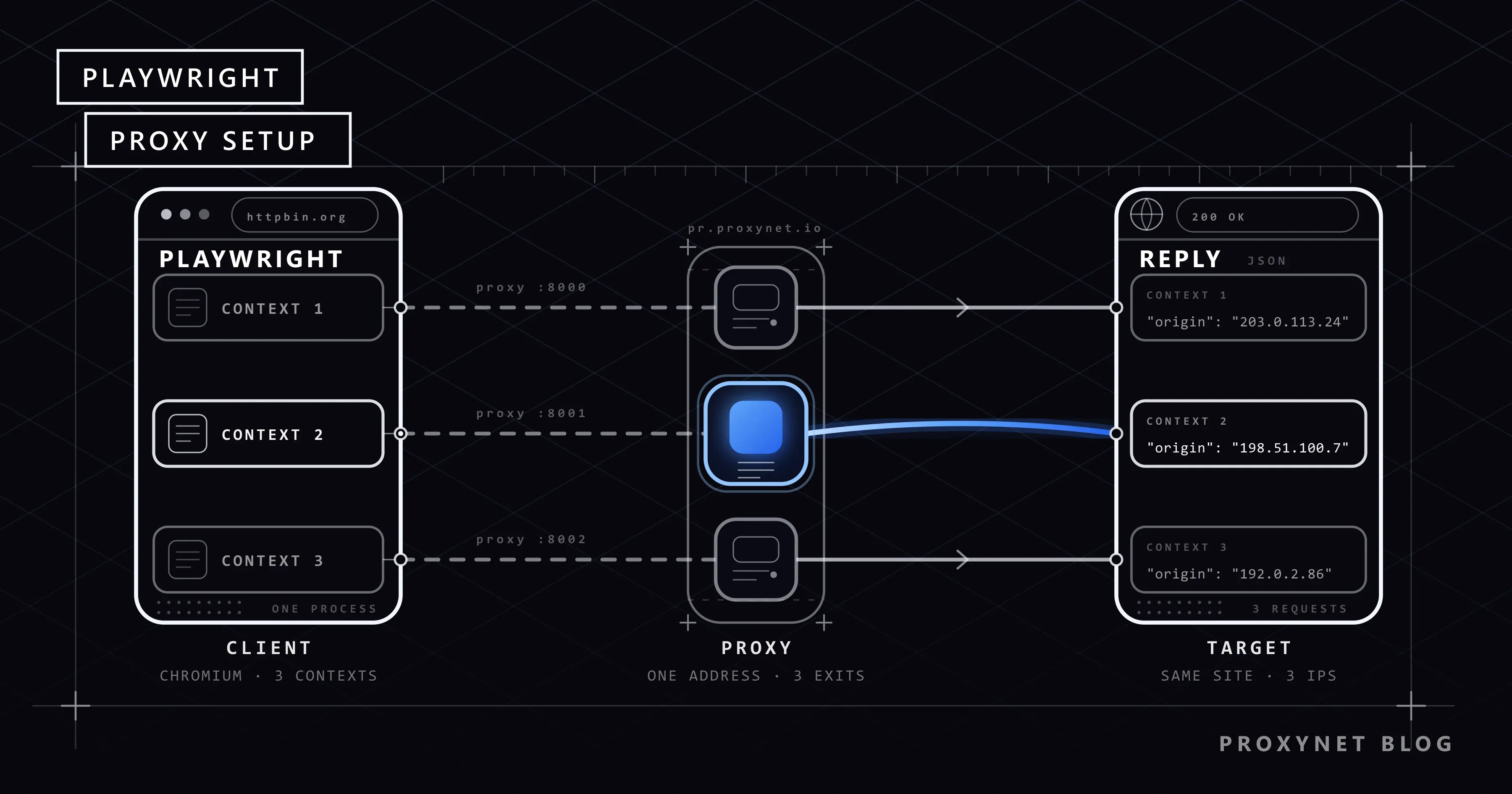
In Playwright, a context is a browser session isolated from the others: it has its own cookies, its own cache and its own local storage. It resembles an incognito window, but dozens of them can be open at once inside a single browser process, and opening one is far cheaper than starting a new browser.
When you pass the proxy to the new_context() call instead of launch(), the setting binds only that context:
from playwright.sync_api import sync_playwright

PROXIES = [
    {"server": "http://pr.proxynet.io:8000", "username": "user", "password": "pass"},
    {"server": "http://pr.proxynet.io:8001", "username": "user", "password": "pass"},
]

with sync_playwright() as p:
    browser = p.chromium.launch()  # the browser opens once, without a proxy
    for proxy in PROXIES:
        context = browser.new_context(proxy=proxy)  # each context with its own proxy
        page = context.new_page()
        page.goto("https://httpbin.org/ip")
        print(proxy["server"], page.inner_text("body"))
        context.close()  # cookies and cache are deleted together with the context
    browser.close()
When we ran this example with two separate local proxies, each context's request landed in the log of its own proxy, and a third context with no proxy connected directly. Older guides say that for Chromium on Windows you have to write a placeholder proxy such as http://per-context into the launch() call. That was a limitation of older Playwright versions and was removed from the code in August 2024; the current documentation carries no such note either. With Playwright 1.63 on Windows 11 the example ran without a placeholder.
Browser level (launch) | Context level (new_context) | |
|---|---|---|
| Scope | All contexts and pages | Only that context |
| Different IPs in one browser | No | Yes, a separate proxy per context |
| To change the proxy | Close the browser and start it again | Close the context and open a new one |
| Cookies and session | Contexts are still separate | Isolated together with the proxy |
| Suitable for | Scripts and tests where one exit point is enough | Many independent sessions, country comparisons |
The practical rule: one session, one context, one IP. There is no way to change the proxy inside the same context, and that is a good thing; a session whose cookies stay the same while its IP changes is an inconsistent visitor from the target site's point of view.
Does Playwright work with a SOCKS5 proxy?
It does, but without a username and password. When you give server an address with the socks5:// scheme and add username, Playwright throws this error without starting the browser at all:
BrowserType.launch: Browser does not support socks5 proxy authenticationThe same check applies to new_context(). The reason is Chromium itself: Chromium's proxy documentation states plainly that no authentication method is supported for SOCKSv5. We tried this on the day of writing with a local SOCKS5 server. The only method Chromium offered in its handshake message was 0x00, meaning "no authentication"; the username and password method (0x02) from RFC 1929 was not on the list. Embedding the credentials in the address (socks5://user:pass@...) did not change the result either: Playwright dropped that part, and because the server required authentication the connection closed with net::ERR_SOCKS_CONNECTION_FAILED. On a SOCKS5 server that did not require authentication, the page opened without trouble.
The solution is to prove your identity with your IP address rather than a password. You add the exit IP of the server running the script to the IP whitelist in the proxy dashboard and pass the server field alone:
from playwright.sync_api import sync_playwright

with sync_playwright() as p:
    # No username or password: your exit IP must be on the IP whitelist in the dashboard
    browser = p.chromium.launch(proxy={"server": "socks5://pr.proxynet.io:1080"})
    page = browser.new_page()
    page.goto("https://httpbin.org/ip")
    print(page.inner_text("body"))
    browser.close()
In our test logs Chromium sent the SOCKS5 server a domain name, not an IP address; in other words DNS resolution happens on the proxy side, and the socks5h:// distinction known from cURL is not needed here. For opening pages an HTTP proxy is enough most of the time, because HTTPS traffic is carried through a CONNECT tunnel anyway. We explained when to prefer SOCKS5 in SOCKS vs. HTTP Proxy: Which One Should You Choose?; the product side is on the SOCKS5 Proxy page.
Rotating or sticky: which one for which job?
A browser behaves differently from a script that sends a single HTTP request. While a page loads, separate connections are opened to different domains for the main document, scripts, stylesheets, images and API calls. On a gateway that changes the exit IP on every connection, these connections can leave from different IPs. When you crawl pages that are independent of each other, this is not a problem. In flows that involve a login, a shopping cart or a multi-step form, however, an IP change in the middle of the session can lead the site to end the session.
- Independent pages (product list, category, search results): Rotating Proxy is a good fit. The gateway handles rotation, and you do not keep a proxy list in your code. How rotation works is covered in our post on IP rotation.
- Flows that need a session (logging in with your own account, multi-step operations): with Sticky Proxy the same IP is kept for the lifetime of the context. You take the sticky session details from the dashboard and write them into the context's
proxyfield. - Content that changes by country: you open a separate context for each country and give it that country's exit point; one browser, side-by-side comparison.
Giving a proxy per context is a rotation scheme in its own right: when you close the context and open a new one, the cookies and the IP are renewed together.
How do you reduce traffic by blocking images and fonts?
Residential Proxy traffic is billed per GB, and a browser downloads everything a plain HTTP client does not: product images, web fonts, videos. If what you need is the price and the title, there is no point in paying for those bytes. Playwright's route mechanism catches a request before it goes out to the network, and you can abort it by resource type.
from playwright.sync_api import sync_playwright

BLOCKED = {"image", "media", "font"}


def filter_resources(route):
    if route.request.resource_type in BLOCKED:
        route.abort()
    else:
        route.continue_()


with sync_playwright() as p:
    browser = p.chromium.launch(proxy={
        "server": "http://pr.proxynet.io:8000",
        "username": "user",
        "password": "pass",
    })
    page = browser.new_page()
    page.route("**/*", filter_resources)
    page.goto("https://books.toscrape.com/")
    print(page.locator("article.product_pod h3 a").first.get_attribute("title"))
    browser.close()
The size of the gain depends on the page; quoting a general percentage would be misleading. To measure it on your own target, open the same page with and without the filter and compare the traffic counter in the proxy dashboard. Two warnings: blocking stylesheets (stylesheet) and scripts (script) can stop the page from rendering its content, so keep the list limited to images, media and fonts. This technique is a way to save traffic; it is not used to strip out a site's protection scripts.
The bigger saving is often inside the traffic the browser listens to. Dynamic pages usually pull their data from a JSON endpoint, and Playwright lets you read that response directly:
from playwright.sync_api import sync_playwright

with sync_playwright() as p:
    browser = p.chromium.launch(proxy={
        "server": "http://pr.proxynet.io:8000",
        "username": "user",
        "password": "pass",
    })
    page = browser.new_page()
    with page.expect_response("**/api/quotes?page=1") as info:
        page.goto("https://quotes.toscrape.com/scroll")
    data = info.value.json()
    for quote in data["quotes"][:3]:
        print(quote["author"]["name"], "-", quote["text"][:60])
    browser.close()
Instead of parsing HTML with selectors, you get structured data. If the endpoint does not require credentials, the next step can be to drop the browser entirely and call that address with a plain HTTP client.
How do you verify that the proxy works?
Three checks are enough:
- Open
https://httpbin.org/ipwith Playwright and compare the returned IP with your own. If it differs, the traffic is going through the proxy. - Open the same address with a context that has no proxy. If the two results are the same, the
proxyobject was passed to the wrong call or the domain ended up on thebypasslist. - If you target a country, check the IP's location in a geolocation service. We explained why databases disagree in Why Is My IP Location Wrong? What an IP Address Reveals.
Testing the proxy independently of Playwright tells you whether the problem is in the code or in the network. The command-line tests are in Is My Proxy Working? How to Test a Proxy.
Full example: concurrent contexts, retries and resource blocking
The script below crawls six JavaScript-rendered pages. It keeps at most three contexts open at once, uses a clean context and proxy connection on every attempt, blocks images and fonts, and retries transient errors with exponential backoff plus a random component. On errors showing that the proxy cannot be reached at all it does not retry, because what fixes that situation is the configuration, not waiting.
import asyncio
import random

from playwright.async_api import Error, async_playwright

PROXY = {
    "server": "http://pr.proxynet.io:8000",
    "username": "user",
    "password": "pass",
}
URLS = [f"https://quotes.toscrape.com/js/page/{n}/" for n in range(1, 7)]
BLOCKED = {"image", "media", "font"}
CONCURRENCY = 3  # number of contexts open at the same time
ATTEMPTS = 3
# Errors a retry will not change: fix the configuration first
FATAL = ("ERR_PROXY_CONNECTION_FAILED", "ERR_TUNNEL_CONNECTION_FAILED", "ERR_SOCKS_CONNECTION_FAILED")


async def filter_resources(route):
    if route.request.resource_type in BLOCKED:
        await route.abort()
    else:
        await route.continue_()


async def scrape(browser, url, limit):
    async with limit:
        for attempt in range(ATTEMPTS):
            context = await browser.new_context(proxy=PROXY)  # clean session on every attempt
            try:
                page = await context.new_page()
                await page.route("**/*", filter_resources)
                response = await page.goto(url, timeout=30_000)
                if response is None or response.status >= 400:
                    raise Error(f"HTTP {response.status if response else 'no response'}")
                quotes = page.locator("div.quote span.text")
                await quotes.first.wait_for(timeout=10_000)  # wait until JavaScript renders the content
                return url, await quotes.all_inner_texts()
            except Error as exc:  # TimeoutError also derives from Error
                if any(code in str(exc) for code in FATAL):
                    raise
                if attempt == ATTEMPTS - 1:
                    raise
                await asyncio.sleep(2**attempt + random.random())
            finally:
                await context.close()


async def main():
    async with async_playwright() as p:
        browser = await p.chromium.launch()
        limit = asyncio.Semaphore(CONCURRENCY)
        results = await asyncio.gather(
            *(scrape(browser, url, limit) for url in URLS), return_exceptions=True
        )
        await browser.close()
    for url, result in zip(URLS, results):
        if isinstance(result, Exception):
            print(url, "ERROR:", str(result).splitlines()[0])
        else:
            print(url, len(result[1]), "quotes")


asyncio.run(main())
On our local test proxy all six pages came back with ten quotes each; when we deliberately mistyped the proxy port, the script stopped with ERR_PROXY_CONNECTION_FAILED without retrying. In a real job, make two additions. Take the retry logic that honours the Retry-After header on 429 and 503 responses from the example in HTTP Status Codes in Web Scraping: 403, 407, 429, 503; we do not repeat it here. Also tune concurrency to your memory: every context and page consumes memory, so start CONCURRENCY low and raise it while watching your server. The details of waiting strategies (why you wait for an element instead of networkidle) are in the static and dynamic pages post mentioned above.
Error table: ERR_PROXY_CONNECTION_FAILED, ERR_TUNNEL_CONNECTION_FAILED, 407
We deliberately produced each of the rows below on the local test proxy.
| What you see | What it means | What to do |
|---|---|---|
net::ERR_PROXY_CONNECTION_FAILED | No TCP connection to the proxy server could be made: the address or port is wrong, or a firewall blocks outbound traffic | Check the server value and the port, try the same address with cURL |
net::ERR_TUNNEL_CONNECTION_FAILED | The proxy was reached but the CONNECT request got a response other than 200: authentication was rejected (407) or the proxy could not reach the target (502) | Check the credentials first, then the target address |
goto timeout on an HTTPS address, 407 in the proxy log | The username or password is wrong or was never given. In our test the requestfailed event reported ERR_TUNNEL_CONNECTION_FAILED, but goto waited until the timeout instead of throwing | See the real error with page.on("requestfailed"), then fix the username and password fields |
Response code 407 on an HTTP (unencrypted) address | Same cause; with no tunnel, the proxy's response arrives as the page response | Check response.status, fix the credentials |
Browser does not support socks5 proxy authentication | A username was given together with a socks5:// address | Remove the credentials and use an IP whitelist, or switch to an HTTP proxy |
net::ERR_SOCKS_CONNECTION_FAILED | The SOCKS5 server requires authentication or your IP is not on the whitelist | Add your exit IP to the list in the dashboard |
| The page opens but the IP is your own | The proxy object was never applied or the domain is on the bypass list | Confirm that you passed the object to the launch or new_context call |
The third row is the one that wastes the most time: the script raises no error, it just waits thirty seconds and times out, and the problem gets blamed on a slow target site. Adding these two lines during development shortens the diagnosis:
page.on("requestfailed", lambda r: print("FAILED:", r.url, r.failure))
page.on("response", lambda r: print(r.status, r.url) if r.status >= 400 else None)
The general meaning of the 407 code and how it shows up in other libraries is in our HTTP status codes post; for "proxy server is not responding" errors outside a browser automation context, see our post on proxy errors and the "proxy server is not responding" message. If the wait has another cause, such as a slow exit or a selector that never appears, Playwright Timeout 30000ms Exceeded: Causes and Fixes shows how to tell which timeout ran out.
Use cases
- Dynamic store and catalogue pages: price and stock data loaded with JavaScript. The overall setup is on our data scraping solution page.
- Regular crawling of many pages: page discovery and queue management are on the web crawler solution page; pagination patterns are in our post on pagination in web scraping.
- Testing your app from different countries: one context per country, each with that country's exit point. Details are on the app testing page.
- Competitor price monitoring: a daily crawl that blocks resources and respects rate limits.
Whatever the job, the framework is the same: follow the robots.txt rules and the site's terms of use, prefer an official API where one exists, and keep your request rate at a level the site can handle. How to read a robots.txt file is covered in What Is a robots.txt File and How Do You Read It?.
Common mistakes
- Embedding credentials in the
serveraddress. Playwright ignores that part; the result is a407or a timeout. - Trying a username and password with SOCKS5. Chromium does not support it; use an IP whitelist or an HTTP proxy.
- Starting a new browser for every page. The browser opens once; isolation and proxy changes are done with contexts.
- Sending a session-based flow through a rotating gateway. Connections leave from different IPs and the session drops. Use sticky.
- Not closing contexts. Every context left open holds memory; close it in a
finallyblock. - Blocking scripts and stylesheets. The page cannot render its content and your selector comes back empty.
- Blaming the target site for a
gototimeout. Look at therequestfailedevent and the proxy credentials first. - Accepting a
200response without looking at the content. Confirm that the element you expect is on the page; verification screens can return200too.
Decision guide
| Need | Recommendation |
|---|---|
| A script or test where one exit point is enough | launch(proxy=...), HTTP proxy |
| Several independent sessions in one browser | new_context(proxy=...), a separate proxy per context |
| Bulk crawling of independent pages | Rotating proxy, a single gateway address |
| A multi-step flow that requires a login | Sticky proxy, one context one IP |
| SOCKS5 is mandatory | IP whitelist, without username and password |
| Traffic billed per GB | Block image, media and font requests with route; read the JSON response where possible |
| Data in the page source or behind a JSON endpoint | A plain HTTP client instead of Playwright |
| Letting an AI agent use a browser | Playwright MCP |
Frequently asked questions
Is Playwright free?
Yes. It is an open source project under the Apache 2.0 licence; you pay nothing for the library or the browser binaries it downloads. The cost comes from the server resources the browsers consume and from the proxy traffic you use.
Should you choose Playwright for Python or for Node.js?
The proxy settings and browser behaviour are identical in both languages, because both talk to the same driver. The language of your team and of your data processing pipeline should decide. A comparison of the two languages from a scraping point of view is in Web Scraping: JavaScript or Python?.
Can I use a separate proxy for every page?
A proxy is bound to a context, not to a page. If you want a separate IP for every page, open each page in its own context. If you use a rotating gateway you do not need this either; the gateway handles rotation.
Does SOCKS5 authentication work with Firefox or WebKit?
When a username is given together with a socks5:// address, Playwright raises the error in its own validation step, before starting the browser, and this check does not look at the browser type. We tried it only with Chromium; assume an IP whitelist for the other engines as well.
Does a proxy behave differently in headless mode?
No. The proxy object is applied in the same way in headed and headless mode. If you want to see the problem with your own eyes, you can open the window with launch(headless=False) and run the same script.
Does using a proxy make verification screens go away?
No. A proxy only changes which IP the request leaves from; request rate, browser signals and session consistency stay the same. We explained why these screens appear in Puppeteer and CAPTCHA: Why It Appears and How to Reduce It; what is described there applies to Playwright too. We do not recommend detection evasion plugins: the lasting path is a reasonable rate, a consistent session and, where one exists, an official API.
Summary
In Playwright a proxy is a single object: server, username, password. Pass it to the launch() call and the whole browser leaves through the proxy; pass it to the new_context() call and only that session does. The second path means a separate IP per context in a single browser. Credentials are not written inside the address, SOCKS5 uses an IP whitelist instead of a password, session-based flows get sticky and independent pages get rotating. If you pay for traffic per GB, block images and fonts; if you see timeouts, look at the requestfailed event first. You can find the proxy types that suit your work in our proxy services.


