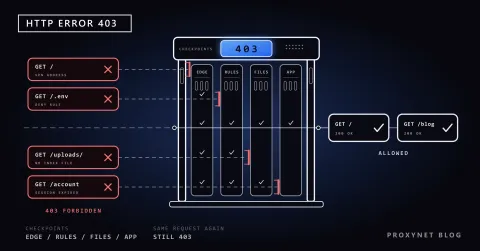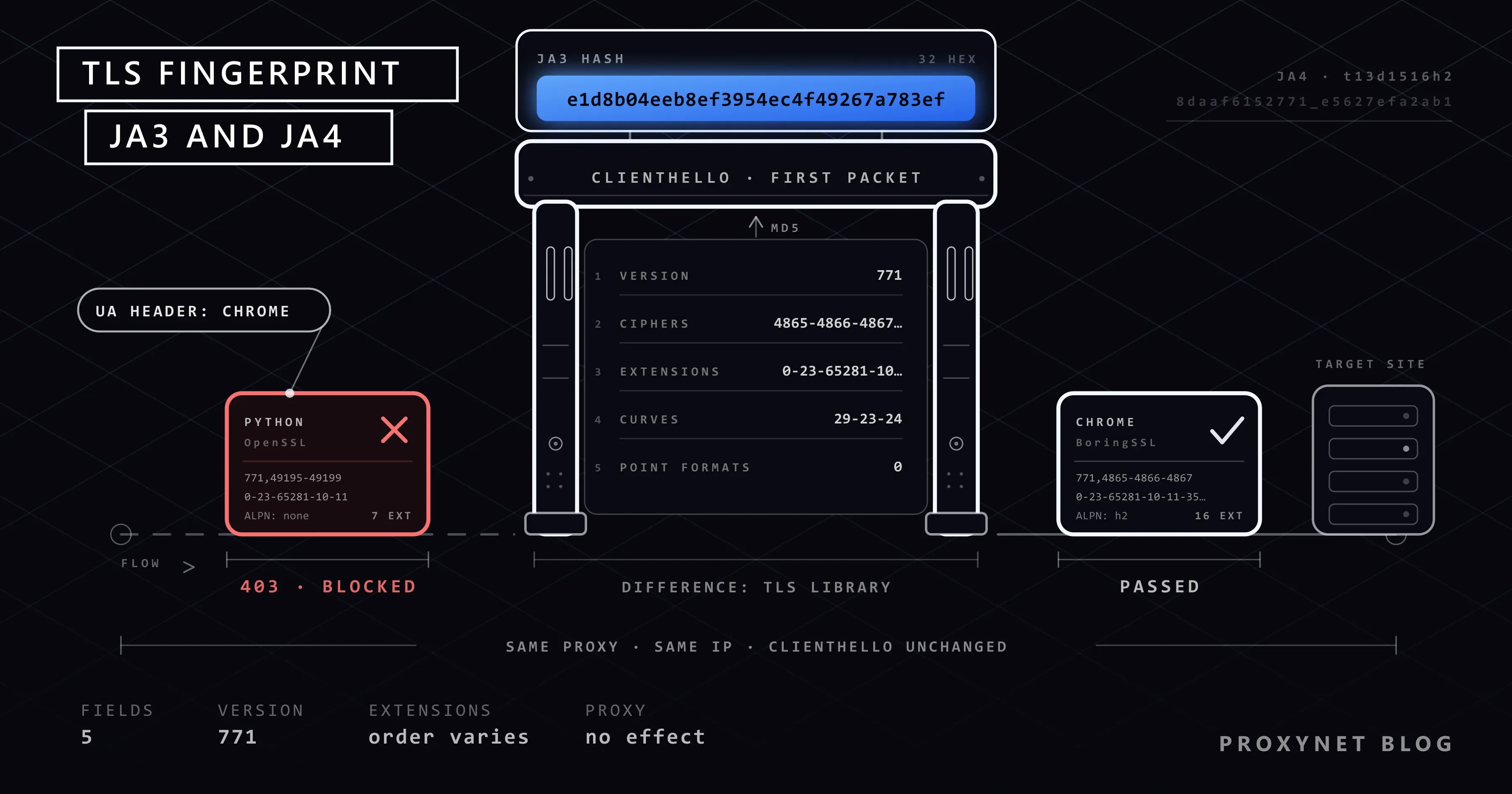
You have a script written in Python. It goes out through a proxy, the IP address changes on every request, and you put a current Chrome string in the User-Agent header. The site still returns 403 on the very first request. Open the same address from the same IP in a real browser and the page loads. The difference sits in a packet that travels before any HTTP header: the ClientHello message that starts the encrypted connection. By looking at how that message is laid out, a site can tell whether it is talking to Chrome, Python or curl without reading a single header.
This post covers the TLS handshake, the fields inside ClientHello, how the JA3 string is computed from those fields and what JA4 does differently. Then we move on to the question we hear most: does a proxy change the TLS fingerprint? At the end there is a tested Python example that shows your own client's JA3 string locally.
What is the TLS handshake?
TLS is the protocol that encrypts traffic between the browser and the site; the https:// in the address bar shows you are using it. Before encryption starts, both sides have to agree on which version, which cipher suite and which key to use. This short negotiation is called the handshake. The current version, TLS 1.3, is defined in RFC 8446, and the handshake runs roughly like this:
- The client connects to the server over TCP and sends a
ClientHellomessage. It contains the cipher suites and extensions the client supports, plus its key share. - The server picks from the list and replies with
ServerHello. From this point both sides can derive the shared key. - The server sends its certificate and a
Finishedmessage proving the integrity of the handshake, both encrypted. - The client verifies the certificate and sends its own
Finishedmessage. - Only then does the first HTTP request (
GET /, headers,User-Agent) travel, inside the encrypted channel.
For fingerprinting, step one is what matters. ClientHello is sent before any shared key exists, so it is unencrypted; the server, the CDN in front of it and every network device on the path can read it as is, before any header, cookie or line of JavaScript.
Which fields does the ClientHello message contain?
ClientHello is a list in which the client says "this is what I can speak". These are the fields used for fingerprinting:
| Field | What does it carry? | Why is it distinctive? |
|---|---|---|
legacy_version | The old version field. TLS 1.3 clients still write the TLS 1.2 value (771) here for compatibility | Carries little on its own; the real version is in an extension |
cipher_suites | Supported cipher suites, in order of preference | Both the list and its order vary from library to library |
extensions | The type numbers of the extensions: server_name (0), supported_groups (10), signature_algorithms (13), ALPN (16), supported_versions (43), key_share (51) and others | Which extensions are present, and in what order, is specific to the software |
supported_groups | Curves and groups usable for key exchange (29 = x25519, 23 = secp256r1) | New groups reach browsers first |
ec_point_formats | Elliptic curve point formats | Some libraries send three values, others just one |
signature_algorithms | Accepted signature algorithms, in order | JA3 does not use it, JA4 does |
| ALPN | The application protocol the client wants to speak (h2, http/1.1) | A browser asks for h2; simple clients often do not |
These lists are filled in not by your application but by the TLS library underneath it. Chrome uses BoringSSL, Firefox uses NSS. Python's ssl module and Node.js are built on OpenSSL. The curl that ships with Windows uses Schannel, the operating system's own TLS stack. Each library has a different default cipher list, extension set and ordering; that is how the client's identity leaks into the first packet of the handshake.
What is a TLS fingerprint?
A TLS fingerprint is these ClientHello lists reduced to a short, comparable string. Three properties set it apart from other signals:
- It is passive. The site does not make the client run anything; it only reads the first packet that arrives. Turning off JavaScript or clearing cookies has no effect on the result.
- It is independent of headers.
User-Agentis a line of text and changes with one line of code in any HTTP library.ClientHellocomes from the compiled behaviour of the library. - It identifies the software, not the person. Everyone running the same Chrome version on the same operating system produces the same value. The JavaScript layer (canvas, fonts, WebGL), which aims to tell individual devices apart, is covered in What Is Browser Fingerprinting?.
The method was not invented for bot detection. Its first use was network security: malware encrypts its traffic, but its TLS library and settings are usually fixed. A security team that cannot see the content can still recognise the same software family from the layout of its ClientHello. Reading handshake fields like this on the network path is one form of deep packet inspection, which What Is Deep Packet Inspection (DPI) and How Does It Work? explains.
What is JA3 and how is it computed?
JA3 is the first widely adopted method that tied this idea to a standard format. It was developed at Salesforce in 2017 by John Althouse, Jeff Atkinson and Josh Atkins and released as open source. As described in Salesforce's JA3 repository, the calculation has five steps:
- Five fields are taken from the
ClientHellomessage: TLS version, cipher suites, extensions, curves (supported_groups) and elliptic curve point formats. - The values in each field are converted to decimal numbers and joined with
-in the order they appear in the message. - The five fields are joined with
,. If a field is empty, its place is left empty. - GREASE values (explained below) are left out of the lists entirely.
- The MD5 hash of the resulting string is taken. That 32-character hash is the JA3 fingerprint.
The repository's own example looks like this:
769,47-53-5-10-49161-49162-49171-49172-50-56-19-4,0-10-11,23-24-25,0
→ ada70206e40642a3e4461f35503241d5
Reading from the left: 769 means TLS 1.0; then come twelve cipher suites, three extensions, three curves and a single point format. MD5 is used here not for security but to turn a long string into a fixed-length, searchable key.
Two notes: because TLS 1.3 clients write the TLS 1.2 value into the version field, almost every current JA3 string starts with 771. Salesforce archived the repository on 1 May 2025; tools such as Wireshark still compute the value, but the method is no longer maintained.
What is GREASE and why does JA3 ignore it?
GREASE is a robustness mechanism defined in RFC 8701. The client adds a few randomly chosen reserved values of the pattern 0x0A0A, 0x1A1A … 0xFAFA to its cipher suite, extension and group lists. These values mean nothing. The aim is to keep testing whether servers silently ignore values they do not recognise: a faulty server that drops the connection on an unknown value gets noticed today, not on the day a new TLS feature ships.
Because the values are picked at random, the same browser would produce a different hash on every connection if JA3 included them. That is why the method's documentation asks for GREASE values to be skipped; in the code below, the is_grease function does this.
Why does Chrome shuffle its extension order?
GREASE protects the content of the lists, not their order. Server and middlebox software relying on Chrome's fixed extension order carried the same risk, so the Chrome team randomised the order as well. According to the Chrome Platform Status entry, the "TLS ClientHello extension permutation" feature was enabled by default in Chrome 110. The stated motivation is not to escape fingerprinting but to reduce ecosystem brittleness: a fixed order pushes server developers to recognise Chrome and assume a particular behaviour, which makes future changes to TLS harder. RFC 8446 already says extensions may appear in any order; the single exception is pre_shared_key, which must come last when present.
Since JA3 joins the extensions in message order, this change made the JA3 hash of Chromium-based browsers unstable. We measured it with the listener below: 24 consecutive connections from a Chromium-based browser produced 24 different JA3 hashes. When we sorted the extension numbers, every connection had the same set; only the order had changed.
What is JA4 and how does it differ from JA3?
JA4 is the newer format published by FoxIO that answers this problem. According to the JA4 technical specification, the fingerprint has three parts in the form a_b_c. The example in the document, t13d1516h2_8daaf6152771_e5627efa2ab1, reads as follows:
t: TLS over TCP (qwould be QUIC,dDTLS).13: TLS 1.3. JA4 reads the version from thesupported_versionsextension, not from the legacy field.d: an SNI extension is present, meaning the client is connecting to a domain name (ishows that SNI is absent).15and16: 15 cipher suites and 16 extensions, not counting GREASE.h2: the first and last character of the first value in the ALPN list, i.e. HTTP/2.8daaf6152771: the hex codes of the cipher suites are sorted, hashed with SHA-256, and the first 12 characters are kept.e5627efa2ab1: the extension codes are sorted (without SNI and ALPN), the signature algorithms are appended in their original order, and the result is hashed the same way.
Sorting removes the effect of extension shuffling. The readable first part allows a rough distinction without looking at the hashes: two first parts, one ending in h2 and the other in 00 because it sends no ALPN, do not come from the same software.
| JA3 | JA4 | |
|---|---|---|
| Publisher | Salesforce (2017), repository archived in 2025 | FoxIO, under active development |
| Format | A single 32-character MD5 hash | a_b_c: readable prefix + two truncated SHA-256 hashes |
| Extension order | Order in the message | Sorted; unaffected by shuffling |
| TLS version | Legacy version field (771 even for TLS 1.3) | supported_versions extension |
| ALPN, SNI | Visible only as extension numbers | Both written out in the first part |
| Signature algorithms | Not used | Included in the third part |
| GREASE | Ignored | Ignored |
According to the licence note in FoxIO's repository, JA4, the TLS client fingerprint, is open under the BSD 3-Clause licence; the other members of the family (JA4S, JA4H, JA4X, JA4T and so on) fall under a separate FoxIO licence.
Does a proxy change the TLS fingerprint?
No. The reason lies in how a proxy carries HTTPS traffic.
With an HTTP proxy, the client first sends the proxy a CONNECT target.com:443 request. The proxy opens a TCP connection to the target, answers 200 Connection Established and from then on only relays bytes. ClientHello travels inside this tunnel: your client produces it, the target site reads it, and the proxy neither changes its content nor rewrites it. SOCKS5 behaves the same way; the protocol relays the TCP connection one layer lower and does not even know that the data it carries is TLS. We walked through both protocols step by step in SOCKS vs. HTTP Proxy.
The outcome: the site sees the proxy's IP address and your client's TLS fingerprint at the same time. Using HTTPS Proxy or SOCKS5 Proxy does not change that, and neither does the proxy being residential, mobile or datacenter. We tried it with a local test proxy: the same curl client connected to the listener below directly, through an HTTP CONNECT tunnel and over SOCKS5, and the listener recorded the same JA3 string all three times.
The only case in which the fingerprint changes is when an intermediary that terminates TLS sits in between:
| What sits in between | Who sets up TLS with the target? | Which fingerprint does the site see? |
|---|---|---|
HTTP proxy (CONNECT tunnel) | Your client | Your client's |
| SOCKS5 proxy | Your client | Your client's |
| VPN | Your client | Your client's |
| Corporate gateway doing TLS inspection | The gateway | The gateway's |
| Antivirus with HTTPS scanning turned on | The antivirus | The antivirus's |
| A service that fetches the page on your behalf | The service's own client | The service client's |
We ran into the fifth row on our own machine while preparing this post: curl on Windows returned one fingerprint when it connected to the echo service directly and a different one when it went through the local proxy tunnel. The cause was the antivirus's HTTPS scanning, which re-established the direct connection with its own TLS stack. If the value at the echo service does not look like the library you expected, check who signed the certificate.
How can you see your own JA3 string?
The shortest route is an echo service: open BrowserLeaks' TLS page in your browser and you will see your JA3 and JA4 values. If you want to look at packet level, Wireshark computes these values itself on ClientHello packets; the display filter reference lists the fields as tls.handshake.ja3 and tls.handshake.ja4.
To see the calculation itself, you can use the script below. It runs on Python's standard library alone and sends no requests to the outside: it opens a raw TCP listener on port 8443, parses the ClientHello message of every client that connects, and prints the JA3 string and its hash. On startup it connects Python's own urllib client once. The listener does not complete the handshake, it reads the first packet and closes; a connection error on the client side is expected.
import hashlib
import socket
import threading
import urllib.request

HOST, PORT = "127.0.0.1", 8443


def is_grease(value):
    # RFC 8701: 0x0a0a, 0x1a1a, ... 0xfafa
    return (value & 0x0F0F) == 0x0A0A and (value >> 8) == (value & 0xFF)


def read_client_hello(conn):
    data = b""
    while len(data) < 5:
        data += conn.recv(4096)
    if data[0] != 22:  # 22 = handshake record
        raise ValueError("not a TLS handshake")
    record_length = int.from_bytes(data[3:5], "big")
    while len(data) < 5 + record_length:
        chunk = conn.recv(4096)
        if not chunk:
            break
        data += chunk
    return data[5 : 5 + record_length]


def ja3_from_client_hello(hello):
    if hello[0] != 1:  # 1 = ClientHello
        raise ValueError("not a ClientHello")
    pos = 4  # message type (1) + length (3)
    version = int.from_bytes(hello[pos : pos + 2], "big")
    pos += 2 + 32  # version + random
    pos += 1 + hello[pos]  # session_id
    size = int.from_bytes(hello[pos : pos + 2], "big")
    pos += 2
    ciphers = [int.from_bytes(hello[i : i + 2], "big") for i in range(pos, pos + size, 2)]
    pos += size
    pos += 1 + hello[pos]  # compression_methods
    end = pos + 2 + int.from_bytes(hello[pos : pos + 2], "big")
    pos += 2

    extensions, groups, point_formats = [], [], []
    while pos < end:
        ext_type = int.from_bytes(hello[pos : pos + 2], "big")
        ext_size = int.from_bytes(hello[pos + 2 : pos + 4], "big")
        body = hello[pos + 4 : pos + 4 + ext_size]
        pos += 4 + ext_size
        extensions.append(ext_type)
        if ext_type == 10:  # supported_groups
            groups = [int.from_bytes(body[i : i + 2], "big") for i in range(2, len(body), 2)]
        elif ext_type == 11:  # ec_point_formats
            point_formats = list(body[1:])

    def join(values):
        return "-".join(str(v) for v in values if not is_grease(v))

    fields = [str(version), join(ciphers), join(extensions), join(groups), join(point_formats)]
    ja3_text = ",".join(fields)
    return ja3_text, hashlib.md5(ja3_text.encode()).hexdigest()


def own_python_client():
    try:
        urllib.request.urlopen(f"https://localhost:{PORT}", timeout=5)
    except OSError:
        pass  # the listener closes without replying, which is expected


def main():
    server = socket.create_server((HOST, PORT))
    print(f"listening on https://localhost:{PORT}, press Ctrl+C to quit")
    threading.Thread(target=own_python_client, daemon=True).start()
    while True:
        conn, _ = server.accept()
        with conn:
            try:
                ja3_text, ja3_hash = ja3_from_client_hello(read_client_hello(conn))
            except (ValueError, IndexError, OSError) as exc:
                print("could not read:", exc)
                continue
        print(ja3_hash, ja3_text)


if __name__ == "__main__":
    main()
While the script is running, point different clients at the same address from another terminal. Use localhost in the address; a client that connects to an IP address does not send the SNI extension, and the fingerprint changes.
curl -k https://localhost:8443
node -e "require('https').get('https://localhost:8443', { rejectUnauthorized: false }).on('error', () => {})"
On our machine (Windows 11, Python 3.13 with OpenSSL 3.0, Node.js 24, curl 8 built with Schannel) the output looked like this. We shortened the cipher suite field to keep it readable:
331a436afb23d4e31134c11b301bdcb5 771,4866-4867-4865-…,0-11-10-35-16-22-23-49-13-43-45-51-21,29-23-30-25-24-256-257-258-259-260,0-1-2
2e6c64f66822fc35b6a7a128b557f1de 771,4866-4865-49196-…,0-43-13-35-10-11-16-51-49-23-65281-45,29-23-24,0
944d1e1858cd278718f8a46b65d3212f 771,4866-4867-4865-…,65281-0-11-10-35-22-23-13-43-45-51,4588-29-23-30-24-25-256-257,0-1-2
Same machine, same IP, three separate identities: Python, curl and Node.js, in that order. The echo service returned exactly the same hash for Python, so the parser works correctly. The 4588 in the Node.js line is the post-quantum hybrid key exchange group listed in the IANA registry as X25519MLKEM768; this Python version does not send it. In the same Node.js, https.get and the built-in fetch also gave different JA3 values, because fetch adds the ALPN extension: the fingerprint depends on the HTTP library in use, not on the language. We compared the library differences on the Python side in HTTPX vs. Requests vs. AIOHTTP.
The listener is no use for measuring the effect of a proxy (a remote proxy cannot reach your localhost), so ask the echo service twice instead:
import json
import urllib.request

PROXY = "http://user:pass@pr.proxynet.io:8000"
URL = "https://tls.browserleaks.com/json"


def fingerprint(opener):
    with opener.open(URL, timeout=15) as response:
        result = json.load(response)
    return result["ja3_hash"], result["ja4"]


direct = urllib.request.build_opener(urllib.request.ProxyHandler({}))
proxied = urllib.request.build_opener(urllib.request.ProxyHandler({"https": PROXY}))

print("direct :", *fingerprint(direct))
print("proxied:", *fingerprint(proxied))
You will see the same values on both lines; the only thing that changes is the IP address the service sees.
How does a site owner use this data?
CDN and firewall products expose the JA3 or JA4 value as a field next to every request. The site owner uses that field when writing rules and reviewing logs. Typical uses:
- Consistency check. If
User-Agentsays "Chrome" but the fingerprint matches no known Chrome version, the header has been altered. It is not conclusive proof on its own, but it is a strong signal that affects the score. The header itself is covered in What Is a User Agent?. - Rate limiting independent of IP. If traffic spread over hundreds of IPs carries the same fingerprint, the counter can be tied to the fingerprint instead of the IP. A rotating IP does not reset that counter.
- Recognising known tools. Fingerprint lists exist for malware families and scanning tools; security teams match them against their logs.
It has limits too. A site that blocks the value of a current browser blocks every visitor who uses that browser. Browser updates change the value, and corporate gateways and antivirus products insert their own fingerprints. That is why a TLS fingerprint does not decide anything on its own; it is one of the signals that feed the score along with IP reputation and behaviour. The scoring as a whole is covered in How Bot Detection Works, and Cloudflare's layers in Cloudflare Precursor.
What does this mean for a developer who collects data?
Back to the situation in the introduction. The Python client says it is Chrome in its User-Agent line, while its ClientHello says it is OpenSSL. The site sees the contradiction in the first packet. The right response is to remove the contradiction, not to try to hide it:
- Do not claim to be a browser you are not. Let your script's
User-Agentintroduce the script: a name, a version and a contact address. A client that arrives with an honest identity, followsrobots.txtand works slowly is one a site owner can recognise and put on an allowlist. The rules are explained in What Is a robots.txt File and How Do You Read It?. - If there is an official API, use it. A request that arrives with an API key already has a known identity; the fingerprint question goes away.
- If the page really needs a browser, use a real browser. When you open a JavaScript-rendered page with Playwright in a real Chromium, your client really is that browser; its headers, TLS layer and JavaScript environment agree with each other. Setup is in What Is Playwright and How to Use It With a Proxy.
- Slow down and ask for permission. For regular, high-volume work, writing to the site owner is often the most durable solution.
The other reasons for getting blocked, and the legitimate ways around them, are collected in How to Scrape Websites Without Getting Blocked.
Use cases
- Diagnosing a
403in a scraper: if a browser gets through with the same IP and the script does not, the difference is most likely in the client identity. Status codes are told apart in HTTP Status Codes in Web Scraping; the overall setup is on our data scraping solution page. - Separating bot traffic on your own site: grouping logs by fingerprint shows the distributed traffic that grouping by IP misses.
- Introducing your own crawler: a fixed library version produces a consistent fingerprint, which is how your crawler gets recognised in the logs. The infrastructure side is on our web crawler solution page.
- Setting the right expectation of a proxy: Residential Proxy change IP reputation and location; your client's identity remains your responsibility.
Common mistakes
- Assuming the client changes when
User-Agentchanges. The header is text;ClientHellois the library's behaviour, and it goes out before the header. - Expecting the proxy to change the TLS fingerprint. A tunnelling proxy changes the IP and does not touch the handshake.
- Expecting the JA3 hash to stay fixed in a Chromium-based browser. The extension order changes on every connection; use JA4 or a sorted extension list for comparisons.
- Accepting the echo service's result without questioning it. An antivirus or corporate gateway that scans HTTPS shows the service its own fingerprint.
- Using
127.0.0.1when measuring. No SNI is sent, and the value differs from the one in real connections.
Decision guide
| Situation | Recommendation |
|---|---|
The IP changes through the proxy, yet you get 403 on the first request | Look at the client identity: do User-Agent and the library you use say the same thing? |
| You want to know your own client's JA3 or JA4 value | An echo service or the local listener above |
| You want to group Chrome traffic in your logs | JA4, not JA3; it is unaffected by extension shuffling |
| The page needs JavaScript and a real browser | Real browser automation (Playwright), a reasonable pace, the scope the site allows |
| The echo service shows a value you did not expect | Check who signed the certificate; there may be software terminating TLS in between |
| Your site has distributed bot traffic | Tie the rate limit to the IP + fingerprint pair instead of the IP; do not block on a single hash |
Frequently asked questions
What is the difference between JA3 and JA3S?
JA3 is produced from the client's ClientHello message, JA3S from the server's ServerHello message. Because a server answers different clients differently, JA3S does not identify the server on its own; its answer to the same client, however, is always the same. That is why security teams use the two as a pair.
Does using a VPN change the TLS fingerprint?
No. A VPN sends traffic through an encrypted tunnel, but the TLS handshake with the site is still performed by your browser or script. The site sees the VPN server's IP address and your client's fingerprint. The difference between the two tools is explained in Proxy vs. VPN.
Does a TLS fingerprint identify me personally?
Not on its own. Everyone who runs the same browser version on the same operating system produces the same value. An identity that gets close to a person comes from combining this value with the IP address, cookies and signals from the JavaScript layer.
Does updating the browser change the fingerprint?
It can. When a new version removes a cipher suite or adds a new extension, the list and the hash change. That is why fingerprint lists are kept version by version.
Does a private window or clearing cookies affect the TLS fingerprint?
No. The ClientHello message is produced by the browser's TLS library; history, cookies and window type do not enter these lists.
What should I do if I am being blocked because of my fingerprint?
Measure first: look at which value appears at the echo service and whether some software in between terminates TLS. If you are writing a script, state your identity honestly, slow down and use the site's official API or permission channel. If you are blocked with an ordinary browser, the problem is most likely IP reputation, not the fingerprint.
Summary
A TLS fingerprint comes from ClientHello, the first and unencrypted packet of an encrypted connection. JA3 joins the five lists in this message in order and takes the MD5 hash; once Chrome started shuffling its extension order the hash became unstable, and JA4 fixed that by sorting the lists. The value shows the software, not the person, goes out before the headers, and no tunnelling proxy touches it: the proxy changes the IP, the client's identity stays with you. To add the right IP type to a consistent and honest client identity, take a look at our proxy services.