


































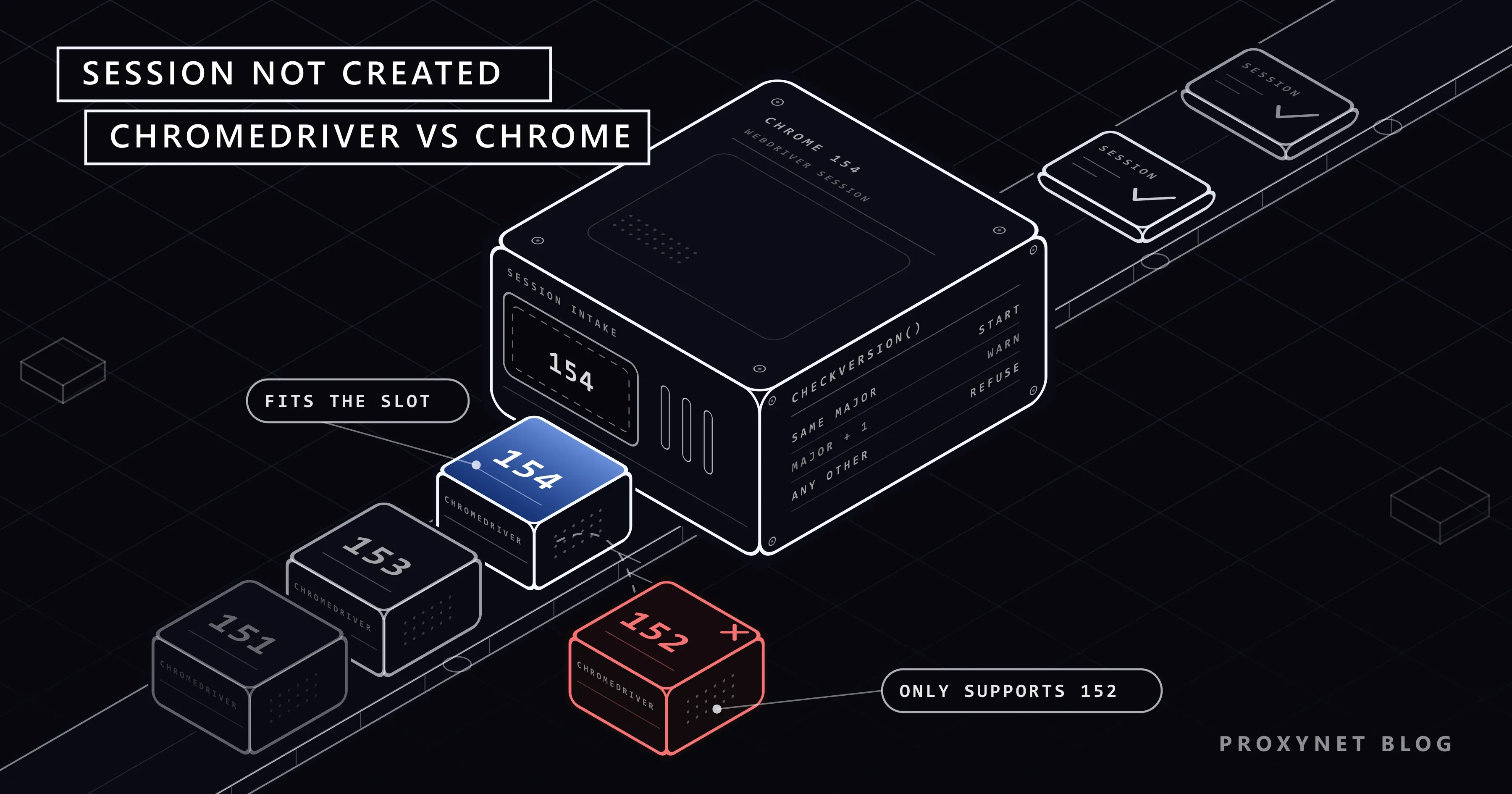
Your Selenium job ran without trouble on Friday. On Monday its first line, webdriver.Chrome(), stops with a SessionNotCreatedException and two lines of text: This version of ChromeDriver only supports Chrome version 152 and Current browser version is 154.0.8037.92. Nobody touched the code. Chrome updated itself over the weekend, and the chromedriver file on the disk stayed where it was.
This guide reads the message, shows the rule ChromeDriver applies (from its source code) and explains why the error now returns every few weeks. Then come the fixes: Selenium Manager, a stale driver on PATH, Chrome for Testing, Docker and CI, the same error in Edge, and a tested Python script that names the stale driver.
What does "This version of ChromeDriver only supports Chrome version" mean?
ChromeDriver is a small program between Selenium and Chrome: Selenium sends it standard WebDriver commands such as "open this URL", and ChromeDriver turns them into commands Chrome understands. Each build comes from the same source tree as one Chrome release and carries its version number.
A session is one browser that your code controls until quit(); "session not created" means it never got that far. This is what Selenium 4.50 printed in our test with ChromeDriver 152 and a Chrome 154 test build (path shortened, stack trace cut):
selenium.common.exceptions.SessionNotCreatedException: Message: session not created: This version of ChromeDriver only supports Chrome version 152
Current browser version is 154.0.8037.92 with binary path ...\154.0.8037.92\chrome-win64\chrome.exe; For documentation on this error, please visit: https://www.selenium.dev/documentation/webdriver/troubleshooting/errors#sessionnotcreatedexception
The message has three parts:
only supports Chrome version 152is the major version of the driver Selenium started.Current browser version is 154.0.8037.92is the full version of the Chrome this driver launched.with binary pathnames the Chrome file. On a machine with Chrome, Chrome Beta and a test build, it tells you which one was picked.
The text comes from ChromeDriver itself, not from the Python package, so Java, C# and JavaScript carry the same two lines inside their own exception. The stack trace below it belongs to the driver and adds nothing here.
Which Chrome versions does a ChromeDriver accept?
The check is a short function, CheckVersion, in ChromeDriver's launcher source. It compares only the first number of the two versions:
- Same major version: the session starts.
- Chrome exactly one major version newer than the driver: the session starts, and the driver writes a warning to its log. A comment in the source gives the reason: a Beta driver should be able to run a Dev or Canary browser.
- Anything else, including a Chrome older than the driver:
session not created.
We tested each case with Chrome for Testing builds, Selenium 4.50.0 and Python 3.13 on Windows 11:
| ChromeDriver | Chrome | Result |
|---|---|---|
| 154.0.8037.92 | 154.0.8037.92 | Session starts |
| 153.0.8010.52 | 154.0.8037.92 | Session starts, warning only in the driver log |
| 152.0.7977.82 | 154.0.8037.92 | session not created |
| 154.0.8037.92 | 153.0.8010.52 | session not created (driver newer than the browser) |
In the second row, the driver log said This version of ChromeDriver has not been tested with Chrome version 154. Selenium hides that log unless you ask for it, so the warning goes unnoticed until the next Chrome release turns it into an error. Google's ChromeDriver documentation is stricter than the code and asks for matching major, minor and build numbers.
Why does the error keep coming back?
Chrome updates itself: the new version downloads in the background and takes effect the next time the browser starts, and Selenium starts a fresh Chrome for every session. A chromedriver you downloaded is a plain executable file, and nothing updates it.
Since Chrome 153 this happens more often. Google moved Chrome to a two-week stable cycle on 8 September 2026 on desktop, Android and iOS: Chrome 154 shipped on 22 September, 155 on 6 October, and 156 is scheduled for 20 October. With the one-version slack, a driver that matched Chrome on release day survives one release and fails at the next, so its working life is now about four weeks instead of eight. Companies on the Extended Stable channel still get a new major version only every eight weeks.
To see both numbers yourself, open Chrome and select More > Help > About Google Chrome. For the driver, run it with --version:
> chromedriver --version
ChromeDriver 152.0.7977.82 (d04cdb24d67b081f6cf80200ffc5233f44b61109-refs/branch-heads/7977@{#2322})
How does Selenium choose which chromedriver to start?
Most "it worked yesterday" cases come down to which driver file Selenium picked. With Selenium 4.50, webdriver.Chrome() looked in this order:
- A path passed in
Service(executable_path=...). Selenium uses that file as it is and never checks its version. - A
chromedriveronPATH, the list of folders the system searches for programs. Selenium Manager uses this copy even when the versions do not match, and only prints a warning. - A driver downloaded by Selenium Manager. It reads the version of the Chrome it is about to launch, looks up the matching driver on Chrome for Testing and keeps it in
~/.cache/selenium.
Selenium Manager is a helper program that has shipped inside every official Selenium package since version 4.6, so it behaves the same from Python, Java, C#, Ruby and JavaScript. The Selenium Manager documentation lists its settings; each also has an environment variable starting with SE_.
Fix 1: remove the fixed driver path
Older tutorials download ChromeDriver by hand and pass its location. That path stops matching with the next Chrome update:
from selenium import webdriver
from selenium.webdriver.chrome.service import Service

# Before: a fixed file that goes stale after a Chrome update
service = Service(executable_path=r"C:\tools\chromedriver.exe")
driver = webdriver.Chrome(service=service)

# After: no path, Selenium Manager fetches the driver for the installed Chrome
driver = webdriver.Chrome()
Check the installed version with pip show selenium first: anything older than 4.6 has no Selenium Manager, and the current release, 4.50.0, came out on 30 September 2026. In our test, the second form downloaded ChromeDriver 154.0.8037.92 for Chrome 154.0.8037.92 on the first run and reused it afterwards.
The download needs internet access. Behind a company proxy, put the proxy address in SE_PROXY; on a machine with no internet at all, provide both files yourself as in Fix 3. Drivers for Chrome 115 and later are published only on Chrome for Testing, so an old download script that reads the former ChromeDriver storage site stops at version 114.
Fix 2: delete the old chromedriver on PATH
Selenium Manager cannot solve this case alone. If an old chromedriver.exe sits in a folder on PATH, such as a tools folder or a Python Scripts folder, Selenium Manager uses it and warns. With ChromeDriver 152 on PATH and Chrome 154, our run printed this line before the exception:
The chromedriver version (152.0.7977.82) detected in PATH at ...\chromedriver.exe might not be compatible with the detected chrome version (154.0.8037.92); currently, chromedriver 154.0.8037.92 is recommended for chrome 154.*, so it is advised to delete the driver in PATH and retryFind every copy with where.exe chromedriver on Windows or which -a chromedriver on macOS and Linux, then delete the file or take its folder out of PATH. If you cannot change the machine, as on a shared build server, set SE_SKIP_DRIVER_IN_PATH=true. In our test Selenium Manager then ignored the stale copy, downloaded driver 154 and the session started.
Fix 3: pin Chrome and ChromeDriver with Chrome for Testing
Fixes 1 and 2 follow the installed Chrome, which suits a developer machine. Scheduled jobs and test suites often need the opposite: the same browser on every run, updated when you decide. Chrome for Testing is a Chrome build made for this. It does not update itself, and each version is published together with the ChromeDriver of the same number. With Selenium Manager, pinning takes one option:
from selenium import webdriver

options = webdriver.ChromeOptions()
options.browser_version = "153"  # Chrome for Testing 153 and ChromeDriver 153
driver = webdriver.Chrome(options=options)
print(driver.capabilities["browserVersion"])  # 153.0.8010.52 in our test
driver.quit()
If the installed Chrome has a different major version, Selenium Manager downloads Chrome for Testing 153 into its cache next to the driver; if the installed Chrome is already 153, it uses that one. SE_FORCE_BROWSER_DOWNLOAD=true makes it always use the downloaded build, and SE_CACHE_PATH moves the cache, for example into the project folder.
For an offline machine or a Docker image, download the browser and driver archives from the same version row of the Chrome for Testing dashboard and point Selenium at them with options.binary_location and Service(executable_path=...). Here a fixed path is fine, because the browser next to it cannot update.
webdriver-manager, Docker and CI
Older Python projects call ChromeDriverManager().install() from the webdriver-manager package, whose README now recommends Selenium Manager for Selenium 4.6+. It caches drivers in a .wdm folder for one day by default, and driver_version="..." freezes the driver while Chrome moves on. Remove that argument, or replace the call with Fix 1.
Containers and build servers usually break after a rebuild:
- A Dockerfile with the current Chrome and a fixed driver.
apt-get install google-chrome-stableinstalls whatever is current on build day, while a chromedriver downloaded from a versioned URL stays put. Install both from one Chrome for Testing version, or let Selenium Manager fetch the driver at runtime. - Selenium's Docker images. The
selenium/standalone-chrometags name both versions, for example153.0-chromedriver-153.0-20260909, so browser and driver match inside the image. The project recommends a full tag rather thanlatest. - GitHub-hosted runners. The Ubuntu images ship Chrome with a matching ChromeDriver linked into
/usr/bin, which is onPATH. If a workflow step installs a different Chrome, that driver no longer matches; setSE_SKIP_DRIVER_IN_PATH=trueor install the driver from the same source as the browser.
The same error in Edge, and why Playwright avoids it
Edge is built on Chromium, and its driver, msedgedriver (Microsoft Edge WebDriver), fails the same way after an Edge update: This version of Microsoft Edge WebDriver only supports Microsoft Edge version 122, followed by Current browser version is 124.0.2478.80. Microsoft's WebDriver documentation asks for a driver whose first three version parts match Edge; Edge shows its version at edge://settings/help. The fixes carry over: Selenium Manager downloads msedgedriver for webdriver.Edge(), and an old copy on PATH gets in its way exactly like an old chromedriver.
Playwright avoids the problem by design. Each Playwright release is tied to specific browser builds that playwright install downloads, so there is no separate driver file to keep in step with the browser. Its equivalent failure is "Executable doesn't exist" after a library update, fixed by running playwright install again. If the two-week Chrome cycle has you rethinking the tool, our Playwright vs Selenium comparison runs the same job in both.
A Python script that names the stale driver
The script starts Chrome the way Fix 1 recommends and turns a mismatch into two lines that say which file to remove. It reads both major versions out of the message, checks whether a chromedriver on PATH was used, and re-raises any other session not created error unchanged.
"""Start Chrome with Selenium and explain a driver/browser version mismatch."""
import os
import re
import shutil
import sys

from selenium import webdriver
from selenium.common.exceptions import SessionNotCreatedException
from selenium.webdriver.chrome.service import Service

MISMATCH = re.compile(
    r"only supports Chrome version (?P<driver>\d+)\s+"
    r"Current browser version is (?P<browser>\d+)"
)


def start_chrome(browser_version=None, binary=None, driver_path=None, headless=True):
    """Return a Chrome driver; on a version mismatch, say which driver is stale and exit."""
    options = webdriver.ChromeOptions()
    if browser_version:  # e.g. "154": Selenium Manager fetches that Chrome for Testing + its driver
        options.browser_version = browser_version
    if binary:  # a Chrome for Testing build you unpacked yourself
        options.binary_location = binary
    if headless:
        options.add_argument("--headless")
    service = Service(executable_path=driver_path) if driver_path else None

    try:
        driver = webdriver.Chrome(options=options, service=service)
    except SessionNotCreatedException as exc:
        found = MISMATCH.search(exc.msg or "")
        if not found:
            raise  # "session not created" for another reason: read the full message
        print(f"ChromeDriver {found['driver']} cannot drive Chrome {found['browser']}.")
        on_path = shutil.which("chromedriver")
        if driver_path:
            print(f"The fixed path is stale: {driver_path}")
            print("Remove driver_path and let Selenium Manager pick the driver.")
        elif on_path:
            print(f"Selenium used the chromedriver on PATH: {on_path}")
            print("Delete that file (or set SE_SKIP_DRIVER_IN_PATH=true) and run again.")
        sys.exit(1)

    caps = driver.capabilities
    driver_version = caps["chrome"]["chromedriverVersion"].split(" ")[0]
    print(f"Chrome {caps['browserVersion']} with ChromeDriver {driver_version}")
    return driver


if __name__ == "__main__":
    driver = start_chrome(
        browser_version=os.environ.get("CHROME_VERSION"),
        binary=os.environ.get("CHROME_BINARY"),
        driver_path=os.environ.get("CHROMEDRIVER_PATH"),
    )
    try:
        driver.get("https://example.com/")
        print(driver.title)
    finally:
        driver.quit()
The script needs only pip install selenium; without environment variables it starts the installed Chrome.
What the output looks like
We ran it five times on Windows 11 with Selenium 4.50.0, Chrome for Testing 154 in CHROME_BINARY (runs 1, 2, 3 and 5) and the Selenium Manager cache in the project folder. Lines starting with # are our labels; paths are shortened:
# 1. ChromeDriver 152 on PATH
The chromedriver version (152.0.7977.82) detected in PATH at ...\chromedriver.exe might not be compatible with the detected chrome version (154.0.8037.92); currently, chromedriver 154.0.8037.92 is recommended for chrome 154.*, so it is advised to delete the driver in PATH and retry
ChromeDriver 152 cannot drive Chrome 154.
Selenium used the chromedriver on PATH: ...\152.0.7977.82\chromedriver-win64\chromedriver.EXE
Delete that file (or set SE_SKIP_DRIVER_IN_PATH=true) and run again.

# 2. CHROMEDRIVER_PATH set to ChromeDriver 152
ChromeDriver 152 cannot drive Chrome 154.
The fixed path is stale: ...\152.0.7977.82\chromedriver-win64\chromedriver.exe
Remove driver_path and let Selenium Manager pick the driver.

# 3. No driver anywhere: Selenium Manager downloads 154
Chrome 154.0.8037.92 with ChromeDriver 154.0.8037.92
Example Domain

# 4. CHROME_VERSION=153 (with SE_FORCE_BROWSER_DOWNLOAD=true)
Chrome 153.0.8010.52 with ChromeDriver 153.0.8010.52
Example Domain

# 5. Run 1 again with SE_SKIP_DRIVER_IN_PATH=true
Chrome 154.0.8037.92 with ChromeDriver 154.0.8037.92
Example Domain
The first line of run 1 is Selenium Manager's own warning, printed through Python's logging module.
Other "session not created" messages
Not every session not created is about versions. Two others came up while we tested, and the script passes them through unchanged:
| Message after "session not created" | What happened | What to check |
|---|---|---|
from unknown error: no chrome binary at ... | binary_location points to a missing file | The path in options.binary_location |
Chrome failed to start: crashed. with DevToolsActivePort file doesn't exist | Chrome quit right after launch; here, another session used the same profile folder | One --user-data-dir per session, or none |
Where you run into this error
- Scheduled scrapers and price checks that run unattended: the first run after a Chrome update fails before any page loads.
- Test suites on developer laptops with a driver from an old setup guide still on
PATH. - CI pipelines after a runner image or Docker base image changes.
- Shared servers where someone installed chromedriver for everyone years ago.
The version check runs before Chrome loads a single page, so the network is never the cause. A scraper behind a Datacenter Proxy fails the same way as one on a home connection, and changing the proxy changes nothing.
Common mistakes
- Hard-coding a freshly downloaded driver again. It works until Chrome moves two versions ahead, about four weeks now.
- Updating the wrong copy. A newer driver in one folder does not help while an older one sits earlier on
PATH. - Downgrading your everyday Chrome to fit an old driver. You give up security fixes; use Chrome for Testing for an older browser.
- Relying on the one-version grace. The warning lands in a log nobody reads.
- Adding
--disable-build-checkto ChromeDriver. This unsupported switch skips the comparison and makes the driver warn that bugs seen only with it should not be reported. It hides the mismatch instead of fixing it.
Decision guide
| What you see | What to do |
|---|---|
| Driver major two or more below Chrome | Remove the fixed path; let Selenium Manager match the driver |
| Selenium Manager warning about a driver in PATH | Delete that file, or set SE_SKIP_DRIVER_IN_PATH=true |
| Driver newer than Chrome | Update Chrome from About Google Chrome, or pin with browser_version |
| Tests must run on the same browser for weeks | Pin Chrome and ChromeDriver with Chrome for Testing |
| Error after a Docker rebuild | Install both from one Chrome for Testing version, or use a fully tagged Selenium image |
| Selenium older than 4.6 | Upgrade Selenium |
| Same message from msedgedriver | Same steps with webdriver.Edge(); check edge://settings/help |
Frequently asked questions
Why did ChromeDriver stop working when I changed nothing?
Chrome updated itself and applied the update the next time it started, while the chromedriver file stayed on its old version. Once the browser is two major versions ahead, or the driver is newer than the browser, the session is refused.
Can ChromeDriver 153 run Chrome 154?
Yes, with a warning in the driver log; in our test the session started normally. ChromeDriver 153 refuses Chrome 155 and anything older than 153.
Where does Selenium Manager save the drivers it downloads?
In ~/.cache/selenium in your home folder, sorted by driver, platform and version, together with any Chrome for Testing builds it fetched. Set SE_CACHE_PATH to keep the cache in a project folder instead.
Should I stop Chrome from updating so the driver keeps matching?
Not on the browser you use every day, because updates carry security fixes. For tests that must not change, use Chrome for Testing: it never updates itself, and you choose when to move to a newer version.
Can a proxy cause "session not created"?
No. ChromeDriver compares versions before Chrome opens any page, and the --proxy-server argument only affects traffic after that. A company proxy can, however, block Selenium Manager's download; set SE_PROXY so the download goes through it.
Does the same fix work in Java, C# and JavaScript?
Yes. Selenium Manager ships with every official Selenium package since 4.6: in Java, remove System.setProperty("webdriver.chrome.driver", ...); in C# and JavaScript, stop passing a driver path.
Summary
"This version of ChromeDriver only supports Chrome version N" means Chrome updated itself and the driver file did not. ChromeDriver accepts the same major version and, with a warning, one version newer, so on Chrome's two-week cycle a frozen driver lasts about four weeks. Remove fixed driver paths and old copies on PATH, let Selenium Manager match the driver, and pin both with Chrome for Testing where runs must stay identical.
Once the session starts again, the next step for most scraping jobs is the network setup; our guide to using a proxy with Selenium covers Chrome, Edge, authentication and SOCKS5.
For sites that judge visitors by the reputation of their IP address, send that traffic through a Residential Proxy, which exits through home connections.


