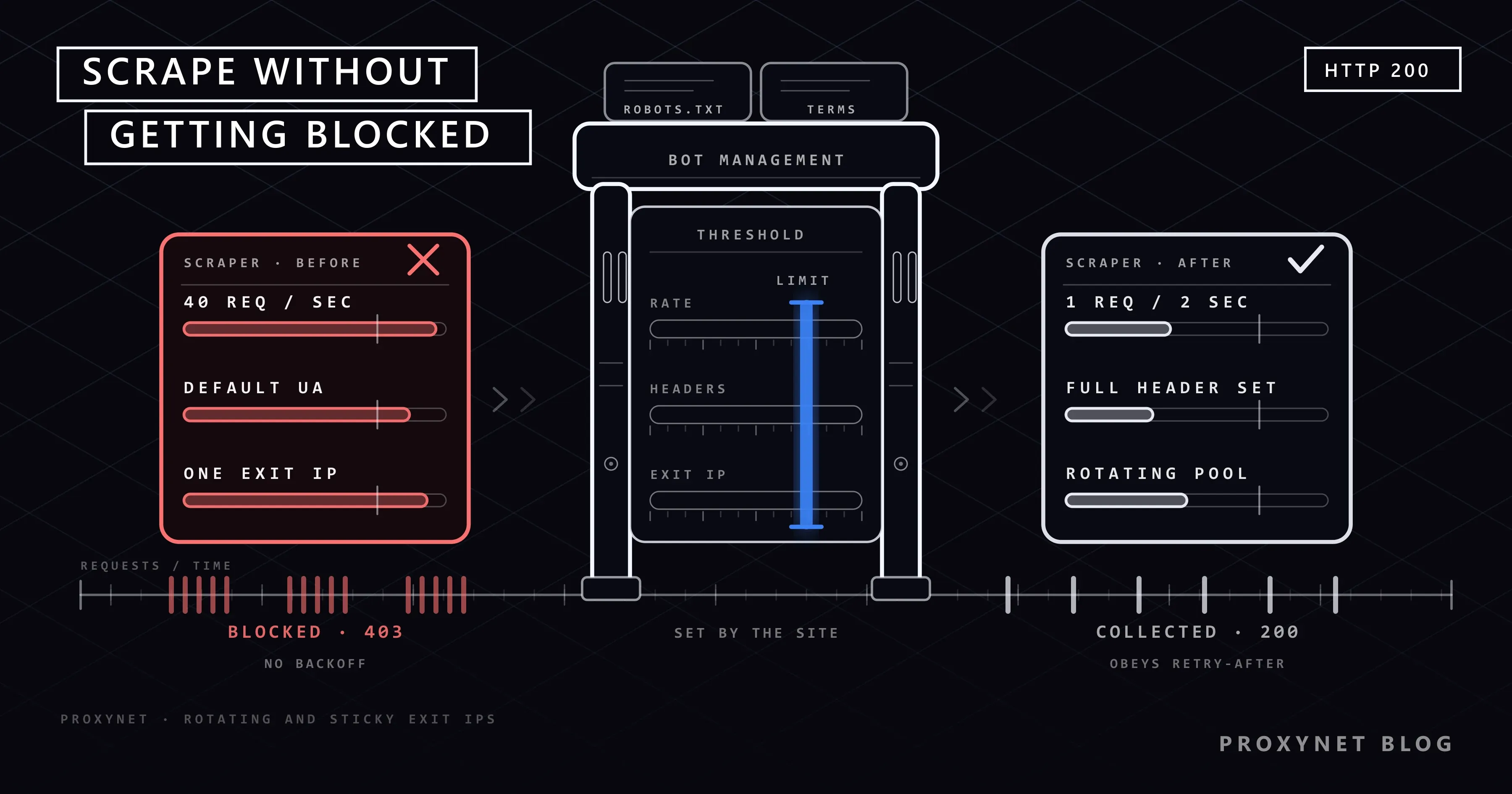
A price monitoring script runs fine on the first day, returns half-empty pages on the second and gets a 403 for every request on the third. Almost everyone who writes scrapers goes through this, and the first reaction is usually to look for "more IPs" or "better hiding". Most blocks have a more ordinary cause: dozens of requests per second, headers that never match a real browser, all the load piled onto one IP address, and rules the site states openly that nobody read.
In this article we explain why web scraping tools get blocked, the symptoms of being blocked and the causes behind them. Then we cover adjusting request speed, keeping headers consistent, when IP rotation is really needed, using a fixed IP where a session is required, and robots.txt and site terms. This is not a guide to "getting around protection": "without getting blocked" in the title means not running into blocks because you do not harm the site and you follow its rules.
Why do sites block scrapers?
Behind a site limiting automated traffic there are usually concrete costs rather than an assumption of bad intent:
- Server load. A single script sending hundreds of requests per second can eat up the resources a small e-commerce site sets aside for real visitors. On search and filter pages that hit the database, the effect multiplies.
- Bandwidth and infrastructure cost. Every request shows up on the site's server and CDN bill.
- Protecting content and commercial data. When prices, stock and listing data are pulled in bulk by competitors, the site owner may want to restrict it.
- Security. Brute-force logins, card testing and inventory hoarding are also done with automated traffic. At first glance, protection systems cannot tell that traffic apart from a legitimate scraper.
Most of these decisions are made not in the site's own code but in the bot management layer in front of it. CDNs and security services score each request with signals such as speed, IP reputation, header consistency and behaviour. For one example of how that layer classifies bot traffic, see Cloudflare Precursor.
What are the signs of being blocked?
Blocks do not always come with a clear error message. If you see one of these symptoms in the data your scraper produces, being blocked is the likely cause:
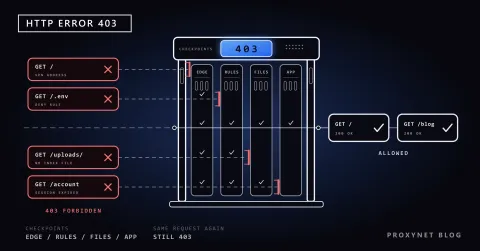
403 Forbidden: the request was understood but refused. It may be IP reputation, missing headers or a geographic restriction.429 Too Many Requests: you exceeded the rate limit. Often aRetry-Afterheader tells you how long to wait.503 Service Unavailable: the server may really be busy, or a bot protection system may be returning this response temporarily.200but a verification page: the status code looks successful, but the page content is a challenge screen instead of a product list.200but empty or incomplete content: your selectors find nothing. This can come from a block or from the page loading its content with JavaScript.- Redirects to a login page: your session has been ended, often because of an IP change in the middle of it.
- Responses getting slower: some systems delay the response on purpose instead of refusing the request.
We explain each HTTP status code and which ones you should retry in HTTP Status Codes in Web Scraping. To tell whether empty content is a block or a dynamic page, see Static vs Dynamic Pages. If the site sits behind Cloudflare, Cloudflare Scraper shows how to tell a challenge, a firewall rule and a rate limit apart from the headers and the body.
| Symptom | Likely cause | Legitimate fix |
|---|---|---|
Many 429s in a short time | Request rate exceeds the site's limit | Lower concurrency, wait as long as Retry-After says |
403 from the very first request | Missing headers, a data center IP or a regional restriction | Use consistent headers; pick an IP type and location that match the target audience |
403 that starts after a while | Heavy traffic from one IP was flagged | Slow down and spread the load over time and, if needed, across IPs |
| Verification page | Behaviour or IP reputation found suspicious | Stop, review speed and scope; look for an API or permission |
200 but empty content | The page loads with JavaScript or content was hidden | Find the background API request; a headless browser if needed |
| The session suddenly ends | The IP changed mid-session | Use a fixed IP for the session |
| Responses slow down over time | Server load or deliberate delay | Lower the request rate, avoid peak hours |
| Page content differs from a real browser | Bot-specific content or a location difference | Check the location; use a client identity that introduces you |
Request speed: how do you respect rate limits?
The most common and easiest to prevent cause of blocks is speed. A person on an e-commerce site opens a page every few seconds; a scraper written with asyncio can send hundreds of requests in the same time. RFC 6585 defines the 429 Too Many Requests code for exactly this situation and says the server can indicate how long to wait with a Retry-After header.
The basic rules for keeping speed under control:
- Set a concurrency limit per site. Keep the number of open requests to the same domain small. Total concurrency can be high, but the share that falls on a single site should stay low.
- Add random delays between requests. A request every exactly 2 seconds stands out more than irregular intervals and does not prevent momentary bursts.
- Slow down, don't speed up, when you get
429and503. Resending a failed request immediately makes the problem worse. Use exponential backoff. - Honour the
Retry-Afterheader. The value can be a number of seconds or an HTTP date; MDN's explanation shows both forms. - Don't send unnecessary requests. To avoid downloading unchanged pages again, store
ETagandLast-Modifiedvalues and send conditional requests withIf-None-MatchandIf-Modified-Since; if the page has not changed, the server returns a304without a body. - Use the sitemap. Start from the addresses in the site's
sitemap.xmlinstead of crawling the whole site link by link. How to find the file and uselastmodto pick only the addresses that changed is covered in How to Find a Website's Sitemap. - Avoid peak hours. Don't run bulk collection when the site's target audience is most active.
The Python function below honours the Retry-After header on 429, 502, 503 and 504 responses; when there is no header, it applies exponential backoff with a random component. It does not retry responses such as 403 and 404, because resending does not change the result:
import random
import time
from datetime import datetime, timezone
from email.utils import parsedate_to_datetime

import requests

RETRY_STATUS = {429, 502, 503, 504}


def retry_after_seconds(value):
    """Retry-After can be seconds or an HTTP date."""
    if not value:
        return None
    if value.isdigit():
        return int(value)
    try:
        when = parsedate_to_datetime(value)
    except (TypeError, ValueError):
        return None
    return max(0.0, (when - datetime.now(timezone.utc)).total_seconds())


def polite_get(session, url, max_attempts=5, base=1.0, cap=60.0):
    for attempt in range(max_attempts):
        try:
            response = session.get(url, timeout=20)
        except (requests.ConnectionError, requests.Timeout):
            response = None

        if response is not None and response.status_code not in RETRY_STATUS:
            return response  # responses such as 200, 404 and 403 are not retried

        wait = None
        if response is not None:
            wait = retry_after_seconds(response.headers.get("Retry-After"))
        if wait is None:
            wait = min(cap, base * 2**attempt) * random.uniform(0.5, 1.0)
        time.sleep(min(wait, cap))

    raise RuntimeError(f"{url}: no response after {max_attempts} attempts")
Using this function over a list of pages with a delay between requests is enough:
session = requests.Session()
session.headers.update({
    "User-Agent": "ExamplePriceBot/1.0 (+https://example.com/about-our-bot)",
    "Accept-Language": "en-US,en;q=0.9",
})

for url in urls:
    response = polite_get(session, url)
    if response.status_code == 403:
        print("Access denied, stop and investigate:", url)
        break
    process(response.text)
    time.sleep(random.uniform(2, 5))
How to set concurrency and what really limits speed is explained in Concurrency vs Parallelism.
Headers and a consistent client identity
An HTTP request's headers say who the client is and what it accepts. Libraries' default headers are very different from a browser's. Python Requests sends a User-Agent like python-requests/2.x by default; many sites reject that value outright.
There are two approaches here, and they serve different purposes:
Introducing yourself. Legitimate crawlers put the bot's name and an address with information about it in the User-Agent: ExamplePriceBot/1.0 (+https://example.com/about-our-bot). When the site administrator sees the traffic, they know who is sending it and how to reach you; if there is a problem, they can contact you instead of blocking. They can also write robots.txt rules specifically for that name.
Consistency. Whatever identity you use, it must be consistent throughout the request. Examples of inconsistency:
- A
User-Agentthat changes randomly on every request, but with the same cookies and the same IP. - A
User-Agentclaiming to be Chrome, but none of theAccept,Accept-LanguageandSec-CH-UAheaders Chrome sends with every request. - Visiting a site in Türkiye with
Accept-Language: en-USand an IP exiting in the US while expecting Turkish prices.
We explain which signals besides headers identify browsers in Browser Fingerprinting. Faking these signals to get around bot protection is not what this article recommends; the goal is for your client to state consistently what it is.
IP diversity: when is rotation needed?
Heavy traffic from a single IP address is the unit rate limits are easiest to apply to. That is why "I got blocked, let me change IP" is such a common reflex. But rotation has two legitimate purposes and one wrong use.
Legitimate purpose 1: spreading the load. A job that collects public price pages from hundreds of different sites, sending all traffic from one IP, quickly gives that IP a bad reputation and may get it flagged on general reputation lists even without exceeding any single site's limit. Spreading traffic across different addresses keeps the load on each address at a realistic level.
Legitimate purpose 2: seeing content by location. Prices, stock and search results change with the visitor's country and city. Exiting from different locations is the only way to collect the real view of each market.
Wrong use: getting around an explicit block. If the site has warned you with a rate limit, closed that path in robots.txt or explicitly forbidden automated access in its terms, changing IPs and continuing at the same speed does not solve anything; it means ignoring a preference the site owner has clearly stated.
Rotation can be set up with a Rotating Proxy, which gives a different exit IP on every connection through a single address. For jobs that need addresses from real home connections, a Residential Proxy is preferred. We walk through a rotating setup in Python in How to Rotate Proxies in Python.
A sticky IP where a session is needed
Changing IP on every request is not right for every job. In these jobs the IP address needs to stay fixed for a while:
- Logged-in pages. If you pull reports from your own account's panel, an IP change mid-session triggers security checks and the session closes.
- Multi-step flows. Flows that keep state on the server side, such as adding to cart, selecting filters or paging.
- Visits tied to cookies. Requests with the same cookie coming from different countries create an inconsistent visitor picture.
For these jobs, a Sticky Proxy keeps the same exit IP for a set period. The general rule: one session = one IP; the IP can change when the session ends.
robots.txt and site terms
Before collecting data from a site, two documents should be checked.
robots.txt is the file in which a site says which paths it does not want bots to crawl, and its format is standardised in RFC 9309. Not crawling paths closed with Disallow means respecting the preference the site has stated explicitly. We explain how to read the file and check it with Python in What Is a robots.txt File and How Do You Read It?.
Terms of service may contain provisions about automated access. Some sites forbid scraping completely, some limit it to a certain speed, and some offer an official API for the data. If there is an official API, it is almost always the better route: the data arrives structured, your code doesn't break when the page design changes, and your access rests on an agreement.
Pages containing personal data need extra care; obligations under KVKK in Türkiye and GDPR in Europe apply regardless of how you collect the data. We cover the legal framework in Is Web Scraping Legal?.
Some sites also place hidden links that visitors cannot see but bots get caught on. A crawler that follows visible links and keeps its scope narrow stays away from these traps naturally; we explain the mechanism in Honeypot Traps.
What should you do when a CAPTCHA appears?
A challenge screen in front of a scraper means the site finds your traffic suspicious. At this point CAPTCHA solving services or detection evasion plugins are not recommended; they mean trying to get around a site's explicit control, and they usually hide the source of the problem. Instead, go in this order:
- Stop the scraper. Continuing to send requests to the challenge screen lowers the reputation of the IP and session even further.
- Measure the speed. Check how many requests you sent to the same site in the last minute.
- Compare headers with a real browser. Are any headers missing or contradictory?
- Review the scope. Are you crawling paths closed by robots.txt or pages you don't need?
- Look for alternatives. An official API, a data export option or direct contact with the site owner.
- Only then try again at a lower speed with a consistent client identity.
We explain why challenge screens appear in browser automation, with the same diagnostic logic, in Puppeteer and CAPTCHA.
What to do when you get blocked: a diagnostic list
- Do you know when the block started and the request rate at that moment?
- What is the response code:
403,429,503, or200with a challenge page? - Did a
Retry-Afterheader arrive, and did you honour it? - Does the same address open in a real browser with the same IP?
- Are your headers consistent, or is the
User-Agentthe library's default? - Are the paths you crawl closed in robots.txt?
- What do the site's terms say about automated access?
- Does the IP change in a flow that needs a session?
- Is the empty content coming from a page that loads with JavaScript?
- Is there an official API that provides the same data?
Use cases
- Price monitoring: a few times a day, product addresses taken from the sitemap, only changed pages via conditional requests. The setup is on our price monitoring solution page.
- Market research and catalogue collection: public pages from many different sites, low concurrency per site, rotation to spread the load. The general setup is on our data scraping solution page.
- Broad crawling: a crawler that follows links, respects robots.txt and keeps a queue per domain. The scaling side is on our web crawler solution page.
- Tracking search results by location: the official API first, then city-level exit points. Details are in How to Automate SEO Rank Tracking.
- Robust selectors: even if you are not blocked, data comes back empty when the page structure changes. We explain how to write selectors that don't break in CSS Selector vs XPath.
Common mistakes
- Starting hundreds of requests at once with
Promise.allorasyncio.gather. Total speed looks high, but the load on each site becomes unacceptable. - Retrying immediately on
429. Retries without backoff make the rate limit last longer. - Using the library's default
User-Agent. Many sites block that value outright. - Generating a random
User-Agenton every request. A changing identity with the same IP and cookies is a signal of inconsistency. - Changing IP on every request in a job that needs a session. The session closes and you are redirected to the login page.
- Mistaking a successful status code for successful data. A challenge page returned with
200silently produces broken data because the selectors come back empty. Check that an expected element exists in the response content. - Not reading robots.txt. Crawling without knowing the site's preference is a weak start both ethically and legally.
Decision guide
| Your situation | Recommendation |
|---|---|
| There is an official API | API first |
| A small number of pages from one site | Single IP, low speed, consistent headers |
| Public pages from many sites | Low concurrency per site + rotating proxy |
| Content in another country or city | Residential proxy with location selection |
| Your own logged-in account | Sticky or fixed IP, the same address for the session |
You are getting 429 | Wait as long as Retry-After, lower concurrency |
| A challenge screen appears | Stop, run the diagnostic list, look for alternatives |
| The page comes back empty | First check whether it loads dynamically |
| The path is closed in robots.txt | Don't crawl it |
Frequently asked questions
Does using a proxy prevent blocks completely?
No. A proxy spreads traffic across different IP addresses and lets you see location-based content, but requests that are sent too fast, carry inconsistent headers or go to paths the site has closed get blocked whatever IP they come from. A proxy works together with the right speed and a consistent client.
How many requests per second are safe?
There is no single safe value for every site; it depends on the site's infrastructure, how heavy the page is and the time of day. If robots.txt specifies a Crawl-delay, honour it. If not, start at a low rate, increase slowly while watching 429s and response times, and back off as soon as you see the server slowing down.
Should the User-Agent be a browser value or a bot name?
For a legitimate crawler, the recommended approach is to write your bot's name and a contact address. The site administrator sees who you are and can reach you if there is a problem. Some sites block unknown bots by default; in that case asking for permission or looking for an official API is a more solid route than trying to look like a browser.
Does using a headless browser reduce the risk of being blocked?
It lets you see data on pages that load with JavaScript, but it does not reduce the risk of being blocked by itself. On the contrary, every page generates dozens of extra requests (images, scripts, stylesheets) and puts more load on the site. Finding the API request the page makes in the background is usually more efficient.
My IP got blocked. How long will it last?
It varies by site: from a rate limit of a few minutes to a blacklist lasting days. If there is a Retry-After header, it tells you the duration. If not, wait a while and send a single request at a very low speed to check; don't continue at the same speed before the block is lifted.
Do I need all these precautions for a small one-off job?
For a one-off job of a few dozen pages, putting a few seconds between requests, using a meaningful User-Agent and checking robots.txt is usually enough. The other precautions become important when the job turns regular and large-scale.
Summary
Most scrapers get blocked not because they can't hide, but because they strain the site and look inconsistent. Limit request speed per site, honour 429 and Retry-After responses, don't download unchanged pages again, use a consistent client identity that introduces you, and read robots.txt and the site's terms. IP rotation is for spreading load and seeing location-based content, and a sticky IP is for jobs that need a session; neither is a tool for getting around an explicit block. You can find proxy types that suit your data collection work in our proxy services.