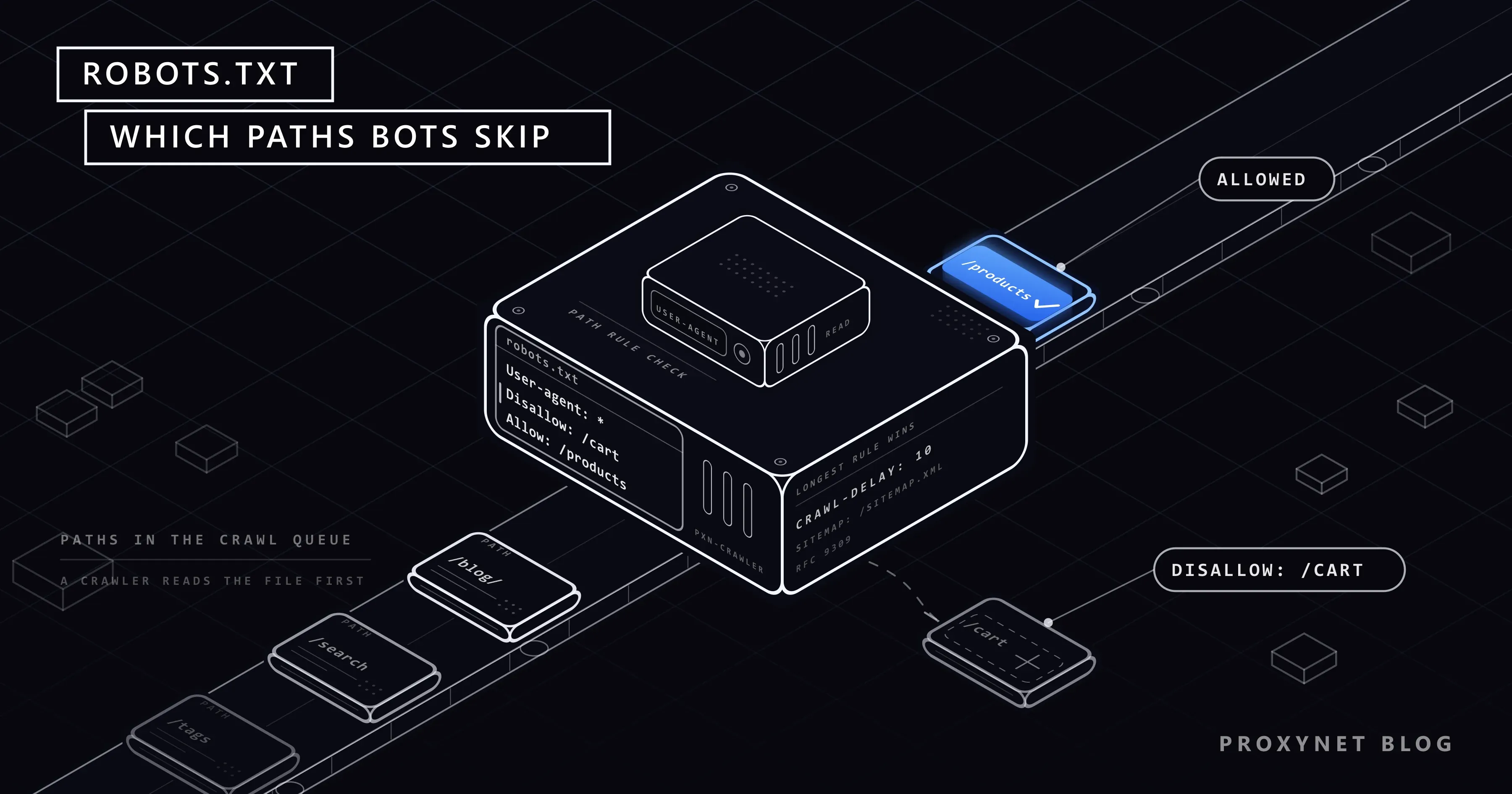
If you add /robots.txt to the end of any site's address and open it, you usually see a plain text file a few lines long. This file is where the site tells search engines, crawlers and scrapers "don't crawl these paths". For an SEO specialist it is a setting that affects how the site appears in search engines; for a developer collecting data, it is the first document to read before starting.
In this article we explain what robots.txt is, where it lives and how the rules are read, along with User-agent, Disallow, Allow, wildcards and the longest match rule. Then we cover the Crawl-delay and Sitemap lines, whether the file is legally binding, how a scraper should read robots.txt with Python (and when the standard library's parser gives the wrong answer), common SEO mistakes and lines written for AI bots.
What is robots.txt?
robots.txt is the file of the Robots Exclusion Protocol, which has been in use since 1994 and spread for years without a written standard. The protocol became an official standard in 2022 with RFC 9309. The standard defines the file's format, how rules are matched and what to do when the file cannot be reached.
The file's job is simple: the site owner states which paths automated visitors should stay out of. Typical reasons include:
- Server load: paths such as search and filter pages that hit the database on every request.
- Low-value or duplicate content: thousands of identical pages generated by sorting parameters, cart and account pages.
- Crawl budget: steering search engine bots' time towards important pages.
- Content use preference: keeping certain bots, such as those collecting data for AI training, from crawling the site.
robots.txt is not a security mechanism. The file is public, and closing a path with Disallow also announces that the path exists. Pages that need to stay private should be protected with passwords, access control or methods such as noindex.
Where is robots.txt located?
The file is always in the site's root directory, and its name is robots.txt in lowercase:
https://example.com/robots.txtis valid.https://example.com/folder/robots.txtis not read by any bot.
Rules apply per protocol, host and port. https://example.com/robots.txt only applies to https://example.com; the subdomain https://shop.example.com needs its own file. The http:// and https:// versions are also technically separate files.
RFC 9309 defines what happens when the file cannot be reached:
- A
4xxresponse (the file does not exist): the crawler may assume there are no restrictions on the site. - A
5xxresponse or a network error (the file is unreachable): the crawler should assume the whole site is disallowed.
The standard also says crawlers may keep the file in a cache but should generally not use a cached version for more than 24 hours. So a change you make to the file can take up to a day to reach bots.
How are the rules read?
Below is a realistic example file for an e-commerce site:
User-agent: *
Disallow: /cart
Disallow: /account/
Disallow: /search
Allow: /search/popular
Disallow: /*?sort=
Disallow: /*.pdf$
Crawl-delay: 5

User-agent: ExamplePriceBot
Disallow: /account/
Allow: /

User-agent: GPTBot
Disallow: /

Sitemap: https://example.com/sitemap.xml| Line | Meaning |
|---|---|
User-agent: * | The rules in this group apply to every bot that does not have its own group |
Disallow: /cart | Every path that starts with /cart: /cart, /cart/add, even /cartoon |
Disallow: /account/ | The /account/ folder and everything under it; /account (no trailing slash) does not match |
Disallow: /search | /search, /search?q=phone, /search/popular |
Allow: /search/popular | An exception to the previous ban; it is longer, so this path can be crawled |
Disallow: /*?sort= | * is any sequence of characters: every address with a ?sort= parameter |
Disallow: /*.pdf$ | $ marks the end of the address: addresses ending in .pdf; /catalog.pdf?v=2 does not match |
Crawl-delay: 5 | A request to wait 5 seconds between requests (non-standard, explained below) |
User-agent: ExamplePriceBot | A group for this bot only; this bot does not read the * group above at all |
Allow: / | Everything except the account pages is open for this bot |
User-agent: GPTBot + Disallow: / | GPTBot should not crawl any of the site |
Sitemap: | The sitemap's address; independent of groups |
User-agent groups
The file is made up of groups. Each group starts with one or more User-agent lines, and the rules that follow belong to that group. When a bot reads the file:
- It looks for a group matching its own name. Matching is done on the bot's product token (for example
GPTBot), case-insensitively, not on the browser's full User-Agent string. - If it finds a group of its own, it applies only that group's rules. The rules in the
*group are not added for that bot. - If there is no group of its own, it applies the
*group. - If there are no groups at all, it assumes the site has no restrictions.
Point 2 is often overlooked. In the example above, because ExamplePriceBot has its own group, that bot is affected neither by the /cart and /search bans nor by the Crawl-delay request.
Disallow, Allow and the longest match rule
Rules match as path prefixes: Disallow: /cart covers every path starting with /cart. When more than one rule matches an address, according to RFC 9309 the longest matching rule wins. The address /search/popular matches both Disallow: /search (7 characters) and Allow: /search/popular (15 characters); the longer Allow wins and the page can be crawled.
If two rules are the same length and one is Allow and the other Disallow, the standard recommends preferring Allow. The order of the rules in the file does not change the result. As we will see below, some parsers do not implement this point correctly.
Wildcards
*matches zero or more characters:Disallow: /*?session=closes every address carrying a session parameter.$marks the end of the address:Disallow: /*.pdf$closes only addresses ending in.pdf.
If the value of a Disallow: line is left empty (Disallow:), no path is closed. Disallow: / closes the whole site. The one-character difference between these two lines can cause one of the most expensive SEO mistakes.
Crawl-delay and Sitemap lines
Crawl-delay is a request telling a bot how many seconds to wait between consecutive requests to the same site. It is not part of RFC 9309, but many crawlers and scrapers read it. Google does not support the Crawl-delay line; Google's crawl rate is set by its own systems. Some other search engines do take the line into account.
For a scraper, the Crawl-delay value is a speed preference the site owner has stated explicitly, and even though it is non-standard, it is a signal worth following. Other ways to respect rate limits are covered in How to Scrape Websites Without Getting Blocked.
The Sitemap line gives the full address of the sitemap file. It is independent of groups, can appear anywhere in the file and can be written more than once. For search engines and scrapers alike, it is the way to get straight to the list of pages instead of crawling the whole site link by link. If there is no Sitemap line, we cover where else to look and how to open index and .gz files in How to Find a Website's Sitemap.
Is robots.txt legally binding?
Technically, robots.txt is a request, not an access barrier. A path being closed in the file does not physically prevent access to it. So the answer to "do I have to follow robots.txt" is legal and ethical rather than technical.
What you need to know in practice:
- Every legitimate crawler follows it. Search engines, archiving services and corporate crawlers read and apply robots.txt.
- It is considered together with the site's terms. Many sites' terms of use regulate automated access with a reference to robots.txt. Google's terms of service, for example, list automated access that violates machine-readable instructions such as robots.txt among examples of abuse.
- It can be a decisive signal in disputes. A scraper that crawls paths a site has explicitly closed is seen as having ignored the site's preference knowingly.
- Following robots.txt does not make everything legal. Collecting personal data from an open path is not exempt from obligations under laws such as GDPR.
We cover the legal framework of data collection in Is Web Scraping Legal?. This article is not legal advice; we recommend consulting a lawyer for your own situation.
How should a scraper read robots.txt?
Python's standard library includes the urllib.robotparser module, and its official documentation describes basic usage. But when we tested the module with the example file above, it departed from RFC 9309 in four places:
| Case | RFC 9309 | urllib.robotparser |
|---|---|---|
Disallow: /search first, Allow: /search/popular after | /search/popular can be crawled (longest rule) | Cannot be crawled; it applies the first matching rule |
| The same two rules in reverse order | Can be crawled | Can be crawled |
Disallow: /*?sort= | /category?sort=price is closed | Open; * is not supported |
Disallow: /*.pdf$ | /catalog.pdf is closed | Open; $ is not supported |
There are also two behavioural differences:
- When given the full User-Agent string as the bot name (
Mozilla/5.0 (compatible; GPTBot/1.2; ...)), the module could not find the bot's own group and applied the*group. You need to pass only the product token (GPTBot) to the function. - When the file responds with
401or403, the module treats the whole site as closed. RFC 9309 treats4xxresponses as "the file doesn't exist". Because the module'sread()function downloads the file with Python's default User-Agent and no timeout, you can mistakenly get "everything closed" on a site that blocks that value.
That is why it is safer to download the file with your own client, pass it to parse(), and use a more complete parser for files that use wildcards:
from urllib.parse import urlsplit
from urllib.robotparser import RobotFileParser

import requests

BOT_NAME = "ExamplePriceBot"
USER_AGENT = f"{BOT_NAME}/1.0 (+https://example.com/about-our-bot)"


def robots_for(site, session):
    """Downloads robots.txt and applies the 4xx and 5xx behaviour from RFC 9309."""
    parser = RobotFileParser()
    try:
        response = session.get(f"{site}/robots.txt", timeout=10)
    except requests.RequestException:
        parser.parse(["User-agent: *", "Disallow: /"])  # unreachable: everything closed
        return parser
    if response.status_code >= 500:
        parser.parse(["User-agent: *", "Disallow: /"])
    elif response.status_code >= 400:
        parser.parse([])  # no file: no restrictions
    else:
        parser.parse(response.text.splitlines())
    return parser


session = requests.Session()
session.headers["User-Agent"] = USER_AGENT

url = "https://example.com/product/123"
site = "{0.scheme}://{0.netloc}".format(urlsplit(url))
robots = robots_for(site, session)

if robots.can_fetch(BOT_NAME, url):
    delay = robots.crawl_delay(BOT_NAME) or 2
    print(f"Crawlable, will wait {delay} s between requests")
else:
    print("robots.txt closes this address, skipping")

print("Sitemaps:", robots.site_maps())
Two details in the example matter: can_fetch is given only the bot name, not the full User-Agent string; and the file is downloaded once per site and kept in memory, not downloaded again for every page.
If wildcards and the longest match rule matter to you, the protego library used by Scrapy applies these rules closer to the RFC. Whichever parser you use, verify the results by checking a few addresses by hand against the target site's file. Why a crawler that follows links runs into these rules more often than a scraper working from a fixed list is explained in Web Scraping vs Web Crawling.
Common SEO mistakes
Because robots.txt directly affects search visibility, it is often misconfigured on the SEO side too:
- Forgetting the
Disallow: /line when going live. The line written to close the site in the staging environment gets carried over to the live site, and the site disappears from search. - Trying to remove a page from the index with robots.txt.
Disallowprevents the page from being crawled, not from being indexed. A closed page that gets links from other sites can appear in search results with just its address, without its content being read. To remove it from the index, the page must be crawlable and carrynoindex. - Closing CSS and JavaScript files. The search engine cannot render the page correctly, and mobile-friendliness and content evaluation suffer.
- Mixing up trailing slashes.
Disallow: /blogcloses both the/blog/folder and a/blogger-guidepage. - Overlooking case differences. Path matching is case-sensitive:
Disallow: /Searchdoes not close/search. - Not putting a file on the subdomain.
shop.example.comneeds its own robots.txt. - Expecting changes to apply instantly. Bots read the file from cache; a change can take up to a day to take effect.
Google Search Central's documentation explains in detail how Google interprets robots.txt, including its file size limit and its behaviour on error codes. For checking search results in different countries, see our SEO proxy solution page.
Lines for AI bots
In recent years, the lines added to robots.txt files most often are aimed at AI companies' crawlers. Some of these bots collect data for model training; some fetch a page on the fly in response to a user's question. Common product tokens:
GPTBot(OpenAI)ClaudeBot(Anthropic)CCBot(Common Crawl)Google-Extended: not a separate crawler, but a token that controls whether content collected by Google's existing bots is used in Gemini models; it does not affect visibility in Google Search.
For example, a site that wants to close crawling for training while staying open to search engines can add these lines:
User-agent: GPTBot
Disallow: /

User-agent: CCBot
Disallow: /

User-agent: Google-Extended
Disallow: /
Companies add new bot names or split the roles of existing bots from time to time. When writing these lines, or configuring a scraper around them, check the relevant company's current documentation. A site's llms.txt file cannot take over this job: it only points AI tools to the pages worth reading and allows or blocks nothing, as we explain in What Is llms.txt? Format, Example and Does It Work?. For one example of the measures sites take at other layers against bots that don't follow robots.txt, see Cloudflare Precursor. Some sites go a step further and, instead of blocking AI crawlers, ask them to pay per request; how that works is in HTTP 402 Payment Required: Pay Per Crawl and x402 Explained.
If you are building your own AI agent or scraper, give it a defined product token and read robots.txt with that name. The site owner can then write a group just for you and pass their crawling preferences to you directly.
Use cases
- A large-scale crawler: downloads robots.txt once per domain, caches it, and checks every address before queuing it. The scaling side is on our web crawler solution page.
- A price monitoring script: takes product addresses from the sitemap, never visits the search and filter pages closed by robots.txt, and honours
Crawl-delay. The general setup is on our data scraping solution page. - An SEO audit: before going live, checks that robots.txt does not close important pages and that the sitemap line is correct.
- Setting a policy for AI bots: the content owner decides which bots may crawl the site for which purpose and adds the corresponding lines.
Some sites also place hidden links to lure bots into paths closed by robots.txt; a crawler that follows robots.txt stays away from these traps naturally. We explain the mechanism in Honeypot Traps.
Common mistakes (scraper side)
- Never reading robots.txt. Starting to crawl without knowing a preference the site has stated explicitly.
- Trusting
urllib.robotparserblindly. It can give wrong results for rule order and wildcards. - Passing the full User-Agent string to
can_fetch. The bot's own group is not found. - Assuming the bot's own group is merged with the
*group. If there is a group of its own, only that one applies. - Downloading the file again on every request. It puts unnecessary load on the site; download it once per site and cache it.
- Continuing to crawl on a
5xxresponse. The standard says the whole site should be treated as closed when the file is unreachable. - Ignoring
Crawl-delaybecause it isn't standard. It is an explicit speed request from the site owner.
Decision guide
| Your situation | Recommendation |
|---|---|
The address is closed with Disallow | Don't crawl it |
The address is open and there is a Crawl-delay | Wait at least that long between requests |
robots.txt returns 404 | Treat as no restrictions, but still check the site's terms |
robots.txt returns 5xx or is unreachable | Treat the site as closed and try again later |
The file uses * or $ wildcards | Use an RFC-compliant parser |
| There is a group for your bot | Apply only that group |
| There is a sitemap line | Take addresses from the sitemap |
| You want to remove a page from search | Not robots.txt, but noindex |
Frequently asked questions
Is crawling a site without robots.txt allowed?
If there is no robots.txt, the site is assumed to have no crawling restrictions. That does not mean the site's terms of use, rate limits and personal data laws don't apply.
What is the difference between Disallow and noindex?
Disallow prevents a bot from crawling the page, that is, downloading its content. noindex asks for the page not to be shown in search results and requires the bot to be able to read the page. If you both close a page with Disallow and add noindex, the bot never sees the noindex tag.
Does Google read the Crawl-delay line?
No. Google does not support the line and sets its crawl rate with its own systems. Some other search engines and many crawlers do take it into account.
How big can a robots.txt file be?
RFC 9309 requires crawlers to be able to process a file of at least 500 kibibytes; rules beyond that limit may be ignored. In practice robots.txt files are far below that, and keeping them short reduces the risk of mistakes.
Can I block AI bots with robots.txt?
Yes, for bots that follow robots.txt: open a group with the relevant product token and write Disallow: /. For bots that don't follow robots.txt, you need additional measures on the server or CDN side.
What User-agent name should I use for my scraper?
A value with a short product token that identifies your bot and a contact address: ExamplePriceBot/1.0 (+https://example.com/about-our-bot). When checking robots.txt, use only the ExamplePriceBot part.
Summary
robots.txt is the file in a site's root directory that tells bots which paths not to crawl. Rules are split into User-agent groups; if a bot has its own group, only that applies, the longest match wins when rules conflict, and * and $ are used as wildcards. Crawl-delay is non-standard and not supported by Google, but for scrapers it is an explicit speed request. Python's urllib.robotparser departs from the RFC on rule order and wildcards; download the file with your own client and verify the results. For data collection work that follows the rules, take a look at our proxy services.