


































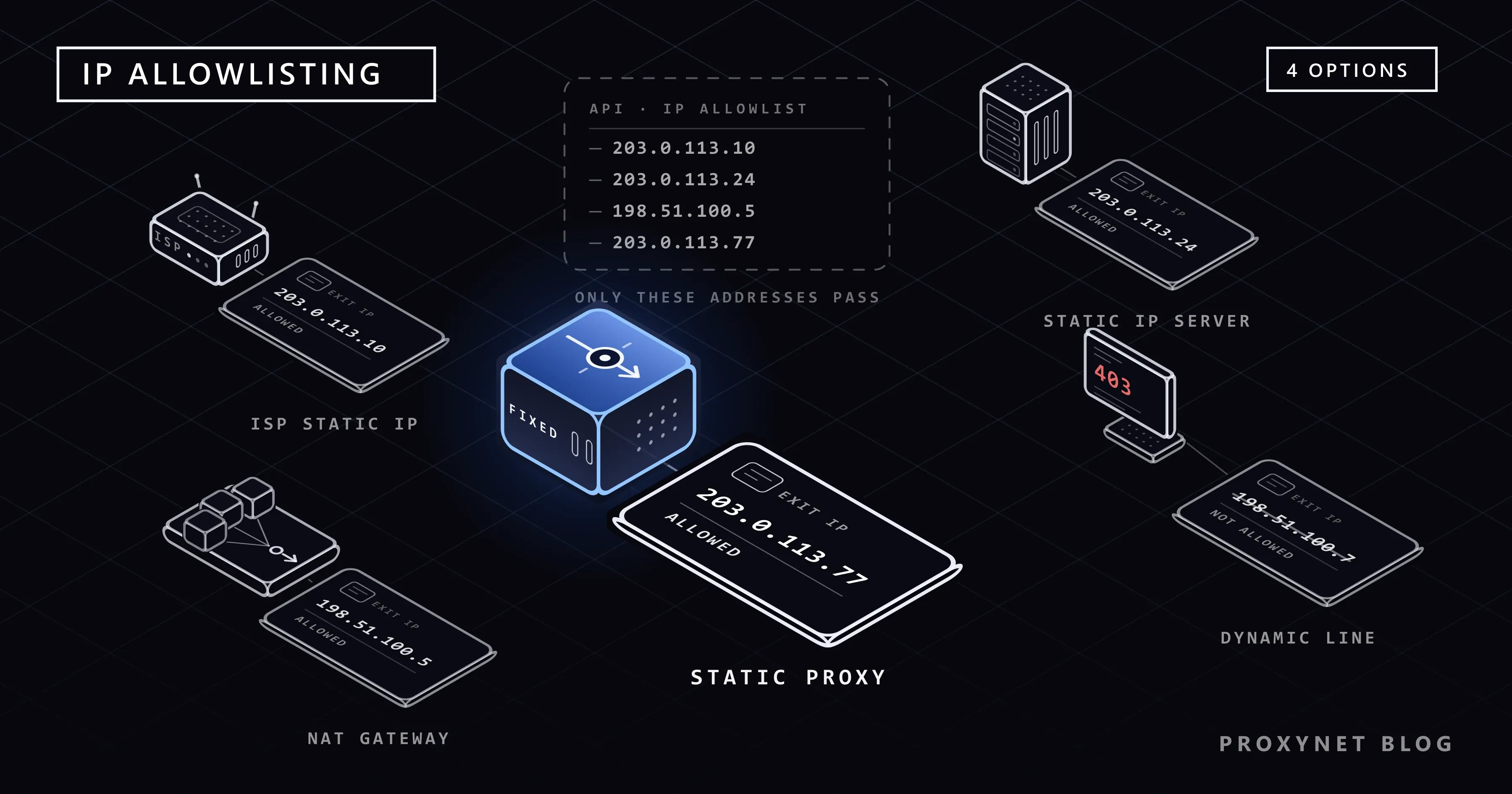
You ran the integration last night: the order list came back, the SMS went out. This morning the same code with the same key returns "IP authorization required" or a bare 403. Nothing changed in the code. What changed is the address your request leaves from: the modem reconnected overnight, a colleague working from home tried it on their own line, or the application moved to another server. The service on the other side only knows the address it was given in advance.
This post explains how IP authorization works in APIs, when the warning shows up and how to find the egress IP the service actually sees. Then we compare the four ways to get a fixed egress address (a static IP from your internet provider, a server with a fixed IP, a NAT gateway and a static proxy) in one table. A separate section covers which route should not be chosen for payment, healthcare and e-invoicing integrations. At the end there is a tested Python and Node.js example that verifies your egress address.
What is IP authorization in APIs?
IP authorization (an allowed IP list, called "IP whitelist" or "allowlist" in most documentation) means a service filters an incoming request by its source address before it looks at the content. The service's dashboard, or its support team's records, holds a list of addresses tied to your account. If the request comes from an address on that list, your API key is checked; if it does not, the request is rejected even when the key is correct. Public web pages rarely have a check like this; it is one of the differences between reading a site's pages and calling its API that we compare in Web Scraping vs API: Which One Should You Use?.
This check does not replace the API key, it is added on top of it. Even if your key is pushed to a repository by mistake or leaks from an employee's laptop, whoever gets hold of it cannot use it unless they also leave from your address. What is checked is not an HTTP header but the address at the other end of the TCP connection; you cannot change the source address by adding a header such as X-Forwarded-For.
Two directions often get mixed up here. In the list we describe in Proxy Authentication: User:Pass vs IP Whitelist, you give your address to your proxy provider, and the goal is to connect to the proxy without a password. This post is about the opposite direction: you give your address to the third-party service whose data you want to reach. The mechanism is the same, the counterpart is different. Crypto exchange API keys are a common case of this second direction; the setup is in Crypto Exchange API IP Whitelist: How to Set It Up.
In what forms do services ask for your egress IP?
In practice you will meet three forms.
Mandatory registration. The service does not open access until your address is defined. Often you cannot define it yourself: you open a support ticket and the address is entered by hand on the other side. This form is common in bank and public-sector integrations and in some marketplace and shipping APIs. In some services the rule applies to one environment only, for example to the test environment but not to production.
Optional restriction. You turn the restriction on, not the service. Many messaging and email services have a field in the dashboard that says "accept requests only from these addresses". In this form the cause of the error is usually a forgotten setting: you enabled the restriction yourself, the server moved, and the old address stayed on the list.
The reverse direction. In flows such as webhooks the service sends the request to you, and you keep the allowlist: you add the addresses the service publishes in its documentation to your own firewall.
The first two forms often sit side by side at the same provider: IP authorization is required in the test environment but not in production, while the dashboard also offers an optional restriction you can switch on yourself. Many messaging and marketplace providers list that restriction as a recommended security step in their setup guides.
Rules differ from service to service and change over time. Read the service's own developer documentation to learn in which environment, for how many addresses and through which channel access is granted.
When does the "IP authorization required" warning appear?
The warning has no single form. Services report the same situation with different codes:
- An explicit message. A text such as "IP authorization required" or "IP not allowed" in the response body. This is the easiest case to diagnose.
403 Forbidden. The server understood the request but refused it. As MDN's page on 403 notes, sending your credentials again makes no difference with this code.401 Unauthorized. Some services report an address mismatch with the same code as a credential error. If you have renewed your key three times and still get401, look at the address.503or a timeout. If the filtering happens at the firewall, before the application, you may get no meaningful response at all. Some services document exactly this behaviour: a503in the test environment that in fact means missing IP authorization.
The reverse also happens: not every 403 is an address problem. Some APIs reject requests that lack a required header, a User-Agent for instance, with the same 403. Before you change the address, read the response body and compare your request with the example in the documentation, header by header. We covered the general reading of status codes in HTTP Status Codes in Web Scraping.
How do you find your egress IP?
The address you report to the service is not the 192.168.x.x address you see in your computer's network settings; that one is only valid on your local network. What the service sees is the public address your modem or server uses to reach the internet. To find the right one:
- Measure on the machine that sends the request. If the integration runs on a server, find the address from that server's terminal, not from the browser on your own laptop.
- Call an echo service.
curl https://api.ipify.orgorcurl https://checkip.amazonaws.comreturns nothing but the address it sees. - Measure over the path the application uses. If your application leaves through a proxy or a corporate VPN, measure over the same path; a direct measurement shows a different address.
- Check IPv6.
curl https://api64.ipify.orgreturns your IPv6 address if your line has one. If the service's domain supports IPv6, your request may be leaving from there; in that case the IPv4 address you reported is never seen. - Repeat the measurement. Run the same command again after restarting the modem and once more the next day. If the address changes, your line is dynamic.
Why does the registered IP stop matching?
You reported the right address, it worked for a while, then it broke. Possible causes:
- Dynamic IP. On most home and small-office lines the address can change whenever the modem reconnects or the lease expires. The full distinction is in Static IP vs Dynamic IP.
- CGNAT. If the carrier shares one public address among many subscribers, the address you see is not yours, and on the next connection you may land on another pool address. Registering such an address with an API also opens the door to other subscribers in the same pool. How to recognise it is in What Is CGNAT?.
- A mobile hotspot or a VPN left on. A connection shared from a phone, or a VPN client forgotten on the computer, sends the request out from a completely different address.
- More than one egress point. Auto-scaled containers and serverless functions that are not attached to a private network can leave with a different address from the cloud provider's wide pool on every run. The public address assigned automatically to a cloud server also changes on most providers when the server is stopped and started; to make it permanent you need to reserve an address.
Four options for a fixed egress IP
The lasting fix is an address you report to the service once and that does not change. There are four ways to get one; which is right depends on where the code runs and what data it carries.
| Option | Whose address? | Setup | Who manages it? | When is it the right choice? |
|---|---|---|---|---|
| Static IP from your internet provider | Tied to your subscription, the contract is yours | Request to the provider; one address per line | You and your provider | The code runs on an office computer or server; the institution asks for "the address of your own line" |
| VPS or cloud server with a fixed IP | Reserved to the account that rents the server | Set up the server, move the application there | You | Integrations that run without interruption, scheduled jobs, applications that receive webhooks |
| Cloud NAT gateway | Reserved to your cloud account | All resources in the private network are routed to one exit | You (network configuration required) | Several servers, containers or serverless functions must leave from the same address |
| Static (ISP) proxy | The proxy provider's; dedicated to you | Minutes; only the proxy address is entered in the client | Your proxy provider | Test and development environments, API clients that carry no sensitive data, a distributed team leaving from one address |
Static IP from your internet provider. No new system enters the path; the address of your existing line is fixed. The address is bound to that line; a developer working from home or a branch in another city cannot leave from it. The steps to request one are in the "How do you get a static IP?" section of the sibling post.
Server with a fixed IP. Running a continuous job such as nightly stock sync or order polling on a server with a reserved address, rather than on an office computer, solves both the address problem and the continuity problem. Instead of moving the application, you can also install Squid on that server and send only the API traffic out through it; we cover the setup in our Squid proxy guide.
NAT gateway. Instead of reporting a separate address for every machine, you connect them all to one exit. According to AWS's NAT gateway documentation, an Elastic IP is associated with a public NAT gateway when it is created, and resources in private subnets reach the internet through it. Google Cloud's Cloud NAT overview likewise says that when NAT addresses are assigned manually they can be shared with the destination party, and gives services that accept connections only from known addresses as the example.
Static proxy. Your client reaches the internet from a proxy address that is dedicated to you and does not change, and you report that address to the service. It does not matter whether your line is dynamic or behind CGNAT, because the address the service sees is the proxy's. In return, a third party enters the path of your traffic; the next section covers where that is unacceptable.
Why is a proxy not used for payment, healthcare and e-invoicing integrations?
Virtual POS and payment institution APIs, the claims and record systems of healthcare institutions, e-invoicing and e-ledger integrations and the reporting services of public bodies form a separate class. For these integrations we do not recommend a third-party proxy as the egress address; that includes our own product. The right route is a static IP from your internet provider, the reserved address of your own server, or a NAT gateway in your cloud account. The reasons:
- The registered address must be yours. These institutions keep the address not as a security setting but as a record that says "this transaction came from this system of this business". A proxy address belongs to the provider and may be given to another customer once you leave the service. An allow entry that nobody remembers to delete on the other side brings the address's next user one step closer to your account.
- A link is added to the chain. With HTTPS the proxy cannot see the content of the request: the connection is set up through a
CONNECTtunnel and encryption stays between you and the API. Even so, the proxy sees which server you send data to, when and how much, and in an outage your payment or invoicing flow stops because of a system you do not control. - Contracts and audits. The contracts of these integrations, and the regulations they fall under, expect you to know and to document which systems the data passes through. Read the institution's specification; many of them explicitly require the address to be a line or server that belongs to your business.
- There is no need. These systems need a server that runs without interruption anyway. If you have a server, you have a fixed address.
The same boundary applies to every integration that carries personal data: on a line where customer identity, health or card data flows, the egress point should be your own infrastructure.
When is a static proxy a good fit?
What remains are cases that carry no sensitive data and need a quick solution:
- Test and development environments. The service asks for an address for its test environment, while developers work from home on dynamic lines. Instead of buying a static IP for everyone's line, the team leaves from one proxy address and that address is reported to the service.
- A distributed team, one allowed address. A team that uses the same internal tool from three different cities does not have to report three separate addresses to the service.
- A transition period. The integration has to keep working until your static IP request or the move to a server is complete.
- A small business behind CGNAT. The line works with a shared address and the provider does not offer a static IP on that subscription.
In every case read the service's terms of use first: where a service requires requests to come directly from your own infrastructure, a proxy stops being an option.
Look at two properties when you choose. The address must be dedicated to you: if you register a shared address with an API, others using the same address pass that filter too. The address must be static; the addresses of a rotating pool change by definition. The concept is explained in detail on our Static Proxy page. At Proxynet this need is met by ISP Proxy and Datacenter Proxy: in both, the address is allocated to you alone and does not change until you give it up. The monthly base price is $1 for an ISP address and $0.70 for a datacenter address. For API clients a datacenter address is usually enough; if the service additionally restricts datacenter address blocks, choose an ISP address.
How do you set up a single egress address with a static proxy?
Get a static proxy address that is dedicated to you.
Measure the egress address with the command below. This response is the address you report to the service; repeat the command a few hours apart and confirm the address stays the same:
bashcurl -x http://user:pass@pr.proxynet.io:8000 https://api.ipify.orgReport this address to the API provider (a dashboard field or a support ticket). Depending on the service, the entry may take minutes or hours to become active; check the service's documentation for the timing.
Define the proxy in your client. For Postman the settings screen is covered in Postman Proxy Settings, for the command line in How to Use cURL with Proxy?, and for application code in Using a Proxy in Node.js, each step by step.
Always call the API address with
https://. The TLS connection inside the tunnel is established directly with the API server; your key and your data do not reach the proxy in the clear.
Verifying the egress IP in code
If the address looks right once and then changes, a single measurement is misleading. The script below sends three rounds of requests to two separate echo services, opens a new connection for every measurement and compares every address it sees with the one you reported to the service. Because it exits with code 1 on a mismatch, it can be added to your deployment pipeline (CI). 203.0.113.10 is an example address reserved for documentation; replace it with your own.
import sys
import time

import requests

PROXY_URL = "http://user:pass@pr.proxynet.io:8000"
EXPECTED_IP = "203.0.113.10"  # the address you reported to the API provider
ECHO_URLS = ["https://api.ipify.org", "https://checkip.amazonaws.com"]
ROUNDS = 3


def egress_ip(url):
    # Every measurement opens a new session: if an open tunnel is reused,
    # a changing egress address goes unnoticed.
    with requests.Session() as session:
        session.trust_env = False  # keep HTTP_PROXY / NO_PROXY from the shell out of it
        session.proxies = {"http": PROXY_URL, "https": PROXY_URL}
        response = session.get(url, timeout=15)
        response.raise_for_status()
        return response.text.strip()


def main():
    seen = set()
    for round_no in range(1, ROUNDS + 1):
        for url in ECHO_URLS:
            ip = egress_ip(url)
            seen.add(ip)
            print(f"round {round_no}  {url:<32} {ip}")
        time.sleep(2)

    if seen == {EXPECTED_IP}:
        print(f"OK: every request left from {EXPECTED_IP}")
        return 0
    print(f"MISMATCH: expected {EXPECTED_IP}, seen {sorted(seen)}")
    return 1


if __name__ == "__main__":
    sys.exit(main())
We ran the script through a local test proxy: each of the six measurements opened its own CONNECT tunnel, and the script exited with 0 when the address matched the expected one and with 1 when it did not. When we deliberately typed the wrong password, Requests raised a ProxyError containing 407; a credential error does not silently fall back to a direct connection. If you do not use a proxy (a line or server with a static IP), deleting the session.proxies line is enough; the script then checks the machine's own egress address.
On the Node.js side the same check can be done without installing an extra package. In current Node.js versions the built-in fetch reads the HTTPS_PROXY variable when NODE_USE_ENV_PROXY=1 is set (details are in our Node.js post):
const EXPECTED_IP = process.env.EXPECTED_IP ?? "203.0.113.10";
const ECHO_URLS = ["https://api.ipify.org", "https://checkip.amazonaws.com"];

const seen = new Set();
for (const url of ECHO_URLS) {
  const response = await fetch(url, { signal: AbortSignal.timeout(15_000) });
  if (!response.ok) throw new Error(`${url}: HTTP ${response.status}`);
  const ip = (await response.text()).trim();
  seen.add(ip);
  console.log(url.padEnd(32), ip);
}

const ok = seen.size === 1 && seen.has(EXPECTED_IP);
console.log(ok ? `OK: ${EXPECTED_IP}` : `MISMATCH: expected ${EXPECTED_IP}, seen ${[...seen].join(", ")}`);
process.exitCode = ok ? 0 : 1;NODE_USE_ENV_PROXY=1 HTTPS_PROXY="http://user:pass@pr.proxynet.io:8000" node check-egress-ip.mjsUse cases
- Testing a marketplace integration: The test environment asks for an address and the team works from different places. The team leaves from one static address; when you move to production, read the service's rule for that environment again. Other e-commerce scenarios are on our e-commerce proxy page.
- Testing location-dependent API responses: To see how the same endpoint responds from different countries, fixed addresses with a selectable country are used; the setup is on our app testing page.
- Shipping, stock and supplier APIs: If the warehouse, accounting and an operations team working from home all call the same service, either they all connect to the office network over VPN or they leave from one static address.
If the IP is right but you still get an error
- The entry is not active yet. If you reported the address today, wait for the service's processing time.
- Wrong environment. An address defined for the test environment does not work in production, and a production key does not work in the test environment. Check the domain and the key pair together.
- You are leaving over IPv6. If
api64.ipify.orgreturns an IPv6 address and the service supports IPv6, either report your IPv6 address as well or force the client to IPv4 (curl -4). - A missing header. A missing
User-Agent,Content-Typeor service-specific header can also return403. Run the example request from the documentation exactly as written and find the difference. - The request does not leave from the machine you expect. The server's address may be registered with the service while you are trying the request from your own computer in Postman; the scheduled job may also be running on another server. Run the script next to the process that sends the request.
- A proxy variable in the shell. A tool started from a terminal where
HTTPS_PROXYis set leaves through the proxy without you noticing; an application started as a service, on the other hand, does not see the shell variable.
Decision guide
| Your situation | Recommendation |
|---|---|
| Payment, e-invoicing, e-ledger, healthcare or public-sector integration | A static IP on your own line or your own server with a reserved address; do not use a proxy |
| The integration runs continuously (stock, orders, scheduled jobs) | VPS or cloud server with a fixed IP |
| Several servers, containers or serverless functions | Cloud NAT gateway with a reserved address |
| The code runs on a single office computer | Static IP from your internet provider |
| The test environment asks for an address, the team works from home | A static proxy dedicated to you |
| The line is behind CGNAT, the provider offers no static IP, the data is not sensitive | A static proxy or a small VPS |
The error is 403 but the address is right | Check the headers, the environment and IPv6 |
Frequently asked questions
What does "IP authorization required" mean?
It means the service compared the address your request came from with the addresses registered to your account and found no match. Your API key may be correct; the problem is the address the request left from. Measure your egress IP on the machine that sends the request and compare it with the registered address.
Can you integrate with an API on a dynamic IP?
If the service does not ask for an address, yes, without any problem. If it does, a dynamic line is not a lasting solution: every time the address changes you have to notify the service again, and the integration stops in the meantime. Get a fixed egress address through one of the four options.
Can more than one IP address be registered with an API?
It depends on the service. Some allow several addresses or an address range, others limit you to one. If you have two egress points (a server and its backup), report both in the same request.
Can you get a fixed IP with a VPN?
With consumer VPN apps, no: addresses are shared among many users and can change on every connection. Your company's own VPN server does work, because that server's egress address is fixed and remote employees leave through the office network.
If I use a static proxy, does the proxy see my API key?
Not if you call the API with https://. The proxy only sees the name and port of the server you want to connect to, then relays the encrypted tunnel; your key and the responses are inside the tunnel. With an API called over http://, everything travels in the clear; do not use such an API with or without a proxy.
What should I do with the IP entry at the API when I give up the proxy?
Have it removed the same day. Even though the address was dedicated to you, it may be given to another customer after the service ends, and as long as the entry stays at the service that address remains allowed for your account. The same rule applies to the reserved addresses of servers you shut down.
Summary
An IP authorization error is not a code error but an address mismatch: the service knows one address and your request leaves from another. First measure your egress IP on the machine that sends the request, then fix the address. For integrations that carry sensitive data, that address should be the static IP of your own line, your own server or a NAT gateway in your cloud account; on the payment, healthcare and e-invoicing side, do not put a third party in between. For test environments, distributed teams and transition periods, a static address dedicated to you is enough; you can find the options in our proxy services.


