


































You open a shop, a ticket page or the web address of a chat app, and a white page appears instead: "Sorry, you have been blocked. You are unable to access…". There is a string of letters and digits at the bottom that looks like noise, and your connection works on every other site. Is something wrong with your computer, is the site down, or has access been shut off for your whole country?
This post explains what the message says, who is showing it and what the Ray ID at the bottom is for. It puts the numbered pages of the same family (Error 1020, 1005, 1006, 1009, 1010) in one table, lists what you can try in order and shows how to write to the site owner. Two short sections at the end are for site owners and for teams whose work involves sending automated requests.
What does Sorry, you have been blocked mean?
The heading says exactly what it reads: the site has refused you. The "You are unable to access" line right below it names the site you cannot reach. Two short sections follow.
The first explains why you were blocked. In plain words: this website uses a security service to protect itself from online attacks, and the action you just performed triggered it. The page gives examples too: submitting a certain word or phrase, a database command (SQL) or malformed data.
The second tells you what you can do: email the site owner, say what you were doing at the time and include the Cloudflare Ray ID found at the bottom of the page.
Three conclusions follow from this:
- It does not mean your computer has a virus. The page comes from the site's security layer, not from your device.
- The site is not down. It is up and running; it just did not accept your request.
- It has nothing to do with an official access ban. Sites closed by an authority do not show this page; the browser fails to connect or you see a different notice.
Who is showing this page?
Many sites place a protection and acceleration service in front of their server, and Cloudflare is one of the common ones. Your request reaches that service's network first and only gets to the site if it passes through. This layer is called a web application firewall (WAF). If firewalls are new to you, Proxy vs Firewall: What's the Difference? covers the basics.
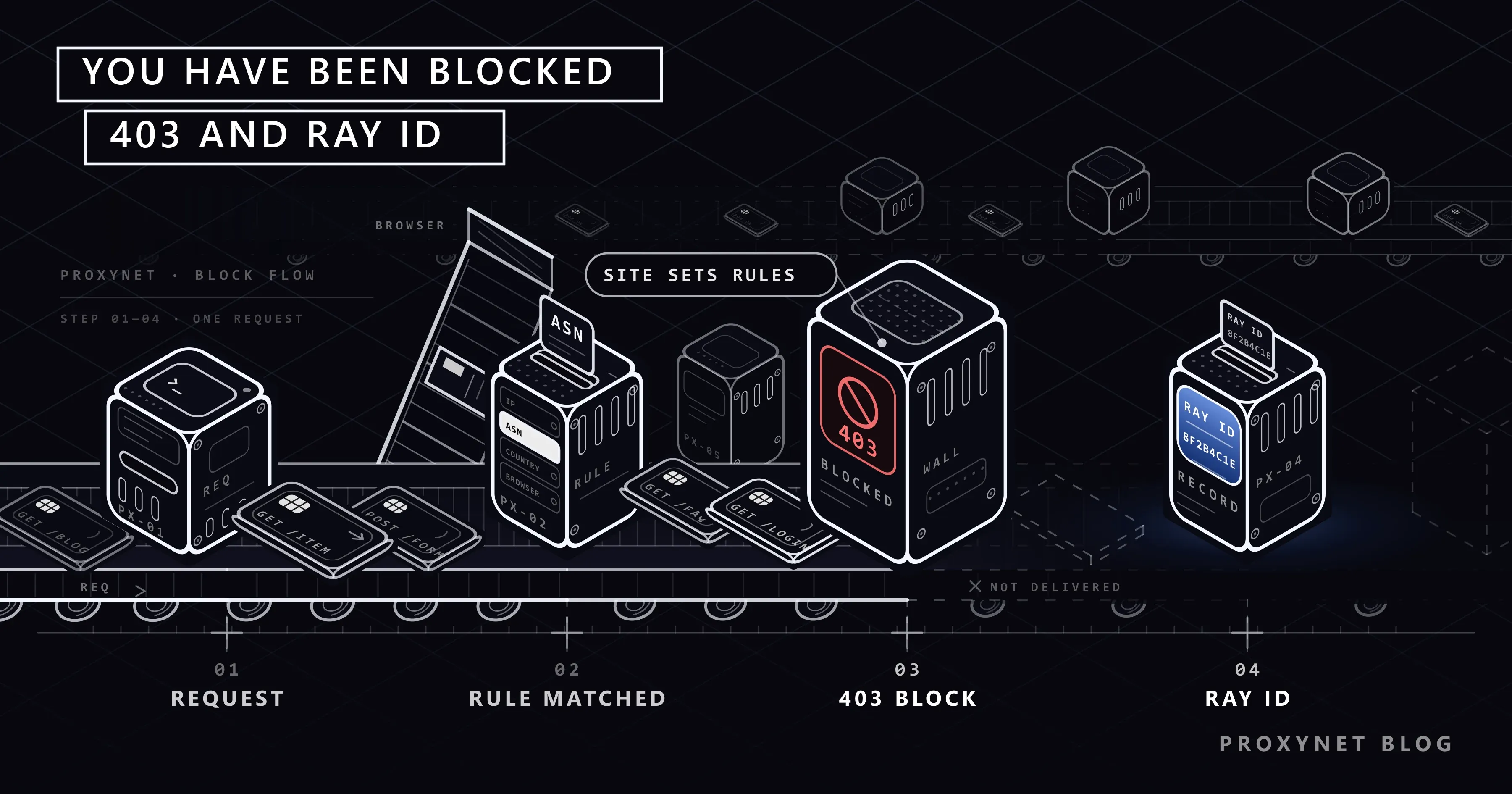
The block page comes about in this order:
- Your browser sends a request to the site's address. The request lands on the Cloudflare network in front of the site, not on the site's server.
- Cloudflare looks at the properties of the request: the IP address, the network and country it belongs to, how the browser identifies itself, the page requested and the content sent along with it.
- These properties are compared with the rules the site owner has written and the managed protections they have switched on. If one rule says "block", the request is never forwarded to the site's server.
- Your browser receives the block page with status code
403. The identifier given to that request, the Ray ID, is printed at the bottom. - The same event is written to the security log in the site owner's dashboard, together with the rule that fired.
One detail matters here: the rule is set by the site owner, not by Cloudflare. Cloudflare only enforces it, and its own documentation says the support team cannot override a customer's security settings. So the party to talk to is the site, not Cloudflare.
Site owners can change how this page looks, so on some sites the same block appears with the site's own logo and wording. If there is a Ray ID at the bottom, the mechanism is the same. A number starting with "Reference #18" or an errors.edgesuite.net address in its place means the page is Akamai's, not Cloudflare's; we explain it in Access Denied Error on Websites: What Reference #18 Means. A pale page with a round "Press & Hold" button and a Reference ID comes from a third vendor, HUMAN Security (formerly PerimeterX), and is covered in Access to This Page Has Been Denied: Causes and Fixes.
What is a Ray ID and what is it for?
A Ray ID is the identifier Cloudflare gives to every request that passes through its network. It appears at the very bottom of the block page as a short string of letters and digits.
You cannot read a reason out of it yourself. It is useful in the site owner's dashboard. When the owner searches the security log for the Ray ID, they find that request: the IP address, its network, the browser identifier and, most importantly, the rule that stopped it. Cloudflare's Ray ID page describes the identifier as a way to review security events and find false positives.
Two things to know about the Ray ID:
- It belongs to a single request, not to you. Reload the page and you will usually see a new Ray ID. Send the site owner the latest one you saw.
- Logs are not kept forever. On Cloudflare's Free and Pro plans the security log covers only the last 24 hours, and on higher plans the window is measured in days. Writing on the same day raises the chance that the record can still be found.
What do Error 1020, 1005 and 1006 mean?
The same family has numbered pages as well. These show "Access denied" and a code such as "Error 1020" in the heading, again with a Ray ID at the bottom. The code hints at the kind of block. The table below is based on Cloudflare's 1xxx error documentation.
| Code | Text on the page | What does it look at? | What does it mean? |
|---|---|---|---|
| Error 1020 | Access denied | A firewall rule written by the site owner | Your request matched a rule the site owner defined; the page does not say what the rule checks |
| Error 1005 | Autonomous System Number (ASN) banned | The whole network your IP address belongs to | The site has closed every address of the network you go online through. Common on VPN and server networks |
| Error 1006, 1007, 1008 | Your IP address has been banned | A single IP address | The address you are using right now has been banned by the site |
| Error 1009 | Country or region banned | The country your IP address appears in | The site is closed to visitors from your country |
| Error 1010 | Browser's signature | The way the browser identifies itself | The request does not look like what an ordinary browser sends |
| Error 1015 | You are being rate limited | The number of requests sent in a short time | A temporary rate limit. Details in our Error 1015 post |
Are the "Sorry, you have been blocked" page and Error 1020 the same thing? Cloudflare's 1020 documentation does not mention that heading, so we cannot say "they are the same page". What we do know: both are the result of a rule set by the site owner, both come back with a 403 code, and both carry a Ray ID at the bottom. The steps for a visitor are the same too.
A separate note on Error 1009: a country block is not a fault, it is the site's choice. The site may not serve that country, or its licence may not cover it. This post does not explain how to get around that choice. If you really need the site, write to the owner and explain your situation.
Why did the block land on you?
You cannot see the exact reason from outside, but most reasons fall under these five headings.
Your IP address. You may be using an address the site has banned. On home and mobile connections addresses change hands, and carriers can put many subscribers behind one address. What someone did on the same address before you, or alongside you, may have stuck to you. We covered shared addresses in What Is CGNAT? and how addresses end up on blacklists in our IP blacklist post.
The network you are on. Every IP address is registered to a company's network, and each network has a number (ASN). Instead of chasing single addresses, a site owner can close an entire network. VPN services and server hosting companies are the networks closed most often, because much of the traffic coming from them is generated by programs. This is the most likely reason you see a block while your VPN is on. We explained what an ASN is in ISP vs Residential Proxies, and the variant of the same mechanism that ends in a "VPN or proxy detected" warning in a separate post.
Your country. The country your IP address appears in is not among the ones the site allows. It can happen when you are abroad and open a site from your home country. A VPN left running also places you in another country.
Your browser and extensions. A Cloudflare check that is enabled by default challenges or rejects requests whose browser identifier (User-Agent) is missing or unusual. A very old browser, or an extension that changes the browser identifier, can trip this check. Details are in our User-Agent post.
What you were doing at that moment. Sometimes the block is aimed at what you sent, not at you. If you pasted a piece of code, a lot of links or text full of special characters into a form, the firewall may mistake it for an attack attempt. In that case the rest of the site opens and only that form ends in the block page.
What should you do, in order, as a visitor?
The purpose of these steps is not to get around the block but to find out whether it comes from a setting on your side. Try the page once after each step.
- Turn off your VPN and proxy extensions. Close the VPN app on your phone, the VPN program on your computer and any browser extensions. On Windows, open Settings > Network & internet > Proxy and switch off any manually configured proxy. The full path is in How to Set Up Proxy Settings in Windows and Chrome, and the difference between the two is in Proxy vs. VPN.
- Try a private window. Extensions mostly do not run in a private window. If the page opens there, disable your extensions one by one to find the culprit.
- Update your browser or try another one. Go to Help > About Google Chrome (other browsers have a similar entry) and check for an update.
- Try a different network. Turn off Wi-Fi and open the same address on mobile data, or the other way round. If it opens on the other network, the block applies to the address the first network goes online with, not to your device.
- Restart your modem. Switch the modem off, wait half a minute and switch it back on. On some subscriptions this gives you a different address, on others it does not. Details are in our post on changing your IP address.
- If the block appeared on a form, simplify what you send. Remove code snippets, long links and special characters, then submit again.
- Write to the site owner. If none of the above helped, the block cannot be solved on your side.
If what you see is not a block page but a verification box saying "Verify you are human", the situation is different: you have not been refused, you are being tested. We covered that screen in our Cloudflare verification post.
How do you write to the site owner?
Most people skip this step, yet it is the only route that can lift the block. If the contact page is blocked as well, you can use the site's social media account, the support address listed in the app store or the contact details in the domain's Whois record. Cloudflare recommends the same route in its documentation.
Include the following in your message:
- A screenshot of the block page and the Ray ID as text
- The date and time you saw the block
- The address you were trying to open and what you were doing (opening a page, logging in, submitting a form)
- Your connection type: home internet, mobile data, office network. If you use a VPN, say so
How does it relate to the 403 Forbidden error?
Technically, the block page is a 403 Forbidden response. But not every 403 is a firewall block. The HTTP standard RFC 9110 defines 403 as "the server understood the request but refuses to fulfill it" and does not oblige the server to say why. That is why the same code shows up in different situations:
- A page that needs a login or permission. Your session has ended, or your account is not allowed to see that page.
- A location restriction. Some institutional and service sites accept visitors from certain countries only. This is a common reason for a 403 seen from abroad or with a VPN on.
- The site's own configuration. File permissions or a server setting are wrong. In that case everyone sees the 403, not just you.
- A firewall rule. The case this post is about.
The easy way to tell them apart is to look at the bottom of the page. If you see a Cloudflare Ray ID, the block came from the firewall. If there is a plain "403 Forbidden" line with a server name such as nginx or Apache underneath, the site's own server answered.
What to do for each of these causes, including when the address opens in a browser but your program gets "Request failed with status code 403", is in 403 Forbidden Error: What It Means and How to Fix It.
Advanced: confirming that the response came from Cloudflare
If you use a command line, you can read from the response headers whether a site is behind Cloudflare and which Ray ID your request received. In PowerShell on Windows, type curl.exe instead of curl:
curl -sI https://www.cloudflare.com/The first line of the output is the status code. The server: cloudflare line (header names may also be capitalised) shows that the Cloudflare network answered. The value on the cf-ray line is the Ray ID; the three letters at its end are the code of the data center that handled the request (IST for Istanbul). If the address that blocks you returns 403 on the first line with these two headers below it, the block came from the security layer in front of the site, not from the site's server.
If you own the site: finding the rule that blocks real customers
If customers tell you "I can't open your site", Cloudflare's Error 1020 documentation suggests three steps:
- Ask the visitor for a screenshot of the block page.
- In the Cloudflare dashboard, open the Events tab (Security Events) on the security analytics page and search for the Ray ID or the visitor's IP address. The time on the error page is in UTC, so convert it to your own time zone before you search.
- Review the rule the record points to. Either narrow the rule or allow that address through IP Access Rules.
Behind most false positives there is a rule that was written too broadly: a rule that closed a whole network or country during an attack and was then forgotten, or an IP list that bans the shared addresses of mobile carriers. Choosing the challenge action instead of block leaves real visitors a way through. We covered Cloudflare's newer behaviour-based layer in What Is Cloudflare Precursor?.
For businesses and automation teams: the role of network type
Teams that visit sites with programs, for price monitoring or brand protection for example, see this page more often than home users. The reason is the second item above: programs usually run on a cloud server, and cloud providers' networks are the first ones site owners close.
What needs to be done first is procedural. If the site has an official API or a data feed, use it. Respect the robots.txt file and the terms of use, and keep your request rate low. If you need regular access, ask the site owner to allow your addresses. Other causes are in How to Scrape Websites Without Getting Blocked, and the way sites tell automated traffic apart is in our bot detection post.
The difference that network type makes is a matter of mechanism. ISP Proxy addresses are registered to an internet service provider's network, and Residential Proxy addresses to home connections. These addresses fall outside bulk rules of the "close server networks" kind, because they are not on those networks. That is not a guarantee of passage: if the rule targets a single address, a country or a behaviour, network type does not change the outcome, and insisting on a site that clearly does not want you is not right. The comparison is in Residential vs. Datacenter Proxy, and the use cases are on our brand protection and data scraping pages.
Common mistakes
- Reloading the page over and over. Every reload is a new request, and a temporary block can last longer because of it.
- Turning on a VPN when you see the block. VPN networks are the ones closed most often. In many cases you will now meet Error 1005 instead. We covered the other risks of free VPNs and proxies in our post on free proxy safety.
- Complaining to Cloudflare. Cloudflare did not set the rule and cannot remove it.
- Writing without the Ray ID. With a message that only says "I can't open your site", the owner cannot find the record.
Decision guide
| Your situation | What to do |
|---|---|
| A VPN or proxy extension is on | Turn it off and try the page again |
| It opens on mobile data but not on home internet | Restart the modem; if it continues, write to the site owner with the Ray ID |
| It appears only when you submit one form | Remove code, links and special characters from the text and submit again |
| The page says Error 1009 | A country block is the site's choice; explain your need to the site owner |
| You own the site and a customer is blocked | Search for the Ray ID in Security Events and narrow the rule that fired |
| You access the site with a program for work | Official API and permission first; then review the type of network your requests leave from |
Frequently asked questions
Is this block permanent, and when will it go away?
It depends on the rule, and the page does not say. Blocks tied to a rate limit clear within minutes. A block placed on an IP address or a network lasts until the site owner removes it.
Has my account been blocked?
Most likely not. This page is shown before your request reaches the site; the firewall evaluates the address and browser the request came from, not your account.
It opens on one device at home but not on another. Why?
If both devices are on the same Wi-Fi, they go out from the same address and the difference is in the device: extensions, an old browser, a VPN left on. If one of them is on mobile data, they go out from different addresses and the block applies to the address.
Does changing DNS or resetting the computer help?
No. The DNS setting does not change which IP address the site sees you with. Because the block applies to how the request looks from the other side, not to your device, an antivirus scan or a reset does not change the result either.
Will I be blocked on every site that uses Cloudflare?
No. Rules are specific to each site. If you see blocks on many sites at once, the common factor is most likely the reputation of your address or a VPN that is on. We explained how address reputation is measured in our IP fraud score post.
What is the difference between Error 1020 and Error 1005?
1020 says that some rule written by the site owner fired; it does not state what the rule looks at. 1005 is more explicit: the block covers the whole network your IP address belongs to. If you see 1005 with a VPN on, turning it off is usually enough. If you see it on your home connection, only the site owner can fix it.
Summary
The "Sorry, you have been blocked" page shows that the firewall in front of the site you want to reach has rejected your request under a rule written by the site owner. The rule may look at your IP address, your network, your country, your browser or the content you sent; the codes Error 1020, 1005, 1006, 1009 and 1010 hint at which one it is. Turn off your VPN and extensions, try a private window and a different network, and do not keep reloading the page. If the block remains, write to the site owner with the Ray ID, the time and a screenshot; they are the only one who can lift it. If you access sites with programs, try permission and the official API first, and compare network type options on our proxy services page.


