


































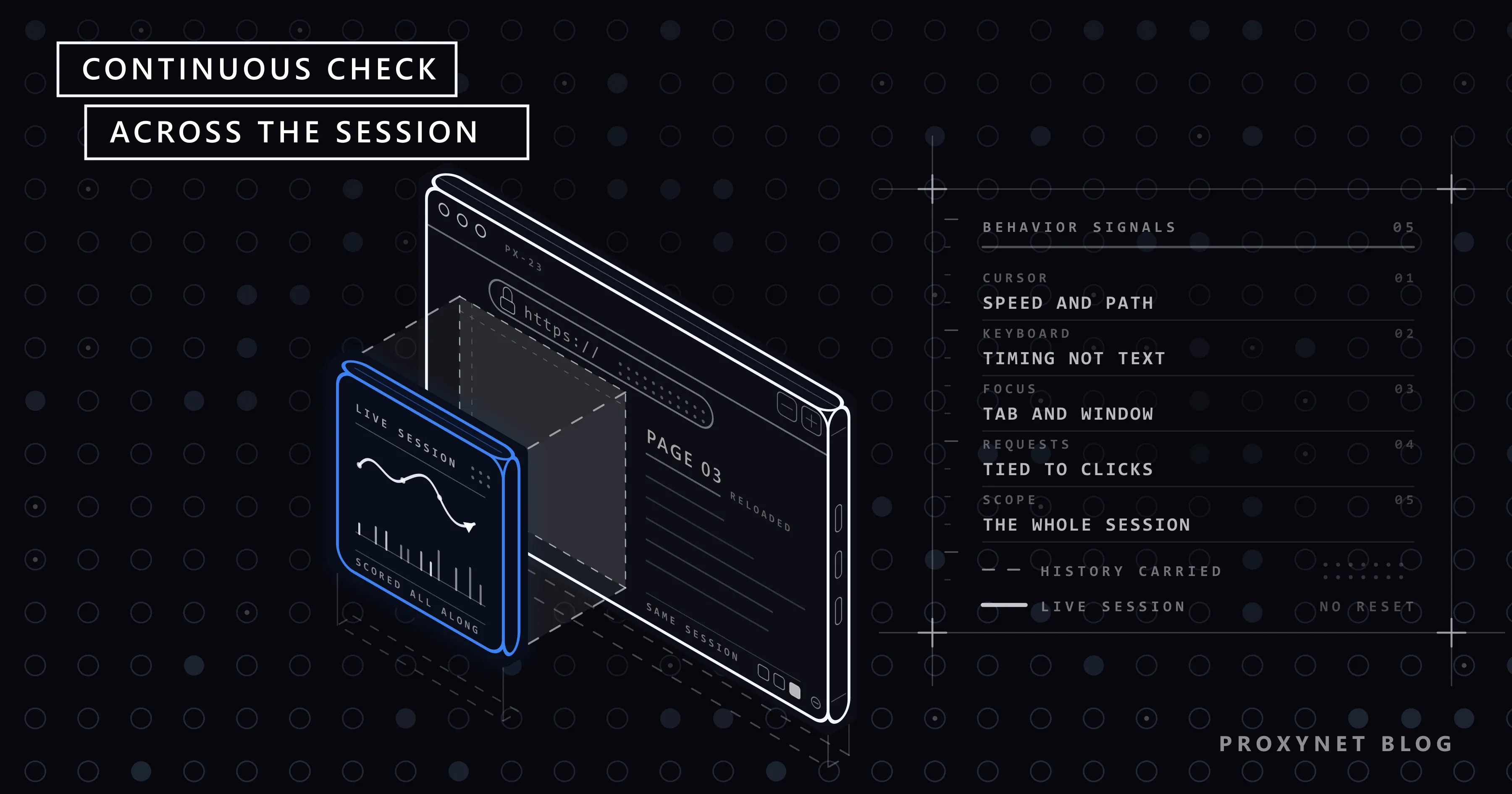
Cloudflare announced a new bot-detection layer called Precursor on July 13, 2026. Precursor's approach differs from the checks we're used to: instead of testing a visitor once at the entry gate, it continuously evaluates their behavior throughout their time on the site. This article explains what Precursor does, where it departs from earlier protections, how site owners turn it on, and what it means for teams using browser automation.
Why did Cloudflare need a new layer?
Classic bot protections focus on specific moments: the login page, the sign-up form, the checkout step. The visitor passes a CAPTCHA or gets a pass from a JavaScript check at that point and continues on their way.
According to the observation in Cloudflare's announcement post, modern automation has become capable of passing these brief tests: bots run JavaScript, use real browser environments, and can get through individual CAPTCHAs without raising suspicion. Cloudflare's conclusion is that looking human in a brief moment has gotten easier, but sustaining consistently human behavior over time is still hard.
This shift also shows the general direction bot detection is heading. First IP reputation was checked; proxies got past that. Then the browser environment was checked; real browsers and antidetect tools got past that. Now it's the turn of consistency in behavior over time.
Cloudflare's existing protection layers
To place Precursor correctly, it helps to recall the layers Cloudflare already uses to protect a site:
| Layer | What does it do? | When does it kick in? |
|---|---|---|
| IP reputation and WAF rules | Blocks known bad addresses and request patterns | On every request, server-side |
| Bot score | Produces a score of 1-99 using request headers, TLS fingerprint, and machine learning | On every request |
| JavaScript Detections | Tests client-side whether the browser is real | Once, when the page loads |
| Turnstile / Managed Challenge | Presents a visible or invisible verification to the visitor | When a suspicion threshold is crossed |
| Precursor | Evaluates interaction behavior throughout the session | After the page loads, continuously |
As the table shows, the client-side checks before Precursor were one-off. Precursor fills that gap.
How does Precursor work?
According to Cloudflare's developer documentation, Precursor is a system that runs on the client side and verifies throughout the session. The announcement describes three components:
- Collection layer. Cloudflare injects a small script into the site's HTML response. The site owner doesn't need to change their code. The script listens for interaction signals such as cursor movement, keyboard activity, focus changes, and whether the page is visible. According to the announcement, it's not the content typed on the keyboard that's evaluated, but the typing timing.
- Evaluation layer. The signals pass through multiple evaluators on Cloudflare's edge servers and are cross-checked against each other. For example, if cursor movement is coming in while the page is in the background, that's an inconsistency.
- Session integration. Results accumulate over the session. The point the announcement emphasizes: a bot cannot reset its behavior history by refreshing the page or starting a new verification.
Evaluation results are reflected in the visitor's cf_clearance cookie. According to the documentation, if behavior becomes suspicious during the session, a previously granted access permission can be weakened or invalidated.
Which signals are evaluated?
The announcement and documentation don't list the signals one by one, but the described categories are:
- Cursor movement: Whether the speed, acceleration, and direction changes resemble human movement. A human cursor doesn't move in a straight line at a constant speed.
- Keyboard timing: The distribution of intervals between keystrokes. It's the rhythm that's evaluated, not the content.
- Focus and visibility: Whether the page is in the active tab, whether the window has focus. If interaction is coming in from a tab in the background, that's a contradiction.
- Relationship between interaction and network requests: Whether the request expected after a click actually arrives, whether requests are generated without a click.
- Consistency over time: Whether the signals above maintain the same "character" throughout the session.
This list explains why Precursor can't be passed with a single check: producing a moment of human-like movement is easy; producing consistent behavior for minutes is not.
Does it replace CAPTCHA and Turnstile?
No. Cloudflare positions Precursor as a complement to existing verifications. According to the documentation, Precursor helps decide when an additional verification is needed, and it re-evaluates a visitor who has already passed a verification afterward. When Precursor is enabled, the older JavaScript Detections feature is automatically disabled.
| Classic verification | Precursor | |
|---|---|---|
| When does it check? | At specific moments | Throughout the session |
| What does it look at? | Browser environment, a one-off test | Consistency of interaction behavior over time |
| Can it be reset? | With a new attempt | Accumulates within the session |
| Does the user see it? | If a CAPTCHA appears | Mostly no, depending on the selected mode |
| Site owner's code change | Yes, for Turnstile | No, the script is added automatically |
How do site owners turn Precursor on?
Precursor is not on by default; the site owner has to enable it. According to the documentation, the setting is made in the Cloudflare panel under Security > Settings, and two modes are offered:
- Minimize Friction: Verification runs in the background, keeping the user experience as uninterrupted as possible.
- Maximize Security: A light interstitial screen may be used for stricter verification.
Results are reflected in the domain's Security > Analytics bot analysis screen and WAF rule matches. Since which conditions apply on which plans can change over time, it's worth following Cloudflare's documentation for current information.
If you protect your own site with Cloudflare, it's worth checking two things before turning Precursor on: your site's legitimate automation (monitoring tools, your own test scripts, your partners' integrations), and whether you've exempted that traffic with WAF rules. Otherwise, your own tools will also get evaluated as "non-human."
What changes for browser automation?
On a site where Precursor is enabled, automation done with a headless browser is now evaluated not just at the entry point, but throughout the entire session. This has a few practical consequences:
- A one-off "pass" approach doesn't work. A session that passes verification on the first page can lose access if it shows a non-human pattern on later pages.
- Refreshing the page doesn't open a clean page. Behavior history accumulates within the session.
- The IP alone is not decisive. A well-reputed IP address won't save a session if the behavioral signals are inconsistent. We covered the role of browser fingerprinting in our What Is Browser Fingerprinting? article.
- Interaction-free browsing is suspicious. A session moving from page to page with no cursor movement and no scrolling at all doesn't resemble an ordinary visitor.
One point is worth underlining here: building tools that imitate human behavior to get past Precursor means specifically targeting a protection the site owner deliberately turned on. This can conflict with both the site's terms of use and, in many countries, the law.
The right path for legitimate automation
For teams working on data collection, testing, or monitoring, Precursor's message is clear: getting the site's consent is more sustainable than racing against the protection layers.
- Prefer official APIs. Many platforms provide the data you need through an API. An API is both faster and never enters behavioral evaluation at all.
- Reach an agreement with the site owner. If you're testing your own sites or a client's site, the site owner can exempt your test traffic with WAF rules. This is the cleanest way to keep automation running smoothly even with Precursor enabled.
- Look into verified bot programs. Known bots such as search engine crawlers are recognized through Cloudflare's verified bot mechanism. If you operate a crawler that serves the public, applying to this program is an option.
- Reasonable speed and clear identity. When collecting publicly available data, keep the request rate low, follow the
robots.txtrules, and use a User-Agent that identifies you. - Look for paths that don't require a browser. If a page's data comes from a JSON endpoint, requesting that endpoint directly is both cheaper than browser automation and independent of the behavioral layer.
Proxy infrastructure still matters in this framework: it's needed to see location-dependent content from the correct region, to avoid piling all traffic onto a single address, and to distribute web crawler workloads evenly. On protected targets, a Residential Proxy coming from real user addresses and a Sticky Proxy that keeps the same address for the whole session are part of this setup. But a proxy is not a tool that makes a behavioral protection a site has explicitly put in place legitimate to bypass. We covered which data can be collected under which conditions in our Is Web Scraping Legal? article.
The broader trend Precursor points to
Beyond being a product on its own, Precursor shows the direction bot detection is heading. Three conclusions can be drawn:
- Static signals are losing value. Signals read once, like IP type, User-Agent, and browser environment, are still used, but they no longer decide on their own.
- The session is becoming the unit. Evaluation is done per session, not per request. This means the "different IP on every request" strategy can backfire on some targets; the IP changing within a session can be counted as an inconsistency.
- Disclosing the identity of legitimate automation is gaining importance. Verified bot programs and agreements with site owners are becoming a more reliable path than covert automation.
This trend isn't unique to Cloudflare; similar behavioral approaches are appearing at other protection providers as well. When planning your automation infrastructure, asking "which direction is protection heading" rather than "what check exists today" leads to longer-lasting decisions.
Frequently asked questions
Does Precursor run on every Cloudflare site?
No. It's an opt-in feature the site owner has to enable from the panel.
Does Precursor collect personal data?
According to Cloudflare's announcement, the script collects interaction signals; it evaluates the timing, not the content typed on the keyboard. It's the site owner's responsibility to disclose this processing to their visitors in their privacy policy.
Do tools like Undetected ChromeDriver work against Precursor?
These kinds of tools focus on reducing known automation tells in the browser environment. Precursor, on the other hand, operates at a different layer since it looks at behavioral consistency throughout the session. We covered the general limits of these tools in our Undetected ChromeDriver article.
How do I know if a site uses Precursor?
There's no definitive external method. On a site behind Cloudflare, access narrowing or extra verification being requested on later pages after you've passed the entry point can be a sign. If you're the site owner, you can see it from the panel.
Does Precursor accidentally block real users?
Cloudflare states that "Minimize Friction" mode is designed to keep this risk low. Even so, the site owner needs to monitor false positives from the analytics screen for accessibility tools, keyboard-heavy users, and unusual devices.
What should I do on a Precursor-enabled site while working with Puppeteer?
First check whether the site offers an API; then get in touch with the site owner. If automation is unavoidable, slow down the rate, keep the session intact, and stay on a single IP; we covered these steps in our Puppeteer and CAPTCHA article. Turning to tools that generate behavior mimicry is both fragile and risky.
In short
Cloudflare Precursor moves bot detection from one-off tests to an evaluation that runs throughout the session. It's enabled at the site owner's discretion, complements existing verifications, and doesn't reset on a page refresh. For teams working with automation, the most solid strategy isn't trying to bypass the protection — it's building a data-collection setup based on APIs, permission, and reasonable traffic. In that setup, a proxy is a tool for managing traffic from the right region in a balanced way, not for getting past protection.


