You need a list of every category and product page on a bookshop site that has no sitemap. Our test target is books.toscrape.com, a sandbox built for scraping practice. A crawler that follows every link without remembering where it has been never finishes here: most links point back to pages it has already met. In our measurement, 3,515 of the 4,098 links on the first 60 pages pointed to addresses the crawler already knew, and 524 new addresses were still waiting in the queue.
Below we build a crawler with Requests and BeautifulSoup and no framework: queue, seen set, URL normalization, scope, depth limit, robots.txt, pauses and JSON Lines output. What a crawler is, and how it differs from a scraper, is covered on our web crawler page and in Web Scraping vs Web Crawling. All numbers come from runs of the final script on 25 September 2026.
What parts does a Python web crawler need?
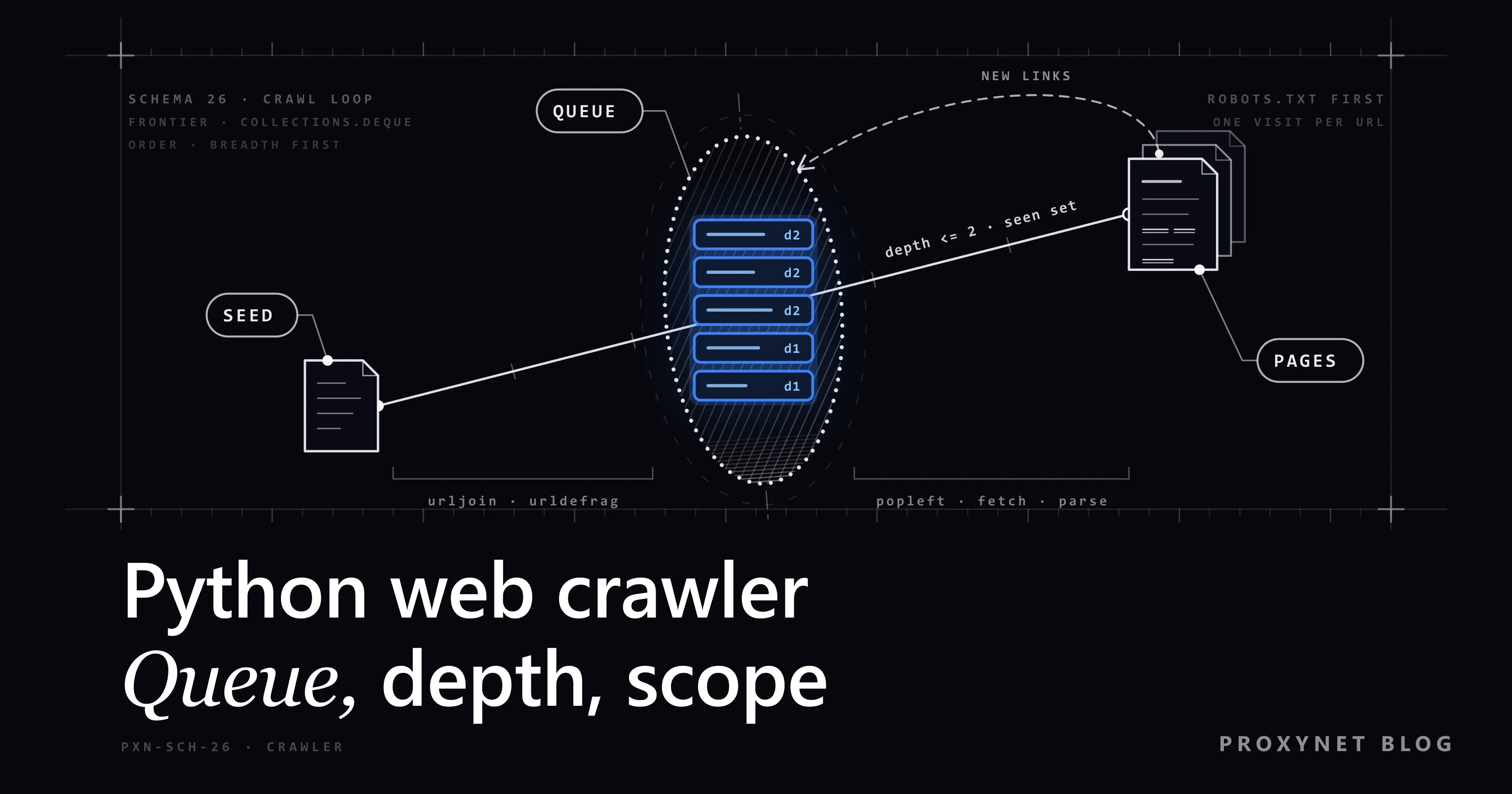
Six parts, each a few lines of Python:
- Frontier: the queue of addresses still to visit, a
collections.deque. - Seen set: every address the crawler has met so far.
- Fetcher: a
requests.Sessionwith a timeout and an honestUser-Agentthat names the bot and a contact (What Is a User-Agent?). - Link extractor:
select("a[href]"). Reading the rest of the page is a scraper's job (What Is BeautifulSoup). - Scope filter: host, scheme and content type decide what counts.
- Output: one JSON object per page in a
.jsonlfile.
We use Requests 2.34.2 and Beautiful Soup 4.15.0, the current PyPI releases on 25 September 2026; Requests needs Python 3.10 or newer. Scrapy ships all six ready-made.
How does the crawl loop work, step by step?
- Seed. Normalize the start address, put
(url, 0)in the queue and the address in the seen set. - Take.
popleft()the oldest entry. - Ask robots.txt. Read the host's rules from a cache, fetching them once.
- Wait, then fetch. Keep the delay per host, then send a GET request.
- Check the answer. Read the final address after redirects and the
Content-Typeheader. - Extract and filter. Resolve each
hrefwithurljoin, normalize it, and drop what is seen, offsite or too deep. - Record and queue. Write one JSON line and append the new addresses with
depth + 1.
The loop ends when the queue is empty or the page ceiling is reached.
Which part prevents which problem?
| Part | What it prevents | In Python | Without it |
|---|---|---|---|
| Seen set, filled at queue time | Fetching one page twice | set, added on enqueue | 3,515 known links in our books run fetched again |
| Depth limit and page ceiling | Endless chains such as calendars and filters | (url, depth), --depth, --max-pages | A queue that keeps growing (524 waiting after 60 pages) |
| URL normalization | One page under several spellings | urldefrag, urlsplit, parse_qsl | The same page is fetched and saved more than once |
| Redirect and content type check | Drifting to another site, parsing a PDF as HTML | r.url, Content-Type, stream=True | Links from foreign pages enter the queue |
| robots.txt cache and per-host pause | Forbidden paths, bursts of requests | RobotFileParser.parse(), time.monotonic() | The site answers 429 |
Why should the queue be a deque and not a list?
deque.popleft() takes the oldest address, so the crawl is breadth-first (BFS): the start page, then pages one click away, then two. Pages near the home page arrive first, and a depth limit makes sense because depth grows in order. pop() from the end you append to is depth-first (DFS): one branch to the bottom before the next.
A list can serve as the queue, but pop(0) moves every remaining item (O(n)), while a deque pops at both ends in roughly constant time (collections documentation). Recursive crawlers are DFS in disguise, and they can stop at Python's default limit of 1,000 nested calls with a RecursionError.
BFS also meets every address first at its lowest depth, so a link that is too deep on first sight can be marked as seen and forgotten.
How do you write URL normalization in code?
The seen set compares strings, so normalize() gives each page one spelling:
urldefrag()drops#reviews. Under RFC 3986 section 3.5, the fragment never reaches the server.- The scheme and host become lowercase;
urlsplit().hostnamealready is. - Default ports (
:80for http,:443for https) are dropped, and an empty path becomes/, which section 6.2.3 of the same RFC treats as equivalent. - Tracking parameters (
utm_*,gclid,fbclid) are removed and the rest are sorted, so?b=2&a=1and?a=1&b=2match. mailto:,tel:andjavascript:links and broken ports returnNone.
Never delete the whole query string: ?page=2 is a different page. Trailing slashes stay too, because /a and /a/ can differ; a redirect tells you when they do not. On books.toscrape.com, / and /index.html served the same page, which only a site-specific rule could merge.
The seen set also ignores the scheme. On quotes.toscrape.com, author pages redirect from https to http, and their relative links then point to http://quotes.toscrape.com/, so our first test run fetched the home and login pages twice. page_key() drops the scheme, so both spellings count as one page.
The sandboxes have no fragments or tracking tags, so these checks use made-up input:
from crawler import normalize

assert normalize("https://Example.COM:443/a#reviews") == "https://example.com/a"
assert normalize("http://example.com") == "http://example.com/"
assert normalize("https://example.com:8443/a") == "https://example.com:8443/a"
assert normalize("https://example.com/list?b=2&a=1") == "https://example.com/list?a=1&b=2"
assert normalize("https://example.com/list?utm_source=mail&page=2") == "https://example.com/list?page=2"
assert normalize("mailto:shop@example.com") is None
assert normalize("javascript:void(0)") is None
assert normalize("https://example.com:abc/") is None
assert normalize("https://example.com/a/") != normalize("https://example.com/a")
print("all normalize checks passed")
Scope: same host, redirects and content type
self.hosts holds only the start host. If a site uses both www.example.com and example.com, add both by hand; a check such as endswith("example.com") would also let in notexample.com.
Requests follows redirects for every method except HEAD and keeps the final address in r.url (Requests quickstart), so check scope on r.url and resolve relative links against it. On quotes.toscrape.com, /author/Jane-Austen redirects to http://quotes.toscrape.com/author/Jane-Austen/; in our depth-2 run, 40 of 149 pages arrived this way. A redirect off the site is dropped, but Requests has already fetched the target. To avoid even that request, pass allow_redirects=False and queue the Location header yourself.
With stream=True, Requests returns once the headers arrive. If Content-Type is not text/html, the connection closes without reading the body.
How do you set a depth limit and a page ceiling?
Queue entries are (url, depth, attempts). A link whose depth + 1 would pass --depth counts as too_deep and stays out; --max-pages ends the run whatever the queue holds. On the sandboxes:
- quotes.toscrape.com, depth 2, ceiling 500: the queue emptied on its own after 149 pages (1, 46 and 102 by depth); 30 addresses were too deep.
- The same site, ceiling 60: the run stopped at 60 pages with 89 still queued.
- books.toscrape.com, depth 2, ceiling 60: all 60 pages came from depths 0 and 1, with 524 waiting. The ceiling, not the depth, ended this run.
Choose the depth from the site's structure (home, category, item is depth 2; each further listing page adds one) and the ceiling from your budget. Links planted to catch bots are covered in Honeypot Traps.
robots.txt and pauses: the short version
The crawler keeps one RobotFileParser per scheme and host, downloads robots.txt with its own session (timeout, bot User-Agent, proxy) and passes the lines to parse(). We avoid read(): in Python 3.13.9 it uses urllib with no timeout and urllib's own User-Agent, and it raises on network errors. A 5xx or an unreachable file means crawl nothing, as RFC 9309 requires; a 4xx means no rules (both sandboxes returned 404). Syntax: What Is a robots.txt File.
Before each request, the crawler makes sure --delay (1 second by default) or the site's Crawl-delay, whichever is longer, has passed since its last request to that host. With Crawl-delay: 2 on a local test site and --delay 0.2, the server logged 2-second gaps. On a 429, the crawler stops the host and prints Retry-After. Retrying properly is covered in HTTP Status Codes in Web Scraping, and these checks with a SQLite queue in Pagination in Web Scraping.
Full code: a Python web crawler without a framework
Install the two libraries in a virtual environment, save the script as crawler.py and give it a start address:
pip install requests==2.34.2 beautifulsoup4==4.15.0
python crawler.py https://books.toscrape.com/ --depth 2 --max-pages 60"""A breadth-first crawler for one site: Requests + BeautifulSoup, no framework."""
import argparse
import json
import time
from collections import Counter, deque
from urllib.parse import parse_qsl, urldefrag, urlencode, urljoin, urlsplit, urlunsplit
from urllib.robotparser import RobotFileParser
import requests
from bs4 import BeautifulSoup
BOT_NAME = "ExampleSiteMapper"
USER_AGENT = f"{BOT_NAME}/1.0 (+https://example.com/bot; bot@example.com)"
TIMEOUT = 15 # seconds; without a timeout Requests can wait forever
MAX_RETRIES = 2 # a URL goes back to the end of the queue at most twice
TRACKING = {"utm_source", "utm_medium", "utm_campaign", "utm_term", "utm_content", "gclid", "fbclid"}
DEFAULT_PORTS = {"http": 80, "https": 443}
def normalize(url):
"""One spelling per page, or None for links a crawler should not follow."""
url, _fragment = urldefrag(url.strip())
parts = urlsplit(url)
scheme = parts.scheme.lower()
try:
port = parts.port
except ValueError: # a broken port such as ":abc"
return None
if scheme not in DEFAULT_PORTS or not parts.hostname:
return None # mailto:, tel:, javascript:, ftp:, ...
host = parts.hostname # already lowercase
if port and port != DEFAULT_PORTS[scheme]:
host = f"{host}:{port}"
query = sorted((k, v) for k, v in parse_qsl(parts.query, keep_blank_values=True)
if k not in TRACKING)
return urlunsplit((scheme, host, parts.path or "/", urlencode(query), ""))
def page_key(url):
"""The seen-set key: http:// and https:// of one address count as one page."""
return url.split("://", 1)[1]
class Crawler:
def __init__(self, start, max_depth, max_pages, delay, out, proxy=None):
self.start = normalize(start)
self.hosts = {urlsplit(self.start).hostname} # add a "www." twin here on purpose
self.max_depth, self.max_pages, self.delay, self.out = max_depth, max_pages, delay, out
self.queue = deque([(self.start, 0, 0)]) # (url, depth, attempts)
self.seen = {page_key(self.start)} # marked when a URL is first met, not when fetched
self.robots, self.last, self.stopped = {}, {}, {}
self.stats, self.depths = Counter(), Counter()
self.session = requests.Session()
self.session.headers["User-Agent"] = USER_AGENT
# per request: session.proxies would lose to HTTP(S)_PROXY environment variables
self.proxies = {"http": proxy, "https": proxy} if proxy else None
def in_scope(self, url):
return urlsplit(url).hostname in self.hosts
def fetch(self, url):
"""GET with a per-host pause. stream=True reads the headers before the body."""
parts = urlsplit(url)
rules = self.robots.get(f"{parts.scheme}://{parts.netloc}")
gap = max(self.delay, (rules.crawl_delay(BOT_NAME) if rules else None) or 0)
pause = self.last.get(parts.netloc, float("-inf")) + gap - time.monotonic()
if pause > 0:
time.sleep(pause)
try:
return self.session.get(url, timeout=TIMEOUT, stream=True, proxies=self.proxies)
finally:
self.last[parts.netloc] = time.monotonic() # per host: http and https share it
def robots_ok(self, url):
root = "{0.scheme}://{0.netloc}".format(urlsplit(url))
if root not in self.robots:
rules = RobotFileParser()
try:
with self.fetch(root + "/robots.txt") as r:
status = r.status_code
rules.parse(r.text.splitlines() if status == 200 else [])
except requests.RequestException:
status = None
rules.parse([])
if status is None or status >= 500:
rules.disallow_all = True # robots.txt unreachable: crawl nothing on this host
self.robots[root] = rules
return self.robots[root].can_fetch(BOT_NAME, url)
def extract_links(self, html, base):
soup = BeautifulSoup(html, "html.parser")
title = " ".join(soup.title.get_text().split()) if soup.title else ""
return title, [urljoin(base, a["href"]) for a in soup.select("a[href]")]
def enqueue(self, links, depth):
for link in links:
self.stats["raw_links"] += 1
url = normalize(link)
if url is None:
self.stats["not_http"] += 1
continue
if page_key(url) in self.seen:
self.stats["duplicate"] += 1
continue
self.seen.add(page_key(url)) # BFS meets every URL first at its lowest depth
if not self.in_scope(url):
self.stats["offsite"] += 1
elif depth + 1 > self.max_depth:
self.stats["too_deep"] += 1
else:
self.queue.append((url, depth + 1, 0))
self.stats["queued"] += 1
def retry(self, url, depth, attempts, why):
if attempts < MAX_RETRIES:
self.queue.append((url, depth, attempts + 1))
self.stats["retried"] += 1
else:
self.stats["failed"] += 1
print(f"giving up on {url}: {why}")
def run(self):
started = time.monotonic()
with open(self.out, "w", encoding="utf-8", newline="\n") as out: # JSON Lines: \n, no BOM
while self.queue and self.stats["fetched"] < self.max_pages:
url, depth, attempts = self.queue.popleft()
host = urlsplit(url).netloc
if host in self.stopped:
self.stats["skipped_stopped_host"] += 1
continue
if not self.robots_ok(url):
self.stats["robots_disallowed"] += 1
continue
try:
r = self.fetch(url)
except requests.RequestException as exc:
self.retry(url, depth, attempts, type(exc).__name__)
continue
with r:
if r.status_code == 429:
self.stopped[host] = r.headers.get("Retry-After", "not sent")
print(f"429 from {host}, host stopped (Retry-After: {self.stopped[host]})")
continue
if r.status_code >= 500:
self.retry(url, depth, attempts, f"HTTP {r.status_code}")
continue
final = normalize(r.url)
moved = page_key(final) != page_key(url) # not just http -> https
if not self.in_scope(final) or (moved and page_key(final) in self.seen):
self.stats["redirect_skipped"] += 1 # left the site, or a known page
continue
is_html = "text/html" in r.headers.get("Content-Type", "")
try: # the body is downloaded here, and only for HTML
html = r.content if r.status_code == 200 and is_html else b""
except requests.RequestException as exc: # connection broke mid-body
self.retry(url, depth, attempts, type(exc).__name__)
continue
if final != url:
self.stats["redirected"] += 1
self.seen.add(page_key(final))
self.stats["fetched"] += 1
self.depths[depth] += 1
title, links = "", []
if html:
self.stats["html_bytes"] += len(html) # for a traffic estimate
title, links = self.extract_links(html, r.url)
elif not is_html:
self.stats["not_html"] += 1 # body never downloaded
record = {"url": url, "final_url": final, "depth": depth,
"status": r.status_code, "title": title, "links_found": len(links)}
out.write(json.dumps(record, ensure_ascii=False) + "\n")
print(f"{r.status_code} d{depth} {url}")
self.enqueue(links, depth)
print(f"\n{self.stats['fetched']} pages in {time.monotonic() - started:.1f} s,"
f" by depth {dict(sorted(self.depths.items()))}, left in queue {len(self.queue)}")
for key, value in sorted(self.stats.items()):
print(f" {key:<21}{value}")
if __name__ == "__main__":
ap = argparse.ArgumentParser(description=__doc__)
ap.add_argument("start", help="start URL, e.g. https://books.toscrape.com/")
ap.add_argument("--depth", type=int, default=2, help="link hops from the start URL")
ap.add_argument("--max-pages", type=int, default=100, help="hard ceiling on fetched pages")
ap.add_argument("--delay", type=float, default=1.0, help="minimum seconds between requests to one host")
ap.add_argument("--out", default="pages.jsonl")
ap.add_argument("--proxy", help="e.g. http://user:pass@pr.proxynet.io:8000")
args = ap.parse_args()
Crawler(args.start, args.depth, args.max_pages, args.delay, args.out, args.proxy).run()Three details matter when you change the code:
- Retries go to the back of the queue, at most twice, after a connection error or a
5xx. A local test page that answered500twice returned200on the third try. Retries inside Requests: Max Retries Exceeded With URL. - The file is plain JSON Lines.
encoding="utf-8"writes no byte order mark andnewline="\n"keeps the\nline ends that JSON Lines asks for; otherwise Windows writes\r\n.ensure_ascii=Falsekeeps non-ASCII text readable. A title with Turkish letters survived the round trip (Python Unicode Encoding Errors). - GET only. The crawler opens
/loginlike any page and never submits a form.
What we saw when we ran it
We used Python 3.13.9, the default one-second delay and depth 2. On quotes.toscrape.com with a ceiling of 500:
149 pages in 179.1 s, by depth {0: 1, 1: 46, 2: 102}, left in queue 0
  duplicate            2916
  fetched              149
  html_bytes           722227
  offsite              2
  queued               148
  raw_links            3096
  redirected           40
  too_deep             30
On books.toscrape.com with a ceiling of 60:
60 pages in 69.8 s, by depth {0: 1, 1: 59}, left in queue 524
  duplicate            3515
  fetched              60
  html_bytes           2047561
  queued               583
  raw_links            4098
On quotes, 94% of the links pointed to known addresses, and only 2 distinct addresses lay off the site. Two lines of output, one plain and one redirected:
{"url": "https://books.toscrape.com/", "final_url": "https://books.toscrape.com/", "depth": 0, "status": 200, "title": "All products | Books to Scrape - Sandbox", "links_found": 94}
{"url": "https://quotes.toscrape.com/author/Jane-Austen", "final_url": "http://quotes.toscrape.com/author/Jane-Austen/", "depth": 1, "status": 200, "title": "Quotes to Scrape", "links_found": 4}
A small local site covered the error branches. The crawler skipped a disallowed path, three non-web links and a redirect to another host, closed a PDF unread and recorded a 404. A 429 with Retry-After: 120 stopped the host, and a 503 on robots.txt meant nothing was fetched.
Where does a proxy go in the crawler?
--proxy http://user:pass@pr.proxynet.io:8000 is passed with each request, robots.txt included. The code does not set session.proxies, because the Requests documentation warns that proxy environment variables override it (advanced usage). Through a local test proxy with a password, the first 10 books pages gave the same rows as without one, even with a dead proxy in HTTPS_PROXY.
One site at one request per second seldom needs a proxy. It helps when a crawl covers many hosts and the traffic should not all leave from one address: a Rotating Proxy gives each request or host a different exit IP. For a short, fixed list of targets, a Datacenter Proxy is often enough; its IPs come with a target-site restriction by default, and access to all websites is an option when you order. Rotation code is in How to Rotate Proxies in Python.
Rotating residential traffic is billed per GB, so measure html_bytes on a short run first. Both sandboxes sent uncompressed HTML, about 34 KB per books page and 5 KB per quotes page: 10,000 pages come to roughly 0.34 GB or 0.05 GB, plus headers. The pause and robots.txt apply to every exit IP, and rotation is no reason to send one site more requests than it allows.
Use cases
- Broken internal links: filter the output for status
404(web crawler). - A URL list before scraping: crawl first, then scrape only product or article pages (data scraping).
- New products at competitors: compare this week's URL list with last week's (Competitor Price Tracking in E-Commerce).
- Sitemap gaps: pages the crawler finds but the sitemap lacks (How to Find a Website's Sitemap).
- Images from known pages: list the pages, then download (How to Download All Images From a Website).
- Fields from the pages found: titles and prices from the same HTML (What Is BeautifulSoup). Loading those fields into a database on every run turns the crawler into the first stage of a pipeline (What Is ETL? Extract, Transform, Load With a Python Example).
Common mistakes
list.pop(0)as the queue. Each call moves the whole list.- Recursion for every link. The crawl turns depth-first and can end in
RecursionError. - Marking URLs as seen only after fetching. The same address enters the queue many times.
- Deleting the whole query string.
?page=2and every later page disappear. - Resolving links against the requested URL. After a redirect, the base is
r.url. - No timeout. Without one, Requests can hang indefinitely.
- Parsing PDF and ZIP files as HTML. Check
Content-Typefirst. - No page ceiling. On a site with filters or a calendar, the run never ends.
- Filling in forms. A crawler reads pages with GET; sending data is another job (Python Requests POST JSON).
Decision guide
| Need | Recommendation |
|---|---|
| A few hundred pages of one site, and the mechanism in view | The script in this post |
| Resume a long crawl after it stops | A queue on disk: the SQLite version in Pagination in Web Scraping |
| Many requests at the same time | Concurrency, sized as in Concurrency vs Parallelism |
| Thousands of pages, built-in retries and exports | Scrapy (CrawlSpider, proxy setup) |
| Links that appear only after JavaScript runs | A browser-based crawler such as Crawlee for Python's PlaywrightCrawler, or Crawl4AI |
| The site publishes a sitemap | Read it first, crawl only for what it misses (How to Find a Website's Sitemap) |
| A crawl spread across many hosts | A Rotating Proxy at the same polite rate per host |
Frequently asked questions
Which Python library should I use for a web crawler?
For a few hundred pages, Requests to download and BeautifulSoup to read links are enough. For thousands of pages with retries, exports and scheduling, Scrapy saves you that code. Links built by JavaScript need a browser-based tool.
Can I build a crawler with BeautifulSoup, or do I need Scrapy?
You can. BeautifulSoup is a parser: it reads links from HTML but does not download pages, keep a queue or wait between requests. The script above writes them in under 200 lines. Scrapy has them built in, which pays off on larger jobs.
Does a Python crawler see links loaded with JavaScript?
No. Requests does not run scripts, so links added by JavaScript never reach BeautifulSoup. First look for a JSON request behind the page that you can call directly. If not, use a browser-based crawler where the site's terms allow automation.
Should I make the crawler multithreaded?
Only when you crawl several hosts. On one site, the pause between requests sets the speed, and extra threads would only wait or break the delay. Across many hosts, one polite worker per host helps (Concurrency vs Parallelism).
How do I find all the links on a website with Python?
Start with the sitemap, usually named in robots.txt or found at /sitemap.xml. If there is none, run a crawler like this one with a depth limit and a page ceiling, and treat the result as what links can reach, not a complete list.
Is it legal to write and run a web crawler?
This is not legal advice. The answer depends on your country, the site's terms, whether the pages hold personal data and what you do with the copies. Obey robots.txt, keep the rate low and stay out of areas behind a login. Country by country: Is Data & Web Scraping Legal?.
Summary
A crawler that finishes without repeating itself needs a deque for breadth-first order, a seen set filled at queue time, one spelling per URL, a scope check after redirects, and a depth limit with a page ceiling. robots.txt, a pause per host and a stop on 429 belong in the first version. When the job grows, move to a queue on disk, concurrency across hosts or Scrapy. For crawls across many sites or countries, compare the options on our proxy services page.