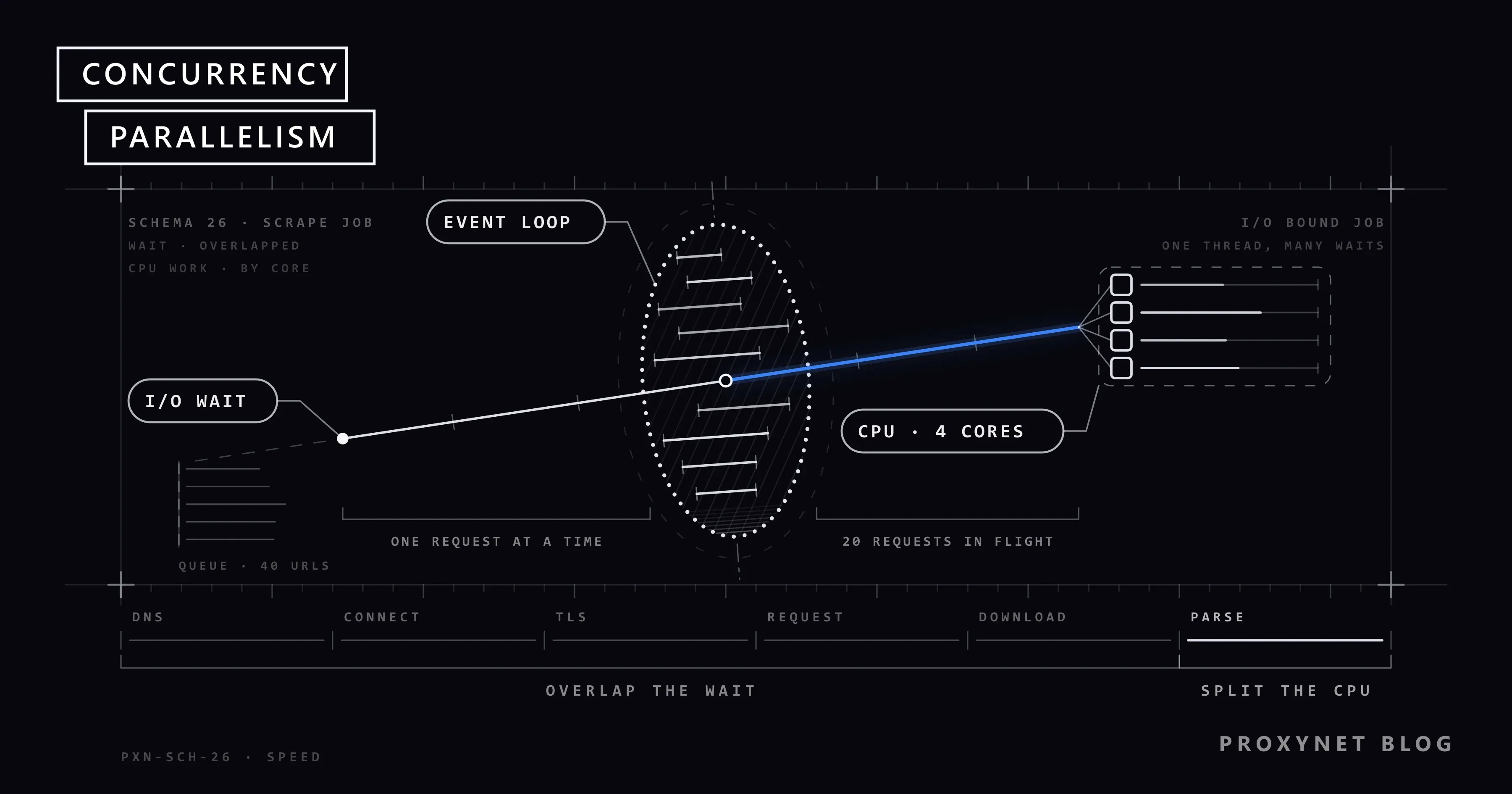
A developer who wants to speed up a scraper usually thinks first of "more cores": split the work across processes, get a bigger server. But in a typical scraping job, the processor sits idle most of the time. The program waits seconds for the target server's response, the TLS handshake and the proxy opening its tunnel. The way to use that waiting time is called concurrency, and the way to use processor power is called parallelism, and the two solve different problems.
In this article we explain the difference between the two concepts, why scraping is mostly an input/output (I/O) heavy job, and when Python's asyncio, threads and processes are useful. We also look at Node.js's event loop, what really limits speed and how to decide on a concurrency value. We ran the example code against a local server with artificial latency, and we share a measurement skeleton so you can measure your own work.
What is concurrency?
Concurrency is the ability of several tasks to make progress in the same period. The tasks don't have to run at the same instant; while one waits, another runs. A cook chopping salad while waiting for pasta water to boil is concurrency: one person finishes two jobs in the same amount of time.
In programming, this is done by a task handing control to another task at the moment it waits for a response. Python's asyncio and Node.js's event loop work this way. A single processor core and a single thread can keep hundreds of network requests "open" at once, because none of those requests use the processor while they wait.
What is parallelism?
Parallelism is running several tasks physically at the same time, on different processor cores. In the kitchen example, it is two cooks preparing two different dishes at once. The speed of the work grows directly with the number of workers, but each worker needs their own counter and ingredients.
In programming, parallelism is usually achieved with several processes or with threads that can truly run at the same time. Its benefit shows up when the work uses the processor heavily: parsing a large HTML document, processing images, compressing data.
| Criterion | Concurrency | Parallelism |
|---|---|---|
| Core idea | Overlap waiting times | Split work across cores |
| Cores needed | One core is enough | Several cores |
| Suitable work | I/O-heavy: network, disk, database | CPU-heavy: parsing, computation |
| Python tools | asyncio, threads | multiprocessing, ProcessPoolExecutor |
| Node.js tools | Event loop, Promise | worker_threads, multiple processes |
| Memory cost | Low, small per task | High, separate memory per process |
| Role in scraping | Sending requests and receiving responses | Parsing pages, running headless browsers |
| Typical mistake | Straining the target with unlimited concurrency | Splitting I/O work across processes and wasting resources |
The two concepts are not alternatives. A large scraping system usually uses both: each process manages hundreds of requests concurrently, and the processes run in parallel on different cores.
Why is scraping I/O-heavy?
Looking at the stages a single page request goes through shows how little the processor works:
- DNS resolution. Turning the domain name into an IP address. A query and a response over the network.
- Connection to the proxy and the tunnel. A TCP connection to the proxy, a
CONNECTrequest, then waiting until the proxy connects to the target. - TLS handshake. An encrypted connection with the target server. It takes a few round trips.
- Sending the request and waiting for the response. The target server prepares the page; on pages with database queries this takes longer.
- Downloading the response. Depends on page size and bandwidth.
- Parsing. Extracting data from the HTML. This is the only step that uses the processor.
In the first five steps the program waits for bytes from the network. In a script that downloads pages one after another, parsing is a small part of the total; the script spends most of its time waiting while the processor is idle.
But that ratio is not fixed. On a local server that delays every response by 300 milliseconds, we downloaded and parsed 40 pages, each containing 400 product cards. Raising concurrency from 1 to 5 and 20 cut the download time by more than ten times. At a concurrency of 20, parsing the same pages on a single core took longer than downloading them; moving to a process pool cut that step roughly in half. So as concurrency rises, the bottleneck can shift from the network to the processor. The numbers will be different for your targets; we recommend measuring your own work with the measurement skeleton below.
What is the difference between asyncio, threads and processes in Python?
Python has three tools, and the key to choosing between them is the GIL (Global Interpreter Lock). In the standard CPython interpreter, the GIL allows only one thread to run Python code at a time. But a thread releases the GIL while it waits for data from the network. As a result:
asyncio: an event loop running in a single thread. Tasks hand control to each other atawaitpoints. It is the lightest option for hundreds or even thousands of concurrent network requests. The asyncio documentation describes the building blocks of this model. The library must also be async: HTTPX'sAsyncClientor AIOHTTP.- Threads (
ThreadPoolExecutor): because the GIL is released while waiting on the network, threads give a real speed-up for I/O work. They are the easiest way to add concurrency with synchronous libraries such as Requests. A thread costs more memory than anasynciotask, so efficiency drops after a few hundred concurrent requests. - Processes (
ProcessPoolExecutor,multiprocessing): each process runs with its own interpreter and its own GIL, so they give real parallelism for CPU-heavy work. Starting processes and moving data between them is expensive. The concurrent.futures documentation defines the common interface for thread and process pools.
Python 3.13 also introduced an experimental build that can run without the GIL; but because library compatibility is still limited, the standard build and the trio above remain common in production scraping work.
| Tool | Does it give parallelism? | Suitable work | Use in scraping |
|---|---|---|---|
asyncio + HTTPX/AIOHTTP | No, single thread | Many network requests | Downloading pages |
ThreadPoolExecutor + Requests | Effectively yes during I/O | A moderate number of network requests, synchronous code | Speeding up existing Requests code |
ProcessPoolExecutor | Yes | CPU-heavy work | Parsing large pages |
We compare the concurrency support of Python libraries in HTTPX vs Requests vs AIOHTTP.
Example 1: limited concurrency with asyncio.Semaphore
The code below downloads pages concurrently but limits the number of open requests at any time with the limit value. Without the Semaphore, asyncio.gather starts every request at once, which strains both your own connection pool and the target site.
import asyncio

import httpx


async def fetch(client, sem, url):
    async with sem:
        response = await client.get(url)
        response.raise_for_status()
        return response.text


async def fetch_all(urls, limit=10, proxy=None):
    sem = asyncio.Semaphore(limit)
    async with httpx.AsyncClient(proxy=proxy, timeout=30) as client:
        return await asyncio.gather(*(fetch(client, sem, u) for u in urls), return_exceptions=True)


urls = [f"https://example.com/product/{i}" for i in range(100)]
pages = asyncio.run(fetch_all(urls, limit=10, proxy="http://user:pass@pr.proxynet.io:8000"))
A single AsyncClient is shared across all requests. That lets connections be reused and avoids a new TLS handshake on every request.
Example 2: concurrent downloads, parallel parsing
If pages are large and parsing takes noticeable time, combining the two models makes sense: download with asyncio, parse in a process pool.
import asyncio
from concurrent.futures import ProcessPoolExecutor

from bs4 import BeautifulSoup


def parse(html):
    soup = BeautifulSoup(html, "html.parser")
    return [(p.h2.get_text(strip=True), p.select_one(".price").get_text(strip=True)) for p in soup.select(".product")]


async def scrape(urls, limit=10, proxy=None):
    pages = await fetch_all(urls, limit=limit, proxy=proxy)
    html_pages = [p for p in pages if isinstance(p, str)]
    loop = asyncio.get_running_loop()
    with ProcessPoolExecutor() as pool:
        return await asyncio.gather(*(loop.run_in_executor(pool, parse, html) for html in html_pages))


if __name__ == "__main__":
    results = asyncio.run(scrape(urls, limit=10))
The if __name__ == "__main__": line is required on Windows and macOS: the process pool starts new processes by loading the module from the top, and without this guard the code runs itself over and over.
It's important to know this setup does not always speed things up. Starting processes and moving HTML between them has a cost; if pages are small and few, that cost can exceed the parsing itself. In the test above, the process pool clearly shortened parsing on pages with 400 cards, but the process startup cost was added to the total time that combined downloading and parsing. Measure with your own pages before deciding.
How does the Node.js event loop work?
Node.js runs JavaScript code in a single thread and manages network operations through an event loop. When you call fetch, Node.js hands the request to the operating system and the JavaScript code carries on; when the response arrives, the related callback is queued. Node.js's event loop guide explains the phases of this loop in detail.
For scraping this has three consequences:
- Network requests are naturally concurrent. Every
Promise-based request does not block the others while it waits. It is similar to Python'sasynciomodel. - CPU-heavy code stops the whole loop. While a synchronous function is parsing a large HTML document, no other response can be handled. For that kind of work, use separate threads with the
worker_threadsmodule or separate processes. - Domain name resolution can be a hidden bottleneck. Node.js's default
dns.lookupfunction runs the operating system resolver on libuv's small thread pool. In a script connecting to many different domains at once, that pool can fill up. When you use a proxy, target domains are resolved on the proxy side, which reduces the effect.
You don't need an extra library to limit concurrency; a simple limiter is enough:
function limiter(max) {
  let active = 0;
  const queue = [];
  const next = () => {
    if (active >= max || queue.length === 0) return;
    active++;
    const { task, resolve, reject } = queue.shift();
    task().then(resolve, reject).finally(() => {
      active--;
      next();
    });
  };
  return (task) => new Promise((resolve, reject) => {
    queue.push({ task, resolve, reject });
    next();
  });
}

const limit = limiter(10);
const results = await Promise.allSettled(
  urls.map((url) => limit(() => fetch(url).then((r) => r.text()))),
);
How to pass a proxy in Node.js, along with an example with rotation and retries, is explained in Using a Proxy in Node.js.
What really limits speed?
Raising concurrency increases speed up to a point; after that it either has no effect or slows the job down. In scraping, the ceiling is usually set not by the processor but by these factors:
- The target site's rate limit. If the site allows a certain number of requests per minute from the same source, raising concurrency only produces more
429responses. How to handle these codes is covered in HTTP Status Codes in Web Scraping. - The target server's capacity. When a small site's server slows down, your concurrency lengthens that site's response times; both your job and the site's real visitors slow down.
- Proxy capacity. The plan's concurrent connection limit, the number of IPs in the pool and the response times of exit points. With a Rotating Proxy, which offers many exit IPs through a single address, requests are spread across different addresses, but the connection limit set for the plan still applies.
- Bandwidth. When downloading large pages and responses with images, your own connection's or proxy traffic's limit kicks in.
- Connection setup cost. If a new connection and a new TLS handshake are made on every request, time goes up. Sharing the client and reusing connections lowers that cost.
- Distance. The latency between the proxy's exit point and the target server is added to every round trip. With Residential Proxy addresses that go out through real home connections, this time varies by location and line.
- The processor. It only becomes decisive when running headless browsers, parsing very large documents or doing heavy data processing on the same machine.
We cover the other ways to tune speed without getting blocked or harming the site in How to Scrape Websites Without Getting Blocked.
How high should concurrency be set?
There is no single number for every job; the right value is found by measuring. The method we recommend:
- Start with a low value. A few concurrent requests for a single target site.
- Measure three things. Pages completed per minute, average response time and error rate (
429,503, timeouts). - Increase the value gradually. Repeat the same measurement at each step.
- Find the turning point. When pages completed stop increasing and response time or error rate starts rising, go back to the previous value.
- Set a limit per site. If you crawl several sites at once, total concurrency can be high, but the share for each site should stay small.
- Measure again periodically. Target sites' infrastructure and rate limits change over time.
A simple skeleton for measuring:
import asyncio
import time


def measure(label, fn):
    start = time.perf_counter()
    result = fn()
    elapsed = time.perf_counter() - start
    print(f"{label}: {elapsed:.2f} s")
    return result


for limit in (1, 5, 10, 20):
    pages = measure(f"limit={limit}", lambda: asyncio.run(fetch_all(urls, limit=limit)))
    errors = sum(isinstance(p, Exception) for p in pages)
    print(f"  errors: {errors} / {len(pages)}")
time.perf_counter() is a high-resolution counter that is not affected by changes to the system clock, and it suits measuring durations better than time.time(). Run the measurement with a small URL list that won't put load on the target site, and if possible at hours when the site isn't busy.
Use cases
- A limited number of pages from one site: synchronous Requests with delays between requests. No concurrency needed.
- Price and catalogue collection from many sites: concurrency with a small per-site limit using
asyncio, and a rotating proxy for distribution. The general setup is on our data scraping solution page. - Large-scale crawling: several processes, each running
asyncio; a queue per domain. The scaling side is on our web crawler solution page. - Speeding up an existing Requests script: with
ThreadPoolExecutor, without rewriting the code. For a rotating Requests setup, see How to Rotate Proxies in Python. - Pages loaded with JavaScript: because a headless browser uses a lot of CPU and memory, the number of concurrent browsers is limited by cores and memory.
Common mistakes
- Splitting I/O-heavy work across processes. You pay the process startup and memory cost, but speed doesn't improve because the bottleneck is the network.
- Using a synchronous library inside
asyncio. Arequests.get()call inside anasync defstops the event loop, and all tasks run one after another. - Unlimited
gatherorPromise.all. Starting thousands of requests at once leads to connection errors and rate limits on the target site. - Creating a new client for every request. Connections aren't reused, and every request does a new TLS handshake.
- Looking at total time but not error rate. A job that gets faster while its
429rate rises collects less data. - Parsing on the main thread in Node.js. On large documents the event loop stops and waiting responses can time out.
Decision guide
| Your situation | Recommendation |
|---|---|
| Many pages, small HTML | asyncio + HTTPX/AIOHTTP, limited with Semaphore |
| Existing synchronous Requests code | ThreadPoolExecutor |
| Large pages, heavy parsing | Download with asyncio, parse with ProcessPoolExecutor |
| Downloading pages with Node.js | Promise + concurrency limiter |
| Heavy parsing in Node.js | worker_threads |
| Headless browser | A few concurrent browsers based on cores and memory |
The 429 rate is rising | Lower concurrency, set a per-site limit |
| Speed isn't improving and there are no errors | Measure the bottleneck: proxy, bandwidth, target server |
Frequently asked questions
Are concurrency and parallelism the same thing?
No. Concurrency is tasks making progress in the same period and can happen on a single core. Parallelism is tasks really running at the same time on several cores. Every parallel system is concurrent, but not every concurrent system is parallel.
asyncio or threads for scraping?
If you are writing from scratch and will send many requests, asyncio manages more concurrent requests with fewer resources. If your existing code is written with Requests and concurrent requests won't go beyond a few hundred, ThreadPoolExecutor is the easiest way to speed it up without rewriting the code.
Does the GIL slow scraping down?
Because the GIL is released during network requests, it doesn't slow page downloads in practice. In CPU-heavy steps such as parsing, threads cannot run Python code at the same time; a process pool is used for those steps.
Do more proxy IPs increase speed?
If the target site counts its rate limit per IP, spreading the load can let you reach more pages in the same time. But if the site applies the limit by other criteria, or the bottleneck is bandwidth or the target server's capacity, the number of IPs doesn't change the result. Not harming the site is a responsibility that holds regardless of how many IPs you have.
What happens if I set concurrency too high?
On your side it leads to connection pool and file handle limits; on the target side, 429 responses, timeouts and a slower site. After a point, pages completed stop increasing and errors increase.
How is concurrency set for headless browsers?
Each browser instance uses significant memory and CPU, so the number of concurrent pages is limited by machine resources rather than the network. Start with a few browser instances and increase while watching memory and CPU usage. When a headless browser is really needed is explained in Static vs Dynamic Pages.
Summary
Concurrency makes use of waiting time, parallelism makes use of processor cores. Because most of the time in scraping is spent waiting for network responses, speed is mostly increased by limited concurrency built with asyncio, threads or the Node.js event loop; a process pool is only needed for CPU-heavy steps such as heavy parsing and headless browsers. The ceiling is usually set by the target site's rate limit, proxy capacity and bandwidth. Set concurrency by measuring, not guessing, and set a limit per site. For data collection at scale, take a look at our proxy services.