The script you wrote with Requests and BeautifulSoup runs fine on a hundred pages. At ten thousand pages the job itself changes: you have to manage which address has been crawled, which one failed and needs a retry, how many requests hit the same site at once, and where the data gets written. Scrapy is a Python framework that ships with all of that built in. The proxy setting also lives inside this structure, in one of the layers every request passes through.
In this post we first show briefly what Scrapy is and how to install it. Then we move to the main topic: the three ways to define a proxy, authentication, the difference between a single-endpoint rotating gateway and your own proxy list, speed control with DOWNLOAD_DELAY and AutoThrottle, and how Scrapy behaves on 429 and 503 responses. We ran every example with Scrapy 2.19 and Python 3.13, against the practice sites at toscrape.com and a local test proxy.
What is Scrapy and what is it for?
Scrapy is a Python framework written for crawling websites and extracting structured data from their pages. Here is how it differs from a library: Requests gives you a tool for sending one request, and you build the loop. In Scrapy the loop is the framework itself. You only write a class that says where to start and what to take from each page that comes back; that class is called a spider.
Everything outside the spider is ready: a scheduler that queues requests, a duplicate filter that never asks for the same address twice, an asynchronous downloader, retries, robots.txt checks, rate limiting and export to JSON or CSV. For selectors, CSS and XPath are used side by side; we covered how they differ in CSS Selector vs XPath. For the broader map of tools on the Python and JavaScript sides, see Web Scraping: JavaScript or Python?.
How do you install Scrapy?
Install Scrapy into a virtual environment that belongs to the project, not into the system Python. On Windows the commands are:
python -m venv venv
venv\Scripts\activate
pip install scrapy
scrapy startproject kitaplik
cd kitaplik
scrapy genspider kitaplar books.toscrape.com
On macOS and Linux the second line becomes source venv/bin/activate. The startproject command generates a skeleton with settings.py, middlewares.py and a spiders/ folder. The settings.py file of the current template comes with three settings already in place: ROBOTSTXT_OBEY = True, CONCURRENT_REQUESTS_PER_DOMAIN = 1 and DOWNLOAD_DELAY = 1. In other words, a new project obeys robots.txt by default and sends roughly one request per second to the same site. Do not delete these lines; build your own settings on top of them.
Fill the file created by genspider as shown below. The spider reads the book cards and follows the "next page" link:
import scrapy


class KitaplarSpider(scrapy.Spider):
    name = "kitaplar"
    allowed_domains = ["books.toscrape.com"]
    start_urls = ["https://books.toscrape.com/"]

    def parse(self, response):
        for kart in response.css("article.product_pod"):
            yield {
                "baslik": kart.css("h3 a::attr(title)").get(),
                "fiyat": kart.css("p.price_color::text").get(),
                "adres": response.urljoin(kart.css("h3 a::attr(href)").get()),
            }

        sonraki = response.css("li.next a::attr(href)").get()
        if sonraki:
            yield response.follow(sonraki, callback=self.parse)
The command scrapy crawl kitaplar -O kitaplar.json runs the spider and writes the result to a file. In our run the first two pages returned 40 records. Keep the FEED_EXPORT_ENCODING = "utf-8" line from the template so that non-ASCII characters and currency symbols are not mangled in the file. If you export to CSV and the letters still look broken in Excel, we explain why and how utf-8-sig fixes it in Python Encoding Errors.
How does Scrapy process a request?
To understand where the proxy setting belongs, you need to know the path a request takes:
- The spider produces a
Requestobject (fromstart_urlsorresponse.follow). - The engine hands the request to the scheduler; the duplicate filter drops addresses that were already requested.
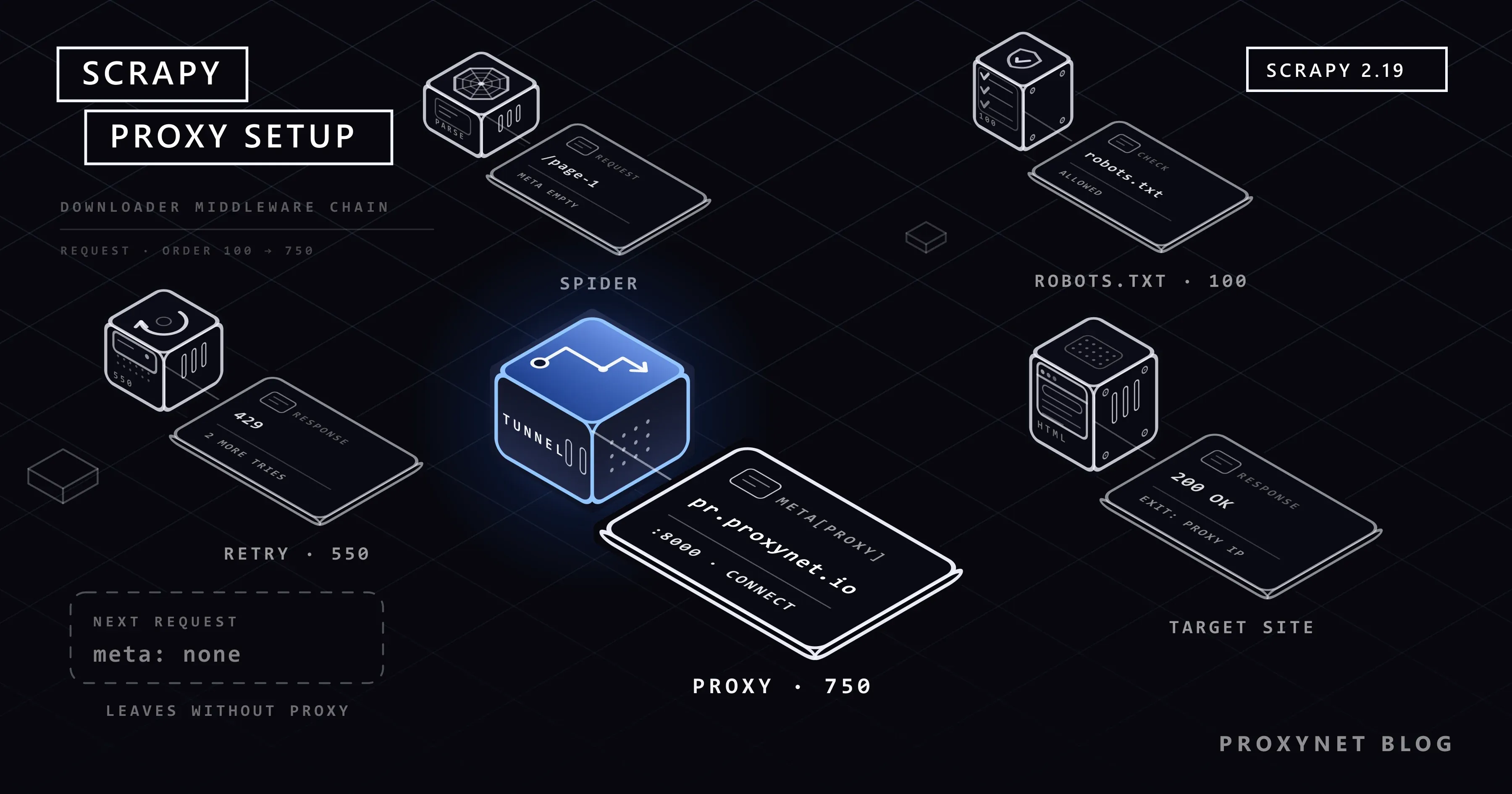
- When its turn comes, the request passes through the downloader middleware chain. Each middleware carries an order number and the request moves from the smaller number to the larger: the robots.txt check is 100, retry is 550,
HttpProxyMiddlewareis 750. - The downloader sends the request to the network. If the request has
meta["proxy"], the connection opens to the proxy instead of the target; for HTTPS addresses aCONNECTtunnel is set up through the proxy. - The response travels back through the same chain in reverse order and reaches the spider's callback (
parse). - The records the callback yields go to the item pipeline, and new requests go back to the scheduler.
The takeaway: the proxy belongs to step three, not to the spider's parsing code. No matter who fills meta["proxy"], the component that does the work is HttpProxyMiddleware. This middleware is enabled by default; the HttpProxyMiddleware section of the Scrapy documentation defines its behaviour.
How do you define a proxy in Scrapy?
There are three ways, and all three end up filling the same meta["proxy"] field.
| Method | Where it goes | Scope | When it fits |
|---|---|---|---|
meta["proxy"] | In the spider, inside each Request | That request only | Sending a few requests through a different exit |
| Environment variable | In the shell, http_proxy / https_proxy | All requests, robots.txt included | Quick trials, running without code changes |
| Downloader middleware | middlewares.py + settings.py | All requests, robots.txt included | Permanent project setup, rotation |
Per request: the meta field
import scrapy

PROXY = "http://user:pass@pr.proxynet.io:8000"


class KitaplarMetaSpider(scrapy.Spider):
    name = "kitaplar_meta"
    allowed_domains = ["books.toscrape.com"]

    async def start(self):
        yield scrapy.Request("https://books.toscrape.com/", meta={"proxy": PROXY})

    def parse(self, response):
        for kart in response.css("article.product_pod"):
            yield {"baslik": kart.css("h3 a::attr(title)").get()}

        sonraki = response.css("li.next a::attr(href)").get()
        if sonraki:
            # meta is not passed on to the new request automatically, carry it by hand
            yield response.follow(sonraki, callback=self.parse, meta={"proxy": PROXY})
This method has two consequences that are easy to miss, and we saw both in testing. First, meta is not carried over to the next request on its own. In the run where we left meta out of the response.follow call, the first page went through the proxy and the second page went straight out from our own IP address. Second, Scrapy's robots.txt request is not a request you wrote, so it carries no meta and also leaves without a proxy. If you want all traffic to use the same exit, pick one of the two methods below.
Environment variable
Like the Python standard library, HttpProxyMiddleware reads the http_proxy, https_proxy and no_proxy variables. Without changing anything in the code:
export https_proxy="http://user:pass@pr.proxynet.io:8000"
export http_proxy="$https_proxy"
scrapy crawl kitaplar
If a request also has meta["proxy"], that value takes precedence over the environment variable and ignores the no_proxy list. How these variables are defined on Windows, macOS and Linux, and the upper and lower case difference, is covered in Using a Proxy with wget; we do not repeat it here.
For the whole project: a small middleware
For a permanent setup, a middleware of a few lines that reads the address from the environment, rather than hard-coding it, is enough:
# kitaplik/middlewares.py
from scrapy.exceptions import NotConfigured


class TekProxyMiddleware:
    """Applies the single proxy address from the settings to every request."""

    def __init__(self, adres):
        self.adres = adres

    @classmethod
    def from_crawler(cls, crawler):
        adres = crawler.settings.get("PROXY_ADRESI")
        if not adres:
            raise NotConfigured
        return cls(adres)

    def process_request(self, request):
        request.meta.setdefault("proxy", self.adres)
return None# kitaplik/settings.py
import os
PROXY_ADRESI = os.environ.get("PROXY_ADRESI")
DOWNLOADER_MIDDLEWARES = {
"kitaplik.middlewares.TekProxyMiddleware": 610,
}Thanks to setdefault, a meta["proxy"] you wrote by hand on a request is preserved. If PROXY_ADRESI is not defined, the middleware disables itself and the spider runs without a proxy. The order number has to be lower than 750; that way you write the address first and HttpProxyMiddleware parses the credentials afterwards. In examples written for older versions you will see the signature as process_request(self, request, spider); the current documentation has no spider parameter, and the example runs as written on Scrapy 2.19.
How does authentication work?
HttpProxyMiddleware splits off the user:pass part of the address, encodes it with Base64 and adds it to the request as a Proxy-Authorization: Basic … header. What remains in meta["proxy"] is the address without credentials; you will not see your password in the log. If the password contains @, : or /, write it percent-encoded (%40 instead of @); the middleware decodes the value before sending it.
In our run with a wrong password, Scrapy logged this line:
TunnelError: Could not open CONNECT tunnel with proxy 127.0.0.1:8120 [{'status': 407, 'reason': b'Proxy Authentication Required'}]For HTTPS addresses, 407 does not arrive as a response but as an exception, because the tunnel could not be opened. One thing to watch: the retry middleware treats this exception as a temporary failure and tries the same request two more times. A wrong password does not fix itself through repetition; if you see TunnelError and 407 in the log, stop the crawl and correct the credentials. If you use an IP whitelist instead of a username and password, the address is written without credentials, as http://pr.proxynet.io:8000. The difference between the two methods is covered in Proxy Authentication: User:Pass vs IP Whitelist.
Do you need a middleware for rotation?
The answer depends on the kind of proxy you have.
With a rotating gateway you do not. With a rotating proxy service you connect to a single endpoint and the gateway changes the exit IP. On the Scrapy side the TekProxyMiddleware above, or a single environment variable, is enough; keeping a list, picking the next address and weeding out broken ones is not your job. This is the typical setup for crawls run with Residential Proxy. How the rotation modes work is explained in our post on IP rotation.
If you have a list of fixed addresses (for example a few Datacenter Proxy or ISP Proxy addresses), a middleware does the distribution. The example below uses the addresses in turn, rests an address that fails several times in a row, and writes the counts to the Scrapy stats:
# kitaplik/middlewares.py
import time
from urllib.parse import urlsplit

from scrapy.exceptions import IgnoreRequest, NotConfigured


def anahtar(proxy_adresi):
    parca = urlsplit(proxy_adresi)
    return f"{parca.hostname}:{parca.port}"


class ProxyHavuzuMiddleware:
    """Assigns the next proxy in the list to each request and rests one that keeps failing."""

    def __init__(self, adresler, hata_siniri, dinlenme, stats):
        self.adresler = adresler
        self.hata_siniri = hata_siniri
        self.dinlenme = dinlenme
        self.stats = stats
        self.sira = 0
        self.hatalar = {anahtar(a): 0 for a in adresler}
        self.kapali = {}  # key -> the moment it reopens

    @classmethod
    def from_crawler(cls, crawler):
        adresler = crawler.settings.getlist("PROXY_LISTESI")
        if not adresler:
            raise NotConfigured
        return cls(
            adresler,
            crawler.settings.getint("PROXY_HATA_SINIRI", 3),
            crawler.settings.getfloat("PROXY_DINLENME", 60.0),
            crawler.stats,
        )

    def sec(self):
        simdi = time.monotonic()
        for _ in self.adresler:
            adres = self.adresler[self.sira % len(self.adresler)]
            self.sira += 1
            if self.kapali.get(anahtar(adres), 0) <= simdi:
                return adres
        return None

    def process_request(self, request):
        adres = self.sec()
        if adres is None:
            self.stats.inc_value("proxy_havuzu/hepsi_dinleniyor")
            raise IgnoreRequest("Every proxy in the list is resting")
        request.meta["proxy"] = adres
        request.meta["proxy_anahtari"] = anahtar(adres)
        return None

    def process_response(self, request, response):
        kim = request.meta.get("proxy_anahtari")
        if kim:
            self.hatalar[kim] = 0
            self.stats.inc_value(f"proxy_havuzu/yanit/{kim}")
        return response

    def process_exception(self, request, exception):
        kim = request.meta.get("proxy_anahtari")
        if not kim:
            return None
        self.hatalar[kim] += 1
        self.stats.inc_value(f"proxy_havuzu/hata/{kim}")
        if self.hatalar[kim] >= self.hata_siniri:
            self.kapali[kim] = time.monotonic() + self.dinlenme
            self.hatalar[kim] = 0
return None# kitaplik/settings.py
PROXY_LISTESI = [
"http://user:pass@203.0.113.10:8000",
"http://user:pass@203.0.113.11:8000",
"http://user:pass@203.0.113.12:8000",
]
DOWNLOADER_MIDDLEWARES = {
"kitaplik.middlewares.ProxyHavuzuMiddleware": 610,
}We tried the example with three local proxies, two running and one switched off. All one hundred records arrived; requests were split 6 and 5 between the two working addresses, the dead address was taken out after three connection errors, and Scrapy retried the failed requests through the other addresses.
The order number is not arbitrary here. In our first attempt we put the middleware at 350 and the error counter never fired: exceptions travel through the chain in reverse order, and when the retry middleware at 550 catches the exception and returns a new request, middlewares with smaller numbers are never told. A value between 550 and 750 (610 in the example) meets both conditions: you see the error before the retry does, and HttpProxyMiddleware handles the credentials after you. Doing the same job by hand with Requests is covered in How to Rotate Proxies in Python.
How do you set DOWNLOAD_DELAY and AutoThrottle?
A proxy changes where the request leaves from; it does not change the load placed on the target server. The settings that decide the load are these:
# kitaplik/settings.py
USER_AGENT = "kitaplik-bot/1.0 (+https://ornek.com/bot)"
ROBOTSTXT_OBEY = True

CONCURRENT_REQUESTS = 8
CONCURRENT_REQUESTS_PER_DOMAIN = 2
DOWNLOAD_DELAY = 1
DOWNLOAD_TIMEOUT = 30

AUTOTHROTTLE_ENABLED = True
AUTOTHROTTLE_START_DELAY = 2
AUTOTHROTTLE_MAX_DELAY = 30
AUTOTHROTTLE_TARGET_CONCURRENCY = 1.0
AUTOTHROTTLE_DEBUG = False

RETRY_ENABLED = True
RETRY_TIMES = 2
RETRY_HTTP_CODES = [429, 500, 502, 503, 504, 408]CONCURRENT_REQUESTS_PER_DOMAINis the number of requests that can be open to the same domain at the same time. The framework default is 8; the project template lowers it to 1. What concurrency means is explained in Concurrency vs Parallelism.DOWNLOAD_DELAYis the wait between two requests to the same domain, in seconds. By default Scrapy adds a random variation to this value, so requests do not go out at clockwork intervals.- AutoThrottle adjusts the wait to the server's response time. According to the algorithm in the documentation, the target delay is the response latency divided by
AUTOTHROTTLE_TARGET_CONCURRENCY, and the new delay is the average of the previous delay and that target. Responses other than200cannot lower the delay. The delay never drops belowDOWNLOAD_DELAYand never rises aboveAUTOTHROTTLE_MAX_DELAY. DOWNLOAD_TIMEOUTdefaults to 180 seconds. When working through a proxy, shorten it so that a connection that never answers does not hang for three minutes.
With AUTOTHROTTLE_DEBUG = True you get one line per response. In our run the delay started at 2,000 ms, dropped to 1,072 ms as the server answered in 145 ms, then settled at 1,000 ms, the DOWNLOAD_DELAY floor, and stayed there:
slot: books.toscrape.com | conc: 1 | delay: 2000 ms (+0)   | latency: 446 ms
slot: books.toscrape.com | conc: 1 | delay: 1072 ms (-927) | latency: 145 ms
slot: books.toscrape.com | conc: 1 | delay: 1000 ms (-72)  | latency: 144 ms
With ROBOTSTXT_OBEY on, Scrapy first downloads /robots.txt for each domain and drops disallowed addresses without requesting them. How the file is read is covered in What Is a robots.txt File and How Do You Read It?, and the legal framework of crawling in Is Data & Web Scraping Legal?. Putting an address where you can be reached into USER_AGENT lets the site administrator write to you when they see a problem, instead of blocking you.
What does Scrapy do on 429 and 503 responses?
By default the retry middleware retries the codes 500, 502, 503, 504, 522, 524, 408 and 429 as well as connection errors; RETRY_TIMES = 2 means three attempts in total, counting the first request. A retried request goes back into the queue with a lower priority.
Two limits are worth knowing. Scrapy's retry does not read the Retry-After header and does not apply an exponential wait between attempts; the gap is still decided by DOWNLOAD_DELAY and AutoThrottle. Because AutoThrottle does not lower the delay on responses other than 200, speed does not climb by itself during a wave of 429s, but it may not drop far enough automatically either. If the share of 429s in the log is growing, the right reaction is to lower CONCURRENT_REQUESTS_PER_DOMAIN and raise DOWNLOAD_DELAY. Trying to get past a rate limit with more IPs does not solve the problem; it increases the load on the site. What the codes mean and how to wait correctly with Retry-After is in HTTP Status Codes in Web Scraping, and the site-side logic of rate limiting in our post on 429 Too Many Requests.
Can you use a SOCKS5 proxy in Scrapy?
Not with the default downloader. In the run where we wrote a socks5:// address into meta["proxy"], the request waited until the timeout without receiving any response. Scrapy's second, httpx-based downloader HttpxDownloadHandler, however, has supported SOCKS5 since version 2.17. To set it up, run pip install "scrapy[httpx]" and add this to your settings:
DOWNLOAD_HANDLERS = {
    "http": "scrapy.core.downloader.handlers._httpx.HttpxDownloadHandler",
    "https": "scrapy.core.downloader.handlers._httpx.HttpxDownloadHandler",
}
With this setting a socks5://user:pass@… address worked in our test, authentication included. The Scrapy documentation marks this downloader as experimental and does not yet recommend it for production; it also notes that it opens a separate connection pool for each proxy address. Unless you have to, stay with an HTTP proxy. The protocol differences are in SOCKS vs. HTTP Proxy.
What about pages loaded with JavaScript?
Scrapy downloads the page's HTML; it does not run JavaScript. If the data is loaded later in the browser, first look at the JSON endpoint the page calls in the background; most of the time that address can be requested directly with Scrapy. If that is not possible, the scrapy-playwright plugin opens the requests you choose in a real browser. Note that in this plugin the proxy is not given through meta["proxy"] but through the browser launch or context options. The details are in What Is Playwright and How to Use It With a Proxy, and the way to tell page types apart is in Static vs Dynamic Pages.
Scrapy, BeautifulSoup or Selenium?
The three are different parts of the same job, which is why the comparison is usually set up wrong.
| Scrapy | Requests + BeautifulSoup | Selenium | |
|---|---|---|---|
| What it is | Crawling framework | HTTP client + HTML parser | Browser automation |
| Request queue and concurrency | Built in | You write it | You write it |
| Retries, rate limiting, robots.txt | Switched on in settings | You write it | You write it |
| Running JavaScript | No (with a plugin) | No | Yes |
| Proxy definition | meta["proxy"] or middleware | proxies= parameter | Browser launch option |
| Learning curve | Medium | Low | Medium |
| Suitable job | Multi-page, recurring crawls | One-off, a few pages | Login, clicks, dynamic content |
BeautifulSoup is only a parser and can be used inside Scrapy as well. Selenium opens a full browser for every page, so it handles far fewer pages on the same hardware; it makes sense only for the steps that truly need a browser. Proxy setup on the Selenium side is in Selenium Proxy Integration, and the comparison of the two browser tools in our post on Playwright vs Selenium.
Use cases
- Price and stock tracking: The same product list is crawled every day; Scrapy's structure, which suits scheduled runs, fits this job. The setup is on our price monitoring solution page, and a working example is in our post on competitor price tracking in e-commerce.
- Site crawling and index building: The
CrawlSpiderclass, which walks every page by following links, is a ready starting point for web crawler jobs. - Multi-site catalogue collection: A separate spider for each site, a shared pipeline and a shared proxy setting. The general architecture is on our data scraping solution page.
- Paginated lists: The "next" link, page number and cursor patterns are in our post on pagination in web scraping.
Common mistakes
- Writing the proxy only on the first request.
metais not passed to later requests; from the second page on the crawl continues from your own IP address and you will not notice it in the log. - Picking the middleware order number at random. Above 750 the credentials are not parsed and the request fails with an
invalid hostnameerror; below 550 you cannot see connection errors. - Deleting the
ROBOTSTXT_OBEY,DOWNLOAD_DELAYand concurrency lines from the template. The framework's bare defaults (robots.txt off, no delay, 8 requests per domain) are fast enough to strain a small site. - Continuing the crawl while getting
407. Every request is tried three times and none succeeds; fix the credentials first. - Adding a rotation middleware on top of a rotating gateway. The gateway already does this job; a second layer only makes debugging harder.
- Leaving
DOWNLOAD_TIMEOUTat the default. A single connection that never answers keeps a slot busy for three minutes. - Writing the password into
settings.pyand pushing it to the repository. Read the address from an environment variable.
Decision guide
| Need | Recommendation |
|---|---|
| A one-off job of a few pages | Requests + BeautifulSoup is enough, Scrapy is not required |
| Thousands of pages, repeated regularly | A Scrapy project, with the template settings kept |
| All traffic through the proxy | TekProxyMiddleware or the https_proxy environment variable |
| Only certain requests through a different exit | meta["proxy"] on those requests |
| Spreading load across many IPs | Rotating gateway, single address, no middleware |
| You have a fixed proxy list | ProxyHavuzuMiddleware, order number between 550 and 750 |
| The same IP for a whole session | Sticky Proxy and a single address |
429s are growing in the log | Lower concurrency, raise DOWNLOAD_DELAY, turn on AutoThrottle |
| SOCKS5 is mandatory | HttpxDownloadHandler (experimental) |
| The data arrives through JavaScript | JSON endpoint first, otherwise scrapy-playwright |
Frequently asked questions
What is a Scrapy spider?
A spider is a Python class derived from scrapy.Spider that defines two things: which addresses the crawl starts from, and which data and which new links are extracted from each response. The queue, downloading and error handling are the framework's job, not the spider's.
Do you need to know Python to use Scrapy?
Yes. A spider is a Python class, and you use selectors, loops and dictionaries. Someone with basic Python can write a first spider; for the middleware and pipeline side you need to be comfortable with classes.
How do I know the proxy is really being used?
Send a request with Scrapy to a service that returns your IP address as JSON and compare the address in the response with your own IP. Logging the value of response.meta.get("proxy") inside parse also shows which request went through which proxy. General methods are in Is My Proxy Working? How to Test a Proxy.
Which is faster, Scrapy or Selenium?
On the same hardware Scrapy handles noticeably more pages, because it does not open a browser and sends requests asynchronously. Speed only matters if the page does not need JavaScript; if the data is produced in the browser, Scrapy on its own cannot see it.
Does AutoThrottle make DOWNLOAD_DELAY unnecessary?
No, that value sets the floor. AutoThrottle never takes the delay below DOWNLOAD_DELAY. On a server that answers quickly the delay falls to this floor and stays there; so relying on AutoThrottle with DOWNLOAD_DELAY = 0 means sending requests to fast servers with almost no wait.
Does using a different IP for every request prevent blocks?
Not on its own. Sites count speed not only per IP but also per session, cookie and behaviour. Rotation spreads the load across many exits; it makes sense together with obeying robots.txt, low concurrency and an honest User-Agent. We gathered the legitimate methods in How to Scrape Websites Without Getting Blocked.
Summary
In Scrapy the proxy is the request's meta["proxy"] field, and you can fill it in three ways: by hand per request, with an environment variable, or with a downloader middleware. For all traffic, robots.txt included, to leave from the same exit you need one of the last two. With a rotating gateway a single address is enough; if you have a fixed list, a middleware numbered between 550 and 750 takes over distribution and error counting. Speed is decided not by the proxy but by DOWNLOAD_DELAY, per-domain concurrency and AutoThrottle; keep the cautious settings the template brings. You can find the proxy types that suit your crawling jobs among our proxy services.