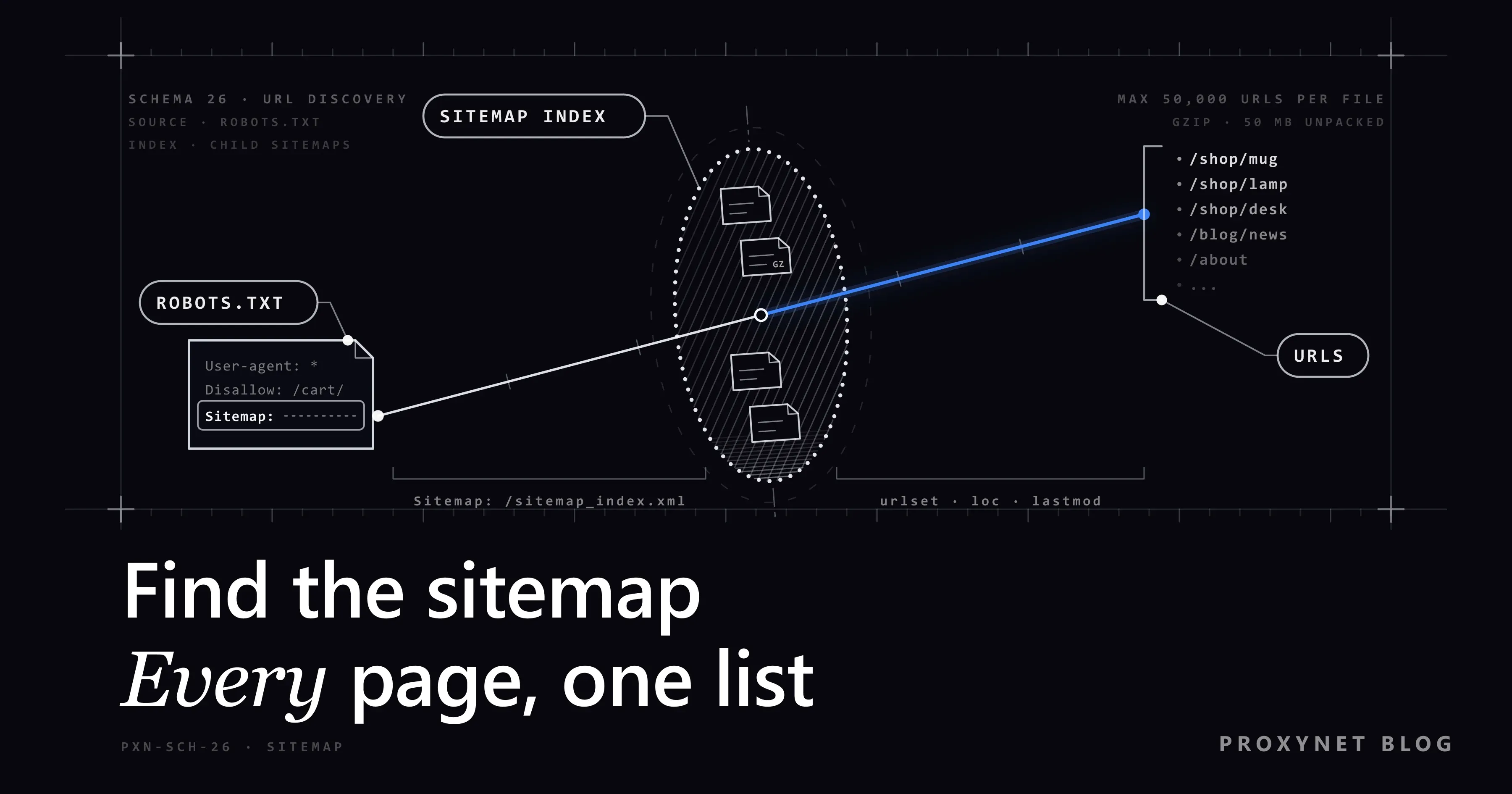
You need a list of every product page on a competitor's online shop. Clicking through every category would take hours and thousands of requests. The owner may already publish that list for search engines in one XML file: the sitemap, a file that lists the addresses the site wants crawled. Finding it lets you see all the pages of a website in a few requests.
This guide covers where to look for a sitemap and in which order, how to read the file, how to open indexes and .gz files, and how to use lastmod to pick only the pages that changed. It ends with a tested Python script, why a sitemap never shows the whole site, and what to do without one. For the wider picture of crawler design, see our web crawler page.
How do you find a website's sitemap?
Try these places in order. Each step costs one request.
- The
Sitemap:lines in robots.txt. Openhttps://example.com/robots.txt. Owners list each sitemap's full address there. RFC 9309 lets crawlers read these lines as a record outside the robots.txt protocol (section 2.2.4); the rest of the syntax is in What Is a robots.txt File and How Do You Read It?. - The root paths. Try
/sitemap.xml, then/sitemap_index.xml. Most generators use one of the two. - The platform's path. Since version 5.5, WordPress core publishes an index at
/wp-sitemap.xmland adds it to robots.txt (WordPress 5.5 announcement). SEO plugins such as Yoast replace it with their own index, usually/sitemap_index.xml. Shopify serves/sitemap.xml, which links to separate sitemaps for products, collections, blogs and pages. - The HTML site map. A footer "Site map" page is written for people but shows the main sections.
- Search Console, for your own site. The Sitemaps report lists what you submitted and how many URLs Google discovered in each file.
A site:example.com filetype:xml search typed into Google once by hand can help too. Do not automate it: Google treats scripted queries as unusual traffic (Google Unusual Traffic Error).
Some sites, documentation sites in particular, also publish an /llms.txt file, a short Markdown selection of key pages for AI tools that does not replace the sitemap; see What Is llms.txt? Format, Example and Does It Work?.
How do you read a sitemap file: urlset, sitemapindex and lastmod
A sitemap with two pages looks like this:
<?xml version="1.0" encoding="UTF-8"?>
<urlset xmlns="http://www.sitemaps.org/schemas/sitemap/0.9">
<url>
<loc>https://example.com/product/1</loc>
<lastmod>2026-09-21T12:00:00+00:00</lastmod>
</url>
<url>
<loc>https://example.com/product/2?colour=red&size=m</loc>
</url>
</urlset>The sitemap protocol requires only <loc>; <lastmod>, <changefreq> and <priority> are optional. Google ignores the last two and uses lastmod only when it is "consistently and verifiably" accurate (Google Search Central). Four more rules matter when you read someone else's file:
- One file holds at most 50,000 URLs and 50 MB (52,428,800 bytes) uncompressed.
- The file is UTF-8, and
&is written as&. An XML parser turns it back; a regular expression does not. - A sitemap at
/catalog/sitemap.xmlmay list only addresses under/catalog/. <xhtml:link hreflang="…">lines point to language versions of a page; they are not<loc>entries.
How do you get from a sitemap to every URL?
A script that turns a domain into a URL list works like this:
- Download robots.txt once; keep its rules and
Sitemap:lines. - With no
Sitemap:line, try the common paths and stop at the first200. - Download the file. If its first two bytes are
1f 8b, decompress it with gzip. - Check the root element. For
sitemapindex, repeat step 3 for each child<loc>; forurlset, collect the entries. - With a date cutoff, drop older entries and skip child files whose index
lastmodis older. - Check each address against robots.txt and skip closed ones.
- Remove duplicates and queue the rest. Keeping the queue on disk so a stopped run can resume is covered in What Is Pagination and How to Scrape Paginated Lists?.
A crawler builds the same kind of list by following links, one request per page, with rules for depth and duplicates. The difference is explained in Web Scraping vs Web Crawling.
URL discovery methods side by side
| Method | Load on the site | What it shows | Change information | When to use it |
|---|---|---|---|---|
| XML sitemap | Very low: a few files | Addresses the owner wants crawled; may be incomplete | lastmod, if accurate | Always first |
| RSS or Atom feed | Very low | Recent content only | Publish dates | Blogs, news, new listings |
| Official API or export | Low, documented limits | What the API offers | Usually | When offered; before HTML |
| Following links | High: one request per page | Everything linked, traps and duplicates included | None | No sitemap or gaps; with a depth limit |
| Wayback CDX API | None (requests go to the archive) | Archived addresses; some are gone | Capture date | No sitemap; candidate list |
| Google Search Console | None | Pages Google knows | Crawl and index status | Your own site only |
The sitemap comes first: a few requests return most of the addresses.
How do you open sitemap indexes and .gz files?
Large sites split their list by type. The index has <sitemapindex> as its root and one <sitemap> element per child file, each with a <loc> and an optional <lastmod>. Google's guide to large sitemaps requires the child files to sit on the same site, in the index's directory or below. A script should still remember the files it opened, so a self-referencing index cannot trap it in a loop.
Compressed files usually end in .xml.gz, and servers tend to send them as application/gzip without a Content-Encoding header. Requests then hands you the compressed bytes unchanged; in our local test the body started with 1f 8b, the gzip signature. Checking those two bytes works whatever the file is called.
The 50 MB limit applies to the uncompressed file, so stop reading there. This also protects you from a decompression bomb, a small file that expands to gigabytes; Python's XML security notes list it next to entity expansion attacks.
Using lastmod to fetch only changed pages
lastmod uses the W3C Datetime format: a date (2026-09-20) or a date with time and zone (2026-09-20T10:00:00+03:00). From Python 3.11, datetime.fromisoformat() reads both, including a trailing Z. Treat values without a zone as UTC so that all dates compare.
Keep entries changed since your last run, plus entries with a missing or broken lastmod: nothing shows they stayed the same. In an index, lastmod says when each child file changed, so an older child file can be skipped without downloading it. In our test with a 30-day cutoff, the script skipped a file last changed in January 2025 and made three requests instead of four.
Whether the dates mean anything depends on the site:
- The same date and time everywhere: the sitemap is rebuilt on each deploy, and the date says nothing about the pages.
- No dates: on 24 September 2026, none of the entries in the docs.python.org sitemap had a
lastmod. - Some dates: WordPress core writes no
lastmodfor the files in its index, so every child file must be opened. Since WordPress 6.5, post entries carry one; category, tag and author sitemaps do not.
Where lastmod fails, use conditional requests and 304 Not Modified, described in How to Scrape Websites Without Getting Blocked.
Why does a sitemap differ from what the site actually serves?
Google calls a submitted sitemap "merely a hint". Expect five kinds of differences:
- Missing pages. On 24 September 2026,
docs.python.org/sitemap.xmllisted 8 URLs, one start page per Python version, while the site serves thousands of pages. - Stale entries. Deleted products linger and return
404or410. Drop them from your list. - robots.txt conflicts. An address can be in the sitemap and closed in robots.txt. robots.txt is the owner's explicit rule, so skip the address; in our test, a listed search page was skipped this way.
- Scope. A subdirectory sitemap covers only that directory, and each subdomain has its own robots.txt and sitemap.
- Variants. Tracking parameters, language alternates and pages with a canonical tag pointing elsewhere all show up. Decide which version you need.
A sitemap lists pages published on purpose, not hidden ones; login-only and noindex pages stay outside this method. The legal side is in Is Data & Web Scraping Legal?.
What if a site has no sitemap?
Sitemaps are optional. These legitimate options come next, in order:
- A feed. WordPress serves one at
/feed/, and many sites announce theirs with<link rel="alternate">in the page head. For new content, it works as well as a sitemap. - An official API or export, with a documented format and limit. See route 1 in Cloudflare Scraper: Why Requests Get Blocked and What Works.
- Following links from category pages, with a depth limit and a page ceiling, as covered in the crawling guide linked above. We build a depth-limited crawler step by step in How to Build a Web Crawler in Python.
- The Wayback Machine CDX API. A query such as
https://web.archive.org/cdx/search/cdx?url=example.com/blog/&matchType=prefix&collapse=urlkey&fl=original&limit=500lists archived addresses under a path (CDX server documentation). Fordocs.python.org/3/library/, our result included2to3.html, which now redirects because Python removed 2to3. Check each address, and keeplimitso the archive is not loaded either. - Search Console's Pages report, for your own site.
We do not recommend guessing paths with wordlists, scraping Google results automatically or entering login areas. Keep a low rate per site.
Reading a sitemap with Python: a working example
The script needs Python 3.11 or later, Requests and lxml (pip install requests lxml).
"""Find a site's sitemap, open indexes and .gz files, and list the URLs.

Usage: python read_sitemap.py https://example.com [DAYS]
With DAYS, only URLs changed in the last DAYS days (or with no usable date) are listed.
"""
import gzip
import io
import os
import sys
import time
from datetime import datetime, timedelta, timezone
from functools import lru_cache
from urllib.parse import urljoin
from urllib.robotparser import RobotFileParser

import requests
from lxml import etree

BOT_NAME = "ExampleSitemapReader"
USER_AGENT = f"{BOT_NAME}/1.0 (+mailto:bots@example.com)"
DELAY = 1.0                        # seconds to wait before every request
LIMIT = 50 * 1024 * 1024           # sitemaps.org: at most 50 MB uncompressed
CANDIDATES = ["/sitemap.xml", "/sitemap_index.xml", "/wp-sitemap.xml"]

session = requests.Session()
session.headers["User-Agent"] = USER_AGENT
if os.environ.get("PROXY_URL"):    # e.g. http://user:pass@pr.proxynet.io:8000
    session.proxies = {"http": os.environ["PROXY_URL"], "https": os.environ["PROXY_URL"]}

xml_parser = etree.XMLParser(resolve_entities=False, no_network=True)


@lru_cache(maxsize=16)             # never download the same file twice in one run
def fetch(url):
    time.sleep(DELAY)
    resp = session.get(url, timeout=(5, 30))
    resp.raise_for_status()
    data = resp.content
    if data[:2] == b"\x1f\x8b":    # gzip: trust the first two bytes, not the file name
        with gzip.GzipFile(fileobj=io.BytesIO(data)) as gz:
            data = gz.read(LIMIT + 1)
    if len(data) > LIMIT:
        raise ValueError(f"{url} is larger than 50 MB uncompressed")
    return data


def read_robots(site):
    robots = RobotFileParser()
    try:
        lines = fetch(urljoin(site, "/robots.txt")).decode("utf-8", "replace").splitlines()
    except requests.HTTPError as err:
        if err.response.status_code >= 500:
            lines = ["User-agent: *", "Disallow: /"]  # RFC 9309: server error, stay out
        else:
            lines = []                                # 4xx: no robots.txt, no rules
    robots.parse(lines)
    return robots


def find_sitemaps(site, robots):
    if robots.site_maps():
        return robots.site_maps()
    for path in CANDIDATES:
        url = urljoin(site, path)
        if not robots.can_fetch(BOT_NAME, url):
            continue
        try:
            fetch(url)
        except requests.HTTPError:
            continue
        return [url]
    return []


def parse_date(text):
    if not text:
        return None
    try:
        when = datetime.fromisoformat(text)  # 2026-09-20, 2026-09-20T10:00:00+03:00 or ...Z
    except ValueError:
        return None                          # broken date: treat as unknown
    return when if when.tzinfo else when.replace(tzinfo=timezone.utc)


def name(el):
    return etree.QName(el).localname         # tag name without the namespace


def read_sitemap(url, since, seen):
    if url in seen:
        return
    seen.add(url)
    try:
        root = etree.fromstring(fetch(url), xml_parser)
    except (requests.RequestException, etree.XMLSyntaxError, ValueError) as err:
        print(f"skipped {url}: {err}", file=sys.stderr)
        return
    is_index = name(root) == "sitemapindex"
    for entry in root.iterchildren(etree.Element):          # elements only, no comments
        fields = {name(f): (f.text or "").strip() for f in entry.iterchildren(etree.Element)}
        loc, lastmod = fields.get("loc"), parse_date(fields.get("lastmod"))
        if not loc:
            continue
        if is_index:
            if since and lastmod and lastmod < since:
                continue                     # nothing in this file changed after the cutoff
            yield from read_sitemap(loc, since, seen)
        elif since is None or lastmod is None or lastmod >= since:
            yield loc, lastmod


if __name__ == "__main__":
    site = sys.argv[1]
    days = int(sys.argv[2]) if len(sys.argv) > 2 else None
    since = datetime.now(timezone.utc) - timedelta(days=days) if days else None
    robots = read_robots(site)
    seen, listed = set(), set()
    for sitemap in find_sitemaps(site, robots):
        for loc, lastmod in read_sitemap(sitemap, since, seen):
            if loc in listed:
                continue
            listed.add(loc)
            if robots.can_fetch(BOT_NAME, loc):
                print(lastmod.date() if lastmod else "-", loc)
            else:
                print("disallowed by robots.txt, skipped:", loc, file=sys.stderr)
What the script does, and what it leaves out
- One polite client. A single session waits one second before each request and sends an honest
User-Agentwith a bot name and contact address (What Is a User Agent?). - robots.txt through your own client. The file goes to
RobotFileParser.parse(), becauseread()would fetch it with urllib's default identity. A4xxmeans no rules and a5xxmeans stay out, as RFC 9309 requires.site_maps()returns theSitemap:lines orNone(Python documentation), andcan_fetch()gets the bot name, not the fullUser-Agent. - Safe parsing.
resolve_entities=Falseandno_network=Truestop lxml from expanding entities or loading anything remote; in our test, a<loc>built from nested entities came back empty.localnameignores namespace differences. - No retries or parallel requests, on purpose. For
429andRetry-After, see HTTP Status Codes in Web Scraping; for parallel requests, Concurrency vs Parallelism.
We ran it with Python 3.13.9, Requests 2.34.2 and lxml 6.1.3 against a local site: a robots.txt closing /search/, an index, a gzip product sitemap sent without Content-Encoding and a page sitemap dated January 2025. With a 30-day cutoff:
$ python read_sitemap.py http://127.0.0.1:18766 30
disallowed by robots.txt, skipped: http://127.0.0.1:18766/search/?q=x
2026-09-21 http://127.0.0.1:18766/product/1
- http://127.0.0.1:18766/product/3
- http://127.0.0.1:18766/product/4?colour=red&size=mproduct/2, changed in March, fell outside the cutoff; product/3 (no date) and product/4 (broken date) stay, and & came out as &. The page sitemap was never requested. Without robots.txt, the script found the index on its second candidate path. Against docs.python.org it made two requests and printed 8 URLs, and the same run through a local HTTP proxy with PROXY_URL set gave the same list.
Reading a sitemap needs no proxy. The proxy line is for the next stage, checking listed pages as visitors in another country see them, where a Residential Proxy gives you local addresses at the same polite rate.
If you prefer a library, ultimate-sitemap-parser (1.8.1 on PyPI) finds sitemaps through robots.txt and common names and walks the tree with sitemap_tree_for_homepage(). Scrapy's SitemapSpider follows nested sitemaps and can start from robots.txt (What Is Scrapy and How to Use It With a Proxy).
Use cases
- Price tracking: take product URLs from the sitemap and refetch only changed ones (How to Track Competitor Prices in E-Commerce).
- SEO audits of your own site: confirm every sitemap URL returns
200and none is closed in robots.txt, then check how pages look from other countries (SEO proxy). - Large crawls: start from the sitemap and avoid trap links (Honeypot Traps).
- One-off extraction: prepare the URL list before pulling fields (How to Extract Data From a Website).
- Change monitoring: a daily run with a one-day cutoff shows new listings or articles (web crawler). To watch a site without a sitemap, or a single announcements page, see the no-code options in How to Monitor a Website for Changes and Get Alerts.
Common mistakes
- Trying only
/sitemap.xml. robots.txt often names a different file. - Reading only the first
Sitemap:line. Each line counts. - Treating an index as a page list. Its
<loc>values are sitemaps. - Spotting gzip by file name. Check the first two bytes.
- Dropping entries without
lastmod. They may be the changed ones. - Trusting a
lastmodthat is identical everywhere. It records the build. - Fetching a URL because the sitemap lists it. robots.txt still applies.
- Parsing XML with regular expressions.
&stays escaped. - Downloading every child file on every run. Use the index
lastmod. For failing connections, see Max Retries Exceeded With URL.
Decision guide
| Need | Recommendation |
|---|---|
| A site's sitemap address, quickly | /robots.txt, then /sitemap.xml and /sitemap_index.xml |
| A WordPress site's sitemap | /wp-sitemap.xml; /sitemap_index.xml with an SEO plugin |
| Thousands of addresses as a list | A script that opens indexes and gzip, or ultimate-sitemap-parser |
| Only pages changed since the last run | A lastmod cutoff; conditional requests where dates fail |
| A sitemap URL closed in robots.txt | Skip it |
| No sitemap | Feed and API, then limited link following or Wayback CDX |
| All pages of your own site | Search Console's Pages and Sitemaps reports |
| Regular crawls of sitemap URLs at scale | A crawler setup with a proxy pool (web crawler, Rotating Proxy) |
Frequently asked questions
How do I view a website's sitemap?
Type the domain followed by /robots.txt into your browser and open the address on the Sitemap: line. If there is none, try /sitemap.xml and /sitemap_index.xml. A .gz file downloads and must be decompressed first.
Does every website have a sitemap?
No. Sitemaps are optional, and small sites with good internal links often skip them. Without one, use a feed, an API, limited link following or the Wayback CDX API.
What is the difference between sitemap.xml and sitemap_index.xml?
sitemap_index.xml is usually an index that lists other sitemaps. The name does not decide it, though: open the file and check the root element. <urlset> holds pages, <sitemapindex> holds sitemaps.
How do I find pages that are not in the sitemap?
Follow links from known pages, read the feed, use the API or query the Wayback CDX API, then check archived addresses. We do not recommend guessing paths with wordlists. Link following is covered in Web Scraping vs Web Crawling.
Can I trust lastmod?
It depends on the site. Identical dates on every entry mean the sitemap is regenerated on each build. WordPress core leaves lastmod out of its index and its category and author sitemaps. Where dates fail, conditional requests let the server answer 304 for unchanged pages.
What should I do if a sitemap URL is blocked by robots.txt?
Skip it. robots.txt is the owner's explicit rule for crawlers, while a sitemap is only a list. The script above checks every address with can_fetch() before printing it; the details are in What Is a robots.txt File and How Do You Read It?.
Summary
Look for the sitemap in robots.txt first, then at /sitemap.xml, /sitemap_index.xml and the platform's path. Open indexes and gzip files, use lastmod to keep only what changed, and let robots.txt overrule the sitemap every time. Without a sitemap, move to feeds, APIs, limited link following and the Wayback CDX API. When the list grows to thousands of pages a day, our web crawler page shows how to run that crawl at scale.