A script collects tender notices from an old municipal website in Türkiye. In the browser a heading reads Çankırı İhale İlanı, but the script prints Çankýrý Ýhale Ýlaný. The list it saved on a Windows laptop then fails to open on a Linux server with 'utf-8' codec can't decode byte 0xc7 in position 0: invalid continuation byte. Both problems have one cause: the bytes were written with one code table and read with another.
This guide fixes that cause wherever it appears: source files, open(), the Windows console, pages fetched with Requests and Beautiful Soup, and CSV files for Excel. It also shows how to read and repair garbled text. Every byte value and error message below comes from our own runs with Python 3.13.
What is the difference between str and bytes in Python?
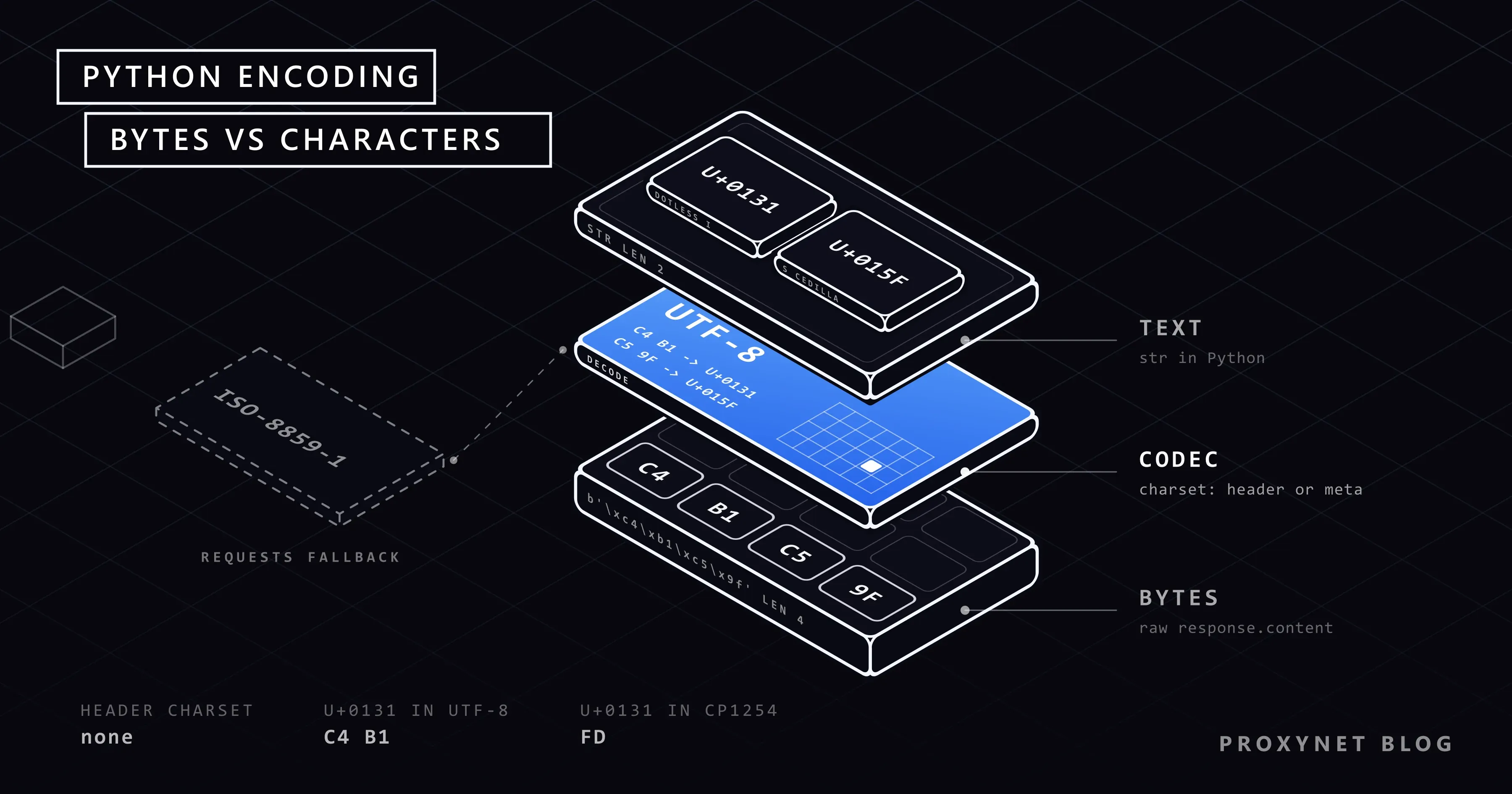
A str holds characters, each with a Unicode code point: the Turkish dotless ı is U+0131 and é is U+00E9. Disks and networks store only bytes, so text is encoded on the way out and decoded on the way in. The codec decides which bytes stand for which character. In UTF-8, ı is two bytes, C4 B1. In windows-1254, the old Turkish Windows code page, it is one byte, FD. Western European cp1252 and ISO-8859-1 have no ı at all.
When writer and reader use different codecs, the bytes survive but the letters change. This is called mojibake, and it can often be undone.
How does a character turn into the wrong one?
Every encoding bug follows the same steps:
- Your text is Unicode.
"Çankırı"in Python is seven code points. - It is encoded with codec A. Turkish Windows writes
C7 61 6E 6B FD 72 FDin cp1254. - Only the bytes travel. A file, an HTTP body or a pipe says nothing about codec A, unless a header, a BOM or a
<meta>tag adds it. - Someone decodes with codec B. ISO-8859-1 maps
FDtoý, which givesÇankýrý. UTF-8 cannot readC7 61as a character, so it raisesUnicodeDecodeError. - Output is encoded again.
print()andwrite()use the codec of the console or file, and a character it lacks raisesUnicodeEncodeError.
The traceback tells you which direction failed.
What does the garbled text tell you?
The shape of the damage points to the codec pair.
| What you see | Real text | What happened | What to do |
|---|---|---|---|
café, ü, ı, ÅŸ | café, ü, ı, ş | UTF-8 bytes (C3 A9, C4 B1) decoded as cp1252 or ISO-8859-1 | Decode the bytes as UTF-8, or repair the text (see below) |
ý, þ, ð, Ý | ı, ş, ğ, İ | windows-1254 bytes (FD, FE, F0, DD) decoded as ISO-8859-1, the Requests default | Set r.encoding = "cp1254" or give r.content to Beautiful Soup |
ţ in place of ş | ş | A guess picked windows-1250 for a Turkish page | Pin the codec for that site |
� | Any non-ASCII letter | Bytes decoded as UTF-8 with errors="replace" | Lost in the text; decode the raw bytes again |
? | Any letter | Text encoded with errors="replace" into a codec without it | Lost; write with UTF-8 |
| An empty box | The right letter | The font has no glyph (PDF, old terminal) | Change the font, not the encoding |
Do you still need # -*- coding: utf-8 -*- in Python 3?
No. PEP 3120 made UTF-8 the default encoding of source files in Python 3.0, so the line is a leftover from Python 2. If string literals in your .py file still break, your editor saved it in a legacy code page ("ANSI" on Windows); save it as UTF-8. Other Python 2 advice, such as u"" prefixes and codecs.open(), is not needed either.
How do you set the encoding when reading and writing files?
Pass it every time: open("cities.txt", "w", encoding="utf-8"). Without it, Python 3.13 on Windows uses the ANSI code page. On our Turkish Windows machine locale.getpreferredencoding(False) returned cp1254, and a plain open("cities.txt", "w") wrote Çankırı as C7 61 6E 6B FD 72 FD. English Windows uses cp1252, which has no ı, so the same write fails with 'charmap' codec can't encode character '\u0131'.
For files you receive, use the codec they were written with: cp1254 for older Turkish Windows and Excel exports, cp1252 for Western European ones, cp1256 for Arabic and Persian. The errors argument decides what happens to bytes that do not fit:
strict, the default, raises an error, which you want while you look for the right codec.replaceputs�in place of each bad byte, so you see where the damage is.backslashreplacekeeps bad bytes visible as\xfd.ignoredeletes them silently:Iğdırwritten in cp1254 and read as UTF-8 becameIdr.
"Just try latin-1" fails the same way. ISO-8859-1 maps all 256 byte values to characters, so it never raises, and Turkish text quietly becomes Çankýrý.
UnicodeDecodeError: 'utf-8' codec can't decode byte
The file is not UTF-8, and the byte in the message is a clue: 0xfd, 0xfe or 0xf0 in Turkish data points to cp1254, while 0xe9 (é) or 0xfc (ü) suggests cp1252. In pandas, pass the codec: pd.read_csv("export.csv", sep=";", encoding="cp1254").
UnicodeEncodeError: 'charmap' codec can't encode character on Windows
The interactive Windows console writes UTF-8 since Python 3.6 (PEP 528), but output redirected to a file or pipe uses the ANSI code page. Turkish letters fit into cp1254, an arrow does not: python script.py > out.txt with print("Istanbul → Ankara") failed with 'charmap' codec can't encode character '\u2192'. Three fixes worked:
set PYTHONUTF8=1($env:PYTHONUTF8=1in PowerShell) turns on UTF-8 mode for files and standard streams.python -X utf8 script.pydoes the same for one run.PYTHONIOENCODING=utf-8changes only the standard streams, notopen().
The Windows guide documents UTF-8 mode. PEP 686 makes UTF-8 mode the default from Python 3.15, whose final release is planned for 1 October 2026. Keep encoding="utf-8" in your code until every machine runs it.
The 'latin-1' codec can't encode character variant usually comes from an HTTP header. http.client, which Requests uses underneath, encodes header values as Latin-1, so a header value of Iğdır failed that way. Percent-encode such values or send them in the body.
Where does a web page's encoding come from?
A browser decides a page's encoding in this order:
- A byte order mark (BOM) at the start of the body.
- The
charsetparameter of theContent-Typeheader. - A
<meta charset>tag, which MDN says must sit in the first 1024 bytes. - A guess from the bytes.
Requests reads only the header. For a text/* type without a charset, the Requests documentation says it follows RFC 2616 and uses ISO-8859-1, although RFC 7231 removed that default in 2014. A JSON response without a charset is read as UTF-8, and other types are guessed. On our test pages served as plain text/html, r.encoding was ISO-8859-1 every time. That is why a page can look right in the browser and wrong in your script.
Are windows-1254 and ISO-8859-9 the same?
Almost. Both put the Turkish letters on the same bytes from 0xA0 to 0xFF. From 0x80 to 0x9F, windows-1254 has €, “, ” and …, while ISO-8859-9 has invisible control codes. The WHATWG Encoding Standard tells browsers to read iso-8859-9 as windows-1254 and iso-8859-1 as windows-1252; Python treats them as separate codecs. On our page labelled iso-8859-9, Beautiful Soup produced \x93Kampanya\x94 10\x80, and with from_encoding="cp1254" the same bytes became “Kampanya” 10€. Decode such pages as cp1254 or cp1252.
How should your own HTML page declare its charset?
Save the file as UTF-8, put <meta charset="utf-8"> at the top of <head>, and make sure the server's Content-Type header does not name another charset, because the header wins.
response.encoding, apparent_encoding or Beautiful Soup?
Each option reads a different signal:
r.encodingcomes from the header. Settingr.encoding = "cp1254"fixes one known site; setting"utf-8"for every site breaks the windows-1254 ones (�ank�r�on our test page).r.apparent_encodingis charset-normalizer's guess from the body. It saidWindows-1254for one of our Turkish pages andwindows-1250for two others, which turnsşintoţ.BeautifulSoup(r.content, "html.parser")reads the<meta>tag itself. Pass bytes, notr.text; the Beautiful Soup tutorial covers the parsing side.
Our order follows the browser: a BOM, a charset in the header, the <meta> tag, then the guess, and log which one you used. HTTPX differs: version 0.28.1 assumes UTF-8 when the header has no charset, and our cp1254 page came out as �ank�r� (HTTPX vs Requests vs AIOHTTP).
A Python scraper that decodes pages the way a browser does
The script fetches each URL once, picks the codec in that order, maps the ISO labels the way browsers do and writes the headings to a CSV for Excel. It needs pip install requests beautifulsoup4. It does not retry or rotate IPs; see HTTP status codes in web scraping and how to rotate proxies in Python.
"""Fetch pages, decode each one the way a browser would, and save the headings to a CSV for Excel."""
import csv
import logging
import sys
from email.message import Message

import requests
from bs4 import BeautifulSoup
from bs4.dammit import EncodingDetector

PROXY = None  # for example "http://user:pass@pr.proxynet.io:8000"
USER_AGENT = "heading-reader/1.0 (+https://example.com/bot)"

# Browsers read these labels as Windows code pages (WHATWG Encoding Standard); Python does not.
BROWSER_ALIASES = {
    "iso-8859-1": "cp1252", "iso8859-1": "cp1252", "latin1": "cp1252", "latin-1": "cp1252",
    "us-ascii": "cp1252", "ascii": "cp1252",
    "iso-8859-9": "cp1254", "iso8859-9": "cp1254", "latin5": "cp1254",
}

log = logging.getLogger("headings")


def header_charset(resp):
    """The charset from the Content-Type header, or None. Requests' own r.encoding
    would say ISO-8859-1 here for any text/* type without a charset."""
    msg = Message()
    msg["content-type"] = resp.headers.get("Content-Type", "")
    return msg.get_param("charset")


def pick_codec(resp):
    """Return (codec, where it came from): a BOM, the header, <meta charset>, then a guess."""
    bom = EncodingDetector.strip_byte_order_mark(resp.content)[1]
    if bom:
        return bom, "bom"
    declared = header_charset(resp)
    source = "header"
    if not declared:
        declared = EncodingDetector.find_declared_encoding(resp.content, is_html=True)
        source = "meta"
    if not declared:
        return resp.apparent_encoding or "utf-8", "guess"
    return BROWSER_ALIASES.get(declared.lower(), declared), source


def clean(text):
    """Collapse runs of whitespace, including the non-breaking space U+00A0."""
    return " ".join(text.split())


def read_headings(session, url):
    resp = session.get(url, timeout=20)
    resp.raise_for_status()
    codec, source = pick_codec(resp)
    soup = BeautifulSoup(resp.content, "html.parser", from_encoding=codec)
    level = logging.WARNING if source == "guess" else logging.INFO
    log.log(level, "%s: %s from %s", url, codec, source)
    if soup.contains_replacement_characters:
        log.warning("%s: some bytes did not fit %s and became U+FFFD", url, codec)
    return [(url, codec, source, clean(h.get_text())) for h in soup.select("h1, h2")]


def main(urls, out="headings.csv"):
    session = requests.Session()
    session.headers["User-Agent"] = USER_AGENT
    if PROXY:
        session.proxies = {"http": PROXY, "https": PROXY}
    rows = []
    for url in urls:
        try:
            rows += read_headings(session, url)
        except requests.RequestException as exc:
            log.error("%s: %s", url, exc)
    # utf-8-sig writes a BOM first, so Excel recognises the file as UTF-8
    with open(out, "w", newline="", encoding="utf-8-sig") as f:
        writer = csv.writer(f)
        writer.writerow(["url", "codec", "source", "heading"])
        writer.writerows(rows)
    log.info("%d headings written to %s", len(rows), out)


if __name__ == "__main__":
    logging.basicConfig(level=logging.INFO, format="%(levelname)-7s %(message)s")
    main(sys.argv[1:] or ["https://example.com/"])
We ran it with Python 3.13, Requests 2.34.2 and Beautiful Soup 4.15.0 through a local HTTP proxy. The local test pages were served as text/html without a charset, except utf8hdr, and the last URL is a public page:
INFO    http://127.0.0.1:8057/cp1254: windows-1254 from meta
INFO    http://127.0.0.1:8057/iso9: cp1254 from meta
INFO    http://127.0.0.1:8057/utf8meta: utf-8 from meta
INFO    http://127.0.0.1:8057/utf8hdr: utf-8 from header
INFO    http://127.0.0.1:8057/latin1: cp1252 from meta
WARNING http://127.0.0.1:8057/nometa: windows-1250 from guess
WARNING https://example.com/: ascii from guess
INFO    12 headings written to headings.csv
Every page with a header charset or a <meta> tag came out right, including “quoted” 5€ on the page labelled ISO-8859-1. The page with neither is the weak spot: the guess said windows-1250 and the CSV got Çankýrý and ţubat.
If you read many sites in one country on a schedule, a Residential Proxy in that country returns the pages local visitors see; the codec logic stays the same.
What do "can't decode byte 0x8b" and "0xa0" mean?
UnicodeDecodeError: 'utf-8' codec can't decode byte 0x8b in position 1
A gzip stream starts with 1F 8B (RFC 1952), so 0x8b at position 1 means compressed data is being decoded as text; gzip.compress(...).decode("utf-8") gave us exactly this message. In scraping it happens when you read r.raw directly, or send a copied Accept-Encoding header with urllib.request, which never decompresses. Requests unpacks gzip itself, so drop the copied header and use r.content. Copied br or zstd values fail too, unless urllib3 has the optional Brotli or Zstandard package.
UnicodeDecodeError: 'utf-8' codec can't decode byte 0xa0
In cp1252, cp1254 and ISO-8859-1 the non-breaking space U+00A0 is the single byte A0, which UTF-8 never starts a character with. Read the file with its real codec. If the character is already in your text, "10\xa0kg".split() removes it, .split(" ") does not, and unicodedata.normalize("NFKC", s) turns it into a plain space (NFKC also changes characters such as ² to 2).
How do you repair text that is already garbled?
If no byte was lost, reverse the wrong step:
- Text such as
ışğcopied from a screen or spreadsheet:s.encode("cp1252").decode("utf-8")givesışğ. - The same damage from Requests'
r.texthides a control character (\x9f) that cp1252 cannot encode, so uses.encode("latin-1").decode("utf-8"). cp1252 failed on it with'charmap' codec can't encode character '\x9f'. - windows-1254 text read as ISO-8859-1, such as
Çankýrý:s.encode("latin-1").decode("cp1254")givesÇankırı.
For large or mixed data, ftfy 6.3.1 repairs UTF-8 mojibake: ftfy.fix_text("ışğ") returned ışğ. It left Çankýrý alone because that looks like valid Latin text, so fix code page mix-ups by hand. Text with ? or � in place of letters cannot be repaired; fetch the source again.
Why does Excel show garbled characters in a UTF-8 CSV?
Excel opens a UTF-8 CSV correctly on a double-click when the file starts with a byte order mark, as Microsoft's support page notes. encoding="utf-8-sig" adds the three bytes EF BB BF; in pandas, df.to_csv("out.csv", encoding="utf-8-sig"). Read such files back with utf-8-sig as well: with plain utf-8, the csv module gave us a first column named \ufeffşehir, while pandas removed the BOM either way. A full scrape-to-Excel flow is in how to extract data from a website.
Why doesn't "I".lower() return "ı"?
str.lower() uses Unicode's default mapping, which ignores language. For Turkish that is wrong twice: "ISPARTA".lower() returns isparta instead of ısparta, and "İ".lower() returns i plus a combining dot (U+0307). casefold() has the same gap. Map the two special letters first:
TR_LOWER = str.maketrans({"I": "ı", "İ": "i"})
TR_UPPER = str.maketrans({"i": "İ", "ı": "I"})

print("ISPARTA İZMİR".translate(TR_LOWER).lower())  # ısparta izmir
print("istanbul ışık".translate(TR_UPPER).upper())  # İSTANBUL IŞIK
Numbers and dates follow local rules too. A Turkish price such as 1.299,90 becomes a float after s.replace(".", "").replace(",", "."), and pandas has decimal="," and thousands=".". Avoid locale.setlocale() in a scraper, because it changes the whole process. Full price cleaning is in competitor price tracking.
Use cases
- Price tracking: shops that still serve legacy code pages (competitor price tracking).
- Tables to Excel: a CSV that opens with the right letters (extract data from a website).
- PHP scrapers:
DOMDocumenthas its own fix (PHP web scraping). - Scrapy exports:
FEED_EXPORT_ENCODINGsets the output codec (Scrapy with a proxy). - .NET jobs:
HttpClienthandles charsets its own way (web scraping with C#). - Crawls across many sites: log the codec of every page (web crawler).
Common mistakes
- Silencing the error with
errors="ignore"or latin-1. The script runs and the letters disappear or change. - Hard-coding
r.encoding = "utf-8"for every site. It fixes some pages and breaks windows-1254 ones. - Decoding twice. Calling
.encode().decode()on text that was already decoded correctly adds a new error to good text. - Using
iso-8859-9oriso-8859-1as declared. Browsers use windows-1254 and windows-1252, and quotes and the euro sign show the difference. - Reading a
utf-8-sigfile asutf-8. The first column name starts with an invisible character and lookups fail. - Confusing character encoding with URL encoding.
%40in a proxy password is percent-encoding, a separate topic (special characters in proxy passwords).
Decision guide
| Need | Recommendation |
|---|---|
Non-ASCII text in your own .py file | Save it as UTF-8; no coding line |
| Reading or writing a file | encoding="utf-8"; a legacy code page only for files written with it |
'charmap' error on redirected output in Windows | PYTHONUTF8=1 or python -X utf8; default from Python 3.15 |
| HTML without a charset in the header | Give r.content to Beautiful Soup, log the codec |
No header charset and no <meta> tag | Pin the site's codec; apparent_encoding as a last resort |
The page says iso-8859-9 or iso-8859-1 | Decode as cp1254 or cp1252, like a browser |
Text already reads é or ı | .encode("cp1252").decode("utf-8") or ftfy.fix_text |
| The result opens in Excel | Write the CSV with utf-8-sig |
Frequently asked questions
Do I need a library to handle non-English characters in Python?
No. A Python 3 str is Unicode, and the standard library ships codecs for the common code pages (standard encodings). charset-normalizer, installed with Requests, guesses unknown codecs, and ftfy repairs mojibake.
How do I convert a cp1252 or cp1254 file to UTF-8?
Read it with its old codec and write it with the new one: Path("new.txt").write_text(Path("old.txt").read_text(encoding="cp1254"), encoding="utf-8"), with Path from pathlib. Check a few names before deleting the original.
Does errors="ignore" fix UnicodeDecodeError?
It hides it. Bytes that do not fit are deleted without a warning, so names lose letters. Find the right codec instead.
How do I find out which encoding a file uses?
Unless it starts with a BOM, a text file does not record its codec, so every tool guesses. charset_normalizer.from_path("old.txt").best().encoding returned cp1254 for our Turkish test file. Confirm the guess by decoding and reading a few words that contain local letters.
What is the difference between utf-8 and utf-8-sig?
utf-8-sig writes a BOM (EF BB BF) and skips it when reading. Use it for CSV files people open in Excel.
How do I fix UnicodeDecodeError in pandas read_csv?
Pass the file's codec: encoding="cp1254" for a Turkish Windows export, cp1252 for a Western European one, utf-8-sig if it has a BOM. encoding_errors="replace" stops the error but loses letters.
Summary
Python encoding errors come down to one rule: decode bytes with the codec they were written in, and write your own output in UTF-8. Read the garbled text to find the codec pair, set encoding on every open(), use UTF-8 mode on Windows until Python 3.15 does it for you, and give web pages to Beautiful Soup as bytes. For scraping jobs that need clean text from many local sites, see our data scraping solution.