A teammate asks you to pull a statistics table from a web page into Python. You downloaded the HTML with Requests, and soup.find("td").text gave you the first cell. Now you need every row, the class that colours some cells green and others red, and the page links under the table. The table > tbody > tr selector you copied from the browser's developer tools returns nothing. The general route from a page to a file is in How to Extract Data From a Website; this guide covers the library that reads the HTML.
We cover the three parsers, find, find_all and select, selecting by class, moving around the tree, reading text and links, a full example on a practice table, and pandas.read_html with its common errors. Every sample ran on 24 September 2026 with beautifulsoup4 4.15.0 and Python 3.13.
What is BeautifulSoup?
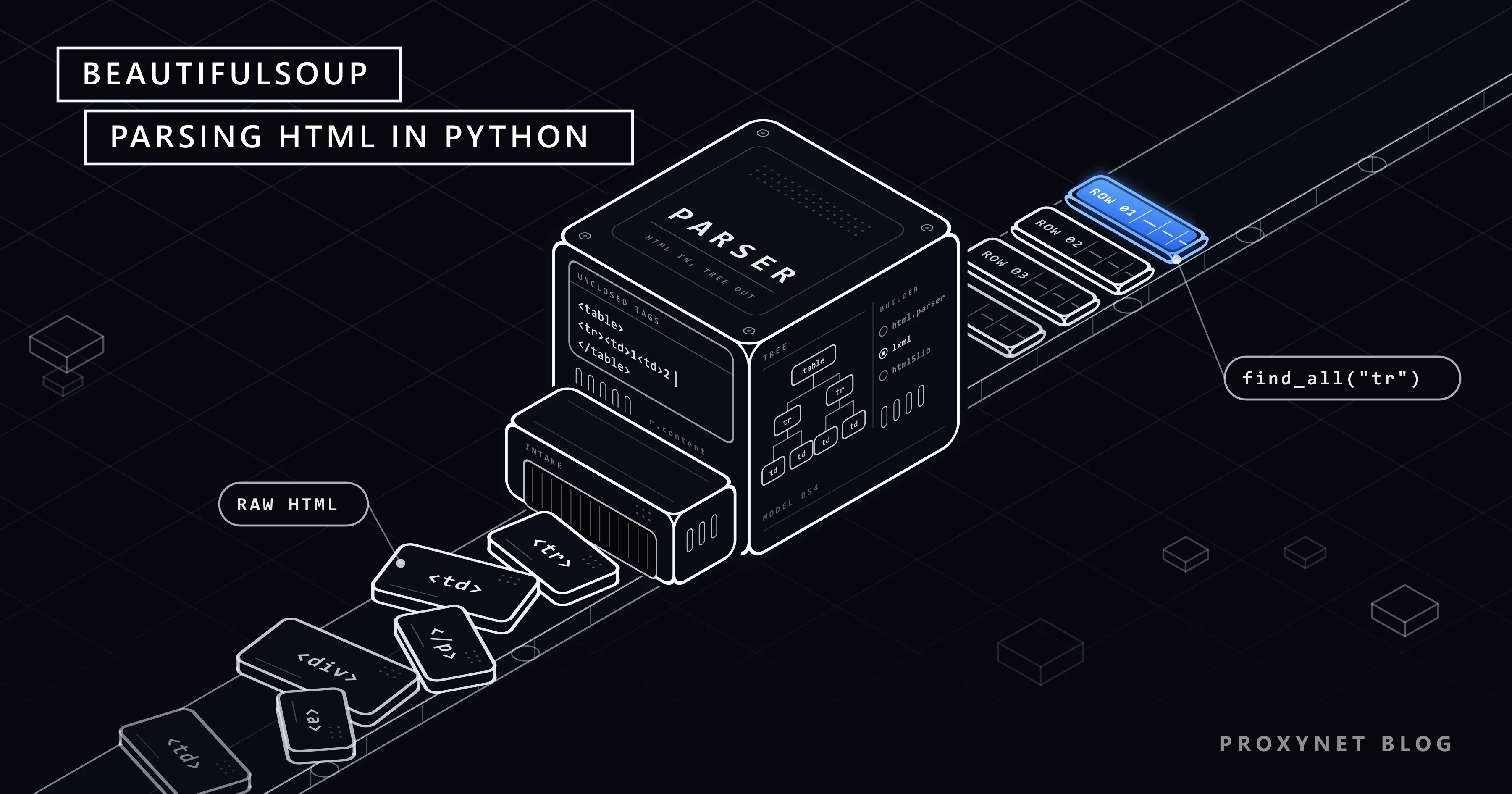
BeautifulSoup is a Python library that parses HTML and XML into a tree of objects you can search, broken markup included. It sends no requests. An HTTP client such as Requests or HTTPX downloads the page (HTTPX vs Requests vs AIOHTTP), and BeautifulSoup works on what that client returns.
The package name and the import name differ. You install beautifulsoup4 and import bs4:
pip install beautifulsoup4 lxmlThe bs4 package on PyPI is a dummy (version 0.0.2) that holds the name and only pulls in beautifulsoup4. Tutorials that start with from BeautifulSoup import BeautifulSoup were written for BeautifulSoup 3 and Python 2 and do not run on Python 3. The current release is 4.15.0 (beautifulsoup4 on PyPI), which the official documentation covers. How it compares with Scrapy and Selenium is in Scrapy, BeautifulSoup or Selenium?.
How does BeautifulSoup turn a page into a tree?
Five steps sit between the download and your first search:
- The client downloads bytes. Requests keeps them in
response.contentand offers a decoded guess inresponse.text. - BeautifulSoup finds the encoding. A sub-library called Unicode, Dammit reads
<meta charset>and other clues, then converts the bytes to Unicode. Passresponse.content, notresponse.text: when a server sendstext/htmlwithout a charset, Requests assumes ISO-8859-1 andéturns intoé. Details are in Python Unicode encoding errors. - The parser reads the tags. It turns the text into elements and repairs unclosed tags by its own rules.
- The result is a tree. Each element becomes a
Tagwith a name and attributes, each piece of text aNavigableString. - Search methods walk the tree.
find,find_allandselectread this tree in memory and never touch the network.
Which parser should you choose: html.parser, lxml or html5lib?
Each parser repairs broken markup its own way. We gave all three the same fragment with unclosed cells:
from bs4 import BeautifulSoup

broken = "<table><tr><td>1<td>2</table>"
for parser in ("html.parser", "lxml", "html5lib"):
print(parser, BeautifulSoup(broken, parser))html.parser <table><tr><td>1<td>2</td></td></tr></table>
lxml <html><body><table><tr><td>1</td><td>2</td></tr></table></body></html>
html5lib <html><head></head><body><table><tbody><tr><td>1</td><td>2</td></tr></tbody></table></body></html>html.parser put the second cell inside the first, so row.find_all("td", recursive=False) finds one cell instead of two. lxml closed both cells and wrapped the fragment in <html><body>. html5lib built the tree a browser would build, <tbody> included.
| Parser | How to call it | Install | Unclosed tags | When to choose it |
|---|---|---|---|---|
| html.parser | BeautifulSoup(html, "html.parser") | Ships with Python | Can nest one cell inside another | Small scripts where you cannot install packages |
| lxml | BeautifulSoup(html, "lxml") | pip install lxml (C extension) | Closes the cells, adds <html><body> | Most scraping jobs; the documentation calls it very fast |
| html5lib | BeautifulSoup(html, "html5lib") | pip install html5lib (pure Python) | Builds the browser's tree, adds <tbody> | Badly broken pages, or when you need the tree the browser shows; very slow |
A parser that is not installed raises bs4.FeatureNotFound: Couldn't find a tree builder with the features you requested: html5lib. With no parser named, BeautifulSoup picks the best one it finds and issues a GuessedAtParserWarning, so the same script can build a different tree on a machine without lxml.
What is the difference between find, find_all and select?
Four methods cover almost every search:
find(name, attrs)returns the first matching tag, orNone.find_all(name, attrs)returns a list of all matches, or an empty list.select(css)takes a CSS selector and returns a list.select_one(css)returns the first match of a CSS selector, orNone.
The CSS methods run on Soup Sieve, installed along with beautifulsoup4. When nothing matches:
soup.find("td", class_="rank")        # None
soup.find_all("td", class_="rank")    # []
soup.select_one("td.rank")            # None
soup.select("td.rank")                # []

soup.find("td", class_="rank").get_text()
# AttributeError: 'NoneType' object has no attribute 'get_text'
This is a common first error: find returned None and the next call failed. Check before you chain:
cell = soup.find("td", class_="name")
name = cell.get_text(strip=True) if cell else None
limit=3 stops find_all after three matches, and recursive=False searches only direct children. select is shorter when the path runs through several levels, as in table.table tr.team td.name. Selector syntax, and why BeautifulSoup has no XPath, are in CSS Selector vs XPath.
How do you select by class, id and attribute?
class is a reserved word in Python, so BeautifulSoup uses class_. The trap is that class holds several values: td["class"] returns a list such as ['pct', 'text-success']. On the practice page used below, Win % cells carry pct and + / - cells carry diff, each plus text-success or text-danger. On one page of 25 rows we counted:
soup.find_all("td", class_="text-danger")       # 31 cells, from both columns
soup.find_all("td", class_="pct text-danger")   # 19 cells: matches the exact string
soup.find_all("td", class_="text-danger pct")   # 0 cells: same classes, other order
soup.select("td.pct.text-danger")               # 19 cells, in any order
One class in class_ matches any tag that has it among others. A string with a space matches only that exact attribute value, and breaks when the page reorders the classes. For two or more classes, use select with dots. Other attributes work as keyword arguments or through attrs:
import re

soup.find("div", id="results")                     # by id
soup.find_all("a", href=True)                      # only links that have an href
soup.find("a", attrs={"aria-label": "Next"})       # names with a dash go in attrs
soup.find("th", string=re.compile("Wins"))         # by text
string="Wins" returns None here because string compares the whole text, and the cell holds line breaks and spaces around the word. A regular expression matches anywhere inside it.
How do you move around the tree: parent, children and siblings?
.parentgoes one level up, andfind_parent("table")climbs until it meets a table..childrengives the direct children,.descendantsevery node below. A practice-table row has 9 cells, yet.childrenreturned 19 items: the other 10 are whitespace strings..next_siblingreturns the next node, which in indented HTML is usually whitespace.
name = soup.find("td", class_="name")
name.next_sibling                                   # '\n'
name.find_next_sibling("td").get_text(strip=True)   # '1990'
find_next_sibling("td") and find_previous_sibling("td") skip to the next or previous tag. The same method reads label and value tables: th.find_next_sibling("td") gives the value next to a label.
How do you read text and attributes: get_text, href and src?
.text keeps the whitespace, so the team cell returns the name wrapped in line breaks and indentation. get_text(strip=True) trims it to 'Boston Bruins'. When a tag contains other tags, add a separator: for <td>12<small>pts</small></td>, get_text(strip=True) returns '12pts' and get_text(" ", strip=True) returns '12 pts'. .stripped_strings yields the pieces one by one.
Attributes read like a dictionary. a["href"] raises a KeyError when the tag has no href; a.get("href") returns None, which is safer in a loop. Relative links such as /pages/forms/?page_num=2 become full addresses with urllib.parse.urljoin(page_url, href), and an image works the same way with img.get("src"). Lazy-loaded images and srcset are covered in How to Download All Images From a Website.
Full example: reading an HTML table row by row
The target is the hockey table at scrapethissite.com/pages/forms, whose page title calls the site a public sandbox for learning web scraping. Its robots.txt disallows only /lessons/ and /faq/, and the script checks it first (how to read robots.txt). It reads the 25 rows of one page, turns the class of the Win % cell into a true or false field, and collects the page links.
"""Read one page of a practice table with Requests and BeautifulSoup."""
import json
import os
import sys
from urllib.parse import urljoin
from urllib.robotparser import RobotFileParser

import requests
from bs4 import BeautifulSoup

URL = "https://www.scrapethissite.com/pages/forms/"
USER_AGENT = "hockey-table-demo/1.0 (contact: you@example.com)"

# Optional: PROXY_URL=http://user:pass@pr.proxynet.io:8000
proxy = os.environ.get("PROXY_URL")

session = requests.Session()
session.headers["User-Agent"] = USER_AGENT
if proxy:
    session.proxies = {"http": proxy, "https": proxy}

# Check robots.txt once before the first request
robots = RobotFileParser()
robots.parse(session.get(urljoin(URL, "/robots.txt"), timeout=(5, 20)).text.splitlines())
if not robots.can_fetch(USER_AGENT, URL):
    sys.exit("robots.txt does not allow this page")

response = session.get(URL, timeout=(5, 20))
response.raise_for_status()

# Give BeautifulSoup the bytes and name the parser
soup = BeautifulSoup(response.content, "lxml")

table = soup.select_one("table.table")
if table is None:
    sys.exit("No table.table on the page: the layout changed or the data comes from JavaScript")

headers = [th.get_text(" ", strip=True) for th in table.find("tr").find_all("th")]

teams = []
for row in table.find_all("tr", class_="team"):
    record = {}
    for td in row.find_all("td"):
        key = td["class"][0]              # "name", "year", "wins", "pct", "diff" ...
        record[key] = td.get_text(strip=True)
    # The site colours Win % green or red; the colour lives only in the class
    pct_classes = row.find("td", class_="pct").get("class", [])
    record["above_500"] = "text-success" in pct_classes
    teams.append(record)

# Page links: relative hrefs become full URLs, duplicates removed, order kept
page_links = list(dict.fromkeys(
    urljoin(URL, a["href"]) for a in soup.select("ul.pagination a[href]")
))

print("columns:", headers)
print("rows:", len(teams), "| page links:", len(page_links))
for team in teams[:3]:
    print(json.dumps(team, ensure_ascii=False))
print("last page:", page_links[-1])
We ran it with beautifulsoup4 4.15.0, lxml 6.1.3 and Requests 2.34.2, once directly and once through a local test proxy set in PROXY_URL. Both runs printed the same lines:
columns: ['Team Name', 'Year', 'Wins', 'Losses', 'OT Losses', 'Win %', 'Goals For (GF)', 'Goals Against (GA)', '+ / -']
rows: 25 | page links: 24
{"name": "Boston Bruins", "year": "1990", "wins": "44", "losses": "24", "ot-losses": "", "pct": "0.55", "gf": "299", "ga": "264", "diff": "35", "above_500": true}
{"name": "Buffalo Sabres", "year": "1990", "wins": "31", "losses": "30", "ot-losses": "", "pct": "0.388", "gf": "292", "ga": "278", "diff": "14", "above_500": false}
{"name": "Calgary Flames", "year": "1990", "wins": "46", "losses": "26", "ot-losses": "", "pct": "0.575", "gf": "344", "ga": "263", "diff": "81", "above_500": true}
last page: https://www.scrapethissite.com/pages/forms/?page_num=24
The header row has no class, so the script takes the first <tr> for the column names and tr.team for the data. Each cell's first class (name, wins, ot-losses) becomes the dictionary key, which keeps the code independent of column order. The empty OT Losses cell comes back as an empty string, not None. Here the colour only repeats the number, but on some sites, such as shops that mark a sold-out item with a class, the class is the only place that fact appears. The pagination block has 25 links because the "Next" arrow repeats the address of page 1; dict.fromkeys removes the duplicate and keeps the order.
The User-Agent names the script and gives a contact address instead of pretending to be a browser (What Is a User Agent?). timeout=(5, 20) gives up after 5 seconds without a connection or 20 seconds without data, and raise_for_status() stops on an error page before it gets parsed. A wrong proxy password raises a ProxyError with "Max retries exceeded" and "407 Proxy Authentication Required" in the message (Max Retries Exceeded With URL). You need a proxy only when the volume grows or you need pages as visitors in another country see them; a Residential Proxy then fits into the same PROXY_URL line.
The script deliberately stops at one page. Walking all 24 pages with a pause between requests is covered in How to Scrape Paginated Lists, retrying after a 429 or 503 in HTTP Status Codes in Web Scraping, running requests in parallel in Concurrency vs Parallelism, and switching exits between requests in How to Rotate Proxies in Python. The rows only go to the screen here; writing them to a file or a database is the subject of How to Save Scraped Data to CSV, JSON and SQLite.
How do you read a table with pandas read_html?
When the page has a proper <table> and you only need the values, pandas reads it in one call. pandas.read_html looks only at <table>, <tr>, <th> and <td> elements and always returns a list of DataFrames, one per table it finds. We used pandas 3.0.6:
import io
import os

import pandas as pd
import requests

URL = "https://www.scrapethissite.com/pages/forms/"

session = requests.Session()
session.headers["User-Agent"] = "hockey-table-demo/1.0 (contact: you@example.com)"
if os.environ.get("PROXY_URL"):
    session.proxies = {"http": os.environ["PROXY_URL"], "https": os.environ["PROXY_URL"]}

response = session.get(URL, timeout=(5, 20))
response.raise_for_status()

# pandas 3: wrap the HTML in StringIO, a plain string is read as a file path
tables = pd.read_html(io.StringIO(response.text), attrs={"class": "table"})
df = tables[0]
print(len(tables), df.shape)
print(df[["Team Name", "Year", "Wins", "OT Losses", "Win %"]].head(3))1 (25, 9)
Team Name Year Wins OT Losses Win %
0 Boston Bruins 1990 44 NaN 0.550
1 Buffalo Sabres 1990 31 NaN 0.388
2 Calgary Flames 1990 46 NaN 0.575The server declares UTF-8 in its Content-Type header, so response.text decodes correctly here. pandas also converted the numbers: Year and Wins became integers, Win % a float, and the empty OT Losses column NaN. attrs picks a table by its attributes, match by a string or regular expression in its text. By default pandas parses with lxml and falls back to BeautifulSoup with html5lib if that fails.
Three errors come up again and again:
- A file error when you pass HTML text. Since pandas 3.0,
read_htmlno longer accepts literal HTML strings; wrap the text inio.StringIO(pandas 3.0.0 release notes). A plain string is treated as a file path, and we got aFileNotFoundErrorthat quoted the start of the page. ValueError: No tables found. The table arrives later through JavaScript, the page draws its grid with<div>elements, or yourmatchtext is in no table (No tables found matching pattern 'Points'). Without html5lib installed, the fallback parser fails first and you get anImportErrorasking you to install html5lib.HTTP Error 403: Forbiddenwhen you pass the URL. pandas then downloads with urllib, whose default User-Agent isPython-urllib/3.13, and some sites refuse it; our local test server logged exactly that string. Download the page yourself as above, or pass an honest bot name throughstorage_options={"User-Agent": "..."}. Do not copy a browser's User-Agent: RFC 9110 notes that a client masquerading as another may be served the responses meant for that other client.
pandas returns values only. extract_links="body" adds each cell's link but no classes, so for the Win % colour above you go back to BeautifulSoup.
Use cases
- Competitor prices: many product pages carry their price in a JSON-LD
<script>tag thatfind_all("script", type="application/ld+json")reads (competitor price tracking). - Logging in with your own account: a login form often has a hidden CSRF field that you read with
find("input", attrs={"name": "csrf_token"})before you post (sessions and cookies in Python). - Following page links:
select_one("a[rel=next]")or a pagination block tells the crawler where the next page is (scraping paginated lists). We follow the extractedhrefvalues through a queue to walk a whole site in How to Build a Web Crawler in Python. - Scraping versus crawling: BeautifulSoup is the extraction step; a crawler adds the part that discovers pages (web scraping vs web crawling).
- Large, scheduled collection: thousands of pages a day need queues, rate control and exits in several countries (data scraping).
Common mistakes
- Leaving out the parser. The result depends on what is installed on each machine, and you get a
GuessedAtParserWarning. - Chaining on
findwithout a check. A missing element turns into'NoneType' object has no attribute ...three lines later. - Copying a selector with
tbodyfrom developer tools. Browsers add<tbody>because HTML lets authors leave its tags out (WHATWG HTML, the tbody element). On the practice pagetable > tbody > trfound 0 rows with html.parser and lxml, 26 with html5lib, whiletable tr.teamfound 25 with all three. - Searching for several classes as one string.
class_="pct text-danger"fails when the page writes the classes in another order; useselect("td.pct.text-danger"). - Expecting
.next_siblingto be a tag. In indented HTML it is usually a whitespace string; usefind_next_sibling("td"). - Passing
response.text. Without a charset in the header, Requests guesses ISO-8859-1; passresponse.content. - Starting a loop before reading
robots.txt. Check what the site allows, and set a pause before requesting more than one page.
Decision guide
| Need | Recommendation |
|---|---|
The page has a clean <table> and you want a DataFrame | pandas.read_html with io.StringIO, and attrs or match to pick the table |
| You also need a cell's class, colour or link | BeautifulSoup: rows with find_all("tr"), attributes with td.get("class") and a.get("href") |
| You cannot install extra packages | html.parser, and check the result on pages with unclosed tags |
| Speed and tolerance for broken tables | lxml, the default choice for most jobs |
| The tree differs from what the browser shows | Try html5lib, and remove tbody from your selector |
| The data arrives through JavaScript | Look for the JSON request first, then a headless browser (Static vs Dynamic Pages) |
| Thousands of pages with queues, retries and proxies | Scrapy (Scrapy with a proxy) and a Rotating Proxy |
Frequently asked questions
Does BeautifulSoup download web pages?
No. BeautifulSoup only parses HTML that you give it. An HTTP client such as Requests or HTTPX downloads the page, and you pass response.content to BeautifulSoup together with a parser name. It does not run JavaScript either.
What is the difference between find and find_all?
find returns the first matching tag or None; find_all returns a list of every match, empty when nothing matches. select_one and select do the same with a CSS selector. Check a find result before calling a method on it.
Which parser is best for BeautifulSoup?
lxml suits most jobs: it is fast and closes unclosed tags sensibly. Use html.parser when you cannot install packages, and html5lib when you need the browser's tree and can accept that it is slow. Always write the parser name in the call.
Can BeautifulSoup read content loaded with JavaScript?
No. It sees only the HTML the server returned, and data that a script adds later is not in it. Look in the browser's network tab for the JSON request that delivers the data, or use a headless browser where the site allows it (Static vs Dynamic Pages).
Why does pandas read_html say "No tables found"?
The table is built by JavaScript, the page draws its grid with <div> elements instead of a <table>, or your match or attrs value fits no table. Since pandas 3.0, also make sure you pass the HTML wrapped in io.StringIO; a plain string is treated as a file path.
Is pip install bs4 the same as pip install beautifulsoup4?
In effect, but use the real name. bs4 on PyPI is a dummy package that only installs beautifulsoup4. Install beautifulsoup4 and import bs4 in your code: from bs4 import BeautifulSoup.
Summary
BeautifulSoup parses HTML into a tree; it does not download pages or run JavaScript. Name the parser in every call, and know that find returns None where find_all returns an empty list. Use select when you match several classes at once, and try pandas.read_html first when the page has a clean table. When one page becomes thousands of pages a day, see how our data scraping proxies carry the extra volume.