An e-commerce team pulls a competitor's prices every morning from a list of a few hundred product URLs. One month the competitor opens a new category. Those products are not on the list, so they never reach the report, and nobody notices for weeks. A faster scraper would not have helped. The missing piece was a step that walks the category pages and finds new addresses, and that is where web crawling ends and web scraping begins.
This post compares web scraping vs web crawling on six axes: input, output, stop condition, deduplication, speed and robots.txt. It explains where a crawler stops and how both jobs join in one pipeline, then shows Spider and CrawlSpider in Scrapy with code we ran.
What does web crawling do, and what does web scraping do?
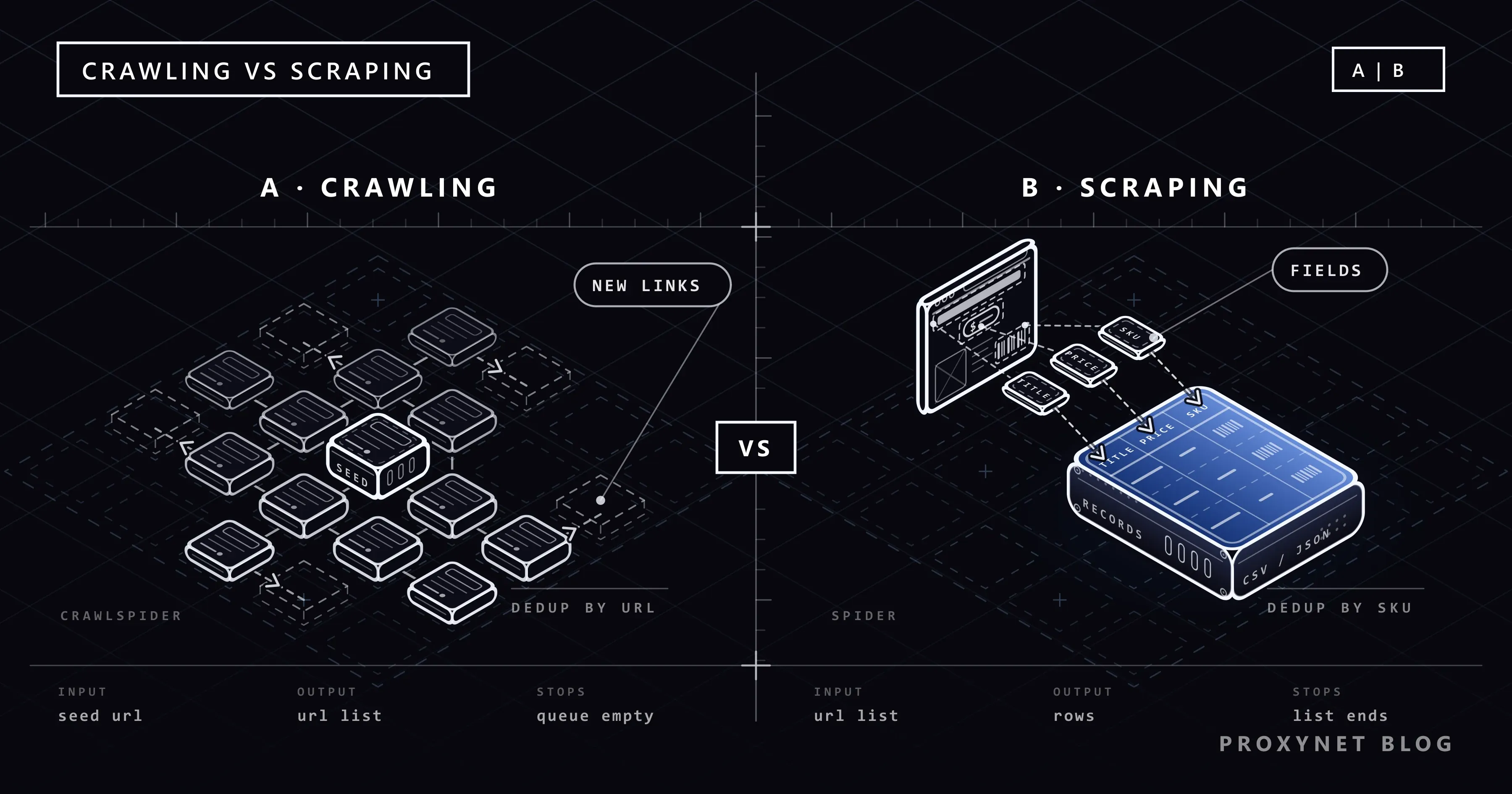
Web crawling answers the question "where can I go?". A crawler fetches a page, queues the new links it finds and repeats until a rule stops it. The result is a map of which pages exist. Crawler jobs and the proxies behind them are on our web crawler page.
Web scraping answers the question "what is on this page?". A scraper opens a page it already knows and turns the parts a person would read (name, price, date, SKU) into a structured row. How that works from the request to the saved row is explained in What Is Web Scraping and How Does It Work?. The method choice, from Excel to Python, is on our data scraping page and in How to Extract Data From a Website. The two get mixed up because most tools do both.
What happens when the same page reaches a crawler and a scraper?
Hand one category page from a bookshop to both. The crawler reads its links:
- It collects the
<a href>values in the category menu and the "next" button. - It makes relative addresses absolute and normalises them, so two spellings of one address become one string.
- It checks each address against the set of URLs it has already seen.
- It adds the new ones that pass its domain and depth rules to the frontier, the queue of URLs waiting to be fetched.
The scraper reads its content:
- It finds the fields with selectors (CSS Selector vs XPath).
- It checks types: a price is a number, a SKU is not empty.
- It merges the row with earlier ones by a record key.
- It writes the row to a file or database.
Web crawling vs web scraping: comparison table
| Axis | Web crawling | Web scraping |
|---|---|---|
| Input | A few seed URLs and link-following rules | A list of known page URLs |
| Output | A list of URLs, or a set of downloaded pages | Structured rows (CSV, JSON, a database table) |
| Stop condition | The frontier is empty, or a depth, domain or page limit is reached | The list ends |
| Unit of deduplication | The URL or the request fingerprint | The record key (SKU, listing ID) |
| What limits speed | Concurrent requests per host and robots.txt rules | The target's rate limit and parsing time |
| Relation to robots.txt | Meets Disallow lines on paths it discovers on its own | The whole list can be checked before the run |
| Typical failure | Endless URL variants, drifting to other domains | A changed template that returns empty fields |
The difference comes from the question the job asks, not from the tool: where to go next, or what to take from here.
Search engine bot vs price bot: two ends of the scale
Googlebot sits at the crawling end. Google's How Search Works guide says some pages are known from earlier visits, others are found through links on known pages, and sitemaps add more. An algorithm decides which sites to crawl, how often and how many pages to fetch, and the crawler slows down when a server returns errors. Duplicates are grouped later, at indexing, under one canonical page. Google's crawl budget guide is aimed mainly at sites with over a million unique pages that change about weekly, or over 10,000 pages that change daily.
A price bot sits at the scraping end. It has a fixed list of product URLs, follows no links and returns the same set of rows every day.
Most commercial jobs sit in between: a weekly category crawl finds new products, and a daily scraper reads prices from the list the crawl keeps current, as in How to Track Competitor Prices. How sites tell verified search bots from other traffic is in How Bot Detection Works and Cloudflare Scraper.
Where does a crawler stop on a site?
A crawler has no list to finish, so rules decide how far it goes:
- The frontier is empty. Every discovered URL has been fetched and no new ones appeared.
- Depth limit. Depth counts link hops from the seed. Scrapy's
DEPTH_LIMITdefaults to0, which means no limit. - Domain limit.
allowed_domainskeeps the crawler on the target site and its subdomains. Since Scrapy 2.18, changes to it during a crawl take effect. - Page ceiling. A hard cap such as
CLOSESPIDER_PAGECOUNTends the run whatever else happens.
URL normalisation decides whether the frontier ever empties. RFC 3986 section 6 describes the steps: lowercase the scheme and host, decode percent-encoded unreserved characters, remove . and .. segments and drop a default port, so http://example.com and http://example.com:80/ are the same resource. Beyond that, you decide which query parameters matter: a sort order or session ID creates a new address for the same content.
Some sites generate addresses without end, such as a calendar with a "next month" link or filter combinations that multiply with every click. Without a depth limit and a page ceiling, a crawler never leaves them. Deliberate trap links work the same way (Honeypot Traps). A published sitemap is often a better starting list than link following (How to Find a Website's Sitemap).
At which layer do you remove duplicates: URL or record?
A crawler removes duplicate requests. Scrapy's default DUPEFILTER_CLASS is RFPDupeFilter, which compares request fingerprints, so one page is not downloaded twice in a run.
A scraper removes duplicate records. One product can arrive from two URLs, through its category and through a sale page, and the URL filter lets both through. The key has to come from the data: a SKU, a product code or a listing ID. That is why the claim that scraping needs no deduplication is wrong. Storing rows by key in SQLite is shown in Pagination in Web Scraping.
How do robots.txt and rate rules affect a crawler?
RFC 9309 calls crawlers automated clients, with search engine crawlers that "recursively traverse links" as its example, and says robots.txt rules "are not a form of access authorization". A legitimate crawler follows them anyway, and should not use a cached copy for more than 24 hours unless the file cannot be reached. A crawler meets Disallow lines more often, because it keeps entering new paths. Syntax and Crawl-delay are in What Is a robots.txt File.
Speed is limited per host with CONCURRENT_REQUESTS_PER_DOMAIN and DOWNLOAD_DELAY. Scrapy's code defaults are 8 and 0; the settings.py from scrapy startproject sets 1 and 1 and turns on ROBOTSTXT_OBEY, which is False in the code defaults. Choosing the number is in Concurrency vs Parallelism, retrying a 429 in HTTP Status Codes in Web Scraping, and spreading requests over addresses in How to Rotate Proxies in Python. A wide crawl over many hosts fits a Rotating Proxy; a short fixed list often runs fine on a Datacenter Proxy.
How do crawling and scraping join in one pipeline?
In a real project the two jobs are stages of one loop:
- Discovery. Seed URLs and sitemap entries enter the system.
- Frontier. A queue holds URLs with a priority and a depth label.
- Download. Requests go out under a per-host rate limit, with retries on temporary errors.
- Parsing. Each page yields records for the output and new links for the frontier.
Keep the queue on disk so an interrupted crawl can resume: Scrapy uses JOBDIR, and a SQLite version is in Pagination in Web Scraping. Scrapy crawls depth-first by default, because its default queues are LIFO; a positive DEPTH_PRIORITY with FIFO queues moves it towards breadth-first.
What is the difference between Spider and CrawlSpider in Scrapy?
scrapy.Spider starts from start_urls and calls parse for each response. It follows a link only when your code yields a new request, so with a fixed list it is a pure scraper.
CrawlSpider moves link following into rules. Each Rule pairs a LinkExtractor with an optional callback and a follow flag. The Scrapy spiders documentation sets the default: if callback is None, follow defaults to True, otherwise to False. A rule without a callback walks through pages; a rule with one parses pages and stops there. The same page warns that a request you create yourself inside a CrawlSpider needs an explicit callback; a request without one is sent back through the rules.
The file below runs both on a practice site made for scraping exercises. It needs Scrapy 2.19 (released 10 September 2026, Python 3.10 or later). Installation and the proxy middleware are in What Is Scrapy and How to Use It With a Proxy.
"""One practice site, two jobs: a list scraper and a rule-based crawler."""
import sys

import scrapy
from scrapy.crawler import CrawlerProcess
from scrapy.linkextractors import LinkExtractor
from scrapy.spiders import CrawlSpider, Rule

POLITE = {
    "ROBOTSTXT_OBEY": True,  # a script run has no project settings.py, so set it here
    "CONCURRENT_REQUESTS_PER_DOMAIN": 2,
    "DOWNLOAD_DELAY": 1,
    "RETRY_TIMES": 2,  # RetryMiddleware: up to 2 retries on 429, 500/502/503/504 and timeouts
    "USER_AGENT": "ExampleCatalogBot/1.0 (+https://example.com/bot)",
}


def product(response):
    """The record: the UPC is its key, so two URLs for one book give one row."""
    return {
        "upc": response.xpath("//th[text()='UPC']/following-sibling::td/text()").get(),
        "title": response.css("div.product_main h1::text").get(),
        "price": response.css("div.product_main p.price_color::text").get(),
        "url": response.url,
    }


class ListSpider(scrapy.Spider):
    """Scraping: a known list of product URLs, no link following."""

    name = "list"
    custom_settings = POLITE
    start_urls = [
        "https://books.toscrape.com/catalogue/a-light-in-the-attic_1000/index.html",
        "https://books.toscrape.com/catalogue/tipping-the-velvet_999/index.html",
        "https://books.toscrape.com/catalogue/soumission_998/index.html",
    ]

    def parse(self, response):
        yield product(response)


class CatalogSpider(CrawlSpider):
    """Crawling: find product pages by following category and next-page links."""

    name = "catalog"
    allowed_domains = ["books.toscrape.com"]
    start_urls = ["https://books.toscrape.com/catalogue/category/books/poetry_23/index.html"]
    custom_settings = {**POLITE, "DEPTH_LIMIT": 3, "CLOSESPIDER_PAGECOUNT": 60}
    rules = (
        # No callback, so follow defaults to True: links on these pages are followed.
        Rule(LinkExtractor(restrict_css=("ul.nav-list", "li.next"))),
        # A callback, so follow defaults to False: product pages are parsed, not crawled.
        Rule(LinkExtractor(restrict_css="article.product_pod h3"), callback="parse_item"),
    )

    def parse_item(self, response):
        yield product(response)


if __name__ == "__main__":
    spider = CatalogSpider if sys.argv[1:] == ["catalog"] else ListSpider
    feed = {f"{spider.name}.jsonl": {"format": "jsonlines", "encoding": "utf-8"}}
    process = CrawlerProcess(settings={"FEEDS": feed})
    process.crawl(spider)
    process.start()
python spiders.py runs the scraper, python spiders.py catalog the crawler. We use a __main__ block because scrapy runspider picks only one spider class from a file that holds two. For a proxy, set https_proxy=http://user:pass@pr.proxynet.io:8000 in the environment first; Scrapy's HttpProxyMiddleware reads it.
What the runs showed
We ran both with Python 3.13 and Scrapy 2.19.0, directly and through a local test proxy:
- The scraper sent four requests,
robots.txt(a404, so no rules) and the three URLs, and wrote three rows. - The crawler closed with
finish_reason: closespider_pagecountand 56 unique books after 74 pages, not 60: requests already handed to the downloader still finish, so the cap is approximate. - The duplicate filter dropped 867 requests, because every category page links to all 50 categories in its menu.
- With
DEPTH_LIMITset to 1, the crawler ignored 3,151 deeper links, collected only the 19 poetry books linked from the seed and ended withfinish_reason: finishedwhen its frontier emptied. - Through the proxy the scraper returned the same rows. With a wrong password, each
407was retried twice before Scrapy gave up.
Use cases
- Competitor price tracking: a fixed list scraped daily plus a weekly crawl for new products (How to Track Competitor Prices).
- Price monitoring at scale: many shops, each read at its own pace (price monitoring).
- SEO site audits: broken links and orphan pages are pure crawling, with URLs and status codes as output (SEO proxy).
- Brand protection: a marketplace crawl finds new listings, a scraper reads seller and price (brand protection).
- JavaScript catalogues: the crawl finds pages, and a headless browser renders only those that need it (Static vs Dynamic Pages).
Common mistakes
- Crawling a whole site for a fixed-list job. It loads the site for nothing and hits more
Disallowlines. - Skipping URL normalisation. The same page with reordered query parameters is downloaded again and again.
follow=Trueon a callback rule without a depth limit. Every product page becomes a new start, and the crawl spreads through related-item links.- Leaving out
allowed_domains. One link to a partner shop and the crawler leaves the target site. - Fetching robots.txt on every request, or never again. Once per host is enough; refresh it within 24 hours on longer runs.
- Rows without a record key. One product found through two paths is written twice.
- Yielding your own request without a callback in a
CrawlSpider. It goes back through the rules instead of to your parser.
Decision guide
| Need | Recommendation |
|---|---|
| My product URL list is fixed and I read prices daily | A scraper only (scrapy.Spider or an HTTP client) |
| I also want the competitor's new products | A weekly category crawl that adds URLs, plus the daily scraper |
| I need every page of my site to find broken links | A pure crawler; the output is URLs and status codes |
| I want Scrapy to follow links by rules | CrawlSpider with Rule and LinkExtractor, always with DEPTH_LIMIT and allowed_domains |
| The site publishes a sitemap | Start from the sitemap; follow links only for sections it leaves out |
| An interrupted crawl must not start over | A persistent queue: Scrapy's JOBDIR or a SQLite table |
Frequently asked questions
Are web crawling and web scraping the same thing?
No. Crawling discovers pages by following links and outputs a list of URLs. Scraping extracts fields from known pages and outputs structured records. A tool that does both is still doing two jobs.
Is Googlebot a crawler or a scraper?
A crawler. It finds URLs through links, sitemaps and earlier visits, and an algorithm decides how often and how deeply each site is crawled. It does not pull fields into rows the way a price scraper does.
What is the difference between Spider and CrawlSpider in Scrapy?
A Spider follows only the links your code requests, which suits a fixed list. A CrawlSpider follows links through rules: a rule without a callback follows by default, a rule with a callback parses and does not follow by default. Requests you yield yourself need an explicit callback.
Does a crawler have to obey robots.txt?
RFC 9309 says the rules are not a form of access authorization, so the file is not a lock. A legitimate crawler obeys it anyway, keeps a low rate and uses an honest User-Agent. Legal consequences depend on the country and the case (Is Data & Web Scraping Legal?).
Which Python libraries are used for crawling and scraping?
Scrapy covers both, with a scheduler, duplicate filter, robots.txt checks and rate limits for crawling, and selectors for scraping. For a short list, Requests or HTTPX with BeautifulSoup or lxml is often enough (HTTPX vs Requests vs AIOHTTP). A working crawler built with Requests and BeautifulSoup, without a framework, is in How to Build a Web Crawler in Python.
Do you need a proxy for crawling?
A crawler sends many requests to one host, and sites limit requests per IP. A proxy spreads a wide crawl across addresses, but each host should still get a polite rate. For large crawls over many sites, a Rotating Proxy gives each request or session a different exit.
Summary
Web crawling finds out which pages exist by following links, and web scraping turns known pages into rows of data. In most projects a queue connects them: the crawl fills it, scraping empties it. When your crawl needs exits in a specific country, see the Residential Proxy or compare the options on our proxy services page.