Every night at two o'clock, a server with no monitor attached turns the day's invoices into PDF files. Nobody opens a browser, yet each invoice passes through one: the HTML template loads, the stylesheet applies, a small script adds the totals, and the finished page is printed to a file. That browser never shows a window. It is a headless browser, and the same kind of program runs end-to-end tests, takes screenshots and lets AI agents read pages.
This post explains what a headless browser is, what keeps working without a window, how Chrome's headless mode works today, how you run and control one, what it costs next to a plain HTTP request, why websites may treat automated browsers differently and where it is useful. We ran the commands against a local test page and report what we saw.
What is a headless browser?
A headless browser is a full web browser that runs without a graphical user interface. "Head" here means the visible part: the window, the address bar, the tabs and the menus. Remove it, and what remains is the engine that loads and runs web pages, waiting for instructions from a script or the command line.
It is not a simplified imitation. Chrome's documentation describes headless mode as a way to run the browser "in an unattended environment", and both modes share the same code, so a page is loaded, scripted and laid out exactly as in your everyday window. An HTTP client such as curl, by contrast, downloads the HTML file and stops: it never runs the page's JavaScript, so anything a script adds later never appears.
What keeps working when the window is gone?
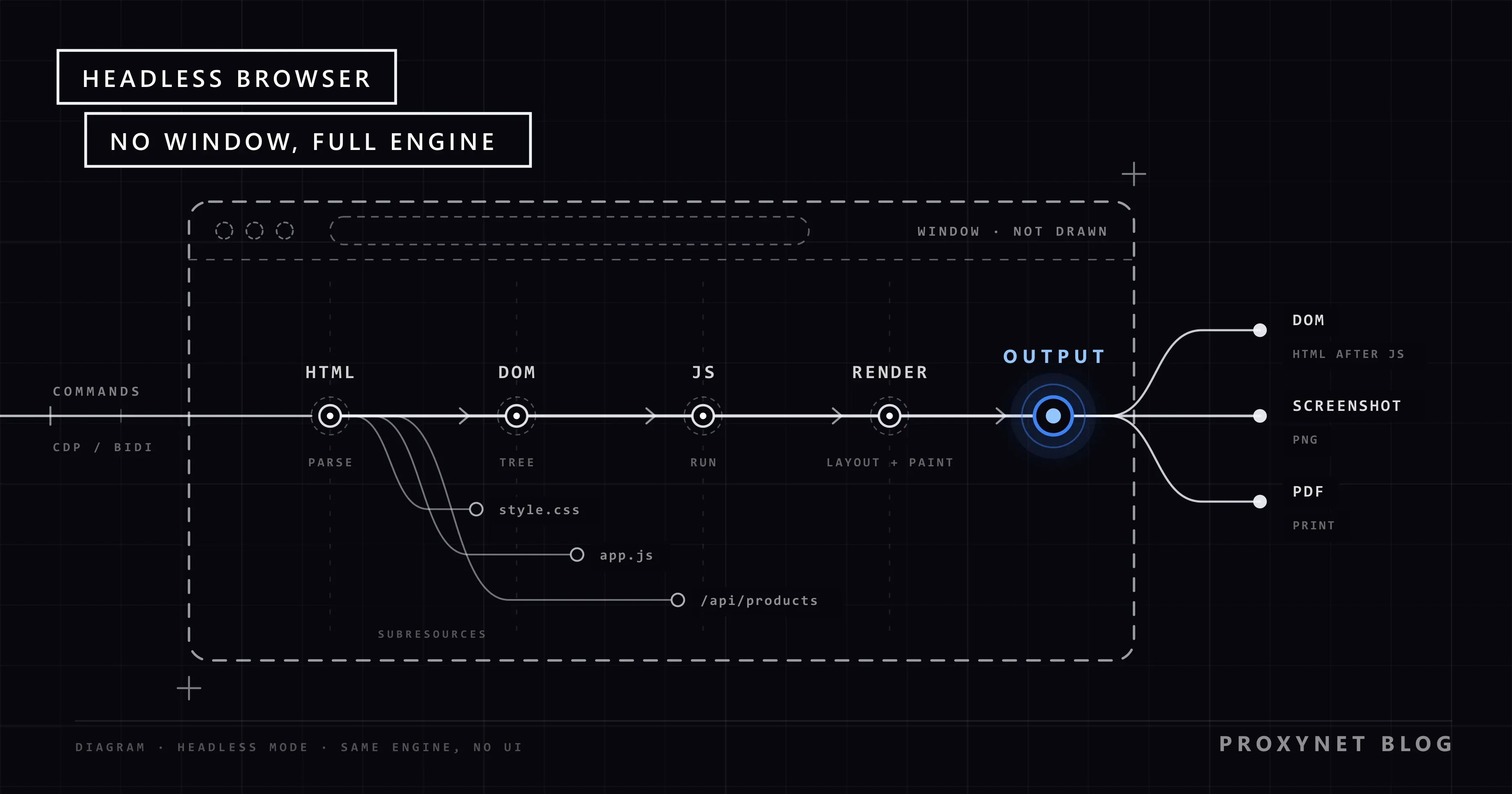
Almost everything keeps working; only the parts that exist for a human disappear. When a headless browser opens a page, it goes through the same pipeline as a normal browser:
- Network. It resolves the domain, opens a TLS connection and requests the HTML, then every stylesheet, script, font, image and API call the page asks for. Cookies and storage work as usual.
- Parsing into the DOM. The HTML becomes the DOM (Document Object Model), the live tree of elements that scripts read and change.
- Styles. CSS rules are matched to the elements.
- JavaScript. Scripts run, fetch more data and rewrite elements. On many modern sites, this step puts the actual content on the page.
- Layout and rendering. The engine calculates where each element goes for the given window size and paints the result into memory.
- Output. Instead of a screen, the result goes to your program: the current DOM as HTML, a screenshot, a PDF or values your script reads.
What is missing is the interface and the person in front of it: no window, no address bar, no mouse. Clicks and key presses arrive as commands, and dialogs that would wait for a human, such as a print preview, become direct instructions like "save this page as a PDF".
How does Chrome's headless mode work today?
Today's headless Chrome is the real Chrome running without showing its windows, while the older, separate implementation lives on as a standalone program called chrome-headless-shell. That split explains much of the confusing advice online.
For years, headless mode was a separate implementation shipped inside the Chrome binary that did not share Chrome's own browser code, so it behaved differently in small ways. According to the Chrome headless mode documentation, Chrome now has unified headless and headful modes: from Chrome 112, headless Chrome creates platform windows but does not display them, and all other functions are available. From Chrome 132.0.6793.0, the old mode is no longer part of Chrome and is distributed only as chrome-headless-shell, downloadable from the Chrome for Testing dashboard.
Libraries chose different defaults. In Puppeteer, headless: true is the default and starts the new mode, while headless: "shell" selects the shell. Playwright runs headless by default with a separate Chromium headless shell build, and you opt into the new mode with the chromium channel. Firefox has had a headless mode on all platforms since Firefox 56, started with -headless.
How do you run a headless browser from the command line?
You add --headless to the browser's start command and one flag that says what output you want. Chrome's headless command-line reference documents --dump-dom (print the page's DOM after scripts have run), --screenshot (save a PNG), --print-to-pdf (save a PDF) and two timing flags, --timeout and --virtual-time-budget. In these examples, chrome stands for your Chrome program: google-chrome on Linux, the full path to chrome.exe on Windows.
# Print the DOM after the page's scripts have run
chrome --headless --dump-dom https://example.com

# Save a screenshot at a chosen window size
chrome --headless --window-size=1280,800 --screenshot https://example.com

# Save the page as a PDF without the date and URL header and footer
chrome --headless --no-pdf-header-footer --print-to-pdf https://example.com

# Give time-dependent scripts up to 5 seconds of virtual time before the dump
chrome --headless --virtual-time-budget=5000 --dump-dom https://example.com
On our test machine (Windows 11, Chrome 157), we served a small page on 127.0.0.1 whose product list is filled in by a script that fetches JSON, and ran Chrome with a throwaway profile folder. curl returned the page with an empty list. So did the first --dump-dom run: the DOM was printed before the script's request even reached our server. With --virtual-time-budget=5000, the dump, the screenshot and the PDF all showed the three products.
That is the most common surprise with headless browsers: "the page has loaded" and "the content is there" are different moments. In code, wait for the element or response you need, not a fixed delay.
How is a headless browser controlled from code?
A headless browser is controlled through an automation protocol: your program sends commands such as "open this URL" or "take a screenshot" over a connection, and the browser answers and reports events. Three protocols matter today.
- Chrome DevTools Protocol (CDP). The protocol behind Chrome's developer tools, available in Chromium-based browsers such as Chrome and Edge. It runs over a WebSocket and gives low-level access to pages, the network and the DOM.
- WebDriver (classic). The W3C standard behind Selenium: request and response over HTTP, through a separate driver program for each browser.
- WebDriver BiDi. A newer W3C protocol with two-way communication, so the browser can stream events such as console messages and network activity. The WebDriver BiDi specification is a W3C Working Draft dated 13 November 2026; Firefox's remote protocols are WebDriver BiDi and Marionette.
When we started our test Chrome with --remote-debugging-port=9333, http://127.0.0.1:9333/json/version answered with the browser version, "Protocol-Version": "1.3" and a WebSocket address for CDP commands. Since Chrome 136, these debugging switches are ignored on the default profile folder and need --user-data-dir pointing elsewhere; Google made the change because malware used the debugging port to read cookies.
Most people never write protocol messages by hand. Libraries wrap them: Puppeteer uses CDP with Chrome by default and WebDriver BiDi with Firefox, Playwright drives Chromium, Firefox and WebKit builds from several languages, and Selenium uses WebDriver and is moving its implementation to WebDriver BiDi. All three run headless or with a window. How Playwright and Selenium differ in waiting, proxies and language support is compared in Playwright vs Selenium.
Headless vs headful: what is the difference?
Headless and headful (with a window) browsers load pages with the same engine; they differ in who watches and what the output is.
| Aspect | Headless | Headful |
|---|---|---|
| Window | None on screen | Visible window |
| Input | Commands from code | Mouse, keyboard or code |
| Output | DOM, screenshot, PDF, data | What you see |
| Where it runs | Servers, CI, containers | A desktop with a display |
| Debugging | Logs, traces, screenshots | Watch the page live |
| Typical job | Tests, PDFs, scheduled runs | Writing and debugging scripts |
In practice, teams use both: a test is debugged headful, so you can see where a click lands, then runs headless on a build server with no display. If a script behaves differently between the modes, check timing and window size first; a narrower default window can switch a responsive page to its mobile layout.
What does a headless browser cost compared with an HTTP request?
A headless browser costs much more than an HTTP request, because it downloads and runs the whole page instead of one file and keeps a set of processes running to do it.
Our local test showed the gap. curl made exactly one request to our test server; one page load in headless Chrome made five: the HTML, the stylesheet, the script, the JSON call and the site icon. A real shop page refers to dozens of images, fonts and scripts. With one headless Chrome page open, Windows listed twelve chrome.exe processes (one browser process, seven renderers, a GPU process and helpers), together using hundreds of megabytes of memory.
So use a browser only when the page needs one. If the data is in the HTML or comes from a JSON endpoint the page calls, a plain HTTP request is faster and lighter; how to tell which kind of page you have is explained in Static vs Dynamic Pages.
Where do proxies fit with a headless browser?
A proxy gives a headless browser's traffic an exit IP address in a chosen location, which matters when a page shows different prices, languages or results by country. Every library accepts a proxy server in its launch or context options, and the browser then sends all page requests through it.
Two things follow. Bandwidth: if you pay per gigabyte, as with Residential Proxy, every image, font and script counts, so blocking resources you do not need keeps the bill close to the data you want. Consistency: one page visit is many requests, and a sticky session keeps them on one IP address, as a normal visitor's would be.
When a team needs page data at scale and would rather not run a browser fleet, our Web Scraping API offers managed page extraction through our sales team.
Why do websites treat automated browsers differently?
Websites may treat automated browsers differently because traffic that strains a site, or breaks its terms, often comes from automation, and an automated browser carries recognisable signs. A site cannot see intentions; it sees signals and applies rules.
Some signals are openly declared. In our test, every request from headless Chrome carried a User-Agent header containing HeadlessChrome/157.0.0.0, the browser's default self-description. The W3C WebDriver standard defines navigator.webdriver, which is true when a browser is under remote control, as the standard way to tell a page it is automated. Sites also weigh request rate, navigation patterns and IP reputation; how these layers become one score is covered in How Bot Detection Works.
The legitimate route is to work with those rules, not around them. Read the site's robots.txt, the file that states which paths automated clients may visit; RFC 9309 standardises it and notes that its rules are not a form of access authorization, so read the site's terms as well. Keep the request rate low, use an official API where one exists, and identify your automation where the site asks. This post does not cover hiding automation or getting past bot checks.
What is a headless browser used for?
Headless browsers are used wherever a program needs a page exactly as a browser would build it.
- Automated testing. End-to-end tests click through sign-up or checkout in the real application on every code change, on build servers with no display.
- PDFs and screenshots. Invoices, reports and tickets are designed as HTML and printed to PDF; link previews and visual regression tests use screenshots.
- Monitoring. Scheduled checks load key pages, time them, confirm that a button or a price is present and alert when something breaks.
- AI agents. Agents that browse on a user's behalf drive a real browser through the same protocols, headless on a server or with a window when a person watches.
- Reading JavaScript-built pages. Where content exists only after scripts run and the site permits automated access, a headless browser renders it for price monitoring or market research.
- Pre-rendering. Some sites render their JavaScript pages to static HTML in advance, so visitors and crawlers get the finished content.
Common mistakes
- Starting a browser for a static page. If the data is in the HTML, curl or any HTTP library does the job with a fraction of the resources.
- Reading the page too early. "Loaded" is not "ready"; wait for the element or the response you need instead of a fixed sleep.
- Running automation in your everyday profile. Use a separate profile folder; since Chrome 136, remote debugging refuses the default one anyway.
- Copying old flag advice. Articles about
--headless=newor the old headless mode describe a split that changed with Chrome 132. - Assuming headless means invisible to sites. The default User-Agent and
navigator.webdriverdeclare automation openly. - Ignoring robots.txt and rate limits. A browser loads far more per page than an HTTP client, so a careless loop weighs much more on the site.
- Leaving processes behind. Close the browser when the job ends, or a server fills up with orphaned processes.
Decision guide
| Your situation | What to use |
|---|---|
| The data is in the page HTML | A plain HTTP request |
| The page loads its data from a JSON call | Request that endpoint, within the site's terms |
| Content appears only after scripts run | A headless browser |
| End-to-end tests on a build server | Headless, debugged headful |
| You need a PDF or screenshot of a page | Headless Chrome flags or a library |
| An agent must act in pages a user watches | A headful browser with automation |
| The site offers an official API | The API, not the browser |
Frequently asked questions
What does headless browser mean?
It means a browser running without its "head", the visible window and interface. The engine works normally, but it takes instructions from code or command-line flags and returns HTML, screenshots, PDFs or data instead of drawing the page on a screen.
Is a headless browser faster than a normal browser?
Not by much. It skips drawing to a screen, but the network, JavaScript and layout work is the same in both modes, and either is far slower than a plain HTTP request for one file.
How do I run Chrome in headless mode?
Start Chrome with --headless plus an output flag such as --dump-dom, --screenshot or --print-to-pdf. For more than a single capture, use a library such as Puppeteer, Playwright or Selenium, which starts Chrome headless and controls it.
Is chrome-headless-shell the same as Chrome's headless mode?
No. chrome-headless-shell is the old, separate headless implementation, distributed as its own program since Chrome 132. Chrome with --headless is the real Chrome without visible windows, while the shell is a separate program that does not share Chrome's own browser code.
Do AI agents use headless browsers?
Many do. An agent that reads or acts on web pages often controls a real browser through CDP or WebDriver BiDi, headless on a server and with a window when a person follows along. Agents that need only text from simple pages can use plain HTTP requests.
Is using a headless browser legal?
Running one is ordinary software use; testing, PDF generation and monitoring your own sites raise no special questions. On other people's sites, follow their terms and robots.txt, keep the request rate reasonable and respect personal data rules. This is general information, not legal advice.
Summary
A headless browser is a complete browser without the window: it loads the page, runs JavaScript and renders the result, then hands HTML, a screenshot, a PDF or data to your program. Chrome's headless mode is now the real Chrome, with the old implementation kept as chrome-headless-shell, and libraries control it over CDP, WebDriver or WebDriver BiDi. Use one only when a page needs a browser, wait for the content rather than the load event, keep request rates polite and route the traffic through a proxy in the right country when the page changes by location.