After downloading a page, the real work of scraping begins: finding and extracting the product name, price and link among hundreds of tags. You describe which element you want with a selector. There are two common languages: CSS selectors, familiar to web developers from stylesheets, and XPath, which comes from the XML world. You can often select the same element with either, but one is short and readable while the other does some things CSS cannot do at all.
In this article we explain what the two languages are, their syntax side by side, what XPath can do beyond CSS and whether the performance difference really matters. Then we show how to write selectors that don't break when the page design changes and how to test selectors in the browser. In the middle of the article there is a 20-row quick reference table you can bookmark; we verified on a test page that every CSS and XPath pair in the table selects the same elements.
What is a CSS selector?
A CSS selector is the pattern language used in CSS stylesheets to specify which elements a style applies to. Browsers also support the same language in JavaScript through document.querySelector() and querySelectorAll(). The current definition is W3C's Selectors Level 4.
A CSS selector picks an element based on:
- Tag:
div,a,span - Class:
.product - Id:
#list - Attribute:
a[href],img[src$=".webp"] - Hierarchy:
ul > li(direct child),div span(descendant at any depth) - Siblings:
h2 + p(immediately following),h2 ~ span(all following siblings) - Position:
li:first-of-type,li:nth-of-type(3)
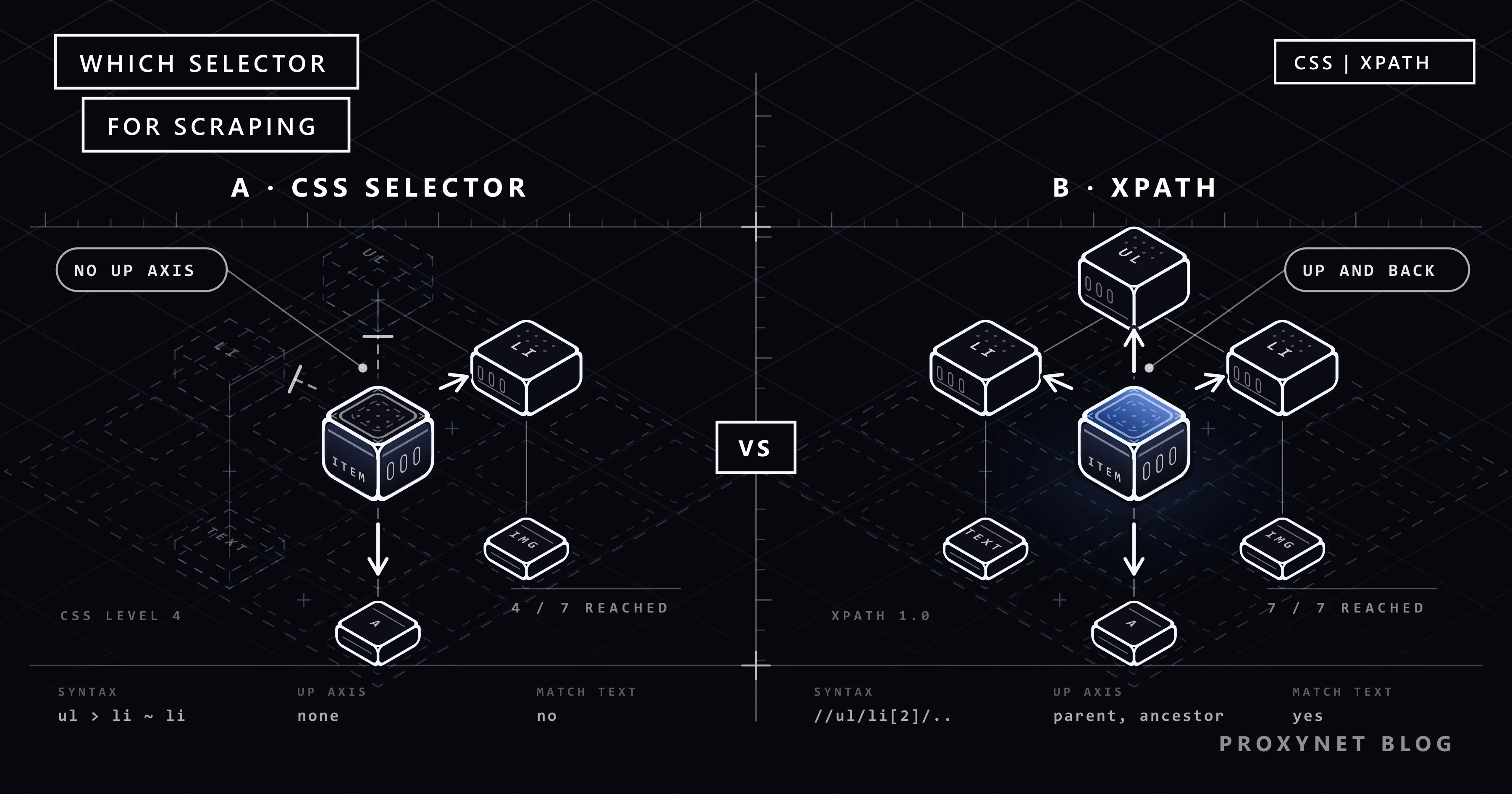
CSS's basic direction is down and forward: you can go from an element to its descendants and following siblings. The :has() pseudo-class introduced in Selectors Level 4 partly relaxes this rule: div.product:has(> span.discount) selects product cards that contain a discount label. But :has() doesn't "climb up" from an element; it selects the outer element by looking at what's inside it.
What is XPath?
XPath (XML Path Language) is a query language that selects nodes in XML and HTML documents with a path expression. It sees the document as a tree and can move in any direction in it: down, up, and to previous and following siblings. W3C's current definition is XPath 3.1.
There is an important practical detail: browsers and Python's lxml library support XPath 1.0. Features added in later versions, such as ends-with(), regular expression functions and a richer type system, are not available in these environments. Keep XPath expressions for scraping within 1.0 limits.
The basic parts of XPath:
//any depth in the document,/direct child://ul/li[...]a condition (predicate)://a[@href],//li[3]@attribute://img/@srctext()text node://h2/text()- Axes:
parent::,ancestor::,following-sibling::,preceding-sibling:: - Functions:
contains(),starts-with(),normalize-space(),last(),string-length()
In the browser, XPath runs through JavaScript's document.evaluate() function; its use is described in the MDN documentation.
Syntax comparison
| Criterion | CSS selector | XPath |
|---|---|---|
| Readability | Short, familiar to web developers | Long, steeper learning curve |
| Direction | Down and forward (partly outward with :has()) | Any direction: parent, previous sibling, ancestor |
| Selection by text | Not in the standard | Yes: text(), contains() |
| Returning attribute values | No (with library extensions) | Yes: /@href |
| Returning text nodes | No (with library extensions) | Yes: /text() |
| Class matching | .product exact and short | contains(@class, ...) needs care |
| Browser support | querySelectorAll | document.evaluate (XPath 1.0) |
| Python support | BeautifulSoup, lxml (cssselect), parsel | lxml, parsel; BeautifulSoup doesn't support it |
| Headless browsers | Playwright, Puppeteer, Selenium | Playwright, Puppeteer, Selenium |
| Typical use | Extracting lists by class and attribute | Label-value tables, text-based selection |
Quick reference table
Each row in the table below is the same selection in both languages. In rows without a CSS equivalent, the extra things XPath can do are shown.
| # | What is selected? | CSS selector | XPath |
|---|---|---|---|
| 1 | All div elements | div | //div |
| 2 | By id | #list | //*[@id="list"] |
| 3 | By class | .product | //*[contains(concat(" ", normalize-space(@class), " "), " product ")] |
| 4 | Direct child | ul > li | //ul/li |
| 5 | Descendant at any depth | div span | //div//span |
| 6 | Has the attribute | a[href] | //a[@href] |
| 7 | Attribute value equals | input[name="q"] | //input[@name="q"] |
| 8 | Attribute starts with | a[href^="https"] | //a[starts-with(@href, "https")] |
| 9 | Attribute contains | a[href*="product"] | //a[contains(@href, "product")] |
| 10 | Attribute ends with | img[src$=".webp"] | //img[substring(@src, string-length(@src) - 4) = ".webp"] |
| 11 | First item | ul > li:first-of-type | //ul/li[1] |
| 12 | Last item | ul > li:last-of-type | //ul/li[last()] |
| 13 | Third item | ul > li:nth-of-type(3) | //ul/li[3] |
| 14 | Immediately following sibling | h2 + p | //h2/following-sibling::*[1][self::p] |
| 15 | All following siblings | h2 ~ span | //h2/following-sibling::span |
| 16 | Several selections | h1, h2 | //h1 | //h2 |
| 17 | Card containing a specific element | div.product:has(> span.discount) | //span[@class="discount"]/.. |
| 18 | Button with exact text | Not in the standard | //button[text()="Add to cart"] |
| 19 | A specific ancestor of an element | Not in the standard | //span[@class="price"]/ancestor::div[@data-sku][1] |
| 20 | Value next to a label | Not in the standard | //th[normalize-space()="Stock"]/following-sibling::td[1] |
A few details in the table cause frequent mistakes:
- Row 3:
//*[contains(@class, "product")]looks shorter, but it also selectsproductsorold-productclasses. The long expression in the table matches only the exactproductclass. - Row 10: XPath 1.0 has no
ends-with(); the last characters are compared withsubstring. The number is one less than the length of the extension you're looking for (.webphas five characters,- 4). - Row 11:
li:first-childandli:first-of-typeare different. The first selects anlithat is the first child of its parent; if the first child is another tag, it selects nothing. - Row 14:
//h2/following-sibling::p[1]means "the first followingp" and matches even if there are other elements in between. CSS'sh2 + ponly matches if the element immediately afterh2is ap.
To return attribute values and text nodes, XPath uses //a/@href and //h2/text(). Python's parsel library adds the non-standard a::attr(href) and h2::text extensions to CSS for these jobs.
What XPath can do that CSS can't
Selection by text
On an e-commerce page, the "Add to cart" button and the "Out of stock" button may carry the same class. The only thing that tells them apart is their text:
//button[text()="Add to cart"]
//span[contains(normalize-space(.), "Discount")]
text() only looks at the element's direct text node; it doesn't match if the text is split across nested tags. normalize-space(.) joins all of the element's text and trims spaces at the start and end, so it is usually more reliable.
Standard CSS has no selection by text. Some tools offer their own extensions: the has_text option and :has-text() in Playwright, and :-soup-contains() in BeautifulSoup. These extensions only work in that tool.
Climbing to the parent and previous sibling
If only the price field on a product card has a stable class, you need to start from the price and reach the whole card:
//span[@class="price"]/..
//span[@class="price"]/ancestor::div[@data-sku][1]
.. selects the direct parent, and ancestor:: selects an ancestor at any level above. [1] takes the nearest ancestor.
Label-value structures
Product specification tables and definition lists are among the structures scraping runs into most. Which row comes in which order varies by product; what stays fixed is the label's text:
//th[normalize-space()="Stock"]/following-sibling::td[1]
//dt[normalize-space()="Warranty"]/following-sibling::dd[1]
These expressions find the value next to "Stock" no matter which row of the table it's in. To do the same with CSS, you'd have to pull every row and loop through them in Python.
Using CSS and XPath in Python
Python has three common libraries, and their selector support differs.
BeautifulSoup only supports CSS selectors (select and select_one); it has no XPath support:
from bs4 import BeautifulSoup

soup = BeautifulSoup(html, "html.parser")
products = []
for card in soup.select("div.product"):
    products.append({
        "sku": card.get("data-sku"),
        "name": card.select_one("h2").get_text(strip=True),
        "price": card.select_one(".price").get_text(strip=True),
        "link": card.select_one("a[href]")["href"],
    })
lxml runs XPath 1.0 directly and can return the result as text with functions such as string():
from lxml import html as lxml_html

tree = lxml_html.fromstring(html)
stock = tree.xpath('string(//th[normalize-space()="Stock"]/following-sibling::td[1])')
discounted_sku = tree.xpath('//span[@class="discount"]/ancestor::div[@data-sku][1]/@data-sku')
parsel (Scrapy's selector library) offers both languages on the same object, chainable with each other. You can find cards with CSS and use XPath inside a card:
from parsel import Selector

page = Selector(text=html)
for card in page.css("div.product"):
    name = card.css("h2::text").get()
    link = card.css("a::attr(href)").get()
    available = card.xpath('.//button[text()="Add to cart"]').get() is not None
    print(name, link, available)
The thing to watch in chaining is that an XPath expression running inside a card starts with .//. If you write //button, the search runs over the whole document instead of inside the card, and you find the first button on the page for every card.
To decide which language and which library to work with, see Web Scraping: JavaScript or Python?. For the details of find_all, selecting by class and get_text in BeautifulSoup, see our BeautifulSoup guide.
Selectors in headless browsers
On pages whose content loads with JavaScript, selectors are used inside a browser automation tool. Playwright supports both languages and treats an expression starting with // as XPath automatically:
from playwright.sync_api import sync_playwright

with sync_playwright() as p:
    browser = p.chromium.launch()
    page = browser.new_page()
    page.goto("https://example.com/deals")

    prices = page.locator("div.product .price").all_inner_texts()
    stock = page.locator('xpath=//th[normalize-space()="Stock"]/following-sibling::td[1]').inner_text()
    addable = page.locator("div.product", has_text="Add to cart")

    print(prices, stock, addable.count())
    browser.close()
In Selenium the same jobs are done with By.CSS_SELECTOR and By.XPATH; we explain setup and proxy configuration in Using a Proxy with Selenium and How to Use a Proxy with SeleniumBase. To tell whether a page really needs a browser, see Static vs Dynamic Pages.
Does the performance difference really matter?
The claim "CSS selectors are faster than XPath" comes up often online. It depends on the environment:
- In the browser,
querySelectorAlluses the browser engine's optimised selector matcher directly; XPath running throughdocument.evaluateis usually slower. The difference is noticeable on very large pages and with queries repeated thousands of times. - In Python with lxml and parsel, CSS selectors are mostly translated to XPath behind the scenes and run as XPath. So both languages use the same engine and the difference largely disappears.
- In BeautifulSoup, selection speed depends more on the parser used (
html.parserorlxml) than on the selector language.
What really decides it is how the selector is written. //*[contains(@class, "price")], which scans the whole document, does far more work than an expression that finds the card first and then the price inside it. And all of this is usually small next to the time spent downloading the page from the network or loading it in a headless browser. We cover a scraper's real bottleneck in Concurrency vs Parallelism.
How do you avoid fragile selectors?
The most common reason scrapers break is not blocking but a change in the site's design. For a selector to survive small changes on the page:
- Avoid auto-generated class names. Classes like
css-1x9k2aborsc-bdVaJacan change with every release. - Don't write absolute paths. An expression copied from the browser, like
/html/body/div[3]/div[2]/ul/li[4]/span, breaks when a single banner is added to the page. - Anchor to meaning, not position. Not "the third
span", but "thespanwith thepriceclass" or "the cell next to the Stock heading". - Prefer stable attributes. Attributes such as
data-sku,data-testid,itempropandaria-labelare independent of visual design, so they change less. - Look at structured data first. Many product pages carry the product name, price and stock in schema.org format inside
<script type="application/ld+json">. Reading that data is much more robust than parsing visual HTML. Turning those fields into clean, typed values is a separate step, covered in What Is Data Parsing? Parser Types, Errors and Examples. - Select the container first, then the field. Finding a card once and searching for fields inside it avoids mixing up fields.
- Treat an empty result as an error. Instead of silently writing an empty value when a selector finds nothing, log it and raise an alert; you'll notice the design change on day one.
Selectors coming back empty is not always a design change; sometimes it's a different page returned by bot protection, and sometimes content loaded later with JavaScript. For diagnosis, see the list in How to Scrape Websites Without Getting Blocked.
How do you test a selector in the browser?
Trying a selector in the browser before writing it into code saves time. In the developer tools (F12) of Chrome, Edge and Firefox:
$$("div.product .price")in the console returns all elements matching the CSS selector as an array.$x('//th[normalize-space()="Stock"]/following-sibling::td[1]')in the console runs an XPath expression.Ctrl + Fin the Elements panel opens a search box that accepts plain text, CSS selectors and XPath, and highlights matching elements one by one.
Two warnings: the page you see in the browser is the state after JavaScript has run. If your scraper only gets the HTML the server returns through an HTTP client, a selector that works in the browser can come back empty in code; check by viewing the source (Ctrl + U). Second, the browser's "Copy XPath" feature usually produces absolute, fragile paths; use them as a starting point and simplify them.
Use cases
- Price monitoring: product cards with CSS, label-value fields such as "Stock" with XPath. The setup is on our price monitoring solution page.
- Catalogue collection: JSON-LD first; if it's missing, CSS selectors with stable
data-*attributes. The general data collection setup is on our data scraping solution page. - Comparison sites: a selector definition file per site for different sites' structures; XPath for text-based fields.
- Test automation: CSS selectors with
data-testidattributes in your own application; tests that aren't affected by design changes. - Regular collection from many pages: as long as selectors stay stable, the job becomes a matter of distributing requests; a Rotating Proxy can be used for different exit IPs through a single address.
Decision guide
| Your need | Recommendation |
|---|---|
| Select by class, id or attribute | CSS selector |
| You use BeautifulSoup | CSS selector (no XPath support) |
| Find an element by its text | XPath |
| Move from an element to its parent or previous sibling | XPath |
| Label-value tables and definition lists | XPath |
| Return an attribute value directly | XPath /@attr or parsel ::attr() |
| Both in the same project | parsel |
| Headless browser | Playwright locators, CSS first |
| Robustness against design changes | data-* attributes or JSON-LD |
Frequently asked questions
Should I learn CSS selectors or XPath?
Learn CSS selectors first; they are shorter, more common and useful in web development too. When you need selection by text and climbing to parents in scraping, learning XPath's axes and functions is enough. With libraries such as parsel that use both, switching is easy.
Does BeautifulSoup support XPath?
No. BeautifulSoup only supports CSS selectors. If you need XPath, you can parse the same HTML with lxml or parsel.
Can CSS select by text?
Not in standard CSS. Some tools offer their own extensions: has_text and :has-text() in Playwright, and :-soup-contains() in BeautifulSoup. These extensions only work in that tool and are not portable.
Why doesn't the XPath copied from the browser work?
The path the browser generates is usually absolute and based on the page after JavaScript has run. That structure may not exist in the HTML the server first returns, or a small design change can break the path. Simplify the path so it starts from a stable class, id or attribute.
What is the difference between text() and normalize-space()?
text() returns the element's direct text nodes and leaves whitespace as it is. normalize-space(.) joins all of the element's text including nested tags, removes spaces at the start and end and collapses inner spaces into one. For text comparisons, normalize-space() is usually more reliable.
Why do my selectors sometimes come back empty?
There are three common reasons: the page design has changed, the content is loaded later with JavaScript, or the site is returning a challenge or error page instead of the one you expect. Saving the response's HTML to a file and trying the selector on that file is the fastest way to tell the three apart.
Summary
CSS selectors are short, readable and supported by every tool; they should be the default choice for selecting by tag, class, id and attribute. XPath is needed for things CSS cannot do, such as selecting by text, climbing to parents and previous siblings, and label-value structures; in browsers and lxml it is limited to version 1.0. In most scraping jobs the performance difference is negligible next to network time; what really matters is writing selectors that survive design changes. You can find proxy types that suit your data collection work in our proxy services.