You want a supplier's price list, the names and prices of two hundred products on a bookshop site, or the table an agency updates every week, and you want it in your own file. Copy and paste is the first idea. It works for ten rows and eats an afternoon at a thousand. Everyone who searches for "extract data from a website" is after the same thing: a way to stop doing this by hand.
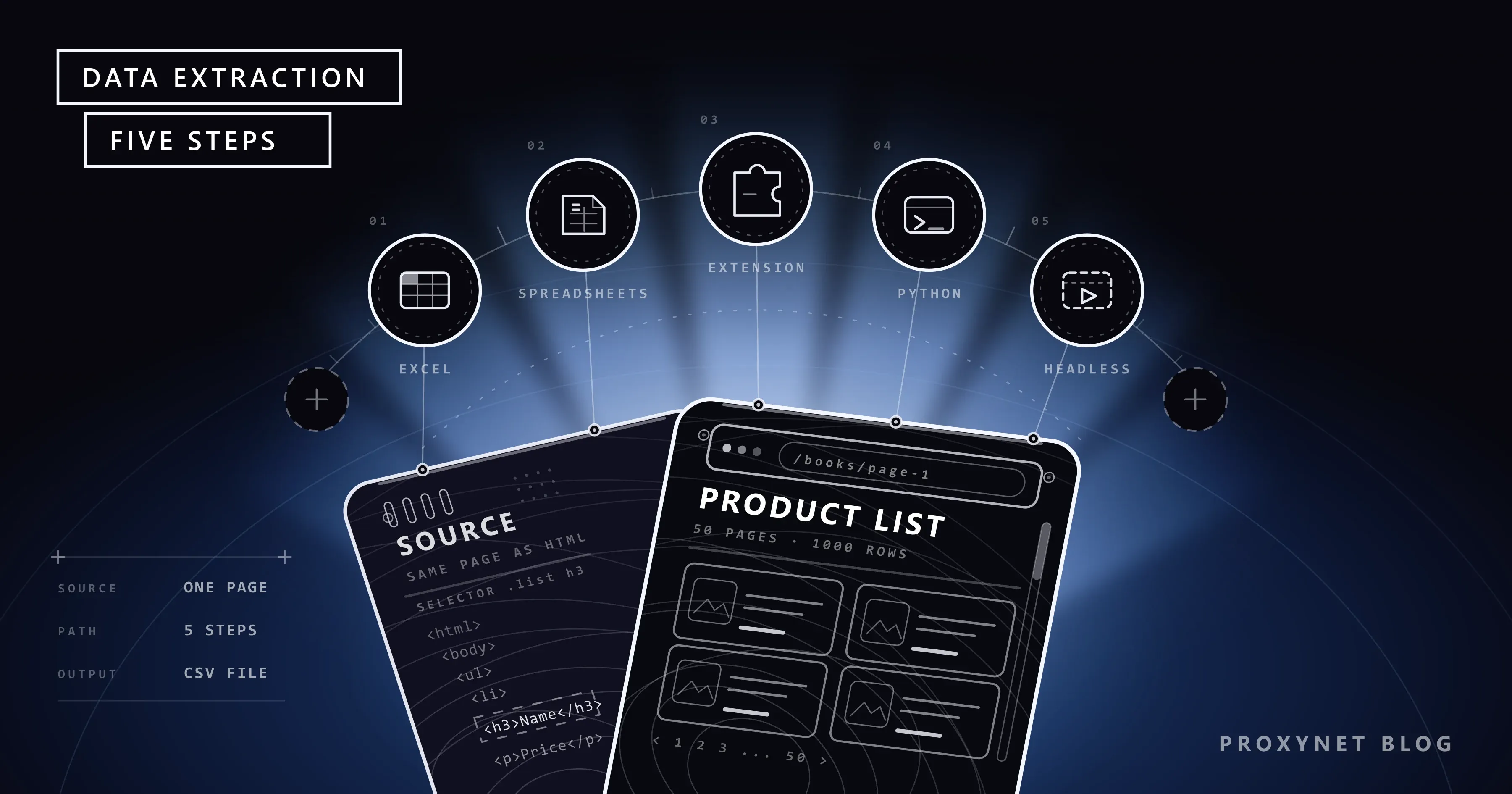
There is no single way, because the right method depends on how many pages you need, how the page is built and how often you will repeat the job. In this post we line the methods up as a ladder: Excel's From Web feature, Google Sheets formulas, browser extensions and no-code tools, Python with Requests and BeautifulSoup, and a headless browser at the top. For each step we explain what it covers, where it gets stuck and at which step a proxy enters the picture. We ran the Python examples in this post against a practice site.
What does extracting data from a website mean?
Extracting data from a website means turning information laid out for human eyes (product name, price, date, address) into a file made of rows and columns. The technical name is web scraping; for the rest of the post we will say "scraping" or "data extraction". We covered the definition in detail, and which proxy fits which kind of job, on our data scraping solution page. This post is about choosing a method, not about the definition. If the term is new to you, What Is Web Scraping and How Does It Work? explains it from the ground up.
Three concepts that often get mixed up are worth separating first:
- Crawling: Finding out which pages exist on a site, that is, building the address list. This is what search engines do. Details are on our web crawler page.
- Scraping: Pulling specific fields out of a page whose address you already know. Crawling gives you the addresses, scraping gives you the information inside them.
- API: The official door where the site already serves data in a structured form, usually JSON. If there is an API, there is no need to parse the page.
Before you extract: is there an API or a download button?
The cheapest data extraction job is the one you never do. Before settling on a method, look in these three places:
- An official API. Marketplaces offer APIs to their sellers, public bodies to researchers. The European Central Bank, for example, publishes euro reference rates and its other series on the ECB Data Portal, both through a browsable interface and through a web service. For an exchange rate table, go to the source itself instead of parsing a news site.
- A download button. More pages than you would think have an "Export to Excel" or "Download CSV" link under the table. The data portals of statistics offices work this way. When the download turns out to be a PDF report rather than a spreadsheet, the steps in How to Extract Data From PDF Files: Tables, Text and OCR take it from there.
- The page's own data request. Some pages fetch their content in the background from a JSON address. We showed how to find that address step by step in Static vs Dynamic Pages.
If none of these exist, you move on to extraction, but with four rules. Only data that is public and needs no login is collected. You read the site's robots.txt file and its terms of use; classifieds, live-score and social media sites whose terms explicitly forbid automated collection are not targets for the methods in this post. Names, phone numbers and email addresses are personal data covered by laws such as the GDPR, and "it was sitting in plain view on the page" does not change that; we gathered the legal framework in Is Data & Web Scraping Legal?. The last rule is speed: the site should not slow down because of you.
That is why every example in this post runs on books.toscrape.com, a site built for scraping practice. The site describes itself as "a demo website for web scraping purposes"; prices and ratings are randomly assigned.
How does a request turn into data?
Whether you use Excel or write Python, the same six steps run in the background. The difference between the methods is how many of these steps they do for you.
- A request is sent. The tool sends an HTTP request to the page's address, the way a browser does.
- A response arrives. The server returns a status code and the page's HTML. What codes other than
200mean is covered in our HTTP status codes post. - The HTML is parsed. Plain text is turned into a tree of nested tags.
- Fields are selected. You write a rule such as "the title and price inside each product card". The language of that rule is a CSS selector or XPath; we compared the two in CSS Selector vs XPath.
- Rows are saved. The selected fields are written to a table, a CSV file or a database.
- The next page is opened. If the list spans several pages, steps 1 to 5 are repeated for each page.
Excel and Sheets do all of these steps in one click but have limited options at step four. No-code tools let you describe that step with the mouse. In Python all six steps are in your hands.
Data extraction methods side by side
| Step | Method | Code needed? | When is it enough? | Where does it get stuck? |
|---|---|---|---|---|
| 1 | Excel, Data > From Web | No | The page has an HTML table and the data will be processed in Excel | Card layouts, login through a form, multi-page lists |
| 2 | Google Sheets, IMPORTHTML and IMPORTXML | A formula | A single page that should stay current in a shared sheet | Content filled in by JavaScript, pages behind a login, large numbers of formulas |
| 3 | Browser extension or no-code tool | No | Card layout, a few hundred rows, a one-off job | Regular repeats, large volume, recipes that break when the site design changes |
| 4 | Python, Requests and BeautifulSoup | Yes | Dozens or thousands of pages, scheduled runs, your own format | Content filled in later by JavaScript |
| 5 | Headless browser (Playwright) | Yes | The content only exists once a browser has rendered it | Speed and resources: a real browser runs for every page |
Climb the ladder from the bottom. If a lower step does the job, moving up only adds maintenance.
Step 1: Getting data from a website with Excel
Excel has a built-in feature for this and most users do not know about it. The steps on Microsoft's support page are as follows: on the Data tab, in the "Get & Transform" section, you select From Web, paste the page address and select OK. Excel finds the tables on the page and lists them in the Navigator pane. When you pick the table you want and select Load, the data lands in the worksheet. The connection stays in the file; next week you do not repeat the steps, you refresh the query. The "Web View" tab in the Navigator shows the page itself and highlights the tables it detected.
Where it gets stuck is also clear. The feature is most comfortable with tables that are really built with the <table> tag in HTML. The home page of our practice site has no table tag at all, the books are laid out as cards; on pages like this the Navigator may not offer the table you are after, and what remains is the "Add table using examples" button, where you describe columns by typing sample values. According to the connector documentation on Microsoft Learn, the supported authentication types are anonymous, Windows, basic (user name and password), Web API key and organizational account. Filling in a login form and signing in is not on that list. Walking through a fifty-page list page by page is possible in Excel but not practical; at that point you move to step four.
Step 2: IMPORTHTML and IMPORTXML in Google Sheets
Google Sheets does the same job with a formula. IMPORTHTML pours a table or list from a page into cells, and IMPORTXML does the same for any element you describe with XPath. In a sheet set to a United States or United Kingdom locale, arguments are separated with commas:
=IMPORTHTML("https://en.wikipedia.org/wiki/Demographics_of_India", "table", 4)
=IMPORTXML("https://books.toscrape.com/", "//article[@class='product_pod']/h3/a/@title")
The first formula is the example from Google's own documentation: it fetches the fourth table on the page, and counting starts at 1. The second argument takes either "table" or "list". If your sheet uses a locale where the decimal separator is a comma, arguments are separated with semicolons instead, and that is the first place to look when a formula returns a parse error. We tried the XPath expression in the second formula against the HTML of the practice site; it returns the titles of the twenty books on the home page. This is why, on a card-layout page, describing the element with XPath works where looking for a table does not.
This step has three limits. The formula runs on Google's servers; the request is not sent by your computer. So it cannot see a page you are logged in to, a dashboard on your company network or the session in your browser. The formula reads the page's raw HTML; if the content is filled in later by JavaScript, the cell gets an empty result or an error. The third limit is scale: you do not decide when formulas refresh, and putting hundreds of import formulas in one file makes the sheet heavy. It suits a single-page table that a team looks at together, not a catalog of a thousand products.
Step 3: Data extraction software and browser extensions
The tools you find when you search for "data extraction software" or "web scraping without coding" fall into three groups:
- Browser extensions. On the open page you click a product card, then the title and the price; the extension finds all cards with the same pattern and downloads them as a CSV or Excel file. Because the request leaves your own browser, the extension sees the page exactly as you see it. If what you want is the page's images rather than a table, we covered bulk downloading with an extension or the browser's own save option in how to download all images from a website.
- Desktop and cloud-based no-code tools. They add pagination, scheduling and cloud runs to the same point-and-click logic. Most have a free tier; check its limits on the tool's own pricing page.
- Workflow tools. They make data extraction one link in a chain: fetch the page, pull out the field, write it to a sheet, send a notification if something changed. We built an example from this group in our n8n and web scraping post.
For one-off jobs of a few hundred rows these tools give results faster than Python. Where they get stuck shows up over time. The recipe is recorded against the page design of that day; when the site renames a class, the tool quietly produces an empty column and noticing is up to you. With cloud tools, the data you collect and any account details you enter pass through a third company's servers; take that into account when choosing a tool.
Step 4: Extracting data from a site with Python
The most common pair in Python is the Requests and BeautifulSoup libraries. Requests downloads the page, BeautifulSoup parses the HTML and lets you select fields with CSS selectors. Installation is one line:
pip install requests beautifulsoup4The script below walks the first three pages of the practice site, collects each book's title, price, stock status and address, and writes the result to a CSV file that Excel can open directly. When we ran it with Python 3.13 it produced the 60-book file without problems.
import csv
import os
import time
from urllib.parse import urljoin

import requests
from bs4 import BeautifulSoup

START_URL = "https://books.toscrape.com/"
MAX_PAGES = 3          # three pages are enough for practice
DELAY = 2              # seconds between two requests

# If you need a proxy: PROXY_URL=http://user:pass@pr.proxynet.io:8000
proxy = os.environ.get("PROXY_URL")

session = requests.Session()
session.headers["User-Agent"] = "book-price-test/1.0 (contact: you@example.com)"
if proxy:
    session.proxies = {"http": proxy, "https": proxy}

rows = []
url = START_URL
for page in range(MAX_PAGES):
    response = session.get(url, timeout=20)
    response.raise_for_status()
    response.encoding = "utf-8"
    soup = BeautifulSoup(response.text, "html.parser")

    for card in soup.select("article.product_pod"):
        rows.append({
            "title": card.select_one("h3 a")["title"],
            "price": card.select_one("p.price_color").get_text(strip=True),
            "stock": card.select_one("p.instock").get_text(strip=True),
            "url": urljoin(url, card.select_one("h3 a")["href"]),
        })

    next_link = soup.select_one("li.next a")
    if next_link is None:
        break
    url = urljoin(url, next_link["href"])
    time.sleep(DELAY)

if not rows:
    raise SystemExit("No products found: the selectors may have changed or the page may be filled in by JavaScript.")

# utf-8-sig: Excel shows non-ASCII characters correctly when it opens the file
with open("books.csv", "w", newline="", encoding="utf-8-sig") as f:
    writer = csv.DictWriter(f, fieldnames=rows[0].keys())
    writer.writeheader()
    writer.writerows(rows)

print(f"{len(rows)} rows written to books.csv")
The script contains four decisions that no-code tools do not leave to you. The User-Agent line says who you are and how to reach you; use an honest bot name instead of a fake browser identity. DELAY puts a pause between two requests. raise_for_status() stops the script on an error code, so the content of a blocked page does not get written to your file as data. The if not rows check at the end is the cure for the silent empty column problem from step three: if the selector does not match, the script says so out loud.
From here the path branches according to the size of the job. For a crawl queue that can resume a fifty-page run where it stopped, see our post on scraping paginated lists; for pages that need a login with your own account, session and cookie handling in Python; for regular jobs of hundreds of pages, Scrapy. If your team does not write Python, you can build the same logic with PHP, with C# or with JavaScript; the method does not depend on the language. For parser choice, the difference between find_all and select, and reading attributes, see our BeautifulSoup guide.
On the storage side, CSV is enough for a one-off job. If the job repeats, a file that gets overwritten loses the change history; the setup that adds a date to every row and writes to SQLite is in our competitor price tracking post, and analysing the collected data is covered in What is Data Mining?.
Step 5: A headless browser when the page is filled in by JavaScript
The makers of the same site also offer a practice page that is filled in by JavaScript. When we downloaded this page with Requests and looked for the quote boxes in it, the result was zero: the boxes are not in the HTML, they appear after the browser runs the script. This is exactly where steps two and four get stuck.
A headless browser is a real browser without a window. It opens the page, runs the JavaScript, and you read the data from the rendered page. With Playwright the same page is read like this (after pip install playwright and playwright install chromium):
from playwright.sync_api import sync_playwright

with sync_playwright() as p:
    browser = p.chromium.launch()
    page = browser.new_page()
    page.goto("https://quotes.toscrape.com/js/")
    page.wait_for_selector("div.quote")          # wait until the element appears
    for quote in page.locator("div.quote").all():
        text = quote.locator("span.text").inner_text()
        author = quote.locator("small.author").inner_text()
        print(author, "-", text[:60])
    browser.close()
The cost of this step is resources: a browser tab opens for every page, images and scripts are downloaded. That is why the headless browser is the last step. On most dynamic pages, finding the JSON address the data comes from is the cheaper solution; you will find the decision between the two and the waiting strategies in Static vs Dynamic Pages, and how to set a proxy on the browser in our Playwright and proxy post.
At which step does a proxy come in?
On the first three steps a proxy is mostly beside the point. A Sheets formula leaves from Google's server and you cannot put anything in between. Excel and a browser extension use your computer's own connection; for a job of a few pages nothing else is needed anyway.
A proxy comes up on steps four and five, in three concrete situations:
- The content changes by country. If a shop shows one price to a visitor from Germany and another to a visitor from Türkiye, only a connection that leaves from that country sees the right data. Location-targeted Residential Proxy are for this job; they are billed per GB and the current base price is $1.50.
- The job has grown. Fetching thousands of pages in a reasonable time without tiring the target site means requests must not pile up on a single address. Rotating Proxy spread the load across a pool. We explained the mechanism in our IP rotation post.
- A session is needed. If you log in with your own account and visit several pages, you need to stay on the same IP for the length of the session; Sticky Proxy are used for that.
What a proxy does not do also needs saying. A rate limit is a site's way of saying "that is enough", and it is a signal to respect, not an obstacle to get past by changing IPs; we unpacked the meaning of the 429 response in our 429 Too Many Requests post. The checklist for diagnosing why you were blocked is in How to Scrape Websites Without Getting Blocked.
You do not need to change the code to use a proxy in the script. When you set the PROXY_URL variable to an address in the form http://user:pass@pr.proxynet.io:8000, all requests go through it. We tried the example with a local test proxy: with the right credentials the pages arrived, with a wrong password Requests raised a ProxyError containing 407 Proxy Authentication Required. Requests also reads the HTTPS_PROXY environment variable on its own; the details of these variables are in Using a Proxy with wget.
Use cases
- Price and stock monitoring: Regularly collecting the public prices on competitor pages to follow where your own products stand in the market. The setup is described on our price monitoring page.
- Market research: Aggregate indicators such as the number of products in a category, the price range and the brand mix. Details are on our market research page.
- Catalog and content audits: Looking for missing descriptions, broken links or wrong prices across thousands of pages on your own site. There is no permission question on your own site, and it is also the safest target for first attempts.
Common mistakes
- Parsing the page without checking for an API. Wrestling with HTML when there is an official source produces a job that breaks every time the design changes.
- Starting at the top of the ladder. Setting up a headless browser for a plain HTML table slows the job down and makes it harder to maintain.
- Mistaking an empty result for data. When a selector does not match, most tools give no error, they give an empty column. Check the row count on every run.
- Writing a loop with no delay. A script that sends dozens of requests a second first gets a
429, then a lasting block, and can really slow down a small site. - Collecting personal data because "it is out in the open". The names of reviewers and the phone numbers of advertisers are personal data. Stay with price and product information.
Decision guide
| Need | Method |
|---|---|
| The site has an API or a "Download CSV" button | Use it, do not scrape |
| A proper table on a single page, data will be processed in Excel | Excel, Data > From Web |
| A few hundred rows in a card layout, one-off | Browser extension or IMPORTXML |
| Dozens of pages, scheduled runs, your own file format | Python, Requests and BeautifulSoup |
| Hundreds or thousands of pages, regular crawling | Scrapy and rotating proxies that spread the load |
| The content only exists in the browser and no JSON address can be found | Headless browser (Playwright) |
| The data changes by country | Python or Playwright with location-targeted residential proxies |
| The data is behind a login and the account is not yours | Do not extract it; ask the site owner for permission or an API |
Frequently asked questions
Can you extract data from a website without writing code?
Yes. If the page has an HTML table, Excel's From Web feature and the IMPORTHTML formula in Sheets do the job; on card-layout pages, browser extensions and no-code tools do. When you need hundreds of pages, daily repeats and error checks, writing code becomes the less laborious route.
Is there free data extraction software?
If you have Excel or a Google account, the first two steps cost nothing extra. Python and the libraries named in this post are open source. Most no-code tools offer a free tier; check its limits on the tool's own page. Stay away from "download program" links of unclear origin; install extensions from your browser's official store.
Is it legal to extract data from a website?
Collecting public, non-personal data at a reasonable speed is not forbidden in itself in most legal systems; but the site's terms of use, copyright and, for personal data, laws such as the GDPR change the outcome. This post is not legal advice. We described the framework in Is Data & Web Scraping Legal?; for a commercial project, consult a lawyer.
Why does Excel not see the data on the page?
The most common reason is that the data is built as cards or a list rather than an HTML table; the Navigator may not offer the table you are after. The second reason is that the page asks for a login, the third that the content is loaded later by JavaScript. In the first case IMPORTXML or a browser extension is the answer, in the others the Python steps.
Do you have to learn Python to extract data?
No. The method does not depend on the language: send a request, parse the HTML, select the field, save. Start with whichever language your team knows. A comparison of two popular languages is in Web Scraping: JavaScript or Python?.
When do you need a proxy for data extraction?
Not for a low-speed job of a few hundred pages from a single country. You need one if the content changes by country, if the job has grown to thousands of pages and the load has to be spread, or if the IP must stay fixed during a logged-in session. A proxy is not a tool for ignoring the rate limit a site has set.
Summary
Extracting data from a website has five steps, and the right one is the lowest that does your job. Look for an API or a download button first. Excel or Sheets is used for a proper table, extensions and no-code tools for one-off jobs on card layouts, Python for jobs that repeat and grow, and a headless browser only for content that exists solely in the browser. Whichever step you are on, collect only public data, at low speed and within the site's rules. When the job grows enough to need country targeting or load spreading, you can find the suitable proxy types among our proxy services.