Every Monday, the owner of a small online bookshop checks what 150 of her titles cost at three other shops. By hand, that is 450 page visits and most of a morning, and by Wednesday some of the numbers are already out of date. A short program can open the same pages, read the price next to each title and fill in the spreadsheet on its own. That program is a web scraper, and the job it does is called web scraping.
This post follows one real price from the first request to the finished table. Along the way it compares scraping with crawling and APIs, sorts the tools by the skill they need, covers legality, explains why sites block scrapers and where a proxy fits, and ends with a short Python example we ran against a practice site.
What is web scraping?
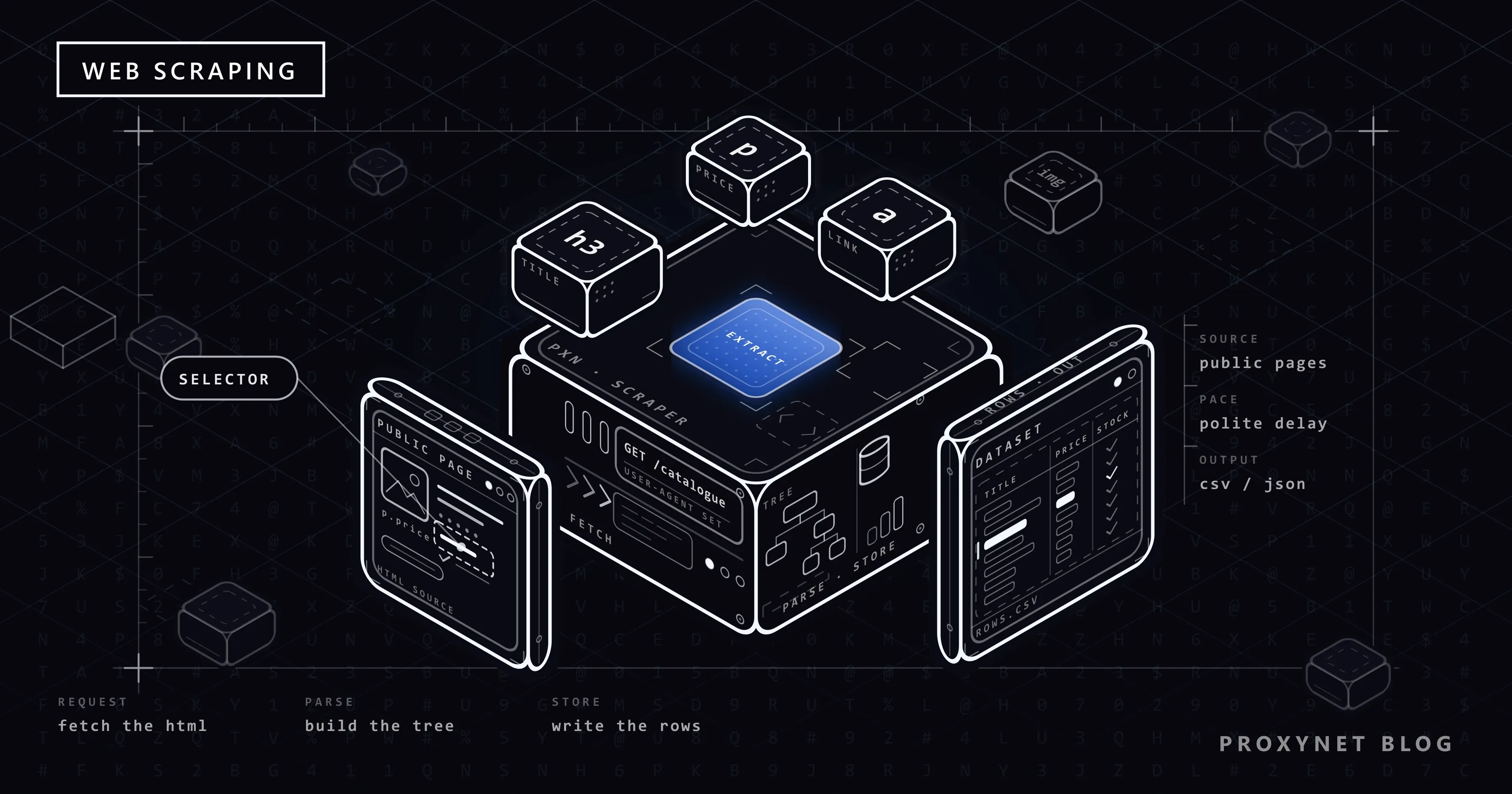
Web scraping means using software to read web pages and copy specific pieces of information from them into a structured form. A person looking at a product page sees a picture, a title and a price. A scraper sees the text behind the page, the HTML code, and takes out only the parts it was told to find: product names, prices, dates, table cells, links.
Data scraping is the wider term and also covers pulling data out of files, PDFs or old program screens; web scraping is the part that works on websites. Data extraction is the step inside scraping where the fields are picked out. A scraper is not a hacking tool either. It reads the same pages any visitor can open, only faster, and that speed is the reason scraping comes with rules.
Before writing any code, decide which fields you need. The scraper then fills in one row per product or article. Collecting "everything on the page, just in case" makes the data harder to clean and more likely to include personal information you should not store.
How does web scraping work?
Every scraper, from a browser extension to a system that visits millions of pages, runs the same loop. We follow one real price through it: the first book on the Travel category page of books.toscrape.com, a site that calls itself "a demo website for web scraping purposes" and whose prices are random.
- Pick the pages. The scraper starts with a list of addresses, written by you or built by a crawler that follows links. Ours has one entry, the Travel category page.
- Check the rules. Look for an official API or a download link, read the terms of use and fetch the site's robots.txt file. On the practice site that address returns a 404 error; the site exists to be scraped.
- Send a request. The program asks the server for the page with an HTTP request, the same message a browser sends. A well-behaved scraper adds a User-Agent header that says what it is.
- Receive the HTML. The server answers with a status code (200 means the page was delivered) and the HTML. Our price arrives as
<p class="price_color">£45.17</p>: text wrapped in tags, not yet a number. - Parse the HTML. A parser turns the text into a tree of nested elements that the program can search. We explained this step in our data parsing post.
- Extract the fields. A CSS selector points at the exact element: inside each product card, the paragraph with the class
price_color. The result is a small record: "It's Only the Himalayas",£45.17, "In stock". - Clean and store. Spaces are trimmed, the currency sign is split off if you want to calculate, and the record becomes a row in a file or database; the formats are compared in How to Save Scraped Data to CSV, JSON and SQLite.
- Repeat on a schedule. The scraper moves to the next page or runs again tomorrow. Comparing today's row with yesterday's is how a price change becomes visible.
Steps 3 to 7 take well under a second per page. The careful work is in steps 1, 2 and 8.
Web scraping vs web crawling vs API
| Web scraping | Web crawling | Official API | |
|---|---|---|---|
| What it does | Takes fields out of known pages | Finds pages by following links | Serves data the site has already structured |
| What you get | Rows: title, price, date | A list of page addresses | JSON or CSV in a documented format |
| Who defines the format | You, with selectors | Nobody; it is a list of URLs | The site |
| When it breaks | When the page design changes | When the site's links change | Rarely; new versions are announced |
| What governs it | robots.txt, terms of use, the law | robots.txt and crawl rate | An API key and the API's terms |
In practice the first two work together: a crawler finds the product pages, a scraper reads each one. We compared them with Scrapy code in Web Scraping vs Web Crawling, and our web crawler page covers proxy setups for large crawls. When a site offers an API with the fields you need, it is almost always the better route, because it does not break when a designer renames a class; our comparison of web scraping and APIs walks through that decision.
Web scraping tools: which type suits whom?
Tool types differ mainly in how much of the loop they do for you and how much control they leave you.
| Tool type | Skill needed | Good for | Where it falls short |
|---|---|---|---|
| Browser extension | None | A few hundred rows from one site, once | Breaks quietly when the layout changes |
| No-code desktop or cloud tool | Low | Scheduled jobs without programming | Your data passes through a third party; free tiers are limited |
| Python or Node.js libraries | Medium | Regular jobs, thousands of pages, your own format | You write and maintain the code |
| Headless browser | Medium to high | Pages that fill in their content with JavaScript | Slow and heavy on memory |
| AI scraper | Low to medium | Layouts that change often | Cost per page; a wrong value can look right |
| Hosted scraping API | Low to medium | A URL in, HTML or JSON out, no servers to run | Monthly cost; the site's rules still apply to you |
A headless browser is a real browser without a window that runs the page's JavaScript for your code; when you need one is covered in Static vs Dynamic Pages. An AI scraper hands the "find the field" step to a language model; the trade-offs are in our AI web scraper post. Without code, start with our guide to extracting data from a website; with code, the BeautifulSoup tutorial goes further than the example below.
Is web scraping legal?
Collecting public, non-personal data at a reasonable pace is not forbidden as such in most legal systems. What changes the answer is what you collect and how: personal data falls under laws such as the EU's GDPR even when it sits in plain view, copyrighted text and databases have their own protection, and terms of use can prohibit automated collection. Scraping behind a login or around a technical barrier puts you on much weaker ground. The rules by country are in Is Data & Web Scraping Legal?; this post is not legal advice.
Why do websites block scrapers?
A person reads a page for a minute; a careless script can ask for a hundred pages in the same minute and slow the site down for everyone. Three mechanisms decide whether a scraper keeps getting answers.
- Rate limits. The server counts requests per address or account within a time window. Past the limit it answers
429 Too Many Requests, defined in RFC 6585, optionally with aRetry-Afterheader saying how long to wait. The RFC does not define how the server counts, so every site sets its own threshold; see our 429 Too Many Requests post. - IP reputation. Addresses have a history. Data-centre ranges, addresses seen in spam and addresses sending thousands of requests an hour get less trust than a home connection.
- Bot scores. Bot-protection services combine request rate, headers, the TLS handshake and whether JavaScript runs into a score; below a threshold the visitor gets a challenge or a block. The layers are explained in How Bot Detection Works.
Where does a proxy fit?
A proxy server passes your requests on, and the site sees the proxy's IP address instead of yours. That matters in two legitimate situations. The first is location: a shop that shows one price in Germany and another in Türkiye can only be checked from each country, and location-targeted Residential Proxy let you pick the country and city. The second is volume: a large job should not pile up on one address, and Rotating Proxy give each request, or each session of a few minutes, a different IP from a pool. Our data scraping page matches proxy types to jobs.
A proxy is not a way around a rate limit or a block. If a site answers 429 or asks you to stop, slow down, switch to the API or ask for permission; changing IPs to keep the pace is exactly what the limit exists to stop. The diagnostic list is in How to Scrape Websites Without Getting Blocked.
A responsible web scraping checklist
- API first. Look for an official API, a download or a feed before you parse a page.
- Follow robots.txt. RFC 9309 places the file at
/robots.txtin the top-level path and says its rules are "not a form of access authorization". It is a request, not a lock: nothing stops a scraper from ignoring it, which is why following it is on you. How to read it is in our robots.txt guide. - Read the terms of use. A site that forbids automated collection is not a target.
- Public pages only, never behind someone else's login.
- Leave personal data out. See How to Handle Personal Data (PII) in Scraped Datasets for what to do when it slips in.
- Keep a slow, steady pace: seconds between requests to a small site, and a full stop on
429or503. - Say who you are with an honest User-Agent, not a fake browser identity.
A short web scraping example in Python
Python is a common starting point because two libraries do the hard parts. Requests sends the HTTP request. Beautiful Soup is, in its documentation's words, "a Python library for pulling data out of HTML and XML files"; it does not download anything itself.
pip install requests beautifulsoup4The script reads the Travel category of the practice site, takes the title, price and stock status of every book and writes them to a CSV file. The numbered comments match steps 3 to 7 above.
import csv
import os

import requests
from bs4 import BeautifulSoup

URL = "https://books.toscrape.com/catalogue/category/books/travel_2/index.html"

# Optional: PROXY_URL=http://user:pass@pr.proxynet.io:8000
proxy = os.environ.get("PROXY_URL")
proxies = {"http": proxy, "https": proxy} if proxy else None

# 1. Request: download the page
response = requests.get(
    URL,
    headers={"User-Agent": "scraping-intro/1.0 (contact: you@example.com)"},
    proxies=proxies,
    timeout=20,
)
response.raise_for_status()
response.encoding = "utf-8"

# 2. Parse: turn the HTML text into a tree you can search
soup = BeautifulSoup(response.text, "html.parser")

# 3. Extract: the same three fields from every product card
rows = []
for card in soup.select("article.product_pod"):
    rows.append({
        "title": card.h3.a["title"],
        "price": card.select_one("p.price_color").get_text(strip=True),
        "stock": card.select_one("p.availability").get_text(strip=True),
    })

# 4. Store: write the rows to a CSV file
with open("travel_books.csv", "w", newline="", encoding="utf-8-sig") as f:
    writer = csv.DictWriter(f, fieldnames=["title", "price", "stock"])
    writer.writeheader()
    writer.writerows(rows)

print(len(rows), "books saved to travel_books.csv")
for row in rows[:3]:
    print(row["price"], "|", row["stock"], "|", row["title"])
Run with Python 3.13, Requests 2.34 and Beautiful Soup 4.15, it printed:
11 books saved to travel_books.csv
£45.17 | In stock | It's Only the Himalayas
£49.43 | In stock | Full Moon over Noah’s Ark: An Odyssey to Mount Ararat and Beyond
£48.87 | In stock | See America: A Celebration of Our National Parks & Treasured Sites
Three lines are there for a reason. Without timeout=20, Requests never gives up on a silent server, as its documentation warns, and the script hangs. The practice site sends Content-Type: text/html without a character set, so Requests falls back to ISO-8859-1; when we removed response.encoding = "utf-8", every price came out as £45.17. And raise_for_status() stops on a 4xx or 5xx answer, so an error page is never saved as data.
To go through a proxy, set PROXY_URL to http://user:pass@pr.proxynet.io:8000 before running; nothing else changes. We tested this with a local test proxy: the right credentials returned the same 11 rows, a wrong password raised a ProxyError containing 407 Proxy Authentication Required. For pagination, retries and a rotating pool, continue with Web Scraping in Python with Rotating Proxies.
What is web scraping used for?
- Price and stock monitoring: following competitors' public prices and stock levels. The setup is on our price monitoring page.
- Market research: product counts, price ranges and brand mix across shops show how a market moves. See our market research page.
- SEO data: your own rankings come from the official Search Console API, and licensed SERP data fills the gaps. Google's spam policies treat scraping results for rank checking without express permission as a violation; the official route is in How to Automate SEO Rank Tracking.
- Research and data science: public listings and statistics collected over time become a dataset for analysis, the subject of What Is Data Mining?
- AI tools and RAG: in retrieval-augmented generation (RAG), an AI model looks up current documents before it answers, and scrapers often fetch those documents. See Safe Web Access for LLMs for the limits.
- Auditing your own site: missing descriptions, wrong prices and broken links across thousands of pages. Our HTTP status codes post helps read the answers.
Common mistakes
- Scraping when there is an API. The job then breaks with every redesign.
- No timeout. One silent server can hang a script overnight.
- Ignoring the encoding.
£instead of£, or broken accented letters, means the character set was guessed wrong. - Treating an empty result as data. A selector that stops matching usually gives an empty column, not an error. Check the row count on every run.
- Using a proxy to push past a limit. A
429asks you to slow down; rotating IPs to keep the pace only escalates the problem. - Starting with a headless browser. If the data is already in the HTML, a real browser only adds time and memory.
Decision guide
| Need | Recommendation |
|---|---|
| The site offers an API with your fields | Use the API instead of scraping |
| One table from one page, once | A spreadsheet import or a browser extension |
| The same pages every day | A Python script with a delay, a timeout and a row-count check |
| Content appears only after JavaScript runs | The page's JSON source first, then a headless browser |
| Prices differ by country | Residential proxies targeted to that country |
| Thousands of pages at a polite pace | A crawler with rotating proxies to spread the load |
| The site answers 429 | Slow down and respect Retry-After |
| Personal data or someone else's login | Do not scrape it; ask the site owner |
Frequently asked questions
What is web scraping used for in data science?
For datasets that do not exist in ready form: prices across shops over time, job listings by city, reviews for text analysis. The value usually comes from repeating the collection for weeks, so a stable schedule matters more than speed.
Can you do web scraping without coding?
Yes. Spreadsheet imports, browser extensions and no-code tools handle one-off jobs and simple layouts. With large volumes, daily repeats and pages that change often, a short script with error checks becomes less work.
Why is Python used so often for web scraping?
Because the pieces are ready: Requests for downloading, Beautiful Soup for parsing, Scrapy for large crawls and Playwright for pages that need a browser. Node.js is a common alternative; we compared the two in Web Scraping: JavaScript or Python?
Can a website tell that it is being scraped?
Often, yes. Request rate, the User-Agent, missing JavaScript execution and IP reputation all point to automation. A scraper that identifies itself and keeps a low pace is usually tolerated; one that poses as a browser and sends hundreds of requests a minute is usually blocked.
Does web scraping work on every website?
No. Pages behind a login, text drawn inside images and data that only exists in a mobile app are out of reach for a plain scraper, and many of them should stay that way. Pages that load content with JavaScript can be read, but need a headless browser or the page's own data source.
Do you need a proxy for web scraping?
Not for a small, slow job from one country. You need one when content changes by country, when a large job must spread its load over many addresses, or when a session with your own account must keep the same IP. A proxy does not make a site's rate limit or terms go away.
Summary
Web scraping is the automated version of reading a page and copying what you need into a table: request the page, parse the HTML, extract the fields, store the rows, repeat on a schedule. Crawling finds the pages, scraping reads them, and an official API makes both unnecessary when it exists. Pick the simplest tool that does the job, check robots.txt and the terms first, leave personal data out and keep the pace low. When a job needs country-specific results or has to spread its load over many addresses, you can find the right proxy type among our proxy services.