
































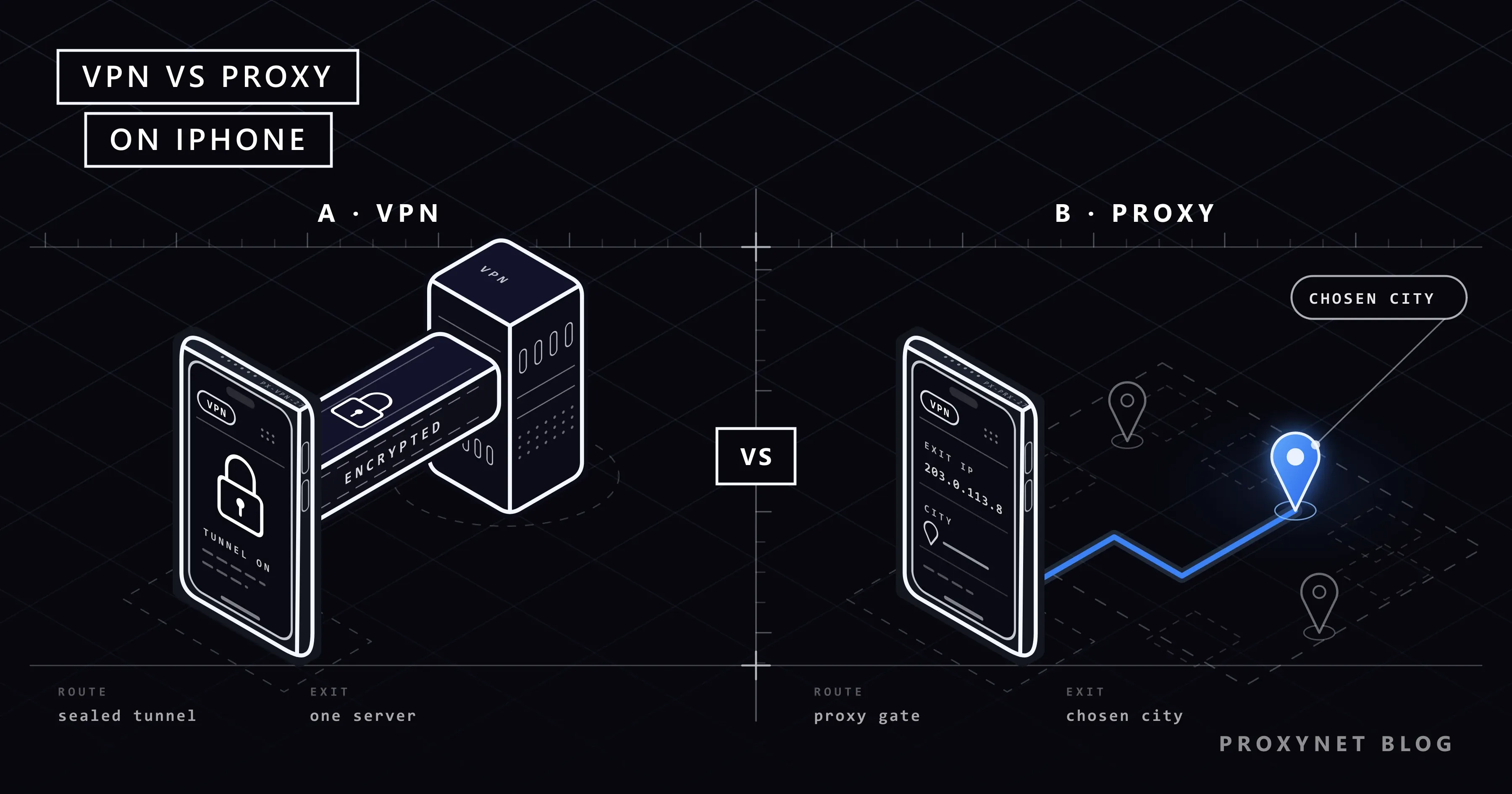
You install a proxy app on your iPhone, pick a city, tap to connect, and a small "VPN" badge appears at the top of the screen. You never installed a VPN, so the question is fair: did the app just turn into one, and if both show the same badge, what is the difference between the two on a phone?
This post answers that for the iPhone: why proxy apps share the VPN slot and icon, what the Wi-Fi proxy field can and cannot do, how each option treats your apps and privacy, and which one fits which job. The general comparison for all devices is in Proxy vs. VPN: Which One and When?; here the focus stays on what iOS shows you.
What is the difference between a VPN and a proxy on iPhone?
The difference is the job each one is built for. A VPN (virtual private network) wraps everything your iPhone sends into an encrypted tunnel to one server run by the VPN provider; the coffee-shop Wi-Fi or mobile network carrying it sees only that tunnel. A proxy is an intermediary server that forwards your requests from its own IP address, so the site sees the proxy's address and location instead of yours.
On a laptop the two look different: a VPN is an app, a proxy is a line in the browser settings. On an iPhone that line blurs, because a proxy app also builds a tunnel on the device to carry the whole phone's traffic to its gateway. What still differs is where the tunnel ends and what the service promises there.
- VPN: the promise is a protected connection. The exit address usually belongs to a data center, and you choose a country from the provider's list.
- Proxy app: the promise is a specific exit. You choose the country, often the city, and the type of address, such as a home broadband connection or a mobile carrier.
How does each one connect on an iPhone?
Both start the same way on the device; the difference shows up at the end of the route. With a VPN app:
- You tap to connect, and iOS starts the tunnel from the VPN configuration you approved when you first opened the app.
- iOS encrypts the iPhone's traffic with the VPN protocol, for example IKEv2, and sends it to the VPN server.
- The server decrypts it and passes it on. Sites see the server's IP; the Wi-Fi owner or carrier sees only an encrypted stream.
With a proxy app such as Proxynet.io:
- You pick a gateway, a location and a rotating or sticky session, then tap to connect.
- iOS starts the app's tunnel, which hands your traffic to the chosen HTTP or SOCKS5 proxy gateway.
- The gateway forwards each request from an exit IP in the place you chose. HTTPS sites stay encrypted end to end as always; the proxy adds no encryption layer of its own.
VPN or proxy on iPhone: the main differences
| Question | VPN on iPhone | Proxy app on iPhone |
|---|---|---|
| Main job | Protect the connection | Choose the exit IP and place |
| Location choice | Country, from the VPN's list | Country, state, city |
| Exit IP type | Usually data center | Residential, mobile, ISP or data center |
| Extra encryption | Yes, to the VPN server | No; HTTPS sites stay encrypted |
| iOS status icon | VPN | VPN |
| Listed in Settings | VPN & Device Management | VPN & Device Management |
The two rows at the bottom are the reason people confuse them. The rows above them are the reason the choice matters.
Why does a proxy app show the VPN icon on iPhone?
Because iOS gives every app that routes traffic for the whole device the same kind of system configuration, and it labels that configuration "VPN". Apps do this through Apple's Network Extension framework, whose tunnel building blocks are all filed under "Virtual private networks": Personal VPN for the built-in protocols, plus a packet tunnel provider and an app proxy provider for custom ones. A proxy app uses the same blocks to carry traffic to a proxy gateway.
The status icon follows that system label. Apple's list of iPhone status icons describes the VPN icon simply as "iPhone is connected to a network using VPN". It appears in the status bar or, on iPhone models with Face ID, among the extra icons at the top of Control Center. The icon does not say who runs the server or what kind of service it is.
You can see the same thing in Settings. Open Settings > General > VPN & Device Management and the proxy app appears in the VPN list next to any VPN you have, with its own status. The App Store listing for Proxynet.io says this plainly: the app routes device traffic through Network Extension, and iOS shows the "VPN" indicator while it is connected. That makes it a proxy tunnel, not a VPN service.
What about the Wi-Fi HTTP Proxy setting?
The built-in proxy setting is narrow, and it does not trigger the VPN icon. You find it under Settings > Wi-Fi: tap the info (i) button next to your network, scroll to the HTTP Proxy section, choose the manual option and type a server and port, with a username and password if the proxy needs one.
Three limits follow from where Apple put it:
- One network only. The setting lives inside one Wi-Fi network's details. On another Wi-Fi network or on mobile data, the iPhone connects directly again.
- HTTP proxies only. There is no field for a SOCKS5 proxy.
- Apps decide. Safari and most apps that use the system's web connections follow the setting; apps that open their own connections can skip it.
This is fine for a quick check in Safari on your home Wi-Fi. When you need the same proxy on mobile data, a SOCKS5 proxy or every app at once, the device-wide tunnel of a proxy app is the route iOS offers. Setting one up, step by step, is covered in iPhone Proxy App: How to Use a Proxy on Your Whole Device.
Do VPNs and proxy apps treat all apps the same?
On a personal iPhone, yes: an app built on Network Extension usually routes the traffic of the whole device, not one app at a time. iOS does support per-app VPN, but Apple's VPN overview for device deployment notes that on iPhone and iPad a device management service has to manage the app. That is a feature for company-managed phones, not something a consumer app switches on for you.
So plan on all or nothing. If your banking app dislikes the location you picked, disconnect for that session. Do not count on stacking two tunnels either: Apple's developer documentation says only one Personal VPN configuration can be enabled at a time, so check which app shows as connected under VPN & Device Management.
Which one is more private on iPhone?
A VPN does more for the privacy of the connection itself; a proxy app does more for where you appear to be. The real question is whom you trust, because both services carry your traffic.
- Without either: the Wi-Fi owner or your carrier can see which servers you connect to, and sites see your own IP address.
- With a VPN: the local network sees only an encrypted stream to the VPN. The VPN provider now sits where the Wi-Fi owner was and can see the same connection details.
- With a proxy app: sites see the proxy's exit IP. The proxy provider sees which sites you reach. The local network can see that you connect to a proxy gateway, and HTTPS keeps page content encrypted on every leg as before.
Neither option makes you anonymous to a site you log in to: your account, cookies and device still identify you. And neither changes the GPS location your Maps or weather app reads. A proxy changes IP-based location only, which is what most websites and apps use to guess your country and city.
Apple adds two of its own options that sit next to this choice. Limit IP Address Tracking, in each Wi-Fi network's settings, hides your IP address from known trackers. iCloud Private Relay, part of an iCloud+ subscription, protects your browsing in Safari. Both are privacy tools; neither lets you pick a city or an IP type.
Does a VPN or proxy app drain the iPhone battery?
Any always-on tunnel costs some battery, because the phone keeps a connection open and passes every packet through an extra step. How much depends on the app, the protocol, the server distance and your data use; there is no single figure to quote.
Speed follows the same logic: a distant server adds delay, a nearby one keeps the detour short. The Proxynet.io app shows the latency (ping) of the active connection, the quickest way to see whether the route you picked is slow.
Which should you use for which job on iPhone?
Pick by the problem, not by the icon. If the worry is the network you are on, use a VPN. Public Wi-Fi in a hotel, airport or coffee shop is the classic case: most sites already use HTTPS, but a VPN still hides which servers you reach from the network owner.
If the need is to appear from a particular place, or as a particular kind of user, use a proxy. Checking how a shop page, a search result or an ad looks in another city, or testing an app release in a new market, needs an exit IP in that place. A Residential Proxy gives you the address of a home internet connection there, which is how a normal visitor in that city appears.
When the question is how your service looks to people on phones, a Mobile Proxy routes you through a mobile carrier's IP instead. Mobile and residential exits can be rotating, with a new IP for new connections, or sticky, holding one IP for 1-60 minutes while you finish a check.
What does the Proxynet.io app do on iPhone, and what does it not do?
The app is the iPhone side of a Proxynet account: you choose a gateway and location and connect the whole device with one tap. It is a free download from the App Store, runs on iOS and iPadOS 15.1 or later, and works with the proxies on your account, including residential, mobile, static ISP and datacenter.
- Targeting: exit IPs by country, state and city, with a rotating or sticky session.
- While connected: connection state, the active gateway, latency, the assigned exit IP with its country flag and location, and live upload and download usage.
- Account: create new residential, mobile, ISP or datacenter gates, see active orders, remaining days and data quotas, and switch between organizations.
- Payment: wallet top-ups through Apple's in-app purchase, with no recurring charge; the balance does not expire.
The honest limits: the interface is in English only, the app changes your IP-based location and not your GPS position, and iOS will show the "VPN" icon while it runs even though it is a proxy tunnel. It is not a VPN service, so it is not the tool for encrypting your connection on an untrusted network.
Where you meet the VPN or proxy choice on iPhone
People who travel often keep a VPN for hotel and airport Wi-Fi and never need a proxy. People who work with location do the opposite: marketers check local ads and search results from a phone, app teams look at the store page and in-app prices other markets see, and support teams reproduce what a customer in one country sees. In each case the deciding question is "which place and which kind of IP", which is a proxy question.
Why do some apps say "VPN or proxy detected" on iPhone?
Because the app or site has looked up your IP address and found it registered to a VPN provider, a hosting company or a known proxy network. Data center addresses are flagged most often, which is why many VPN users see it; residential and mobile IPs belong to ordinary providers and are flagged less often, though no IP type is guaranteed to pass.
If the warning appears while nothing should be running, check VPN & Device Management first: a forgotten app may still be connected. The full checklist, including iCloud Private Relay and browser extensions, is in VPN or Proxy Detected Error: What It Means and Why.
Common mistakes
- Reading the VPN icon as "my traffic is encrypted". The icon only says a tunnel is active. If the app is a proxy, HTTPS sites stay encrypted as usual, but there is no extra VPN encryption on top.
- Expecting the Wi-Fi proxy to follow you. It stops at the edge of that Wi-Fi network; on mobile data the iPhone connects directly.
- Typing a SOCKS5 proxy into the Wi-Fi fields. The built-in setting speaks HTTP only. Use an app that supports SOCKS5.
- Using a VPN to check a city. Many VPNs offer countries only, and their data center IPs often get a "VPN detected" page instead of the local version.
- Thinking a proxy moves the GPS. Maps, weather and ride apps that use location services still read the phone's real position.
- Leaving a tunnel on and forgetting it. A connected proxy or VPN explains many "why is this site in another language" moments. Check the icon first.
Decision guide
| Your need on iPhone | Choose |
|---|---|
| Safer browsing on hotel Wi-Fi | VPN |
| See a site as a visitor in one city | Proxy app, residential IP |
| Check mobile ads in another country | Proxy app, mobile IP |
| Quick HTTP proxy check on home Wi-Fi | Wi-Fi HTTP Proxy setting |
| Proxy on mobile data or SOCKS5 | Proxy app |
| Hide your IP from known trackers | Limit IP Address Tracking |
Frequently asked questions
Why does my iPhone say VPN at the top when I use a proxy?
Because the proxy app routes your traffic through Apple's Network Extension system, which iOS files under VPN. The icon means "a tunnel is active", whether that tunnel leads to a VPN server or to a proxy gateway. Disconnect in the app and the icon goes away.
Is a proxy app on iPhone the same as a VPN?
No. Both create a tunnel on the device, but a VPN's purpose is to encrypt your connection to its server, while a proxy app's purpose is to give you an exit IP in a place and of a type you choose. The proxy app does not add its own encryption on top of HTTPS.
Is a residential proxy a VPN?
No. A residential proxy is an IP address from a home internet connection that your traffic exits from. A VPN is a service that encrypts your connection to its own servers, which are usually in data centers.
Can I use a SOCKS5 proxy on iPhone without an app?
No. The iPhone's built-in proxy setting in the Wi-Fi menu accepts HTTP proxies only and has no SOCKS5 field. To use a SOCKS5 proxy for the whole device, including on mobile data, you need an app that supports it, such as Proxynet.io.
Should I use a VPN or a proxy on public Wi-Fi?
Use a VPN when the network itself is what worries you, since it encrypts everything between your iPhone and the VPN server. A proxy changes the address sites see but adds no encryption of its own. With HTTPS on most sites, the main extra gain of a VPN is hiding which servers you reach.
How do I turn off the VPN icon on iPhone?
Disconnect the app that created it, or open Settings > General > VPN & Device Management and turn off the connection listed there. If the icon comes back, check whether that app is set to reconnect on its own and switch that off in the app.
Summary
On iPhone, a VPN and a proxy app look alike from the outside: both are listed under VPN settings and both light up the same "VPN" icon. Underneath, a VPN encrypts your connection to one server to protect you on untrusted networks, while a proxy app gives sites an exit IP in the country, state or city you pick, as a home or mobile user if you need it. Choose the VPN for public Wi-Fi and the proxy app when location is the job. For the proxy side, the Proxynet.io app connects your residential or mobile proxies to the whole iPhone with one tap.