

































You buy a pack of cheap proxies to check product prices on a few shops each morning. On the first day one address answers with a CAPTCHA before your script has sent ten requests, and another returns 429 Too Many Requests on a site you have never visited from it. Nothing is wrong with your setup. The address was already busy: other customers were sending their own traffic through it, and the site counted all of it as one visitor.
This post explains what shared, semi-dedicated and dedicated proxies are, what "shared" means for a rotating residential pool as opposed to an IP you rent, and how sharing changes reputation, rate limits, speed and price. It ends with the mistakes people make when choosing, a decision guide and six common questions.
What is a shared proxy?
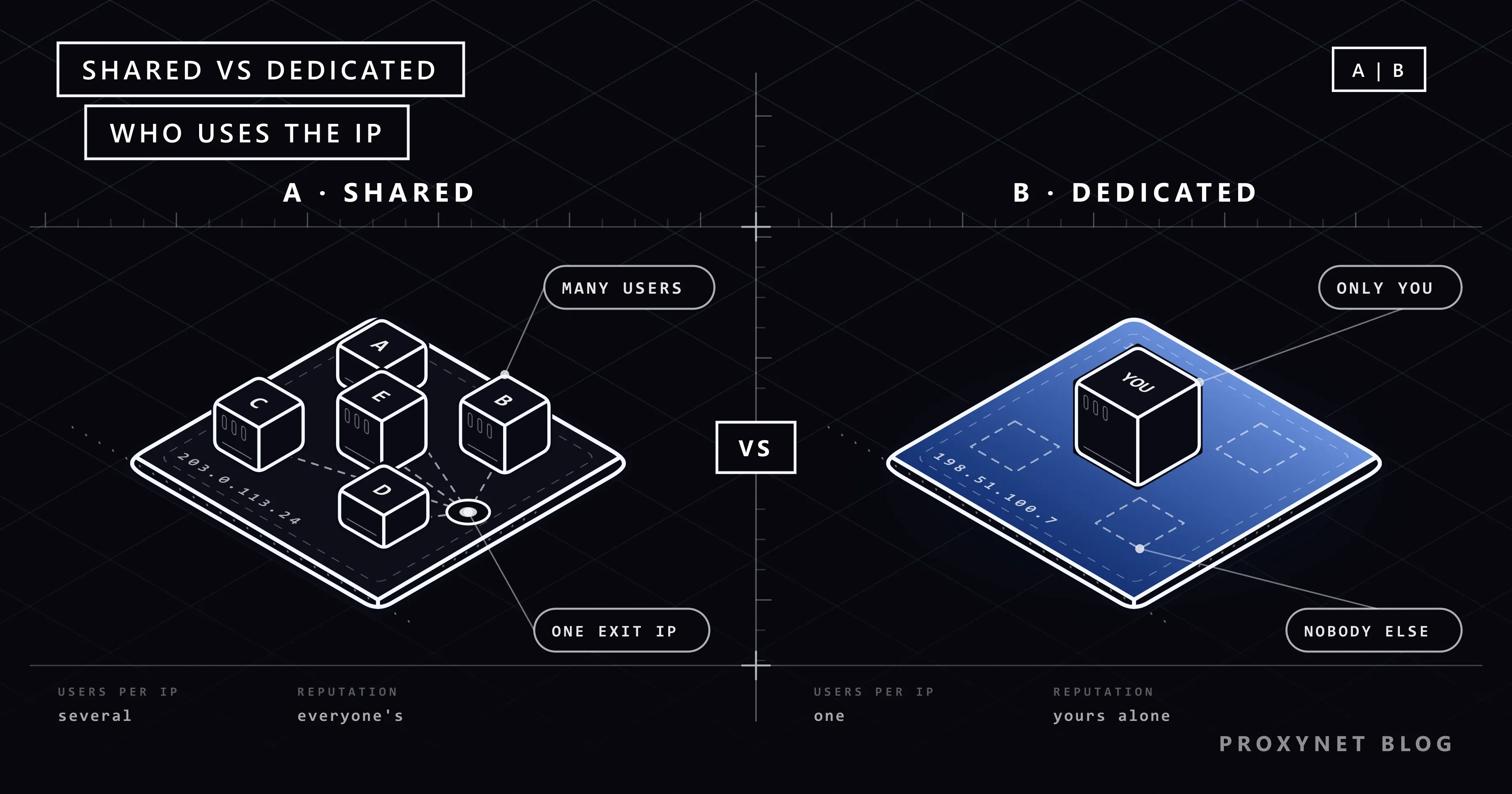
A shared proxy is a single IP address that a provider sells to several customers at once. Each customer gets their own login, but all of them connect to the same address and all of their requests leave the proxy from it. To the website on the other end there is no "several customers": there is one IP address doing everything those customers do.
The listing usually says how many users share each address, and the price per IP is the lowest you will find for a fixed address. What you do not get is control: you do not know who the other users are, which sites they visit or how fast they send requests.
A semi-dedicated proxy sits in the middle. The address is still shared, but with a small group whose size the provider caps, often just a few customers. The idea is to spread the cost while keeping the crowd small enough that its behaviour stays predictable. It is still a shared address, though, and everything below about sharing applies to it on a smaller scale.
What is a dedicated proxy?
A dedicated proxy is an IP address reserved for one customer for as long as the rental runs. Only your login, or the IP addresses you allowlist, can use it, and no other customer's traffic leaves through it during that time. Providers also call this a private proxy; the two words describe the same thing, and the older term is covered in What Is a Private Proxy?
"Dedicated" answers one question: who sends traffic through the address. It does not mean the connection is encrypted, that the address is hidden from the site, or that it can never be blocked. A dedicated IP is usually static as well, meaning it stays the same for the whole rental, but static and dedicated are separate properties: a shared IP can be static too, and a dedicated one is only yours until the rental ends.
Dedicated addresses come in two common kinds. A datacenter IP belongs to a hosting or cloud network. An ISP IP is registered to an internet service provider, the kind of company that sells home and business connections, while the proxy itself runs on a server. Sites that look at who owns an address treat the two differently, which matters more than the shared-or-dedicated question on some targets.
What does "shared" mean in a rotating residential pool?
In a rotating residential or mobile pool, "shared" means shared over time, not shared at the same moment by a fixed group. You do not rent particular addresses. You buy traffic, usually per gigabyte, and the provider's gateway gives you an exit from a large pool: a new one for each connection on a rotating session, or the same one for a set time on a sticky session.
Because the pool serves many customers, an address you use this morning may have served someone else last week and will serve someone else tomorrow. Its reputation is shaped by all of that traffic. A large pool offsets this with numbers: if one exit is flagged on your target, the next connection gets another one.
Mobile addresses add one more layer. Carriers often place many subscribers behind one public IPv4 address through carrier-grade NAT, so a mobile exit is shared with real phone users at the same time, whatever the proxy plan calls it. The IETF's RFC 6269 on IP address sharing describes the side effect plainly: blacklisting one shared address restricts every subscriber behind it. That is one reason sites tend to handle carrier addresses with more care than server addresses.
So the shared-or-dedicated question mainly applies to per-IP products. For pools, what matters is how large the pool is, which countries and cities it covers, and how long a sticky session can hold one exit.
How does sharing change what a website sees?
A website sees addresses, not customers, so everything sent through a shared IP adds up to one visitor's record. Here is what happens when two customers on one shared address use the same site on the same afternoon:
- Both connect to the same proxy IP. Each authenticates with their own username and password, so the provider can tell them apart. The website cannot.
- Both send requests to the same site. Customer A checks ten product pages; customer B runs a fast job that loads hundreds.
- The site counts per address. MDN's reference for 429 Too Many Requests notes that rate limits are typically based on the client's IP. Both customers' requests count against one limit.
- The limit trips for everyone. Customer B's burst uses up the budget, and customer A's tenth request gets a 429 too, often with a
Retry-Afterheader that tells the client how long to wait. - The record outlasts the session. If the burst looked abusive, the site or a fraud-scoring service may flag the address. The flag stays on the IP, not on customer B.
- The next user inherits it. Whoever uses the address next, including customer A tomorrow, starts with that history.
On a dedicated IP the same steps involve only you. The site still counts and still remembers, but every entry in the record is something you sent.
Shared vs dedicated proxy compared
| Criterion | Shared | Semi-dedicated | Dedicated |
|---|---|---|---|
| Users per IP | Several, at once | A few, capped | One |
| Reputation written by | Every user | A small group | You |
| Per-IP rate limit | Split with others | Split with a few | Yours alone |
| Speed | Varies with others' load | Less variation | Your load only |
| Price per IP | Lowest | Middle | Highest |
| Allowlist on a target | Unsafe | Unsafe | Suitable |
| Logged-in accounts | Poor fit | Risky | Good fit |
Why does reputation decide most of it?
Reputation is the record sites and security services keep on an address, and it is the main thing sharing changes. A reputation score draws on the address's past traffic, abuse reports, appearances on blocklists and the type of network it belongs to. On a shared IP that record is written by everyone on it; on a dedicated IP it is written by you. The signals and how a score recovers are covered in What Is IP Reputation?
Email sending, where the same choice has been made for years, shows both sides of it. Amazon's documentation on dedicated IP addresses for SES says that with a dedicated address your sender reputation is completely under your control, while on shared addresses it is managed by the provider and cannot be isolated. The same page recommends shared addresses to senders without large, regular volumes, because a new dedicated address has no history and has to build one through steady use.
Proxies follow the same logic. A dedicated IP protects you from strangers' mistakes, but it also leaves you without a crowd: a new address has no record yet, and anything careless you do stays on it. A shared IP borrows a record that may be good or bad, and you cannot see which before you start.
One limit applies to both. Many sites judge a whole block of addresses, often the 256 addresses of a /24 range, rather than one IP. A dedicated IP next to heavily abused neighbours can inherit some of their reputation, and 50 consecutive dedicated IPs can look like a single source. Addresses spread across different ranges reduce that risk.
Is a dedicated proxy faster than a shared one?
A dedicated proxy is often steadier, but not automatically faster. What you rent is the address, not the whole server: the proxy server's uplink is usually shared by many customers on either kind of product, and raw speed depends on that server, its distance from the target and the target itself.
What does change is contention for the address. On a shared IP, another user's heavy job can use up the target's rate limit or trigger CAPTCHAs, and you see slow or failed pages. On a dedicated IP the only traffic testing the site's patience is yours, so response times vary less. Measure on your real target rather than trusting a label.
Why do shared proxies cost less?
Shared proxies cost less because the provider splits the cost of one address between several customers. IPv4 addresses are a limited resource, and a provider pays for every one it holds, whether it sells it once or several times.
Dedicated IPs are priced per IP, usually per month, so the bill grows with the number of addresses, not with the traffic. Pools are priced the other way around: per gigabyte, however many exits you pass through. If you need thousands of different addresses for light requests, a pool usually costs less; if you need five addresses all day, per-IP pricing usually wins.
Where do proxies fit?
Proxynet's datacenter and static ISP IPs are dedicated, and its residential and mobile products are pools. The Datacenter Proxy gives you dedicated IPv4 addresses, more than 2 million of them across 50+ countries, from $0.70 per IP a month, with unlimited bandwidth subject to the fair-use policy. Addresses are delivered for the target sites you choose at order time, and "Access to all websites" is a paid add-on.
The ISP Proxy is the dedicated choice when the target looks at who owns the address: each IP is registered to an internet service provider, with more than 240,000 addresses in 20+ countries, from $1 per IP a month. It suits an account that should always log in from one place, or an API that accepts calls only from an allowlisted IP.
For work that needs many different addresses rather than a few fixed ones, the Residential Proxy pool holds more than 140 million IPs in 190+ countries, from $1.50 per GB. Sessions rotate per connection or stay sticky for 1-60 minutes, with country and city targeting and free ASN targeting. All products work over HTTP, HTTPS and SOCKS5, with a username and password or an allowlist of up to 10 IPs.
Common mistakes
- Putting a shared IP on an allowlist. If a target or your own API accepts calls from an allowlisted address, every other customer on that shared IP is let in too. Allowlists need a dedicated address.
- Logging into accounts through shared IPs. An account that shares its address with strangers' activity can be flagged for things it never did.
- Treating "dedicated" as "unblockable". A dedicated IP can still be rate-limited or blocked; the difference is that the cause is your own traffic or the address's neighbourhood.
- Rushing a fresh dedicated IP. A new address has no history. Starting at full volume on day one looks less natural than building up steadily.
- Buying dedicated IPs for a job that needs breadth. Thousands of light requests spread across many sites are cheaper and smoother on a rotating pool than on a few rented addresses.
- Ignoring the range. Many consecutive addresses from one /24 block can be judged as a single source, dedicated or not.
Decision guide
| Your need | Choice |
|---|---|
| Occasional light browsing, no login | Shared or semi-dedicated |
| One account, same IP every day | Dedicated ISP IP |
| A target or API that allowlists your IP | Dedicated IP |
| Steady daily work on sites that accept servers | Dedicated datacenter IP |
| Many addresses, light requests each | Rotating residential pool |
| One exit for a login session up to an hour | Residential or mobile, sticky |
If you settle on dedicated addresses and want to compare providers on price per IP, countries and terms, see Best Dedicated Proxy Providers - 2027.
Frequently asked questions
Is a dedicated proxy the same as a private proxy?
Yes, in practice the two names mean the same thing: an IP address that only one customer uses during the rental. Some providers say "private", others "dedicated"; check the product page for how many users each address has, because that number is what the word should describe.
What is a semi-dedicated proxy?
It is a shared proxy with a small, capped group of users, usually just a few customers on one IP. It costs less than a dedicated address and shares less than a fully shared one, but its reputation and rate limits are still split with people you do not know.
Are shared proxies safe to use?
They are safe for light, low-stakes work, provided the provider is trustworthy and the connection to the target uses HTTPS. The risk is not that other users see your traffic, since each customer has their own login, but that their behaviour lands on the address you use. Avoid shared IPs for logins, payments and allowlists.
Is a dedicated IP the same as a static IP?
No. Dedicated describes who uses the address, and static describes whether it changes. Most dedicated proxy IPs are also static for the rental period, but a shared IP can be static too, and a pool exit can be held for a while on a sticky session without being dedicated to you.
Can a dedicated proxy still get blocked?
Yes. A dedicated IP can be rate-limited or blocked if your own traffic is too fast, if the site rejects addresses from hosting networks, or if its /24 range has a poor record. What changes is that you can trace the cause, because no one else is sending traffic through it.
Are residential proxies shared or dedicated?
Rotating residential proxies are neither in the per-IP sense: they come from a pool that many customers use over time. You receive an exit per connection, or keep one for a sticky session, and the pool size, not ownership of an address, is what keeps the work spread out. Static ISP proxies are the dedicated option with addresses registered to internet providers.
Summary
The difference between shared and dedicated proxies comes down to who else sends traffic through your address. On a shared IP, others' requests count against the same rate limits and write the same reputation record; on a dedicated IP, both are yours alone, for better or worse. Semi-dedicated plans shrink the crowd, and rotating pools trade ownership for breadth and session control. Choose shared for light, anonymous browsing, dedicated for logins, allowlists and steady daily work, and a pool when you need many addresses rather than a few fixed ones.