An accounts team scans five years of paper invoices into PDFs, then tries to find every invoice from one supplier. Ctrl+F finds nothing, because each page is a picture of paper, not text. A traveller points a phone at a menu in a foreign language; a student wants to paste a paragraph from a photographed textbook. All three need software that works out which letters the pixels show: OCR.
This post explains how an OCR engine works, how its main types and its cousins ICR and OMR differ, what decides accuracy, how to use OCR on a phone, a computer and a PDF, and which privacy rules apply to scanned documents.
What is OCR?
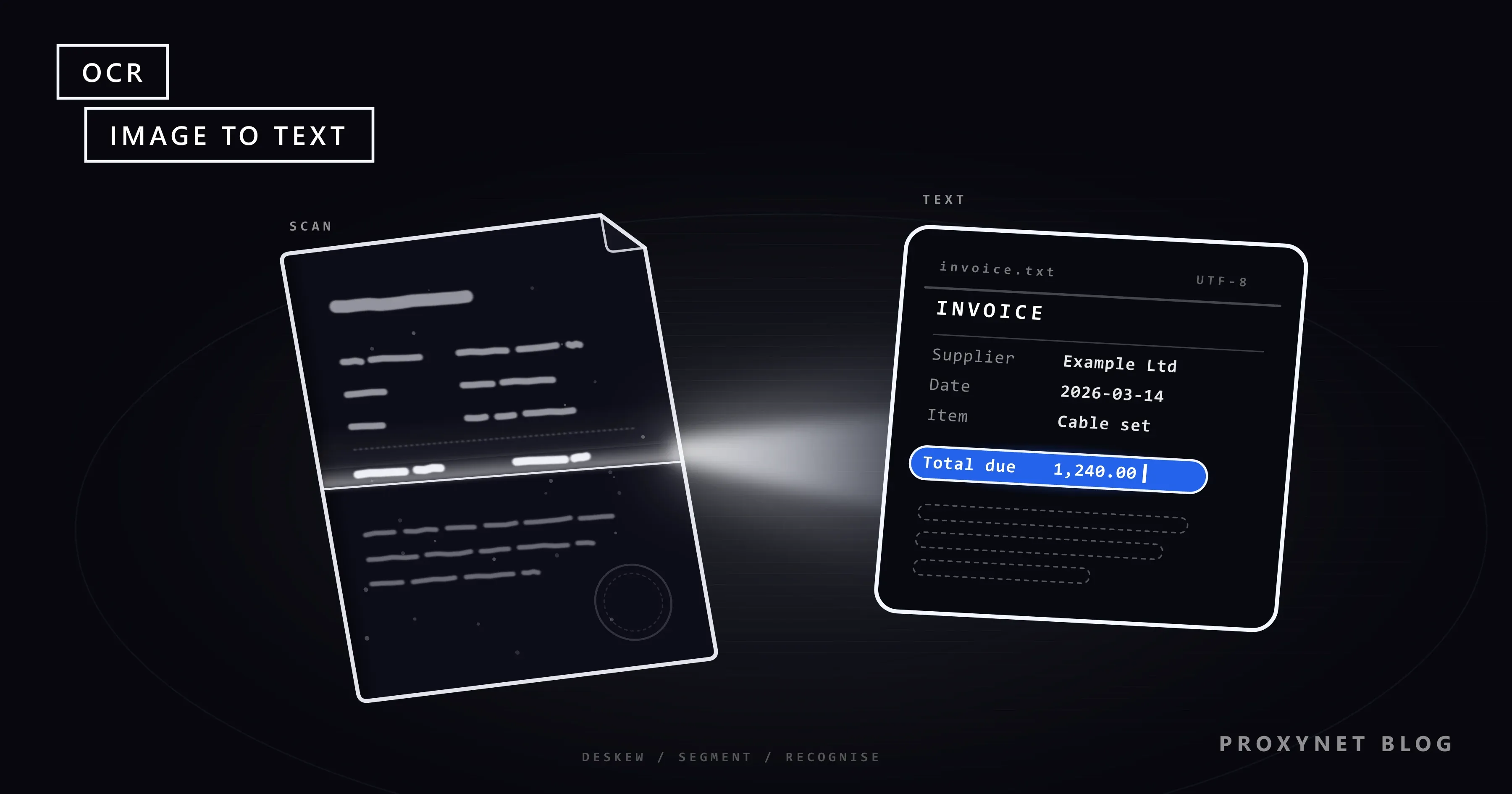
OCR, short for optical character recognition, is software that recognises the letters, digits and symbols in an image and stores them as text characters. To a computer, a scanned page is a grid of coloured dots; the word "Invoice" on it is no more text than a drawing of a cat. OCR turns those dots into characters a program can search, edit, translate or read aloud.
The input can be a scan, a photo of a receipt, a screenshot or a street sign in a camera view. The output is text, often with each word's position and a score for how sure the engine is. "OCR scanning" means scanning paper and running OCR in one go, as many scanner apps do.
How does OCR work?
OCR works as a pipeline: the engine prepares the image, finds where the text is, recognises it and cleans up the result, in six stages:
- Capture. A scanner, camera or screenshot produces the image. Tesseract's documentation recommends at least 300 DPI for scans; a phone photo should be sharp, evenly lit and taken straight on.
- Preprocessing. The engine straightens a tilted page (deskewing), turns it into dark text on a light background (binarisation), removes specks and scanner borders, and enlarges small text.
- Layout analysis. The page is split into blocks, columns, lines and words, and the reading order is decided. Read straight across, a two-column page mixes sentences; tables fail here most often.
- Recognition. Older engines compared each character with stored shapes. Current engines pass a whole line image to a neural network, which outputs the most likely characters.
- Language correction. A dictionary or language model turns "c1ient" into "client". It can also wrongly "correct" a product code or a surname, so some tools let you switch it off.
- Output. Plain text, text with word positions (formats such as hOCR and ALTO) or a searchable PDF, usually with a confidence score per word that shows a reviewer where to look.
Tesseract, a widely used open-source engine, shows the change. It was developed at Hewlett-Packard from 1985 to 1994 and open-sourced in 2005; version 4 added a neural-network engine (LSTM, a network built for sequences) that recognises whole lines instead of single characters.
What are the main types of OCR technology?
OCR technology falls into three families: classic engines that match character shapes, deep-learning OCR that reads whole lines with neural networks, and vision-language models that read and interpret a page in one model.
| Approach | How it reads | Strong at | Weak spot |
|---|---|---|---|
| Classic OCR | Matches each character's shape | Clean printed pages, common fonts | Noise, unusual fonts, handwriting |
| Deep-learning OCR | A neural network reads whole lines | Varied fonts, photos, many languages | Tables and complex layouts |
| Vision-language model | Reads the page and answers about it | Messy layouts, questions about a document | May reword or invent text; costlier |
Deep-learning OCR has usually paired a convolutional network that reads visual features from the line image with a recurrent network that turns them into characters, plus a separate language model. The TrOCR paper by Microsoft researchers uses Transformers, the architecture behind large language models, for both parts, so one model reads the image and writes the text without a separate language model.
Should you use OCR or a vision-language model?
Use OCR when you need an exact copy of the text with positions and confidence scores, and a vision-language model when you need the meaning of a messy document more than a character-perfect copy. A vision-language model is a multimodal model, one that takes an image and text together as input, as What Is Multimodal AI? explains.
An OCR engine copies: every character comes from a region of the image, and it can say which region and how sure it is. A vision-language model generates the most likely answer. That copes with a crumpled receipt or an unfamiliar form, but it can also fix a typo that was really on the page, skip a line or write a plausible number that is not there.
Many pipelines use both: OCR for the text and positions, a language model to map it to fields such as supplier and total, and a person for low-confidence cases.
OCR vs ICR vs OMR: what is the difference?
OCR reads machine-printed text, ICR reads hand-printed characters, and OMR detects marks such as ticked boxes and filled bubbles. The names come from paper forms, where one sheet often needs all three.
- OCR (optical character recognition) is the general term and the usual name for reading typed and printed text.
- ICR (intelligent character recognition) usually means reading hand-printed characters, typically block capitals written one per box. The term is used loosely, and many products now include it under OCR.
- OMR (optical mark recognition) reads no characters at all; it checks whether a box or bubble is marked, as on exam sheets and census forms, where the handwritten answers are handled separately.
- HTR (handwritten text recognition) covers free, joined-up handwriting such as letters and historical manuscripts, the hardest case.
What affects OCR accuracy?
The input decides OCR accuracy more than the engine does: a sharp 300 DPI scan of a printed page and a photo of a crumpled receipt give very different results with the same software. The main factors:
- Resolution and focus. Blurred characters lose the detail that separates "e" from "c" and "rn" from "m".
- Skew and perspective. Pages photographed at an angle have slanted lines; thick books curve near the spine.
- Contrast and background. Faded ink, coloured paper, stamps and shadows add noise.
- Fonts and handwriting. Decorative or tiny type is harder, and joined-up writing far harder than block capitals.
- Layout. Tables, columns and text over pictures confuse the reading order.
- Language data. The engine has to know the alphabet, and ideally the words, of the language on the page.
Accuracy is usually measured as the character error rate: the characters that must be inserted, deleted or replaced to reach the correct text, divided by its length. A low rate can still hide the one wrong digit in a total, so use confidence scores to decide what to check and verify key fields every time.
Does OCR work in every language?
OCR works in a language only if the engine has been trained on its characters, and it works better when it also knows the words. Tesseract recognises more than 100 languages with a separate data file for each, and its list of language data files includes Turkish under the code tur, next to English (eng).
The wrong setting makes errors that look minor and break search. An engine set to English may read the Turkish dotless i as an ordinary i and the g with a breve as a plain g, and a later search for the correct spelling then finds nothing. For mixed documents select both languages (Tesseract accepts tur+eng). Scripts such as Arabic or Chinese need their own models, so check yours is installed before a batch.
How do you use OCR on your phone or computer?
Most phones already include OCR: Google Lens on Android and Live Text on iPhone let you select text in a photo or camera view and copy or translate it.
On Android, open the Google app, tap the Google Lens icon in the search bar and take a photo or pick a screenshot. Tap the text, then Select text; the menu offers Copy, Listen, Translate and Search. Google's help page on Lens adds the condition that matters most: a clear, well-lit image.
On an iPhone XS, iPhone XR or later with iOS 15 or later, open a photo, touch and hold a word, drag the grab points and tap Copy or Select All. If nothing happens, turn on Settings > General > Language & Region > Live Text. Apple's instructions also cover translation; Live Text is not available in every region and language.
On a computer, many scanner apps and PDF editors can recognise text in a scan and save a searchable PDF. For larger jobs, Tesseract runs from the command line or Python; How to Extract Data From PDF Files has tested code for scanned pages.
What is OCR in a PDF?
OCR in a PDF means adding a text layer to a scanned PDF: the page still looks like the scan, but invisible text sits on top of it, each word over its image. There are three kinds of PDF:
- Text PDF. Exported from software; the text is already stored as characters, so OCR can only add errors.
- Image-only PDF. A scan without OCR; each page is a picture, and search finds nothing.
- Searchable PDF. The scan plus hidden OCR text; search, copy and screen readers work, as far as the OCR was right.
The text layer matters for accessibility too. The W3C's technique PDF7 calls scanned images of text inherently inaccessible and recommends OCR, then a check that the text is complete and in reading order. Keep the original scans so that better OCR can start from the image later.
Where is OCR used?
OCR is used wherever text arrives as paper, images or scans and has to end up in a system:
- Invoices and receipts. Supplier, date and total go into accounting software without retyping.
- Forms. Applications, claims and delivery notes, often read with OCR, ICR and OMR together.
- Archives and libraries. Books, newspapers and records become searchable by word.
- Accessibility. Printed text is read aloud, and scans work with screen readers.
- Translation on the go. Signs, menus and labels in an unfamiliar language.
- Logistics. Shipping labels, container codes and serial numbers; number-plate recognition is a specialised form of OCR with its own legal rules.
OCR only gives you text. Turning "Total due 1,240.00" into a field named total holding the number 1240 is a separate step called parsing, explained in What Is Data Parsing?. Products that combine OCR with document classification, field extraction and validation are often sold as intelligent document processing (IDP).
What are the privacy rules for OCR on documents?
OCR does not change who may read a document: if you may not process the personal data in a file, running OCR on it does not make that allowed, and it makes the data easier to search and copy. Identity documents, payslips and medical records are the usual examples.
Under the GDPR in the EU and KVKK in Türkiye, health data and biometric data used to identify a person are special categories of personal data, with stricter conditions. In practice:
- Run OCR only on documents you are entitled to process, never on someone else's identity document.
- For sensitive files, prefer OCR on your own device or servers; for a cloud service, check where files are stored, for how long and whether they train models.
- Extract the fields you need, redact the rest, and delete output you no longer use.
Where do proxies fit in?
Proxies have nothing to do with OCR itself; they matter one step earlier, when the documents you need are public files on websites in other countries. Catalogues, public notices, price lists and menus are often published as images or scanned PDFs, and some sites serve a different version by the visitor's country.
A Residential Proxy routes requests through home connections in the country and city you choose, so you download what local visitors get. Collect public files only, follow robots.txt and the site's terms, keep the request rate low and use an official download or API where one exists.
Teams that would rather not run the collection themselves can ask our sales team about managed page extraction through our Web Scraping API.
Common mistakes
- Running OCR on a PDF that already has text. Exact characters get replaced with guesses.
- Scanning too low or shooting at an angle. Seconds saved at capture cost far more in corrections.
- Leaving the language on English. Accented letters and other alphabets come out wrong.
- Trusting numbers without a check. Totals and dates need a sum check or a second look.
- Expecting tables to come out as tables. OCR returns lines; columns have to be rebuilt.
- Throwing away the original images. Better OCR later needs them.
- Uploading identity documents to an unknown free converter. Use local OCR or a service with clear terms.
- Treating a chatbot's transcription as exact. Compare key values with the image.
Decision guide
| Need | Use |
|---|---|
| Copy a few lines from a photo or screenshot | Google Lens or Live Text on your phone |
| Make old scans searchable | OCR to a searchable PDF, keeping the originals |
| Text from hundreds of scanned pages | An OCR engine such as Tesseract in a batch job |
| Fields from invoices or forms | OCR plus parsing and validation, with human review |
| Questions about a messy document | A vision-language model, with key values checked |
| Ticked boxes on paper forms | OMR |
| Joined-up handwriting or old manuscripts | A handwriting recognition model, plus review |
| Identity or health documents | Local OCR, a legal basis and data minimisation |
Frequently asked questions
Is OCR artificial intelligence?
Modern OCR is a form of AI: its recognition step is a neural network trained on large sets of labelled text images. Older engines relied on hand-crafted rules and shape matching. OCR is not generative AI, though: it copies what is on the page, while a generative model writes new text, so the two make different kinds of mistakes.
Is OCR free?
Yes, free OCR is easy to find. Tesseract is open source under the Apache 2.0 licence, Google Lens and Live Text cost nothing on a phone, and many scanner apps include OCR. Paid tools usually add better handling of poor scans, tables and handwriting, form templates and high-volume processing.
How accurate is OCR?
On sharp printed pages modern OCR makes few errors; on blurry photos, handwriting and tables it makes many more. No single figure applies, because the result depends on the input, so measure the character error rate on a sample of your own documents.
Can OCR read handwriting?
Partly. Hand-printed capitals in form boxes have long been read automatically, and neural models now read neat joined-up handwriting too. Messy handwriting and historical documents need a model trained for that kind of writing and a person to review the output.
What is a searchable PDF?
A searchable PDF is a scanned PDF with an invisible OCR text layer behind the page image. It looks exactly like the scan, but you can search it, copy its text and have a screen reader read it aloud.
Can OCR read Turkish characters?
Yes, if the engine has Turkish language data. Tesseract has a Turkish model (tur), and Apple lists Turkish among the Live Text languages. With only English selected, Turkish letters may come out as plain Latin ones, so select Turkish, or Turkish and English for mixed documents.
Summary
OCR turns text in images into real text: the engine cleans up the image, finds the lines, recognises the characters with a neural network and corrects the output with language data. It works best on sharp, straight scans in a language it knows. Use your phone for quick copies, searchable PDFs for archives, and OCR with parsing and human checks for business documents; keep the originals, and handle identity and health documents under GDPR or KVKK rules.