The first technical choice you run into when buying a proxy is usually the protocol: HTTP(S) or SOCKS5? Both route your traffic through another IP, but they do it at different layers and with different capabilities. An HTTP proxy recognizes web requests and works with them. A SOCKS proxy, on the other hand, carries bytes from one end to the other without caring which app is sending what.
This article explains step by step how the two protocols work, their practical differences, DNS and encryption details, software support, and which is right for which task. If you want to go deeper into SOCKS5's technical details, our What Are SOCKS5 Proxies? article is a good complement.
How does an HTTP proxy work?
As the name suggests, an HTTP proxy speaks the HTTP protocol. It behaves differently in two different situations:
- In unencrypted HTTP requests, the client sends the entire request to the proxy. The proxy reads the request, forwards it to the target, and returns the response. It can see the headers along the way, cache them, or modify them.
- In HTTPS requests, the client first sends a
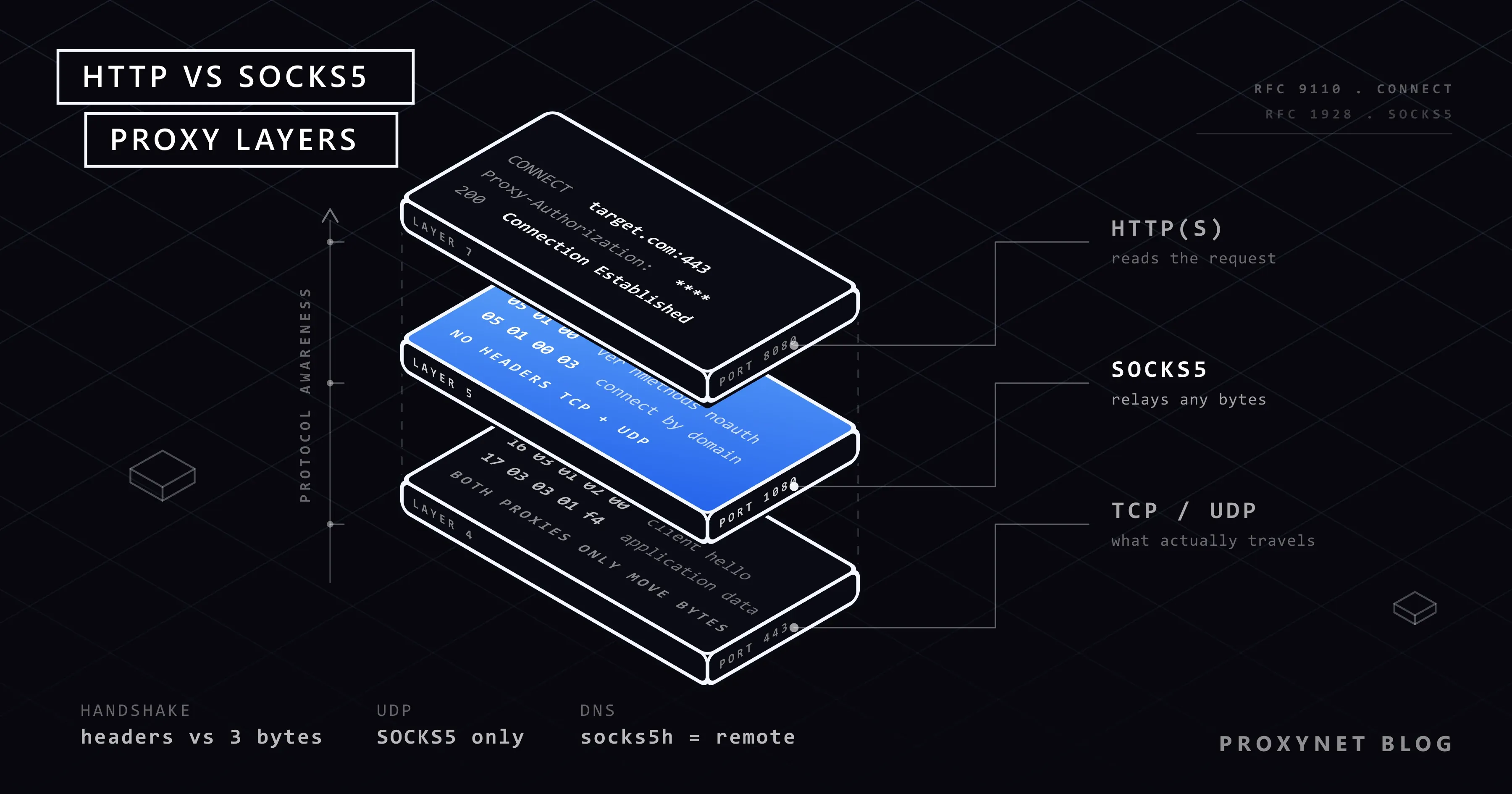
CONNECT hedef.com:443request to the proxy. The proxy opens a TCP connection to the target, and from then on only relays encrypted bytes. It can't see the content. This method is defined in RFC 9110.
So, in today's HTTPS-dominant web, an HTTP proxy accesses only the domain name and port being connected to, not the site's content.
The path an HTTPS request follows through a proxy looks like this:
- The client connects to the proxy over TCP and sends
CONNECT hedef.com:443 HTTP/1.1; it authenticates with aProxy-Authorizationheader if needed. - The proxy connects to the target and returns
200 Connection Establishedto the client. - The client performs the TLS handshake with the target inside this connection. Certificate validation happens between the client and the target.
- Encrypted HTTP traffic flows through the tunnel; the proxy only carries bytes.
The phrase "HTTPS proxy" often describes this tunneling capability; the connection established with the proxy itself is generally unencrypted HTTP. That's why proxy addresses start with http:// even for HTTPS sites.
How does a SOCKS proxy work?
SOCKS operates independently of the application protocol. The client tells the proxy "connect to this address, this port"; the SOCKS server establishes the connection and relays the traffic between the two sides as-is. It doesn't matter to it whether the traffic on the other end is web, gaming, email, or a database.
The current version in use, SOCKS5, is defined by RFC 1928 and adds three important features over the older SOCKS4:
- Authentication (username and password, RFC 1929),
- UDP support (for UDP-based traffic like games, voice calls, and DNS),
- Connecting by domain name, meaning DNS resolution can be done on the proxy side; plus IPv6 address support.
A SOCKS5 connection is also established in a few steps: the client announces the authentication methods it supports, the server picks one, authentication happens, and then the client sends the target address and port. Once the server establishes the connection, raw data flows in both directions. This handshake is only a few bytes; it's smaller than HTTP headers.
The key differences
| Criterion | HTTP(S) proxy | SOCKS5 proxy |
|---|---|---|
| Layer it operates at | Application layer (HTTP) | Session layer, protocol-independent |
| Traffic carried | Web requests | Any TCP and UDP traffic |
| UDP support | No | Yes |
| Access to request headers | Yes, in unencrypted HTTP | No |
| Caching and content filtering | Possible in unencrypted HTTP | Not possible |
| Authentication | Yes (Proxy-Authorization) | Yes (username/password) |
| DNS resolution | The target domain is passed to the proxy over HTTPS | Can be done on the client or the proxy |
| Handshake overhead | HTTP headers | A few bytes |
| Software support | Browsers, HTTP libraries, nearly every tool | Browsers, cURL, desktop apps, game clients; an extra package needed in some libraries |
| Typical use | Web scraping, SEO, price tracking | Games, desktop apps, non-web protocols |
Why does DNS resolution matter?
One of the least-known but most important differences between the two protocols is where the domain name is translated into an IP.
- With an HTTP proxy, the
CONNECT hedef.com:443request passes the domain name to the proxy; the proxy does the resolution. No query ever leaves to your own DNS server. - With SOCKS5, there are two options. The client can resolve the domain name itself and send the IP (
socks5://in cURL), or it can leave the domain name to the proxy (socks5h://in cURL). In the first option, the DNS query leaves your own network; this means which sites you're connecting to can be seen from the local network, and the target site can give the proxy a server that's farther away instead of one closest to you.
Practical rule: prefer remote resolution when using SOCKS5. In libraries this is usually set with the socks5h scheme or a "remote DNS" option; some tools do local resolution by default, and this difference goes unnoticed.
Which one is faster?
Generally speaking, SOCKS5 has lower overhead because it does less work: it doesn't interpret requests, it just relays them. In HTTPS traffic, though, since an HTTP proxy also only carries bytes after the CONNECT tunnel, the difference largely closes.
In practice, speed is determined less by the protocol and more by the proxy server's location, IP type, and line quality. Choosing an exit point close to the target server makes a much bigger difference than switching protocols. We covered how this difference is measured in games in our Fixing Ping and Packet Loss in Games article, and the effect of IP type on speed in our Residential vs. Datacenter Proxy article.
Is there a difference in security and privacy?
Neither protocol encrypts traffic. Encryption comes from the protocol the target service uses: HTTPS on the web, SSH for a remote shell, TLS for email. In this sense, saying "SOCKS5 is more secure" or "an HTTP proxy is more secure" is wrong; both are equally just a carrier.
Two points do differ:
- Visibility in unencrypted HTTP. If you connect to an unencrypted HTTP site through an HTTP proxy, the proxy can read the entire request; SOCKS5 carries the same bytes, it just doesn't interpret them. So there's no difference in privacy — traffic is unencrypted either way.
- DNS leakage. As explained above, if you do local resolution with SOCKS5, which sites you're going to can be seen from the local network. There's no such risk with an HTTP proxy, because the domain name is always passed to the proxy.
If you're curious about the encryption difference between a proxy and a VPN, see our Proxy vs. VPN article.
When should you choose an HTTP proxy?
- Web scraping and automation. Libraries like Python's Requests, HTTPX, and AIOHTTP support an HTTP proxy without needing an extra package. We covered the differences between the libraries in our HTTPX vs. Requests vs. AIOHTTP comparison; we showed the Node.js side in our cURL in JavaScript article.
- If you're only routing web traffic. In a browser, SEO tools, or price-tracking software, an HTTP proxy offers the widest compatibility.
- Command-line tools. For quick tests with cURL and wget, an HTTP proxy works directly. It's worth remembering that wget doesn't have built-in SOCKS support; see the details in our Using a Proxy with wget article.
- Browser automation. Puppeteer, Playwright, and Selenium support username/password authentication with an HTTP proxy; Chrome doesn't support this authentication with SOCKS5.
- Corporate network and caching. Caching or filtering unencrypted HTTP traffic is only possible with an HTTP proxy.
The right option for web traffic is the HTTPS Proxy packages.
When should you choose a SOCKS5 proxy?
- Games and desktop apps. Game clients aren't web browsers; they communicate with their own protocols, often over UDP. Only SOCKS5 can carry this traffic. We covered game-side setups in our Knight Online and Silkroad Online guides.
- Non-web protocols. SSH, FTP, email, or custom TCP services.
- Forcing an app through a proxy. Programs that don't offer a proxy setting can be routed through SOCKS5 with tools like Proxifier. You can find the setup in our Proxifier guide.
- Preventing DNS leakage. When you want domain-name resolution to happen on the proxy side (like the
socks5h://scheme in cURL). - Low overhead. In applications that open a large number of short connections, SOCKS5's smaller handshake can make a measurable difference.
For these scenarios, take a look at the SOCKS5 Proxy packages. If you want to see how the providers compare before you pick one, read Best SOCKS5 Proxy Providers - 2026.
Which tool supports what?
| Tool | HTTP(S) proxy | SOCKS5 proxy |
|---|---|---|
| Chrome, Firefox, Edge | Yes | Yes (no password authentication in Chrome) |
| cURL | Yes | Yes (socks5://, socks5h://) |
| wget | Yes | No |
| Python Requests | Built in | With requests[socks] |
| Python HTTPX | Built in | With httpx[socks] |
| Node.js undici / fetch | ProxyAgent | With an extra package like socks-proxy-agent |
| Puppeteer / Playwright | Yes | Yes (limited password authentication) |
| Proxifier | Yes | Yes |
| SSH clients | With ProxyCommand | With ProxyCommand, native support |
| Game clients | Generally no | With a routing tool |
As the table shows, HTTP proxy support is more widespread; SOCKS5 carries a broader range of traffic wherever it is supported.
Can the same proxy support both protocols?
Yes. Many providers offer the same IP over both an HTTP and a SOCKS5 port; the scheme in the connection address determines the protocol. Trying the same proxy both ways with cURL is the fastest way to see the difference:
# Through the HTTP proxy
curl -x "http://kullanici:parola@pr.proxynet.io:8000" https://httpbin.org/ip

# Through SOCKS5, with DNS resolution on the proxy side
curl -x "socks5h://kullanici:parola@pr.proxynet.io:1080" https://httpbin.org/ip
Both commands should return the same exit IP. Address and port information vary by package; you can find the correct values in your customer panel. See our How to Use a Proxy with cURL article for cURL's other proxy options.
If you want to try the same two attempts in Python with Requests:
import requests

HTTP_PROXY = "http://kullanici:parola@pr.proxynet.io:8000"
SOCKS_PROXY = "socks5h://kullanici:parola@pr.proxynet.io:1080"  # pip install "requests[socks]"

for proxy in (HTTP_PROXY, SOCKS_PROXY):
    r = requests.get("https://httpbin.org/ip", proxies={"http": proxy, "https": proxy}, timeout=20)
    print(proxy.split("://")[0], r.json()["origin"])
Decision guide
| Your need | Recommendation |
|---|---|
| Web scraping with Python or Node.js | HTTP(S) |
| Browser automation, password-authenticated proxy | HTTP(S) |
| SEO, price tracking, ad verification tools | HTTP(S) |
| Game client, UDP traffic | SOCKS5 |
| SSH, FTP, email, custom TCP service | SOCKS5 |
| Desktop app with no proxy setting | SOCKS5 + Proxifier |
| Keeping DNS queries on the proxy side | SOCKS5 (remote resolution) or HTTP(S) |
| Downloading with wget | HTTP(S) |
Frequently asked questions
Does SOCKS5 encrypt traffic?
No. SOCKS5 carries traffic as-is. What secures the connection's privacy is the encryption used by the target service (HTTPS or SSH, for example). The same is true for an HTTP proxy.
Which should I use in a browser?
If you're only accessing websites, both work. An HTTP proxy is more widely supported and every browser supports password authentication for it; SOCKS5 offers an advantage when you want to leave DNS resolution to the proxy. For profile-based management at the browser level, see our SwitchyOmega and Firefox proxy settings guides.
Can I use SOCKS5 in Python?
You can, but it requires an extra package depending on the library. Install requests[socks] for Requests and httpx[socks] for HTTPX; then use the socks5:// or socks5h:// scheme in the proxy address.
Is SOCKS4 still used?
Some older tools support it, but since it lacks authentication, UDP, and domain-name support, it isn't preferred in new setups. If a provider says "SOCKS" today, SOCKS5 is what's meant.
Are HTTP proxy and HTTPS proxy the same thing?
In everyday use, yes: "HTTPS proxy" means an HTTP proxy that can reach HTTPS sites through a CONNECT tunnel. There's technically also a form where you speak to the proxy itself over TLS, but it isn't common and most clients don't support it.
How do I know which protocol a proxy supports?
The provider's panel usually gives port information by protocol; HTTP and SOCKS5 have different ports. If you're not sure, try the two cURL commands above: trying to connect with the wrong protocol gives a connection error or a meaningless response, while the correct protocol returns the IP.
In short
If you're routing web traffic, an HTTP(S) proxy offers the widest compatibility and works out of the box in most scraping tools. If games, desktop apps, UDP traffic, or non-web protocols are involved, SOCKS5 is the only correct choice — in that case, don't forget to leave DNS resolution on the proxy side. The speed difference is determined less by the protocol than by the proxy's location and IP type. For packages that support both protocols, take a look at our proxy solutions.