


































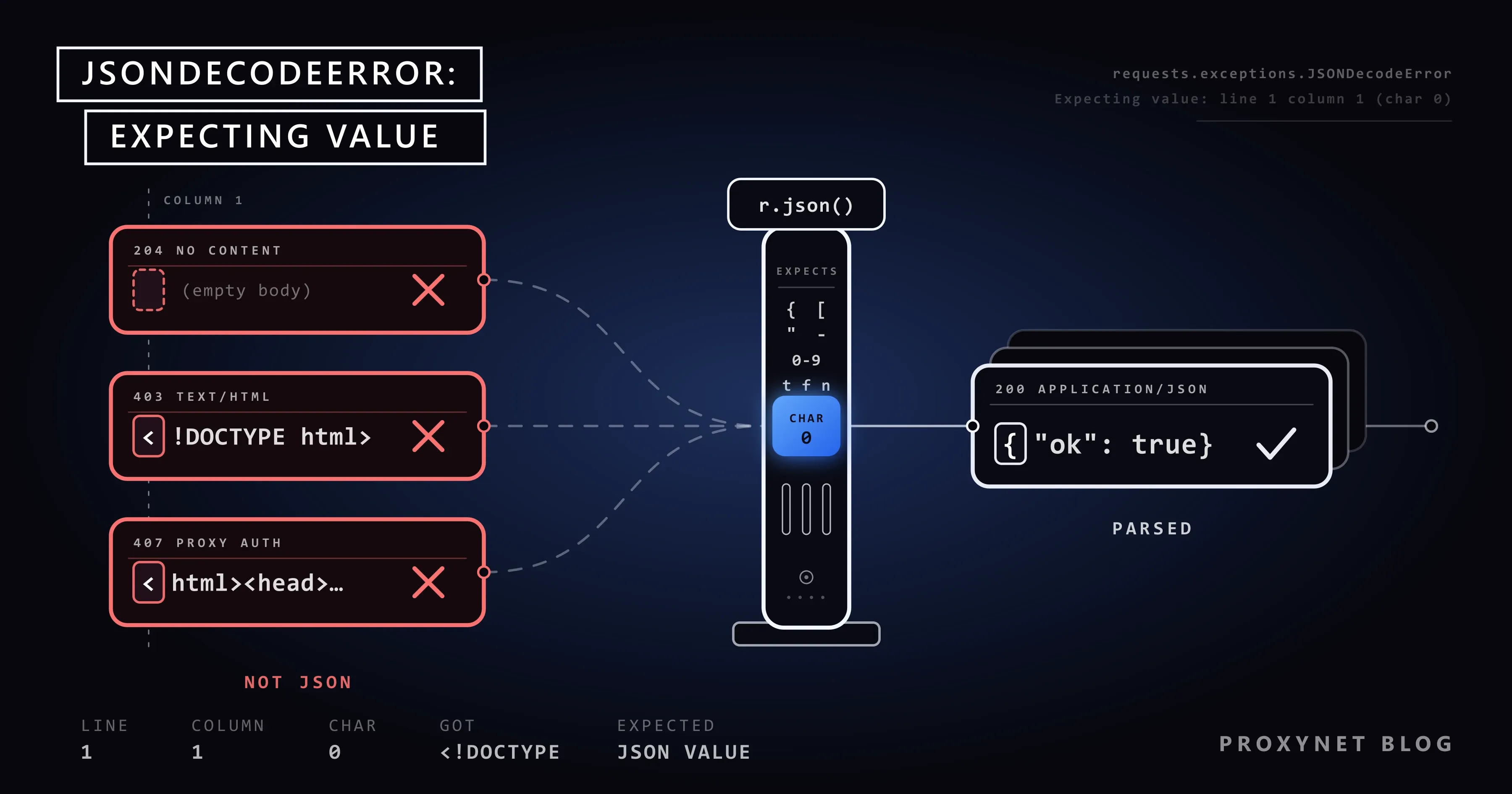
You collect a shop's product list from /api/products?page=1, an address you found in the browser's Network panel. The script runs through the first 300 pages, then stops at data = r.json() with requests.exceptions.JSONDecodeError: Expecting value: line 1 column 1 (char 0). Same address, same code. You add one line, print(r.status_code, r.headers.get("Content-Type"), r.text[:200]), and the picture changes: 403, text/html and a page that starts with <!DOCTYPE html>. The server sent a web page instead of JSON, and the parser gave up at the first character, <.
This guide covers what the message and its position mean, which exception each Python library raises, and a three-line check that finds the cause. It then goes through empty responses, HTML pages, a proxy's 407 answer and bodies that only look like JSON, and ends with a tested parse_json() helper.
What does JSONDecodeError: Expecting value mean?
It means the parser expected the start of a JSON value and found something else. A JSON text is a single value, as RFC 8259 defines it: an object, an array, a string in double quotes, a number, true, false or null. A valid text can therefore only start with {, [, ", a digit, -, t, f or n, after optional whitespace. When the parser meets < from an HTML page, the T of Too Many Requests or the end of an empty string, it stops with "Expecting value".
This is not a connection error. A request that never reached the server fails earlier, inside requests.get(), with errors such as ConnectionError or ProxyError (Max Retries Exceeded With URL). When you see JSONDecodeError, a response has arrived; only its content could not be read as JSON.
What does "line 1 column 1 (char 0)" tell you?
The numbers point to where parsing failed. json.JSONDecodeError carries them as attributes: msg (the reason), doc (the whole text), pos (the index of the failing character), lineno and colno (Python json documentation). char 0 is the first character of the body, so no JSON started at all.
Other positions tell you more:
line 1 column 4 (char 3): the body was three spaces and nothing else. Whitespace is skipped, then the text ends.line 2 column 1 (char 1): the body starts with a line break, followed by something that is not JSON, often an HTML page.- A position deep inside the text: JSON did start, but broke later, for example in a cut-off download.
Inside an except block, e.doc[:200] shows the start of that text.
Which exception do requests, json, httpx and aiohttp raise?
We checked each library with Python 3.13, Requests 2.34.2, HTTPX 0.28.1 and AIOHTTP 3.14.3:
- json:
json.loads()raisesjson.JSONDecodeError, a subclass ofValueError. - Requests: since version 2.27.0 (January 2022),
r.json()raisesrequests.exceptions.JSONDecodeError. Per the Requests changelog, it inherits from the exceptions raised before and is also aRequestException. - Requests with simplejson installed: the parent becomes
simplejson.errors.JSONDecodeError. In our test,except json.JSONDecodeErrorthen missed it;except ValueErrorstill caught it. - HTTPX:
Response.json()raises the standardjson.decoder.JSONDecodeError. - AIOHTTP:
await resp.json()checks the Content-Type first and raisesContentTypeError(Attempt to decode JSON with unexpected mimetype: text/html) without parsing. Withcontent_type=Noneit raisesjson.JSONDecodeError.
With Requests, catch requests.exceptions.JSONDecodeError: it works in both cases. Other client differences are in HTTPX vs Requests vs AIOHTTP.
How do you find the cause in three lines?
Print what arrived before you parse it:
print(r.status_code, r.history, r.url)
print(r.headers.get("Content-Type"), len(r.content))
print(r.text[:200])
Then read the output in this order:
- Status and history. Is the status
2xx? Did a301or302happen on the way? After a redirect,r.status_codeshows the final200, and onlyr.historyshows[<Response [302]>]. - Final URL.
r.urlis the address after redirects. If it ends in/loginor/consent, you did not reach the API. - Content-Type. You want
application/jsonor a type ending in+json. Anything else points to a cause below. - Length and first characters.
0means empty,<means HTML,{'a Python dict printed as text,cb(JSONP. - Match the result to the table below.
Log only the first 200 characters: a full body can contain tokens or personal data.
What do the first characters of the body tell you?
Every message below comes from our run with Python 3.13.9 and Requests 2.34.2 against a local test server; other Python versions can word them differently.
| Start of the body | Typical status and Content-Type | Message from r.json() | Likely cause | What to do |
|---|---|---|---|---|
| (nothing) | 204, 304, HEAD, or an empty 200 | Expecting value: line 1 column 1 (char 0) | The endpoint returns no content | Check status and len(r.content) before parsing |
<!DOCTYPE html> | 403, 429, 503, or 200 after a 302; text/html | Expecting value: line 1 column 1 (char 0) | Block page, login redirect, error page | Fix the status first |
<html>...407... or nothing | 407 and Proxy-Authenticate, http:// target | Expecting value: line 1 column 1 (char 0) | Wrong proxy credentials or IP | Check user:pass, IP whitelist |
Too Many Requests | 429, text/plain | Expecting value: line 1 column 1 (char 0) | A plain-text rate limit | Slow down; read Retry-After |
cb({"items": ...}); | 200, application/javascript | Expecting value: line 1 column 1 (char 0) | JSONP | Use the endpoint without a callback |
{"id":1} then a new line and {"id":2} | 200, application/x-ndjson | Extra data: line 2 column 1 (char 9) | NDJSON | Parse line by line |
{'id': 1, ...} | 200, often text/plain | Expecting property name enclosed in double quotes: line 1 column 2 (char 1) | A dict written with str() | json.dumps() in the producer |
An invisible BOM, then { | 200, application/json | Unexpected UTF-8 BOM (decode using utf-8-sig): line 1 column 1 (char 0) | A byte order mark | Decode with utf-8-sig |
The first five rows share one message, so the message alone never names the cause; the status and Content-Type do.
Empty responses: 204, HEAD and 304
Some answers have no body by definition. RFC 9110 states that a 204 No Content response cannot contain content, a 304 Not Modified has none either, and the response to a HEAD request carries headers only. Many APIs answer DELETE and PUT with 204: the action succeeded and there is nothing to parse, yet r.json() raises Expecting value.
Treat these answers as "no data", not as errors, and check r.status_code before parsing. An empty 200 is different: it usually means a server fault or a wrong endpoint, and deserves a log line.
HTML instead of JSON: block, login and error pages
Three kinds of HTML page arrive where JSON was expected, and the status code tells them apart.
A block or verification page. A 403, 429 or 503 with text/html is often a bot protection answer. Its <title>, such as "Just a moment..." or "Access denied", is enough to recognise it. Do not parse it or retry it in a loop. What each code means is in HTTP Status Codes in Web Scraping, Cloudflare pages in Cloudflare Scraper, and bot scoring in How Bot Detection Works. The legitimate routes are an official API, a lower rate that follows robots.txt, or the owner's permission.
A login page after a redirect. The status is 200, so this case is easy to miss. r.history shows [<Response [302]>] and r.url ends in /login: your session expired. For your own account, the fix is session handling (Sessions and Cookies in Python).
A server error page. A 500, 502 or 504 with HTML comes from the server or a gateway in front of it: the API is in trouble, not your parser.
HTML also arrives when the URL points to the page, not the API. The JSON comes from a separate request the page makes, which you find in the Network panel (finding the API request first).
Through a proxy: the 407 answer
Send a plain http:// request through a proxy with a wrong password, and the proxy answers 407 Proxy Authentication Required itself. Requests hands that answer to your code as a normal response, with whatever body the proxy sends: an HTML page, a short text or nothing. With two local test proxies, one sending HTML and one an empty body, r.json() gave Expecting value both times.
For an https:// target, the 407 arrives while the tunnel is set up, so requests.get() raises ProxyError: Tunnel connection failed: 407 and r.json() is never reached (Max Retries Exceeded With URL).
A 407 with a Proxy-Authenticate header points to the proxy, not the target. Check the username and password, encode special characters in the proxy URL (@ becomes %40), or confirm your IP is on the whitelist (Proxy Authentication: User:Pass vs IP Whitelist).
Bodies that look like JSON but are not: JSONP, NDJSON and single quotes
Some bodies contain JSON, but not as one clean value.
JSONP
JSONP wraps the JSON in a function call, cb({"items": [1]});, usually sent as application/javascript. The parser sees c and reports Expecting value at char 0. Use the endpoint without its callback parameter, or take the text between the first ( and the last ).
NDJSON and JSON Lines
Export and streaming endpoints often send one JSON value per line, a format described at jsonlines.org. The first line parses, then the parser finds more text and stops with Extra data: line 2 column 1. Read such bodies line by line with r.iter_lines().
Single quotes and Python values
A body like {'id': 1} was written with Python's str() instead of json.dumps(), and the parser stops at char 1 with Expecting property name enclosed in double quotes. A body of None or True, Python's spelling, fails with Expecting value, because JSON writes null and true. Fix the code that writes the data: text.replace("'", '"') breaks any value with an apostrophe, and ast.literal_eval() is only safe for data you produced yourself. If you send that data to an API yourself with Python Requests, pass the dict to json= instead of turning it into text with str(); we explained the difference between json= and data= in How to POST JSON with Python Requests: cURL Equivalents.
A byte order mark at the start gives Unexpected UTF-8 BOM; the encoding side is in Python Unicode encoding errors.
Full example: parse_json() that checks the body before reading JSON
The helper puts the three-line check into code. It returns the parsed data, None for answers that have no body by definition, or raises one NotJSON error naming the status, redirects, Content-Type, final URL and start of the body. Install Requests with pip install requests.
"""Read a JSON response, or say in one line why the body is not JSON."""
import json

import requests

PROXY = "http://user:pass@pr.proxynet.io:8000"
PROXIES = {"http": PROXY, "https": PROXY}


class NotJSON(ValueError):
    """The server answered, but not with the JSON we asked for."""


def describe(r):
    """Status, redirects, Content-Type, final URL and the first 200 characters."""
    hops = "".join(f"{h.status_code} -> " for h in r.history)
    ctype = r.headers.get("Content-Type", "none")
    start = r.text[:200].replace("\n", " ")
    return f"HTTP {hops}{r.status_code}, {ctype}, {r.url}, body {start!r}"


def media_type(r):
    return r.headers.get("Content-Type", "").split(";")[0].strip().lower()


def is_json_type(mtype):
    return mtype == "application/json" or mtype.endswith("+json")


def parse_json(r):
    """Return the parsed body, None for "no content", or raise NotJSON with the reason."""
    if r.status_code in (204, 304) or r.request.method == "HEAD":
        return None  # these answers carry no body by definition
    mtype = media_type(r)
    if not r.ok and not is_json_type(mtype):
        raise NotJSON(f"error response, not JSON: {describe(r)}")
    if not r.content:
        raise NotJSON(f"empty body: {describe(r)}")
    if mtype == "application/x-ndjson":
        return [json.loads(line) for line in r.iter_lines() if line.strip()]
    if r.text.lstrip().startswith("<"):
        raise NotJSON(f"HTML instead of JSON: {describe(r)}")
    try:
        return r.json()
    except requests.exceptions.JSONDecodeError as e:
        raise NotJSON(f"{e.msg} at char {e.pos}: {describe(r)}") from e


if __name__ == "__main__":
    url = "https://example.com/api/products?page=1"
    r = requests.get(url, proxies=PROXIES, timeout=(5, 30))
    try:
        data = parse_json(r)
    except NotJSON as e:
        print("stop:", e)
    else:
        if not r.ok:
            print("API error:", r.status_code, data)
        elif data is None:
            print("no content")
        else:
            print("ok:", type(data).__name__, len(data))
An error status with a non-JSON body stops first, so a 403 page or a proxy's 407 is never parsed. An error status with a JSON body, such as 400 with {"error": ...}, is returned, because many APIs explain errors that way; the caller checks r.ok. PROXIES is optional, and timeout=(5, 30) gives the connection 5 seconds and the answer 30.
The helper does not retry, rotate IPs or run in parallel on purpose. Which statuses deserve a retry is in HTTP Status Codes in Web Scraping, rotation in How to Rotate Proxies in Python, and parallel requests in Concurrency vs Parallelism.
What the output looks like
We ran parse_json() against a local test server that answers each path with one body from the table; the last line went through a test proxy that answered 407 with HTML.
/api/products -> {'items': [1, 2, 3]}
/api/items/7 -> None
/api/empty -> NotJSON: empty body: HTTP 200, application/json, http://127.0.0.1:8111/api/empty, body ''
/api/blocked -> NotJSON: error response, not JSON: HTTP 403, text/html; charset=utf-8, http://127.0.0.1:8111/api/blocked, body '<!DOCTYPE html><html><head><title>Just a moment...</title></head></html>'
/api/private -> NotJSON: HTML instead of JSON: HTTP 302 -> 200, text/html; charset=utf-8, http://127.0.0.1:8111/login, body '<!DOCTYPE html> <html><head><title>Sign in</title></head></html>'
/api/slow -> NotJSON: error response, not JSON: HTTP 429, text/plain, http://127.0.0.1:8111/api/slow, body 'Too Many Requests'
/api/jsonp -> NotJSON: Expecting value at char 0: HTTP 200, application/javascript, http://127.0.0.1:8111/api/jsonp, body 'cb({"items": [1]});'
/api/export -> [{'id': 1}, {'id': 2}]
/api/dict -> NotJSON: Expecting property name enclosed in double quotes at char 1: HTTP 200, text/plain, http://127.0.0.1:8111/api/dict, body "{'id': 1, 'name': 'Lamp'}"
/api/bad-request -> {'error': 'page must be a number'} (status 400)
proxy, wrong password -> NotJSON: error response, not JSON: HTTP 407, text/html, http://example.com/api/products, body '<html><head><title>407 Proxy Authentication Required</title></head><body><h1>407</h1></body></html>'
/api/items/7 answered 204 and /api/export sent NDJSON, so neither is an error. The /api/private line shows the redirect a status check misses: 302 -> 200, ending at /login.
Use cases: which scripts that expect JSON hit this error?
- Calling a site's own API: the request you copied from the Network panel stops working when the session or token behind it expires (static vs dynamic pages).
- Price tracking: a daily job that reads product JSON gets a block page on the day it runs too fast (competitor price tracking).
- API pagination: the page after the last one can return
204or an empty body instead of an empty list (pagination in web scraping). - Automation tools: an n8n HTTP Request node expects JSON and receives an HTML error page (n8n proxy setup).
- Data pipelines: one HTML answer among thousands of JSON answers should stop a batch, not end up in the database (data scraping).
- Crawlers: a crawler that reads JSON endpoints across many hosts needs one clear message per failed host (web crawler).
Common mistakes
- Swallowing the error.
except JSONDecodeError: passstores nothing and hides the cause. - Trusting status 200. A login page after a
302also arrives as200. Checkr.historyandr.url. - Turning single quotes into double quotes with
replace(). It breaks every value that contains an apostrophe. - Using
eval()on a response body. It runs whatever code the server sent. - Retrying a block page at the same speed. The same requests at the same rate get the same
429or403; lower the rate first (429 Too Many Requests). - Logging the whole body. The first 200 characters name the cause; the rest may hold tokens and personal data.
- One
except RequestExceptionaround bothget()andjson(). Since 2.27.0 it catches both, so a network error and a parse error look the same. - Looking for the bug in the json module. The parser is right; the body is not JSON.
Decision guide
| What you see | What to do |
|---|---|
Status 204, or the body is empty | Do not call r.json(); treat it as "no data" |
403, 429 or 503 with text/html | Stop parsing and fix the status (HTTP Status Codes in Web Scraping) |
200, but r.history shows a 302 to a login page | Renew your session (Sessions and Cookies in Python) |
407 with an HTML or empty body | Check proxy credentials and the IP whitelist |
ProxyError: Tunnel connection failed: 407 | Same cause for https:// targets (Max Retries Exceeded With URL) |
Extra data | Parse line by line with r.iter_lines() |
The body starts with callback( | Use the endpoint without a callback, or strip the wrapper |
Unexpected UTF-8 BOM | Decode with utf-8-sig (Python Unicode encoding errors) |
Frequently asked questions
Why does r.json() fail when the status code is 200?
A 200 says nothing about the format of the body. A login page after a redirect, a JSONP answer or an empty body can all come with 200. Check the Content-Type, r.history and the start of r.text.
What is the difference between requests.exceptions.JSONDecodeError and json.JSONDecodeError?
r.json() has raised requests.exceptions.JSONDecodeError since Requests 2.27.0. It is a subclass of the JSON library's JSONDecodeError and of Requests' own RequestException, so both catch it. The exception is simplejson: when it is installed, except json.JSONDecodeError misses the error, so catch the Requests class.
Why do I get JSONDecodeError: Extra data?
The parser read one complete JSON value, then found more text: usually NDJSON, or two objects written one after the other. Parse line by line, or use json.JSONDecoder().raw_decode() to read one value at a time.
What does "Expecting property name enclosed in double quotes" mean?
A key inside an object is not in double quotes. The usual cause is a Python dict written with str(), which uses single quotes. In Python 3.12 and older, a trailing comma before } also gives this message; Python 3.13 reports it as Illegal trailing comma before end of object.
I get this error in yfinance or spotdl. What should I do?
The library asked a remote service for JSON and received something else. Update the library, call it less often, and check the project's issue tracker for the same message.
What does the same error look like in JavaScript?
In Node.js 24, JSON.parse() on an HTML page throws SyntaxError: Unexpected token '<', "<!DOCTYPE "... is not valid JSON, and on an empty string SyntaxError: Unexpected end of JSON input. Check the status and Content-Type before response.json() there too (cURL in JavaScript). The WordPress editor notice "The response is not a valid JSON response" is a different problem.
Summary
JSONDecodeError: Expecting value is a symptom, not the cause. The connection worked and the server answered, but the body was empty or was not JSON. Three checks find the cause: the status code with r.history, the Content-Type, and the first 200 characters of the body. An empty 204 is normal, an HTML page means a block, login or error page, a 407 points to the proxy, and Extra data or single quotes mean the body only looks like JSON. The proxy types you can put in front of such a job are listed on our proxy services page.


