


































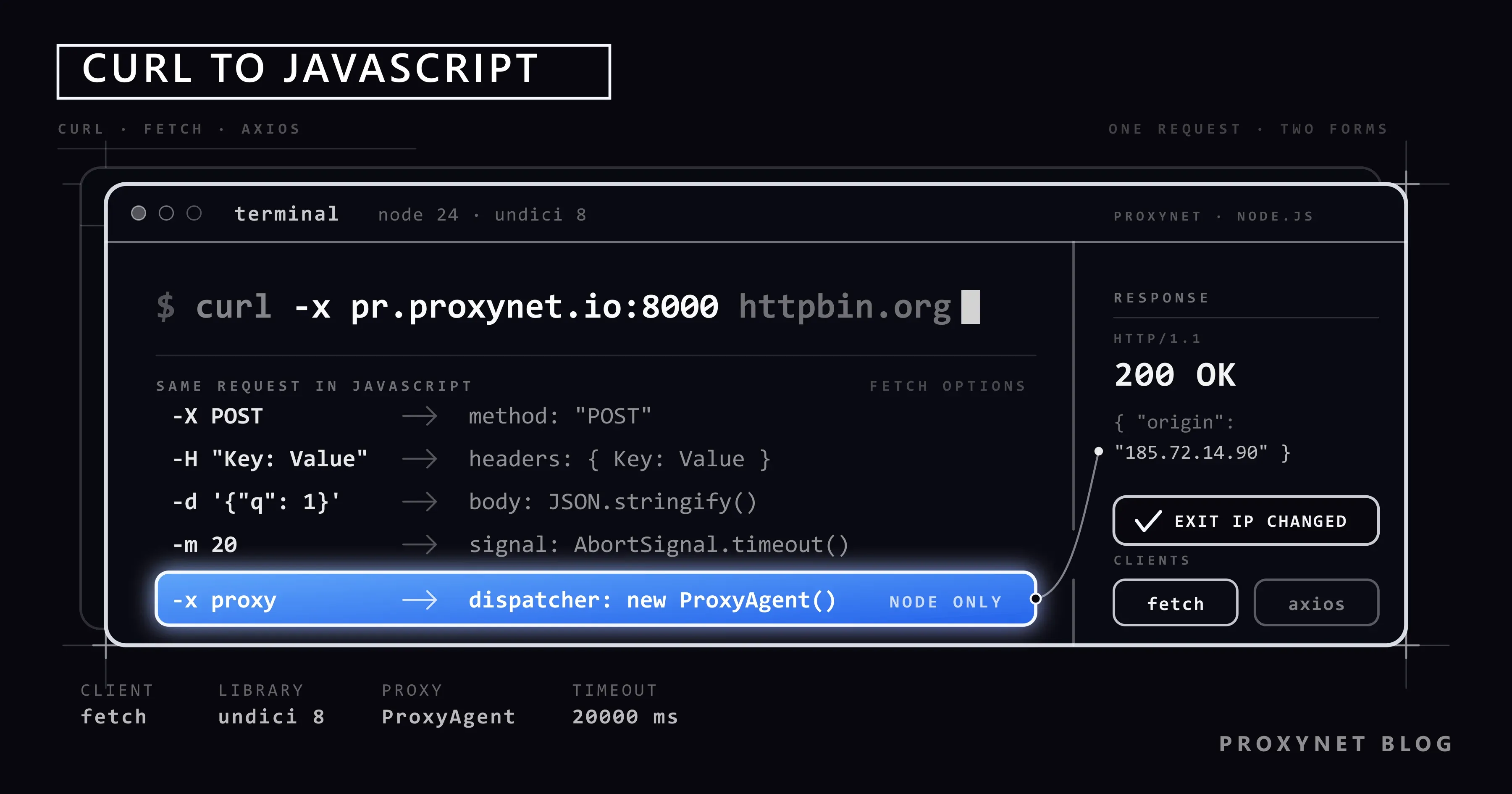
API documentation and a browser's developer tools often give the sample request as a cURL command. It's ideal for a quick try in the terminal, but when you need to carry that same request into a Node.js application or a scraping script, you have to translate the command into JavaScript. This article covers the JavaScript equivalents of the most common cURL options, translation examples, four ways to use a proxy in Node.js, error handling, and common mistakes.
All examples were tested on Node.js 24 with undici 8 and Axios 1.20.
What is cURL's equivalent in JavaScript?
There are two main options:
- fetch: Built in in browsers and, since Node.js 18, in Node.js as well. No extra package required. Node.js's fetch implementation uses the undici library under the hood.
- Axios: A long-standing, popular library that automatically converts JSON and offers request/response interceptor support.
It's also possible to re-run a cURL command without leaving the terminal (with child_process), but this approach makes error handling and portability harder; you stay dependent on cURL being installed on the machine. Writing with a native client is almost always the better option.
JavaScript equivalents of cURL options
| cURL | fetch | Axios |
|---|---|---|
curl URL | fetch(url) | axios.get(url) |
-X POST | method: "POST" | axios.post(url, data) |
-H "Name: Value" | headers: { Name: "Value" } | headers: { Name: "Value" } |
-d '{"a":1}' | body: JSON.stringify({ a: 1 }) | object as the second parameter |
-d "a=1&b=2" | body: new URLSearchParams({ a: 1, b: 2 }) | new URLSearchParams(...) as the second parameter |
-F "file=@a.png" | body: FormData | FormData as the second parameter |
-u username:password | Authorization: "Basic ..." header | auth: { username, password } |
-b "name=value" (cookie) | headers: { Cookie: "name=value" } | headers: { Cookie: "name=value" } |
-A "UA" | headers: { "User-Agent": "UA" } | headers: { "User-Agent": "UA" } |
-L (follow redirects) | Follows by default | Follows by default |
-x proxy | dispatcher: new ProxyAgent(...) | httpsAgent or proxy |
-m 20 (timeout) | signal: AbortSignal.timeout(20000) | timeout: 20000 |
-i (response headers) | response.headers | response.headers |
-o file | write the body with fs.writeFile | responseType: "stream" |
Example: translating a POST request
Take the following cURL command:
curl -X POST https://httpbin.org/post \
  -H "Content-Type: application/json" \
  -H "Authorization: Bearer TOKEN" \
  -d '{"q": 1}'
With fetch
const response = await fetch("https://httpbin.org/post", {
  method: "POST",
  headers: {
    "Content-Type": "application/json",
    Authorization: "Bearer TOKEN",
  },
  body: JSON.stringify({ q: 1 }),
  signal: AbortSignal.timeout(20000),
});

if (!response.ok) throw new Error(`HTTP ${response.status}`);
const data = await response.json();
console.log(data.json);
fetch has one subtlety: it does not throw when the server returns 404 or 500. You have to check whether the response was successful yourself with response.ok. A network error (DNS, connection refused, timeout) does arrive as an exception.
With Axios
npm install axiosimport axios from "axios";
const { data } = await axios.post(
"https://httpbin.org/post",
{ q: 1 },
{ headers: { Authorization: "Bearer TOKEN" }, timeout: 20000 },
);
console.log(data.json);Axios converts the object to JSON itself, adds the Content-Type header, and throws on responses outside the 2xx range.
Example: form submission and file upload
A form submission in the -d "a=1&b=2" format from cURL is met in JavaScript with URLSearchParams:
const response = await fetch("https://httpbin.org/post", {
  method: "POST",
  body: new URLSearchParams({ a: "1", b: "2" }),
});
console.log((await response.json()).form);
When given a URLSearchParams body, fetch sets the Content-Type header to application/x-www-form-urlencoded itself. For file uploads (-F), FormData is used and the boundary value is again added automatically. One detail: if you're getting the fetch function from the undici package, get the FormData class from the same package too; the built-in FormData doesn't match undici's fetch, and the body ends up sent as plain text.
import { openAsBlob } from "node:fs";

const form = new FormData();
form.append("file", await openAsBlob("./a.png"), "a.png");

const response = await fetch("https://httpbin.org/post", { method: "POST", body: form });
console.log(Object.keys((await response.json()).files));
Four ways to use a proxy in Node.js
In cURL, a proxy is a single -x option. In Node.js, the method depends on which client you use.
1. fetch and undici's ProxyAgent
npm install undiciimport { fetch, ProxyAgent } from "undici";
const dispatcher = new ProxyAgent("http://kullanici:parola@pr.proxynet.io:8000");
const response = await fetch("https://httpbin.org/ip", { dispatcher });
console.log(await response.text());Note that we're also importing the fetch function from the undici package. Node's built-in fetch is also undici-based, but since a separately installed package can differ in version, importing both from the same package is the safest approach.
2. A global setting for every fetch call
If you want every fetch call in the app to use the same proxy, you can define a global dispatcher:
import { ProxyAgent, setGlobalDispatcher } from "undici";

setGlobalDispatcher(new ProxyAgent("http://kullanici:parola@pr.proxynet.io:8000"));

const response = await fetch("https://httpbin.org/ip");
console.log(await response.text());
This method also covers fetch calls made from inside a third-party library; you route its traffic through the proxy without touching the library's source code.
3. With an environment variable, without changing the code
Current Node.js versions can read the standard proxy environment variables for the built-in fetch when the NODE_USE_ENV_PROXY variable is enabled:
NODE_USE_ENV_PROXY=1 HTTPS_PROXY="http://kullanici:parola@pr.proxynet.io:8000" node uygulama.mjsThis method is useful for routing an existing script through a proxy without touching the source code. The NO_PROXY variable is also read; you can add internal network addresses to this list to keep them out of the proxy. Check Node.js's documentation to see whether this feature is in your version.
4. Axios and HTTPS targets
Axios's built-in proxy option works without issues for unencrypted HTTP addresses:
const { data } = await axios.get("http://httpbin.org/ip", {
  proxy: {
    protocol: "http",
    host: "pr.proxynet.io",
    port: 8000,
    auth: { username: "kullanici", password: "parola" },
  },
});
For HTTPS addresses, using a proxy agent is more reliable:
npm install https-proxy-agentimport axios from "axios";
import { HttpsProxyAgent } from "https-proxy-agent";
const httpsAgent = new HttpsProxyAgent("http://kullanici:parola@pr.proxynet.io:8000");
const { data } = await axios.get("https://httpbin.org/ip", { httpsAgent, proxy: false });
console.log(data);The proxy: false line matters; it turns off Axios's own proxy logic and hands the tunnel entirely to the agent. If you create the agent once and bind it to an instance with axios.create({ httpsAgent, proxy: false }), you don't need to rewrite it on every call.
Comparing the four methods
| Method | Scope | Code change | Suited for |
|---|---|---|---|
undici ProxyAgent | Single call | dispatcher on every call | Different requests, different proxies |
setGlobalDispatcher | All fetch calls | One line, at startup | A single proxy for the whole app |
NODE_USE_ENV_PROXY | All built-in fetch calls | None | Existing script, deployment environment |
| Axios + agent | Axios instance | httpsAgent + proxy: false | If the project already uses Axios |
Retries and concurrency
In a real scraping script, requests sometimes fail; the proxy might not reach the target, or the site might return 429. The following helper function retries a failed request with exponential backoff and limits how many requests can be open at once:
import { fetch, ProxyAgent } from "undici";

const dispatcher = new ProxyAgent("http://kullanici:parola@pr.proxynet.io:8000");

async function getir(url, deneme = 3) {
  for (let i = 0; i < deneme; i++) {
    try {
      const r = await fetch(url, { dispatcher, signal: AbortSignal.timeout(20000) });
      if (r.status === 429 || r.status >= 500) throw new Error(`HTTP ${r.status}`);
      return await r.text();
    } catch (hata) {
      if (i === deneme - 1) throw hata;
      await new Promise((coz) => setTimeout(coz, 1000 * 2 ** i));
    }
  }
}

async function topluGetir(urls, esZamanli = 5) {
  const sonuclar = [];
  for (let i = 0; i < urls.length; i += esZamanli) {
    const grup = urls.slice(i, i + esZamanli);
    sonuclar.push(...(await Promise.allSettled(grup.map(getir))));
  }
  return sonuclar;
}

const urls = Array.from({ length: 20 }, (_, i) => `https://httpbin.org/get?i=${i}`);
const sonuclar = await topluGetir(urls);
console.log(sonuclar.filter((s) => s.status === "fulfilled").length, "succeeded");
Promise.allSettled prevents one request's failure from bringing down the whole batch; you can inspect each result individually. The wait time doubles on every attempt; hammering at a fixed interval can get an IP that's already hitting a rate limit blocked entirely.
Common mistakes
A special character in the password
If your proxy password contains characters like @, :, or /, encode them within the address with encodeURIComponent. Otherwise the address gets parsed incorrectly and you get a "407 Proxy Authentication Required" error.
Requests without a timeout
At default settings, a request can wait a long time for a response and your script can get stuck. Put a time limit on every request with AbortSignal.timeout in fetch or timeout in Axios.
Too many requests at once
Launching hundreds of requests at once with Promise.all both strains your own connection limits and gets you rate-limited on the target site. Limit concurrency in small batches like the example above. In jobs that send a large number of requests, Rotating Proxy reduces the risk of being blocked by spreading traffic across different IPs.
Giving agent to the built-in fetch
In Node's older http.request API, a proxy is given with the agent option. The built-in fetch doesn't recognize this option and silently ignores it; the request goes out without a proxy. The correct key for fetch is dispatcher.
Copying browser headers as-is
Requests copied from developer tools carry browser-specific headers like sec-ch-ua and sec-fetch-*. There's no need to send these in Node.js, and some of them can be evaluated as inconsistencies on the target site; keep only the headers you actually need.
Pages where an HTTP request isn't enough
fetch and Axios only get the HTML the server returns. If the content loads afterward in the browser via JavaScript, you won't find what you're looking for on the page. In that case you either need to find the underlying API request or use browser automation. We compared the options in our Web Scraping: JavaScript or Python? article; we showed proxy usage with Puppeteer in our Puppeteer and CAPTCHA article.
fetch or Axios?
- Choose fetch: if you don't want an extra dependency, if the code needs to run in both the browser and Node.js, or if you want to take advantage of undici's connection-management features.
- Choose Axios: if you need conveniences like automatic JSON conversion, interceptors, and throwing on non-2xx responses, or if the project already uses it.
The difference between the two is more a matter of habit than capability. Starting a new project with fetch keeps the dependency count low; there's no reason to switch to fetch in a large Axios project.
Frequently asked questions
Can I automatically convert a cURL command to JavaScript?
You can right-click a request in the Network tab of your browser's developer tools and copy it directly as fetch code with the "Copy as fetch" option. Still review the resulting code; browser-specific headers can be unnecessary in Node.js. If you're carrying the same command over to Python, our How to POST JSON with Python Requests: cURL Equivalents article maps cURL options to json=, data= and params= in a table.
Can I use a SOCKS5 proxy in Node.js?
The built-in fetch and undici's ProxyAgent are for HTTP proxies. For SOCKS5 you need to define an agent with an extra package like socks-proxy-agent. On the cURL side, the socks5h:// scheme is supported directly; see the details in our How to Use a Proxy with cURL article.
Can a proxy be defined in JavaScript running in the browser?
No. fetch in the browser doesn't let you change the proxy setting from code; the proxy is defined in the browser's or operating system's settings. Managing the proxy from within code is specific to server environments like Node.js. Extensions like SwitchyOmega are used for proxies at the browser level.
How do I persist cookies between requests?
The built-in fetch doesn't store cookies. You need to read the Set-Cookie header from the response and add it to the next request as a Cookie header; or you can use a tough-cookie-based cookie jar with Axios. Don't forget that the IP also needs to stay fixed in logged-in flows; Sticky Proxy is designed for this job.
Can I use a different proxy on every request?
Yes. With undici you can give a different ProxyAgent to each call. But instead of managing the list yourself, using a rotating proxy is simpler: a single address, a different exit IP on every connection.
Does the same code work in TypeScript?
Yes. undici and Axios ship with type definitions; for the dispatcher option you need to use undici's own fetch type, because the built-in fetch's type definition doesn't know this option.
In short
cURL commands can be matched one-to-one in JavaScript with fetch or Axios. In Node.js there are four ways to use a proxy: undici's ProxyAgent, a global dispatcher, the NODE_USE_ENV_PROXY environment variable, and a proxy agent for Axios. Adding a timeout, error checking, retrying with exponential backoff, and a concurrency limit from the start makes your scripts far more reliable. You can find suitable packages for web traffic on our HTTPS Proxy page.


