


































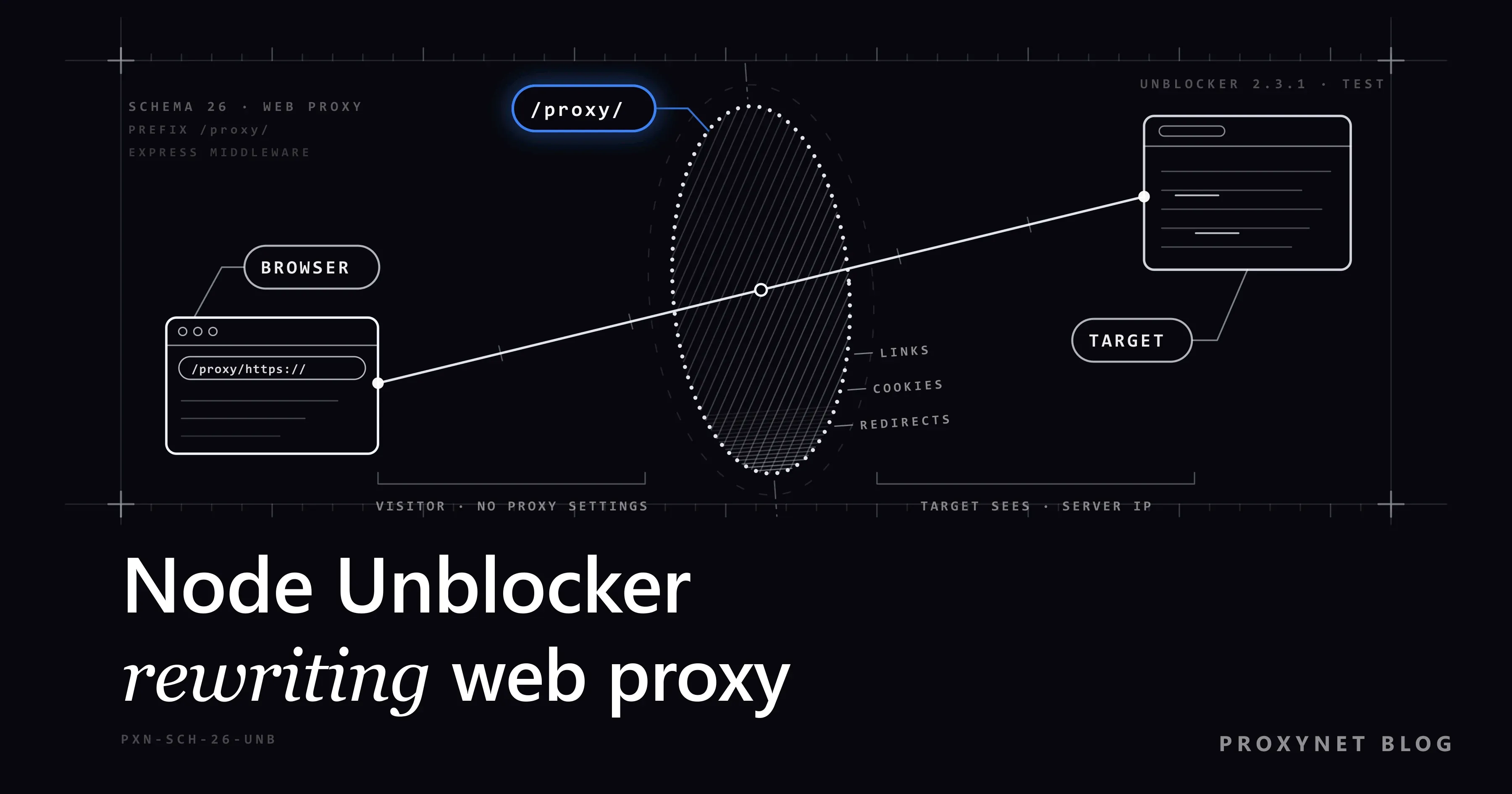
You start a small Express app, open http://127.0.0.1:8080/proxy/https://example.com/ in a browser, and the page appears under your own server's address. Its links, images and forms now start with /proxy/, so every click goes back through your server. That is Node Unblocker, the unblocker package on npm: a few lines that turn a Node.js server into a web proxy anyone can use with a plain browser. Left open, the same lines let strangers use your server too; our first test instance fetched an admin page that a local service showed only to 127.0.0.1.
This post covers how it works, a minimal server, a hardened one that keeps out strangers and internal addresses, an upstream proxy for outgoing traffic, and its limits. Every example ran on 11 October 2026 with unblocker 2.3.1, Express 4.22.3 and Node.js 24.11.1, against a local test site, a WebSocket echo server and a test proxy that requires a username and password.
What is Node Unblocker?
Node Unblocker is an open source Node.js library by Nathan Friedly, published on npm as unblocker. On 11 October 2026 the latest version was 2.3.1 from June 2024; it needs Node.js 16.17 or newer and is licensed under the AGPL-3.0. Its README on GitHub calls it a general-purpose library for proxying and rewriting remote web pages.
It is a web proxy: a website that loads other websites for you. The visitor changes no settings and only needs your server's address. An HTTP or SOCKS5 proxy, by contrast, is set in an app or the operating system and passes traffic through unchanged. Node Unblocker handles web pages and WebSockets only, and it has one exit: the IP of the machine it runs on. Run it on your laptop and the site sees your home IP.
How does Node Unblocker work?
Every request whose path starts with the prefix (/proxy/ by default) goes through these steps:
- The browser asks for a proxy URL, such as
GET /proxy/https://example.com/. Everything after the prefix is the target. A URL without a scheme, like/proxy/example.com, gets a307to/proxy/http://example.com/. - Request middleware runs. Built-in functions fix the
HostandRefererheaders, compression and cookies. Your ownrequestMiddlewarefunctions run next; access checks belong here. - Your server connects to the target with the browser's headers, through
httpAgentorhttpsAgentif you set one. The target sees your server's IP. - Response middleware edits the answer. It removes the
Content-Security-Policy,Strict-Transport-SecurityandPublic-Key-Pinsheaders, rewrites redirects and URLs in HTML and CSS, moves cookies to the path/proxy/<site>/, injects a script and adds aNOINDEX, NOFOLLOWrobots tag. - The page streams back chunk by chunk.
- Missed links are recovered. A root-relative request such as
/aboutarrives without the prefix; Node Unblocker reads theRefererand answers with a307to the full proxy URL.
The injected script wraps fetch, XMLHttpRequest, WebSocket, new elements and history changes, so addresses built by JavaScript also get the prefix. JavaScript files themselves are not rewritten. Our test page, with an absolute, a root-relative and a relative link, a protocol-relative image and a form, came back like this:
set-cookie: session=abc123; Path=/proxy/http://127.0.0.1:9000/; HttpOnly

<script src="/proxy/client/unblocker-client.js"></script>
<script>unblockerInit({"prefix":"/proxy/","url":"http://127.0.0.1:9000/"}, window);</script>
<title>Test page</title><meta name="ROBOTS" content="NOINDEX, NOFOLLOW"/>
<a href="/proxy/https://www.iana.org/help/example-domains">absolute</a>
<a href="/proxy/http://127.0.0.1:9000/about">root-relative</a>
<a href="contact">relative</a>
<img src="/proxy/http://cdn.example.net/logo.png">
<form action="/proxy/http://127.0.0.1:9000/login" method="post"></form>
The relative link already resolves under the proxy path, so it stays. Its Content-Security-Policy and Strict-Transport-Security headers never reached the browser.
How is it different from a forward or reverse proxy?
All three stand between a browser and a site. They differ in who sets them up and whether they change the page.
| Node Unblocker | Forward proxy | Reverse proxy | |
|---|---|---|---|
| How it is used | Open a /proxy/ URL | Set host:port in the app or OS | Visit the site's own address |
| Set up by | Whoever runs the server | The user or their company | The site owner |
| Changes the page | Yes: links, cookies, redirects | No | Usually not |
| HTTPS | Decrypted on your server | Tunnelled, stays encrypted | Decrypted by the site owner |
| Traffic | Web pages and WebSockets | Any HTTP; SOCKS5 also UDP | HTTP(S) to the site's servers |
A forward proxy serves any app with a proxy setting and never needs to understand the page. A reverse proxy such as nginx sits in front of your own site; Forward Proxy vs Reverse Proxy explains both. Node Unblocker is the odd one out: a rewriting proxy for browsers that cannot or should not change their settings.
How do you set up a minimal Node Unblocker server?
In an empty folder, install Express and the package, then save the code as server.mjs:
npm install express unblockerimport express from "express";
import Unblocker from "unblocker";
const app = express();
const unblocker = new Unblocker({ prefix: "/proxy/" });
// Unblocker has to be one of the first app.use() calls and must sit at the root, not on a sub-path
app.use(unblocker);
app.get("/", (req, res) => res.send("Open /proxy/https://example.com/"));
// The upgrade listener lets Unblocker relay WebSocket connections
app.listen(8080, "127.0.0.1").on("upgrade", unblocker.onUpgrade);Run node server.mjs and open http://127.0.0.1:8080/proxy/https://example.com/. The README says the middleware must not sit on a sub-path and warns that / as the prefix causes edge cases. Without the upgrade listener, chats and live dashboards on proxied pages cannot connect.
The server listens on 127.0.0.1, so only your computer can reach it; keep it that way. In our test it loaded pages, rewrote a 302 redirect, relayed a form POST and echoed WebSocket messages. It also fetched /proxy/http://127.0.0.1:9000/admin, a page our test service shows only to the same machine:
INTERNAL ADMIN PAGE - only for 127.0.0.1Express 5. The package depends on Express 4, so we repeated the test on Express 5.3.0. Pages, redirects, forms and WebSockets worked the same; npm put a private Express 4 copy inside the package.
Why is an open Node Unblocker server dangerous?
An open server lets anyone send traffic from your IP and reach places only your server can reach:
- Your IP takes the blame. Form spam and brute-force logins sent through it come from your address. Sites block it or complain to your host, who can suspend the server.
- Your internal network becomes reachable. This is server-side request forgery (SSRF): an outsider makes your server request an address they cannot reach themselves. On a cloud server the classic target is
169.254.169.254, where the metadata service hands out credentials. The OWASP SSRF Prevention Cheat Sheet recommends an allowlist of destinations and a check of the IP each name resolves to. - The server reads everything. HTTPS ends at your server, because it must read pages to rewrite them, so passwords typed into proxied sites pass through it in clear text.
- All sites share one origin. Proxied sites are kept apart only by cookie paths, and MDN notes that
Pathis not a security measure. Script on one proxied page can read another site's cookies that lackHttpOnly.
A web proxy gives nobody new rights either. Using it to get around a school or workplace filter or a site's terms still breaks those rules, and a site's robots.txt and rate limits apply to your server like any other visitor.
How do you lock down a Node Unblocker server?
Treat it as an internal tool for named people and a short list of sites. The hardened version adds:
- A login: one HTTP Basic login for the team, compared in constant time.
- A host allowlist on ports 80 and 443 only, checked in
requestMiddleware. - A check of every DNS answer in the agents'
lookup, because any domain can point to127.0.0.1. Node'snet.BlockListholds the private ranges and also matches IPv4 addresses written in IPv6 form. - Header stripping, so the team's
Authorizationheader and theX-Forwarded-Forclient IP never reach the site. - A WebSocket guard, because upgrade requests skip Express middleware.
- A rate limit, a log line and a plain error page.
npm install express unblocker express-rate-limitThen replace server.mjs with this version:
import crypto from "node:crypto";
import dns from "node:dns";
import http from "node:http";
import https from "node:https";
import net from "node:net";
import express from "express";
import { rateLimit } from "express-rate-limit";
import Unblocker from "unblocker";

const { UI_USER, UI_PASS, PORT = "8080" } = process.env;
if (!UI_USER || !UI_PASS) throw new Error("Set UI_USER and UI_PASS");
const ALLOWED = ["example.com", "iana.org"]; // sites your team may open (subdomains included)

// 1. Address ranges the proxy must never connect to (loopback, private, link-local, cloud metadata)
const blocked = new net.BlockList();
for (const [range, bits] of [["0.0.0.0", 8], ["10.0.0.0", 8], ["100.64.0.0", 10], ["127.0.0.0", 8],
  ["169.254.0.0", 16], ["172.16.0.0", 12], ["192.168.0.0", 16]]) blocked.addSubnet(range, bits);
blocked.addAddress("::1", "ipv6");
blocked.addSubnet("fc00::", 7, "ipv6");
blocked.addSubnet("fe80::", 10, "ipv6");
const isBlockedIp = (ip) => blocked.check(ip, net.isIPv6(ip) ? "ipv6" : "ipv4");

// 2. Check every DNS answer before a socket opens, so an allowed name cannot point inside your network
function safeLookup(hostname, options, callback) {
  dns.lookup(hostname, options, (err, address, family) => {
    if (err) return callback(err);
    const answers = Array.isArray(address) ? address : [{ address, family }];
    if (answers.some((a) => isBlockedIp(a.address))) {
      return callback(new Error(`${hostname} resolves to a blocked address`));
    }
    callback(null, address, family);
  });
}

// 3. Only allowlisted hosts on the default ports 80/443
function isAllowed(target) {
  const { hostname, port } = new URL(target);
  return port === "" && ALLOWED.some((h) => hostname === h || hostname.endsWith(`.${h}`));
}

// Headers the site must not see: the team login and the client IP added by the reverse proxy
const STRIP = ["authorization", "forwarded", "x-forwarded-for", "x-forwarded-host", "x-forwarded-proto", "x-real-ip"];

function checkTarget(data) {
  const ok = isAllowed(data.url);
  console.log(new Date().toISOString(), ok ? "ALLOW" : "DENY", data.url);
  if (ok) {
    for (const h of STRIP) delete data.headers[h];
    return;
  }
  if (data.clientResponse) return data.clientResponse.status(403).send("This site is not on the allowlist.");
  throw new Error("Blocked WebSocket target"); // upgrade requests have no response object
}

// 4. One shared login for the team (HTTP Basic), compared in constant time
const hash = (s) => crypto.createHash("sha256").update(s).digest();
function loginOk(req) {
  const [scheme, value = ""] = (req.headers.authorization ?? "").split(" ");
  const given = Buffer.from(value, "base64").toString();
  return scheme === "Basic" && crypto.timingSafeEqual(hash(given), hash(`${UI_USER}:${UI_PASS}`));
}

const unblocker = new Unblocker({
  prefix: "/proxy/",
  requestMiddleware: [checkTarget],
  httpAgent: new http.Agent({ lookup: safeLookup }),
  httpsAgent: new https.Agent({ lookup: safeLookup }),
});

const app = express();
app.set("trust proxy", "loopback"); // the reverse proxy on this machine passes the real client IP
app.use(rateLimit({ windowMs: 60_000, limit: 600 })); // one page load can pull dozens of files
app.use((req, res, next) => {
  if (loginOk(req)) return next();
  res.set("WWW-Authenticate", 'Basic realm="preview"').status(401).send("Login required");
});
app.use(unblocker);
app.get("/", (req, res) => res.send("Open /proxy/https://example.com/"));
app.use((err, req, res, next) => {
  console.error(err.message);
  res.status(502).send("The site could not be loaded.");
});

// Listen on loopback only: HTTPS and the public port belong to the reverse proxy in front
const server = app.listen(Number(PORT), "127.0.0.1");
// Express middleware does not run for WebSocket upgrades, so check the login here as well
server.on("upgrade", (req, socket, head) => {
  if (!loginOk(req)) return socket.destroy();
  try {
    unblocker.onUpgrade(req, socket, head);
  } catch {
    socket.destroy();
  }
});
Start it with the login in environment variables: UI_USER=team UI_PASS='a-long-random-password' node server.mjs. Our results:
- Without the login, every path returned
401with aWWW-Authenticate: Basicheader. example.comandwww.iana.orgloaded.example.org,evilexample.com,example.com:8443,127.0.0.1:9000and169.254.169.254got403.- With
localtest.me, a public domain that resolves to127.0.0.1, added to a test copy's allowlist, the request got502and the log saidlocaltest.me resolves to a blocked address. - A WebSocket without the login was closed. With it, one to our local echo server was logged as
DENYand closed; one to the allowlistedecho.websocket.orgworked. - Once 600 requests had arrived within a minute, the next ones got
429 Too Many RequestswithRetry-After: 59.
Two defences exist because the obvious version failed. The README's allowlist example refuses with data.clientResponse.status(403); a WebSocket upgrade has no response object, so our server crashed with TypeError: Cannot read properties of null (reading 'status'). With a null check it survived, but the WebSocket still reached the blocked target without a login. Throwing and catching in the upgrade handler stops it. And before we added STRIP, our test proxy saw the team's Authorization: Basic header and a test X-Forwarded-For value on their way to the site.
Put HTTPS in front with nginx or Caddy on the same machine; trust proxy set to loopback then gives Express and the rate limiter the real client IP. With nginx, the README recommends merge_slashes off; so the // in /proxy/https:// survives. Keep the ALLOW and DENY log lines; they answer a site that asks what your server did.
How do you send Node Unblocker's traffic through an upstream proxy?
The httpAgent and httpsAgent options accept any Node.js agent, so a proxy agent moves your exit to the proxy. Install http-proxy-agent and https-proxy-agent, then replace the two agent lines of the hardened server:
npm install http-proxy-agent https-proxy-agentimport { HttpProxyAgent } from "http-proxy-agent";
import { HttpsProxyAgent } from "https-proxy-agent";
const UPSTREAM = process.env.UPSTREAM_PROXY; // http://user:pass@pr.proxynet.io:8000
const unblocker = new Unblocker({
prefix: "/proxy/",
requestMiddleware: [checkTarget],
httpAgent: new HttpProxyAgent(UPSTREAM), // http:// targets: absolute-URI requests to the proxy
httpsAgent: new HttpsProxyAgent(UPSTREAM), // https:// targets: a CONNECT tunnel through the proxy
});Our test proxy asks for user:pass and logged one line per target:
[test-proxy] CONNECT example.com:443 auth=user
[test-proxy] GET http://example.com/ auth=user fwd-authorization=- x-forwarded-for=-
The HTTPS page used a CONNECT tunnel, so the proxy saw only the host name; the dashes show the stripped headers stayed behind. With a wrong password, both pages returned the proxy's 407 Proxy Authentication Required. Encode @, : or / in the password with encodeURIComponent. The same agents with Axios, node-fetch and undici are covered in Using a Proxy in Node.js.
With an upstream, safeLookup no longer runs, because the proxy resolves names in its own network, so keep the allowlist strict. You can also drop the password: put your server's public IP on the dashboard's IP whitelist (up to 10 addresses). Proxy Authentication: User:Pass vs IP Whitelist compares the two.
A Datacenter Proxy gives the team a fixed exit IP with unmetered traffic. Per-IP plans include access to a set of target websites, with access to all websites as a paid add-on, so check that your allowlisted sites are covered.
To see a page as a home visitor in another country does, for a localisation check, use a Residential Proxy exit chosen by country and city. A sticky session of 1 to 60 minutes keeps the same exit through a flow.
What does Node Unblocker not handle?
It works best on ordinary pages rendered mostly on the server. The README is direct about the rest:
- OAuth sign-in and
postMessage. Logins through another provider's window are unlikely to work. - Large single-page apps. The README names several well-known chat, video and social platforms that don't work. The client script wraps the common request APIs, but
window.location,document.cookieandpostMessageare still on its to-do list. - Anything that is not a web page. Desktop apps, mail clients and command-line tools need a forward proxy.
- Slow maintenance. The June 2024 release was still the latest in October 2026. The middleware files in
lib/are short; read them before you depend on it.
Use cases
- An internal preview tool for a QA or localisation team, opening the company's own pages through a residential exit in the target country.
- A browser-only kiosk that cannot change its proxy settings but needs a few approved sites through an authenticated upstream.
- A small team reaching a partner portal from one fixed IP that the partner has allowlisted.
- Learning how rewriting proxies work: run it with
DEBUG=unblocker:*and watch each middleware.
In each case: only sites you may use, at a pace the site can carry, never as a way past a filter or a block.
Common mistakes
- Listening on
0.0.0.0without a login. The server becomes a public relay. - Checking access only in Express middleware. WebSocket upgrades never reach it.
- Calling
data.clientResponseunchecked inrequestMiddleware. It isnullon upgrades and crashes the process. - Trusting a hostname check alone. Check the resolved IP in the agent's
lookup. - Forwarding every browser header.
AuthorizationandX-Forwarded-Forreach the target unless you delete them. - Keeping Express's default error page. Outside production mode it showed our visitor a
getaddrinfo ENOTFOUNDstack trace. - Signing in to personal accounts through it. The server sees every password.
Decision guide
| Need | Recommendation |
|---|---|
| Learn how it works | Minimal server on 127.0.0.1 |
| A small team opens a fixed set of sites | Hardened server behind an HTTPS reverse proxy |
| Check pages as visitors in another country see them | Hardened server with a residential upstream |
| A fixed exit IP a partner can allowlist | Hardened server, datacenter upstream if needed |
| Apps, scripts or a whole browser | A forward proxy (HTTP or SOCKS5) |
| OAuth logins or large web apps | A normal browser with a forward proxy |
| A public proxy for anyone | Don't run one |
Frequently asked questions
Is Node Unblocker a VPN?
No. A VPN carries all of a device's traffic through an encrypted tunnel; Node Unblocker is a website that loads other pages for you. Only what you open under /proxy/ goes through it, and the server reads it in clear text.
Does Node Unblocker hide my IP address?
From the target site, yes, if the server runs elsewhere: the site sees the server's IP. It does not hide you from whoever runs the server, and behind a reverse proxy your IP reaches the site in X-Forwarded-For unless that header is deleted.
Does Node Unblocker work with Express 5?
In our test, yes. With Express 5.3.0, pages, redirects, form posts and WebSockets behaved as on Express 4.22.3; npm installs a separate Express 4 copy inside the package.
Can Node Unblocker proxy WebSockets?
Yes, once unblocker.onUpgrade is attached to the server's upgrade event. Express middleware does not run there, so check the login and the target in that handler too.
Can I use Node Unblocker in a commercial product?
Yes, under the AGPL-3.0: if you modify it and offer the modified version to users over a network, you must offer them its source code. The README says commercial licensing is also available from the author.
Why does a login work but the next page logs me out?
Usually the site moved between subdomains or from HTTP to HTTPS. Unblocker keeps cookies under a path per site and copies them to the new path with an extra redirect; its source notes that flags such as expiry are lost on the way.
Summary
Node Unblocker turns an Express server into a web proxy that rewrites pages for a plain browser: the visitor opens /proxy/<url>, the server fetches it from its own IP, rewrites links, cookies and redirects, and streams it back. The minimal server takes a few lines on Express 4 or 5; the work is making it safe with a login, an allowlist, a resolved-IP check, stripped headers and a guarded WebSocket handler behind HTTPS. When the exit should be elsewhere, the agent options send it through an upstream, and our proxy plans cover datacenter, residential, mobile and static ISP exits.


