


































You connect your laptop to the Wi-Fi in a hotel lobby, and the program your employer installed asks whether to turn on the VPN before you open your work email. On your phone, the app store lists page after page of VPN apps, many of them free, all promising "privacy" and "security". Both are called a VPN, yet one is a door into your company's network and the other is a company you have never heard of that now carries all of your traffic.
This post explains what a VPN is and where the name comes from, what happens to your traffic step by step, and what a VPN hides and what it leaves in plain view. It then compares the VPN protocols you see in app settings, shows how to turn a VPN on and off on Windows, iPhone and Android, looks at whether free VPNs are safe, and ends with the jobs where a proxy is the better tool.
What is a VPN?
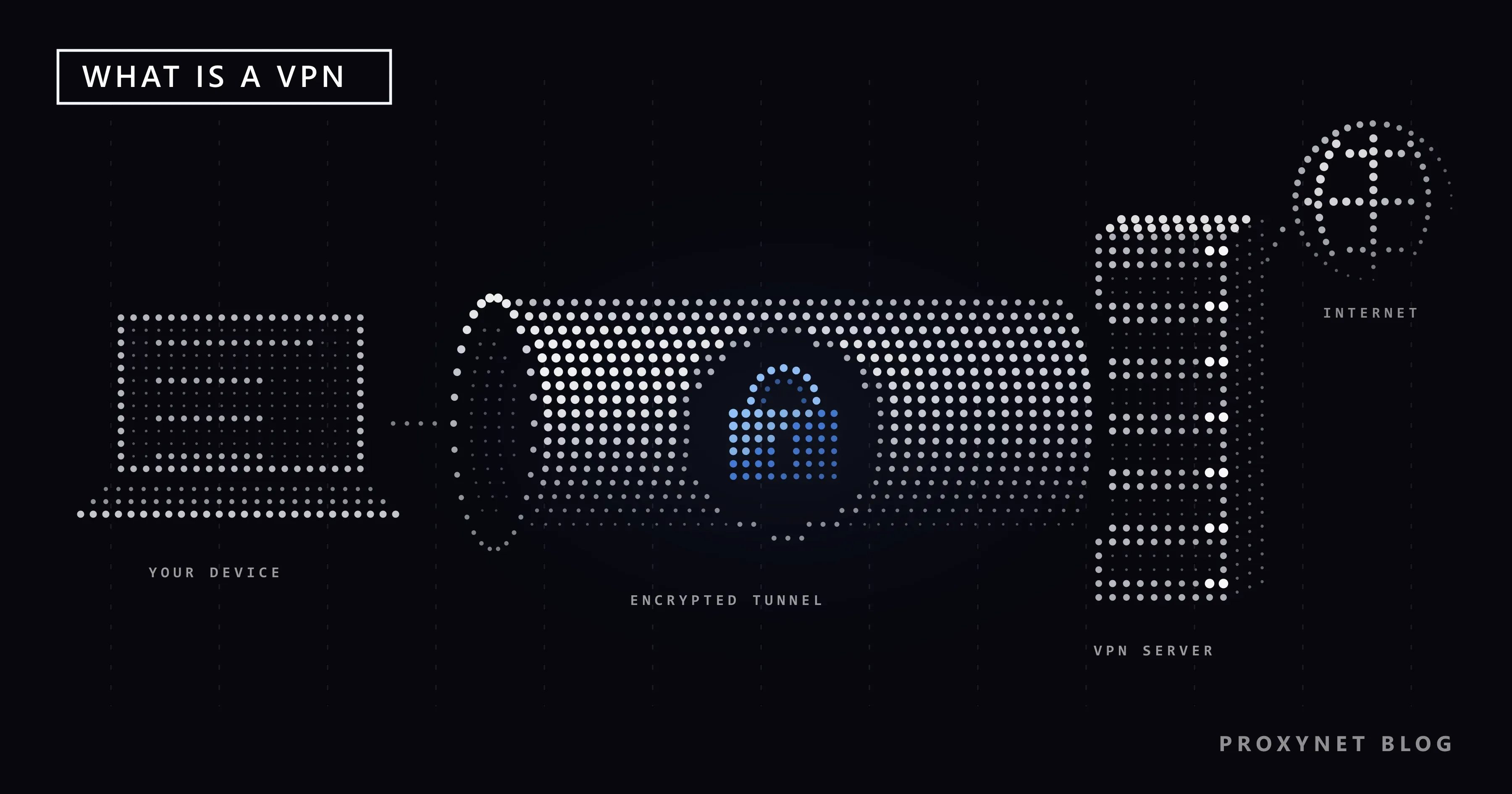
A virtual private network was first a tool for companies. A business has a private network in its office: file servers, internal websites, printers. An employee working from home or from a client's office needs to reach those systems as if sitting at a desk inside. A VPN makes that possible over the ordinary internet. It is "virtual" because there is no private cable between the two places, and "private" because the traffic between the two ends is encrypted, so the networks in between cannot read it.
Microsoft's own VPN help page for Windows still describes the feature in this first sense: a more secure connection to your company's network and to the internet, for example when you work from a coffee shop. This is the VPN your IT department installs.
The consumer VPN came later. It uses the same technology, but the tunnel does not end at your company. It ends at a server run by the VPN company, and from there your traffic goes out to the open internet. You pay a subscription (or you use a free app), pick a server location in the app and press a connect button. When people say "I use a VPN" today, this is usually what they mean.
How does a VPN work?
Two terms first. Encryption means scrambling data so that only someone holding the right key can turn it back into readable form. A tunnel means that each piece of your traffic is wrapped inside another piece of traffic addressed to the VPN server, the way a letter goes inside a second envelope with a different address on it.
Here is what happens when you press "Connect":
- The app and the VPN server recognise each other. They check each other's keys or certificates and agree on fresh encryption keys for this session.
- Your device gets a virtual network adapter. The operating system now sends all outgoing traffic to this adapter instead of straight to your Wi-Fi or mobile connection. Windows shows a small blue shield on the network icon; Android shows a key icon in the status bar.
- Each packet is encrypted and wrapped. The request for a web page is encrypted and placed inside a new packet whose only visible destination is the VPN server.
- Your internet provider carries the wrapped packet. The Wi-Fi network and the provider see data going to the VPN server's address. They cannot see which site the request is for.
- The VPN server unwraps it and sends it on. The server decrypts the packet and sends the request to the website from its own IP address.
- The answer takes the same road back. The website replies to the VPN server, the server encrypts the reply and sends it through the tunnel, and your device decrypts it.
Because the site only ever talks to the VPN server, it sees the server's IP address and the location that belongs to it. Your real address stays between you, your internet provider and the VPN provider.
What does a VPN hide, and what does it not hide?
A VPN moves the point where your traffic becomes readable. It does not remove that point. The US Federal Trade Commission puts it in one line in its guidance on VPN apps: a VPN "just shifts trust" from your internet or Wi-Fi provider to the VPN app provider.
| Who or what | Without a VPN | With a VPN |
|---|---|---|
| Wi-Fi owner and internet provider | The names of the sites you visit, when, and how much data | Only that you exchange encrypted data with one VPN server, when, and how much |
| VPN provider | Not involved | What your internet provider used to see: site names, times, amounts |
| Websites you visit | Your public IP address and its approximate location | The VPN server's IP address and location |
| Your logged-in accounts and cookies | Identify you | Still identify you |
| Your browser's fingerprint (screen size, fonts, language and similar details) | Visible | Unchanged |
| The fact that you use a VPN | Not relevant | Often visible to the network and to websites |
Three points in this table surprise people.
Most page content is already encrypted. Sites that open with https:// encrypt the page, your passwords and your messages between your browser and the site, with or without a VPN. What a VPN adds on a café or hotel network is that the local network no longer sees which sites you visit, and that any connections that are not encrypted also travel inside the tunnel.
The VPN provider sees what your internet provider used to see. It cannot read HTTPS pages either, but it knows which sites you reach and when. Whether it keeps that information, and for how long, depends on the company and its privacy policy.
A VPN is often recognisable. Your internet provider sees a steady stream of encrypted data to a single address, and that address often belongs to a known VPN company. Websites compare your IP address against lists of VPN servers. The FTC guidance notes that sites may be able to tell that you use a VPN app. We explain how networks recognise VPN traffic in What Is Deep Packet Inspection? and how sites spot VPN addresses in VPN or Proxy Detected.
A badly built VPN can also leak. If the app does not send your DNS lookups (the step that turns a site name into an IP address) or your IPv6 traffic (connections that use the newer, longer form of IP address) through the tunnel, part of your activity goes out the old way. How to test for this is in WebRTC and DNS Leaks.
What is a VPN used for?
- Using public Wi-Fi more safely. In a hotel, café or airport, anyone running the network can see which sites connected devices reach. A VPN keeps that between you and the VPN server. What the network owner can and cannot see is covered in Is Public Wi-Fi Safe?.
- Working from home or while travelling. The original job: reaching your company's file servers and internal tools through the company's own VPN. The difference between this and a proxy is in Proxy vs VPN.
- Keeping your browsing away from your internet provider. With a VPN on, your provider sees traffic to one server instead of a list of site names. How much a provider can see without one is explained in What Is Deep Packet Inspection?.
- Hiding your home IP address from the sites you visit. Sites log the IP address of every visitor; with a VPN they log the server's address. A private browser window does not do this, as Does Incognito Mode Hide Your IP? explains.
- Protecting a whole device, not just the browser. A VPN covers every app at once, including background updates and chat apps, which a browser setting cannot do. How this compares with a smart DNS service and a proxy is in Smart DNS vs VPN vs Proxy.
VPN protocols compared
A VPN protocol is the set of rules the app and the server use to build the tunnel: how they check each other, how they agree on keys and how they encrypt each packet. Most apps choose one for you, but the setting is usually there under names such as "Protocol" or "VPN type".
| Protocol | What it is | Where you meet it | Status today |
|---|---|---|---|
| WireGuard | A newer protocol with a deliberately small design; the paper that introduced it notes that the Linux version fits in under 4,000 lines of code, which makes it easy to review | Many VPN apps, as the default or as an option | Current |
| OpenVPN | Open-source software that builds the tunnel with TLS, the same family of encryption that protects HTTPS sites | VPN apps, company VPNs, some routers | Current |
| IKEv2/IPsec | An official internet standard: IKEv2 checks both sides and sets up the keys, IPsec encrypts the packets; copes well with switching between Wi-Fi and mobile data | Built into Windows and Apple devices; many company VPNs | Current |
| SSTP | Microsoft's protocol that carries the tunnel inside an SSL/TLS connection | Mainly Windows and Windows servers | Current, Microsoft-centred |
| L2TP/IPsec | L2TP builds the tunnel but does not encrypt it; the encryption comes from IPsec | Older company setups; still built into many systems | Legacy |
| PPTP | One of the oldest VPN protocols | Very old routers and setups | Insecure, do not use |
The WireGuard paper describes its design and its small code base. IKEv2 is defined in RFC 7296, published by the IETF, the body that writes internet standards. The OpenVPN reference manual describes it as open-source software that relies on OpenSSL, a widely used encryption library.
On the older protocols, Microsoft has made its position clear. In an October 2024 announcement it deprecated PPTP and L2TP in future Windows Server versions, noting that their weaknesses are well documented, and recommended SSTP and IKEv2 instead. The same post points out that IKEv2 keeps the connection alive when your device changes networks, which is why it works well on phones.
For home use, the choice is simple. Leave the app's default, which is normally WireGuard, IKEv2 or OpenVPN. If an app or an old router offers only PPTP, treat that as a reason not to use it.
How do you turn a VPN on and off?
Most people use a VPN through the provider's app, and the big button in that app is the main switch. The operating system also has its own VPN settings, where company VPN profiles live and where you can check what is connected. If the connection never comes up, see VPN Not Connecting? Causes, Error Codes and Fixes; if the app says it is connected but pages will not load, see VPN Connected but No Internet? Causes and Fixes.
Windows 11
To add a VPN by hand, for example with details from your workplace, open Settings > Network & internet > VPN and select Add VPN. For VPN provider choose Windows (built-in), then fill in Connection name, Server name or address, VPN type and Type of sign-in info, and select Save.
To connect, select the Network, Volume, Battery icon on the taskbar, then VPN. With one VPN set up, the VPN quick setting works as an on/off switch; with several, choose Manage VPN connections, pick one and select Connect. When the connection is up, Connected appears under its name in Settings and the network icon shows a blue shield. To turn it off, flip the same VPN quick setting back. Microsoft's help page has the full list of steps. For a personal VPN service, the same page suggests installing the service's own app from the Microsoft Store.
iPhone
On iPhone, a VPN service is normally installed as an app from the App Store and switched on and off inside that app. While a VPN is connected, a VPN icon appears in the status bar at the top of the screen.
A workplace or school may instead send you a configuration profile that contains VPN settings. Apple's guide shows installed profiles under Settings > General > VPN & Device Management; tapping a profile lets you remove it, and removing a profile also removes the settings that came with it. Do not remove a profile your employer requires without asking them first.
Android
Open the Settings app and go to Network & internet > VPN. If you do not see it, search for "VPN" in Settings; menu names differ between phone makers. To add a VPN from your administrator, tap Add, enter the details and tap Save. To connect, tap the VPN, enter your username and password and tap Connect. If the VPN comes from an app, the app opens instead.
To disconnect, tap the settings icon next to the VPN and turn it off; Forget removes it completely. On the same screen you will find Always-on VPN, which keeps the VPN connected all the time. The steps are on Google's Android VPN help page.
When the VPN keeps turning itself back on
If a VPN comes back after you turn it off, something is still switching it on. On Android, check whether Always-on VPN is enabled for it. On iPhone, Apple's troubleshooting article suggests opening Settings, swiping down to reveal the search field and searching for "VPN" and "profile" to find every place a VPN was set up. It also warns that a setting can return later if the software that created it is still in use. In that case, turn the feature off inside the VPN app, or delete the app and cancel any subscription tied to it.
Are free VPNs safe?
Running VPN servers costs money: machines, bandwidth and staff. A free VPN pays for them some other way. The FTC guidance says it plainly: many VPN apps are free because they sell advertising inside the app or because they share your information with third parties, or send your traffic through them.
A well-known measurement of VPN apps is a 2016 study by researchers from Data61 (CSIRO), UNSW, ICSI and UC Berkeley, presented at the ACM Internet Measurement Conference. They examined 283 Android apps that use the VPN permission, taken from more than 1.4 million apps on Google Play. Their findings:
- 75% of the apps contained third-party tracking libraries, and 82% asked for access to sensitive data such as accounts and text messages.
- Over 38% showed some malware presence according to VirusTotal, an online service that scans files with many antivirus engines.
- 18% built the tunnel without encryption, even though they promised security.
- About 84% did not send IPv6 traffic through the tunnel and 66% did not send DNS traffic through it.
- Four apps intercepted encrypted HTTPS connections, and two injected JavaScript into pages for advertising and tracking.
The study is from 2016 and covers Android only, so read the percentages as a picture of that market, not of today's. The lesson has not aged: a VPN app sits in the one place where it can see and change all of your traffic, and the app store listing tells you nothing about what it does there.
If you consider a free or cheap VPN, check four things. Who runs it, and where is that company based? What does its privacy policy say it records and shares? Which permissions does the app ask for beyond the VPN itself? Does it show ads or cap your data, and how does it make money? The same questions apply to free proxies, which we examined in Are Free Proxies Safe?.
VPN vs proxy: what is the difference?
A VPN works at the level of the operating system: it covers every app on the device and encrypts everything up to its server. A proxy works at the level of a single app: you enter its address in a browser or a program, only that program's traffic goes through it, and the proxy does not add encryption of its own. Sites with HTTPS stay encrypted from end to end in both cases. The full comparison is in Proxy vs VPN, and the basics of proxies are in What Is a Proxy Server?.
When is a proxy the better tool?
A VPN is built to protect one person's device. Some jobs need something else:
- Only one app should change address. You want a single browser or tool to appear from another location while the rest of the device keeps your normal connection. A proxy set in that app does exactly this.
- You need many IP addresses, or you choose the city. A VPN usually gives you one server address, often shared with many other users. Residential Proxy let you pick the country and city and change the address as often as you need.
- You collect public data for work. Price checks, search result monitoring and market research send many requests; a pool of rotating addresses spreads them in a way a single VPN server cannot.
- Each account needs its own address. Teams that manage several business accounts keep each one on a separate, stable address instead of one shared VPN exit.
- A program supports proxies but not VPNs. Many desktop apps and scripts have a proxy field; SOCKS5 Proxy work in them for any kind of traffic.
To be clear about what we sell: Proxynet provides proxies, not a VPN service. If what you need is an encrypted connection for your whole laptop on hotel Wi-Fi, a VPN is the right tool, and your employer's VPN is the right one for work systems.
Common mistakes
- Treating a VPN as an anonymity tool. You are still signed in to your accounts, your cookies are still there and your browser still has its fingerprint, which we explain in What Is Browser Fingerprinting?. The VPN changes your address, not who you are to a site.
- Installing the first free app in the store. The app you pick sees all of your traffic. Check who runs it and how it earns money before you connect.
- Choosing PPTP because it connects easily. It connects easily because it is old. Pick WireGuard, IKEv2 or OpenVPN.
- Assuming the VPN stays up. If the connection drops, traffic may go out without it. On Android, Always-on VPN keeps it connected; check the status icon before you do something sensitive.
- Turning off the company VPN to "speed things up". Work systems often only accept connections through it, and your IT policy probably requires it.
- Expecting a VPN to stop phishing or viruses. A VPN protects the road, not what you download or where you type your password.
Decision guide
| Your need | Suggestion |
|---|---|
| Browsing on hotel, café or airport Wi-Fi | VPN from a provider you trust, or your phone's mobile data |
| Reaching your company's internal systems | The VPN your employer provides |
| Keeping your browsing away from your internet provider | VPN, knowing that the VPN provider sees it instead |
| Changing the address of one browser or app only | Proxy |
| Many addresses, a chosen city, or rotation for data collection | Rotating residential proxy |
| A stable address per work account | Static ISP or dedicated proxy |
| An old router offers only PPTP | Do not use it; choose another protocol or device |
Frequently asked questions
Does a VPN make me anonymous?
No. It hides your IP address from websites and your browsing from the local network and your internet provider. The VPN provider can still see which sites you reach, and the sites still recognise you through your logins, cookies and browser. The FTC describes it as shifting trust, not removing it.
Does a VPN slow down my internet?
A little, in most cases. Your traffic makes an extra stop at the VPN server and is encrypted on the way, so pages may open a bit later. A server far away from you, or one shared by many users, makes the difference larger.
Should I keep a VPN on all the time on my phone?
It depends on where you are. On networks you do not control, such as public Wi-Fi, keeping it on is sensible. On your home network or on mobile data, some banking and local services may ask for extra checks when they see a VPN address, so many people switch it on only when they need it.
Is using a VPN legal?
In most countries, yes, and companies use VPNs every day. A few countries restrict VPNs, and what you do through a VPN is still subject to the law and to each site's terms of use. The details by country are in Is Using a VPN or Proxy Legal?.
Can my internet provider see that I use a VPN?
Usually, yes. It cannot read what goes through the tunnel, but it sees encrypted traffic flowing to one server, and that server's address often belongs to a known VPN company. A VPN hides the content, not the fact that a VPN is in use.
Why do some sites show a "VPN or proxy detected" warning?
Many VPN server addresses are listed in databases that sites check, and one address is shared by many users at once. Sites that see unusual activity from such an address may ask for a check or refuse the connection. The reasons and what you can do are in VPN or Proxy Detected.
Summary
A VPN puts the traffic of your whole device into an encrypted tunnel that ends at a VPN server. The local network and your internet provider see only encrypted data going to that server, and websites see the server's IP address. It was built for reaching company networks and is still the right tool for that and for untrusted Wi-Fi. It does not make you anonymous: the VPN provider now sees what your internet provider saw, and your accounts, cookies and browser still identify you. Use a modern protocol such as WireGuard, IKEv2 or OpenVPN, avoid PPTP, and be careful with free apps, since the app you choose can see everything you send. When the job is to change the address of a single app, pick a city, or work with many addresses, a proxy fits better; you can compare the options on our proxy services page.


