


































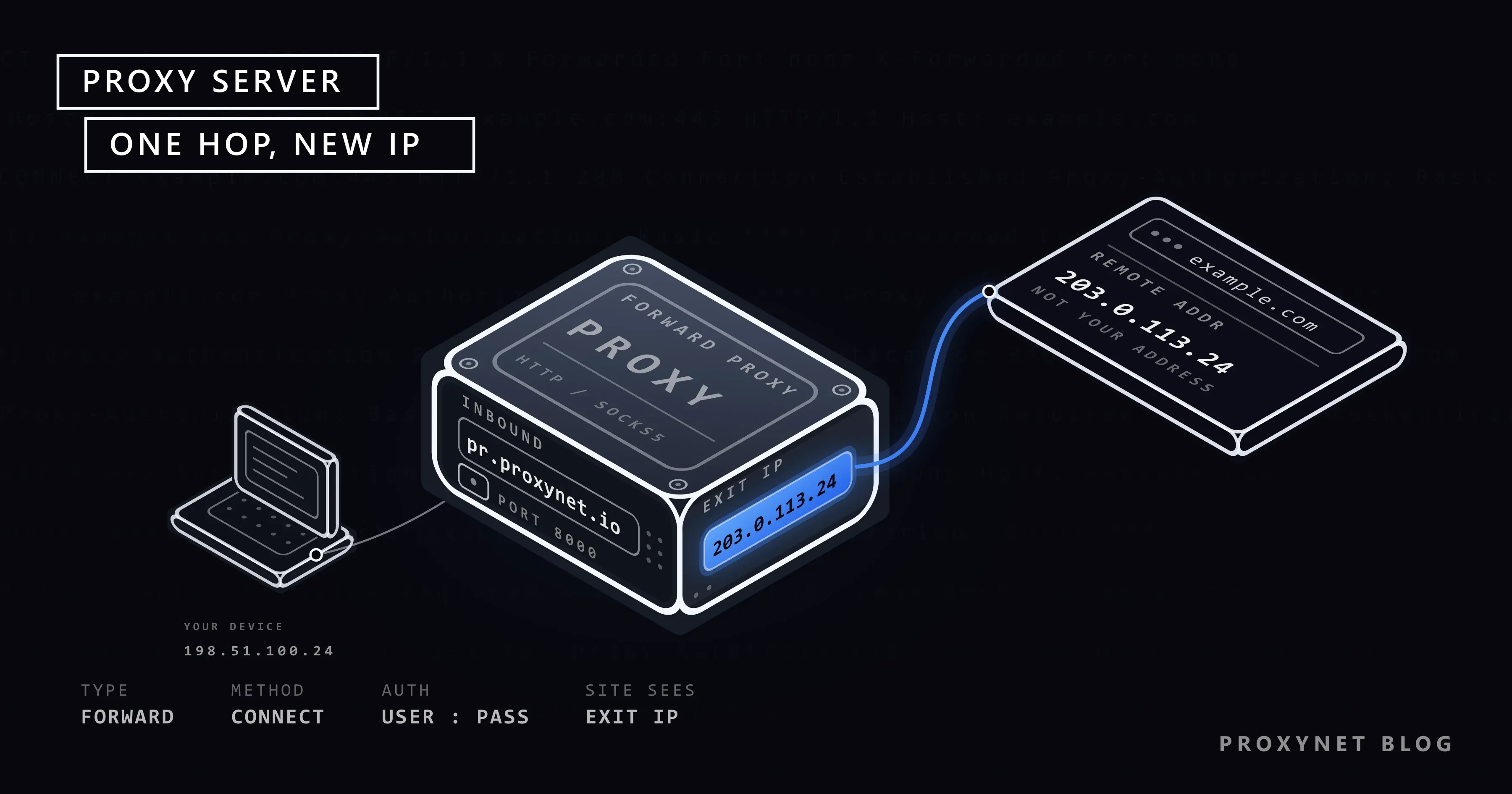
When you open a website, your browser sends the request straight to that site's server, and the site sees your IP address. When you put a proxy server in between, the request goes to the proxy first; the proxy forwards the same request to the target with its own IP address and hands the response back to you. The target site thinks it is talking to the proxy, not to you.
This simple idea sits underneath a lot of work, from access control on corporate networks to price monitoring, ad verification and viewing search results as they appear in other countries. In this article we walk through the path a request takes through a proxy step by step, look at proxy types from three separate angles, explain what a proxy is for and, just as important, what it does not do, and finish with how to choose one for your needs.
What is a proxy server?
"Proxy" means someone authorised to act on another's behalf, and the technical meaning is exactly that: an intermediate server that talks to another server on your behalf. The HTTP standard, RFC 9110, defines a proxy as an intermediary selected by the client that forwards requests on its behalf. The key words are "selected by the client": you or your network administrator configure the proxy, and the browser or application knows where to connect.
In everyday language, "proxy" usually means this kind, the forward proxy. There is also the reverse proxy, which sits in front of servers and represents the site rather than the visitor. We compare the two in Forward Proxy vs Reverse Proxy; the rest of this article is about forward proxies.
A proxy server has three basic components:
- Entry address and port: the address the client connects to, for example
pr.proxynet.io:8000. - Authentication: a username and password or a list of allowed IPs that decides who can use the proxy.
- Exit IP address: the address the target site sees. Most of a proxy's value lies in where this address comes from.
How does a request pass through a proxy?
Since most web traffic today is HTTPS, let's use an HTTPS request as the example. Your browser has a proxy configured and you open https://example.com:
- The client connects to the proxy. The browser opens a TCP connection to the proxy's address and port, not to the target site.
- A tunnel request is sent. The browser sends the proxy a
CONNECT example.com:443request. This method is defined in RFC 9110 §9.3.6. If the proxy requires authentication, the request also carries aProxy-Authorizationheader. - The proxy authenticates the client. If the credentials are wrong, the proxy returns
407 Proxy Authentication Requiredand the process stops. If they are right, it moves on. - The proxy connects to the target with its own IP. The proxy resolves
example.com, connects to port 443 on the server and tells the browser200 Connection Established. The connection the target server sees comes from the proxy's exit IP address. - The response comes back the same way. The browser performs the TLS handshake with the site inside this tunnel; encrypted traffic flows through it in both directions. The proxy carries the bytes but cannot read the HTTPS content.
For an unencrypted http:// address the flow is slightly different: the browser sends the whole request to the proxy, which reads it and forwards it to the target. In that case the proxy can see headers and content and can cache them. MDN's guide to proxy servers and tunneling shows both flows with short diagrams.
The fastest way to see your proxy working is to send a request to an address that returns your IP, first without the proxy and then with it:
curl https://httpbin.org/ip
curl -x "http://user:pass@pr.proxynet.io:8000" https://httpbin.org/ip
The first command should show your own IP address, the second the proxy's exit IP. If both lines return the same address, the request is not going through the proxy. You can find other cURL options in How to Use a Proxy with cURL.
What types of proxies are there?
Trying to sort proxies into a single list is confusing, because "residential", "SOCKS5" and "rotating" answer different questions. The same proxy can be all three at once. It is more accurate to separate the types by three questions.
| Question | Type | What it means |
|---|---|---|
| Which protocol does it speak? | HTTP / HTTPS | Understands web requests; opens a CONNECT tunnel for HTTPS |
| SOCKS5 | Carries any TCP and UDP traffic without inspecting it | |
| Where does the IP address come from? | Datacenter | IPs belonging to servers in data centers |
| Residential | IPs that internet service providers assign to home users | |
| ISP (static residential) | Fixed IPs registered to an ISP but hosted in a data center | |
| Mobile | IPs from mobile operators' 4G/5G networks | |
| When does the IP address change? | Rotating | A new IP on every request or at set intervals |
| Sticky | The same IP for a set period | |
| Static | The same IP until you release it |
The protocol choice depends on your traffic. For browsers and scraping libraries an HTTPS Proxy is enough; game clients, desktop applications and UDP traffic need a SOCKS5 Proxy. The detailed comparison is in SOCKS vs HTTP Proxy.
The IP source decides how the target site sees you. A Datacenter Proxy is fast and predictable, but public registries show that its IP blocks belong to a data center. A Residential Proxy goes out through ordinary home connections. A ISP Proxy sits between the two: an ISP address that stays fixed. A Mobile Proxy comes from an operator network where many real users share the same IP. We compare datacenter and residential in Residential vs Datacenter Proxy.
Rotation is chosen by whether the job needs a session. For a job that fetches thousands of independent pages, a Rotating Proxy fits; for a logged-in flow where the IP must stay the same, a Sticky Proxy fits.
IPv4 and IPv6 form another axis; the difference in address pools and compatibility is explained in IPv4 vs IPv6 Proxies. For proxies reserved for you alone and not shared with anyone else, see Private Proxy.
What is a proxy used for?
A proxy's function can be summed up in one sentence: "send the request from another IP address." Its uses follow from the different consequences of that function:
- Seeing content by location. Search results, prices and ads change with the visitor's country and even city. A team in Istanbul can only see what a user in Germany sees with an IP that exits in Germany. For differences within Türkiye, see our Türkiye locations page.
- Spreading data collection. When a web scraping script sends hundreds of requests a minute from one IP, the target site applies rate limits. A proxy pool spreads the requests across different addresses. We explain the other parts of collecting data within the rules in How to Scrape Websites Without Getting Blocked.
- Access control and logging. Corporate networks route employee internet traffic through a proxy to decide which domains can be reached and to keep logs. How a proxy works with a firewall in this setup is covered in Proxy vs Firewall.
- Keeping accounts separate. An agency that manages several clients' social media accounts opens each account with its own fixed IP and browser profile. The browser side of this setup is in What Is an Antidetect Browser?.
- Testing applications from other networks. Checking how a mobile app or site opens from other countries and whether localisation works correctly.
- Caching. For unencrypted HTTP traffic, a proxy saves bandwidth by storing frequently requested files and serving them again. As HTTPS spread, this use became limited to corporate networks.
We gather business scenarios on our solutions page.
What does a proxy not do?
Most wrong expectations about proxies come from the assumption "if it hides my IP address, it hides everything." On its own, a proxy server does not:
- Encrypt traffic. An HTTP or SOCKS5 proxy carries traffic as it is. When you connect to an HTTPS site, the content is already encrypted by the site's TLS connection; on an unencrypted
http://address, traffic can be read at the proxy and along the way. The setup that encrypts all device traffic is a VPN; the differences are in Proxy vs VPN. - Provide full anonymity. The target site does not see your IP address, but the account you log in to, cookies and browser fingerprint still identify you. We explain how fingerprinting works in Browser Fingerprinting.
- Close IP leaks through other browser channels. Even with a proxy on, WebRTC and DNS queries can reveal your real address. The test and the fix are in WebRTC and DNS Leaks.
- Remove a site's rules. A different IP does not give permission to step outside terms of service, robots.txt rules or legal limits.
- Speed up your connection. There is one more stop on the way; if the proxy is not close to the target, latency goes up. A speed gain is only possible for unencrypted traffic with caching involved.
When does a proxy connection slow down?
The slowness people notice with a proxy usually comes from the route the request takes, not from the protocol. If you go from a computer in Türkiye through a proxy in the US to a site that is also in Türkiye, the packets cross the ocean twice. The main factors behind latency are:
- Distance between the proxy and the target. The closer the exit point is to the target server, the sooner the first byte arrives.
- IP type. Residential and mobile IPs go out through real user lines, so line quality varies; datacenter IPs are more predictable.
- Rotation frequency. A new IP on every request can mean a new connection on every request. A job that makes many requests to the same site is faster when it reuses the connection.
- Authentication errors. Every attempt with a wrong password costs a round trip with a 407 response. The methods and the causes of this error are covered in Proxy Authentication.
To measure speed, look at your own requests rather than guessing. cURL's -w option prints connection and first-byte times separately:
curl -x "http://user:pass@pr.proxynet.io:8000" -o /dev/null -s \
  -w "connect: %{time_connect}s  first byte: %{time_starttransfer}s  total: %{time_total}s\n" \
  https://httpbin.org/ip
Running the same command a few times with exit points in different locations shows which location suits your job.
Common mistakes when using a proxy
- Not encoding a special character in the password. If the password contains
@or:, the proxy address is parsed incorrectly. Inside the address,@must be written as%40. - Assuming the proxy works. The application may be ignoring the proxy setting. Run the IP check above once for every new tool.
- Using a rotating proxy for a job that needs a session. If the IP changes after you log in, the site may end the session or ask for verification.
- Location conflicting with other signals. A browser with an IP exiting in Germany but a Turkish language setting and an Istanbul time zone paints an inconsistent visitor profile.
- Local DNS resolution with SOCKS5. The
socks5://scheme resolves domain names on your own network, so the domains are visible locally. Remote resolution usessocks5h://. - Wrong protocol port. Connecting to an HTTP port with SOCKS5, or the other way round, gives a confusing connection error. Providers usually give separate ports for the two protocols.
How do you choose a proxy?
Answering these questions in order makes the choice easier: Is my traffic web traffic or not? How sensitive is the target site to IP type? Does my job need a session? Which country, and which city, do I need to appear from? The table below sums up common needs.
Decision guide
| Your need | Recommendation |
|---|---|
| View a site from another country in the browser | HTTPS, residential or ISP |
| Collect data from many independent pages | HTTPS, rotating residential |
| Long sessions with logged-in accounts | Sticky or static ISP |
| High-volume targets that do not care about IP type | Datacenter |
| Mobile app or mobile-looking traffic | Mobile proxy |
| Game client, desktop app, UDP | SOCKS5 |
| Encrypt all device traffic | Not a proxy, a VPN |
Frequently asked questions
Is a proxy the same as a VPN?
No. Both send your traffic out from another address, but a VPN encrypts all traffic between your device and the VPN server and usually works at the operating system level. A proxy is configured per application and does not encrypt anything by itself. Details are in Proxy vs VPN.
Is using a proxy legal?
Proxy technology is legal and is used everywhere on the internet, from corporate networks to content delivery networks. What determines legal responsibility is what you do with it: breaking a site's terms, collecting personal data without permission or accessing illegal content has the same consequences through a proxy. For the framework on the data collection side, see Is Web Scraping Legal?.
Are free proxies safe?
Nobody knows who runs the free proxies shared on public lists. They can read unencrypted traffic, inject content into responses or log your connection details. Because thousands of people use the same IP, most sites have already blocked these addresses. Do not use a proxy of unknown origin for anything where you type a password.
Does a proxy hide my IP address completely?
It changes the address the target site sees on the HTTP connection. But if the browser leaks through WebRTC or DNS, if you are logged in to your account or if your cookies are still there, the site can still recognise you. Think of changing your IP as one part of privacy, not all of it.
How do I know if my proxy is working?
Visit a page that shows your IP address with the proxy off and then on. If the two results differ, the proxy is active. The command line check with curl -x is shown above; you can test in the browser by opening the same page.
Can proxy types be used interchangeably?
Partly. Because protocol, IP source and rotation are separate axes, there is no choice between "residential or SOCKS5"; a residential proxy can offer both an HTTP and a SOCKS5 port. What cannot be swapped is the IP source: no setting makes a datacenter IP look residential.
Summary
A proxy server is an intermediary that forwards your request to the target with its own IP address. On HTTPS sites it opens a CONNECT tunnel and cannot see the content; on unencrypted sites it reads and forwards the request. The way to understand proxy types is to treat protocol, IP source and rotation as separate questions. A proxy does not encrypt, does not provide anonymity on its own and does not remove a site's rules; used correctly, it makes a lot of work possible, from seeing location-based content to collecting data. To pick the right type for your needs, take a look at our proxy services.


