


































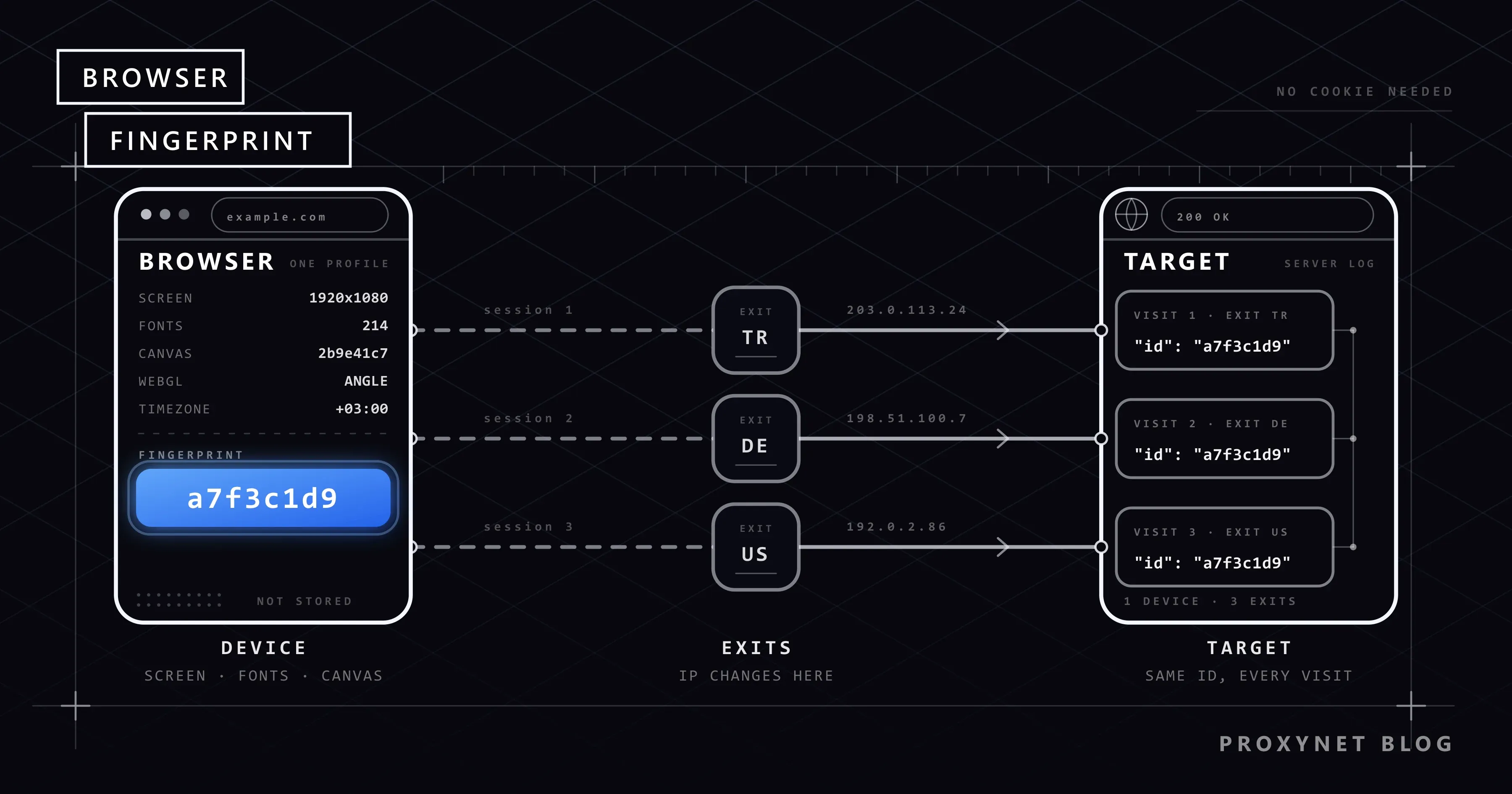
You cleared your cookies, opened a private window, even changed your IP address. A site can still recognize you. The method behind this is called browser fingerprinting. Dozens of small pieces of information your browser exposes combine into an identity unique enough to set you apart from millions of visitors.
This article explains which signals a fingerprint is built from, why sites use it, how it differs from cookies and IP addresses, how you can test it in your own browser, and what it means for someone using a proxy.
How is a browser fingerprint formed?
When a web page loads, the browser exposes a lot of information about itself to the site so the page can render correctly. No single piece of this information identifies you on its own. But together they form a rare combination. Signals commonly used in fingerprinting include:
- User-Agent and browser version: Browser name, version, and operating system. Current browsers have simplified this header and moved the details to the
Client Hintsmechanism, but the basic information is still exposed. - Screen information: Resolution, color depth, pixel density, window size.
- Language and time zone: Browser language, system time zone, and date format.
- Installed fonts: The system's font list, which varies surprisingly widely between devices. The site indirectly learns which fonts are present by measuring text width.
- Canvas fingerprint: The site renders text and shapes onto an invisible area. The same drawing produces a pixel-level different result depending on the graphics card, driver, and operating system. A summary of that result is a distinguishing value. The drawing pipeline is described in MDN's Canvas API documentation.
- WebGL information: The graphics processor's vendor, model, and supported features.
- Audio fingerprint: Small differences in how a sound generated with the Web Audio API is processed.
- Hardware hints: Number of CPU cores, memory amount, touchscreen support.
- Browser features: Supported APIs, installed plugins, media codecs, preferred color scheme.
The W3C covers how these signals should be limited in web standards in its Mitigating Browser Fingerprinting guide.
How does a fingerprint become a value?
The collected signals are not stored one by one; they are usually combined and reduced to a single summary (hash) value. The site associates this value with the visitor and, if the same value is produced on the next visit, calls it "the same device."
Two concepts matter here:
- Entropy: How well a signal distinguishes visitors. Time zone has low entropy (millions of people share the same zone); the font list and canvas output have high entropy. As signals combine, the total entropy rises and the combination becomes unique.
- Stability: How constant a signal stays over time. A browser update changes the User-Agent; a graphics driver update can change the canvas output. This is why advanced systems also link "close enough" fingerprints to the same device instead of requiring an exact match.
You can try EFF's Cover Your Tracks tool to see how unique your own browser looks and which signals carry the most information. The results page shows the entropy of each signal separately.
How is it different from a cookie?
| Criterion | Cookie | Browser fingerprint |
|---|---|---|
| Where is it stored? | In your browser | Nowhere; recalculated on every visit |
| Can it be deleted? | Yes | Cannot be deleted directly |
| Does it work in a private window? | Usually not | Yes |
| Does it work across sites? | Third-party cookies are increasingly restricted | Yes, the same signals are produced on every site |
| Does the user notice it? | Through cookie notices | Mostly no |
| Stability | Constant until deleted | Can change with browser and driver updates |
A cookie is an ID card you carry; a fingerprint is the site recognizing you by your appearance. You can throw the card away, but you cannot change your face. A private window does exactly that: it throws the card away when you close it, but your face and your IP address stay the same, as we explain in Does Incognito Mode Hide Your IP Address?.
Why do sites use fingerprinting?
Fingerprinting is not used solely for ad tracking. Most uses are security-focused:
- Fraud prevention. Banks and payment systems route a login from an unusual device to extra verification.
- Account security. Even with the correct password, a login with a never-before-seen fingerprint can be treated as suspicious. This is often the source of "a new device signed in" emails.
- Bot detection. Automation tools often carry giveaway inconsistencies: a desktop User-Agent paired with a mobile screen size, or fonts specific to Linux in a browser that claims to be Windows.
- Multi-account detection. Marketplaces and social media platforms link multiple accounts opened from the same device.
- Advertising and analytics. As third-party cookies are restricted, some tracking systems have turned to fingerprinting, which is why browser makers have started taking countermeasures against this use.
Why isn't changing the IP enough?
A proxy changes the IP address the target site sees. The fingerprint, on the other hand, is independent of the IP. If you connect to the same site through different proxies with the same browser, the site sees: the same device, from different locations. That can be an even more suspicious pattern than coming from a single IP.
The reverse also deserves attention: a session whose fingerprint looks flawless but comes from a data center IP is just as inconsistent. We covered how IP types are distinguished in our Residential vs. Datacenter Proxy article. Looking trustworthy means making the two layers consistent:
- Location and language match: An IP from Istanbul paired with a browser time zone of
America/New_Yorkis a contradiction. Language, time zone, and IP location should tell the same story. - IP type match: A mobile device profile matching a Mobile Proxy and a desktop profile matching a Residential Proxy looks more natural.
- Session continuity: Opening an account every day with a different IP and a different fingerprint puts the account at risk. A fixed ISP Proxy per account, paired with a fixed browser profile, is more consistent.
Examples of inconsistency: what trips sites up?
Bot detection systems often look not at the fingerprint itself but at the contradiction between signals. Common examples:
| Contradiction | Why is it suspicious? |
|---|---|
| User-Agent says "Windows," but the font list contains macOS fonts | The header was changed, the underlying system was not |
| Screen is 1920×1080, window is 800×600, and it never changes | The default window size of automation tools |
Time zone is Istanbul, language is en-US, IP is Germany | Three signals point to three different places |
| The same fingerprint appears from ten different countries within an hour | A single device, a rotating proxy |
navigator.webdriver is set to true | The browser itself reports that it is under automation |
| WebGL disabled, canvas randomized, empty plugin list | An effort to hide; ordinary users don't turn these off |
The last row in this table makes an important point: blocking or randomizing signals is itself a signal.
Is it possible to fully hide a fingerprint?
Hiding it completely is not practical, because blocking signals is itself a signal. A browser that fully disables canvas rendering, or returns random values on every request, stands out even more among ordinary users.
The realistic goal isn't "becoming invisible" — it's looking ordinary within the crowd. Using common browser versions, consistent settings, and a profile that doesn't change across sessions is more effective for this than randomly scrambling signals.
Browser makers are moving in this direction too: some browsers restrict access to high-entropy APIs or add small random noise to differentiate canvas output between sites. These measures make tracking harder, but they do not fully block security-oriented uses.
How do you test your own fingerprint?
You can follow these steps to see which signals a site uses to recognize you:
- Run the Cover Your Tracks test in a normal window and note the result.
- Repeat the same test in a private window. The cookies are gone, but you'll see the fingerprint result stays largely the same.
- Turn on a proxy or VPN and run the test again. The IP and location change; the screen, font, canvas, and hardware signals do not.
- Try a different browser. The fingerprint changes even on the same device when you switch browsers, because the rendering engine and API set are different.
These four steps show, in a few minutes, why the assumption "I changed my IP, so I won't be recognized" is wrong.
What does it mean for automation and data collection?
Scripts running with headless browsers are easily distinguished from human users at default settings. Common tells include navigator.webdriver being set to true, a missing plugin list, unrealistic screen sizes, and interactions completed within fractions of a second.
That's why, even in data collection that a site permits, three rules apply:
- Keep the request rate reasonable. Even if the fingerprint looks completely ordinary, a session opening dozens of pages per second does not look human.
- Use a consistent browser profile. Window size, language, and time zone should reflect a real device and should not change during the session.
- Keep the same IP for the whole session. Changing the IP mid-flow in a logged-in session breaks both the fingerprint and the IP signal at once; Sticky Proxy is designed for exactly this need.
We covered why CAPTCHAs appear in headless browsers in our Puppeteer and CAPTCHA article, and the newer generation of protections that look at behavior in our Cloudflare Precursor article. For the limits of tools on the Python side, see our Undetected ChromeDriver article.
Frequently asked questions
Is fingerprinting legal?
Using it for security and fraud prevention is common. When it is processed as information that can identify a person, it can fall under regulations such as the GDPR and Türkiye's KVKK. Sites are required to disclose in their privacy policies what purpose they process this information for.
Does a private window change the fingerprint?
Largely, no. A private window does not keep cookies or history, but the screen, font, canvas, and hardware signals stay the same.
Does a VPN or proxy change the fingerprint?
No. Both only change the IP address and, as a result, the apparent location. The information the browser itself sends about itself stays the same. We explained the difference between the two tools in our Proxy vs. VPN article.
Does a browser update change the fingerprint?
Partly. The version information and some API signals change, but the screen, fonts, hardware, and time zone stay the same. Advanced systems tolerate this partial change and continue linking it to the same device.
What does an antidetect browser do?
It generates a separate and consistent fingerprint set for each profile and isolates the profiles from one another. The goal is not to hide the signals, but for each profile to look internally consistent, like an ordinary device. That isolation is incomplete if each profile isn't assigned its own IP.
Is the fingerprint weaker on mobile devices?
Mobile devices resemble one another more closely by model (same screen, same font set), so individual signals have lower entropy. However, touch behavior, sensor data, and app-level signals make up for this. We explained why mobile traffic is evaluated differently in our Mobile Proxy 101 article.
In short
Browser fingerprinting is a way to identify your device without needing cookies, and it is used in areas ranging from security to advertising. The IP address is only one part of this picture; a proxy changes the IP but does not touch the fingerprint. Looking trustworthy requires the IP type, location, and browser profile to be consistent with each other and to stay unchanged over the session. You can find IP types suited to account and profile management in our proxy solutions.


