


































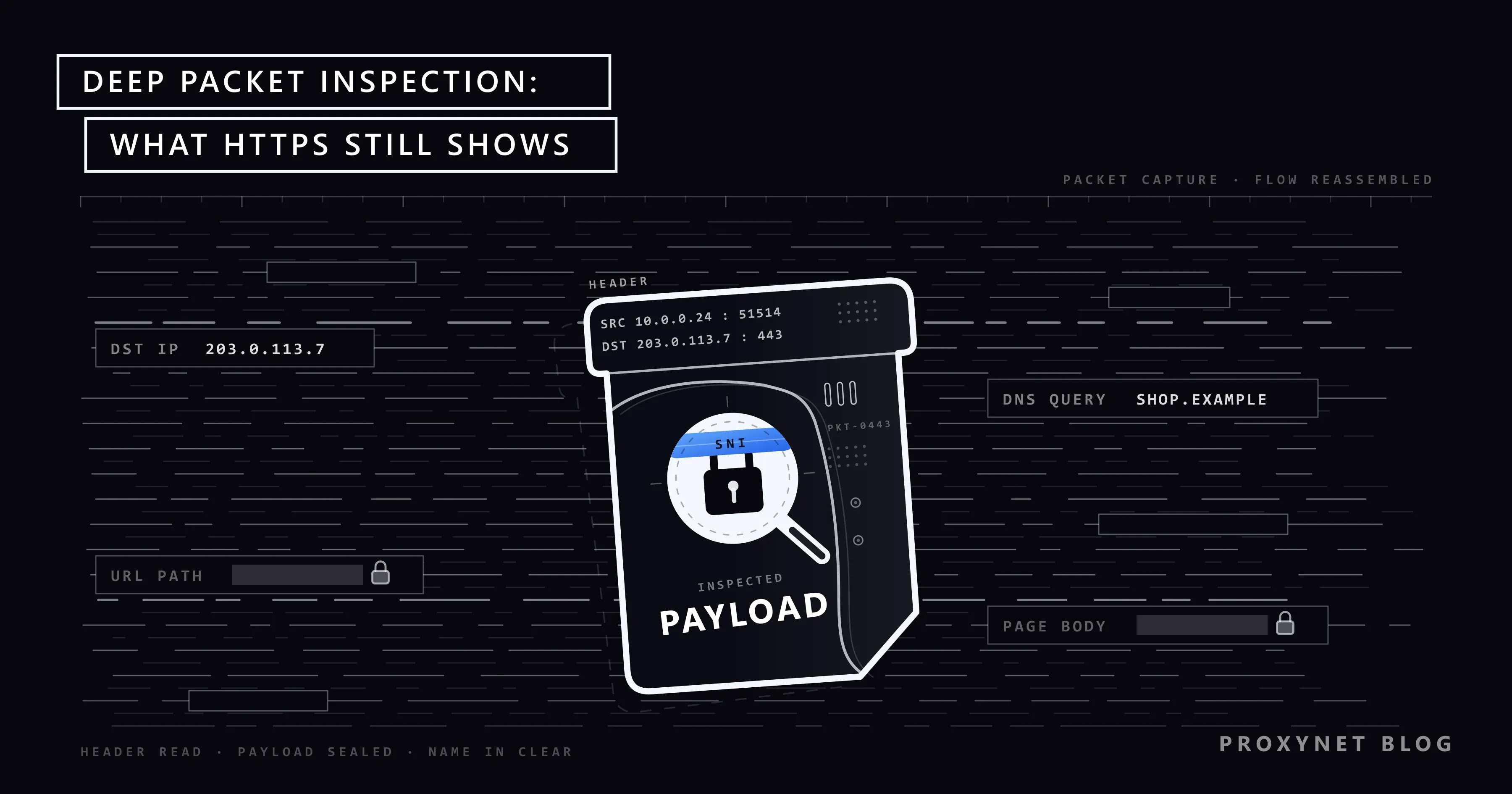
The office Wi-Fi opens every news site you try, yet a file-sharing app on the same laptop is cut off within seconds, even though both use the same port. At home, a video call stays smooth while a large download slows down every evening. In both cases a device on the network looked at the traffic, recognised what kind it was and treated it differently. That is deep packet inspection, usually shortened to DPI, and it has nothing to do with the DPI of a mouse or a printer.
This post explains what a packet is made of, how DPI differs from simpler filtering and how an inspection device works step by step. It then answers the questions people search for: what DPI can still see on HTTPS, what SNI and Encrypted Client Hello are, how company networks decrypt traffic, whether DPI can spot a VPN and what the EU's open-internet rules allow. It describes the mechanism; it is not a guide to avoiding inspection.
What is a network packet?
Everything you send over the internet is cut into small pieces called packets. A web page, a photo or a voice call becomes hundreds or thousands of them, each travelling on its own and put back together at the other end.
Every packet has two parts. The header works like the envelope: it holds the sender's and receiver's IP addresses, the port numbers that say which program the data is for, and the protocol, usually TCP (which waits for the other side to confirm each piece) or UDP (which sends without waiting). The payload is the letter inside: the actual piece of the page, message or file.
Routers only need the header to deliver a packet. They read the envelope, pass it on and never open it. Inspection is about how much of each packet, and how many packets in a row, a device reads before it decides what to do.
What is deep packet inspection?
Deep packet inspection means reading the payload as well as the header, across a whole conversation rather than one packet at a time. A DPI device can tell that a connection on port 443 carries a video call rather than a web page, that an email has an executable file attached, or that a request contains the pattern of a known attack.
NIST, the US standards institute, describes the idea in its firewall guideline, SP 800-41 Rev. 1: a firewall that adds protocol analysis at the application layer, a capability "referred to by some vendors as deep packet inspection". The application layer is where programs talk to each other: the web, email, DNS, video calls. "Deep" means deep into the layers of a connection; how much of your private life that reaches depends on the operator's rules and on encryption.
How does deep packet inspection work?
An inspection device runs through the same steps for every connection, in milliseconds.
- It gets the traffic. The device sits either inline, where every packet passes through it and can be stopped, or on a tap or mirror port, where it only receives a copy and can watch and report. Firewalls and intrusion prevention systems are inline; monitoring systems usually work from a copy.
- It rebuilds the conversation. Packets can arrive out of order, and one request may be split across several of them. The device tracks each connection and puts the pieces back in order, so it reads the stream the way the receiving program would.
- It identifies the protocol. Instead of trusting the port number, it looks at the first bytes of the conversation. A TLS connection, an SSH login and a DNS query each begin in a recognisable way; the documentation of Suricata, an open-source detection engine, calls its pattern-based protocol detection port independent.
- It matches rules. The rebuilt stream is compared with signatures (byte patterns of known malware or attacks), protocol fields (a site name, a file type, a command) and lists of addresses or site categories.
- It looks at behaviour. When the content is encrypted, the device falls back on the shape of the traffic: packet sizes, timing, direction and duration. A video call and a file download look different even when neither can be read.
- It acts. The result is a label such as "video call" or "malware download", and a policy decides what happens: allow, log, slow down (traffic shaping), block, or send the browser to a warning page.
A home router's app-priority setting and a large box in an internet provider's network can work on this same principle. They differ in scale, in the number of rules and in who writes them.
Packet filtering vs stateful inspection vs DPI
Firewalls have gone through three generations of inspection, and a fourth technique sits on top of them for encrypted traffic.
| Method | What it reads | Remembers the connection? | Example rule | Typical place |
|---|---|---|---|---|
| Packet filtering (stateless) | Header only: IP addresses, ports, protocol | No, each packet is judged alone | Block incoming traffic to port 23 | Router access lists, older firewalls |
| Stateful inspection | Headers plus the state of each connection | Yes, in a state table | Allow replies only to connections opened from inside | Practically every firewall today |
| Deep packet inspection | Headers, payload and the rebuilt conversation | Yes, the whole flow | Block executable email attachments; slow file sharing at peak hours | Next-generation firewalls, IDS/IPS, internet providers |
| TLS inspection (decrypting DPI) | The decrypted content of HTTPS connections | Yes, through two separate connections | Scan downloads for malware, except banking and health sites | Company networks with their own root certificate on every device |
The last row is the one that surprises people. Plain DPI works with whatever is visible on the wire; TLS inspection changes the connection itself, so it needs something installed on your device.
What can DPI see in HTTPS traffic?
Most web traffic today is HTTPS, which wraps the conversation in TLS (Transport Layer Security) encryption. TLS starts with a short handshake: your browser sends an opening message called the ClientHello, the server replies, and the two agree on keys. RFC 8446, the TLS 1.3 standard, encrypts every handshake message after the server's first reply. The browser's opening message is not encrypted, because no keys exist yet when it is sent.
What a DPI device can still see on an HTTPS connection:
- IP addresses and ports of both ends. The server's address often belongs to a hosting company or content network that serves many sites.
- The site name in the ClientHello, called SNI, explained in the next section.
- DNS lookups, if your device uses classic DNS, which travels unencrypted; What Is DNS? covers lookups and their encrypted versions.
- Size, timing and direction of the packets, enough to tell a video stream from a chat.
- The TLS fingerprint: the options your browser or app offers in its ClientHello, which differ from one client to another. What Is TLS Fingerprinting and JA3? shows how it is computed.
- The server's certificate, but only on older TLS 1.2 connections.
What it cannot see without decrypting: the rest of the address after the site name (the article or product you opened), the page content, your searches and messages, anything you type into a form, including passwords, and cookies. An observer therefore knows roughly where you went and how much you exchanged, not what you read or typed. On plain HTTP, which some old sites and home devices still use, everything is visible.
What is SNI, and why can DPI read it?
Many websites share one IP address, because one server or content network hosts hundreds of them. When your browser connects, the server has to know which site you want before it can present the right certificate. The browser says so in the ClientHello, in a field called Server Name Indication (SNI), defined in 2011 in RFC 6066.
Because the ClientHello is sent before any keys exist, the SNI travels as plain text. That makes it the most useful single field for DPI on the web: a filter can match the site name without decrypting anything. Company web filters, parental controls and some national filtering systems work this way. It is also why a network can block one site while its neighbours on the same IP address stay reachable, and why the padlock in your address bar does not hide the name of the site you opened.
Does Encrypted Client Hello hide the site name?
Encrypted Client Hello (ECH) is the IETF's answer to that gap. The browser splits its opening message in two. The outer ClientHello carries a generic public name that belongs to the hosting provider's front server; the inner one, encrypted with the server's public key, carries the real site name and other sensitive settings. The site publishes that key in its DNS records.
ECH is now a finished standard. The IETF published it as RFC 9849, TLS Encrypted Client Hello, a Proposed Standard, in March 2026, together with RFC 9848, which defines how browsers find the key through DNS. It only works when both ends support it: your browser, and the site or its hosting provider.
ECH narrows what DPI sees; it does not make a connection invisible. The RFC itself lists what remains exposed: the server's IP address, the public name in the outer message, DNS queries if they are sent unencrypted, and timing patterns.
What is SSL deep packet inspection (TLS inspection)?
When a company needs to see inside HTTPS, for example to scan downloads for malware or to stop confidential files leaving the network, it uses TLS inspection, also called SSL inspection or SSL deep packet inspection. The firewall places itself in the middle and makes two connections: one to the real website, and one to your browser, using a certificate for that site that it creates on the spot and signs with its own certificate authority.
A browser would normally reject such a certificate. It accepts it only because the company has installed its own root certificate, the top-level certificate your computer trusts, on every managed device. Fortinet's SSL/TLS deep inspection guide states the consequence plainly: without that root certificate, users get a certificate warning on every inspected site. The same guide lists finance, health and personal privacy as categories exempted by default.
Developers use the same technique on purpose, on their own machines, to read their own apps' traffic; What Is a MITM Proxy? covers those tools. The difference is who installs the certificate, and on whose device.
Two practical points follow. On a managed work device, assume the company firewall can read your HTTPS traffic outside the exempted categories. On your own device, if nobody has added an extra root certificate, a device in the middle cannot read your HTTPS content without your browser showing a warning; clicking through that warning is what would let it. A proxy that relays HTTPS through a CONNECT tunnel, such as our HTTPS Proxy, passes the encrypted stream along unopened and needs no certificate on your device.
Who uses deep packet inspection?
- Company firewalls. Next-generation firewalls identify applications, block risky file types and enforce web policies. Proxy vs Firewall: What's the Difference? shows where a firewall and a proxy each sit in a company network.
- Intrusion detection and prevention. Open-source engines such as Suricata and Snort compare traffic with signatures of known attacks and raise an alert or drop the connection. Security teams also check how their own services and filters look from outside the network; see our data security page.
- Internet providers. Traffic classification helps them manage congestion, protect the network and plan capacity. In the EU they may only do so within the limits described below.
- Parental controls and school networks. Most of these filters work on site names and categories taken from DNS lookups and the SNI field; What Is DNS? explains the lookup side.
- Lawful interception and national filtering. Operators can be ordered by a court or authority to deliver a specific subscriber's traffic, and some national networks use DPI to filter content. Whether encryption tools are allowed is a separate, country-by-country question covered in Is Using a VPN or Proxy Legal?.
- Websites and anti-bot systems. Not inspection on the network path, but the same idea at the destination: a site reads each visitor's TLS fingerprint and traffic pattern. How Bot Detection Works walks through those layers.
Can DPI detect a VPN or a proxy?
It can usually tell that one is in use, but not what goes through it. A VPN encrypts everything between your device and the VPN server, so the sites you visit, their content and the DNS lookups inside the tunnel are hidden from the local network and the internet provider. What stays visible is the tunnel itself: the VPN server's IP address, the amount and timing of the traffic, and the handshake of the VPN protocol, which for common protocols has a recognisable shape. What Is a VPN? explains how the tunnel is built.
A proxy works differently. A standard HTTP or SOCKS5 proxy connection is not encrypted by itself, so the network between you and the proxy sees your connection to the proxy, the name of the site you asked it to reach and, for HTTPS sites, the same ClientHello with the SNI inside. A proxy changes the IP address the website sees; it does not hide your traffic from the network you are on. Proxy vs. VPN: Which One and When? compares the two.
Detection also happens at the other end, where websites look up the connecting IP address in databases of VPN and hosting ranges. That has nothing to do with DPI; VPN or Proxy Detected Error explains it.
Is deep packet inspection legal? Net neutrality rules
It depends on who inspects, on which network and why. Inside a company, inspecting company devices falls under employment and data-protection law and the company's own policy, which is why employers publish acceptable-use rules and exempt sensitive categories.
For internet providers in the EU, the rule is Regulation (EU) 2015/2120, the open-internet regulation. Article 3(3) requires providers to treat all traffic equally. It allows reasonable traffic management only if it is transparent, non-discriminatory and proportionate and based on the technical quality-of-service needs of categories of traffic rather than on commercial considerations, and it states that such measures "shall not monitor the specific content". Blocking, slowing or altering specific content, apps or services is allowed only as long as necessary to comply with the law or a court order, to protect the security of the network and users' devices, or to deal with impending or exceptional congestion.
In plain terms, an EU provider may treat real-time traffic such as calls differently from bulk downloads when there is a technical reason, but it may not read your content to do so and may not favour one app for commercial reasons. Outside the EU the rules differ from country to country.
What does DPI mean for you at home and at work?
At home, your internet provider and whoever runs the Wi-Fi you are on can see which servers you connect to and usually the site names, but on HTTPS not the pages, messages or passwords. Encrypted DNS hides the lookups, and ECH, where both the browser and the site support it, hides the site name; the server's IP address stays visible. On public Wi-Fi the same applies to whoever operates the hotspot, which Is Public Wi-Fi Safe? looks at in detail. A VPN moves this view from your provider to the VPN company, so the choice is about whom you trust.
At work, expect TLS inspection on managed laptops and phones outside the exempted categories, and keep personal banking and health matters on your own devices. IT teams that inspect traffic need a written policy, clear notice to staff, exemptions for sensitive categories and logs kept only as long as needed. Teams that send testing or data-collection traffic through an outside proxy, such as a SOCKS5 Proxy, should give the firewall team the proxy addresses in advance, so an allow rule covers them and the traffic is not flagged as unknown.
Common mistakes
- "HTTPS hides which sites I visit." It hides the content, not the destination. The IP address, and without ECH the site name, remain visible.
- "Incognito mode protects me from inspection." It only stops the browser from keeping history on your device. The network sees the same traffic.
- Clicking through certificate warnings. A warning on a well-known site means something in the middle presented a certificate your device does not trust. Stop and check the network.
- Treating a work laptop as private. The root certificate that makes TLS inspection work is installed by IT, often without any visible sign.
- Assuming a proxy encrypts traffic. A standard proxy changes the address a site sees. Encryption comes from HTTPS or a VPN tunnel.
- Thinking DPI means someone reads every message. Most inspection is automated classification against rules, and content is readable only where it is unencrypted or decrypted with the operator's own certificate.
Decision guide
| Your need | Recommendation |
|---|---|
| Understand what your provider can see | Assume IP addresses, site names and traffic volume; not HTTPS content |
| Hide DNS lookups from the local network | Turn on encrypted DNS in the browser or phone |
| Hide all traffic from public Wi-Fi operators | A VPN from a provider you trust |
| Know whether your work device decrypts HTTPS | Read the company's acceptable-use policy or ask IT |
| Scan company traffic for malware | A firewall with TLS inspection, a written policy and exempted categories |
| Detect attacks on your network | An IDS/IPS such as Suricata or Snort, inline or on a tap |
| Change the IP address a site sees, for one app | A proxy, which adds no encryption of its own |
| Find out why a site flags your VPN | An IP database check, not DPI; see VPN or Proxy Detected Error |
Frequently asked questions
Can DPI see through a VPN?
It cannot read the content inside the tunnel: the sites, pages and DNS lookups are encrypted between your device and the VPN server. It can often tell that a VPN is in use, from the server's IP address, the traffic pattern and the protocol's handshake.
Does HTTPS stop deep packet inspection?
HTTPS stops DPI from reading content, form data and the full web address. It does not hide the server's IP address, the SNI site name unless ECH is in use, or the size and timing of the traffic. Decryption is only possible with the inspecting organisation's root certificate installed on your device.
Can my internet provider see which websites I visit?
Usually it sees the domain names, from DNS lookups and the SNI field, and the IP addresses you connect to. It cannot see which pages you open on an HTTPS site or what you do there. Encrypted DNS and ECH reduce what it sees; a VPN moves that view to the VPN provider.
Can DPI read my passwords?
Not on an HTTPS site, unless the connection is decrypted with a root certificate installed on your device, as on managed work computers. On a plain HTTP page or in an old app that does not encrypt, a password travels in readable form.
Is DPI the same as a firewall?
No. A firewall decides which traffic may pass; DPI is one of the methods it can use to decide. Intrusion detection systems, traffic-management systems and parental-control filters use DPI without being firewalls.
Does deep packet inspection slow down my internet?
Inspection adds very little delay on hardware built for it. Noticeable slowdowns come from policy, when a network deliberately slows a category of traffic, or from an overloaded inspection device.
Summary
Deep packet inspection reads past a packet's header into its payload, rebuilds the conversation and labels it, so a network can allow, log, slow, block or redirect it. On HTTPS it still sees IP addresses, usually the site name and the shape of the traffic, but not the content, unless an organisation decrypts the connection with a root certificate on the device. ECH, now RFC 9849, hides the site name where both sides support it, and a VPN moves the view from your provider to the VPN company. If what you need is a different IP address for a browser or a tool rather than encryption, our proxy plans cover residential, mobile and static addresses.


