


































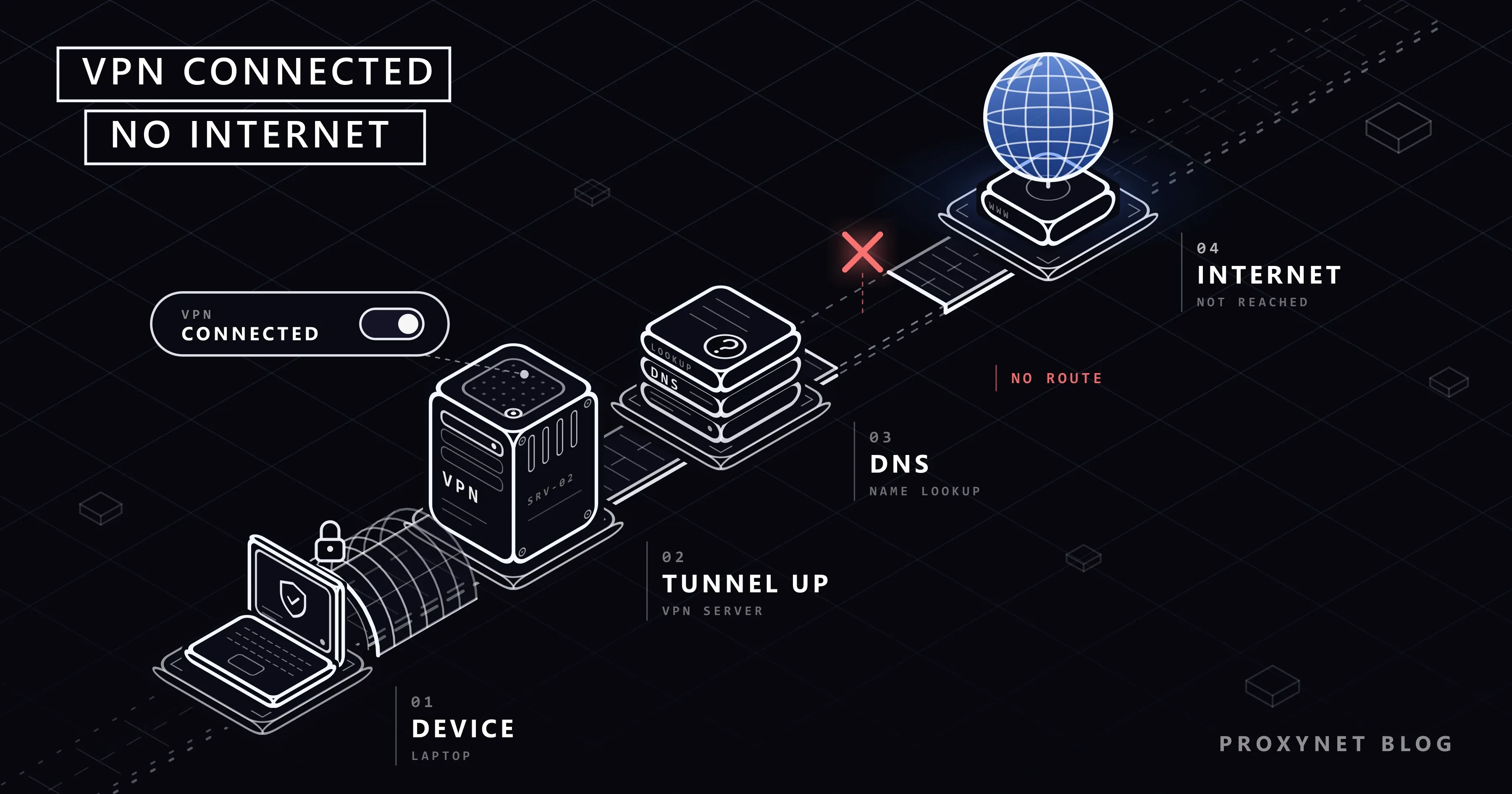
You press Connect in the VPN app and the button turns green. Windows shows "Connected" under the VPN's name and a blue shield on the network icon. Then nothing loads: the browser ends on an error page and a video call drops. Turn the VPN off and everything comes straight back.
This guide covers that case: the app says it is connected, yet pages do not load. If the app never reaches "Connected", read VPN Not Connecting? instead. Below are a two-minute test, the usual causes in the order worth checking, what to tell IT about a work VPN and one optional command.
What does "connected but no internet" mean?
A VPN app says "Connected" once it has built a tunnel: an encrypted connection between your device and the VPN server that all your traffic travels inside. The status describes that tunnel only. It does not test whether the server can reach the rest of the internet.
On Windows, Settings > Network & internet > VPN shows Connected under the VPN's name; phones show a VPN icon at the top of the screen. Meanwhile the browser may show "No internet" or "server IP address could not be found" (ERR_NAME_NOT_RESOLVED); these errors are explained in This Site Can't Be Reached.
What happens to your traffic when you press Connect?
- The app and the server recognise each other and agree on encryption keys. Some protocols set the tunnel up on your device first: WireGuard's protocol page says you "bring the device up, and everything else is handled for you automatically".
- The VPN takes over the default route, the road your device uses for every address it has no more specific road for. OpenVPN's reference manual describes its redirect option this way: the VPN replaces the default gateway until the tunnel closes.
- The VPN sets its own DNS servers. DNS turns names such as
example.cominto IP addresses. - Each packet is wrapped and sent to the server, usually over UDP, a way of sending data that does not wait for each piece to be confirmed. Wrapping makes every packet a little larger.
- The server sends the request on to the internet and passes the answer back.
"Connected" appears after step 2. Steps 3, 4 and 5 can still fail, and from your seat each failure looks the same: nothing loads.
Start with a two-minute test
- Turn the VPN off. If the internet still does not work, the VPN is not the cause; check your router.
- Connect to another server. If that works, the first server was overloaded or broken.
- Try another network, such as your phone's hotspot. If the VPN works there, the first network is the problem: an unfinished login page, or a network that does not carry VPN traffic.
- Quit the app completely and restart the device. Closing the window often leaves the app running.
Which cause fits what you see?
| What you see | Likely cause | First thing to try |
|---|---|---|
| "Server IP address could not be found" | The VPN's DNS does not answer | Reconnect or change server; undo DNS you set by hand |
| Nothing loads on hotel or café Wi-Fi | Login page not completed | VPN off, sign in, VPN on |
| No internet since the VPN dropped | The kill switch is blocking traffic | Reconnect, or disconnect in the app |
| Began after adding a second VPN or a proxy | Two tools fighting over traffic | Keep one; check proxy settings |
| "Your Internet access is blocked" | Firewall or antivirus | Pause it briefly, then add an exception |
| Pages start loading, then stall | Packets too large (MTU) | Another server or protocol |
| Works on mobile data, not on one Wi-Fi | Network drops the VPN's UDP traffic | The app's other protocol option |
| Work sites open, public sites do not | Work VPN routing | Tell IT |
Why do sites fail by name when the VPN is up?
Before opening a site, your device asks a DNS server for its IP address. With the VPN on, it asks the servers the VPN handed over when it connected. If those are down or unreachable through the tunnel, the tunnel stays up and every name fails.
- Reconnect, then try another server. A different server often comes with working DNS.
- Undo DNS you set by hand. A custom provider in the browser's secure DNS setting, on the phone or on the network adapter can clash with the VPN's servers. Set it back to automatic for one test; What Is DNS and How Do You Change Your DNS Server? shows where these settings live.
- Leave the app's DNS protection on. Turning it off can send lookups outside the tunnel, a DNS leak explained in WebRTC and DNS Leaks.
Why must the Wi-Fi login page come before the VPN?
Hotel, café and airport Wi-Fi often lets you out only after you accept terms on a login page, and until then it holds back everything else, including the VPN. Apple calls these captive networks; its help page says to open Settings > Wi-Fi, tap the network's name and wait for a login screen to appear.
A VPN that starts automatically reaches for its server before you have signed in. Turn the VPN off, complete the login page (on a computer, opening any website usually brings it up), then turn the VPN on. Some networks end the sign-in after a few hours.
Is the kill switch cutting you off?
A kill switch blocks all internet traffic when the tunnel drops, so that nothing leaves your device outside the VPN. Many VPN apps for computers have one, and Android has one built in: under Settings > Network & internet > VPN, the settings icon next to a VPN leads to Always-on VPN, and Google's help for managed devices describes Block connections without VPN, which cuts apps off whenever the VPN is not carrying their traffic. Google's Android VPN help adds that when an always-on VPN stops working, a notification stays until you reconnect.
So "no internet" after a drop is often the kill switch doing its job: reconnect, or disconnect properly inside the app. If the block stays after you quit, reopen the app and turn the kill switch off there. The last resort on Windows is Settings > Network & internet > Advanced network settings > Network reset; Microsoft's Wi-Fi troubleshooting page warns that you may need to reinstall VPN client software afterwards.
Can two VPNs, or a VPN and a proxy, clash?
Only one VPN can own the default route and DNS at a time, yet a second VPN app, a browser's built-in VPN or an ad blocker running as a VPN profile can each try to take over. Disconnect everything except the VPN you want, then reconnect it.
A leftover proxy is the other common clash. Windows has a system-wide setting under Settings > Network & internet > Proxy (Use a proxy server), and each VPN connection can carry its own: select the VPN under Settings > Network & internet > VPN, then Advanced options and Proxy settings for this VPN connection. A proxy you did not set is your lead; on a work VPN, ask IT first. Removing one is covered in Proxy Server Not Responding.
Is your antivirus or firewall blocking the VPN?
Apple's support article says third-party security software that monitors network connections can block some connections, including those needed to reach the internet. In Chrome, such a block can appear as "Your Internet access is blocked" and "Firewall or antivirus software may have blocked the connection." (ERR_NETWORK_ACCESS_DENIED).
Pause only the suite's firewall or web protection for a minute and reconnect. If pages load, turn protection back on and add the VPN app as an exception. On iPhone, Apple suggests swiping down in Settings to reveal the search field and searching for "VPN", "profile", "firewall" and "filter" (on a Mac, search System Settings); some ad blockers run as VPN profiles, listed under Settings > General > VPN & Device Management.
Why do pages load only halfway?
Every network has a largest packet it carries in one piece, the MTU. Wrapping makes a full-size packet slightly too big, and when a device on the route silently drops oversized packets, small pieces get through and large ones do not: a page's title appears, then it stalls. OpenVPN's manual says MTU problems "often manifest themselves as connections which hang during periods of active usage". Try another server or protocol, change an MTU setting only to a value the provider gives, and on a work VPN tell IT that pages "start loading, then stall".
IPv6, the newer and longer form of IP address, can give a similar picture: some VPNs carry only IPv4 and block IPv6 so it cannot slip around the tunnel. Browsers try both and use whichever answers; if one app hangs, ask the provider about the app's IPv6 setting.
What if the network does not carry the VPN's traffic?
WireGuard sends every packet over UDP ("All packets are sent over UDP", says its protocol page), and OpenVPN uses UDP by default; its manual says TCP support exists "for situations where UDP cannot be used". Some guest, hotel and office networks pass web traffic but drop other UDP traffic, and because WireGuard brings the tunnel up on your device first, the app can look switched on while nothing comes back.
If the VPN works on mobile data but fails on one network, and your provider's app offers another protocol option, try it there; TCP vs. UDP explains the difference. If an employer or school blocks VPNs on purpose, follow their policy. Some countries and networks restrict VPNs; this guide does not cover that, and the legal side is in Is Using a VPN or Proxy Legal?.
What should you tell IT about a work VPN?
FortiClient, GlobalProtect, Cisco Secure Client (formerly AnyConnect) and similar clients are set up by IT. In a full tunnel, all your traffic goes through the company network, so your internet works only while the company passes it on. In a split tunnel, only company traffic uses the VPN. Microsoft's article on the built-in Windows VPN shows the classic failure: Use default gateway on remote network sends all traffic to a remote network that does not pass it to the internet (Microsoft Learn).
Do not untick that box yourself; a full tunnel is often a security requirement. Tell IT instead whether the internet works with the VPN off, whether company sites open while public sites do not, which network you are on, the client's version, the exact error text and the time, plus the result of the command below if you ran it.
Advanced: what does route print show?
You can skip this section. On Windows, one command shows where the default route points:
route print 0.0.0.0Run it with the VPN off, then on. Under Active Routes, each line starting with 0.0.0.0 is a default route; the columns are destination, netmask, gateway, interface and metric. With the VPN off there is usually one line, your router. If a second line appears with a lower metric (the last number), the VPN carries all traffic, because the route with the lowest metric is chosen (Microsoft's route reference). A netmask of 128.0.0.0 means the same: some VPNs cover the internet with two half routes.
If the VPN's route wins and nothing loads, tell your provider or IT: "full tunnel, default route through the VPN, no internet".
When is a proxy the better tool?
A VPN changes the route of the whole device, so a VPN fault takes everything offline. If you only need to see how a website or an ad looks from another country in one browser or tool, a proxy changes the route for that app alone.
- One browser profile or tool: Residential Proxy let you choose the country and city.
- Programs with a proxy field: SOCKS5 Proxy carry TCP and UDP traffic.
Proxynet sells proxies, not a VPN. A proxy does not encrypt the whole device, so on untrusted Wi-Fi and for company systems a VPN remains the right tool. See Proxy vs VPN and Smart DNS vs VPN vs Proxy.
Where does this happen most often?
- On a work laptop at home, where a full tunnel depends on the company's internet exit: What Is a VPN and How Does It Work?
- On hotel and café Wi-Fi, because of login pages and filtered traffic: Is Public Wi-Fi Safe?
- When only one site fails, because that site refuses VPN addresses: VPN or Proxy Detected
- On networks with IPv6, the newer address kind: What Is an IP Address?
Common mistakes
- Leaving the antivirus or firewall off after a test.
- Installing a second VPN to test the first. They fight over the same traffic.
- Unticking "Use default gateway on remote network" on a work VPN. Company systems stop working.
- Turning off the app's DNS protection for good. Lookups leave the tunnel.
- Copying MTU values from forums instead of using the provider's figure.
Decision guide
| Situation | What to do |
|---|---|
| No internet with the VPN off either | Not a VPN problem; check the router |
| Another server works | Use it; report the broken one |
| Works on a hotspot, not on this Wi-Fi | Finish the login page, then try the other protocol option |
| Employer or school blocks VPNs | Follow the policy; ask the administrator |
| Work VPN, public sites dead | Send IT what you saw |
| Another country's IP in one app only | A proxy in that app |
Frequently asked questions
Why does Chrome say "A network change was detected" when I connect?
Chrome shows "Your connection was interrupted" and "A network change was detected." (ERR_NETWORK_CHANGED) because the VPN added a network adapter mid-load. Reload once. If it keeps returning, the VPN is reconnecting in a loop; try another server.
Why can't I reach my printer or router page with the VPN on?
Some VPNs send home-network traffic into the tunnel; OpenVPN even has an option that blocks the local network. Many apps have a setting that allows local network access; a work VPN may block it on purpose.
Why does the internet not come back after I turn the VPN off?
The kill switch may still be active or the app still running. Open the app, disconnect and quit, then check for a proxy you did not set.
Why does only one site fail when the VPN is on?
The VPN works; that site refuses known VPN addresses or asks for extra checks. Try another server.
Why does it happen only on Wi-Fi and not on mobile data?
That Wi-Fi may still need its login page, or it drops the VPN's UDP traffic. Sign in, then try the app's other protocol option.
Is it safe to browse with the VPN off while I fix this?
At home, usually yes: sites that start with https:// stay encrypted. On public Wi-Fi the network can see which sites you visit, so wait if you can.
Summary
A VPN that says "Connected" while nothing loads has built its tunnel, but traffic stops after it: at the VPN's DNS, a Wi-Fi login page, a network that drops UDP, a kill switch, security software, oversized packets or the server itself. Turn the VPN off, change server, then change network, and the cause usually shows within minutes; with a work VPN, describe what you saw to IT. If you only need another country's address in one browser or tool, a proxy changes just that app's route; see our proxy services.


