On corporate network diagrams, proxies and firewalls are often drawn side by side; both sit between the internal network and the internet, and both are filed under "security". So a common question is whether one can replace the other. The short answer is no: a firewall is a gatekeeper, a proxy is an intermediary. One decides who passes through the gate; the other goes through the gate and does the job for you.
In this article we define firewalls and proxies separately, show which network layer each works at, and explain the "proxy firewall" concept where the two overlap. Then we look at how traffic in a corporate network passes through both layers, the connection problems proxy users run into because of firewalls, and which one is needed for which requirement.
What is a firewall?
A firewall is a system that inspects traffic entering and leaving a network according to predefined rules. It can be a hardware appliance, software built into the operating system or a cloud service. Windows Defender Firewall, nftables on Linux and dedicated appliances in corporate networks do this job at different scales.
A firewall rule basically asks: where does the packet come from, where is it going, which protocol and port does it use, and is it part of an existing connection? Depending on the answer, the packet passes, is dropped or is rejected.
Firewall types differ in how deeply they look at traffic. NIST's SP 800-41 Rev. 1 guide classifies them like this:
- Packet filtering: evaluates each packet on its own, by source and destination address, protocol and port.
- Stateful inspection firewall: keeps a table of open connections. It accepts the response to a connection started from inside and rejects unsolicited packets from outside.
- Application firewall: looks inside the traffic; it can inspect the method of an HTTP request or the format of a DNS query.
- Application proxy gateway: splits the connection between client and server in two and forwards the traffic itself. This type is where firewalls and proxies overlap.
What is a proxy?
A proxy is an intermediary server that receives a client's request and forwards it to the target server on its own behalf. The target site sees the request as coming from the proxy's IP address. The client either configures the proxy itself or the network administrator transparently redirects traffic to it. We explain the basic mechanism in detail in What Is a Proxy Server and How Does It Work?.
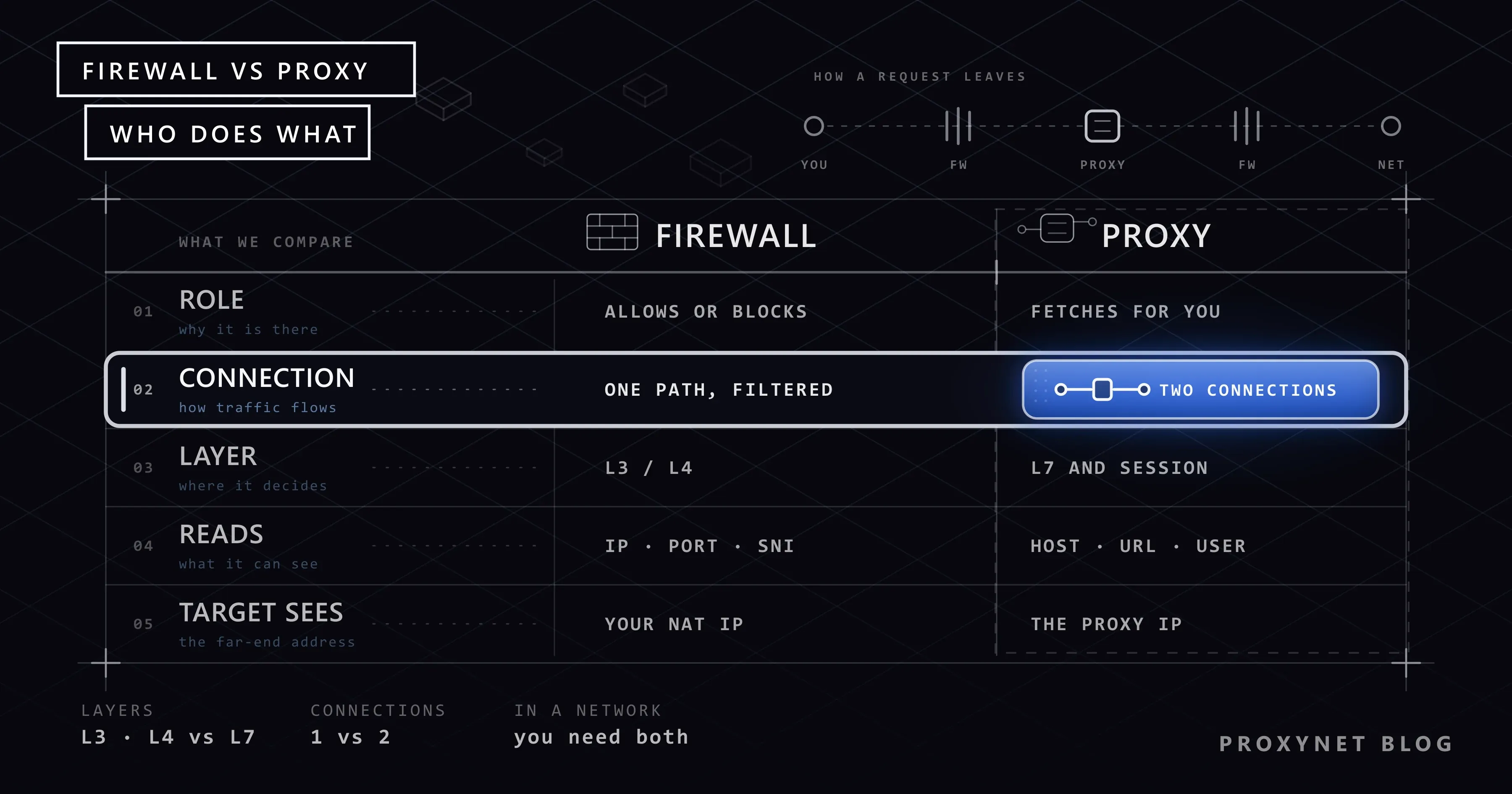
The most fundamental difference from a firewall is this: a firewall sits in the path of an existing connection and passes or stops packets. A proxy sets up two separate connections: one with the client and one with the target. A direct connection between the client and the target never exists.
Proxies come in two directions: a forward proxy that represents internal users on their way to the internet, and a reverse proxy that sits in front of a site and represents its servers. We compare them in Forward Proxy vs Reverse Proxy.
The key difference: filtering or intermediation?
The easiest way to tell the two layers apart is to look at what they do in a request's path.
When an employee wants to connect to example.com:
- With only a firewall: the employee's computer connects directly to the
example.comserver. The firewall checks whether the connection matches the rules and, if it does, passes the packets through unchanged. The target site sees the company's public IP address (after NAT). - With a proxy: the employee's computer connects to the proxy. The proxy receives the request, checks the access policy and, if allowed, opens its own connection to
example.com. The target site sees the proxy's IP address; the employee's computer never talks to the internet directly.
| Criterion | Firewall | Proxy |
|---|---|---|
| Main job | Allow or block traffic | Forward traffic on the client's behalf |
| Connection structure | One connection, filtered in the path | Sets up two separate connections |
| Layer it works at | Usually network and transport (L3/L4) | Application (L7) or session layer |
| What it looks at | IP address, port, protocol, connection state | Domain, URL, HTTP method, user |
| IP seen by the target | The company's public IP (NAT) | The proxy's IP |
| Traffic covered | All protocols | The protocols it supports (HTTP, SOCKS, etc.) |
| Per-user rules | Limited | Common (with authentication) |
| Caching | None | Possible for unencrypted HTTP |
| Log detail | Connection level | Request level (URL, user) |
| Client configuration | Not needed | Needed for an explicit proxy, not for a transparent one |
Which layer do they work at?
Network traffic is thought of in layers. The difference between a firewall and a proxy is clearest when you look at which layer each makes its decision in.
| Layer | Information carried | Component working there |
|---|---|---|
| L3 Network | IP addresses | Packet filtering firewall |
| L4 Transport | TCP/UDP ports, connection state | Stateful firewall, SOCKS5 proxy |
| L7 Application | Domain, URL, HTTP headers, user | HTTP proxy, application firewall, WAF |
The practical consequence of this table: a packet filtering firewall can say "allow traffic to port 443", but it cannot know whether that traffic goes to a news site or a file sharing service. An HTTP proxy sees which domain the request is for and can decide on that basis. A SOCKS5 proxy sits between the two: it knows the target address and port but does not look at the content. We explain this difference in SOCKS vs HTTP Proxy.
Next-generation firewalls (NGFW) blur this line: alongside packet filtering they offer upper-layer features such as application identification, per-user rules and intrusion detection. The basic architecture stays the same, though; they inspect traffic in the path without forwarding it. The technique that lets them recognise applications by looking past the packet headers is called deep packet inspection, explained in What Is Deep Packet Inspection (DPI) and How Does It Work?.
What is a proxy firewall (application-level gateway)?
A proxy firewall is a type of firewall that, instead of only filtering traffic, splits it in two like a proxy. English sources call it an "application-level gateway" or "application proxy gateway".
It works like this:
- A client on the internal network wants to connect to an outside server; the connection terminates at the proxy firewall.
- The proxy firewall reads the request at the application protocol level and evaluates it against policy.
- If the request is allowed, it opens a new connection to the target on its own behalf.
- It inspects the response from the target the same way and passes it to the client.
The security advantage of this setup is that no packet ever flows directly between the internal and external networks. A malformed request that breaks protocol rules never reaches the target. The downside is that it needs separate proxy logic for each protocol and uses more resources because it splits connections in two.
The idea that such gateways should not break the expected behaviour of protocols is also discussed in the Internet Architecture Board's RFC 2979: a firewall should not change the normal behaviour of applications in the traffic it allows.
A web application firewall (WAF) is the server-side counterpart of this idea. It runs as a reverse proxy in front of a site and inspects incoming HTTP requests against rules such as SQL injection, malformed headers or rate limits; how those rules decide is covered in What Is a WAF (Web Application Firewall)? How It Works.
How does HTTPS traffic look at these layers?
Because most web traffic is encrypted, how deeply a firewall and a proxy can look at it is limited.
- A firewall can see the target IP address, the port and the server name (SNI) in the TLS handshake of an HTTPS connection. It cannot see the content.
- An explicitly configured forward proxy sees the domain from the
CONNECT example.com:443request and then carries encrypted bytes. It cannot see the rest of the URL or the content. - A corporate proxy doing TLS inspection terminates the connection with its own certificate, decrypts and inspects the content, and re-encrypts it towards the target. For this to work, the company's own certificate authority must be installed on employee computers.
TLS inspection is used for malware scanning and data loss prevention, but because it makes employees' encrypted traffic readable, it needs a clear policy and notice. Excluding sensitive categories such as banking and health from inspection is common practice. Developers use the same technique on their own devices to inspect their own traffic.
How are they used together in a corporate network?
In a typical corporate network, an employee's request to a website passes through these layers:
- Employee computer: the browser reads the operating system's proxy setting or the network's automatic configuration file. Where these settings are read from on Windows is explained in Windows and Chrome Proxy Settings.
- Internal firewall: allows clients to go out only to the proxy server; blocks connections going directly to the internet.
- Forward proxy: authenticates the user, applies the domain policy, logs the request and performs TLS inspection if required.
- External firewall: allows only the proxy server to reach the internet; rejects unsolicited incoming connections.
- Internet: the target site sees the request as coming from the proxy's exit IP address.
In this setup the two layers complement each other. The firewall prevents the proxy from being bypassed: even if an employee turns off the proxy setting in the browser, they cannot reach the internet directly. The proxy adds the detail the firewall cannot see: which user reached which domain and when.
On the server side the order is reversed: internet → external firewall → WAF or reverse proxy → internal firewall → application server. Corporate data protection scenarios are on our data security solution page.
Can a firewall block a proxy connection?
Yes, and part of the connection problems proxy users run into come from here. Symptoms and likely causes:
- Connections to the proxy port time out. The firewall on a corporate or school network may only allow outbound traffic to ports 80 and 443. If your proxy runs on another port such as 8000, the connection is never established. Ask your provider whether an alternative port is available, or talk to your network administrator.
- The connection opens but drops immediately. An application firewall may recognise the proxy protocol and terminate it by policy.
- Only one application cannot connect on Windows. An outbound rule in the local firewall may be blocking that application's network access. Trying the same proxy with cURL shows whether the problem is in the application or the network.
- SOCKS5 works but UDP traffic doesn't pass. The firewall may be restricting outbound UDP; applications such as games and voice calls are affected.
To quickly check whether the proxy port is reachable from your network:
# Linux / macOS
nc -vz pr.proxynet.io 8000

# Windows PowerShell
Test-NetConnection pr.proxynet.io -Port 8000
If the connection succeeds, the problem is not the firewall but authentication or configuration. In that case you can move on to the 407 diagnosis steps in Proxy Authentication. The "Checking the proxy and the firewall" suggestion on Chrome's error screen asks you to look at exactly these two layers; we explain what it means in This Site Can't Be Reached: What It Means and Why It Happens.
The difference between a proxy, a VPN and a firewall
Because the three concepts get mixed up, here they are side by side:
- A firewall does not forward traffic; it passes or stops it according to rules.
- A proxy forwards the traffic of specific applications with its own IP address; it does not encrypt anything by itself.
- A VPN carries all device traffic through an encrypted tunnel to another server and sends it out from there.
All three can exist on one user's device at the same time: the local firewall is on, a VPN encrypts all traffic, and the browser also uses a proxy for specific jobs. The detailed difference between a proxy and a VPN is in Proxy vs VPN.
Which one does a corporate network need?
Every network needs a firewall; connecting a network to the internet without one is not accepted practice. A proxy is added when specific needs come up.
Decision guide
| Your need | Recommendation |
|---|---|
| Block unsolicited incoming connections | Firewall |
| Close specific ports or protocols | Firewall |
| Log per user which sites employees visit | Forward proxy |
| Apply a domain-based access policy | Forward proxy or application firewall |
| Prevent users from bypassing the proxy setting | Firewall + forward proxy |
| Protect a web application from attacks | WAF (reverse proxy) |
| Send requests from a different IP address and location | Forward proxy service |
| Encrypt all device traffic | VPN |
Frequently asked questions
Can a proxy replace a firewall?
No. A proxy only sees traffic that is sent to it and uses a protocol it supports. Other protocols and incoming connections are outside its scope. Protecting the whole network requires a firewall.
Does a firewall hide my IP address?
No. Corporate firewalls usually perform NAT, and computers on the internal network go out with the company's public IP address; but that address belongs to the company and ties you to its network. Appearing from a different IP and location is a proxy's job.
What is a transparent proxy?
It is a setup where network devices automatically redirect traffic to a proxy without any configuration on the client. The user may not know the proxy exists. It is common on school and hotel networks.
Is a WAF the same as a firewall?
No. A network firewall works at the level of IP addresses, ports and connections. A WAF focuses only on web traffic, sits in front of a site as a reverse proxy and inspects the content of HTTP requests.
Do I need both a proxy and a firewall for personal use?
Your operating system's built-in firewall is already on and should stay on. A proxy depends on your needs: it is added for jobs such as viewing content from another location, collecting data or keeping accounts separate. Neither does the other's job.
Which proxy protocol gets through firewalls more easily?
The deciding factor is the port, not the protocol. Restricted networks often only allow outbound traffic to ports 80 and 443. When using an HTTPS Proxy for web traffic or a SOCKS5 Proxy for application traffic, first check that your network allows outbound connections to the proxy port.
Summary
A firewall passes or stops traffic according to rules; a proxy forwards traffic on the client's behalf, with its own connection and its own IP address. A firewall mostly decides at the network and transport layers, a proxy at the application layer. Proxy firewalls and WAFs combine the two ideas. In corporate networks the firewall prevents the proxy from being bypassed, and the proxy adds the user and domain detail the firewall cannot see. To send your requests from different IP addresses and locations, take a look at our proxy services.