Picture an agency: it logs in to the ad and store dashboards of ten clients every day, and it also collects prices from twenty countries for those same clients. Both jobs need an IP that "looks like home internet", yet their needs pull in opposite directions. The dashboard side wants to arrive from the same address every day, while the price collection side wants to spread thousands of requests over many addresses. This is exactly where the difference between an ISP proxy and a residential proxy shows up: in both cases the target site sees an IP that belongs to an internet service provider, but where that IP sits, how long it stays with you, and what you are billed for are different.
In this post we build the comparison on four concrete axes: who the IP is registered to (the ASN record), where the IP physically sits, what you pay for, and how long the same identity stays with you. We explain in detail what an ASN is and how sites label an address as "ISP" or "hosting"; then we move on to the setup difference, the downsides of both types, and which one to pick for which job.
What is the core difference between an ISP proxy and a residential proxy?
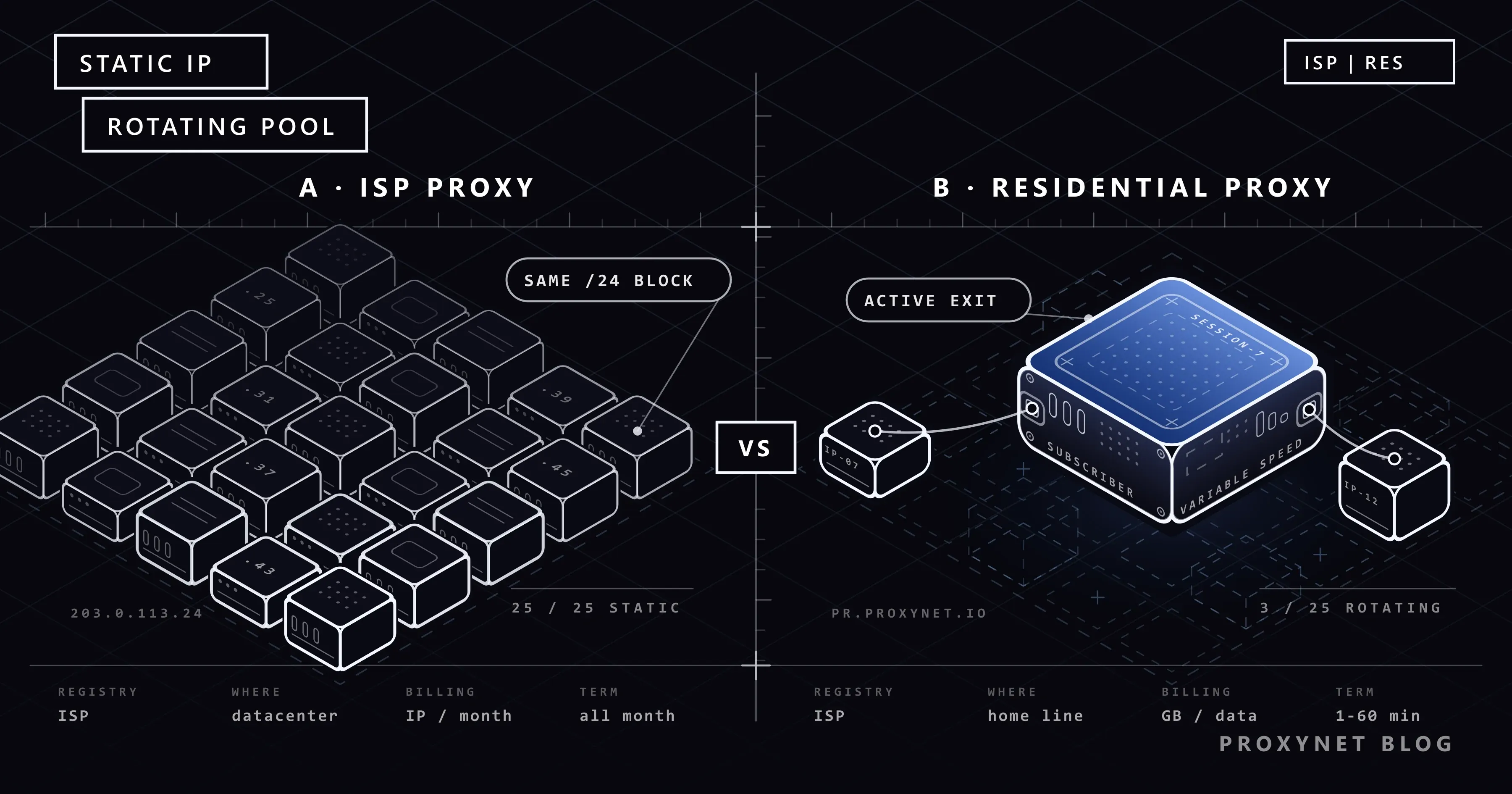
ISP Proxy also goes by the name "static residential proxy"; the two names describe the same product. The address block is registered to an internet service provider (ISP), but the machine carrying the traffic is a server in a data center, not a modem in someone's home. You are assigned a set number of IPs, and those addresses stay yours alone for the rental period. The full definition lives on the product page; here we focus on the comparison.
Residential Proxy, on the other hand, gives you access to a pool of real home and office connections through a single gateway. You do not choose which IP you exit from; you choose the country, the city, and the session length, and the gateway assigns an address that matches.
What the two products share is that an IP lookup by the target site returns an access provider rather than a hosting company. To understand that shared ground, you first need to look at the ASN.
What is an ASN, and how does it show who an IP belongs to?
The internet is not a single network; it is tens of thousands of independent networks connected to each other, each setting its own routing rules. Each of these networks is called an autonomous system (AS). RFC 1930 defines an autonomous system as a connected group of IP prefixes run by one or more network operators with a single, clearly defined routing policy. An access provider, a cloud company, or a university can each run its own autonomous system.
An ASN (Autonomous System Number) is the number of that network and is written with the AS prefix. The numbers were originally 16 bits long; as they neared exhaustion, RFC 6793 extended them to 32 bits. Distribution is hierarchical: IANA hands blocks of numbers to the five regional internet registries, and the registries hand them out to organizations. The region that includes Türkiye is served by the RIPE NCC. As the RIPE NCC's AS numbers page explains, any organization can obtain an ASN, either as a member or through a sponsoring member.
The link between an ASN and an IP works like this. Every autonomous system announces the IP blocks it owns or has the right to use to neighboring networks over BGP: "send traffic for this address range to me." These announcements are visible in public routing tables. So anyone can look up which block an address is in and which autonomous system announces that block. When you enter an IP into an open tool such as RIPEstat, you see the block, the announcing ASN, and the registered holder of that ASN.
Here is what matters for proxies: the holder of an ASN is an organization name, not a "type". The record has no field that says "this network is home internet". Whether an address counts as "ISP" or "hosting" is decided not by the registries but by third-party databases that interpret the record. This is where the two proxy types start to share the same fate.
How do sites classify an IP as "ISP" or "hosting"?
When you connect to a site, the other side does not read ASN records one by one. It leaves that to ready-made IP intelligence databases. The flow looks roughly like this:
- The request arrives. The site's security layer takes the source IP address of the connection.
- The database is queried. The IP is looked up in a database that is kept locally or reached over an API; the answer comes back in a few milliseconds.
- The label is read. The answer contains the ASN, the organization name, and a type label. IPinfo, for example, states in its ASN documentation that it assigns every ASN one of the types
isp,hosting,business,education, orgovernment. MaxMind, in turn, defines address-level user types such as "residential", "hosting", "cellular", and "business". - The rule is applied. The site acts on that label: it may show extra verification on the login page to traffic labeled
hosting, and treat traffic labeledisplike an ordinary visitor.
The detail that gets overlooked here is how the label is produced. MaxMind writes that it derives its user type data not only from registration information but also from traffic and usage patterns. So the classification has two inputs: who the address is registered to, and how that address behaves.
These two inputs explain the position of each proxy type. With a residential proxy, both point to a home user: the block belongs to an access provider, and there is a real subscriber line behind the address. With an ISP proxy, the first input is the same, since the block is registered to an ISP. The second input differs: the address sits on a server, is online around the clock, and produces far more regular traffic than a home line. That is why the same block can show up as isp in one database and as hosting in another, and the label can change over time. We covered how the "VPN or proxy detected" warning relates to these labels in our post on that warning, and the risk score layered on top of the label in our post on IP fraud scores. How the data center side looks in the same lookup is covered in Residential vs. Datacenter Proxy: The Difference.
Where does the IP sit: on a home device or in a data center?
With a residential proxy, your request leaves the gateway, goes to a real subscriber line, and from there to the target site. Because a home connection sits in between, speed depends on that line's capacity and its load at that moment. The device can switch off, or the modem can restart and pick up another address; the gateway replaces an exit node that went offline with another one. Why addresses change so often on home lines is covered in our post on static and dynamic IPs, and how the same public IP is shared among many subscribers in What Is CGNAT? How to Check and Get Out of It.
With an ISP proxy there is no home in between. The address is registered to an ISP but assigned to a server in a data center; the connection goes straight out to the backbone. Latency is low and stable. The price is the "behavior" input described above: an address that is always on and has high capacity does not behave like a home line.
For the different logic of cellular carrier IPs, see Residential vs Mobile Proxies: Comparison Guide.
ISP and residential compared on four axes
| Criterion | ISP proxy (static residential) | Residential proxy |
|---|---|---|
| Who the IP is registered to | Internet service provider | Internet service provider |
| Where the IP sits | Server in a data center | Real subscriber line |
| Identity lifetime | Fixed for the rental period, same IP on renewal | Changes per request, or stays for the sticky session |
| Billing | Monthly per IP, unlimited traffic | Per GB, deducted from your balance |
| Speed and latency | High and stable | Varies with the line |
| Location choice | Limited country list | Country, city, and ASN targeting |
| Authentication | Username-password or IP allowlist | Mostly username-password, parameters in the username |
| Typical job | Dashboard logins, long sessions, APIs that require an allowlist | Multi-country data collection, checking location-based content |
Why is billing different: per IP or per GB?
The unit of measurement follows where the cost arises. With an ISP proxy, the provider's expense is the address block and the server; traffic goes over the backbone and its unit cost is low. That is why payment is monthly per IP, with no quota. At Proxynet, the monthly price of a dedicated ISP IP starts at $1.80 and drops to $1 as your balance grows.
With a residential proxy, there is a real line behind every request, and cost arises as the resource is used. Payment is therefore based on data transferred: you top up a balance, the GB you use is deducted from it, and there is no limit on concurrent connections. The residential price per GB ranges between $3.30 and $1.50. Current tiers are on the ISP and residential pricing pages.
You find out which one comes out cheaper by measuring your own job:
- Residential cost = monthly request count × average response size × price per GB.
- ISP cost = number of IPs needed × monthly price per IP.
A job that fetches light HTML pages and has to spread its requests over many addresses comes out cheap on residential. A job that opens image-heavy pages and stays in a session for hours every day spins the GB counter fast; the same job drops to a flat monthly fee with a few ISP IPs. For jobs with very high traffic you can also look at the high-bandwidth proxy page.
Identity lifetime: a fixed monthly IP or a sticky session?
The fourth axis settles most decisions on its own: for how long should the other side see you on the same address?
With an ISP proxy the answer is "all month". The address does not change during the rental period; when you extend it from the dashboard before it expires, you continue with the same IP. This is the Static Proxy logic with a residential appearance.
A residential proxy has two modes. In rotating mode, every request leaves the pool with a different address. In sticky mode, the same address stays with you for the session length you choose in the dashboard; that length runs from 1 to 60 minutes, not months. Details are on the Sticky Proxy page. A sticky session is enough to finish a checkout flow or a multi-step form; it does not guarantee getting the same address back the next day, because that home line may be offline at the time. We cover how the rotation modes work separately in our post on IP rotation.
A practical rule: if your job is measured in "sessions", residential sticky is enough; if it is measured in "account lifetime", you need ISP.
How do you use an ISP proxy, and how does setup differ from residential?
With an ISP proxy you receive a list. Each line is a separate IP; you decide which account uses which line. You can switch the protocol (HTTP, HTTPS, or SOCKS5) from the dashboard. There are two ways to authenticate: username-password, or adding your own server's IP to the allowlist. We compared the pros and cons of the two methods in Proxy Authentication: User:Pass vs IP Whitelist.
With a residential proxy there is a single gateway address, and the whole pool sits behind it. You make the country, city, ASN, and session length choices in the Endpoint Generator in the dashboard; the tool encodes these choices into the username and produces a connection line that is ready to copy. No matter how many countries you pick, every line connects to the same address and port. We put the format for entering this line in a browser, on a phone and in code into a table in How to Use Residential Proxies: From Panel to First Request.
In terms of format, the difference looks like this:
ISP proxy          203.0.113.24:port:user:pass      each line is a separate, fixed IP
                   203.0.113.87:port:user:pass
Residential proxy  pr.proxynet.io:8000:user:pass    one address, the pool behind it
In a browser or in your own script, both are defined with the same four fields: address, port, username, password. The difference is that with ISP you enter a separate line from the list for each profile, while with residential you multiply the same address with different username parameters. We showed how to set a proxy per profile in What Is an Antidetect Browser and How Does It Work?.
What are the weak points of an ISP proxy?
An ISP proxy bought for the wrong job is wasted money; knowing the downsides makes the choice easier.
- Neighbor risk. ISP addresses come from consecutive blocks; neighboring addresses in the same /24 subnet (a block of 256 addresses) may be with other customers. If a site restricts the whole block instead of a single IP, you also pay for your neighbor's behavior. The logic of block-level blocking is in our post on IP blacklists.
- Limited locations. Address block agreements with ISPs cannot be made in every country. The country list of an ISP proxy is short compared with a residential pool, and city-level choice is usually not available.
- Reclassification. Because databases also look at behavior, a block that shows up as
isptoday may be labeled as hosting by some services after a while. Check the label when you buy and while you use the IP. - No rotation. If you bought five IPs, you have five identities; if you pile thousands of requests onto those five addresses, you will hit the target site's rate limit quickly.
What are the weak points of a residential proxy?
- No continuity guarantee. The exit node is a home line; it can drop in the middle of a session. You need to fit long operations within the sticky session length.
- Variable speed. Two consecutive requests can come back in very different times; it does not suit latency-sensitive jobs.
- Traffic cost can be hard to predict. Heavy pages and autoplaying videos inflate the GB counter; in browser automation, turning off image and media loading is the first saving step.
- It does not suit services that require an IP allowlist. If the other side says "tell us your fixed IP", you cannot meet that condition with a rotating pool.
Which one is used for which job?
Jobs that suit an ISP proxy:
- Agencies managing client accounts. Logging in to each client's ad or store account from a fixed address reserved for that account reduces extra verification prompts. This applies only to accounts you are authorized to manage; details are on the social media proxy page.
- Marketplace seller dashboards. Connecting to the seller dashboard from the same IP every day leaves a consistent login history even if the team works from different cities: e-commerce proxy.
- APIs and services that require an IP allowlist. If your office internet is dynamic, the ISP proxy provides the fixed exit address. We explained the limits of this scenario in our post on static IPs for API access.
Jobs that suit a residential proxy:
- Multi-country, high-volume data collection. Spreading requests over a large pool lowers the load on any single address: data scraping.
- Seeing content that changes by location. If the price of the same product or the result of the same search changes by city, you need city targeting: price monitoring and SEO proxy.
- Ad verification. Checking that the ad really appears in the region and carrier breakdown the campaign targets: ad verification.
For unprotected targets and for testing your own systems, both are more than you need; a Datacenter Proxy is enough there.
Common mistakes when choosing
- Buying rotating residential for account work. An account that appears from a different city on every login looks like a stolen account to the platform's security system. Account work needs a fixed address.
- Going into bulk data work with a handful of ISP IPs. A fixed address is no substitute for rotation; the rate limit is counted per IP.
- Budgeting for residential without measuring traffic. Run a small trial first and measure the average response size, then fill in the formula.
- Treating IP type as the answer to every problem. Request rate, browser fingerprint, and cookie behavior are evaluated too. Respecting robots.txt and the site's rate limit comes before the choice of IP.
For a general buying checklist, see our proxy buying guide.
Decision guide
| Your need | Recommendation |
|---|---|
| Logging in to the same account from the same IP for months | ISP |
| The other side asks you to report a fixed IP (allowlist) | ISP |
| A high-traffic session that stays open for hours a day | ISP |
| Collecting prices or search results from twenty countries | Residential (rotating) |
| City or carrier-level location | Residential |
| A short multi-step flow such as a cart or a form | Residential (sticky) |
| Both dashboard logins and data collection | Both together: dashboards on ISP, collection on residential |
| Unprotected target, testing your own servers | Datacenter |
The answer for the agency in the introduction is the "both together" row of the table. Because the balance is shared across all products, using the two types from the same account requires no extra setup.
Frequently asked questions
Is a static residential proxy the same thing as an ISP proxy?
Yes. The names "static residential", "ISP proxy", and "static ISP residential" describe the same product: an IP registered to an internet service provider, hosted in a data center, and unchanged for the rental period.
Does an ISP proxy really exit from a home?
No. The address block is registered to an ISP, which is why lookups show an access provider, but the traffic is carried by a server in a data center, not by a device in a home.
Can I keep the same IP for a month with a residential proxy?
You cannot. A sticky session holds the address for the length you choose in the dashboard, and that goes up to 60 minutes, not months. If you need the same address for a month, the right product is an ISP proxy.
Is traffic really unlimited on an ISP proxy?
Proxynet's ISP proxies have no quota and no extra charge per GB; you pay by the number of IPs and the duration. Unlimited traffic does not remove the target site's rate limit: if you send requests too often from a single IP, the site returns 429.
How do I find out the ASN and type of an IP?
When you enter the IP into an open tool such as RIPEstat, you see the ASN announcing the block and the registered organization. The type label (ISP, hosting, mobile) is not part of the record; IP intelligence services produce it, and it can differ from one service to another. We explained why location data can be inconsistent in Why Is My IP Location Wrong? What an IP Address Reveals.
Does it make sense to use both in the same project?
For most teams this is the sensible setup. Jobs that carry identity (dashboard logins, services that require an allowlist) go to a few fixed ISP IPs, and jobs that carry volume (crawling, location checks) go to the residential pool.
In short
An ISP proxy and a residential proxy enter through the same door: in both, the target site sees an internet service provider in the ASN lookup. Where they part ways is where the address sits and how long it stays with you. An ISP proxy is an address hosted in a data center, unchanged all month, paid per IP, with unlimited traffic; it suits jobs measured in account lifetime. A residential proxy is a rotating pool of real home lines, paid per GB, with selectable country and city; it suits jobs measured in volume and location. To see the two products and the other types side by side, visit our proxy products page.