


































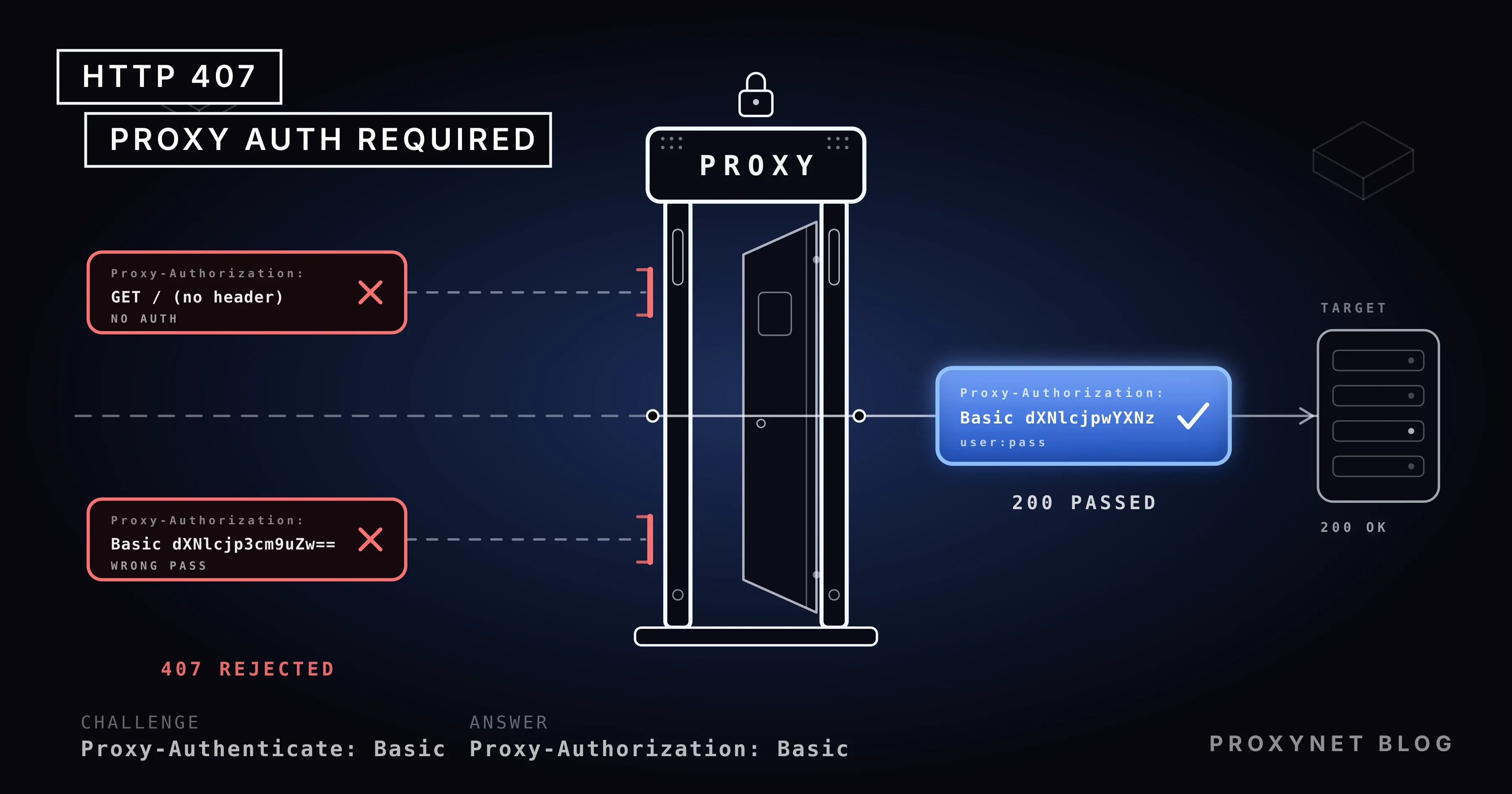
You paste a freshly bought proxy into cURL and the answer is 407 Proxy Authentication Required. The same three digits show up in Python as Tunnel connection failed: 407, in Git as The requested URL returned error: 407, and in Chrome as a username prompt that keeps coming back. They all have one source: your request never reached the website. The proxy in between stopped it at the gate.
This post explains what 407 means in the HTTP standard, how it differs from 401, and what is missing at the gate. Then it goes through the places the error appears: wrong or missing credentials on a purchased proxy, a home IP that changed under IP authorization, a special character in the password, Chrome refusing the user:pass@ form, NTLM and Kerberos proxies on corporate networks, and where the credentials go in cURL, Python, Node.js, npm, pip, Git and Docker. We ran every code sample on 7 October 2026 against a local test proxy that demands a username and password.
What does HTTP 407 Proxy Authentication Required mean?
A 407 is the proxy saying "prove who you are before I forward this". The HTTP standard, RFC 9110, defines the code in section 15.5.8: 407 is similar to 401, but it indicates that the client needs to authenticate itself in order to use a proxy for this request. The proxy must send a Proxy-Authenticate header field containing a challenge applicable to that proxy, and the client may repeat the request with a new or replaced Proxy-Authorization header field.
In practice the exchange runs between those two headers. The proxy names the scheme with Proxy-Authenticate: Basic realm="x"; in Basic, by far the most common scheme, the client joins username and password as user:pass, encodes the string with Base64 and adds Proxy-Authorization: Basic dXNlcjpwYXNz. Base64 is not encryption; anyone who decodes dXNlcjpwYXNz reads user:pass, so the credentials rely on a trusted network or TLS on the way to the proxy.
One detail of the standard helps while debugging: Proxy-Authorization is consumed by the first proxy that receives it and is not forwarded to the website. The proxy sees your password; the site does not. When several proxies sit in a chain on a corporate network, each demands its own credentials, and the realm value in Proxy-Authenticate tells you which one sent the 407.
What is the difference between 407 and 401?
The two codes run the same mechanism on two different parties. 401 Unauthorized is the website asking for credentials: the response carries WWW-Authenticate, the client answers with Authorization, and the problem is between you and the site. In a 407 the same dialogue happens with the proxy, using Proxy-Authenticate and Proxy-Authorization, and the website has not seen the request at all.
That distinction decides where you look. After a 401 you check your account, API key or token on the site. After a 407 nothing on the site matters; the username, password or IP list in the proxy panel, or the account your network administrator gave you, is where the problem lives. You can also get both in a row: first the proxy is passed with a 407, then the site returns 401.
How does a 407 happen, step by step?
To watch the flow we wrote a 40-line test proxy in Node.js. It answers every request whose Proxy-Authorization header does not match user:pass with a 407 and Proxy-Authenticate: Basic realm="x", forwards matching requests, applies the same rule to the CONNECT tunnel used for HTTPS, and logs every request. For an HTTPS page the log read like this:
- The client sends
CONNECT site.com:443to the proxy, asking for a tunnel to the site. For anhttp://address it sends the request itself (GET http://site.com/ …). - If the request has no
Proxy-Authorization, the proxy returns407 Proxy Authentication RequiredwithProxy-Authenticate: Basic realm="x"and opens nothing. The log line readsCONNECT site.com:443 Proxy-Authorization: (none). - The client adds the header and repeats the request:
Proxy-Authorization: Basic dXNlcjpwYXNz. Many tools do this on the first attempt; cURL with-Unever waits for the 407. - The proxy checks the value. If it is right, it opens the tunnel and returns
200 Connection Established; from here the TLS traffic flows through the tunnel. If it is wrong, it repeats step 2; a wrong password and a missing password are the same 407 to a proxy. - The website sees the request only now and gives its own answer (200, 404, 401…). The headers it received did not include
Proxy-Authorization; the proxy consumed it.
With cURL the first step of this flow is visible in one command. For a plain HTTP address, an unauthenticated request got this answer:
curl -i -x http://pr.proxynet.io:8000 http://example.com/HTTP/1.1 407 Proxy Authentication Required
Proxy-Authenticate: Basic realm="x"
Connection: closeFor an HTTPS address cURL reports its own error instead: curl: (56) CONNECT tunnel failed, response 407. Both are the same missing header.
Why does the 407 error happen?
The causes fall into two groups: the credentials of a proxy you bought, and the credentials of the proxy your network runs. The error text is identical in both; the place to fix it is not.
| Cause | Symptom | Fix |
|---|---|---|
| Credentials never sent | No Proxy-Authorization line, 407 on the first request | Use the tool's proxy credential option (-U, proxies=, token) |
| Wrong username or password | Header present, still 407 | Copy from the panel; check spaces and case |
@, : or # in the password | URL "bad hostname" or 407 | Encode as %40, %3A, %23 in the URL, or use a separate option |
| IP authorization, home IP changed | Yesterday's setup fails today | Add the new IP in the panel or switch to username and password |
Chrome ignores user:pass@ in the address | ERR_NO_SUPPORTED_PROXIES or a login prompt | page.authenticate() in Puppeteer, the prompt in the browser |
| Corporate proxy wants NTLM or Kerberos | Proxy-Authenticate: Negotiate or NTLM | Domain account with --proxy-negotiate; NTLM is off in cURL builds since 8.20 |
| A chain of proxies | The prompt keeps reappearing | Each proxy wants its own credentials; ask the network team |
How do you fix a 407 on a purchased proxy?
Most 407s come from a small gap between what you copied from the panel and the format the tool expects. First check whether the credentials are sent at all: if curl -v shows no > Proxy-Authorization: line, the problem is the format. If the line is there and the answer is still 407, the value is wrong or the account has a problem; in our test the proxy answered a wrong password exactly as it answered no password.
Special characters. A proxy address is a URL of the form http://user:pass@host:port, and in a URL the @ sign separates the user info from the host. If your password is p@ss, the address contains two @ signs; cURL 8.5 refused it with curl: (5) Unsupported proxy syntax … Bad hostname. With %40 in place of the @ (http://user:p%40ss@host:port), the proxy decoded user:p@ss and the request went through. Use %3A for :, %23 for # and %2F for /. Python Requests accepted the unencoded address too, because it split the URL at the last @, but encoding works the same in every tool. Options that take the credentials outside the URL (curl -U "user:p@ss", HTTPProxyAuth("user", "p@ss") in Requests) need no encoding; both passed with the raw password.
IP authorization. If you registered your IP address in the panel instead of a password, the proxy looks at the address the connection comes from. On a home connection the public IP changes when the modem restarts or the provider rotates its address pool, and yesterday's working setup returns 407 today. Compare your current IP with the address saved in the panel. If your address changes often, username and password is the less surprising method; our proxy authentication guide compares the two.
Session parameters. Parameters appended to the username for sticky sessions or country selection, such as user-session-abc-country-tr, are part of the username; a typo or an unsupported parameter comes back as a 407 from some providers. Try a plain user:pass first and add the parameters back one by one. On a Residential Proxy plan they set the session length and the exit country, so separating a parameter error from a password error saves time.
How do you fix a 407 on a corporate proxy?
On a company or university network you did not set up the proxy; the operating system takes it from an automatic configuration file (PAC) or group policy, and the credentials are usually your domain account. These proxies often ask for Proxy-Authenticate: Negotiate (Kerberos) or NTLM instead of Basic. Browsers and Office use the Windows account you are logged into and pass silently; command-line tools and scripts do not, and return 407.
cURL lets you pick the scheme: --proxy-negotiate -U : uses the session's identity for Kerberos, and --proxy-anyauth picks a suitable method from what the proxy offers. In our test, with --proxy-anyauth cURL first sent an unauthenticated request, read the 407 and its Proxy-Authenticate: Basic, then repeated with Basic; one extra round trip, but useful when you do not know what the proxy expects. NTLM is a separate matter. Since version 8.20.0 (29 April 2026) the curl project disables NTLM by default in the build and plans to remove it entirely, citing the scheme's weak cryptography, its incompatibility with HTTP/2 and HTTP/3, and Microsoft's own deprecation of NTLM. With cURL 8.20 or later, --proxy-ntlm no longer works in most distributions; if the proxy accepts only NTLM, ask the network team to enable Negotiate. Our cURL 8.5 still sent NTLM's first message with --proxy-ntlm; our Basic-only test proxy answered 407 again.
The prompt that keeps reopening on Windows. Windows proxy settings store only the address, not a username and password; each application asks for credentials itself when it receives a 407. If the prompt closes and reopens at once, the credentials were rejected: after a recent password change, Windows Credential Manager keeps trying the stored old password until you delete it. An old Microsoft support note describes another cause: when several proxies that require NTLM sit in a chain, the first is passed, the second returns 407 and the prompt reappears; the suggested fix is enabling Negotiate with Kerberos, which is the network team's job.
Why do Chrome and Puppeteer show 407 differently?
Chrome does not use a username and password written into the proxy address. Chromium's proxy documentation says so plainly: the browser does not implement credentials embedded in proxy settings, and proxy authentication goes through the ordinary flow, that is, the prompt that follows a 407. HTTP proxies support Basic, Digest, Negotiate and NTLM; SOCKS5 supports no authentication at all. Writing user:pass@ into --proxy-server therefore does nothing. In the test for our Puppeteer post on 6 October, Chrome 154 rejected the whole value with net::ERR_NO_SUPPORTED_PROXIES; with the credentials given nowhere, the first navigation failed with net::ERR_INVALID_AUTH_CREDENTIALS. The 407 never reaches the user in this version; Chrome turns it into its own error code.
The fix is to put the credentials where the browser's answer to the 407 is built. In Puppeteer that is page.authenticate(), and it has to come before the first page.goto():
import puppeteer from "puppeteer";

const browser = await puppeteer.launch({
  args: ["--proxy-server=http://pr.proxynet.io:8000"], // no credentials in the address
});
const page = await browser.newPage();
await page.authenticate({ username: "user", password: "pass" }); // the answer to the 407
await page.goto("https://httpbin.org/ip");
According to Puppeteer's documentation the call turns on request interception behind the scenes and is switched off by passing null. The credentials belong to the browser context, not the page; every page in the same context uses the first value entered. In a Chrome you drive by hand, you type them into the prompt that opens after the 407.
How do you pass proxy credentials in each tool?
Every tool takes the credentials in a different place. All examples ran through the local test proxy; the address is shown as pr.proxynet.io:8000 and the credentials as user:pass.
cURL. The credentials go into the address or into a separate option; -U and --proxy-user are the same thing. cURL uses Basic by default and sends the credentials on the first request.
# credentials in a separate option: no encoding needed for special characters
curl -x http://pr.proxynet.io:8000 -U user:pass https://httpbin.org/ip

# credentials in the address: %40 for @, %3A for :
curl -x http://user:p%40ss@pr.proxynet.io:8000 https://httpbin.org/ip

# see which scheme the proxy expects
curl -v -x http://pr.proxynet.io:8000 https://httpbin.org/ip 2>&1 | grep -i proxy-auth
Environment variables take the same address: export HTTPS_PROXY=http://user:pass@pr.proxynet.io:8000, with HTTP_PROXY for plain HTTP and NO_PROXY for hosts to bypass. The rest of cURL's proxy options are in our cURL with proxy guide.
Python Requests. The credentials go into the address in the proxies dictionary, or into HTTPProxyAuth, which adds the Proxy-Authorization header. The Requests documentation defines the http://user:password@host/ form and warns that storing a username and password in an environment variable or a version-controlled file is a security risk.
import requests
from requests.auth import HTTPProxyAuth

PROXY = "http://user:pass@pr.proxynet.io:8000"
proxies = {"http": PROXY, "https": PROXY}

r = requests.get("https://httpbin.org/ip", proxies=proxies, timeout=15)
print(r.status_code, r.json())

# credentials apart from the address: no encoding needed for special characters
auth = HTTPProxyAuth("user", "pass")
r = requests.get("https://httpbin.org/ip", proxies={"https": "http://pr.proxynet.io:8000"}, auth=auth, timeout=15)
Both paths passed the proxy in our test with Requests 2.34. The shape of the error depends on the target: for an HTTPS address an unauthenticated request raised requests.exceptions.ProxyError with Tunnel connection failed: 407 Proxy Authentication Required in the message; for a plain HTTP address there was no exception, r.status_code was 407 and r.headers["Proxy-Authenticate"] carried the challenge. A script that only catches exceptions misses the 407 on HTTP addresses; it needs an r.status_code == 407 check. HTTPProxyAuth adds only the Proxy-Authorization header; the website's own login goes through HTTPBasicAuth. To send a series of POST requests through one session, add proxies to the Session setup from our Requests POST and JSON guide.
Node.js and undici. Node's built-in fetch goes through a proxy with the ProxyAgent class from undici. The credentials go into uri or into the token option as a ready-made header value; the undici ProxyAgent documentation describes both and notes that credentials in the URI are URL-decoded before being Base64-encoded.
import { fetch, ProxyAgent } from "undici";

const agent = new ProxyAgent({
  uri: "http://pr.proxynet.io:8000",
  token: `Basic ${Buffer.from("user:pass").toString("base64")}`, // the Proxy-Authorization value
});

const res = await fetch("https://httpbin.org/ip", { dispatcher: agent });
console.log(res.status, await res.json());
With undici 8.10, token and a uri containing user:p%40ss gave the same result. An unauthenticated request failed with TypeError: fetch failed; the real reason sat in error.cause as InvalidArgumentError: Proxy Authentication Required (407), and for an HTTPS address it said only Request was cancelled. Node also does not read proxy environment variables on its own: with HTTPS_PROXY set, fetch still connected directly. The NODE_USE_ENV_PROXY=1 variable introduced in Node 22.21 and 24.0 turns that on; it worked in our test with an experimental warning.
npm, pip, Git and Docker. All four accept the same address format, with the credentials inside the address.
# npm: persistent setting (the HTTPS_PROXY environment variable is read too)
npm config set proxy http://user:pass@pr.proxynet.io:8000
npm config set https-proxy http://user:pass@pr.proxynet.io:8000

# pip: --proxy for one command, proxy = in pip.conf for good
pip install --proxy http://user:pass@pr.proxynet.io:8000 requests

# Git: format [protocol://][user[:password]@]proxyhost[:port]
git config --global http.proxy http://user:pass@pr.proxynet.io:8000
git config --global http.proxyAuthMethod basic   # anyauth, basic, digest, negotiate, ntlm
For the Docker client the setting goes into the proxies.default object (httpProxy, httpsProxy, noProxy) in ~/.docker/config.json; Docker's documentation notes that these values are stored as plain text in the container's configuration and can be read through the remote API. In our test Git said fatal: unable to access '…': The requested URL returned error: 407 without credentials and passed with them. pip hid the 407 in its default output behind Could not find a version that satisfies the requirement; the real cause appeared with pip -vvv: 407 Client Error: Proxy Authentication Required.
| Tool | How it shows a 407 | Where the credentials go |
|---|---|---|
| cURL | CONNECT tunnel failed, response 407 | -U user:pass or the address |
| Python Requests | ProxyError on HTTPS, status_code == 407 on HTTP | proxies= address or HTTPProxyAuth |
| Node undici | fetch failed, reason in cause | ProxyAgent token or uri |
| Chrome / Puppeteer | ERR_INVALID_AUTH_CREDENTIALS, a prompt | page.authenticate() |
| Git | The requested URL returned error: 407 | http.proxy address |
| pip | Only with -vvv | --proxy or pip.conf |
How does a static IP prevent 407s?
Under IP authorization the most frequent cause of a 407 is a changed address. From a fixed public IP such as a cloud server or an office line you fill the list once and carry no password in your code; from a home connection or changing networks, username and password causes fewer interruptions.
Stability matters on the proxy's side as well. On a ISP Proxy plan the exit IP does not change, so a single address goes into the website's or a corporate system's allow list and there is no credential problem at that end either.
Common mistakes
- Looking for the error on the website. A 407 request never reached the site; its account, cookies or API key do not change the outcome.
- Writing an unencoded password into the URL. A password with
@breaks the address; use%40or a separate credential option. - Putting
user:pass@into the Chrome flag. Chromium ignores it; usepage.authenticate()in Puppeteer and the prompt by hand. - Catching only exceptions. Requests raises nothing for a plain HTTP address and returns a response object with 407; check the status code.
- Trusting the old IP. Under IP authorization, yesterday's setup may not match today's address.
- Writing credentials into scripts or repositories. Both the Requests and the Docker documentation call this a risk; use a session-scoped environment variable or a secrets manager.
- Expecting NTLM after cURL 8.20. NTLM is off in the build; ask for Negotiate (Kerberos) on corporate proxies.
Decision guide
| Your situation | What to do |
|---|---|
No Proxy-Authorization in curl -v | Add the credentials with -U or in the address |
| Header present, still 407 | Copy the password from the panel again; try a plain user:pass |
@, : or # in the password | %40, %3A, %23 in the URL, or a separate credential option |
| IP authorization, address changed | New IP in the panel; switch to username and password if it changes often |
| Chrome or Puppeteer | page.authenticate(); no credentials in the flag |
Company network, Proxy-Authenticate: Negotiate | --proxy-negotiate -U : or the domain account; Kerberos instead of NTLM |
| Prompt will not go away on Windows | Delete the old password in Credential Manager; ask the network team about chained proxies |
Frequently asked questions
What does the HTTP 407 error mean?
It means the proxy wants credentials before it forwards your request, and the request carried none or the wrong ones. The Proxy-Authenticate header in the response names the expected scheme; the fix is to add a Proxy-Authorization header with the right value.
What is the difference between 407 and 401?
In a 401 the website asks for credentials, using WWW-Authenticate and Authorization; in a 407 the proxy in between asks, using Proxy-Authenticate and Proxy-Authorization. A request that got a 407 never reached the site.
Why do I get 407 when my proxy password is correct?
Three frequent causes: a special character in the password is not encoded in the URL, the tool does not read credentials from the address (Chrome works this way), or the account is in IP authorization mode and your current address is not on the list. Check with curl -v whether a Proxy-Authorization line is sent at all.
How do I write a password with an @ sign into the proxy address?
Replace @ with %40: http://user:p%40ss@host:port. By the same logic use %3A for : and %23 for #. Separate options such as -U "user:p@ss" in cURL or HTTPProxyAuth("user", "p@ss") in Requests need no encoding.
Where do I enter the proxy username and password in Chrome?
Chrome's proxy settings have no username field, and the browser ignores the user:pass@ part of an address. You type the credentials into the prompt that opens after the first 407; in automation tools such as Puppeteer, page.authenticate({ username, password }) replaces that prompt.
I get 407 on my company proxy. What should I do?
The proxy most likely wants NTLM or Kerberos (Negotiate) and expects your domain account. Try --proxy-negotiate -U : in cURL; since NTLM is disabled in cURL builds from 8.20 on, ask the network team to enable Negotiate for a proxy that accepts only NTLM.
Summary
HTTP 407 Proxy Authentication Required says the proxy forwarding your request wants credentials; the website knows nothing about it. The fix is the same header with the right value in every tool: -U in cURL, the proxies= address or HTTPProxyAuth in Requests, token in undici, page.authenticate() in Puppeteer, and the http://user:pass@host:port address in npm, pip, Git and Docker. An @ in the password becomes %40, IP authorization needs your current address on the list, and corporate networks speak Negotiate rather than Basic, with NTLM off in cURL builds since 8.20. For plans that work with username and password or an IP list, see our proxy services.


