The quote you emailed from your company address never reaches the customer, and the bounce message contains a line that starts with "blocked using". Or you open a TV app at home and the screen says "your device's IP address is blacklisted". The same mechanism sits behind both: your IP address appears on a list that someone maintains.
This post explains what an IP blacklist is, why an address ends up on one and how the lists work. We cover the difference between email blacklists and the block lists that websites keep for themselves, why sites block a whole /24 range instead of a single address, how to check an address and the right order for a delisting request.
What is an IP blacklist?
An IP blacklist (the newer term is "blocklist") is a database of IP addresses that have been seen sending unwanted traffic. The party that keeps the list can be an anti-spam organisation, a security company, an email provider or simply the firewall of a single website. The list itself blocks nobody. The blocking decision is made by the mail server or website that consults it.
There is no central "internet blacklist". There are dozens of independent lists, each with its own listing criteria, retention period and removal path. An address that shows up on one list can come back clean on another.
Two concepts are often confused with blacklists. IP reputation is the overall level of trust an address has earned from its past behaviour; a blacklist is the harshest form of it, read as a plain yes or no. A fraud score turns the same information into a number, and that is the subject of our post on IP fraud scores.
How does a blacklist work?
The oldest and most common form is the DNS-based blacklist (DNSBL) used in the email world. How it works is described in RFC 5782. The mail server does not call a web service; it asks DNS a question.
- A connection arrives. The receiving mail server sees the IP address of the server connecting to it, for example
192.0.2.99. - The address is reversed. The server writes the four parts of the address in reverse order and appends the list's domain:
99.2.0.192.list.example. - A DNS query is sent. The server asks for an A record for that name. If the address is not listed, the answer is "no such name" and the email continues on its normal path.
- If it is listed, a code comes back. The answer is an address from the
127.0.0.0/8range, such as127.0.0.2. It is not a real address but a flag that means "listed"; some lists use different codes to say which sub-list the address is on. - The reason is read. A TXT query for the same name returns the reason or a link to a details page. The explanation line in a bounce message is usually this text.
- The server decides. The receiving server can reject the email, put it in the spam folder or only raise its spam score.
On the web side, the site or the security layer in front of it compares the source IP of a request with its own block rules and with the threat lists it subscribes to. If there is a match, it shows a block screen, a verification box or a 403 response instead of the page. This list usually cannot be seen from outside.
What is the difference between an email blacklist and a website's block list?
Email lists ask "should I accept mail from this address"; the web side asks "should I show the page to this visitor".
| Email blacklists (DNSBL) | Block lists of websites and security services | |
|---|---|---|
| Who keeps it? | Anti-spam organisations, email security companies | The site itself, CDN and firewall services, threat intelligence providers |
| What does it look at? | Spam, mail sent to spam traps, compromised devices | Attack attempts, password guessing, excessive requests, automated traffic |
| Is it public? | Yes, it can be queried over DNS or on the list's lookup page | Mostly no; only the site administrator sees it |
| Who is affected? | Businesses that run their own mail server | Everyone who visits that site, home users included |
| Outcome | The email is rejected or lands in spam | Block page, verification screen, 403 or 429 |
| Way out | The list's own request page or automatic expiry | The site's support channel; temporary blocks lift by themselves when they expire |
A home user who relies on a service such as Gmail or Outlook for email is almost never affected by email blacklists: the mail is sent by the service's servers, not from the user's own address.
Why does an IP address get blacklisted?
Lists see traffic, not intent. These are the common causes:
- A compromised device. Malware on a device in the network sends spam in the background or attacks other systems. Spamhaus's XBL, which tracks such devices, names among the causes malware downloaded without the user noticing, devices with security holes and "free VPN" type apps that turn the device into a relay carrying traffic for other people. We cover the risk of those apps in our post on whether free proxies are safe.
- A misconfigured mail server. A server that relays anyone's mail without asking for authentication (an open relay) ends up in the hands of spammers.
- A messy mailing list. A business that sends to a list nobody has cleaned in years also mails old addresses that are now kept as traps.
- A shared address. If many people use the same public IP, the behaviour of one affects all of them. Shared Wi-Fi, shared VPNs and CGNAT, where the carrier puts many subscribers behind one address, fall into this group. Details are in What Is CGNAT?.
- The previous user of the address. Home internet addresses change hands. The address you were given today belonged to another subscriber yesterday, and the list may remember it by that day's behaviour: Static IP vs Dynamic IP.
- Bad neighbours. If the range your address sits in holds many problem addresses, some lists list the entire range. See the /24 section below.
- Policy listings. Some lists record a rule, not a fault. The best-known example is the PBL in the next section.
What does the "your device's IP address is blacklisted" warning mean?
You see this sentence either on an app's error screen or on the results page of an IP lookup site. The two cases are different.
If a lookup site says you are listed, what you are looking at is usually a Spamhaus PBL entry. The PBL, in Spamhaus's own definition, is a list of end-user address ranges that should not send email directly to the recipient's server. Address ranges handed out to home and mobile subscribers are what this list is about, and Spamhaus states plainly that these addresses are not necessarily "bad". If you do not run a mail server from home, the red line on the lookup site is not a fault but the normal state.
If an app or a site turns you away with this message, that service has found your address either in its own records or on a threat list it subscribes to. You cannot see from outside which list it is. Work through these steps in order:
- Turn off your VPN and proxy extension if they are on. Shared VPN exit addresses are used by many people at once, so they end up on lists often.
- Try a different network. If the same app opens over your phone's mobile data, the problem is not the device but the address of your home connection.
- Restart the modem. On many home subscriptions a new address arrives when the modem reconnects. It does not work with every provider; see our guide on how to change your IP address.
- Scan the devices at home. If the same warning returns after the address has changed, a device on your network may be producing bad traffic. Scan your computers with up-to-date security software, remove "free VPN" apps and change the modem's admin password.
- Write to the service's support. Send a screenshot of the message, the time and your IP address at that moment. The service that placed the block is the one that can lift it.
- Call your internet provider. If the address does not change, your provider can assign you another one.
On its own, this warning does not mean your device has a virus. We covered the platform-specific versions of similar messages in VPN or Proxy Detected Error and Instagram IP Ban and Open Proxy Error.
Why do sites block a /24 range instead of a single IP?
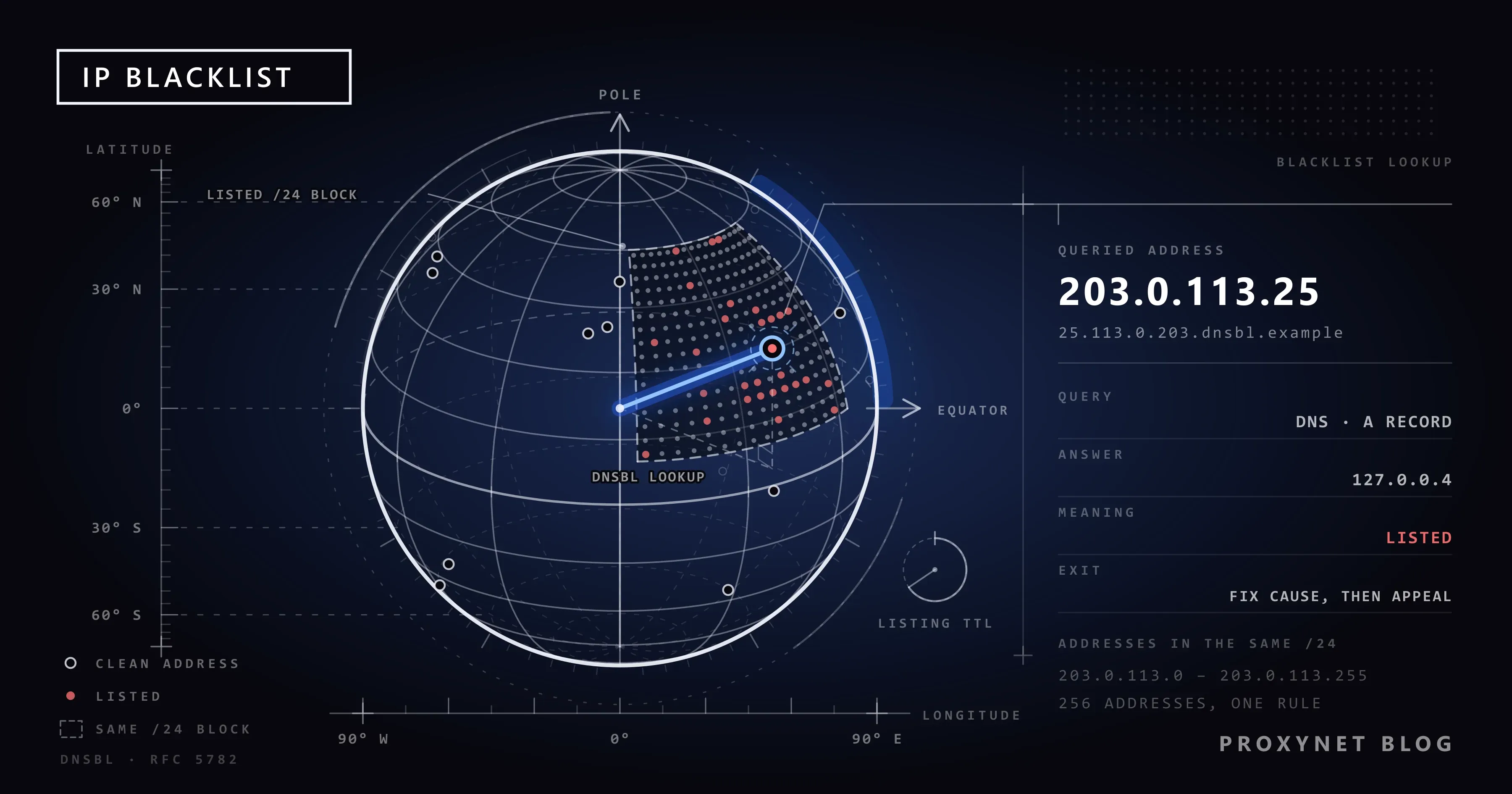
IP addresses are not handed out one by one but in blocks. Block sizes are written in the CIDR notation defined by RFC 4632: the number after the slash says how many bits at the start of the address stay fixed. In 203.0.113.0/24 the first 24 bits, that is the first three parts, are fixed; the last part runs from 0 to 255. That makes 256 addresses sitting side by side. A /16 describes a block of 65,536 addresses.
A hosting company or a proxy provider usually gives a customer consecutive addresses from a block like this. From the site administrator's chair it looks like this: a password-guessing attempt came from 203.0.113.14 and was blocked. Five minutes later the same attempt continued from 203.0.113.15, then from .16. Blocking addresses one by one is a job that never ends. Addresses in the same block are likely to be in the same hands, so the administrator closes the whole block with one rule.
The tools are built for this level too. Cloudflare's IP Access rules accept, besides a single address, /24 and /16 ranges for IPv4 and, one step further, an entire ASN in a single rule. On the email side, the Spamhaus SBL lists address ranges as well as single addresses. UCEPROTECT ties this to a tiered system: level 1 lists the single address, level 2 covers the range if spam keeps coming from the same allocation, and level 3 covers the provider's whole network (ASN).
This has two consequences. First, you can be blocked because of your neighbours without having done anything; this is what happens on shared hosting and in crowded proxy ranges. Second, 50 addresses taken from the same /24 are not 50 separate visitors to a site that blocks at range level, but a single source. When one draws attention, all 50 go together. With 50 addresses from different ranges, what happens to one does not affect the others. How the same logic works over /64 blocks in IPv6 is covered in IPv4 vs IPv6 Proxies. The ASN record that shows which network a block belongs to is explained in ISP vs Residential Proxies.
How do you check whether an IP address is blacklisted?
The address to check is the public address an IP lookup site shows you, not the one starting with 192.168. in the modem interface. If you run a mail server, the address to check is the one the server sends from.
- The list's own lookup page. You see the reason and the way out on the same page. For Spamhaus that is
check.spamhaus.org; Barracuda and SpamCop have lookup forms on their own sites. - Multi-list checkers. They search dozens of lists for one address at once, but they also show policy entries such as the PBL in red. Look at which list you are on and for what reason, not at the count.
There is no such lookup for blocks on the web side.
Advanced: a DNSBL query from the command line
A DNSBL query can be made from any computer. RFC 5782 requires every list to keep a test entry for 127.0.0.2; use it first to confirm the query works, then reverse your own address and ask:
# Test entry: always answers "listed"
nslookup 2.0.0.127.zen.spamhaus.org

# To query 203.0.113.25, write the parts in reverse order
nslookup 25.113.0.203.zen.spamhaus.org

# TXT record to see the reason
nslookup -type=TXT 25.113.0.203.zen.spamhaus.org
A "Non-existent domain" answer means the address is not listed. According to Spamhaus's documentation, 127.0.0.2 is an SBL entry, 127.0.0.3 CSS, 127.0.0.4 XBL, and 127.0.0.10 and 127.0.0.11 PBL. An answer starting with 127.255.255. is an error code, not a listing: 127.255.255.254 means you sent the query through a public DNS resolver. In that case use your internet provider's own DNS server or switch to the lookup page.
How do you get off a blacklist?
The removal request is the last step of the job. A request made before the cause is gone is either refused or the address is listed again shortly afterwards. The right order is:
- Find out which list you are on and why. The line in the bounce message names the list, and the list's lookup page shows the reason.
- Find and fix the cause. Scan the devices on the network, check that the mail server serves only authenticated users, and change the passwords of compromised accounts.
- Fix the sender identity. If you run a mail server, make sure the reverse DNS (PTR) record and the SPF, DKIM and DMARC settings are correct. They do not delist you, but they lower the chance of being listed again.
- Apply through the list's own page. Say briefly what happened and what you fixed.
- Monitor. Check the address again over the following weeks. If the entry comes back, the cause is still there.
The process differs from list to list; the details below come from each service's own page:
| List | How does removal work? |
|---|---|
| Spamhaus XBL | The entry drops by itself a while after the malicious behaviour is no longer seen; you can also apply from the lookup page |
| Spamhaus PBL | Most users do not need removal. If a mail server really runs on that address, apply from the lookup page |
| Spamhaus SBL | Only the internet or hosting provider responsible for the address can apply. You write to your provider's abuse desk |
| SpamCop | If no new spam reports arrive, the address is delisted automatically after 24 hours; the page explicitly asks you not to write for early delisting |
| Barracuda | You fill in a form; with a valid explanation, requests are typically investigated within 12 hours |
A website's own block list has no request form; if you are blocked unfairly, the route is that site's support channel.
What does a blacklist mean for proxy users?
A proxy is not a tool for a listed sender to get around the list. A business listed for spam cannot solve the problem by changing addresses; the new address lands on the same list with the same behaviour.
For someone buying proxies, the blacklist is a quality question to put to the seller. There are three things to look at:
- Is the address shared? On a shared address, another customer's behaviour can put your address on a list. The record of an address assigned only to you is shaped only by your own traffic. ISP Proxy and Datacenter Proxy addresses are reserved for you alone for the rental period. More on the distinction: What Is a Private Proxy?
- Which ranges do the addresses come from? If you are buying many addresses, ask whether they all come from one range or from different ranges.
- Check the delivered address before you use it. On the day you receive the address, run a small test on the site you will work with and look the address up on public lists. The test sequence is in How to Test a Proxy, and the pre-purchase question list is in What to Look for When Buying a Proxy.
What matters on the proxy side is not the email lists but the target site's own records and the reputation data it uses.
Who benefits from knowing about blacklists?
- Businesses that run their own mail server. Whether quotes and invoices arrive depends on the state of the sending address.
- IT and security teams. The company's exit address appearing on the XBL can be an early sign that a device inside has been compromised: data security.
- Brand protection teams. When you monitor fake shops and phishing pages from different countries, the exit address must not be blocked: brand protection.
- Teams collecting public data. The addresses of a crawler that ignores rate limits end up on the target site's list; the fix is not changing addresses but reducing the load: How to Scrape Websites Without Getting Blocked.
Common mistakes
- Filling in the form before finding the cause. As long as the infected device stays on the network, the address is listed again; restarting the modem is not a lasting fix for the same reason.
- Treating every red line in a multi-list checker as a fault. A PBL entry is normal on a home connection, and
127.255.255.254is an error code, not a listing. - Looking for a website's block on an email list. Coming back clean on Spamhaus does not explain a block in a site's own records.
- Buying many addresses from one range and counting them as separate sources. To a site that blocks at range level they are all one source.
Decision guide
| Your situation | What to do |
|---|---|
| A lookup site shows your home address only on the PBL | You do not need to do anything; it is a policy entry |
| An app or a site says "your IP address is blacklisted" | Turn off the VPN, try mobile data, restart the modem; if it continues, write to the service's support |
| The warning comes back after the address has changed | Scan the devices at home, remove suspicious apps, change the modem password |
| Company emails bounce with a "blocked using" error | Find the list named in the error line, fix the cause, then apply through that list's page |
| Your address is on the SBL | Write to the abuse desk of your hosting or internet provider; they make the request |
| A proxy address you just bought is blocked on day one | Send the address and the lookup result to the provider and ask for a replacement |
| You are about to buy many proxy addresses | Ask for addresses from different ranges that are reserved for you alone |
Frequently asked questions
How do I know whether my IP address is blacklisted?
For the email side, it is enough to enter your public IP address on the list's own lookup page or in one of the multi-list checkers. In the result, look at which list you are on and for what reason. You cannot query from outside whether a website has put you in its own records; you only learn that from the block message the site shows.
Is being blacklisted a legal problem?
No. Blacklists are records that private organisations and websites keep by their own decision; they are not an official sanction. The outcome is technical: your email is rejected or a site does not show you the page.
How long does an IP address stay blacklisted?
It depends on the list and the cause. SpamCop removes the address after 24 hours if no new reports arrive. Spamhaus XBL entries drop by themselves a while after the malicious behaviour stops. On the SBL an entry can stay until the provider applies. Websites' own blocks range from a rate limit of a few minutes to a permanent rule.
Will restarting the modem get me off the blacklist?
You are not removed from the list; if your address changes, your tie to the listed address is cut. On subscriptions with a dynamic address this usually works. If you have a static IP, or the provider hands back the same address, it does not.
Does a static IP get blacklisted more easily?
Not more easily, but once it is listed it stays with you. With a dynamic address the problem passes to someone else at the next address change; with a static address the entry lives with you until you resolve it. On the other hand, the history of a static address belongs only to you, and after the first day there is no chance of inheriting an entry from a previous user.
What should I do if a proxy IP is blacklisted?
Look at which list it is on. If it is only on an email policy list such as the PBL, web use is not affected. If the site you work with turns the address away, or the address appears on compromised-device lists, send the lookup result to your provider and ask for a replacement. If it was listed because of your own traffic, review your request rate before changing the address.
Summary
An IP blacklist is not one place but dozens of independent records: on the email side, public lists queried over DNS; on the web side, block records of sites that are closed to the outside. Addresses usually get listed without the owner's knowledge, because of a compromised device, a shared address, a previous user or neighbours in the same /24 range. In a real listing the order is clear: learn the list and the reason, fix the cause, then apply for free through the list's own page. On the proxy side, an address reserved for you alone and drawn from different ranges keeps someone else's behaviour from reflecting on you. You can find the options on our proxy services page.