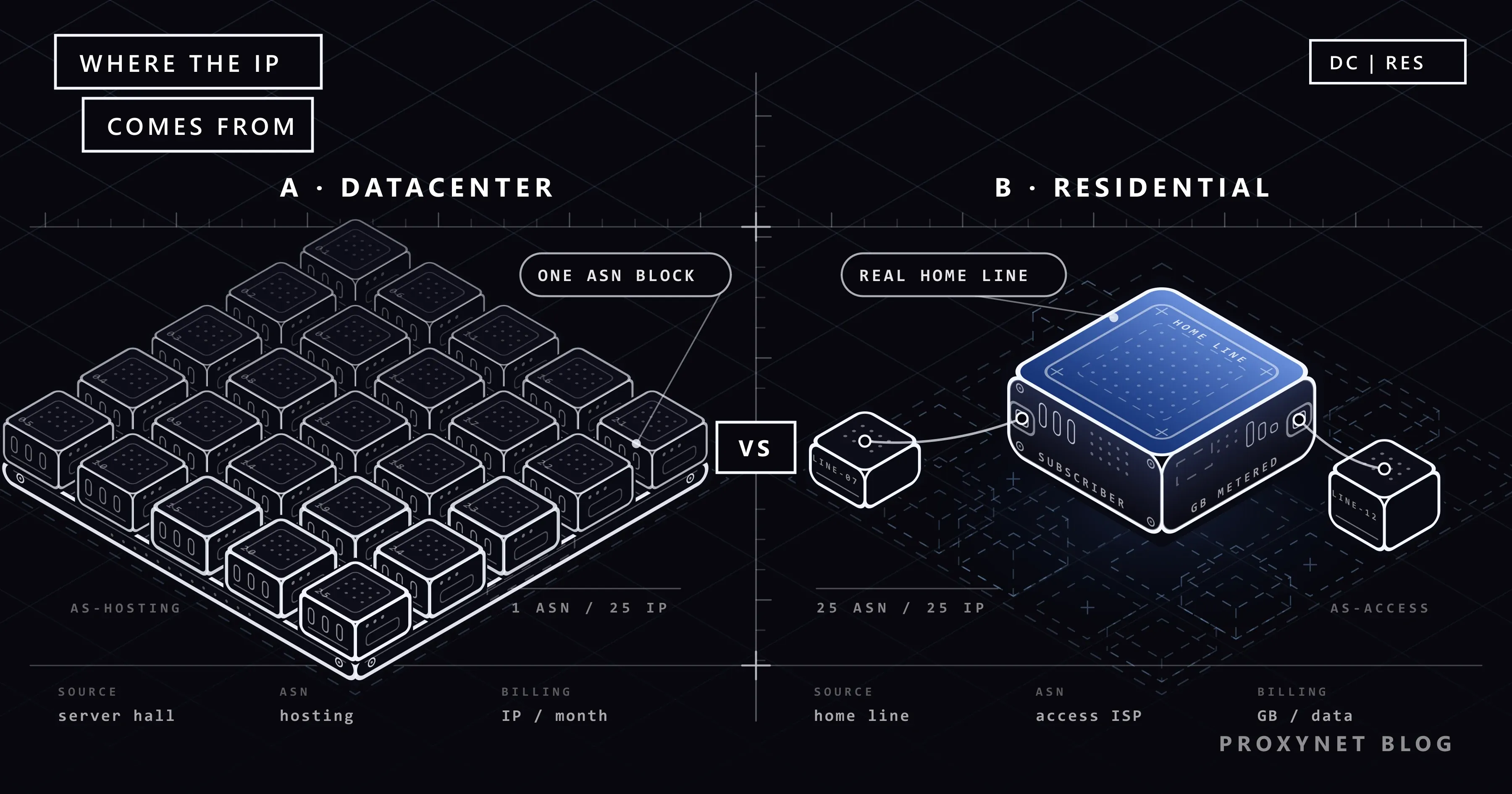
Both proxy types do the same job: your request reaches the target site not with your own address, but with another IP. The difference between them is where that IP comes from. In a residential proxy, the address belongs to a real home internet subscription; in a datacenter proxy, it belongs to a server inside a data center. This single difference determines speed, price, and, most importantly, how the target site treats you.
This article explains how the two types work, the method sites use to tell them apart, why the cost models diverge, and which one to choose for which task, with concrete scenarios. At the end we cover how to use the two types together in the same project, and the ISP proxy that sits between them.
What is a residential proxy?
Residential Proxy uses IP addresses that internet service providers distribute to homes. When the target site queries this address, it sees an individual subscriber of an access provider like Türk Telekom, Vodafone, or Comcast. So the traffic appears to be coming from an ordinary user's home connection.
These addresses generally come from a large pool and can change per request or at set intervals. Targeting is possible at the country, city, and carrier level; it's ideal for comparing how the same content looks from Istanbul and from Berlin. You can see exit points in Türkiye on our Türkiye locations page.
Residential pools come in two sub-forms, and telling them apart makes choosing easier:
- Rotating residential: The address changes on every request or after a set period. Suited for independent page fetches.
- Sticky residential: The same address stays with you for a set duration. Needed in logged-in, cart-holding, or multi-step flows. Details on this option are on the Sticky Proxy page.
What is a datacenter proxy?
Datacenter Proxy gives an IP from servers in cloud providers' and hosting companies' data centers. There's no home user behind these addresses; there are machines with strong connections that run without interruption.
As a result, a datacenter proxy is fast, has low latency, and its unit cost is noticeably lower than residential. In exchange, it has a cost: it's easy to tell that the address belongs to a data center.
Datacenter addresses are also sold in two forms:
- Shared: The same IP is used by more than one customer. It's cheap, but another user's behavior can lower the address's reputation.
- Dedicated (private): The address belongs only to you. We explained why a non-shared address is safer in our What Is a Private Proxy? article.
How does the target site tell the difference?
Every IP address belongs to an ASN (autonomous system number), and the owner of that number appears in publicly available records. When a site looks at an incoming request's ASN, it sees the difference between a "home internet provider" and a "hosting company" in a single lookup. You can look at how ASN records are kept in IANA's AS number table.
For this lookup, sites generally rely on ready-made IP intelligence databases. These databases classify every address block into types like "ISP," "hosting," "mobile," and "corporate," and the system evaluating the request produces a decision in a few milliseconds. In other words, "catching" a datacenter IP doesn't require anyone to track you; the type of the address block is already on record.
Many sites don't outright block data center traffic, but they treat it with suspicion. At sensitive points like login pages, checkout steps, search results, and price lists, datacenter IPs run into CAPTCHA, rate limits, or empty responses more often. Residential IPs, coming from the same address blocks as real users, pass these filters more easily.
What are the signs of being blocked?
There are a few typical signs that a datacenter IP is falling short at a target. Spotting these early lets you base the decision to switch to residential on data:
- 403 or 429 responses. The site is openly rejecting the request or applying a rate limit.
- 200 but empty content. The response code looks successful, but the page body is empty, truncated, or an interstitial page like "verifying access." This is the sneakiest form of blocking, because your script doesn't get an error.
- An increase in CAPTCHA rate. A certain percentage of sessions in browser automation start falling into a verification screen.
- Different content. The same page looks different on a real browser than it does through the proxy. This difference is often seen in price and stock information.
If you're seeing one of these signs, the problem may not be in your code, but in the address block the traffic is coming from.
The key differences in one table
| Criterion | Residential proxy | Datacenter proxy |
|---|---|---|
| IP source | Home internet subscription | Data center server |
| ASN appearance | Access provider | Hosting / cloud company |
| Detection risk | Low | Moderate-high (depends on the target) |
| Speed and latency | Variable, depends on the home line | High speed, low latency |
| Connection continuity | The address can change over time | The address is fixed and stable |
| Location targeting | Country, city, carrier | Usually country or region |
| Pool size | Very large, dynamic | Limited, fixed blocks |
| Pricing | Mostly traffic-based (GB) | Mostly IP- and duration-based |
| Typical use | Protected sites, location testing, accounts | Bulk downloads, testing, open APIs |
Why are the cost models different?
The pricing of the two types diverges not just in the number, but in the unit of measure as well. With a residential proxy, payment is usually based on the amount of data transferred, because there's a real connection behind every address in the pool and cost is incurred as the resource is used. With a datacenter proxy, the addresses are on the provider's own infrastructure; so payment is per IP and per duration, and traffic is often unlimited.
The practical result of this difference is: if you're downloading large files or fetching heavy pages thousands of times, traffic cost on residential grows quickly. If you're fetching small API responses or lightweight HTML pages, the same budget goes much further. Measuring the average response size first when planning a budget shows numerically which type is economical. You can compare current packages on the residential and datacenter pricing pages.
When should you choose a residential proxy?
If the target site strictly monitors its visitors and a block is stopping your workflow, residential's extra cost pays for itself:
- Collecting data from protected sites. E-commerce, ticketing, real estate, and search engine pages flag data center traffic quickly. In data-scraping projects, IP type is often what determines the success rate.
- Seeing content that changes by location. Search results, ads, and prices differ by city. For SEO and SERP tracking or ad verification, you need to see what a real user sees.
- Price tracking. Marketplaces can show prices based on the visitor's location and type. For teams doing price monitoring, a residential IP ensures the price you see is the price a real customer sees.
- Account management. Social media and marketplace accounts can request extra verification when logged into from a data center address. You feel this difference directly in social media proxy scenarios.
- Localization testing. Verifying how your app or site appears to users in different countries; details are on our localization page.
When is a datacenter proxy enough?
If the target site doesn't use an aggressive bot filter, a datacenter proxy's speed and price make it the sensible choice:
- Testing your own systems. Load testing, verifying your app's reachability from different regions, or measuring CDN behavior. In app-testing scenarios, what matters isn't the address's type but its geographic distribution.
- Open APIs and unprotected pages. Public data, documentation sites, RSS feeds, open data portals.
- Bulk jobs where speed is the priority. Large file downloads or long sessions where latency is critical.
- Accessing your own infrastructure. Servers you need to connect to from a distinct fixed IP, addresses whitelisted on a firewall.
- The initial discovery phase. Cheaply learning with datacenter whether a target has a block in place before deciding, when first scanning it.
Using both in the same project
Most mature data-collection setups don't use a single type; they use both in layers. The logic is simple: make the cheap and fast one the default, and bring in the expensive one only when needed.
- Scan listing pages with datacenter. Category and search-result pages are generally less protected and require a large number of requests.
- Catch the block signal. When you see a 403, 429, empty body, or a CAPTCHA page, flag that request.
- Only retry flagged requests with residential. Protected points like detail pages, login-required steps, and price blocks stay at this layer.
- Monitor the ratio. If the percentage of requests falling to residential increases over time, it means the target site is tightening its protection; update the strategy accordingly.
This setup reduces residential traffic to a small share of total traffic and lowers the budget significantly. All you need to do on the code side is write a layer that retries with a different proxy on failure; you can see an example of this in Python in our How to Rotate Proxies in Python article.
Between the two: ISP proxy
Some projects want the advantage of both worlds at once: appearing under a residential ASN, but with the stability of a data center, on a fixed address. ISP Proxy offers exactly this. The address is registered to an access provider, but because it's hosted on server infrastructure, it's fast and continuous.
It's generally the most balanced option in scenarios where you need to keep a session open on the same IP for a long time:
- Assigning each account a separate, unchanging address,
- Maintaining a fixed, low-latency connection in game clients,
- Managing a marketplace store from the same address every day.
In exchange, ISP proxy's location options aren't as broad as a residential pool, and since the address doesn't change, it doesn't provide per-request rotation. So it's designed not for jobs wanting "many addresses, frequent change," but for jobs wanting "few addresses, long life."
If you want to compare a residential proxy to a mobile proxy, take a look at our Residential vs. Mobile Proxy Differences article; mobile addresses being shared by the carrier among users gives them a different advantage.
Decision guide
You can use the table below to quickly see which type suits you:
| Your need | Recommendation |
|---|---|
| High-volume data from an unprotected site | Datacenter |
| Protected e-commerce or search pages | Residential (rotating) |
| Logged-in, multi-step flow | Residential (sticky) or ISP |
| A fixed, long-lived IP per account | ISP |
| City or carrier-level location | Residential |
| Testing your own servers | Datacenter |
| Limited budget, mixed target | Datacenter as default, residential as backup |
Frequently asked questions
Is a datacenter proxy legal?
Yes. Proxy type doesn't determine legality; what you do determines it. Collecting publicly available data in line with a site's terms of use and applicable law is possible with either type. See the details of this topic in our Is Web Scraping Legal? article.
Is a residential proxy always better?
No. Using a residential proxy for an unprotected target means doing the same job slower and more expensively. Trying datacenter first and switching to residential at the point where you hit a block is the most efficient path for most projects.
Can I use both in the same project?
You can, and it often makes sense. Quickly scanning listing pages with datacenter IPs and switching to residential IPs only for protected detail pages cuts costs significantly. The layered setup above describes exactly that.
Why is a residential proxy slower?
There's a home connection behind the address; speed depends on that line's capacity and its current load. A data center's server, on the other hand, is connected to a high-capacity backbone. The difference isn't felt in most web requests, but it becomes noticeable in large file downloads.
A site blocked my datacenter IP — what should I do?
First lower your request rate and try again; the block often comes from request frequency rather than the address's type. If lowering the rate doesn't help, move to the residential layer for that target. Persistently reusing the same datacenter address can make the block permanent.
How do I check whether an IP is residential or datacenter?
Publicly available tools that query the address's ASN show who owns the address block. If the owner is an access provider, it's residential; if it's a hosting or cloud company, it's datacenter. Your proxy provider's panel usually also states the address type.
In short
If your target site doesn't scrutinize incoming traffic, a datacenter proxy is a fast and economical solution. If sites change their behavior based on IP type, a residential proxy's real-user appearance reduces those obstacles. When you need both a fixed address and a residential appearance, an ISP proxy comes into play. For most projects, the most efficient path is making datacenter the default and using residential only where you hit a block. To compare prices, take a look at the residential and datacenter pricing pages.