


































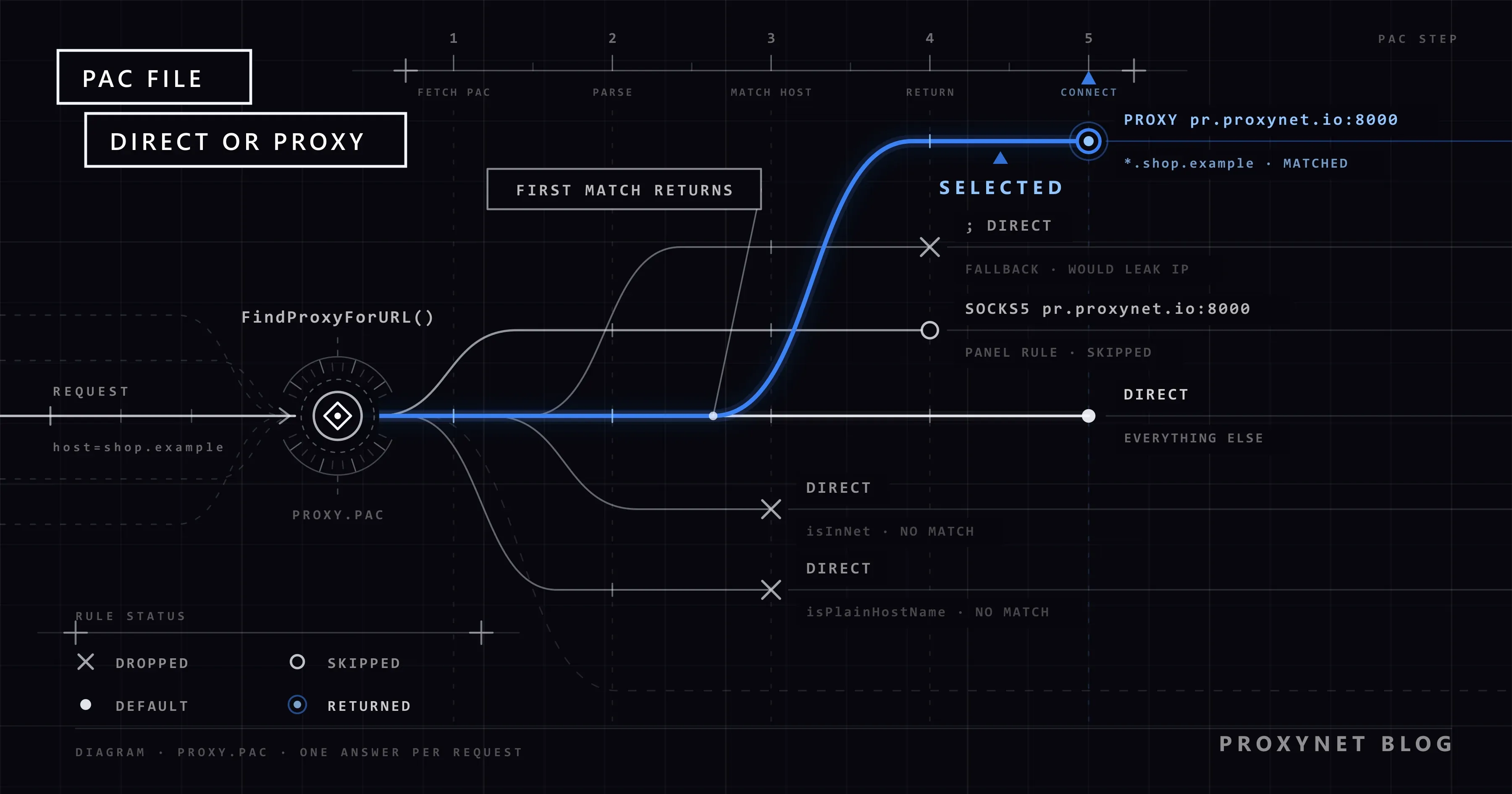
A small price tracking team enters a residential proxy as the Windows system proxy. A few days later the usage page shows far more gigabytes than the job should need. Browser updates, video calls and webmail went through the proxy too, although only two competitor shops had to be seen from another IP address. The team needed a rule that says "these sites through the proxy, everything else direct". That rule is a PAC file.
This guide explains what a PAC file (proxy auto-config file) is, how a browser runs it and what FindProxyForURL may return. It covers the helper functions and their traps, a tested example that sends only target sites through a proxy, WPAD and its risks, why the file cannot hold a password, and how the same rule lowers proxy traffic.
What is a PAC file?
A PAC file is a plain text JavaScript file that defines a single function: FindProxyForURL(url, host). The function receives the address the browser is about to open and returns a string that names the route. Netscape added proxy auto-config to Navigator 2.0, the same release that introduced JavaScript.
PAC has no RFC or formal specification. Each browser ships its own implementation, and the details differ. MDN's PAC file reference describes the common ground, including the MIME type, application/x-ns-proxy-autoconfig. The file usually ends in .pac; found through WPAD, it is called wpad.dat.
A manual proxy setting sends all traffic to one proxy. A PAC file decides again for every request, so one browser can reach a shop through a proxy and the office wiki directly.
How does a browser use a PAC file?
- Fetch the file. The browser downloads it from the address you entered, or from the one WPAD found. Chrome fetches it directly, never through a proxy, and needs an HTTP
200answer within 30 seconds with a body under 1 MB. - Call the function before each request. For
https://addresses, Chrome removes the path and query first, so the function seeshttps://store.example/rather than the full address. Chrome started this in version 52, and since version 75 it cannot be turned off. - Read the answer from left to right. The string is split at semicolons. The browser tries the first entry and moves to the next only if that proxy cannot be reached.
- Set aside a proxy that failed. It moves to the end of the list for a while. How long depends on the browser, so do not build rules around a fixed time.
- Fall back when the file is missing. If Chrome cannot fetch the file, it moves to the next option, usually a direct connection, without a warning. Only a PAC script marked as mandatory makes requests fail instead. In our test, a file with a syntax error also sent Chrome direct.
The full rules are in Chromium's proxy support documentation.
What can FindProxyForURL return?
The function returns one string. Each entry is a keyword followed, for proxies, by host:port.
| Return value | What it does | Support (source) | Watch out |
|---|---|---|---|
DIRECT | Connects without a proxy | Standard keyword (MDN) | As a backup on a target rule, it sends the request from your real IP |
PROXY pr.proxynet.io:8000 | Uses an HTTP proxy | Standard keyword (MDN, Chromium) | If the proxy asks for a password, the browser shows a 407 sign-in dialog |
SOCKS5 pr.proxynet.io:1080 | Uses a SOCKS5 proxy | Chrome and Firefox (Chromium, MDN) | Chrome sends no SOCKS5 credentials, so the proxy must allow your IP |
HTTPS proxy.example:443 | Uses a proxy you reach over TLS | Chrome and Firefox (Chromium, MDN) | The proxy must speak TLS on that port |
SOCKS proxy.example:1080 | Uses a SOCKS server | Standard keyword (MDN) | Chrome reads a bare SOCKS as SOCKS4 |
Firefox also accepts HTTP host:port and SOCKS4 host:port, but Chrome's parser does not know HTTP, so PROXY is the spelling that works everywhere. Chrome reads keywords in any letter case; MDN writes them in capitals, and so do we.
A chain such as "PROXY a.example:8000; PROXY b.example:8000; DIRECT" means: try the first proxy, then the second, and connect directly only if both are down. That last step is fine for general browsing and wrong for data collection. The protocol difference between the two proxy types is in SOCKS vs HTTP Proxy.
Which helper functions can a PAC file use?
The built-in functions fall into two groups.
String checks, fast and safe: shExpMatch (shell-style * and ? patterns), dnsDomainIs, isPlainHostName (no dot in the name), localHostOrDomainIs, dnsDomainLevels, and the time functions weekdayRange, dateRange and timeRange.
Functions that ask DNS: dnsResolve, isResolvable, and isInNet when it gets a host name instead of an IP address. MDN warns that these have to consult the DNS server and are rarely necessary.
We checked three common traps with pacparser, which runs PAC files in the QuickJS engine:
dnsDomainIs(host, "shop.example")only compares the end of the string, soevilshop.examplematches too.dnsDomainIs(host, ".shop.example")fixes that, but the bareshop.exampleno longer matches. Check both:host === "shop.example" || dnsDomainIs(host, ".shop.example").shExpMatch(host, "*.panel.example")does not matchpanel.exampleitself.
myIpAddress() can return the wrong address on a machine with several network interfaces, so avoid rules that depend on the machine's own IP.
How to write a PAC file that sends only target sites through a proxy
Here is the introduction's scenario as one file. Price tracking targets and their subdomains go through a Residential Proxy. A dashboard that must keep one address goes through a SOCKS5 proxy, with an HTTP proxy as backup. Everything else goes direct. Replace the .example domains with your own.
// proxy.pac: only the listed sites use a proxy, everything else goes direct.
function FindProxyForURL(url, host) {
  host = host.toLowerCase();

  // 1. Plain names (intranet, printer) and localhost: always direct.
  if (isPlainHostName(host) || host === "localhost") {
    return "DIRECT";
  }

  // 2. Private and loopback IP addresses: direct. The regex check means
  //    isInNet only ever sees an IP address, so it never asks DNS.
  if (/^\d{1,3}(\.\d{1,3}){3}$/.test(host) &&
      (isInNet(host, "10.0.0.0", "255.0.0.0") ||
       isInNet(host, "172.16.0.0", "255.240.0.0") ||
       isInNet(host, "192.168.0.0", "255.255.0.0") ||
       isInNet(host, "127.0.0.0", "255.0.0.0"))) {
    return "DIRECT";
  }

  // 3. Price tracking targets and their subdomains: residential proxy.
  //    No "; DIRECT" at the end: if the proxy is down, the request fails
  //    instead of leaving from your own IP address.
  var targets = ["shop.example", "store.example"];
  for (var i = 0; i < targets.length; i++) {
    if (host === targets[i] || dnsDomainIs(host, "." + targets[i])) {
      return "PROXY pr.proxynet.io:8000";
    }
  }

  // 4. A dashboard that must keep one IP: SOCKS5 first, HTTP as the backup.
  //    Put the host and ports of your static ISP proxy here.
  if (host === "panel.example" || shExpMatch(host, "*.panel.example")) {
    return "SOCKS5 pr.proxynet.io:1080; PROXY pr.proxynet.io:8000";
  }

  // 5. Everything else: direct.
  return "DIRECT";
}
The host is lowercased first, because the helpers compare strings exactly. isInNet runs only after the regex has confirmed an IP address, so the script never waits for DNS. The code sticks to var and plain loops, because not every PAC engine runs modern JavaScript. In a PAC file, the semicolon chain is the retry mechanism; retry logic in code belongs to the scraper (HTTP Status Codes in Web Scraping).
How we tested it
We ran the file through pacparser 1.5.2 in Python 3.13 with ten hosts, and each returned the expected route, including WWW.Shop.Example (proxy) and notshop.example (direct). Then we served it locally with the application/x-ns-proxy-autoconfig type, pointed the endpoints at two local test proxies and opened Chrome 154 with --proxy-pac-url. Target hosts reached the HTTP proxy and other hosts went direct. For the dashboard, Chrome first tried SOCKS5, offering only the "no authentication" method, then moved to the HTTP backup. A copy with one missing brace sent every request direct without a warning.
How do you point a device or browser at a PAC file?
Serve the file from a web server, over HTTPS where you can, with the Content-Type MDN asks for. Then enter its address:
- Windows: the Use setup script switch; steps in proxy settings in Windows and Chrome.
- Mac: the Automatic proxy configuration row; see when to use it on a Mac.
- Android: the Proxy Auto-Config option on the Wi-Fi network (proxy settings on Android).
- Firefox: Automatic proxy configuration URL in the connection settings (Firefox proxy settings).
To switch between a few profiles inside one browser, an extension is often simpler (SwitchyOmega). If you found a PAC address on a work computer, see how to find a proxy server address.
What is WPAD and why is it a risk?
WPAD (Web Proxy Auto-Discovery) is behind the "Automatically detect settings" switch: the client searches the network for a PAC file, and when a home network has none, Windows' troubleshooter may report that it could not automatically detect the proxy settings, which is usually harmless. The WPAD draft from 1999 lists several discovery methods, and clients mainly use two: DHCP option 252, which hands out the URL, and DNS lookups for a host named wpad. A machine called pc1.sales.corp.example asks for wpad.sales.corp.example, then wpad.corp.example, and requests /wpad.dat from the first name that answers. Chrome tries DHCP before DNS, but it supports the DHCP method only on Windows and ChromeOS. The draft expired without becoming an RFC.
The client trusts whoever answers. If a laptop set to auto-detect joins a café network, or its WPAD lookup leaks to public DNS, a stranger's server can hand it a PAC file and route its traffic. CISA's alert TA16-144A explains how new top-level domains made these name collisions easier.
To protect your machines:
- Turn off automatic detection where it is not needed, above all on laptops that leave the office.
- Enter the PAC address explicitly, over HTTPS.
- On Windows 10 version 1809, Windows Server 2019 and later, set the
DisableWpadregistry value to1, as Microsoft documents, and also switch off detection in Settings, because browsers read that switch. - Log and block outgoing requests for
wpad.datat the firewall, as CISA suggests (Proxy vs Firewall).
Why can't a PAC file hold a username and password?
A PAC file answers one question: where should this request go? It returns a keyword, a host and a port, with no field for credentials.
If an HTTP proxy asks for a password, it answers 407 and the browser shows a sign-in dialog. Chrome supports no authentication method for SOCKS5, so a SOCKS5 entry works only when the proxy lets your IP in. For automated jobs and SOCKS5, IP whitelist authentication is the practical route: you add your outgoing IP to the allowed list in your proxy account. Do not put credentials into URLs as a workaround. The two methods, including what happens when your IP changes, are compared in Proxy Authentication: User:Pass vs IP Whitelist.
How does a PAC file cut proxy traffic and cost?
Residential and mobile proxies are billed per gigabyte, ISP and datacenter proxies per IP address. With a system-wide proxy, updates, video calls and downloads are billed too. A PAC file sends only the target domains through the residential proxy, so the billed gigabytes cover the job.
For a dashboard that must keep one address across sessions, a per-IP product fits better: an ISP Proxy, or a SOCKS5 Proxy with your IP whitelisted.
Use cases
- Price tracking: only the shops you monitor use the proxy, within their
robots.txtrules and at a modest request rate (competitor price tracking). - Office networks: internal addresses go direct, outside traffic goes through a company proxy such as Squid (Squid proxy setup).
- Country-specific checks: each target domain gets the exit type it needs (residential vs datacenter proxy).
- Testing a new proxy: one test domain goes through it while normal browsing stays direct (how to test a proxy).
- Leak checks: a PAC rule covers browser requests, but WebRTC and DNS can still reveal your address (WebRTC and DNS leaks).
- Local proxies: a debugging proxy on
127.0.0.1:8080gets only the domains you inspect (port 8080).
Common mistakes
These are specific to PAC files; for general connection errors, see Proxy Server Not Responding.
- A wrong MIME type or a missing file. MDN asks servers to send
application/x-ns-proxy-autoconfig. Chrome also needs exactly200; a404is a failed fetch and a direct connection. - Seeing no change after an edit. Browsers keep the loaded script in memory. Use Reload in Firefox's connection settings, Re-apply settings on
chrome://net-internals/#proxy, or restart the browser. - Calling DNS in the script.
isInNetwith a host name,dnsResolveandisResolvablerun a lookup per request, and a slow DNS server makes every page wait. - A syntax error. Chrome goes direct without a message. Test the file with pacparser before you deploy it.
- Path rules on HTTPS.
shExpMatch(url, "*/products/*")never matches anhttps://address in Chrome, because the path is removed. In our test the same kind of rule matched onhttp://. Match onhostinstead. - The dot in dnsDomainIs. Without it, look-alike domains match; with it, the bare domain does not.
- Writing
HTTP host:portor a bareSOCKS. Chrome rejects the first and reads the second as SOCKS4. - A
DIRECTbackup on data collection targets. When the proxy is down, the site sees your own IP.
Decision guide
| Need | Recommendation |
|---|---|
| Send only a few domains through a proxy | A PAC file: PROXY for the targets, DIRECT for the rest |
| All browser traffic through one proxy | No PAC needed; a manual system proxy is enough |
| Your real IP must never reach a target site | Return only PROXY for it, with no ; DIRECT backup |
| Use SOCKS5 in Chrome | Return SOCKS5 host:port and whitelist your IP |
| The same PAC address on every office computer | Distribute it by policy or device management; if you use WPAD, protect DHCP and DNS |
| A laptop also works on café and home networks | Turn off automatic detection; set DisableWpad on Windows |
| A dashboard needs the same IP every session | Point that domain at a static ISP proxy |
Frequently asked questions
How do I open or edit a PAC file?
A PAC file is plain text, so Notepad or any code editor opens it. A browser that opens the URL shows the text or downloads the file, depending on the MIME type. Other formats share the .pac extension; if the file looks like binary data, it is not a proxy configuration.
Where is the PAC file on Windows?
Usually it is not a local file. Windows stores the address entered under Use setup script and fetches the file from there. The steps to see or change it are in proxy settings in Windows and Chrome.
Can a PAC file include a username and password?
No. The function returns only a keyword, a host and a port. For an HTTP proxy the browser asks for credentials in a 407 dialog; for automated jobs and SOCKS5, use IP whitelist authentication.
What is the difference between PAC and WPAD?
The PAC file holds the rules. WPAD finds the address of a PAC file on the local network through DHCP or DNS. You can use a PAC file without WPAD by entering its address yourself, which is also the safer choice.
Can a PAC file return a SOCKS5 proxy?
Yes, as SOCKS5 host:port; Chrome and Firefox both follow it. Chrome sends no SOCKS5 credentials, so whitelist your IP on the proxy.
I changed my PAC file, so why does the browser still use the old rules?
The browser keeps the version it loaded until it reloads the configuration. Press Reload in Firefox, use Re-apply settings on chrome://net-internals/#proxy, or restart the browser. A new file name for each version (proxy-v2.pac) removes the doubt.
Summary
A PAC file turns a proxy from an on/off switch into a decision for each request: FindProxyForURL looks at the host and returns DIRECT, PROXY or SOCKS5, and the browser tries the entries from left to right. Match on host, avoid functions that ask DNS, and leave the DIRECT backup off rules for data collection targets. Enter the PAC address yourself over HTTPS and turn WPAD off where it is not needed. Since the file cannot hold a password, pair it with IP whitelist authentication, and choose the proxy type for each rule from our proxy services.


