You need the same list every morning: open issues from a GitHub repository, prices from a shop's category page, quotes from a website. GitHub documents an API for its issues, so a script can ask for them and get JSON back. The shop may offer nothing but its pages, so the script has to download the HTML and pick the prices out of it. That is the whole difference between an API and web scraping, and in most projects the choice is made by what the other side offers rather than by taste.
This article explains what an API is and what scraping is, compares the two on ten points, and then collects the same 100 records both ways in Python: once from HTML pages and once from the JSON endpoint the site's own page calls. After that come hidden JSON endpoints, scraping API services, rate limits, IP whitelists, what each route costs and when to combine them. Every code sample ran on 29 September 2026 with Python 3.13, Requests 2.34.2 and beautifulsoup4 4.15.0.
What is an API?
An API (application programming interface) is a set of fixed requests one program can send to another, together with the rules for what to send and what comes back. On the web that usually means an HTTP request to an address such as https://api.github.com/repos/python/cpython/issues and a JSON answer. A web page is written for a person to read; an API response is written for a program to parse.
A web API is made of a few parts:
- Endpoint: the address of one operation, such as "list issues" or "get one product".
- Parameters: what you ask for, for example
state=openorpage=2. - Authentication: an API key, a token or OAuth that tells the service who is calling. Many APIs also answer anonymous calls, with a lower limit.
- Response format: usually JSON, with field names that stay the same from call to call.
- Limits and terms: how many calls you may make per hour and what you may do with the data.
- Documentation: many APIs publish a machine-readable description in the OpenAPI format. The OpenAPI Specification, at version 3.2.1 since 10 September 2026, calls itself a standard, language-agnostic interface description for HTTP APIs, so that people and tools can learn what a service offers without reading its source code.
Not every API is open to everyone. Banks, exchanges and many business services issue keys only to account holders, and some accept calls only from IP addresses registered in advance; we come back to that below.
What is web scraping?
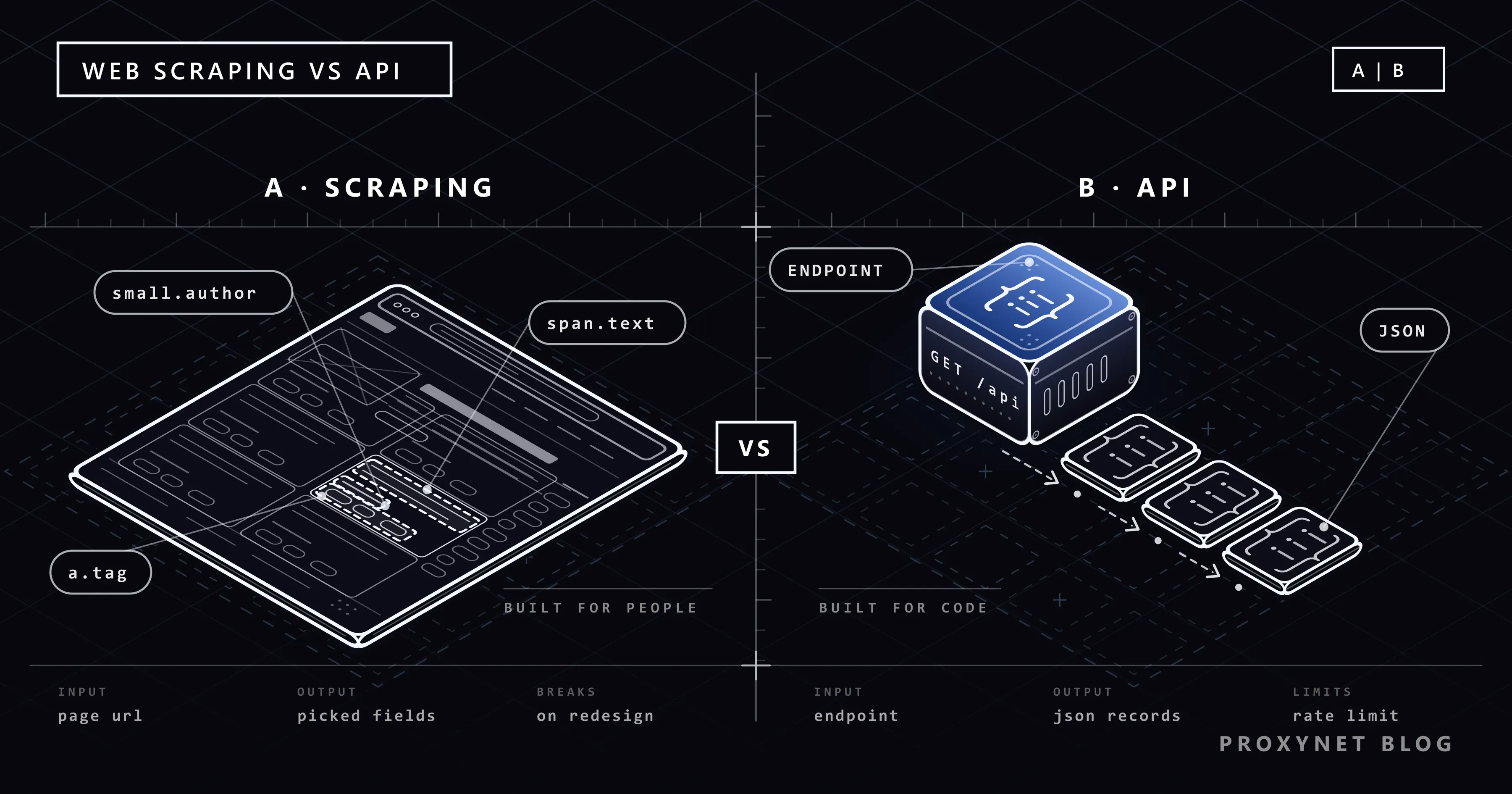
Web scraping is a program doing what your browser does and then keeping only the data: it downloads the page, reads the HTML and picks values out of it with CSS selectors or XPath. The site has agreed to nothing. The layout of the page is the only "contract", and the site can change it any day for its own reasons. What Is Web Scraping and How Does It Work? walks through the whole pipeline, and following links versus extracting fields is covered in Web Scraping vs Web Crawling.
The strength of scraping is reach: anything a visitor can see without logging in is within range. The price is that every value has to be found again in markup that was built for design, not for data.
How does each route get the data?
From a distance the steps look alike. The difference is who decides the shape of the answer.
With an API:
- You read the documentation and find the endpoint, the parameters and the limits.
- You get a key if the API requires one, and keep it in an environment variable rather than in the code.
- You send a request with parameters, for example
?page=2. - The service returns JSON with named fields, and usually a field or header that points to the next page.
- You read the fields by name. A redesign of the website does not touch them.
With scraping:
- You study the page and the HTML behind it to find where each value sits.
- You check
robots.txtand the site's terms (how to read robots.txt). - You download the page as a browser would, or render it in a headless browser if JavaScript builds the content.
- You parse the HTML and select each value with a selector such as
span.text(what is data parsing). - You clean and store the values, and repeat the work when the layout changes.
Web scraping vs API: comparison table
| Official API | The site's own JSON endpoint | Web scraping (HTML) | |
|---|---|---|---|
| Data coverage | Only the fields the provider exposes | What the page needs to draw itself | Everything a visitor can see |
| Format | Documented JSON or XML | JSON, undocumented | HTML that you parse |
| Stability | Versioned; changes are announced | Can change with any front-end release | Breaks when the layout changes |
| Rate limits | Published, often in response headers | Unpublished; you set your own pace | Unpublished; you set your own pace |
| Authentication | Key, token or OAuth; sometimes an IP whitelist | Sometimes the cookies or tokens of a page session | Usually none for public pages |
| Terms of use | The API terms say what is allowed | The site's terms apply; no promise from the site | The site's terms and robots.txt apply |
| Cost | Free quota or a paid plan | No fee; your time and traffic | No fee; development, maintenance, proxies, rendering |
| Maintenance | Low; update when a version is retired | Medium; watch for renamed fields | High; selectors fail after redesigns |
| Size of a response | Small, only the data | Small, only the data | Whole pages with layout and markup |
| JavaScript-built content | Not an issue | Not an issue | Needs a headless browser or the JSON route |
GitHub's REST API shows what "versioned" means in practice. A request can name its version in the X-GitHub-Api-Version header, and when a new version is released the previous one stays supported for at least 24 more months (GitHub REST API versions). Removing or renaming a response field counts as a breaking change there and has to wait for a new version. Requests without the header still get version 2022-11-28, which is supported until 10 March 2028. No website makes that kind of promise about its CSS classes.
The same data both ways: a tested Python example
The practice site quotes.toscrape.com is a sandbox built for scraping exercises; its footer credits Zyte. It lists 100 quotes on ten HTML pages, /page/1/ to /page/10/. Its infinite-scroll version at /scroll loads the same quotes from a JSON endpoint, /api/quotes?page=N, and every answer carries a has_next field. The site returns 404 for /robots.txt, which under the robots.txt standard means there are no crawl rules; the script still waits one second between pages.
The script collects all 100 quotes through both routes with one shared session. Every request carries a timeout, the session names itself in the User-Agent, and it retries on 429 and 5xx answers:
"""The same quotes twice: parsed from the HTML pages and read from the JSON endpoint."""
import os
import time

import requests
from bs4 import BeautifulSoup
from requests.adapters import HTTPAdapter
from urllib3.util import Retry

BASE = "https://quotes.toscrape.com"
DELAY = 1.0  # pause between pages


def make_session():
    retry = Retry(
        total=4,
        backoff_factor=1,  # waits 0, 2, 4, 8 s between attempts
        status_forcelist=[429, 500, 502, 503, 504],
        allowed_methods=["GET"],
        respect_retry_after_header=True,  # a Retry-After header replaces the backoff
    )
    session = requests.Session()
    session.mount("https://", HTTPAdapter(max_retries=retry))
    session.mount("http://", HTTPAdapter(max_retries=retry))
    session.headers["User-Agent"] = "quotes-compare/1.0 (contact: you@example.com)"
    proxy = os.environ.get("PROXY_URL")  # e.g. http://user:pass@pr.proxynet.io:8000
    if proxy:
        session.proxies = {"http": proxy, "https": proxy}
    return session


def scrape_html(session):
    """Route 1: download each HTML page and pick the fields out with CSS selectors."""
    quotes, page, size = [], 1, 0
    while True:
        r = session.get(f"{BASE}/page/{page}/", timeout=(5, 20))
        r.raise_for_status()
        size += len(r.content)
        soup = BeautifulSoup(r.content, "lxml")
        for q in soup.select("div.quote"):
            quotes.append({
                "text": q.select_one("span.text").get_text(strip=True),
                "author": q.select_one("small.author").get_text(strip=True),
                "tags": [a.get_text(strip=True) for a in q.select("a.tag")],
            })
        if soup.select_one("li.next > a") is None:  # no "Next" link: last page
            return quotes, page, size
        page += 1
        time.sleep(DELAY)


def fetch_api(session):
    """Route 2: call the JSON endpoint the site's own scroll page uses."""
    quotes, page, size = [], 1, 0
    while True:
        r = session.get(f"{BASE}/api/quotes", params={"page": page}, timeout=(5, 20))
        r.raise_for_status()
        size += len(r.content)
        data = r.json()
        for q in data["quotes"]:
            quotes.append({
                "text": q["text"],
                "author": q["author"]["name"],
                "tags": q["tags"],
            })
        if not data["has_next"]:  # the API says when the list ends
            return quotes, page, size
        page += 1
        time.sleep(DELAY)


session = make_session()
results = {}
for name, collect in (("HTML", scrape_html), ("API", fetch_api)):
    quotes, pages, size = collect(session)
    results[name] = quotes
    print(f"{name}: {len(quotes)} quotes from {pages} pages, {size / 1024:.1f} KiB")

print("same data:", results["HTML"] == results["API"])
print(results["API"][0])
The output, identical whether we ran it directly or through a local test proxy set in PROXY_URL:
HTML: 100 quotes from 10 pages, 106.1 KiB
API: 100 quotes from 10 pages, 30.2 KiB
same data: True
{'text': '“The world as we have created it is a process of our thinking. It cannot be changed without changing our thinking.”', 'author': 'Albert Einstein', 'tags': ['change', 'deep-thoughts', 'thinking', 'world']}
The 100 records from the two routes matched field for field. The HTML route downloaded 106.1 KiB for them and the JSON route 30.2 KiB, counted after decompression; the HTML pages also carry the layout, the navigation, the tag sidebar and the markup around every value. Through the proxy, the single Session sent all 20 requests through one proxy tunnel.
The two loops keep their stop signal in different places. The HTML route stops when the page has no "Next" link, while the API states it outright with has_next: false. Counting pages until an error would not work on this site: /page/11/ answers 200 with no quotes, and /api/quotes?page=11 answers 200 with an empty list. Other stop conditions are covered in How to Scrape Paginated Lists.
The retry setup serves both routes. We pointed the session at a local test server that answered 429 twice with Retry-After: 2: the session waited two seconds each time, returned the third answer after 4.0 seconds, and the calling code never saw a 429. Against a server that kept answering 503 without that header, it waited 0, 2, 4 and 8 seconds and then raised requests.exceptions.RetryError with "too many 503 error responses" after 14 seconds. allowed_methods=["GET"] is deliberate: RFC 9110 says a client should not automatically retry a request with a non-idempotent method such as POST.
Fields one route has and the other lacks
The two routes do not carry exactly the same fields. Every API record includes the author's Goodreads link and a slug, which the list page does not show:
{
  "author": {
    "goodreads_link": "/author/show/9810.Albert_Einstein",
    "name": "Albert Einstein",
    "slug": "Albert-Einstein"
  },
  "tags": [
    "change",
    "deep-thoughts",
    "thinking",
    "world"
  ],
  "text": "“The world as we have created it is a process of our thinking. It cannot be changed without changing our thinking.”"
}
The HTML list page, in turn, links every author to an "about" page with a birth date and place ("March 14, 1879" and "in Ulm, Germany" for Einstein). That page has no JSON twin: /api/author/Albert-Einstein returns 404. Real projects look much the same. The API holds internal IDs and exact stock figures, while the page holds the text, badges and prices that visitors actually see.
An API can fail in ways that look odd from code, too. /api/quotes?page=abc returns a 500 status with an HTML error page, and calling .json() on that body raises JSONDecodeError: Expecting value: line 1 column 1 (char 0). In the script above the retry adapter catches the 500 first and ends in a RetryError; without it, raise_for_status() stops the run before .json() does. The other causes of that error are in How to Fix JSONDecodeError: Expecting Value.
Hidden JSON endpoints: the middle route
Many pages that look like plain HTML load their data as JSON in the background, just as the /scroll page above calls /api/quotes. You find these requests in the browser's developer tools: open the Network panel, filter by Fetch/XHR, reload the page and look for responses that hold your data. The full procedure is in Static vs Dynamic Pages, and turning a copied request into Python is covered in How to POST JSON with Python Requests.
Such an endpoint is often the best compromise: structured data at a fraction of the page size. It is still not a public API, so a few rules apply:
- Public data only. If the request works only with your logged-in session cookie, the data is not public, and a scheduled script running on your cookie puts your own account at risk.
- No promise of stability. Field names and parameters can change with any release of the site's front end, without notice. Check the shape of the response on every run and fail loudly when a key is missing.
- Same terms, same pace. The site's terms of use and
robots.txtapply to the endpoint just as they apply to its pages. JSON requests are small, which makes it easy to send them far faster than a person would; keep the pause. - Stop at signed parameters. If the request carries a signature or a short-lived token produced by the page's script, it was not built for reuse. Look for an official API or contact the site.
- Prefer the documented route. When the site offers an official API for the same data, use that instead.
The legal side of collecting public data, which differs by country, is covered in Is Data and Web Scraping Legal?.
What is a scraping API?
"Scraping API" also names a kind of commercial service, which is a different thing from a website's own API. You send the service a target URL; it downloads the page for you, often in a headless browser and through its own pool of proxies, retries failed requests and returns the HTML, or fields it has parsed out, as JSON. You call it like an API, but the data still comes from scraping the target page.
These services suit teams that need pages from many sites without running browsers and proxy rotation themselves. They charge for the requests you send through them, so the comparison is between that bill and the cost of running your own scraper. They do not change whose rules apply: the target site's terms and robots.txt still bind you, and a scraping API is no reason to skip an official API that already exists.
Rate limits, 429 and API keys
An official API tells you its limits, often in every response. GitHub's REST API allows 60 requests per hour without authentication, counted against the originating IP address, and 5,000 per hour with a personal access token (GitHub REST API rate limits). The /rate_limit endpoint shows where you stand, and calling it does not count against the primary limit:
import requests

r = requests.get(
    "https://api.github.com/rate_limit",
    headers={"Accept": "application/vnd.github+json"},
    timeout=(5, 20),
)
core = r.json()["resources"]["core"]
print(r.status_code, "limit:", core["limit"], "remaining:", core["remaining"], "reset:", core["reset"])
print({k: v for k, v in r.headers.items() if k.lower().startswith("x-ratelimit")})200 limit: 60 remaining: 58 reset: 1790650244
{'X-RateLimit-Limit': '60', 'X-RateLimit-Remaining': '58', 'X-RateLimit-Used': '2', 'X-RateLimit-Resource': 'core', 'X-RateLimit-Reset': '1790650244'}The reset value is a Unix timestamp in UTC, 02:50:44 on 29 September 2026 in this run, and two requests had already been made from our address that hour. When the limit runs out, GitHub answers 403 or 429 with x-ratelimit-remaining at 0, and you should wait until the time in x-ratelimit-reset. For its secondary limits it sends retry-after when it can, and otherwise asks you to wait at least a minute.
This is where a generic retry falls short. The session in our script retries 429 but not 403, and 14 seconds of backoff are useless against a window that resets once an hour. With an API, read the headers and sleep until the reset.
The status code itself comes from RFC 6585: 429 Too Many Requests means the client sent too many requests in a given amount of time, the response should explain the condition and may include Retry-After. The RFC deliberately leaves open how a server identifies the client and counts requests, so a limit can be per IP, per key or per account. RFC 9110 defines Retry-After as either a date or a number of seconds, and urllib3 reads both forms. A website you scrape rarely publishes any of this, so you set the pace yourself and slow down at the first 429 (429 Too Many Requests explained).
Why do some APIs ask for a fixed IP address?
Some APIs check where a call comes from as well as which key it carries. Exchanges, marketplaces, banks and many business data services let you register one or more IP addresses for a key, and a call from any other address is refused even with the right key. That breaks as soon as the script runs somewhere with a changing address: a home line, a laptop on the move, a serverless function without a fixed outbound IP. How to find your outgoing address, and four ways to fix it, are covered in Static IP for API Access; the exchange case is in Crypto Exchange API IP Whitelist.
For integrations that carry payments, card data or health records, the registered address should be your own server or line. For test environments and clients that carry no sensitive data, a proxy with a fixed address also does the job: a ISP Proxy or a Datacenter Proxy gives your script one outgoing IP that you register with the API once. These per-IP products come with a target-site restriction by default, so you name the API's host when you order; access to all websites is a paid add-on.
Scraping has the opposite need: many pages over time, sometimes as visitors in another country see them. That is what a Rotating Proxy is for. Neither kind of proxy changes the rules above: it changes the address, not the site's terms or the request rate you should keep to.
What does each approach cost?
An official API. The price is on the provider's pricing page. Some APIs are free up to a quota, some charge from the first call, and some are available only under a business contract. The engineering cost is low: a client for a documented JSON API is often a few dozen lines, as above. The hidden costs are the quota, because a job that needs more calls than the plan allows either waits or pays, and the provider's control: terms, prices and access can change, and an API can be closed.
Scraping. There is no fee to the site, but everything else is yours: writing the parser, fixing it after redesigns, a headless browser when JavaScript builds the page (much heavier than a plain request; see the cost section of Static vs Dynamic Pages), proxies when volume or country requires them, and monitoring that notices when a selector quietly returns nothing. Size adds up as well. In our test the HTML route downloaded about 3.5 times as many bytes for the same records, and if your proxy plan is billed by traffic, that ratio shows up on the invoice.
A scraping API service. You pay per request and do not run browsers or proxies. If the service returns raw HTML, you still maintain the parsing.
When should you combine scraping and an API?
Using both is common, and it usually follows one of four patterns:
- The API for the list, the pages for the details. In our example you would take the 100 quotes from the JSON endpoint and visit each of the 50 author pages once for the birth dates.
- The API for your own data, the pages for the public view. A seller API returns your listings with IDs and stock; the public product page shows the badges and review counts customers see. Join the two on the product ID.
- The API for the record, the page for a country. An API may return one list price, while a visitor in another country sees a local currency, tax and promotion on the page. That comparison needs the page loaded from that country.
- The page as a check on the API. A small scraper that samples a few pages a day confirms that what the API returns still matches what visitors see.
Use cases
- Price and stock monitoring: your own listings through the platform's API, competitors' public pages through a scraper (competitor price tracking).
- Repository, issue and release data: GitHub's API with
Linkheader pagination (API pagination). - Exchange data and trading bots: an API key bound to a registered address (exchange API IP whitelist).
- One table into a spreadsheet, once: an import function or a few lines of Python (extract data from a website).
- Keeping the results: the same records written to CSV, JSON or SQLite (save scraped data).
- Finding every page before extraction: a crawler that discovers URLs site-wide (web crawler).
- Large, scheduled collection: queues, rate control and exits in several countries (data scraping).
Common mistakes
- Scraping a site that offers an API for the same data. You take on the maintenance for nothing, and the API's terms may be the only ones that allow automated access.
- Treating a hidden endpoint as a public API. It has no version and no promise; check the response shape on every run.
- One retry rule for every error. Short backoff suits a brief
503; an hourly quota needsx-ratelimit-reset, and a403is not retried at all by the setup above. - Retrying POST requests automatically. An order or a message may be sent twice; limit automatic retries to GET.
- Calling
.json()on whatever comes back. Check the status code andContent-Typefirst; an error page is HTML. - Looping over page numbers until something fails. On the practice site page 11 answered
200with nothing in it; followhas_nextor the "Next" link. - Keeping an API key in the code. Read it from an environment variable and keep it out of the repository.
- Blaming the site for a proxy error. The retry adapter retries a failed proxy login as well: with a wrong proxy password our script tried five times over 14 seconds before it raised
ProxyErrorwith407 Proxy Authentication Required. Check the credentials first.
Decision guide
| Need | Recommendation |
|---|---|
| The site has an official API with the fields you need | Use the API; read its limits and terms first |
| The API exists but lacks some fields | API for the core records, scraping for the rest, joined on an ID |
| No API, and the data is in the HTML | Requests and BeautifulSoup, with a pause between pages |
| No API, and JavaScript loads the data | Look for the JSON request first; a headless browser only if it cannot be reused |
| The API accepts calls only from registered IPs | A fixed egress address: your own server, or a static ISP or datacenter proxy for non-sensitive clients |
| The API quota runs out every hour | Read the rate-limit headers, spread the calls, ask for a higher tier |
| Pages from many sites without your own infrastructure | A scraping API service, if the target sites' terms allow the collection |
| Thousands of pages a day from sites you have assessed | Your own scraper with a Rotating Proxy and a request budget per site |
Frequently asked questions
What is the difference between web scraping and an API?
An API is a route the provider built for programs: you send a documented request and get structured data back, under published limits and terms. Web scraping reads the pages built for people and picks the values out of the HTML. The API decides which fields you get; scraping can reach anything visible but breaks when the page changes.
Is web scraping better than using an API?
Not in general. When an official API returns the fields you need, a script built on it is quicker to write and keeps working through redesigns of the site. Scraping is the better choice when there is no API, when the API leaves out data the page shows, or when its quota or price does not fit the job.
Does every website have an API?
No. Many sites have no public API at all, and many have one that covers only part of their data or requires a business account. Some sites load their pages from internal JSON endpoints; those can be used carefully for public data, but they are not a published API.
Is it legal to use a website's hidden API?
It depends on the data, the site's terms of use and the law where you and the site operate. Reading public data from an endpoint the page itself calls is technically the same as reading the page, and the same terms apply. Logging in with someone else's account, bypassing access controls or collecting personal data raise different questions. The overview is in Is Data and Web Scraping Legal?.
Is a scraping API the same as a website's API?
No. A website's API is published by the site and returns its data in a fixed format. A scraping API is a third-party service that downloads the target page for you and returns the HTML or parsed fields. The data still comes from the page, and the target site's terms still apply.
Do I need a proxy to call an API?
Usually not. You need one when the API accepts calls only from registered IP addresses and your own address changes, or when you have to see an API or page as it answers from another country. For payments and other sensitive integrations, register your own server's address instead.
Summary
An API is the route a provider built for programs, with a versioned format and written limits. Scraping reads what the provider built for people; it reaches everything visible and breaks when the page changes. Check for an official API first, use a site's own JSON endpoint carefully when there is none, and scrape the HTML for what is left. When an API wants a fixed address or a scraping job needs volume across countries, compare our proxy plans.