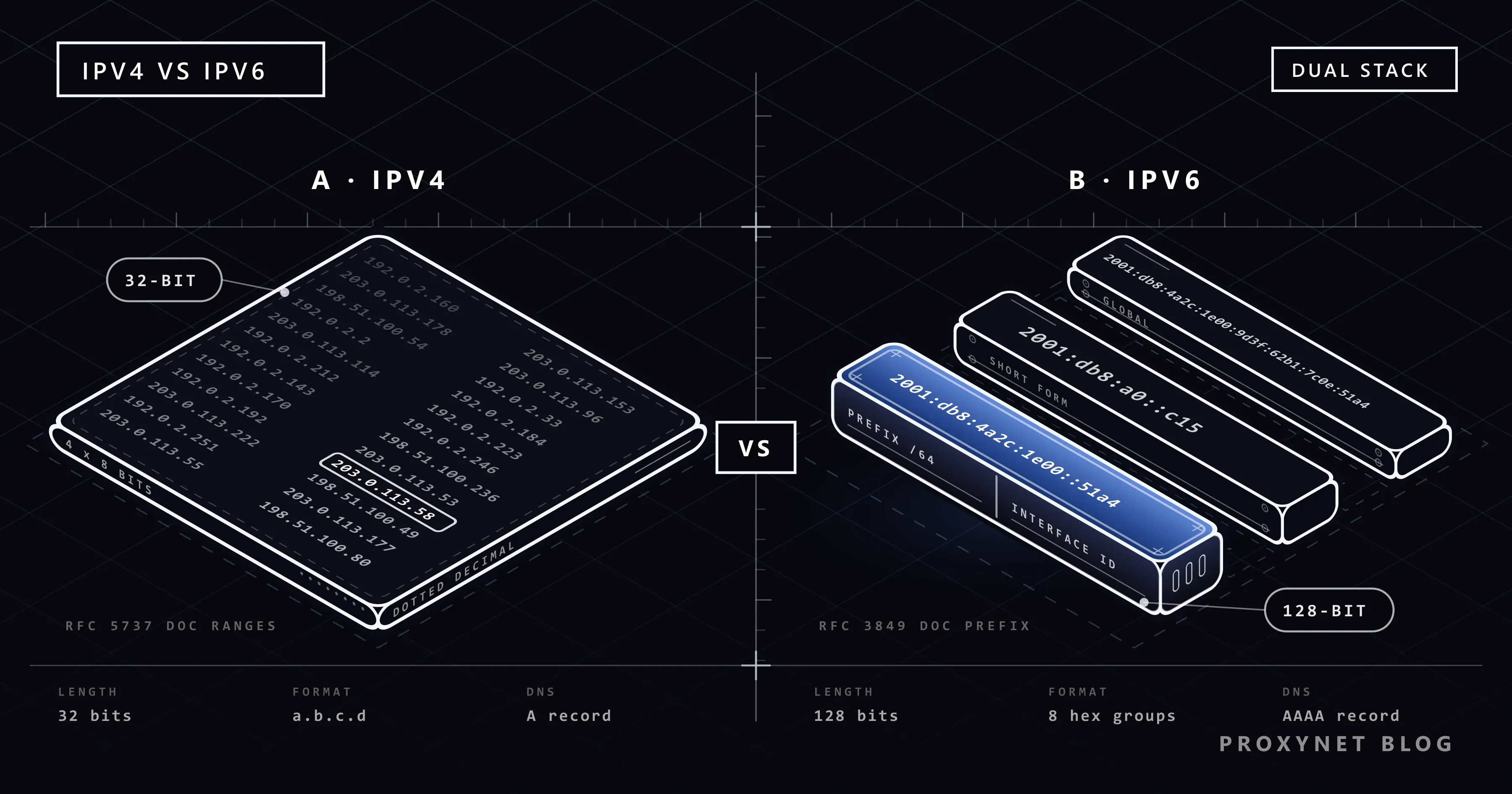
You open a "what is my IP" page and it shows two lines instead of one. The first looks familiar: 203.0.113.58, four numbers with dots. The second is a long string of digits, letters and colons, such as 2001:db8:4a2c:1e00:9d3f:62b1:7c0e:51a4. Both belong to your connection, and your device switches between them all day without asking you.
This post covers what separates the two, why IPv4 ran out, how devices get and choose addresses, how to check whether you have IPv6, the speed and privacy myths, whether to disable IPv6, and notes for site owners and proxy users.
What is the difference between IPv4 and IPv6?
The main difference is the length of the address: IPv4 uses 32 bits and IPv6 uses 128 bits. Thirty-two bits give 4,294,967,296 addresses, which seemed plenty when IPv4 was standardised in 1981. 128 bits give a 39-digit number of addresses: a single home Wi-Fi network on IPv6 gets a block about 4.3 billion times the size of the whole IPv4 internet.
The two are separate protocols, not an upgrade of one another. A device that speaks only IPv4 cannot connect to an address that exists only in IPv6, so the internet runs both at once, a setup called dual stack. If public and private addresses are new to you, start with What Is an IP Address?
All example addresses here come from ranges reserved for documentation (RFC 5737 and RFC 3849), so none belongs to a real device.
How do you read and shorten an IPv6 address?
An IPv6 address is eight groups of four hexadecimal digits (0-9 and a-f) separated by colons, and it is almost always shown shortened. The rules for the short form are fixed in RFC 5952, so every program prints the same address the same way. Take 2001:0db8:00a0:0000:0000:0000:0000:0c15:
- Remove the zeros at the start of each group:
2001:db8:a0:0:0:0:0:c15. - Replace the longest run of zero groups with
:::2001:db8:a0::c15. - Use
::only once, or nobody could tell how many zeros each gap hides. - Never use
::for a single zero group:2001:db8:0:1:0:0:0:5becomes2001:db8:0:1::5. - Write letters in lowercase:
2001:db8::c15, not2001:DB8::C15.
With a port number, the address goes in square brackets, [2001:db8::c15]:8080, so the last colon is not read as part of the address.
The first 64 bits, the prefix, name your network; the last 64 bits, the interface ID, name the device. Three kinds are worth recognising: ::1 is the device itself (IPv4's 127.0.0.1), link-local addresses starting with fe80 work only on the local network and exist on every IPv6 device, and public addresses typically start with 2 or 3.
Why did IPv4 run out, and what did NAT do about it?
IPv4 ran out because 4.3 billion addresses could not cover billions of phones, computers and servers. On 3 February 2011, IANA handed its last blocks to the five regional registries, and the Number Resource Organization announced that the free pool of IPv4 addresses was fully depleted. RIPE NCC, the registry for Europe, the Middle East and Central Asia, used up its own stock in November 2019.
The internet kept growing on IPv4 by sharing. NAT (network address translation) lets a home router give devices private addresses such as 192.168.1.20 and take them all online through one public address. Many providers added carrier-grade NAT (CGNAT) on top, putting several customers behind one shared address.
Sharing works for browsing but breaks anything that needs a connection from outside, such as reaching a home camera while you are away; What Is CGNAT? shows how to tell whether your line is affected. IPv6 has no shortage, so every device can have a public address again.
How does a device get an IPv4 or IPv6 address?
An IPv4 device usually asks a server for its address, while an IPv6 device usually builds its own from what the router announces. Here is a laptop joining a home Wi-Fi network that runs both.
For IPv4, through DHCP (Dynamic Host Configuration Protocol):
- The laptop asks the network for an address.
- The router offers a free private address such as
192.168.1.20, plus its own address and the DNS servers. - The laptop accepts, and the router marks the address as taken for a set lease time.
For IPv6, usually through SLAAC (stateless address autoconfiguration):
- The laptop creates its link-local
fe80address. - The router announces the network prefix, for example
2001:db8:4a2c:1e00::/64. - The laptop fills in the last 64 bits itself and checks that no other device uses the result.
- It also creates temporary addresses with random endings and uses them for the connections it opens.
No server records who has which address, hence "stateless"; offices that need such a record add DHCPv6.
IPv4 vs IPv6 at a glance
| Feature | IPv4 | IPv6 |
|---|---|---|
| Address size | 32 bits | 128 bits |
| Written as | 4 decimal numbers with dots | 8 hex groups with colons |
| Example | 192.0.2.10 | 2001:db8::10 |
| Number of addresses | About 4.3 billion | A 39-digit number |
| Getting an address | DHCP from the router | SLAAC, or DHCPv6 |
| At home | One public address shared via NAT | A public address per device |
| DNS record | A | AAAA |
| Packet header | 20-60 bytes, with checksum | Fixed 40 bytes, no checksum |
How does your device choose between IPv4 and IPv6?
When a site supports both, your device normally tries IPv6 first and falls back to IPv4 within a fraction of a second. The choice starts in DNS, which turns a site name into an address: an A record holds the IPv4 address, an AAAA record the IPv6 one.
The IETF's recommended method is called Happy Eyeballs, described in RFC 8305:
- The device asks DNS for the AAAA record and, immediately after, the A record.
- If IPv6 addresses come back, it starts connecting over IPv6.
- If that has not worked after a short delay, 250 milliseconds by default, it starts an IPv4 attempt alongside.
- The first connection to complete is used.
That is why a broken IPv6 path rarely leaves a page blank; at worst it adds a short pause. Windows also prefers public IPv6 addresses over IPv4 by default. Some networks, mobile carriers among them, give devices IPv6 only and reach IPv4-only sites through NAT64, a translator at the network's edge.
How do you check whether you have IPv6?
The quickest check is a test page on the device and network you care about; a phone on Wi-Fi and on mobile data can give different answers.
- Open a "what is my IP" page. An address with colons next to the one with dots means you have IPv6.
- Run Google's test at
ipv6test.google.com. "Yes, looks like you're using IPv6 already." means it works. "No problems detected." means no IPv6 yet, but nothing is broken. "Looks like your connection isn't ready for IPv6." points to the router, the operating system or the provider. - On a Mac, choose Apple menu > System Settings > Network, click your connection, then Details and TCP/IP. Configure IPv6 should say Automatically; Link-local only keeps IPv6 inside your network.
- If you have no IPv6, check that it is enabled in your router's settings, then ask your provider whether your plan includes it.
Advanced: check on Windows with ipconfig
Type cmd into the Start menu, open Command Prompt and run:
ipconfigUnder your Wi-Fi or Ethernet adapter, an IPv6 Address or Temporary IPv6 Address starting with 2 or 3 means working public IPv6. A Link-local IPv6 Address starting with fe80 alone does not count, because every device has one.
Is IPv6 faster or more secure than IPv4?
Neither is automatically faster or more secure; the network around it decides.
Speed. IPv6 skips address translation, but real speed depends on the route to the site and how busy the server is. A pause on the first connection usually means a half-broken IPv6 path, a fault to fix.
Security. IPv6 is often called safer because it "comes with IPsec", the suite for encrypting IP traffic. IPsec was once mandatory for IPv6, but RFC 8504 now only says it should be supported, and it works on IPv4 too. On the web, encryption comes from HTTPS either way.
Exposure. On IPv4, home NAT hides devices almost by accident: nothing outside can start a connection to a private address. On IPv6 every device is reachable in principle, so the router's IPv6 firewall does that job. RFC 6092, the IETF's guidance for home routers, expects incoming traffic to pass only when a device inside asked for it; check that this firewall is on before you open a port.
Privacy. Early IPv6 built the device half of the address from the network card's hardware (MAC) address, so it followed a laptop everywhere. Devices now use temporary addresses with random endings; under RFC 8981 each is preferred for one day and valid for two by default. The prefix still points to your home, as a public IPv4 address does.
Should you disable IPv6?
Usually not. Microsoft does not recommend disabling IPv6 on Windows, because some Windows components might stop working. If a program really needs IPv4 first, Microsoft recommends the Prefer IPv4 over IPv6 setting, which an administrator applies in the registry and which needs a restart.
The usual reasons for switching IPv6 off each have a better fix:
- Pages hesitate before loading. The IPv6 path is broken; update the router firmware or report it to your provider instead of hiding it on one device.
- A VPN app does not carry IPv6. Use the app's own IPv6 option or ask its support team first.
- An old program fails on IPv6. Use the prefer-IPv4 setting on Windows; on a Mac, set Configure IPv6 to Link-local only for a while, then back to Automatically.
How widely is IPv6 used today?
Close to half of users reach the internet over IPv6. Google's IPv6 statistics, which measure the share of users who access Google over IPv6, showed 48.70% on 9 October 2026, after daily values between about 46% and 52% that month.
Adoption varies widely by country. Google's per-country figures for the same date, rounded: France 87%, Germany 76%, India 68%, the United States 54%, Türkiye 18%, Spain 13%. The rest still connect over IPv4 only, which is why no public website can drop IPv4.
What should site owners check?
A site works over IPv6 only when its DNS has an AAAA record and the server answers on that address:
- Add an AAAA record next to the A record; if a CDN or host runs your DNS, check whether it does this for you.
- Make the web server listen on IPv6 too, and open the same ports in the IPv6 firewall.
- Test from an IPv6-only network, so a silent fallback to IPv4 cannot hide a fault.
- Check that logs, rate limits and allowlists accept IPv6, and count visitors by
/64prefix rather than single address.
What does it mean if you use a proxy?
With a proxy, the site sees the proxy's exit address, so the protocol the proxy uses to reach the site is what counts. An IPv6 exit works only on sites with an AAAA record; testing a target and why sites judge IPv6 by prefix are covered in IPv4 vs IPv6 Proxies.
For a mixed or unknown list of target sites, an IPv4 Proxy is the safe choice.
For jobs that need many addresses on targets you have confirmed support IPv6, look at an IPv6 Proxy. Both are sold per IP and include access to a set of target websites by default; access to all websites is a paid add-on.
Where does the difference show up day to day?
- Reaching a home camera from outside: blocked by CGNAT on IPv4, possible on IPv6 once the router's firewall allows it.
- Allowlists at work: temporary IPv6 addresses change daily, so admins allow a prefix or a fixed address.
- Visitor counts and rate limits: a home shows up as one IPv4 address but many IPv6 addresses.
- Older printers that speak IPv4 only keep working thanks to dual stack.
Common mistakes
- Taking an
fe80address as proof of IPv6 internet. Only a public address starting with2or3shows that. - Disabling IPv6 to speed things up. It hides a fault, and Microsoft does not recommend it.
- Treating NAT as the firewall. With public IPv6 addresses, the router's IPv6 firewall keeps unsolicited traffic out.
- Allowlisting one temporary IPv6 address. It changes within a day or two.
- Assuming a site works over IPv6 because it opens. A fallback to IPv4 looks the same in the browser.
Decision guide
| Your situation | What to do |
|---|---|
| You want to know if you have IPv6 | Open ipv6test.google.com on that device and network |
| The test says you aren't ready | Check the router's IPv6 setting, ask the provider |
| Pages pause, then load | Fix the IPv6 path, don't switch it off |
| A Windows program needs IPv4 first | Have an admin set Prefer IPv4 over IPv6 |
| A home device must be reachable behind CGNAT | IPv6 on both ends, or a public IPv4 from the provider |
| You run a website | AAAA record, listen on both, test from IPv6 only |
| Proxies for sites with mixed IPv6 support | IPv4; IPv6 only for targets with AAAA |
Frequently asked questions
Will IPv6 replace IPv4?
Not any time soon. About half of users still have no IPv6, so sites and providers will run both for years, and no date has been set for switching IPv4 off.
Why does my computer have several IPv6 addresses?
That is normal. A device usually has a link-local fe80 address, a stable public address and one or more temporary addresses that are replaced about daily and used for outgoing connections.
Can an IPv4-only device open an IPv6-only website?
Not directly, because the two protocols cannot talk to each other. It needs a translator such as NAT64 or a proxy that speaks both; in practice this is rare, since nearly every public site still has an IPv4 address.
Does IPv6 make it easier to track me?
Not more than IPv4. Temporary addresses change the device half of the address regularly, the prefix identifies your home much as a public IPv4 address does, and cookies and accounts identify you either way.
Do I need IPv6 at home?
You do not have to do anything: if your provider offers IPv6, your router and devices use it automatically. It is most useful behind CGNAT, when you want to reach a device at home from outside.
What is the IPv6 version of 192.168.1.1?
There is no fixed one. Your router announces itself with a link-local fe80 address that devices use as their gateway, and it differs by router; for the admin page, use the address in the router's manual.
Summary
IPv4 and IPv6 do the same job with different address sizes: 32 bits with dots, whose free supply ran out in 2011, and 128 bits with colons, enough for every device. A dual-stack device prefers IPv6 and falls back to IPv4 within a fraction of a second. Check whether you have IPv6 with a test page, keep it on, use the prefer-IPv4 setting when a program needs it and make sure your router's IPv6 firewall is active. If your own work needs addresses of either kind, take a look at our proxy services.