You need a real browser from Node.js: the page you want to read builds its content with JavaScript, or an HTML report has to become a PDF. Two names come up first, Puppeteer and Playwright. Both are free, and their APIs look alike (page.goto(), page.click(), page.pdf()), so syntax is not what decides it. The choice comes down to the browsers and languages you need, how the proxy is set, and what you expect from testing and AI agent tooling.
This post compares the two on browsers and protocol, languages, waiting, proxy configuration, test tools and MCP servers. We ran the same job in both with Puppeteer 25.12.0 (Chrome for Testing 154) and Playwright 1.63.0 (Chromium 153) on Node.js 24 and Windows 11, through a local proxy that asks for a username and password. Which tool websites notice less is not a topic here: both drive a real browser, and following the site's rules is your job in either.
What are Puppeteer and Playwright?
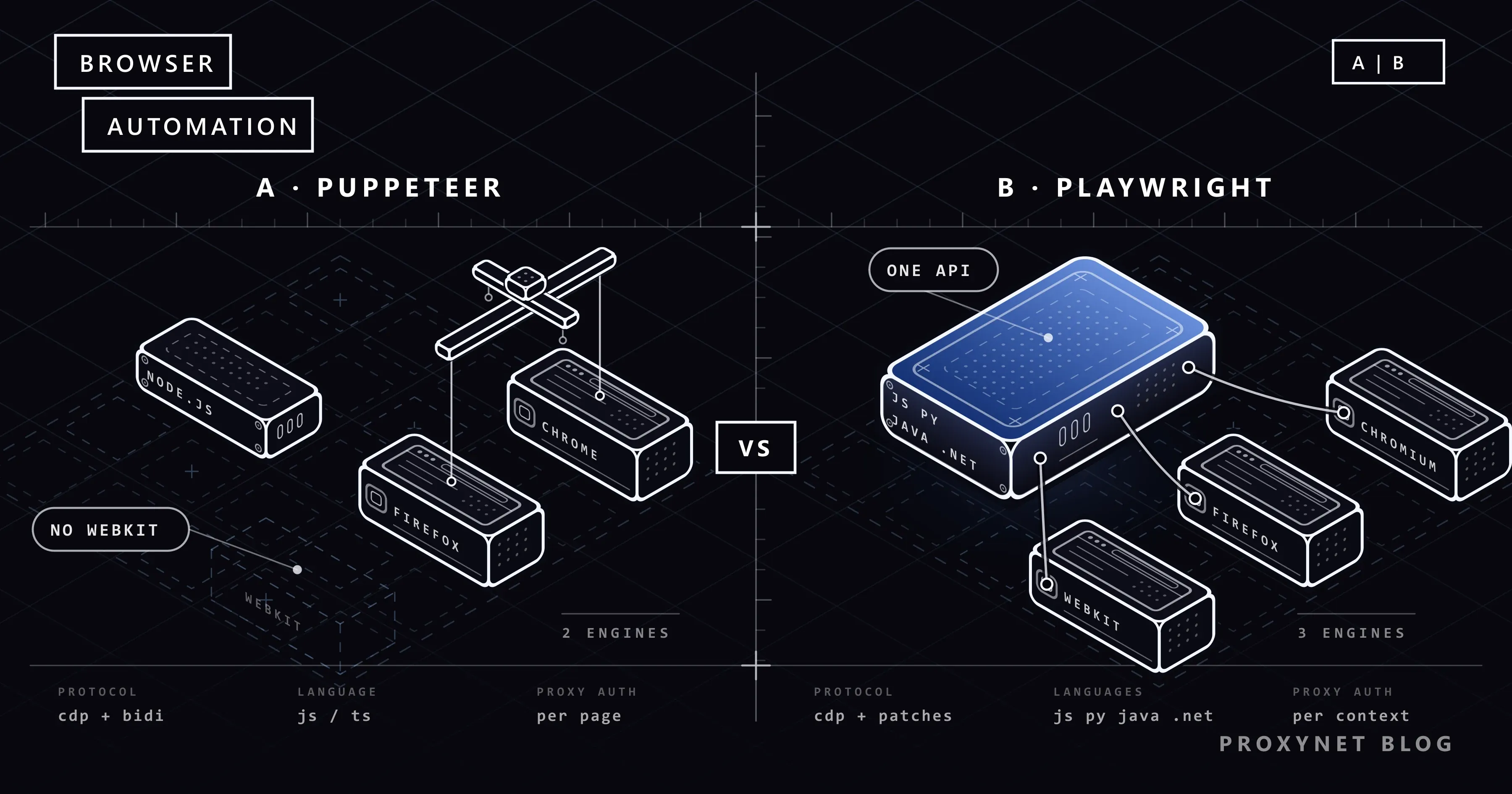
Puppeteer is a JavaScript library with a high-level API for controlling Chrome or Firefox. It runs on Node.js and has no official library in another language; Python ports exist, but they are third-party projects. npm i puppeteer also downloads a matching Chrome for Testing build and the smaller chrome-headless-shell binary into ~/.cache/puppeteer, while puppeteer-core is the same library without the download.
Playwright is Microsoft's open source automation library. It drives Chromium, Firefox and WebKit, the engine behind Safari, through one API, with official libraries for JavaScript and TypeScript, Python, Java and .NET. Next to it sits Playwright Test, a test runner with assertions and parallel runs. Browsers are a separate step: npx playwright install chromium downloads the build pinned to your Playwright version.
Both are for pages whose content appears only after JavaScript runs. If the data is already in the page source or a JSON endpoint, a plain HTTP client needs far less memory.
How do they talk to the browser?
The protocol under each tool explains most of its behaviour. A Puppeteer script runs like this:
puppeteer.launch()starts Chrome for Testing from the cache, or Firefox if you passbrowser: "firefox".- Puppeteer connects over the Chrome DevTools Protocol (CDP), Chrome's own debugging protocol, or over WebDriver BiDi, the W3C standard for two-way browser automation.
- Each call such as
page.goto()becomes a series of protocol messages. - Events come back without you asking: requests, responses, console messages, dialogs.
Puppeteer's WebDriver BiDi page explains the split: BiDi is the default for Firefox, while Chrome stays on CDP because not every CDP feature exists in BiDi yet. Since version 23, Puppeteer works with the stable Firefox release rather than a special build.
Playwright also speaks CDP to Chromium. For Firefox and WebKit it ships patched builds, and its documentation states that it does not work with branded Firefox or Safari because it relies on those patches; Google Chrome and Microsoft Edge are available through the channel option. In Python, Java and .NET, every call passes through a Node.js driver bundled with the package, so the browser side behaves the same in each language. To automate the Firefox your users install, Puppeteer is closer; for WebKit, only Playwright has it.
Puppeteer vs Playwright: comparison table
| Puppeteer | Playwright | |
|---|---|---|
| Browsers | Chrome, stable Firefox | Chromium, patched Firefox, WebKit; Chrome and Edge via channel |
| Protocol | CDP for Chrome, WebDriver BiDi for Firefox | CDP for Chromium; Firefox and WebKit through patched builds |
| Official languages | JavaScript and TypeScript | JavaScript and TypeScript, Python, Java, .NET |
| Waiting | Locators wait before actions | Locators wait before actions; test assertions retry |
| Test runner | None built in | Playwright Test |
| Recording | Chrome DevTools Recorder export | playwright codegen |
| Looking back at a run | Performance trace for DevTools | Trace Viewer |
| Proxy per browser | --proxy-server launch argument | proxy in launch() |
| Proxy per context | proxyServer in createBrowserContext() | proxy in newContext() |
| Proxy username and password | page.authenticate() on a page, cached per context | username and password fields |
| MCP server | Chrome DevTools MCP (built on Puppeteer) | Playwright MCP |
How does the same job look in both tools?
Our test page, shop.test, is a small local page that prints six product cards with JavaScript one and a half seconds after loading, then shows a "Next" link. The job: open it through a proxy that requires a username and password, read the product names, click "Next" and confirm the new address. In your own code, put your target in place of shop.test.
With Puppeteer:
import puppeteer from "puppeteer";

const URL = "http://shop.test/"; // our local test page; put your target here

const browser = await puppeteer.launch({
  args: ["--proxy-server=http://pr.proxynet.io:8000"],
});
try {
  const page = await browser.newPage();
  await page.authenticate({ username: "user", password: "pass" });
  const response = await page.goto(URL);
  console.log("status:", response.status());
  await page.waitForSelector("div.product"); // the list is drawn by JavaScript
  const names = await page.$$eval("div.product h2", (els) => els.map((el) => el.textContent));
  console.log(names.length, "products, first:", names[0]);
  await Promise.all([
    page.waitForNavigation(),
    page.locator("a.next").click(), // the locator waits until the link can be clicked
  ]);
  console.log(page.url());
} finally {
  await browser.close();
}
With Playwright:
import { chromium } from "playwright";

const URL = "http://shop.test/"; // our local test page; put your target here

const browser = await chromium.launch({
  proxy: { server: "http://pr.proxynet.io:8000", username: "user", password: "pass" },
});
try {
  const page = await browser.newPage();
  const response = await page.goto(URL);
  console.log("status:", response.status());
  const products = page.locator("div.product h2");
  await products.first().waitFor(); // count() and allTextContents() do not wait
  const names = await products.allTextContents();
  console.log(names.length, "products, first:", names[0]);
  await page.getByRole("link", { name: "Next" }).click(); // waits on its own
  await page.waitForURL("**/page/2/");
  console.log(page.url());
} finally {
  await browser.close();
}
Both scripts printed the same three lines through our local test proxy:
status: 200
6 products, first: Desk lamp
http://shop.test/page/2/
Puppeteer takes the proxy address as a Chrome argument and the credentials in a separate call; Playwright takes all three in one object. Puppeteer pairs the click with page.waitForNavigation() so the URL is not read too early, while Playwright finds the link by its accessible name and waits for the URL pattern.
The proxy log showed one more difference. Puppeteer's default headless mode runs the full Chrome for Testing build, which also sent requests to Google services (update.googleapis.com, accounts.google.com and others) through the proxy. With headless: "shell", the lighter chrome-headless-shell binary, they disappeared; Playwright's default headless shell sent only the page's own requests. If you pay for traffic by the gigabyte, as with Residential Proxy, that background traffic is worth checking in your panel.
How does automatic waiting work in each?
Most errors on dynamic pages come from timing: the code looks for an element that JavaScript has not drawn yet. For actions, both tools handle it in a similar way.
In Puppeteer the recommended route is the locator. Before a click, a locator makes sure the element is in the viewport, visible, enabled and has a stable bounding box over two animation frames; if not within the page's timeout, it throws a TimeoutError. Older code built on page.$() and page.click(selector) does not wait for the element to appear, so that style calls page.waitForSelector() first.
Playwright checks that the element is visible, stable, able to receive events and enabled. It adds two things: locators that find an element by role, label or text, which survive a renamed CSS class, and, in Playwright Test, assertions such as expect(locator).toHaveText() that retry until the condition holds.
Neither waits when you read a list: page.$$eval() and allTextContents() return what is on the page at that moment, which is why both scripts wait for the first product.
How do proxy settings differ?
For scraping work, this is where the two tools part ways most.
In Puppeteer the --proxy-server argument binds the whole browser. For a separate proxy per session, the BrowserContextOptions reference describes proxyServer and proxyBypassList and leaves the username and password to Page.authenticate:
const context = await browser.createBrowserContext({
  proxyServer: "http://pr.proxynet.io:8000",
});
const page = await context.newPage();
await page.authenticate({ username: "user", password: "pass" }); // Chrome caches it for the context
The reference adds that page.authenticate() turns on request interception behind the scenes, which might affect performance. The call is made on a page, but Chrome caches the credentials for the whole browser context: in our tests a context where no page had made the call failed with net::ERR_INVALID_AUTH_CREDENTIALS, while later pages in an authenticated context went through. Sessions and exit IP checks are covered in our Puppeteer proxy setup guide.
In Playwright the proxy object goes into launch() for the whole browser or newContext() for one context, with the username and password as fields:
const context = await browser.newContext({
  proxy: { server: "http://pr.proxynet.io:8000", username: "user", password: "pass" },
});
The Playwright network guide shows both forms and accepts HTTP(S) and SOCKSv5 servers. Since each context carries its own credentials, there is no per-page call to forget.
One behaviour to know: when we left the credentials out, Playwright threw no error and page.goto() returned a response with status 407. Check response.status() instead of taking a quiet goto as proof that the page loaded. The full setup is in What Is Playwright and How to Use It With a Proxy.
Three Chromium rules apply to both tools. Chromium's proxy document says Chrome supports no authentication method for SOCKS5, so SOCKS5 with a password does not work in Chromium from either tool; use an IP whitelist, which on our side takes up to 10 addresses. Chrome also refuses credentials written into the proxy address: in our Puppeteer test, user:pass@ in --proxy-server made Chrome 154 fail with net::ERR_NO_SUPPORTED_PROXIES, so it is no shortcut. And Chrome skips the proxy for loopback addresses: in our test Puppeteer opened 127.0.0.1 directly while Playwright sent it through the proxy, and with --proxy-bypass-list=<-loopback> Puppeteer used the proxy too.
If each context should leave from a different IP, you do not need an address list in your code. A single gateway with Rotating Proxy changes the exit IP for you, and a sticky session keeps one IP for 1 to 60 minutes.
Which MCP server: Playwright MCP or Chrome DevTools MCP?
This comparison now often comes up when someone wants to give an AI coding assistant such as Claude Code or Cursor a browser. MCP (Model Context Protocol) is the standard way for those assistants to call outside tools, and each library has a server built on it.
Playwright MCP is Microsoft's server. It hands the page to the model as the text of the accessibility tree rather than screenshots, starts with npx @playwright/mcp@latest, and takes --proxy-server and --proxy-bypass flags. Its README notes that for coding agents a command-line route uses fewer tokens, because it does not load large tool schemas into the model's context. Setup and proxy credentials are in What Is Playwright MCP?.
Chrome DevTools MCP lets a coding agent control and inspect a live Chrome, using Puppeteer for actions and DevTools for performance traces; it starts with npx -y chrome-devtools-mcp@latest. In version 1.10.1, --proxyServer is passed to Chrome as --proxy-server with no field for credentials, so an IP whitelist is the practical route. By default it launches the installed stable Chrome and sends usage statistics to Google unless you add --no-usage-statistics.
For an agent that clicks through pages and fills in forms, use Playwright MCP; for one that reads console errors, network requests and performance traces of your own site, Chrome DevTools MCP. Either way, limit where the agent may go (--allowed-origins or --allowedUrlPattern), keep passwords out of the prompt and approve actions that change something.
Test runner, code generation and traces
Playwright's lead is widest here. Playwright Test brings the runner, assertions, parallel runs, retries and an HTML report; Python uses the pytest plugin, Java and .NET their usual test frameworks. npx playwright codegen <url> writes code while you click. The Trace Viewer (npx playwright show-trace trace.zip) replays a recorded run with DOM snapshots, network requests and console messages on a timeline, so you can see why an overnight job came back empty.
Puppeteer leaves testing to you: combine it with Jest, Mocha or the Node.js test runner. For recording, the Recorder panel in Chrome DevTools exports a session as a Puppeteer script, a Puppeteer script for Firefox, or one with a Lighthouse analysis. page.tracing.start() writes a Chrome performance trace for DevTools, which answers why a page is slow but is not a step-by-step replay of your script.
Speed: why we give no numbers
Published "X percent faster" figures were measured on someone else's machine and page. In Chromium both tools speak CDP, and in a crawl through a proxy most of the time goes to the network and the target site. Setup choices such as full Chrome against the headless shell matter more than the library. If you need a number, measure it on your own target with the same proxy and concurrency.
Use cases
- PDFs and screenshots from a Node.js service: both have
page.pdf(), and both produced a PDF from Chromium in our test; Puppeteer is the lighter dependency. - End-to-end tests across engines: Playwright Test runs the same test in Chromium, Firefox and WebKit.
- Data collection in Python, Java or .NET: Playwright, since Puppeteer is JavaScript only.
- Automating the stable Firefox release: Puppeteer over WebDriver BiDi.
Whichever tool you pick, follow the site's robots.txt and terms of use, use the official API when there is one, and keep your request rate at a level the site can carry.
Common mistakes
- Opening a Puppeteer context without
page.authenticate(). Chrome caches the credentials per context; a context in which no page made the call fails withnet::ERR_INVALID_AUTH_CREDENTIALS. - Expecting Playwright to throw when the proxy asks for credentials. In our test it returned a 407 response; check
response.status(). - Writing
user:pass@into the proxy address. Chrome does not take credentials from the address; pass them withpage.authenticate()in Puppeteer or theusernameandpasswordfields in Playwright. - Using SOCKS5 with a password in Chromium. Chrome has no SOCKS5 authentication; use an IP whitelist.
- Testing a proxy against
localhostin Puppeteer. Chrome bypasses the proxy for loopback addresses unless you add<-loopback>. - Expecting Playwright's Firefox to be the installed Firefox. It is a patched build, and WebKit is not Safari.
Decision guide
| Need | Recommendation |
|---|---|
| A Node.js script that only needs Chrome | Either; Puppeteer is enough |
| Python, Java or .NET | Playwright |
| Tests in the WebKit engine | Playwright |
| Automating the stable Firefox release | Puppeteer |
| Proxy credentials set once per context | Playwright |
| Separate IPs per session in one browser | Either, one context per session |
| A test suite with assertions and reports | Playwright Test |
| An agent that fills in forms | Playwright MCP |
| An agent that debugs performance in Chrome | Chrome DevTools MCP |
Frequently asked questions
Is Playwright better than Puppeteer?
Not across the board. Playwright covers more engines, languages and test tooling; Puppeteer is smaller and works with the stable Firefox release. If a working Puppeteer script does what you need, there is no reason to rewrite it.
Can I use Puppeteer with Python?
Not officially. Puppeteer's only official library is for JavaScript and TypeScript on Node.js; Python ports exist, but they are third-party projects outside the Puppeteer repository. For a Python pipeline, Playwright has an official library with the same browser automation features as its Node.js version.
Does Puppeteer work with Firefox?
Yes. Since version 23 it works with the stable Firefox release over WebDriver BiDi; you launch it with browser: "firefox". Firefox is not downloaded with the package unless you enable it in the download configuration, and a few CDP-only features are not available over BiDi.
Is it hard to move from Puppeteer to Playwright?
A small script moves quickly, because many calls share names: goto, click, evaluate, pdf. The work is in three places: proxy credentials move into the proxy object, waitForNavigation() pairs give way to waitForURL() and locators, and browser contexts become the unit of isolation.
Which one should I use with Claude Code or another AI agent?
It depends on the task. Playwright MCP is built for driving pages through the accessibility tree; Chrome DevTools MCP, built on Puppeteer, is stronger at inspecting console messages, network requests and performance traces. You can install both and give each task only the server it needs.
Can either tool use a SOCKS5 proxy with a username and password?
Not in Chromium, because Chrome supports no SOCKS5 authentication. Use SOCKS5 with an IP whitelist, or an HTTP proxy with a username and password. The endpoint builder in our panel shows the SOCKS5 port for each product.
Summary
Puppeteer and Playwright drive the same Chromium in much the same way; the difference is in what surrounds it. Puppeteer is a Node.js library for Chrome and the stable Firefox, with the proxy credentials passed through page.authenticate() and cached per browser context. Playwright adds WebKit, three more official languages, a test runner with traces, and a proxy option that carries the credentials per context. For a Chrome-only Node.js job Puppeteer is enough; for several languages, engines or a test suite, Playwright fits better. You can find the proxy types that work with both in our proxy services.