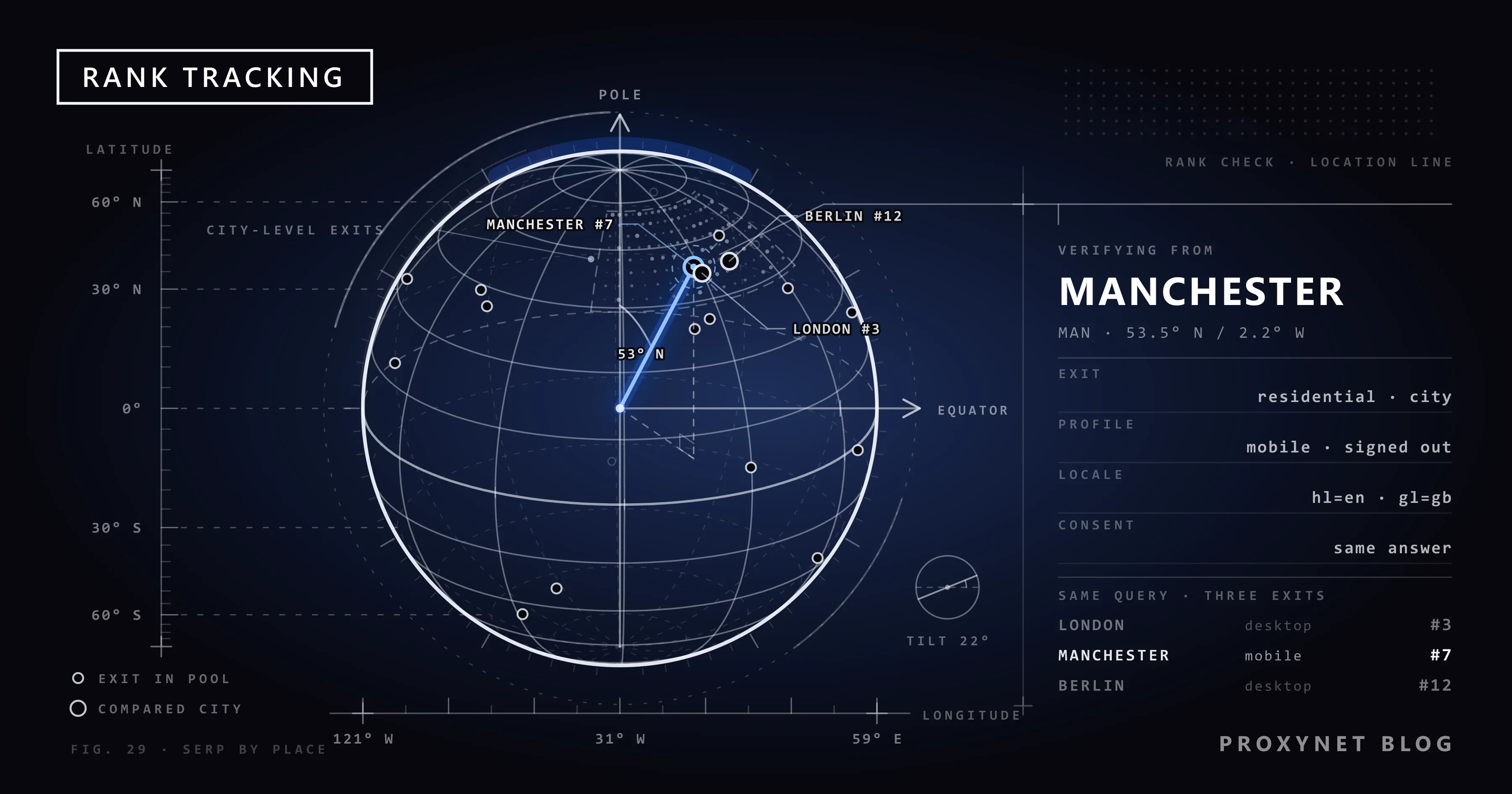
An agency sends its client a monthly report: "car hire Manchester", position 3. The client opens a laptop in the Manchester office, searches the same words and finds the site at position 7, under a map box and two ads. The account manager searched from London on a desktop; the client searched from Manchester on a phone. Both pages are real; the report just never said which one it was describing.
This article is for the person who has to make that report defensible. It covers why one query returns different rankings by country, city, language, device and personalisation, what an accurate check needs, where a proxy belongs in a rank-tracking stack next to the Search Console API and a rank-tracking service, which proxy type suits which check, how to pace checks, and a workflow from keyword list to comparison. The official route comes first; nothing here shows how to scrape Google.
Why does the same query return different rankings?
Google does not keep one ranked list per keyword. It generates a page for each request, and several inputs to that page vary from searcher to searcher.
- Country. Which pages are eligible, which language versions are preferred and which local businesses appear depend on the country Google assigns to the search.
- City and district. For queries with local intent, the local pack, and often the organic results, are ranked by distance from the searcher's estimated position. "Dentist" gets a different page in every city, and in a large city the page changes between districts.
- Language. The interface language and the browser's
Accept-Languageheader decide which language's pages come first. A Turkish-speaking and a German-speaking user on the same Berlin street do not see the same top ten. - Device. On a phone the local pack and the "People also ask" block sit higher and push organic results down, and the mobile version of a page is the one being ranked.
- Personalisation. A signed-in account brings search history and, on a phone, precise device location into the page. If you visit your client's site every day, Google may show it to you higher than to a stranger.
Each factor is explained in why Google results differ between people. For rank tracking the point is that "position 3" is not a property of a keyword; it is a property of a keyword plus a location, a language, a device and a moment.
How does Google decide where a search comes from?
Google's help page on how it uses your location in Search names four sources: the device's own location, the home and work addresses in the Google Account, past activity, and the IP address of the connection. Those four are the levers a rank check has to control, and their order matters:
- Device location wins when it is available. A phone that has granted location permission tells Google where it is to within metres, and a check on that phone reports its position, not the proxy's.
- Account data comes next. Stored addresses and recent activity feed the estimate when the user is signed in. A signed-out profile removes this layer.
- The IP address is the fallback. With no device location and no account, Google reads the connection's IP address. This is where a proxy works: it forwards your request, so Google sees the proxy's address instead of yours, and when that address belongs to a home or mobile connection in Manchester, the estimate becomes Manchester. IP geolocation is usually right at country level and often at city level, but it can miss by a district or more; see how accurate IP geolocation is.
- The page tells you what it decided. The bottom of every results page shows the location Google used and its source, such as "From your internet address". A check that does not record that line has not proved where it ran from.
Because the sources are ranked, changing the exit IP does nothing while the browser still shares device location or is still signed in.
What does an accurate rank check need?
A defensible check controls every input above. It is a fixed profile that you set up once and reuse.
| Input | What to set | Why it matters |
|---|---|---|
| Exit IP address | A residential or mobile IP in the target city | Google's location fallback; the only lever a proxy controls |
Country parameter gl | The target country's two-letter code | States the market instead of leaving it to the IP |
Language parameter hl | The target audience's language | Decides which language's pages rank first |
| Device | A mobile or desktop browser matching the audience | Different layout, different feature positions |
| Sign-in state | Signed out, fresh profile | Removes account history and stored addresses |
| Device location | Denied or unavailable | Otherwise it overrides the IP address |
| Consent state | The same answer to the cookie dialog every time | The choice decides which cookies the session carries |
| Location line | Read and stored with the result | Proof of where the check ran |
gl and hl narrow what you ask for, not where Google thinks you are, so they complement the exit IP rather than replace it. The manual side of this checklist is in how to check your Google ranking accurately; the country-level options that need no proxy are compared in how to search Google from another country.
Consent state is the input agencies most often forget: where Google shows a consent dialog to signed-out visitors, a fresh profile meets it on every visit, so decide once, pick the option that keeps the least data, and give the same answer in every check.
Where do proxies fit in a rank-tracking stack?
A rank-tracking stack has three layers, and proxies belong in two of them.
Layer 1: the Search Console API, primary source for your own site. The Search Analytics query method returns clicks, impressions, CTR and average position by query, page, country (a three-letter ISO 3166-1 alpha-3 code), device (DESKTOP, MOBILE, TABLET) and date, up to 25,000 rows per request. It is Google's own record of the pages real users saw, so it needs no proxy and no browser. Its limits are why the other layers exist: averages rather than a page, country level rather than city, nothing about competitors. Pulling it daily is covered in how to automate SEO rank tracking.
Layer 2: a rank-tracking service for competitors, cities and daily snapshots. These platforms run their own location infrastructure: set a keyword to "Manchester, mobile" and the service checks from an exit in Manchester with a mobile profile. The proxy is already inside the product; your job is to configure locations and devices correctly and to ask the provider how it sources its data and whether its contract covers your use.
Layer 3: your own verification checks from a city where you are not. The service says position 3 in Manchester; the client says 7. Someone has to look at the actual page: a clean, signed-out browser, hl and gl set, routed through a residential or mobile IP in Manchester, one search, the location line read and the page saved. This is what proxies are for in an agency: verification at human scale, screenshots for the client, a look at the local pack and the ads above the fold. The setups are on our SEO proxy and Google proxy pages.
What belongs nowhere in the stack is a script of your own that sends queries to Google. Google's spam policies define "machine-generated traffic" as sending automated queries to Google, including scraping results for rank-checking purposes, without express permission, and state that it violates both the spam policies and the Terms of Service. A proxy pool changes which addresses are involved, not the policy. If you need volume, buy it from a licensed service; if you need proof, look with your own eyes.
Which proxy type suits SERP checks?
| Proxy type | Where the IP comes from | Fit for SERP checks |
|---|---|---|
| Residential | Home broadband, chosen by country and city | Desktop checks, local pack, city pages |
| Mobile | Carrier networks, chosen by country and city | Mobile checks where the audience is on phones |
| Rotating residential | A new residential IP per request or session | Separate checks spread over days, one session each |
| Sticky residential | The same residential IP for 1 to 60 minutes | One verification session with several screenshots |
| Static ISP | A fixed ISP-registered IP hosted in a datacenter | Logging in to SEO tools that whitelist IPs |
| Datacenter | Cloud and hosting ranges | Weak: verification screens, no searcher's city; crawling your own site instead |
The split in the table comes down to where the address lives. Datacenter addresses belong to hosting ranges, which are public knowledge and tied to no city in the sense that matters for local results; a datacenter exit often meets the "unusual traffic" screen before it sees a result, and when it does, the location line points at the datacenter's town (see why Google shows the unusual traffic error). Residential Proxy addresses come from home connections and carry a city, which is what a local check needs. For a mobile-first audience, a Mobile Proxy exit on a carrier network, combined with a mobile browser profile, reproduces what most of the client's customers see; the exit is chosen by country and city, not by carrier. Pick the device the client's Search Console data says the traffic comes from, then the proxy that matches it. The wider trade-offs are in residential vs datacenter proxies, and our comparison of five providers for SEO work is in the best proxies for SEO tools.
How do you pace and cache checks to stay polite?
Even legitimate verification drifts into a grey zone once it looks like a script. Four habits keep it on the human side of the line.
- Pace like a person. One query at a time, a pause between queries, one session per city. Fifteen keywords in three cities is forty-five searches in a morning, not four thousand. If the list outgrows what one person would search by hand, it belongs in the rank-tracking service.
- Cache what you capture. Store the page, the location line, the timestamp and the profile settings with every check, and answer a colleague's question from the stored capture, not from a new search.
- One sticky session per check. A Sticky Proxy session keeps the same IP for the minutes a verification takes, so the location does not jump between screenshots. A Rotating Proxy is for the gaps between sessions and cities, not the middle of one check.
- Respect the verification screen. If Google shows one, the check is over. Solving it with a service or retrying through another address is the behaviour the spam policy describes.
A rank-tracking workflow
- Keywords. List the queries that matter, each with its target page, priority, language and the audience's device. Seed the list from Search Console's query report.
- Locations. Attach a country and, for local-intent queries, a city to each keyword. Multi-branch clients get one row per branch city.
- Schedule. Search Console is pulled daily; the service runs on its own cadence; verification runs on events such as a launch, an algorithm update or a client meeting, plus a monthly sample of critical keywords.
- Capture. Record the query, the
hlandglvalues, the device profile, the consent choice, the exit city, the location line, the timestamp and a screenshot. A capture without the location line is discarded. - Store. One table, timestamped, never overwritten, tagged with its source, because Search Console rows, service snapshots and captures measure different things.
- Compare. Like with like: this month's Manchester mobile capture against last month's; four weeks of Search Console against the previous four. Report the conditions with the number, so "position 3" always reads "position 3, Manchester, mobile, English, 14 October".
Use cases
- Multi-city clients: one check per branch city, with the local pack and the city page captured. Map results follow their own rules, covered in how to see Google Maps results for another city.
- Country expansion: verifying that the new language version ranks in the new market before the campaign starts; exit points are listed on our locations pages.
- Client disputes: reproducing what the client saw, from their city and device, and explaining the gap with the location line and the ad layout in hand; the ad side is on our ad verification page.
Common mistakes
- Checking from the office IP. Every result carries the office's city, and every client elsewhere gets a report about the wrong page.
- Ignoring the local pack. Counting only the ten blue links hides a map box that pushes the client's result below the fold on a phone.
- Mixing devices. Comparing a desktop check with last month's mobile check produces a "drop" that never happened.
- Skipping the location line. Without it there is no proof of where the check ran, and IP geolocation does miss.
- Running a script of your own against Google. It violates the spam policies and does not become acceptable through a proxy pool.
Decision guide
| Your need | Recommendation |
|---|---|
| Your own site's position by query, country and device | Search Console API, daily pull into a database |
| Competitor positions and daily snapshots across cities | A rank-tracking service, locations and devices set per keyword |
| Proof of what a local user sees in one city | A manual check through a residential IP there, signed out, location line recorded |
| Mobile audience in a specific city | A mobile proxy exit plus a mobile browser profile |
| Logging in to a dashboard that whitelists IPs | A static ISP proxy with a fixed address |
| Thousands of queries sent to Google by your own script | Not an option; use a licensed service |
Frequently asked questions
Why does my rank tracker show a different position than my browser?
Because the two looked at different pages: the tracker ran from the location and device you configured, your browser from your city, possibly signed in, on another device. Compare the location lines and device profiles first.
Do I still need a proxy if I pay for a rank-tracking tool?
Not for the tool's own checks. You need one for verification: reproducing a page by hand from a city where you have no office, capturing screenshots for a client, or checking the local pack and ads that a position number does not show.
Residential or mobile proxy for rank tracking?
Match the audience's device. If the client's Search Console data shows most traffic on mobile, verify on a mobile browser profile through a mobile exit; desktop verification uses a residential exit in the target city.
Can a datacenter proxy check Google rankings?
It is a poor fit. Hosting ranges are not tied to a city the way home connections are, and they often meet a verification screen before showing results. Use them for crawling your own site and for API calls.
Is checking rankings through a proxy against Google's rules?
A person searching by hand from another location is ordinary browsing. What the spam policies forbid is machine-generated traffic: automated queries to Google, including scraping for rank checking, whatever IP address the automation uses.
How often should rank checks run?
Pull Search Console daily and judge on four-week windows; let the service run on its schedule; do manual verification on events such as a launch or an update, plus a monthly sample of critical keywords.
Summary
A ranking is a page built for one searcher, so a rank check is only as accurate as the place, language, device, sign-in state and consent state it ran under. Take your own site's numbers from the Search Console API, competitor and city snapshots from a rank-tracking service that checks from the right locations, and use a proxy for what neither gives you: a page captured by hand from the target city, with the location line as proof. Residential and mobile exits fit that job; datacenter ranges do not. Pace checks like a person, cache what you capture, and never send scripted queries to Google. For city-level exits, see our SEO proxy solution.