The script that collects product names and prices from an e-commerce site ran without a problem for months. The site refreshed its design, the <span class="price"> element moved into a different component, and overnight the script started writing empty records. The classic answer to this scenario is rewriting the selector. The promise of an AI web scraper is different: even when the page's structure changes, the instruction "find the product name and price" keeps its meaning.
In this article we explain what an AI web scraper is, how it turns a page into structured data in five steps, the four types of tools, the jobs it does well, and whether it differs from a classic scraper on the blocking side. The agentic version, which picks its own route and moves forward by clicking, is a separate topic; in the last section we draw the line between the two and link to that article.
What Is an AI Web Scraper?
Web scraping is two separate jobs: fetching the page's content and parsing the arriving content into fields and turning it into structured data. We covered this distinction, tied to the model's real place in that flow, in our article Web Scraping with GPT-6 Astra; the terminology side is here. When people say "AI web scraper", most understand the tool that delegates the parsing side of these two jobs to the model. Fetching is still done with an HTTP client or a headless browser; what changes is the code that decides which element of the page counts as "price" or "stock".
Two cases outside this definition create confusion. The first is no-code tools: some services have you select the fields you want on the page with your mouse and let the model generalize your selection and apply it to similar pages. We lined up the full ladder of pulling data without writing code (from Excel to headless browsers) in our article How to Extract Data From a Website; the AI scraper sits next to the top rung of that ladder. The second is agentic systems, which leave the route to the model as well; they are the subject not of this article but of Agentic Web Scraping.
How Does an AI Scraper Turn a Page Into Data?
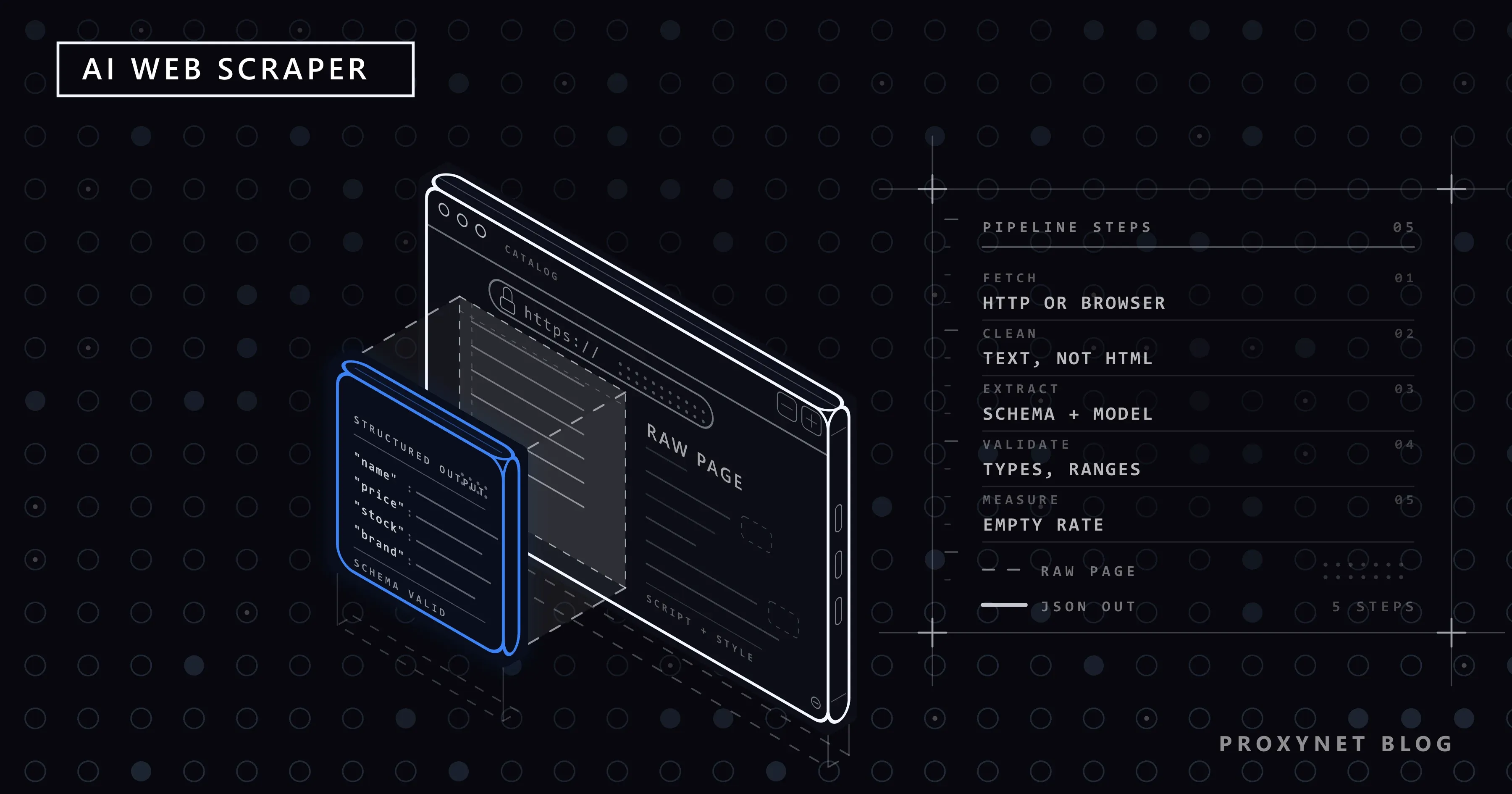
Whatever the tool's brand, the flow consists of five steps. The difference mostly lies in how many of these steps run on your side and how many in the service.
- Fetch the page. For static HTML, a simple HTTP request is enough. If the page fills its content with JavaScript, it is rendered with a headless browser. The IP used in this step, the request rate and the browser fingerprint are what matter here; the model has nothing to do with them.
- Strip the noise. A product page's raw HTML is several times the size of the visible text; if script and navigation blocks reach the model, it gets slow and expensive. Script and style elements are cleaned out, and if needed only the main content block is extracted. Mozilla's Readability library, the open source version of the algorithm behind the browser's "reader view", is the best-known reference for this job.
- Provide the schema and the instruction. You define the fields you want as a JSON schema: which field is required, which is a number, which is a date. Modern model APIs, with structured output support, force the model's response to conform to this schema; that is what separates it from a free-form answer written as text.
- Validate the output. A response that conforms to the schema can still be wrong: the price field arrives as the text "1.299 TL", the currency is missing, an out-of-stock product comes back as "true". Type, range and required-field checks are done in code; a suspicious record goes not into the database but into a separate queue.
- Store and measure. Valid records go to the store; the rate of pages that come back empty, need correction or don't conform to the schema is monitored. If this rate quietly rises, either the site has changed or the model can't crack that page structure; neither is a bug in the code you wrote, and both become visible only by measuring.
The contract of the third step looks like this. The schema:
{
  "name": "string (required)",
  "price": "number (required)",
  "currency": "string",
  "in_stock": "boolean"
}
The response the model is expected to return:
{
  "name": "Wireless Mouse",
  "price": 1299,
  "currency": "TRY",
  "in_stock": true
}
AI Scraper Types and Tools
The tools on the market fall into four groups. The question to ask when choosing one is not "which is the best" but which steps stay on your side and which stay with the service.
| Type | Needs code? | Representative | Suitable job |
|---|---|---|---|
| No-code tools | No | Monitoring tools like Browse AI | Recurring page monitoring, change alerts |
| Scraping APIs with AI parsing | At the level of an endpoint call | Firecrawl, Apify | Ready-made integrations, mid-scale jobs |
| Code-side libraries | Yes | ScrapeGraphAI, LangChain extraction chains | Teams that build and customize their own pipeline |
| Agent frameworks | Yes | Browser Use, Playwright MCP | Multi-step jobs whose route isn't known in advance |
Let's open them up briefly. Firecrawl is an open source scraping API that takes a URL and turns the page into clean Markdown suitable for language models and, if requested, into JSON that conforms to a schema. Apify is a platform where ready-made scraping programs run in the cloud; you pick from hundreds of ready "actors" and run them. ScrapeGraphAI is an open source Python library that builds the fetching and parsing pipeline around a language model; you say "extract this information from this site" and leave the rest of the pipeline to the library. LangChain is a general-purpose framework for language models; you build chains that extract fields from documents in this framework. The fourth row abandons the pipeline: in agent frameworks, the model also decides which page to visit and what to click. How to run Browser Use, one of these frameworks, through a proxy with domain limits and a human approval step is shown in Browser Use With a Proxy: Set Up the AI Browser Agent.
The first two groups in the table speed the job up; the last two change how you define the job. Most teams start with the second group and move to the third as scale and customization grow; the fourth group's place is a separate article. For an open-source example from the third group, Crawl4AI turns pages into LLM-ready Markdown, and we cover its setup and proxy configuration in What Is Crawl4AI? Setup and Proxy Configuration.
What Is It Good At, and What Can It Not Do?
The strong side of model-based parsing is exactly where the classic script breaks:
- Resilience to site changes. When the design is refreshed, elements move, or class names change, the instruction stays the same. The "fix the selector" item doesn't disappear from the maintenance list but becomes rarer.
- Long-tail sites. Writing separate selectors for hundreds of small sites with different structures is impossible in most projects; giving each the same schema and the same instruction is possible.
- Free text. Extracting the delivery time from the sentence "delivery within two days" or the apartment floor from a listing description isn't written with a selector; it is a meaning-extraction job.
On the other side there are three permanent costs. Cost and speed: a selector runs in milliseconds and for free; the model takes seconds and asks for tokens for every page. On a fixed pipeline processing a hundred thousand pages a day, this difference flips the table. Consistency: the same input may not produce the same output every time; that's why the fourth step cannot be skipped. Hallucination: the model can fill in a field that isn't on the page from its own knowledge. Because of these two risks in the structure, on a single site whose structure hasn't changed in months, the CSS selector is still the fastest and cheapest route; AI here is not an improvement but an expense.
What Changes on the Blocking Side?
Nothing changes; one thing gets heavier. Because the model doesn't change how the page is reached, IP reputation, request rate and location restrictions are the same as in classic scraping; the 429 that comes back has nothing to do with the model. What gets heavier is this: to make sense of JavaScript, AI scrapers mostly work with a headless browser, meaning every request opens a browser, runs it and closes it. That is a slower and more conspicuous footprint than a plain HTTP request; run at high speed, it hits the allowed request count sooner.
For this reason the fetching layer matters more in an AI scraper than before. The starting point is still the site's own rules: if the robots.txt file doesn't allow it, no scraping is done; for a site with an API, the API is used; rate limits are respected. We lined up the framework of this in our article How to Scrape Websites Without Getting Blocked. In high-volume, messy jobs, if requests leave from a single IP, that address gets flagged quickly; a Residential Proxy coming from real user addresses lands in a better position in the target site's trust calculation, and a Rotating Proxy, which changes the address with every request, spreads the load across the pool. We covered provider choice in a separate section: Best Proxies for Web Scraping.
In short, the expectation of "I scrape with AI, so I won't get blocked" is wrong; quite the opposite, in a typical project an AI scraper sends traffic that looks heavier to bot protection. That's why the fetching layer is designed and monitored separately.
What Is the Difference Between an AI Scraper and Agentic Scraping?
The two terms are often confused because in both, a language model reads the page. The difference lies in who holds the decision. An AI web scraper is a fixed pipeline: the steps are written by the developer, and the model runs only at the parsing step. The page is fetched, parsed, done; the model doesn't decide on the next round of the flow.
In agentic web scraping the model is inside the loop: it decides for itself which link to follow, when to stop, whether the plan has fallen apart. That means moving from single-page jobs to multi-step jobs; the price is that cost and duration are tied to the number of steps. We explained how the general agent loop works in our article How Do AI Agents Work?; we covered the scraping-specific version, its building blocks and failure modes in our article Agentic Web Scraping.
Use Cases
- Price and stock monitoring. The product pages of hundreds of sellers collapse into a single schema; design changes don't take the pipeline down. We explained the end-to-end setup in our article How to Track Competitor Prices.
- Long-tail data collection. Extracting the same fields from hundreds of small sites with different structures comes much cheaper than writing a selector per site.
- Extracting information from free text. In unstructured text such as reviews, listing descriptions and job postings, a selector has no place; the extracted fields feed into the data mining pipeline. Once reviews are collected, scoring their tone is the next step (Sentiment Analysis in Python: VADER vs Hugging Face).
- Fresh data for language model applications. If current information such as a product catalog, documentation or prices needs to be given to the model, an AI scraper does this job in structured form; for a secure design of the access layer, see our article Safe Web Access for LLMs.
Common Mistakes
- Sending every page to the model. The stable region where the selector works shouldn't go to the model; narrowing the region with a rough selector and leaving its inside to the model combines the advantages of the two methods.
- Sending raw HTML. Script and style blocks burn the token budget; if the cleaning step is skipped, the same job comes out several times more expensive.
- Output without validation. Conforming to the schema doesn't mean the data is correct. Without type, range and required-field checks, a single wrong response from the model gets silently written into your database.
- Not defining a schema. A free instruction like "give me the product information on this page" gets answered in a different format on every page; building the pipeline without binding the field set to a contract is wasted work.
- Treating block symptoms with the model. A 429 response, empty content or a CAPTCHA shows up as a parsing problem; changing the prompt doesn't fix these — fixing the fetching layer (rate, IP strategy) does.
- Opening private pages in a third-party tool. Loading pages that require a session or contain personal data into a no-code service's window carries that data to the third party; such pages are processed in your own infrastructure.
Decision Guide
| Need | Recommendation |
|---|---|
| A single page whose structure rarely changes; high volume | Classic selector; no need for AI |
| Recurring monitoring without writing code | No-code tool |
| Mid-scale job on a site whose structure changes often | API with AI parsing or a library |
| Hundreds of sites with different structures, free text | LLM parsing + a mandatory validation layer |
| Multi-step jobs whose steps aren't known in advance | Agent framework (Agentic Web Scraping) |
Frequently Asked Questions
Do you need to know how to code to use an AI web scraper?
Maybe not. No-code tools let you select fields on the page and set up recurring monitoring; code-side libraries give flexibility to those who want to build the pipeline themselves. As the job grows and the need for customization increases, the code side becomes inevitable.
Are AI scrapers easier to block than classic scrapers?
The cause of blocking is the traffic itself, not the model; but because an AI scraper typically works with a headless browser, each request is slower and more conspicuous. At high speed, this can hit a limit sooner than a classic plain request. That's why designing the fetching layer separately matters.
Is extracting data with AI legal?
Using AI doesn't change the legal question: personal data, behind-login content and copyright rules apply just the same; robots.txt and site terms are still the starting point. We covered the framework in our article Is Data & Web Scraping Legal?. One extra point of care: sending page content to a third party's model API is a data transfer in itself.
Can I extract data from a website with ChatGPT?
For small single-page jobs, yes: you copy the page from the browser, give your schema and get an edited output. That is not a pipeline; no fetching, no validation, no repetition. For continuous or many-page jobs you need a pipeline built with a script and API calls.
Can you trust the data an AI scraper extracts?
Output that conforms to the schema is not the same as correct output. Type and required-field checks, range audits and manual comparison on samples are standard practice; suspicious records are queued before they get written to the main store. What raises trust is not growing the model but building the validation layer seriously.
In which case does a classic script make more sense?
Jobs where the page structure hasn't changed in months, volume is high and the field set is fixed. The selector runs in milliseconds and without tokens; the model here is not an improvement but a permanent cost. The exceptions where the selector breaks and long-tail sites should be left to AI.
Summary
An AI web scraper hands scraping's fragile end — the field-extraction job — to the language model; fetching, validation and measurement stay the same with classic discipline. The short-term gain is rows deleted from the maintenance list; the price paid is the token fee for every page. The team that balances the two uses the selector on stable pages and the model on changing structures. When setting up your data collection pipeline, take a look at our data-scraping solutions.