


































You live in Germany, the Netherlands or somewhere else outside Türkiye. You need to get something done on a website in Türkiye, but the page does not open, or it shows a notice along the lines of "this site can only be accessed with a Türkiye IP address". A shopping site lists its prices in another currency, and an account you have used for years asks you to verify yourself again at every login. Nothing is wrong with your computer. The site sees that your connection comes from outside Türkiye and behaves accordingly.
This post explains how sites work out which country you are in, the two ways to get a Türkiye IP address from abroad and how they differ. We also go step by step through which IP type suits which job, the setup and how to check that the connection works as intended. Banking and official services get a section of their own. None of the steps requires technical knowledge.
How do sites know which country you are in?
Every device that connects to the internet has an IP address. The IP address is the address of your connection on the internet, and every site you visit sees it. You do not choose it; the internet provider you are connected to at that moment assigns it. If you connect from your home in Berlin, your address belongs to a German provider. If you are on holiday in Türkiye and connect through the hotel Wi-Fi, it belongs to a Turkish provider.
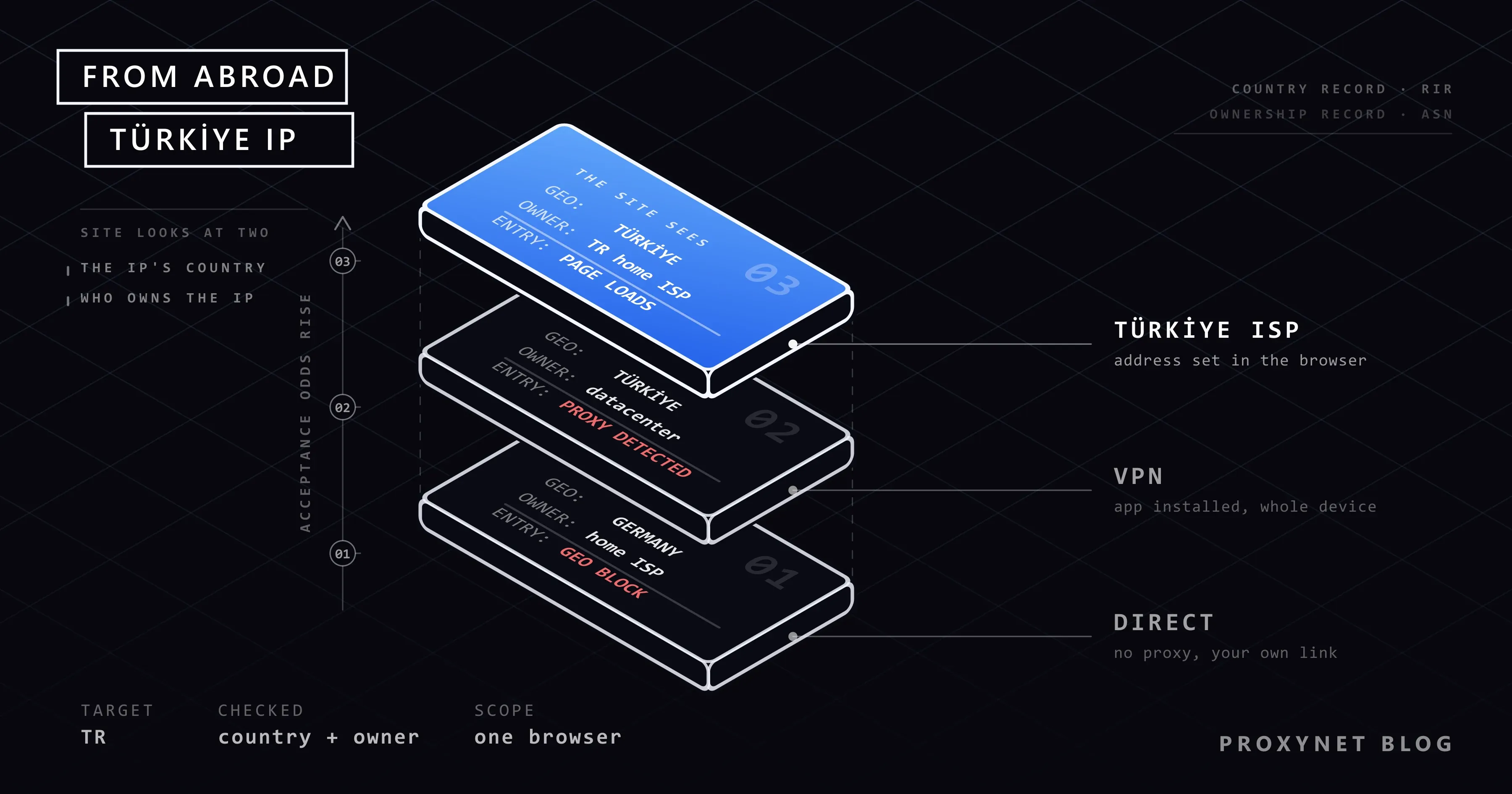
IP addresses are handed out to countries and companies in blocks. Which block sits in which country, and in which company's hands, is kept in public records. Sites look at databases compiled from those records and read two things from your address: which country you come from and who the address belongs to (a home internet provider or a hosting company). How these databases work, and why they sometimes show the wrong city, is covered in our post Why Is My IP Location Wrong?.
"Getting a Türkiye IP address" therefore means going out to the internet through an address registered in Türkiye.
What does the "only accessible with a Türkiye IP address" notice mean?
The Turkish original usually reads Türkiye IP adresi ile erişim sağlayabilirsiniz. This notice and its variants show that the site deliberately closes itself to connections from abroad. Site owners do this for different reasons:
- Reducing attack traffic. A site that serves only Türkiye has no customers abroad. If automated programs make up a large share of the traffic from there, the owner may choose to shut the door entirely.
- The service is offered only in Türkiye. If shipping, payment or contract terms are limited to Türkiye, the site may not show the page to a visitor from another country.
- Licensing and broadcast rights. The right to show some content is sold country by country. We return to this in a separate section below.
Not every block is this upfront. Some sites do not open at all or return an "access denied" message. Others open the page but change the content: they show the price in another currency or send you to their international version.
Check first: is the IP address really the problem?
Not every page that fails to open abroad is restricted by country. Before you start looking for a Türkiye IP address, run these three checks:
- Try another network. If the page does not open on your home connection, try it on your phone's mobile data. If it fails on both and opens for someone you know in Türkiye, the country is very likely the reason.
- Read the error message. Messages such as "wrong password", "verification code could not be sent" or "session expired" have nothing to do with the IP address.
- Look for the institution's own route. There may be a separate login method, a notification step or a support line for users abroad.
The third point matters most for official services. The e-Devlet portal (Türkiye's e-government gateway) takes citizens living abroad into account: its frequently asked questions page (in Turkish) states that the password can be obtained abroad from embassies and consulates. If you cannot sign in to e-Devlet from abroad, first check that your password is still valid, that you still have the phone number the verification code is sent to and that your browser is up to date. If the problem continues, contacting e-Devlet's own help channels is a better first step than changing your IP address.
The same order applies to banks. Banks do not disclose their login security rules, so from the outside you cannot know for certain why the app does not open. Call your bank's customer service first and tell them you are abroad. The cause may well be something unrelated to the IP address, such as the verification code not reaching your phone or the app being stuck on an old version.
Two ways to get a Türkiye IP address from abroad
Both methods follow the same logic: your connection first goes to a point in Türkiye and reaches the site from there. The site does not see your address abroad; it sees the address of that intermediate point in Türkiye.
- VPN. You install an app on your phone or computer and pick Türkiye from the server list. All traffic on the device travels through an encrypted tunnel to the VPN server in Türkiye.
- A proxy that exits in Türkiye. A proxy is an intermediary server that goes out to the internet on your behalf. You get an address in Türkiye from a provider and enter it in your browser or in a single app. Only that browser's traffic exits from Türkiye; the rest of the device keeps using its own connection.
| Feature | VPN | Proxy exiting in Türkiye |
|---|---|---|
| What it covers | All traffic on the device | Only the browser or app you configure |
| Who owns the address | Mostly a data center | Depends on the type you choose: home internet provider, mobile carrier or data center |
| Who you share the address with | Other users connected to the same server | Depends on the type; a dedicated address is available |
| Setup | Install an app and pick a country | Enter the address and port in the browser or device |
| Weak point | Sites can recognize VPN addresses | Covers only the configured app, not the whole device |
The full difference between a VPN and a proxy is in our post Proxy vs. VPN. Here we focus only on the point that matters for a Türkiye IP address: who the address belongs to.
Choosing between the two is mostly a question of scope. If every app on the phone has to exit from Türkiye, a VPN is the only route. If you have business with a single site, a proxy is cleaner: the rest of your traffic keeps leaving from the country you are in, so your local bank and local sites still see you where you are.
Why does a VPN's Türkiye address sometimes not help?
Many people abroad try a VPN first and see this: the address shows up as Türkiye, yet the site still does not open or says "VPN or proxy detected". The reason is not the country but the owner of the address.
VPN servers sit in data centers. A data center is a large facility where servers are rented, and the IP addresses there are registered to a hosting company. When the site looks at its database, it concludes that "this address is in Türkiye, but it comes from a server, not from a home". An ordinary visitor would not connect from a server, so the site treats this traffic with caution. On top of that, many people use the same VPN server at the same time, and what one of them does lowers the reputation of the address for everyone.
How this warning is produced is covered in detail in our post VPN or Proxy Detected Error. The ASN concept, which shows which company an address is registered to, is explained in ISP vs Residential Proxies.
The same holds for proxies that exit from a data center. What decides the outcome is not the name of the tool (VPN or proxy) but the type of the exit address. On free VPN and proxy lists the addresses both belong to data centers and are shared by a large number of people. The security side is covered in our post on whether free proxies and web proxy sites are safe.
Which IP type should you choose?
When you buy a proxy that exits in Türkiye you will come across four types. Two of them matter for a home user:
Static ISP address. The address is registered to an internet service provider in Türkiye, it is dedicated to you and it does not change until you give it up. It suits you if you want to sign in to an account from the same address every day. Someone who signs in from a different city and a different address each time can look unusual to a site; a user who always arrives from the same address does not create that picture. Still, do not read this as a guarantee: whether a site asks for extra verification is decided by its own security rules, and those rules are not published. Product details are on the ISP Proxy page.
Rotating residential address. The addresses belong to home internet connections in Türkiye and change at set intervals or with every request. This type is not for signing in to an account but for checks that need no account: looking at the price of a product in Türkiye or seeing how an ad appears in Türkiye. Because a province can be selected, it also answers the question "what shows up when you look from Izmir". Details are on the Residential Proxy page.
The other two types (mobile and datacenter) are not needed for the tasks in this post. You can see which provinces and which types are offered in Türkiye on our Türkiye proxy page. If you want to compare providers, our Best Türkiye Proxy Providers list will help, and if you wonder what to ask before buying, see our proxy buying guide.
How do you set up a proxy that exits in Türkiye?
The setup has two parts: getting the address and entering it on the device.
- Get the address. In the provider's dashboard you select the product and mark Türkiye as the country. The dashboard gives you four pieces of information: server address, port, username and password.
- Try it in a single browser. Configuring just one browser is cleaner than routing the whole computer through the proxy. For Firefox, the browser's own network settings do the job, and we show that path in Firefox proxy settings.
- Set it device-wide if you need to. On Windows 11 the path is Settings > Network & internet > Proxy; Microsoft's support page explains each field. For a walkthrough with screenshots see Windows and Chrome proxy settings, and for Mac see Mac and Safari proxy settings.
- On a phone, use the Wi-Fi setting. On iPhone and Android the proxy is defined in the details of the Wi-Fi network you are connected to. The steps are in iPhone proxy settings and proxy settings on an Android phone. This setting covers only the browser and apps that honor the proxy.
- Turn it off when you are done. While the proxy stays on, everything in that browser travels through Türkiye, and local sites where you live will also think you are in Türkiye.
When you are asked for a username and password, enter the details shown in the dashboard. If the password prompt never appears or keeps coming back, look at the IP whitelist method in our post on proxy authentication.
How do you verify that the Türkiye IP address works?
After you make the setting, run two checks before you open the actual site:
- Address and country. In the browser where you configured the proxy, open a "what is my IP" page. The country should be Türkiye and the provider name should be a Turkish internet company. If you still see your address abroad, the setting has not reached that browser.
- Leaks. In some situations the browser can reveal your real address through another channel. What that is and how to close it is explained in WebRTC and DNS Leaks.
The full four-step checklist is in our post How to Test a Proxy. One detail: IP databases can show different cities for the same address. If the country shows as Türkiye, the city difference does not matter for most sites.
What should you watch out for with banking and official services?
Using an intermediary for transactions that involve money and identity is not the same as looking at a price on a shopping site. Follow these rules:
- Try the institution's own route first. Customer service, a travel or residence-abroad notification, the consulate. Most problems are solved here and no tool is needed.
- Sign in without an intermediary. Use your own connection for bank and government accounts. Entering a bank password through a tool when you do not know who carries your traffic is a serious risk, and free VPN and proxy lists are not suitable for this at all.
- Use only the official app and the official site with a padlock icon in the address bar. On a secure (HTTPS) connection your password travels encrypted between your device and the bank; the server in between cannot read the content, it only sees which site you connect to.
- Treat extra verification as normal. For a sign-in from an address it does not recognize, the bank may ask for an SMS code, a security question or a video call. No IP type can promise to remove that.
If the bank's app will not open or keeps failing while you are abroad, the causes and fixes are gathered in Banking App Not Working Abroad? Causes and Fixes.
Why are streaming services not the subject of this post?
The rights to show series, films and matches are sold country by country. When a streaming service shows its content only in Türkiye, that is not a technical gap but a requirement of the license agreement it signed. The terms of use of these services mostly forbid reaching content by presenting a different location. For that reason we do not recommend the methods in this post for watching licensed broadcasts from abroad. If the broadcaster has a separate package or app for viewers abroad, that is the right route.
What is a Türkiye IP address used for?
Besides home users who want to reach their own accounts, businesses also want to check from abroad how things look in Türkiye:
- Price and stock checks. A brand that sells to Türkiye wants to see on the spot at what price its product appears on marketplaces in Türkiye. Details: price monitoring.
- Ad checks. Whether an ad placed for Türkiye appears on the right page and in the right language only becomes clear when you look from Türkiye. Details: ad verification.
- Localization testing. You test that your site shows the visitor in Türkiye the Turkish page, the right currency and the right shipping options. Details: localization.
- Search results. Google results change by country. We compare the methods in our post on searching Google from a different country.
Common mistakes
- Signing in to an account through a free "Turkish VPN". The address most likely belongs to a data center and is crowded. The site rejects the login, and you have entrusted your password to a tool you know nothing about.
- Using a different address at every login. Rotating addresses are not suitable for account logins. Use a static address for account work and a rotating address for checks without an account.
- Looking only at the country. It is not enough for the address to show as Türkiye; who it belongs to matters too. Look at the provider name on the check page as well.
- Leaving the proxy on for the whole device. Now your bank and the local sites where you live think you are in Türkiye, and they start asking for verification.
- Blaming the IP address. An SMS code that does not arrive, an expired password or an outdated app version is not fixed by a Türkiye address.
- Taking this route without a country target. If your only goal is to change your address, the simpler methods in our post on how to change your IP address are enough.
Decision guide
| Your situation | Recommendation |
|---|---|
| You cannot sign in to e-Devlet from abroad | First check the password, the phone number and the browser; apply to the consulate for the password |
| The banking app does not open abroad | Call the bank's customer service first; sign in without an intermediary, on your own connection |
| You will sign in to one of your accounts in Türkiye regularly | A dedicated, static Türkiye ISP address, in a separate browser |
| You will look at how a product or an ad appears in Türkiye | A rotating residential address with province selection |
| With the VPN on, you get a "VPN or proxy detected" warning | The address most likely belongs to a data center. If the site's terms forbid intermediary connections, use the institution's own route; if they do not, compare the address types |
| You want to watch a licensed broadcast from abroad | Look at the broadcaster's international package |
Frequently asked questions
Is it legal to get a Türkiye IP address?
Using a VPN or a proxy is not illegal in itself. What determines the legal position is what you do with that address. Breaking a site's terms of use or signing in to someone else's account is a problem no matter which address it is done from.
Is there a free way?
Free VPN and proxy lists exist, but it is unclear who carries your traffic; we do not recommend them for anything that involves signing in to an account. Even for a one-off check the address usually belongs to a data center and is crowded, so the site does not open the door anyway.
Can I switch my whole phone to a Türkiye IP address?
The proxy field in the phone's Wi-Fi settings covers only the browser and apps that honor the proxy. If every app has to exit from Türkiye, you need a VPN-type tool. In that case, keep in mind that the address may belong to a data center.
If I get a static Türkiye IP address, will the bank stop asking for extra verification?
Nobody can promise that. Banks decide with their own security rules which logins need extra verification, and they do not disclose those rules. We recommend signing in to your bank on your own connection and contacting the bank's customer service if the problem continues.
Does a Türkiye IP address show a city as well?
Yes, IP databases keep a city estimate alongside the country, but that estimate is not always accurate. With residential addresses that offer province selection, you decide the exit province yourself.
Do I need these settings when I go to Türkiye on holiday?
No. When you connect to a Wi-Fi network in Türkiye or to a Turkish carrier's mobile data, your address already belongs to Türkiye. Turning the proxy setting off is enough.
Summary
Sites look at your IP address to see where you are, and they read not only the country of the address but also who it belongs to. There are two ways to get a Türkiye IP address from abroad: a VPN and a proxy that exits in Türkiye. VPN addresses mostly belong to data centers, and sites can recognize that. For account logins a dedicated, static address is the better fit; for checks without an account, a rotating address with province selection. With banking and official services the first step is always the institution's own route, and no address type can promise to remove extra verification. You can explore the provinces and address types in Türkiye on our Türkiye proxy page and all products under our proxy services.


