You had a security camera installed at home and the installer said "you need a static IP to watch it from outside". Or you complained about your ping on a forum and someone replied "get a static IP, that fixes it". Maybe you simply opened a "what is my IP" site and noticed that the address you saw last week has changed, and now you wonder whether that is a problem. The same question sits behind all three: does your internet provider always give you the same address, or does your address change from time to time?
In this post we explain what static and dynamic IP addresses are, how a provider hands out addresses and what separates the two. We then cover how to find out which one your line has, whether a static IP lowers ping, whether it is safe and who actually benefits from it. At the end we look at how the same distinction shows up on the proxy side.
What is a static IP?
An IP address is the address of a device connected to the internet; the sites you visit send their replies to it. On a home connection this address is not given to your phone or your computer individually but to your router, and every device in the house goes online with the router's address.
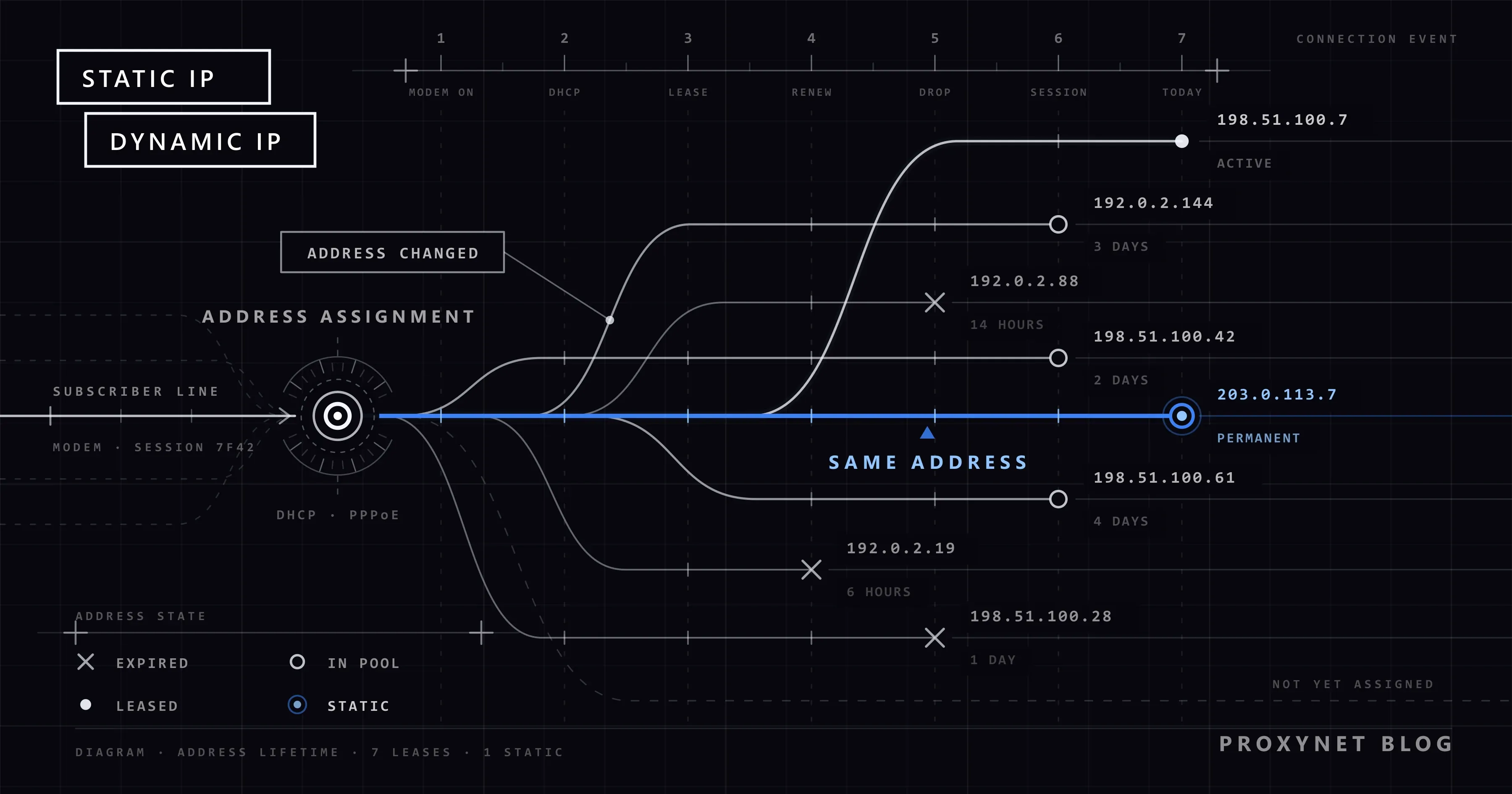
A static IP is that address, pinned. The provider reserves one address for your subscription and gives it to nobody else. Restart the router, sit through a power cut, let months go by: you still go online with the same address. "Fixed IP" means the same thing.
You can compare it to a phone number: because your number does not change, anyone who calls it reaches you. A static IP does the same job for anyone who needs to reach a device in your home from outside. Providers usually offer it for a monthly surcharge; on business plans it is often part of the package.
What is a dynamic IP?
With a dynamic IP the address is not yours, it is on loan. The provider holds a pool of addresses. When your router connects, it takes a free address from the pool; when the connection ends, the address returns to the pool and can be given to another subscriber.
Providers choose this method because of the number of addresses. The IPv4 scheme in use today has about 4.3 billion addresses, and there are no free ones left to hand out. RIPE NCC, the registry that distributes addresses across Europe, the Middle East and Türkiye, announced that it ran out of its remaining IPv4 pool in November 2019. Handing addresses only to the subscribers who are connected at that moment is how providers stretch the stock they have.
A dynamic IP is not a shortcoming. When you open a site or join a game, you start the connection, and the reply comes back to whichever address you hold at that moment.
How does a provider hand out IP addresses?
Address assignment is automatic. The most common method is DHCP (the protocol that gives devices their addresses automatically). RFC 2131, the document that defines DHCP, describes the address as a "lease": it is allocated for a set period and has to be renewed before that period ends. On many DSL and fibre lines the router instead logs in to the provider with a username and password (PPPoE) and receives its address while that session is being set up. The logic is the same in both cases:
- The router powers on and asks the provider's network for an address.
- The provider's server picks a free address from the pool and reserves it for the router for a set period.
- The router goes online with that address. The devices in your home use their own internal addresses behind the router.
- As the period nears its end, the router asks to renew the same address. The provider usually agrees, which is why your address can stay the same for days.
- If the connection drops or the session is set up again, the process starts over. This time a different address may come out of the pool.
With a static IP the second step is different. The server does not look at the pool; it hands out the address registered to your subscription. RFC 2131 defines this as well: the network administrator chooses the address and DHCP merely conveys it to the device. So for a static IP you usually do not have to type anything into your router by hand.
What is the difference between a static and a dynamic IP?
| Feature | Static IP | Dynamic IP |
|---|---|---|
| Does the address change? | No, it stays the same for as long as the service runs | Yes, it can change when the connection is re-established |
| Who decides? | The provider assigns it to your line permanently | The provider lends it from the pool |
| Cost | Usually a monthly surcharge | Included in the subscription |
| Access to your home from outside (camera, server) | Easy, because the address is always the same | The connection breaks whenever the address changes; you need an extra solution |
| IP-based authorisation | You enter the address once and it keeps working | The allowlist entry becomes useless once the address changes |
| Internet speed and ping | No difference | No difference |
| Setup | You have to apply to the provider | Nothing to do |
The most important row in the table is the speed row: both kinds of address travel over the same line and through the same exchange.
Is typing an IP into your computer the same as getting a static IP?
No. Most of the steps you find when you search for "set a static IP" describe something else: pinning your computer's address inside your home.
There are two separate layers of addresses in your home. The public IP is the address the provider gives your router and the one websites see. The local IP is the address the router hands to the devices in the house, typically starting with 192.168.1.x. These addresses are reserved for private networks by RFC 1918 and are not valid on the internet; your neighbour's home uses the very same ones.
In Windows, open Settings > Network & internet, select the network you are connected to and press Edit next to IP assignment; you will see Automatic (DHCP) and Manual. Choosing "Manual" and typing an address pins only the address your computer has inside the home. It neither changes nor fixes the public address you go online with. If you only want a printer or a console to keep the same local address, most routers offer a DHCP reservation that recognises the device by its MAC address, explained in What Is a MAC Address? How It Differs From an IP. Microsoft also recommends leaving this setting on automatic in its network settings help page.
A similar mix-up happens in the router's admin page. On some routers the Connection type list in the internet (WAN) settings offers "Dynamic IP", "Static IP" and "PPPoE". That list decides which method the router uses to obtain its address from the provider; picking "Static IP" there does not earn you a fixed address. Unless your provider gave you values to enter by hand, it only cuts off your internet.
How do you find out whether your IP is static or dynamic?
If you never applied for a static IP service, your line is most likely dynamic. To be sure, follow these steps:
- Check your subscription. If your provider's customer portal or your bill shows an add-on called "static IP" or "fixed IP", your address is fixed. If not, it is dynamic.
- Write down your address. Turn off any VPN or proxy, type "what is my IP" into a search engine, open one of the sites in the results and note the address you see.
- Look again a few days apart. It helps if the router has reconnected at least once in between. If the address has changed, you are definitely on a dynamic IP.
- If the address has not changed, do not call it static yet. Dynamic addresses can stay the same for days, sometimes weeks, as long as they keep being renewed. An unchanged address does not prove it is fixed; only your provider can give the definitive answer.
If the WAN address in your router's admin page differs from the one a "what is my IP" site shows, your provider is sharing a single public address among many subscribers, in other words it uses CGNAT. In that case your address is both dynamic and not yours alone; we covered the test in detail and the ways out in What Is CGNAT? How to Check and Get Out of It.
Why does your IP address keep changing?
With a dynamic IP, a changing address is not a fault but the system working as designed. The change usually happens when the connection is re-established: a power cut, a router restart, a brief line drop or maintenance on the provider's side. The provider can also re-establish the session from its own end, and then the address changes without you doing anything. On mobile data the address changes far more often, because a phone generally gets a new address every time it reconnects to the network (airplane mode, moving out of coverage). Sites that compare each sign-in with your history may ask for an extra check after such a change; how this plays out on LinkedIn is covered in LinkedIn Account Restricted: Why It Happens and What to Do.
Whether restarting the router always changes the address, and the other ways to change your address on purpose, are covered separately in our guide to changing your IP address.
Does a static IP lower ping or help in games?
The short answer: a fixed address does not lower ping. Ping is the time a packet takes to travel from your computer to the game server and back. That time is set by the route the packet takes, the distance to the server, the quality of your line and the Wi-Fi inside your home. None of that changes when you get a static IP; the only difference is that the sender address on your packets is now always the same.
People on forums who say "I got a static IP and my games improved" may not be wrong either. A static IP is always a public address, so a subscriber who buys the service also leaves the CGNAT pool. The effect on games shows up not in ping but in connecting: you can forward ports on the router, the console's NAT type stops being "strict", and hosting a game or joining voice chat gets easier. You can find those settings in our post on NAT types. If all you want is to leave the pool, a public but dynamic address from your provider is enough for that.
If your ping really is high, the cause is to be found in the line, the Wi-Fi and the route to the server. We walked through those steps in How to Fix Ping and Packet Loss in Online Games. Solutions that change the path to the game server, such as Gaming Proxy, are likewise about the route the traffic follows, not about the address being fixed.
Is a static IP safe?
A static IP does not make you safer or less safe by itself, but it has an effect in two directions.
The upside: when your address is fixed you can put it on an allowlist. A rule on a server or an admin panel that says "accept connections only from this address" adds a second lock next to the password. With a dynamic IP, the day the address changes you are the one locked out.
The downside: a fixed address is a fixed target. Every public address on the internet is scanned continuously by automated programs. With a dynamic IP, a camera interface you forgot to close may drop out of sight when the address changes; with a static IP it stays in the same place. If you get a static IP and open ports to the outside, change the default passwords on your devices, keep their software up to date and open only the port you truly need.
There is a small difference on the privacy side too: sites see you on the same address for months. A dynamic IP is still not a privacy tool, because sites also recognise you through cookies and browser characteristics. We explained that in What Is Browser Fingerprinting?.
What is a static IP used for, and who uses one?
The jobs that call for a static IP fall into two groups: those where something has to reach you from outside, and those where the other side recognises you by your address.
- Security cameras and recorders. If you want to connect to the camera directly, without the manufacturer's cloud app, the address has to be fixed and public. What a port is is explained in the ports section of TCP vs. UDP.
- A server running at home or in the office. A game server, a file server (NAS) or your own VPN server waits for connections coming in from outside. If your line is behind CGNAT you first have to solve the CGNAT problem; a static IP takes care of that too.
- Company network, API and panel access. Some company networks, and some marketplace, payment and shipping APIs, accept requests only from IP addresses declared in advance. We described that scenario in our post on static IPs for API access.
- IP whitelist on a proxy. If you sign in to a proxy with your address instead of a password, the address must not change. We compared the two sign-in methods in Proxy Authentication: User:Pass vs IP Whitelist.
- Your own email server. The address ranges handed to home users are marked in the policy lists used by email providers as "mail should not be sent directly from here"; this is not a penalty but a record of what the range is meant for. That is why people who want to send email from their own server start by getting a fixed address from their provider. How blocklists work is covered in our post on IP blacklists.
If you do not see yourself in this list, you do not need a static IP.
How do you get a static IP?
A static IP cannot be set from the router, from the computer or with a program; the party that hands out the address is your provider. The path is short:
- Call your provider's customer service or look under add-on services in the customer portal. The service is listed as "static IP" or "fixed IP".
- Ask whether it is available on residential plans and what the monthly fee is. Terms vary by provider and plan; rely on the current price list, not on forum posts.
- Once the service is active, restart the router. The address you see on a "what is my IP" site should match the one you were told.
- Keep your expectations low on mobile internet: consumer mobile lines mostly run on shared addresses and are rarely given a fixed one.
Ways to do the same job without a static IP
If your only goal is to reach your home from outside, there are two alternatives. The first is dynamic DNS (DDNS): your router or recorder reports its address to a domain name service every time it changes, and you connect with a name that always stays the same, such as myhome.example.com. Many routers have a page titled DDNS in their admin interface. The method works only with a public address and is of no use behind CGNAT. The second is the cloud apps of camera and NAS manufacturers. With those, the device in your home starts the connection, so the address does not matter.
What is the proxy-side equivalent of this distinction?
A proxy is an intermediary server that goes online on your behalf from a different address; the details are in What Is a Proxy Server and How Does It Work?. The static and dynamic split you have at home exists for proxies too, except that here the choice is yours rather than the provider's, and there are three options:
| Home equivalent | Proxy type | When does the address change? | What is it used for? |
|---|---|---|---|
| Dynamic IP | Rotating Proxy | On every request or at an interval you set | Collecting public data from many pages, price and search result tracking |
| A dynamic IP that stays fixed for a while | Sticky Proxy | When the session time runs out (1 to 60 minutes) | Tasks that involve signing in and several steps, cart and form flows |
| Static IP | Static Proxy | It does not change until you give it up | Long-lived account sessions, IP-based authorisation, APIs that expect a fixed outgoing address |
The practical takeaway is this: if your work requires you to go out with the same address every time, getting a static IP on your home line is not the only way. ISP Proxy gives you a dedicated, unchanging address registered to an internet service provider. It makes no difference whether your home line is dynamic or behind CGNAT, because you are the one who starts the connection. How this type differs from the others is covered in ISP vs Residential Proxies, and the logic of changing addresses in our post on IP rotation.
One limit is worth stating: a proxy changes only the address of connections going out from you. It does not provide outside access to your camera and does not open ports on your router; the solution for those lies with your provider.
Common mistakes
- Typing an IP by hand in Windows and thinking "I made it static". That setting pins only the address inside your home. Your public address stays dynamic.
- Setting the router's connection type to "Static IP". If your provider did not give you values, this choice cuts off your internet.
- Getting a static IP for ping. Latency is decided by the route, not the address.
- Getting a static IP and opening every port. A fixed address is scanned all the time. Open only the port you need and change device passwords.
- Putting a dynamic IP on an allowlist and forgetting about it. Access stops the day the address changes. If your address is dynamic, prefer signing in with a username and password.
Decision guide
| Your need | Recommendation |
|---|---|
| Browsing, watching video, playing games | A dynamic IP is enough, there is nothing to do |
| Connecting to a camera or NAS from outside | Try the manufacturer's cloud app first; if that is not enough, DDNS, and if that fails, a static IP |
| NAT type is strict on the console, ports will not open | The problem is most likely CGNAT; ask the provider for a public IP, it need not be static |
| Getting authorised by address on a company network or an API | A static IP for the line, or a dedicated fixed proxy address |
| Signing in to a proxy with an IP whitelist | If your address is dynamic, switch to username and password |
| Lowering ping | Do not get a static IP; check the line, the Wi-Fi and the route to the server |
Frequently asked questions
Does a static IP increase internet speed?
No. Speed is set by your plan and the quality of your line. A static IP decides only whether your address will change; download speed, upload speed and data allowance stay the same.
How often does a dynamic IP change?
There is no fixed rule. Depending on the provider and the connection type, the address can stay the same for months or change on every reconnect. On mobile data it changes much more often than on a home connection.
Can I change my static IP later?
Not by yourself; the provider defines the address. If you run into a problem with the address (for example, it ended up on a blocklist) you can ask your provider for a new one. If you cancel the service, your line goes back to a dynamic IP.
Does a static IP change my location?
No. A static IP also comes from the address blocks the same provider has allocated to the same region. Which city websites place you in depends on location databases, not on whether the address is fixed; we explained this in Why Is My IP Location Wrong?.
Can I have a static and a dynamic IP at the same time?
Not on the same line; a line goes online with a single public address. But your home fibre line can be static while the mobile data on your phone is dynamic.
Does the static and dynamic split exist in IPv6?
It does, but it matters less. Because IPv6 has no address shortage, providers give each subscriber a large block of addresses rather than a single one. Whether that block is fixed or variable is again the provider's choice. You can read about the difference between the two schemes in IPv4 vs IPv6 Proxies.
Summary
A static IP is an address the provider assigns to your line permanently; a dynamic IP is lent from the pool and can change when the connection is re-established. For most home users a dynamic IP is enough. You need a static IP for jobs such as reaching a camera or a home server from outside and getting authorised on a system by your address. It does not raise speed and does not lower ping on its own; the improvement people see in games usually comes from leaving the CGNAT pool. An address typed into your computer by hand is valid only inside your home and does not fix your public address. If your work requires you to go out with the same address every time and you do not want a static IP on your home line, take a look at our proxy services.