You open your browser's developer tools on a slow product page, add the Protocol column and reload. The list does not agree with itself: the page and its images say h3, a font from another host says h2, and an old tracking script says http/1.1. One page, three versions of HTTP, all loading side by side.
That mix is normal, and it says a lot about how the web works today. This post explains what HTTP/1.1, HTTP/2 and HTTP/3 each changed, what head-of-line blocking is and why it drove two new versions, how a browser picks a version, how to check which one a site uses, and what happens to the version when your traffic goes through a proxy.
What do HTTP versions have in common?
Every HTTP version speaks the same language; only the way the words are packed and sent changes. A GET request, a 404 status or a Cache-Control header means exactly the same thing in all three. The standards split this cleanly: RFC 9110 defines the shared meaning, and a separate document per version defines how it travels on the wire. That is why a web application does not need to know which version carried a request, and why a server can speak all three at once.
What did HTTP/1.1 change?
HTTP/1.1 made connections reusable. As MDN's history of HTTP recounts, it was first published in January 1997, and its biggest change was the persistent connection: after a response arrives, the same TCP connection stays open for the next request instead of being closed and rebuilt. It also made the Host header mandatory, which lets one IP address serve many websites.
HTTP/1.1 is a text protocol: a request is readable lines like GET /index.html HTTP/1.1 followed by headers. Its limit is that one connection handles one request at a time, and the next request waits until the previous response has fully arrived.
Pipelining, sending several requests without waiting for answers, did not fix this, because the server must return responses in the order the requests arrived. Browsers worked around it by opening several parallel connections per site, and site owners merged files into bundles and image sprites.
What did HTTP/2 change?
HTTP/2 lets many requests share one connection at the same time. Standardized in May 2015 and grown out of Google's experimental SPDY protocol, it keeps HTTP's meaning but replaces the text format with a binary one. The current version of the standard is RFC 9113 from June 2022.
Four changes define it:
- Binary framing. Each request and response is cut into small frames with a fixed layout, which machines parse faster and more reliably than lines of text.
- Streams and multiplexing. Every request gets its own numbered stream, and frames from different streams are interleaved on one TCP connection. A slow response no longer blocks a fast one at the HTTP level.
- Header compression (HPACK). Browsers send nearly identical headers with every request, such as cookies and the user agent. HPACK keeps a table of headers already sent on the connection and replaces repeats with short references.
- Server push. The server could send files the browser had not asked for yet. It rarely helped in practice, and Chrome's announcement explains why push was disabled by default in Chrome 106, with 103 Early Hints and preload as the suggested replacements.
Over HTTPS, browser and server agree on HTTP/2 during the TLS handshake, through an extension called ALPN (Application-Layer Protocol Negotiation), using the identifier h2. The standard still allows HTTP/2 without encryption when both sides know in advance that the other speaks it, but the old method of upgrading a plain HTTP/1.1 connection to HTTP/2 is now deprecated.
What is head-of-line blocking?
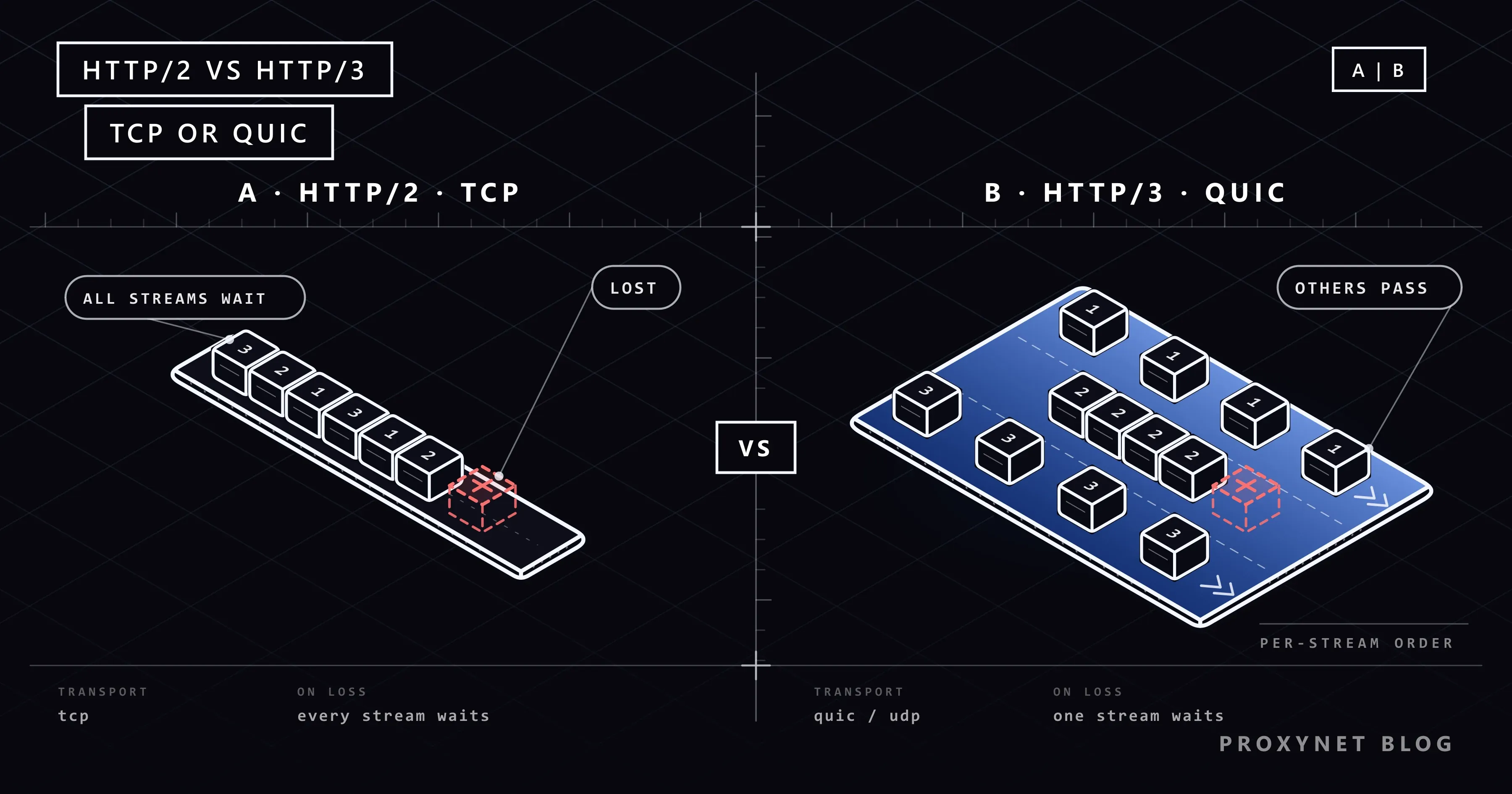
Head-of-line blocking is when one delayed item holds up everything queued behind it, like a car stalled at the front of a single-lane road. It happens at two different layers, and each new HTTP version removed one of them.
- At the HTTP level (HTTP/1.1). One connection carries one exchange at a time. If the first response is slow, the second waits even if it is ready, which is why browsers opened extra connections.
- At the TCP level (HTTP/2). HTTP/2 removes the first problem, but all its streams share one TCP connection. TCP delivers bytes strictly in order, so when one packet is lost, everything after it waits for the retransmission, including data from streams that had nothing to do with the lost packet. RFC 9113 says plainly that TCP head-of-line blocking is not addressed by HTTP/2.
- No shared queue (HTTP/3). QUIC keeps order inside each stream but not across streams, so a lost packet delays only the stream it belonged to.
On our test machine we sent two requests together over one connection to a small local Node.js server: one answer took 2 seconds, the other was instant. Over HTTP/1.1 the fast response arrived after 2,015 ms, stuck behind the slow one; over HTTP/2 it arrived after 4 ms. The TCP-level stall needs packet loss, so it shows up on weak Wi-Fi and mobile links rather than in a local test.
What did HTTP/3 change?
HTTP/3 moves HTTP from TCP to QUIC, a transport protocol that runs over UDP. UDP sends packets without delivery guarantees, so QUIC adds its own reliability and ordering on top, per stream rather than for the whole connection; our TCP vs UDP comparison covers the difference between the two transports.
QUIC was published as RFC 9000 in May 2021 and HTTP/3 as RFC 9114 in June 2022. The move to QUIC brings four practical changes:
- Independent streams. Each request travels on its own QUIC stream. A lost packet stalls only its own stream; the others keep delivering.
- Encryption built in. QUIC always uses TLS 1.3 and folds the transport and encryption handshakes into one. A new connection can send its first request after one round trip; a returning client can even send data in the first packet (0-RTT), which should carry only requests that are safe to repeat, because an attacker could replay it.
- Connection migration. A QUIC connection is identified by connection IDs, not by your IP address and port. When your phone moves from Wi-Fi to mobile data, the connection can continue on the new path instead of starting over.
- QPACK instead of HPACK. HPACK relies on headers arriving in order, which QUIC no longer guarantees across streams, so HTTP/3 uses a variant called QPACK.
QUIC traffic usually runs on UDP port 443. Some firewalls, antivirus web filters and older routers block or mishandle UDP there, and browsers then fall back to HTTP/2 over TCP. When that fallback fails halfway, Chrome shows an error explained in our post on err_quic_protocol_error.
HTTP/1.1 vs HTTP/2 vs HTTP/3 at a glance
| HTTP/1.1 | HTTP/2 | HTTP/3 | |
|---|---|---|---|
| Transport | TCP | TCP | QUIC over UDP |
| Message format | Text | Binary frames | Binary frames |
| Requests per connection | One at a time | Many, multiplexed | Many, independent streams |
| Head-of-line blocking | HTTP and TCP level | TCP level | Only within a stream |
| Header compression | None | HPACK | QPACK |
| Encryption | Optional (HTTPS) | TLS in practice | TLS 1.3 always |
| Network change | New connection | New connection | Connection migrates |
| Standard | RFC 9112 | RFC 9113 | RFC 9114 |
How does a browser choose the HTTP version?
The browser negotiates HTTP/1.1 or HTTP/2 inside the TLS handshake and learns about HTTP/3 from the site itself. In its first handshake message it lists the protocols it speaks, such as h2 and http/1.1, and the server picks one.
HTTP/3 cannot be negotiated this way, because the browser would have to know about it before opening a TCP connection at all. There are two ways to tell it:
- The Alt-Svc header. The server adds a header such as
alt-svc: h3=":443"; ma=86400to an ordinary response, meaning "HTTP/3 is available on UDP port 443, remember this for a day". The browser tries QUIC on later requests. - The HTTPS DNS record. A newer DNS record type (RFC 9460) can carry
alpn=h3, so the browser learns about HTTP/3 while it is still looking up the address and can use it from the very first request.
This is why the first request to a site often shows h2 and the next ones h3. The page in our opening example is not misbehaving: each host made its own choice.
How do you check which HTTP version a site uses?
Your browser's developer tools show the version of every request. In Chrome or Edge:
- Open the page and press F12 (Cmd+Option+I on a Mac), then select the Network panel.
- Right-click the header of the requests table and tick Protocol.
- Reload the page.
http/1.1,h2andh3stand for the three versions.
From a terminal, curl can report the version of a single request:
curl -s -o /dev/null -w "%{http_version}\n" https://example.com
curl -sI https://example.com
The first command prints 1.1, 2 or 3; in the second, an alt-svc line with h3 means the site offers HTTP/3. Which versions curl can use depends on how it was built: curl -V lists them on its Features line as HTTP2 and HTTP3.
On our Windows 11 test machine this mattered. The curl that ships with Windows (8.22.0) has neither feature, so --http2 stopped with "the installed libcurl version does not support this" and the first command printed 1.1. Yet the headers from example.com included alt-svc: h3=":443"; ma=86400, and a TLS connection from Node.js offering h2 was answered with h2. The site offers all three; the tool decides what you see.
Is HTTP/3 always faster than HTTP/2?
No; HTTP/3 helps most where the network is poor. Its gains come from fewer round trips to open a connection, no TCP-level stall when packets are lost, and connections that survive a network change, so they show on phones moving between cells, crowded Wi-Fi and lossy long-distance links.
On a stable wired line with almost no loss, the two usually feel the same. Where UDP is blocked or throttled, the browser tries QUIC, gives up and falls back, which costs time. Measure your pages on the networks your visitors actually use.
Which HTTP version do you get through a proxy?
Through most proxies you get HTTP/2 or HTTP/1.1 to the website, because the usual proxy tunnel runs over TCP. For an https:// address, the client sends the proxy a CONNECT request, and the proxy opens a TCP connection to the site and relays bytes without reading them. TLS and the HTTP version inside it are negotiated directly between your client and the website. Our HTTPS Proxy works this way, through HTTP CONNECT tunnels.
HTTP/3 needs UDP to reach the site, and a TCP tunnel cannot carry it. RFC 9298 (2022) defines CONNECT-UDP, a way to tunnel UDP through an HTTP proxy, and SOCKS5 can relay UDP as well, as our SOCKS5 Proxy does for apps that send UDP themselves.
Browsers do not use either path for web pages today: Chromium's proxy documentation notes that a connection to an HTTPS proxy may negotiate HTTP/2 but not QUIC, and that Chrome's SOCKS5 support does not relay UDP.
So seeing h2 through a proxy where a direct visit shows h3 is expected, not a fault. If you are choosing between proxy protocols for other reasons, our SOCKS vs HTTP proxy guide compares them.
Where you meet the different HTTP versions
- Browsing. Many large sites and CDNs serve HTTP/3 to current Chrome, Edge and Firefox; others stop at HTTP/2.
- APIs and command-line tools. Many HTTP client libraries and scripts still default to HTTP/1.1.
- Mobile apps. Apps on unstable networks gain most from QUIC's connection migration.
- Proxies and corporate networks. Tunnels and firewalls that pass only TCP keep traffic on HTTP/2 or HTTP/1.1.
Common mistakes
- Thinking a new version changes what a page means. A
403over HTTP/3 is the same403as over HTTP/1.1. - Bundling everything for HTTP/2. Giant bundles and sprites were HTTP/1.1 workarounds; with multiplexing, smaller files cache better.
- Enabling HTTP/3 without opening UDP 443.
Alt-Svcthen advertises a door the firewall keeps closed, and every browser has to try and fall back. - Turning QUIC off for good because of one error. It is a useful test, not a permanent setting.
- Testing with a curl build that cannot speak HTTP/2. The result says
1.1because of the tool, not the server.
Decision guide
| Your situation | What to do |
|---|---|
| You run a website | Serve HTTP/2 on TCP, add HTTP/3 if your server or CDN supports it |
| Visitors are mostly on mobile | Enable HTTP/3 and keep UDP 443 open |
| An HTTP/3 error on one network | Test with QUIC off, then fix the firewall or filter |
| An API client for scripts | HTTP/1.1 or HTTP/2 is enough for most request volumes |
| You need to see which version you got | DevTools Protocol column or curl -w "%{http_version}" |
| Traffic goes through a proxy | Expect HTTP/2 or HTTP/1.1 inside a CONNECT tunnel |
Frequently asked questions
Is HTTP/3 faster than HTTP/2?
Often on mobile and lossy networks, rarely by much on a clean wired line. Where little is lost, the two perform about the same, and blocked UDP can make HTTP/3 slower because of the fallback.
Does HTTP/2 require HTTPS?
The standard does not require it, but browsers negotiate HTTP/2 inside the TLS handshake, so on the web it arrives over HTTPS. Unencrypted HTTP/2 exists for cases where both sides already know the other supports it, such as services talking to each other inside one network. HTTP/3 has no unencrypted form at all, because QUIC always uses TLS 1.3.
Is HTTP/1.1 still used?
Yes, widely. Many command-line tools, scripts, embedded devices and older servers use it, and proxy tunnels are often set up with an HTTP/1.1 CONNECT request. Web servers that offer HTTP/2 or HTTP/3 normally keep accepting HTTP/1.1 for clients that cannot use anything newer.
What is the difference between multiplexing and pipelining?
Pipelining (HTTP/1.1) sends several requests without waiting, but the answers must come back in order, so one slow response blocks the rest. Multiplexing (HTTP/2 and HTTP/3) cuts requests and responses into frames tagged with a stream number and interleaves them, so answers come back in whatever order they are ready.
Should I disable QUIC or HTTP/3 in my browser?
Only to diagnose a problem. If a site fails with a QUIC error on one network, turning QUIC off for a test tells you whether UDP is the cause; after that, fix the cause and turn it back on. With QUIC off, your browser still loads every site over HTTP/2 or HTTP/1.1.
Can one server support HTTP/1.1, HTTP/2 and HTTP/3 at the same time?
Yes, that is the usual setup for a site that offers HTTP/3. The server listens on TCP port 443 for HTTP/1.1 and HTTP/2 and on UDP port 443 for HTTP/3, and advertises HTTP/3 with an Alt-Svc header. In nginx, for example, HTTP/3 comes from a module available since version 1.25.0 that is still marked experimental and is not built by default.
Summary
HTTP/1.1, HTTP/2 and HTTP/3 carry the same requests with the same meaning; what changed is the delivery. HTTP/1.1 handles one request at a time per connection, HTTP/2 multiplexes many over one TCP connection, and HTTP/3 moves to QUIC on UDP so that a lost packet stalls only its own stream. Browsers pick the version per host, which is why one page can show all three. When your traffic runs through a proxy, expect HTTP/2 or HTTP/1.1 inside the tunnel, and choose the protocol your tools need from our proxy products.