In an online game, your character suddenly jumps a few steps ahead while an opponent seems to stand still. At the same time, the messages you type into the in-game chat never arrive incomplete or out of order. Both travel over the same connection, but under different rules. Your character's position is most likely sent with UDP, while your chat messages and login details are most likely sent with TCP.
In this article we explain what TCP and UDP are, how they carry data and how they differ, in plain computer terms. Then we cover which one web pages, email, games, video calls and live streams use and why, how ping and packet loss in games relate to this, why UDP support matters when choosing a proxy, and what "opening a port" means.
What are TCP and UDP?
On the internet, data such as a web page or a voice message isn't sent in one piece. It is first split into small parts. These parts are called packets. Each packet sets off on its own, may take a different route and is put back together on the other side.
The sets of rules that decide how these parts are sent, what happens if they get lost and in what order they are reassembled are called protocols. TCP and UDP are the two most common protocols that do this job:
- TCP (Transmission Control Protocol): focuses on delivering data completely and in order. Its current definition is in the IETF's RFC 9293.
- UDP (User Datagram Protocol): focuses on sending data with as little waiting as possible. Its definition is in RFC 768, a short three-page text.
Both run over the same internet, the same cables and the same modem. The difference lies in how packets are sent.
How does TCP work?
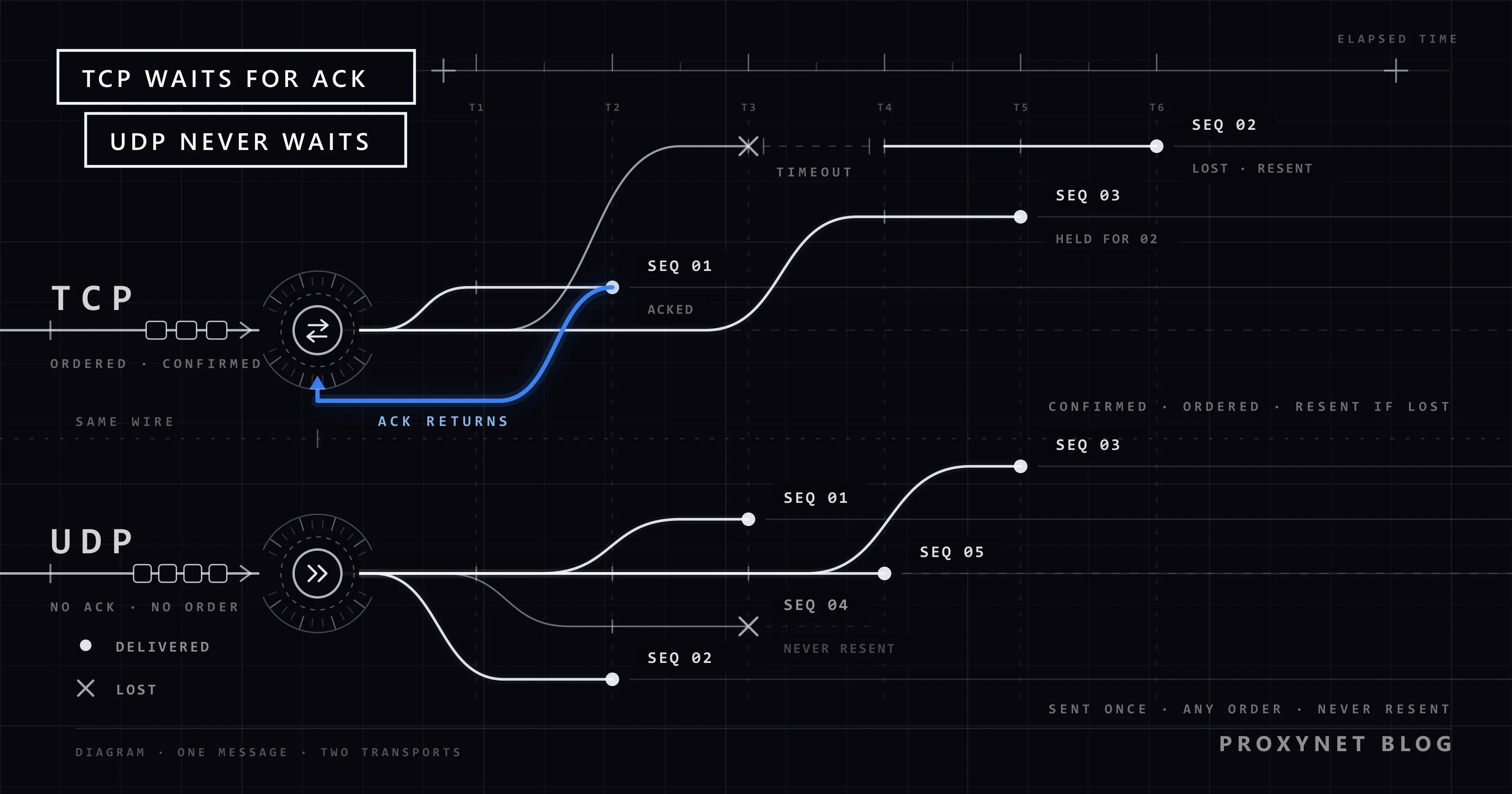
TCP's basic rule is: it doesn't move on until it's sure everything it sent has arrived. It does this in four steps.
- A connection is set up first. Before any data is sent, the two computers exchange three short messages: "I want to connect", "OK, I'm ready", "I'm ready too". This is called the three-way handshake. The actual data doesn't leave until these messages are done.
- Packets are numbered. Each packet gets a sequence number. Even if the other side receives packets in a different order, it puts them back in order using the numbers.
- Confirmation is awaited for each packet. The other side sends confirmation along the lines of "I've received everything up to this number". The sender waits for it.
- A packet with no confirmation is sent again. If no confirmation arrives within a certain time, TCP assumes the packet was lost and sends it again. If the network is busy, it also lowers its sending speed.
As a result, a file sent with TCP either arrives complete or doesn't arrive at all. You don't get half a web page or an email with a few letters missing. The price is time: every wait for confirmation and every resend adds a few milliseconds.
How does UDP work?
UDP's rule is much simpler: send the packet and move on to the next.
- No connection is set up. There is no handshake; the first packet leaves immediately.
- No confirmation is awaited. Whether the other side received the packet is not UDP's concern.
- Lost packets aren't sent again. A packet lost on the way stays lost.
- Order isn't guaranteed. Packets may arrive in a different order; UDP doesn't rearrange them.
With so few rules, UDP is fast and light. Because the sender waits for nothing, data leaves the moment it is produced. If loss and order need handling, the application itself takes care of it. For example, a game discards an old position update that arrives late and uses the newest one. The missing handshake has a downside too: nothing checks that a UDP packet really came from the address written on it, and IP spoofing attacks use exactly that gap.
TCP vs. UDP comparison
| Feature | TCP | UDP |
|---|---|---|
| Connection setup | Handshake before sending data | Starts sending right away |
| Delivery confirmation | Checks that every packet arrived | Doesn't check |
| Lost packet | Sends it again | Doesn't send it again |
| Packet order | Delivers in the right order | Doesn't guarantee order |
| Delay | Higher because of confirmations and resends | Lower |
| When the network is busy | Slows itself down | Keeps sending at the same speed |
| Extra information per packet | More | Less |
| Suited to | Anything where accuracy matters | Real-time communication, short queries |
| Everyday examples | Web pages, email, file downloads, messaging | Online games, video calls, live streams, DNS |
The takeaway from the table: TCP isn't simply "slow" and UDP isn't simply "fast". They answer different questions. TCP suits work that answers yes to "must the data arrive complete?", and UDP suits work that answers no to "is data that arrives late still useful?".
Which one is used in everyday life?
Work that uses TCP:
- Web pages. When your browser opens a site, every letter and image on the page must arrive complete. HTTP, the web's communication protocol, ran only over TCP for a long time.
- Email. A sentence missing from an email is not acceptable.
- File downloads and updates. A file with a single byte missing won't open.
- Written messages in messaging apps. A message may arrive late, but it must not arrive incomplete.
- Login, purchases and chat in games. Account details and messages must arrive correctly.
Work that uses UDP:
- Movement and position updates in online games. If one of the position updates sent dozens of times a second is lost, the next one is already on its way. Waiting for the lost one would freeze the game.
- Video and voice calls. A piece of audio that arrives half a second late is no longer useful; skipping it instead of waiting keeps the conversation flowing.
- Live streams. Some loss is tolerated to deliver the stream as close to real time as possible.
- DNS lookups. The query that turns a site name into an address is very short; if no reply comes, asking again is faster than setting up a connection.
Newer web connections: HTTP/3, the newer version of the web protocol, runs on a protocol called QUIC, and QUIC packets are carried over UDP. The IETF's RFC 9000 describes QUIC as a "UDP-based" transport protocol. QUIC handles the ordering and resending that TCP provides on its own. So some web pages you open today arrive over UDP and still arrive complete; when something on the network interferes with that UDP traffic, Chrome and Edge can stop with the error explained in How to Fix err_quic_protocol_error in Chrome and Edge.
Why do games use UDP?
In an online game, the server updates players' positions many times a second. Sending this information with TCP causes a problem: when one packet is lost, TCP waits to resend it, and all the packets behind it wait in line too. On screen the game freezes for a moment, then the backed-up movements play all at once.
With UDP, a lost packet isn't waited for. The game uses the next position update. In the worst case your character skips a step, so you see a brief "teleport", but the game doesn't stop.
Three terms you often hear in games are directly linked to this difference:
- Ping: the time it takes for a packet to reach the server and for the reply to come back, in milliseconds (ms). Low ping means your moves reach the server quickly.
- Packet loss: the share of packets lost on the way. In games that use UDP, packet loss shows up as teleporting and stuttering.
- Jitter: ping time changing all the time. When packets arrive at irregular intervals, the game loses its smoothness.
We covered the causes and fixes for these problems in How to Fix Ping and Packet Loss in Online Games.
Proxies and UDP: which proxies carry UDP?
A proxy routes your traffic through an intermediary server. But not every proxy type can carry every protocol.
| Proxy type | TCP | UDP | Suited to |
|---|---|---|---|
| HTTP / HTTPS proxy | Yes | No | Websites, browsers, most apps |
| SOCKS5 proxy | Yes | Yes (where server and app support UDP) | Games, video calls, real-time communication apps |
HTTP proxies are designed for web traffic and carry only TCP. If you try to route a game that uses UDP through an HTTP proxy, the login screen may open, but the connection drops once you enter the game. SOCKS5 is a proxy type that can also carry UDP. That's why a SOCKS5 Proxy is preferred for games and real-time communication apps. For UDP to work, though, both the proxy server and the app you use must support SOCKS5 UDP.
We explained the difference between the two types in SOCKS vs. HTTP Proxy: Which One Should You Choose?, and the details of SOCKS5 in What are SOCKS5 Proxies? Everything You Need to Know. Options built for gaming are on our gaming proxy page, and those for live streaming on our streaming proxy page.
What is a port, and what does "opening a TCP/UDP port" mean?
A computer connects to the internet with many programs at once: a browser, a game, a messaging app. To tell which program an incoming packet belongs to, numbers called ports are used. The address takes the packet to the right computer; the port takes it to the right program on that computer. We explain what the numbers you often see in proxy addresses, such as 8080, 3128 or 1080, mean in What Is Port 8080?.
Ports are counted separately for TCP and UDP. That's why game setup guides say things like "open TCP port X and UDP port Y". What it means: your modem doesn't let in connections from outside by default, while some games and apps want to accept connections from outside. "Opening a port" means telling the modem "forward packets arriving on this number to this computer". In the modem's interface this setting is usually called port forwarding.
When opening a port, keep in mind:
- Open only the port you need. Use the port and protocol listed on the game's official support page.
- Choose the right protocol. If the guide says UDP, opening TCP won't help; if it says "both", add two rules.
- Delete forwarding rules you don't use. Ports left open create unnecessary risk.
- Don't turn off your firewall. Instead of switching the firewall off entirely to fix a problem, allow only that program. We explained what a firewall does in Proxy vs Firewall: What's the Difference?
Common misconceptions
- "UDP is always faster." UDP waits less, but download speed is set by your internet connection's capacity. Sending a large file over UDP doesn't make it download faster; the app itself has to gather the missing pieces.
- "TCP is more secure." TCP makes sure data arrives complete, but it doesn't encrypt it. Encryption is the job of layers above, such as HTTPS. QUIC, which runs over UDP, is encrypted too.
- "UDP is unreliable and shouldn't be used." UDP accepting loss isn't a flaw but a deliberate choice. For work such as video calls and games, it's the right choice.
- "If ping is high in a game, you need to change the protocol." The player doesn't decide which protocol a game uses. Ping is determined by distance to the server, network congestion and connection quality.
Decision guide
| Your need | Which protocol and what to do |
|---|---|
| Browsing websites, downloading files | TCP (or QUIC with HTTP/3); an HTTP or HTTPS proxy is enough |
| Playing online games | Game movement uses UDP; a SOCKS5 proxy with UDP support or a gaming proxy |
| Making video calls | UDP; if you'll use a proxy, check UDP support |
| Teleporting and stuttering in games | Measure packet loss and ping, choose a connection close to the server |
| The game says "open a port" | Forward the port and protocol from the official page on the modem, only for that computer |
| With a proxy the game's login screen opens but the game drops | The HTTP proxy doesn't carry UDP; switch to SOCKS5 |
Frequently asked questions
Is TCP or UDP better?
They are designed for different jobs. TCP suits work where data must arrive complete, and UDP suits real-time work where delay matters more than loss. Most applications use both.
How do I know whether an app uses TCP or UDP?
The easiest way is to check the app's official support page; games and communication apps usually list the ports and protocols they use. As a general rule, web pages and file transfers use TCP, while game movement and video calls use UDP.
What happens if data is lost in an app that uses UDP?
The lost packet doesn't come back. The app makes up for it in its own way: a game uses the next position update, a video call skips a short piece of audio or video. If the loss rate is high, these skips become noticeable.
Can I play games with an HTTP proxy?
If the game's login and chat use TCP, those parts may work. But if the game's movement and position updates are carried over UDP, an HTTP proxy can't pass that traffic. For games, use a SOCKS5 proxy with UDP support or a gaming proxy.
Is opening a port safe?
When opened only for the needed port, the right protocol and the right computer, the risk is low. Opening unnecessary ports or wide port ranges leaves a door open to unwanted connections from outside. Delete forwarding rules you don't use.
Why does DNS use UDP?
The DNS query that turns a site name into an address is very short, and so is its reply. The time spent setting up a connection would be longer than the query itself. If no reply comes, sending the query again is faster. For large replies, DNS can also switch to TCP.
Summary
TCP and UDP are two protocols that carry data over the internet in packets. TCP sets up a connection first, waits for confirmation that each packet arrived, resends lost ones and delivers packets in order. UDP sends without waiting and doesn't ask for lost packets again. Web pages, email and files travel over TCP; game movement, video calls and live streams over UDP. This difference matters when choosing a proxy: an HTTP proxy carries only TCP, while SOCKS5 can carry UDP too. You can find proxy types suited to gaming and real-time communication in our proxy services.