You ran the connection test on your PS5 and the last line reads "NAT Type: Type 3" or "NAT Type: Failed". On Xbox the same spot says "NAT Type: Strict". Your internet speed is fine and the game launches. Still, you cannot hear your friend in the party, nobody can join the lobby you created, and matchmaking drags on.
This post explains what NAT does in your home, how NAT type is named on PS5, PS4, Xbox and PC, and how the "failed" warning differs from Type 3. Then we go through the router settings to try in order, why those settings often change nothing, and where a VPN and a proxy sit in this picture. There is no code in this post; everything is done from the menus of the console and the router.
What is NAT and what does your router do?
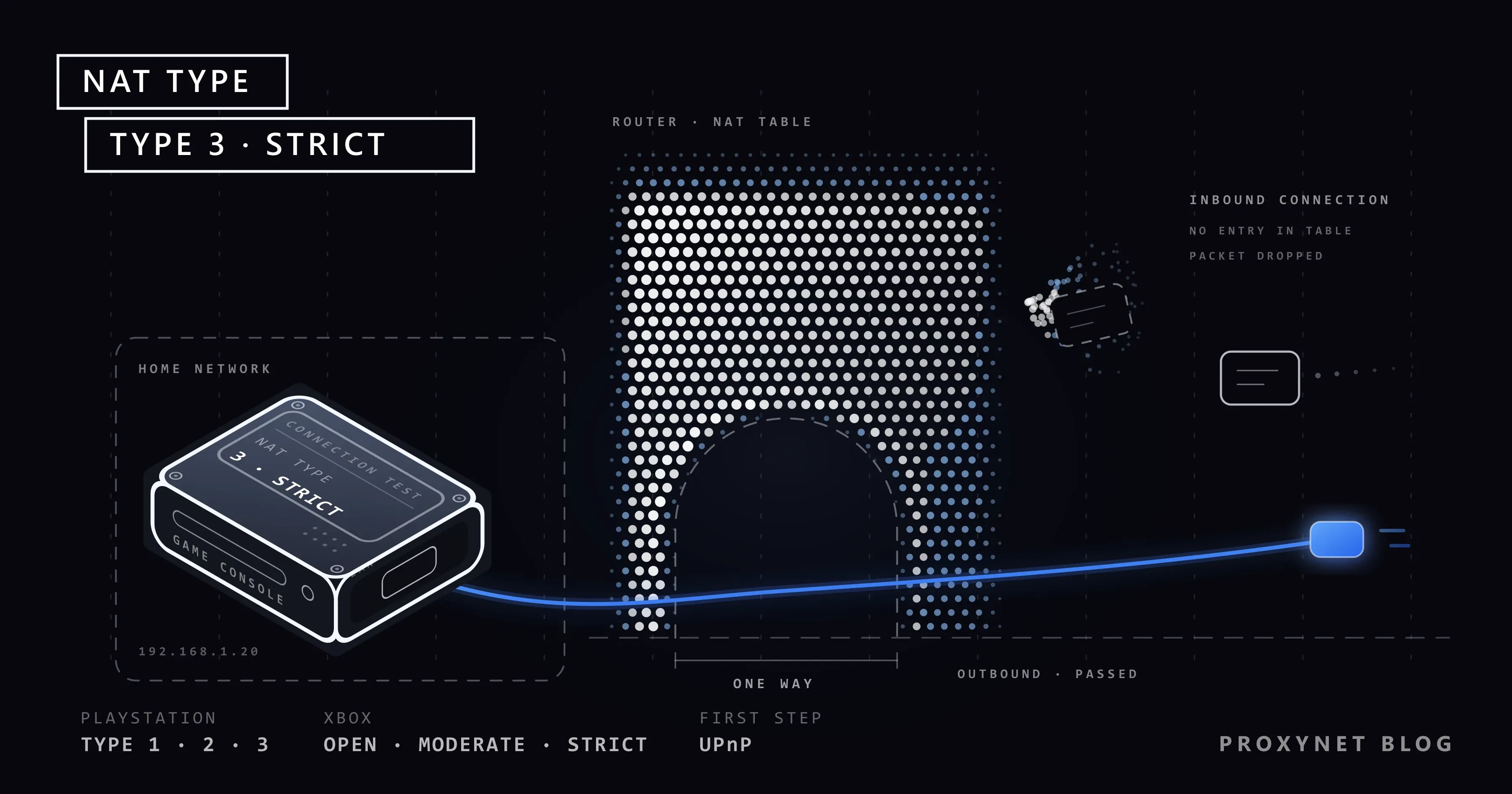
Your provider gives your home a single internet address (IP address). Inside the home, the phone, the TV, the computer and the console all go online at the same time. The router hands each device an address that is valid only inside the home (such as 192.168.1.x) and sends all of them out through that one address. This translation work is called NAT (Network Address Translation).
When you start the connection, things go smoothly. The console sends a request to a server, the router notes it in its table and knows who should receive the reply.
The trouble comes from the opposite direction. When a connection nobody asked for arrives from outside, the router has no matching entry in its table. It cannot tell whether the packet belongs to the TV or the console, so it drops the packet. This behaviour protects the home network, and it turns into an obstacle in games that want to connect players directly to each other.
What is NAT type and what does it measure?
NAT type is not a speed measurement; it is a classification of how open your console is to connections coming from outside. In many games the match, the voice chat or the party is set up directly between the players' devices; this is called a peer-to-peer (P2P) connection. Both sides sit behind their own router, and both routers are ready to drop an uninvited packet. Whether the connection can be set up depends on how the routers behave; NAT type is your side's grade in that exam.
Most game traffic travels over UDP. We explained what UDP is and why games prefer it in TCP vs UDP.
What do the NAT types mean on PS5, Xbox and PC?
Sony numbers the types, Microsoft names them. PC games mostly use Microsoft's names (Open, Moderate, Strict).
| PlayStation | Xbox and PC | How you are connected | What you lose |
|---|---|---|---|
| Type 1 | Open | The console is connected directly to the internet, with no translating router in between | Nothing, but the console is left unprotected |
| Type 2 | Open or Moderate | The console is behind the router and the needed doors can be opened | In practice nothing on PlayStation. If Xbox shows Moderate, you may not be matched with some players |
| Type 3 | Strict | The console is behind the router and incoming connections cannot get through | Voice chat suffers, you cannot host a lobby, you only play with people whose type is Open |
| Failed | Unavailable | The test could not be completed | The type was not determined (see below) |
The two scales do not map one to one. On PlayStation the target for a console at home is Type 2. Sony's PS4 user's guide describes both Type 2 and Type 3 as "connected to the Internet with a router" and adds the restriction warning only for Type 3.
On Xbox the target is Open. According to Microsoft's NAT troubleshooting page, with Open NAT you can play with anyone and host games. With Strict NAT you can only play with people who have Open NAT. The logic is simple: if both doors are shut, nobody is left to let the connection in.
Where do you check your NAT type?
PS5: Settings > Network > Connection Status > Test Internet Connection. When the test finishes, one of the last lines is NAT Type.
PS4: Settings > Network > Test Internet Connection. The result shows the lines Obtain IP Address, Internet Connection, PlayStation Network Sign-In and NAT Type.
Xbox Series X, Series S and Xbox One: Press the Xbox button on the controller and follow Profile & system > Settings > General > Network settings. The NAT type is listed under Current Network Status. The Test NAT type option on the same screen repeats the test.
PC: This information comes from the game's own network settings screen. The router steps below are the same for a PC.
What does "NAT Type: Failed" mean, and is it the same as Type 3?
It is not the same. Type 3 is a result: the test completed and found the console in a restricted position. "Failed" says that this step of the test could not be completed and the type was never determined.
Look at the other lines of the test first.
- If Obtain IP Address or Internet Connection also failed, the problem is not NAT but the connection itself. Check the cable, the Wi-Fi password and the router.
- If PlayStation Network Sign-In failed, check Sony's status page first; there may be maintenance or an outage.
- If only NAT Type failed, the replies to the packets the console sends for the test are not coming back. Power the router and the console off and on, connect the console to the router with a cable, set the router's firewall back to default if it is at the highest level, and repeat the test. On school, dormitory or office networks this traffic may be blocked on purpose; there the fix is in the hands of the network administrator.
The Xbox counterpart is the NAT Type: Unavailable warning. The message "Can't get a Teredo IP address" may appear along with it. Teredo is a tunnelling method Xbox uses for connections between players. For this error Microsoft suggests looking for the "Allow Teredo tunneling" or "Allow IPv6 tunneling" option on the router's IPv6 settings page and turning it on.
How do two players connect, and where does NAT get in the way?
Setting up a match can be summed up in five steps.
- Both consoles first connect to the game's matchmaking server. The consoles start this connection, so both routers allow it.
- Each router reserves an outside port for this outgoing connection and writes it in its table. A port is the number that shows which device and program a packet belongs to.
- The server tells each side the other's address and port number, and the consoles send packets to those addresses at the same moment. The aim is for an entry for the other side to appear in both routers' tables.
- If the router uses the same outside port every time the console goes out, the other side's packet matches the entry in the table and is let in. The connection is made.
- If the router reserves a different port for every new destination, the number the server reported is no longer valid. The other side's packet finds no match in the table and is dropped. The test reports this as Type 3 or Strict.
RFC 4787 from the IETF, the body that writes internet standards, requires the behaviour in step four: a NAT device must use the same outside port for connections leaving the same internal address and port, whatever the destination. UPnP and port forwarding, in turn, write a ready-made line into the router's table: "pass any packet arriving on this port straight to the console".
Before touching the settings: does your router get a real IP address?
Router settings work under one condition: the internet-facing side of your router must have a public (real) IP address.
- On a device connected to the router, type
192.168.1.1in the browser and open the router interface. The username and password are usually on the label under the router. - Note the "WAN IP address" line on the Status, Device Info or WAN page.
- On a device in the same network, search for "what is my IP", open one of the sites that come up and compare the address shown there. If a VPN or proxy is on, turn it off first.
If the two addresses match, the problem is inside the home and the steps in the next section will work.
If the address in the router begins with a number between 100.64 and 100.127, the situation is different. RFC 6598 set this range aside for providers' shared address pools. The provider has placed you behind a single public address together with other subscribers; this is called CGNAT. Some providers use addresses beginning with 10. for the same job.
With CGNAT there is a second NAT layer, and that layer sits on the provider's device. Even if you turn on UPnP, forward ports or set up a DMZ in your router, the packet from outside never reaches your router, because the public address is not on your router. When someone has opened the ports and the NAT type still does not change, this is a common reason. Microsoft's page says the same: if the two addresses do not match, Open NAT is not possible and you need to contact your internet provider for a public IP address. We explained step by step how CGNAT works and how to ask to be taken out of the pool in What Is CGNAT.
How providers handle that request differs from country to country. In Türkiye, for example, many home lines sit behind CGNAT, and a subscriber who forwards ports without seeing any change is a familiar story on forums. Subscribers there call customer support and ask to be moved out of the pool; depending on the provider and the plan, the move is either free or tied to a paid static IP service.
If the address in the router begins with 192.168, it is not CGNAT but double NAT. Your router is behind another router or behind the shared network of a housing complex, a building or a dormitory. The fix for that is in step five.
How do you change your NAT type? Five steps
Apply the steps in order and repeat the test after each one. Microsoft's warning matters here: UPnP, port forwarding and DMZ are not used together. Turn the previous one off when you move to the next.
Menu names vary from router to router; the headings you are looking for are usually under Advanced, NAT, Security or Applications.
1. Restart the router and the console
Old entries may be left in the router's table. Unplug the router and the console, wait half a minute, start the router first and the console once the router is up.
2. Turn on UPnP
UPnP lets a device in the home ask the router by itself to "open this port for me". The console asks for the port when the game starts and releases it when it is done. In a home with a public IP address this setting is often enough by itself.
Find the UPnP option in the router interface and enable it. If it is already on, do the refresh Microsoft recommends: turn UPnP off and save, restart the router and the console, turn UPnP back on and save. UPnP gives every device in the home permission to open ports; if there are devices on your network you do not trust, move on to step three.
3. Give the console a fixed local address and forward the ports
A port forwarding rule is written for a local address; if the console's address changes, the rule points nowhere. First, in the address reservation section (DHCP reservation, static DHCP) of the router's DHCP or LAN page, make sure the console always gets the same address.
Then open the Port Forwarding page. On some routers it is called "Virtual Server". Add rules to the console's address for the ports below.
| Platform | TCP | UDP |
|---|---|---|
| PS4 | 80, 443, 3478, 3479, 3480 | 3478, 3479 |
| PS5 | 80, 443, 3478, 3479, 3480 | 3478, 3479, 49152-65535 |
| Xbox Series X, Series S and Xbox One | 53, 80, 3074 | 53, 88, 500, 3074, 3544, 4500 |
The PS4 list is in the console's user's guide, the PS5 list is on Sony's PS5 connection error page, and the Xbox list is on Microsoft's network ports page. Microsoft adds that if remote play on Xbox does not connect because of Strict NAT, UDP port 9002 may also be needed. Some games want extra ports; check the support page of the game's publisher for that.
Sony's guide also states that a different port number is used each time in connections between players. So this list is for reaching the PlayStation Network servers; in peer-to-peer connections it is usually UPnP that does the real work.
4. Last resort: DMZ
DMZ sends every incoming connection that matches no other rule to a single local address. Microsoft calls it a "perimeter network" and lists it as the step after port forwarding.
Use this setting only for the console and with a fixed local address. Do not put a computer in the DMZ; the router's protection is removed entirely for that device. If the result does not change, turn DMZ off.
5. Remove double NAT
If you plugged a second Wi-Fi device (a router, a mesh system) behind the provider's router, both devices may be doing NAT. Xbox reports this as "Double NAT detected". On PlayStation the sign is a Type 3 that persists even with UPnP on.
There are two fixes. You put the provider's router in bridge mode; it stops translating, and your internet username and password are entered in the second device. Or you put the second device in access point (AP) mode; then it only hands out Wi-Fi. The second way is easier.
Does a proxy or a VPN change the NAT type?
A proxy does not. A proxy is an intermediary server that takes a connection you start and sends it to the internet through another address. NAT type is about connections coming towards you. A proxy does not open a door into your home and does not add a line to your router's table.
The Proxy option in the console's network settings does not change the result either. That field is for an HTTP proxy, and an HTTP proxy carries only TCP; traffic between players flows over UDP. You can find the difference between the two proxy types in SOCKS vs HTTP Proxy.
An ordinary VPN usually does not open it either. A VPN server shares the same exit address among many users, so it adds one more NAT layer. VPN services that offer a dedicated public IP address and port forwarding can get you around CGNAT, but latency may rise because your traffic passes through an extra stop. The difference between the two technologies is in Proxy vs VPN.
A gaming proxy has a different job. Gaming Proxy routes the traffic from the game client on a PC to the server over a different route and from a different IP address. It does not affect incoming connections, and therefore not the NAT type. Do not buy a proxy "to open my NAT type"; if what you need is a different route or address isolation, you can look at the options on our gaming proxy page.
When does NAT type really matter?
Not every player needs Open NAT. It matters in these cases:
- Party and voice chat. If you cannot hear your friends or cannot be added to the party, NAT type is the first suspect.
- Creating a lobby, hosting a match. In games that connect players directly to each other, you cannot host a lobby with Strict NAT.
- Remote play. You connect to the console from outside the home; with Type 3 or Strict the connection may not be made.
- Running a game server at home. When you set up a server on your own computer, your friends connect to you. Port forwarding and a public IP address are required; to keep the address from changing, see Static IP vs Dynamic IP. Where a proxy fits in Minecraft is on our Minecraft proxy page.
- Server-based games. In MMORPGs such as Metin2 or Knight Online you always start the connection, so NAT type has next to no effect; our post Knight Online proxy explains what players look for there.
Common mistakes
- Forwarding ports without looking at the WAN address. A rule written behind CGNAT does nothing. The first job is to compare the two addresses.
- Leaving UPnP, port forwarding and DMZ on together. The rules collide and you cannot tell which one is working.
- Turning the router's firewall off completely. It does not open the NAT type and leaves every device in the home unprotected. We explained what a firewall does in Proxy vs Firewall.
- Searching for a "NAT type changer program". NAT type is decided in the router and at the provider. A program installed on the console or the computer has no access to those settings.
- Confusing NAT type with ping. Stuttering, rubber-banding and high latency are a different subject; see Fix Ping and Packet Loss in Games.
Decision guide
| Your situation | What to do |
|---|---|
| Type 3 or Strict, and the WAN address in the router matches the one on the "what is my IP" site | Turn on UPnP; if that fails, a fixed local address and port forwarding, and finally DMZ |
The WAN address in the router begins with 100.64 - 100.127 or 10. | CGNAT. Ask the provider to take you out of the pool or for a static IP |
The WAN address in the router begins with 192.168, or Xbox says "Double NAT detected" | Put the provider's router in bridge mode or the second device in AP mode |
| "NAT Type: Failed" on PS5 | Look at the other lines of the test, restart the router, try with a cable |
| "NAT Type: Unavailable" on Xbox | Look for the Teredo or IPv6 tunnelling permission in the router, then move on to the UPnP step |
Frequently asked questions
Is NAT Type 2 good, or should I get Type 1?
Type 2 is good, and it is the result a PlayStation at home should have. Type 1 means connecting the console to the internet with no router in between; it adds nothing to the game and is a step backwards for security.
Does NAT type affect ping and download speed?
Not directly. NAT type decides whether a connection can be set up, not how fast an established connection is. It can have an indirect effect: with Strict NAT the number of players you can be matched with shrinks, so you may end up matched with someone far away.
Will my NAT type open if I get a static IP?
A static IP is a public address, so it is a way out of CGNAT. It does not open the NAT type by itself, because your router still does NAT. You still apply the UPnP or port forwarding steps; the difference is that those steps now work.
Can two consoles in one home both be Open?
Not on every router, because the same port cannot be forwarded to two devices at once. Microsoft suggests setting a different port on the second Xbox under Network settings > Advanced settings > Alternate port selection and writing the forwarding rule with that port instead of 3074. It also notes that some routers do not support Open NAT on more than one console. With two consoles, the least troublesome route is UPnP.
Why is the NAT type Strict when I share my phone's mobile internet?
On mobile networks the number of subscribers is far above the number of addresses, so mobile internet mostly runs on CGNAT. On top of that, the phone adds a NAT layer of its own. For hosting lobbies and party chat, home internet is the better fit.
Does turning on IPv6 solve the NAT type problem?
Partly. IPv6 has no address shortage, so every device gets its own public address and NAT is not needed. If your provider gives you IPv6, enabling it in the router may help, but the player on the other side and the game must use IPv6 too. Sony's connection setup page states that PS5 supports IPv6 but cannot connect to an IPv6-only network; do not turn off IPv4 in the router.
Summary
NAT type shows how easily connections from outside reach your console. The target is Type 2 on PlayStation and Open on Xbox; with Type 3 and Strict, voice chat, hosting a lobby and matchmaking suffer. First compare the WAN address in the router with the address on a "what is my IP" site. If the addresses match, follow the order UPnP, port forwarding, DMZ and bridge mode; take the ports only from Sony's and Microsoft's official lists. If the addresses differ, the fix is to ask the provider for a public or static IP. A proxy or an ordinary VPN does not open the NAT type. If you are curious what a proxy is good for in games, you can take a look at our proxy services.